
Primea ReviewsAll Reviews

Primea Reviews is reader-supported. When you buy through our Amazon links we may earn a commission, at no extra cost to you. Rankings are set by our editors and never sold. Learn more

Ranked & Reviewed by Primea Reviews

The 6 Best Docking Stations for Laptops of 2026, Ranked & Reviewed

By the Primea Editorial TeamUpdated November 1, 202610 min read6 products ranked
The 6 Best Docking Stations for Laptops of 2026, Ranked & Reviewed

The short answer

The UGREEN Revodok Max 208 is the best laptop docking station: certified Thunderbolt 4 at 40Gbps, dual 4K at 60Hz or a single 8K display and 85W charging for $100 to $200. The Plugable TBT-UDM adds 100W and driverless setup, and the Anker Prime has 14 ports. The UGREEN Revodok Pro is the budget dual 4K pick.

The Primea Scoreboard

Ranked & Reviewed

  1. Certified Thunderbolt 4 with 40Gbps at a better price than the competition.

    94Outstanding
    Check price
  2. A certified Thunderbolt 4 dock with 100W charging and no drivers to install.

    91Excellent
    Check price
  3. The dock with the most ports and the highest total power output.

    88Excellent
    Check price
  4. A dock for the desk plus a travel hub you can unplug.

    85Excellent
    Check price
  5. Dual 4K at 60Hz and fast data ports for under $50.

    82Very Good
    Check price
  6. Dual HDMI, Ethernet and 85W passthrough at a low price.

    79Very Good
    Check price

Plenty of buyers pick up a USB-C hub expecting Thunderbolt behavior, and the mismatch shows up as a second monitor stuck at 30Hz or an external SSD crawling. The two look alike on the shelf, yet they differ in how many displays they drive, how fast data moves and how much power flows back to your laptop. Thunderbolt 4 is a certified standard with a 40Gbps floor. A plain USB-C dock promises nothing of the kind, so the spec sheet matters.

We read six docks from spec sheets and what owners report after long desk use, ranking them on monitor support, power delivery, data speed, port variety and value. Two thinner listings were left out because their specs gave too little to recommend.

Before you buy

What Actually Matters

01

Thunderbolt vs USB-C

Thunderbolt 4 is a certified standard with 40Gbps and guaranteed display support, while USB-C docks vary in speed and features. Certified docks remove guesswork about compatibility. Look for the words Thunderbolt 4 certified, as on the UGREEN Revodok Max and Plugable, and check that your laptop has a Thunderbolt port before buying. Plugging a Thunderbolt dock into a plain USB-C port still works, but at USB speeds.

02

Monitor output

A dock lists how many displays it can run and at what resolution and refresh. Dual 4K at 60Hz is common, while some docks drop to 30Hz. Check the exact refresh rate and whether the numbers apply to your laptop's graphics, because a dock cannot exceed what the laptop's port can output. Apple and Windows machines also differ in how many external displays they allow.

03

Power delivery

The dock sends power back to the laptop through the cable. A dock that delivers less than your charger can leave a laptop draining under load. Compare the dock's wattage to your laptop's charger and aim for equal or higher. The Plugable lists 100W while the UGREEN Revodok Max lists 85W. Buying below your charger's wattage is the most common cause of slow charging.

04

Data ports

10Gbps USB ports move files far faster than older 5Gbps ones, which matters for external SSDs and camera cards. Look for the Gbps figure beside each port in the listing, not just the version name. A dock with fast ports on paper but slow ones in practice wastes the upgrade, so read the per-port speed, and put external drives on the fastest port.

05

Ethernet and extras

Wired Ethernet gives a steadier connection than Wi-Fi for video calls and large uploads. SD readers help photographers and video editors. Decide which extras you will use daily and check each is listed, such as the Anker 8-in-1's Ethernet and SD slot. Do not pay for ports you never touch, and skip a bundled SD slot if you never use cards.

In-depth reviews

Our Ranked Picks, Reviewed

1

Best Overall

UGREEN 8-in-1 Thunderbolt 4 Docking Station (Revodok Max 208)

Our verdict: Certified Thunderbolt 4 with 40Gbps at a better price than the competition.

The Revodok Max 208 is a certified Thunderbolt 4 dock with 40Gbps bandwidth and three Thunderbolt 4 ports. It drives dual 4K at 60Hz or a single 8K display, delivers 85W charging, and adds Gigabit Ethernet and three USB-A 3.2 ports. It works with Mac M1 through M4 Pro and Max chips and sells for $100 to $200. Certification matters because it guarantees the bandwidth and display behavior that a generic dock only implies.

It takes first place because it brings certified Thunderbolt to a lower price than the Plugable. The 85W charging is under the Plugable's 100W, so a large laptop may charge slowly under load.

Buy it for a Mac or any Thunderbolt laptop where compatibility must be guaranteed. Skip it if your laptop needs more than 85W.

Bandwidth
Thunderbolt 4, 40Gbps
Displays
Dual 4K at 60Hz or single 8K
Charging
85W
Ports
3 Thunderbolt 4, 3 USB-A, Ethernet

What we like

  • +Certified Thunderbolt 4
  • +Dual 4K or single 8K
  • +Three Thunderbolt ports
  • +Works with Apple M-series

Watch out for

  • −85W charging only
  • −Mid price bracket

Buy it if: Mac and Thunderbolt laptop owners.

Skip it if: Your laptop needs more than 85W.

2

Best Driverless Dock

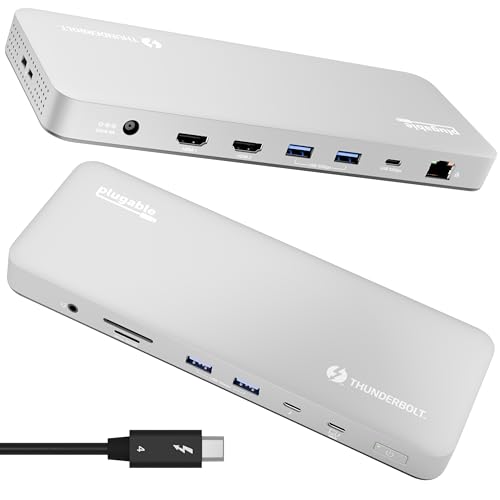
Plugable Thunderbolt 4 Dock (TBT-UDM)

Our verdict: A certified Thunderbolt 4 dock with 100W charging and no drivers to install.

The Plugable TBT-UDM is a certified Thunderbolt 4 dock that charges at 100W and installs without drivers. It supports dual 4K over HDMI or a single 6K display, with six USB ports, an SD card slot and Ethernet. It sells for $100 to $200. Driverless setup means it works on plug-in, which helps on locked-down work machines where you cannot install software.

It ranks just behind the UGREEN because it tops out at a 6K single display against 8K and costs more for the same certification. The 100W charging and no-driver install are the reasons to pick it, particularly for larger laptops that draw more than 85W.

Choose it for guaranteed compatibility and easy setup. The caveat is the price premium. Skip it if you want an 8K display option, or want the lowest-cost certified dock.

Certification
Thunderbolt 4
Charging
100W
Displays
Dual 4K HDMI or single 6K
Ports
6 USB, SD slot, Ethernet

What we like

  • +Thunderbolt 4 certified
  • +100W charging
  • +Driverless setup
  • +Six USB ports

Watch out for

  • −Costs more than UGREEN
  • −6K single display max

Buy it if: Buyers wanting simple, certified compatibility.

Skip it if: You want an 8K display option.

3

Best Port Count

Anker Prime Docking Station 14-Port

Our verdict: The dock with the most ports and the highest total power output.

The Anker Prime 14-port dock offers up to 160W of output, 10Gbps data transfer and dual 4K display support. It works with Dell, HP, Lenovo and other Windows laptops, and sells for $100 to $200. A 160W budget can charge a laptop and phones, a headset and a tablet at the same time, which a 100W dock splits poorly.

It ranks third because it is built around USB-C at 10Gbps, not Thunderbolt at 40Gbps, so it cannot match the speed of the first two. The payoff is the 14 ports and the large power budget. Against the Anker Nano, it has more ports but a bulkier body.

Buy it for a crowded desk with many accessories. The caveat is size, since it takes real desk space. Skip it if you need certified Thunderbolt or have a small desk.

Ports
14 total
Power
Up to 160W output
Data
10Gbps
Displays
Dual 4K

What we like

  • +14 ports total
  • +Up to 160W output
  • +10Gbps data transfer
  • +Dual 4K support

Watch out for

  • −Not Thunderbolt
  • −Bulky on a small desk

Buy it if: Crowded desks with many accessories.

Skip it if: You need certified Thunderbolt.

4

Best Detachable Hub

Anker Nano 13-in-1 Laptop Docking Station

Our verdict: A dock for the desk plus a travel hub you can unplug.

The Anker Nano 13-in-1 has a detachable 6-in-1 hub and supports three displays at once, using two HDMI ports and one DisplayPort. It adds 10Gbps USB-C, three USB-A ports and up to 100W Power Delivery, and sells for $100 to $200. Splitting off a travel hub means one purchase covers both desk and trip, a rare combination.

It ranks fourth because it is a USB-C dock at 10Gbps, slower than the Thunderbolt picks, and it costs similar money to the UGREEN Revodok Max. The triple display support and removable hub are the standout features. Compared with the Anker Prime, it offers fewer total ports but a better travel story.

Choose it for a triple monitor setup that also needs a hub to carry on trips. The caveat is the 10Gbps ceiling. Skip it if you want Thunderbolt speeds.

Format
13-in-1, detachable 6-in-1 hub
Displays
3 at once
Data
10Gbps USB-C, 3 USB-A
Power
Up to 100W

What we like

  • +Detachable travel hub
  • +Triple display support
  • +Up to 100W charging
  • +Three USB-A ports

Watch out for

  • −10Gbps not Thunderbolt
  • −Mid price bracket

Buy it if: Triple monitor desks that also travel.

Skip it if: You want Thunderbolt speeds.

5

Best Budget Dual 4K

UGREEN 7-in-1 Docking Station (Revodok Pro)

Our verdict: Dual 4K at 60Hz and fast data ports for under $50.

The Revodok Pro is a 7-in-1 USB-C dock with two 4K at 60Hz HDMI outputs, 10Gbps USB-A and USB-C data ports and 100W Power Delivery passthrough. It has an aluminum body and sells for $25 to $50. Aluminum acts as a heat sink, which helps a small hub run cool under two displays.

It ranks fifth because the port count is limited and there is no Ethernet listed. For the price it delivers dual 4K at 60Hz that many pricier hubs struggle with, and it offers 15W more passthrough than the Anker 8-in-1. Against the Anker Nano, it lacks the third display and detachable hub.

It suits budget buyers who want two sharp monitors and fast data without extras. The caveat is the missing Ethernet, so skip it if you need wired internet.

Format
7-in-1 USB-C
Displays
Dual 4K at 60Hz HDMI
Data
10Gbps ports
Power
100W passthrough

What we like

  • +Dual 4K at 60Hz
  • +10Gbps data ports
  • +100W passthrough
  • +Aluminum body

Watch out for

  • −Few ports
  • −No Ethernet listed

Buy it if: Budget dual monitor setups.

Skip it if: You need wired internet.

6

Best Budget Ethernet

Anker Laptop Docking Station 8-in-1

Our verdict: Dual HDMI, Ethernet and 85W passthrough at a low price.

This Anker 8-in-1 hub has two HDMI ports for dual 4K monitor support, Gigabit Ethernet, 85W Power Delivery passthrough and an SD card slot. It sells for $50 to $100. Ethernet and an SD reader cover the basics for a home office: a steady wired connection for calls and a way to import photos.

It ranks last because it is the oldest design here and the least future proof, though it covers the basics at a low price. It lacks the faster data ports of the UGREEN Revodok Pro, which costs less. What it adds over that dock is the Ethernet jack.

Choose it for a home office that needs dual monitors and wired internet without much spending. The caveat is the older design with no fast data ports listed. Skip it if you want the fastest data ports, or if you plan to move files to an external SSD often.

Format
8-in-1 USB-C hub
Displays
Dual 4K, 2 HDMI
Network
Gigabit Ethernet
Power
85W passthrough

What we like

  • +Dual HDMI outputs
  • +Gigabit Ethernet
  • +85W passthrough
  • +SD card slot

Watch out for

  • −Older design
  • −No fast data ports listed

Buy it if: Home offices on a tight budget.

Skip it if: You want the fastest data ports.

Methodology

How We Ranked These

Monitor support

We counted display outputs, resolution and refresh rate on the spec sheet.

Power delivery

Charging wattage matters for larger laptops, so higher figures scored better.

Data speed

Thunderbolt at 40Gbps ranked above 10Gbps USB-C.

Port variety

We looked at Ethernet, SD, USB-A and extra Thunderbolt ports.

Value

Price tier was weighed against certified features.

Every Primea Score uses the same weights: Performance 30% · Build & Materials 20% · Everyday Usability 20% · Value 20% · Owner Satisfaction 10%. Full scoring rules

Buyer's guide

How to Pick the Right One for You

By Laptop Type

Match the dock to the machine you own.

LaptopOur pick
MacBook with M-series chipUGREEN Revodok Max 208
Windows Thunderbolt laptopPlugable Thunderbolt 4 Dock
Dell, HP or Lenovo, many accessoriesAnker Prime 14-port
Basic USB-C laptopAnker 8-in-1 docking station

By Budget

SpendOur pick
Under $50UGREEN Revodok Pro 7-in-1
$50 to $100Anker 8-in-1 docking station
$100 to $200UGREEN Revodok Max 208

Thunderbolt 4 vs USB-C Docks

Thunderbolt 4

Certified 40Gbps with guaranteed display and charging support. The UGREEN Revodok Max 208 and Plugable TBT-UDM are certified.

USB-C

Cheaper and often 10Gbps, but features vary by laptop. The Anker docks and UGREEN Revodok Pro are USB-C.

Most buyers should default to Thunderbolt 4 if their laptop supports it.

By Display Setup

SetupOur pick
Three displaysAnker Nano 13-in-1
Dual 4K at 60HzUGREEN Revodok Pro 7-in-1
Single 8KUGREEN Revodok Max 208
Single 6KPlugable Thunderbolt 4 Dock

For Travelers Specifically

Look for

A small footprint or a detachable hub you can carry, with enough power passthrough to run the laptop.

In this ranking

The Anker Nano 13-in-1 has a detachable 6-in-1 hub for trips.

When to Spend More

Spend more if

You use a Thunderbolt laptop daily with large monitors. The Plugable TBT-UDM gives 100W charging and certified compatibility.

Save if

You only need two monitors and a few ports. The UGREEN Revodok Pro covers that for less.

Questions

Frequently Asked Questions

Will a dock work with my laptop?+

It depends on your laptop's port. A USB-C dock needs video output support, and a Thunderbolt dock needs a Thunderbolt port. Check your laptop's spec page before choosing between the UGREEN Revodok Max and a cheaper USB-C hub, and read the manual for monitor limits.

What is the biggest mistake when buying a dock?+

Assuming all USB-C ports are equal. Some laptops cannot output video or charge through USB-C. Confirm your port supports DisplayPort and power delivery before buying even a certified dock like the Plugable. The symbol beside the port tells you which.

Is Thunderbolt worth it over a USB-C hub?+

If you run multiple displays and fast storage, yes. The UGREEN Revodok Max and Plugable certify 40Gbps. For one monitor and basic use, a cheaper USB-C dock like the Anker 8-in-1 is fine.

How do I set up two monitors?+

Connect the dock to your laptop, plug each monitor into a separate HDMI or DisplayPort, then arrange them in your display settings. The Anker Nano's three outputs and the Revodok Pro's two HDMI ports both work this way.

How do I keep a dock cool?+

Leave room around the dock, especially aluminum ones like the Revodok Pro that act as a heat sink, and avoid stacking items on top. A warm dock is normal, but a hot one needs airflow, and a vertical stand can help.

Can one dock charge my laptop at full speed?+

Only if its power delivery matches your laptop's charger. An 85W dock like the UGREEN Revodok Max may charge a 100W laptop slowly under load, so the Plugable or Anker Nano suits those laptops better.

Final take

Choose the UGREEN Revodok Max 208 for most Thunderbolt laptops and Macs, and the Plugable if your laptop needs 100W. The Anker Prime suits crowded desks, the Nano 13-in-1 a triple monitor desk that travels, and the UGREEN Revodok Pro the lowest budget. Match the dock's power and display numbers to your laptop before price.

More Ranked & Reviewed Guides