
Primea ReviewsAll Reviews

Primea Reviews is reader-supported. When you buy through our Amazon links we may earn a commission, at no extra cost to you. Rankings are set by our editors and never sold. Learn more

Ranked & Reviewed by Primea Reviews

8 Desktop Ethernet Switches for a Home Office or Gaming Desk, Ranked & Reviewed

By the Primea Editorial TeamUpdated November 3, 202610 min read8 products ranked
8 Desktop Ethernet Switches for a Home Office or Gaming Desk, Ranked & Reviewed

The short answer

The TP-Link TL-SG108 is the desktop switch to buy for most home offices: eight gigabit ports, a shielded metal case and fanless operation at a very low price. The TL-SG105 is the five-port choice with QoS, the NETGEAR GS308 is the alternative with energy-saving Ethernet, and the TL-SG108S-M2 is the pick if you already own 2.5G gear.

The Primea Scoreboard

Ranked & Reviewed

  1. Eight gigabit ports in a shielded metal case, fanless, plug-and-play, with live support.

    95Outstanding
    Check price
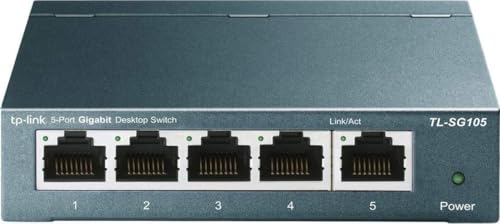
  2. A five-port metal-case switch with QoS and IGMP snooping and a 3-year warranty.

    93Outstanding
    Check price
  3. 03
    NETGEAR GS308 8-Port Gigabit Unmanaged Switch

    Best Energy-Efficient Eight-Port

    NETGEAR GS308 8-Port Gigabit Unmanaged Switch

    A fanless metal eight-port with 802.3az energy-efficient Ethernet, desktop or wall-mount.

    91Excellent
    Check price
  4. Eight 2.5G ports with 40Gbps capacity that run over your existing Cat5e cabling.

    90Excellent
    Check price
  5. Four PoE+ ports sharing 65W, plus an uplink, QoS and IGMP snooping and a 3-year warranty.

    88Excellent
    Check price
  6. A fanless five-port gigabit switch with 802.3az energy-efficient Ethernet.

    86Excellent
    Check price
  7. Five 2.5G ports with 25Gbps capacity, working over existing Cat5e in a compact metal case.

    84Very Good
    Check price
  8. A fanless five-port budget switch, just 2.8 x 3.5 x 0.9 inches and 2.8 oz.

    82Very Good
    Check price

The most common mistake with a desktop switch is buying speed you cannot use. A 2.5G switch looks like an upgrade, but it only helps when both ends of a link are 2.5G capable, and a lot of laptops, consoles and routers are not. Plug a gigabit device into a 2.5G port and that link runs at gigabit, so the extra money buys nothing until you replace the other side.

This ranking sorts eight small switches by what they will actually do on a desk. We reviewed each from its listing, comparing port count, speed, PoE, QoS features, case material, cooling and warranty. Several of these are close to identical in plain gigabit mode, so the differences come down to port count, build and the few extras each one adds. Prices are brackets only.

Before you buy

What Actually Matters

01

Gigabit versus 2.5G

A 2.5G switch only runs faster when both ends of the cable are 2.5G capable. Many laptops and routers are still gigabit. Count your multi-gig devices first, and buy 2.5G only if at least two links will use it.

02

Port count

A 5-port switch gives four usable ports once one connects to the router. Eight ports leave room for growth. Buy one size up from what you have today, since a desk fills with devices.

03

PoE budget

PoE powers devices through the Ethernet cable. The budget is the total wattage, shared across ports. A 65W budget covers one or two cameras but not four. Check each device's draw before you buy.

04

QoS and IGMP snooping

QoS prioritizes video calls and games over downloads, and IGMP snooping keeps multicast streams from flooding every port. On an unmanaged switch these work automatically. They matter more on a busy network.

05

Case and cooling

A fanless switch is silent, but it relies on its case to shed heat. Metal cases do this better than thin plastic. Leave a gap around the switch and avoid stacking items on top.

In-depth reviews

Our Ranked Picks, Reviewed

3

Best Energy-Efficient Eight-Port

NETGEAR GS308 8-Port Gigabit Unmanaged Switch

Our verdict: A fanless metal eight-port with 802.3az energy-efficient Ethernet, desktop or wall-mount.

The GS308 is an eight-port gigabit unmanaged switch with a fanless metal housing and 802.3az energy-efficient Ethernet. It mounts on a desk or a wall. It falls under $25.

It ranks third because it is a direct rival to the TL-SG108, and on the listing the two are close. The difference is the 802.3az standard, which lowers power use when links are idle. On one switch the saving is small, but it runs around the clock. NETGEAR also has strong brand recognition, which helps with finding replacements and documentation. It does not list support or warranty details as clearly as the TP-Link listings.

Buy it if you prefer NETGEAR or want the energy-saving feature. Otherwise, the TL-SG108 is the better-documented choice.

Ports
8 gigabit
Energy
802.3az energy-efficient Ethernet
Case
Fanless metal housing
Mounting
Desktop or wall-mount

What we like

  • +Energy-efficient Ethernet saves idle power
  • +Fanless metal housing
  • +Eight ports at a low price
  • +Desk or wall mounting

Watch out for

  • −Warranty details not listed
  • −No PoE or 2.5G

Buy it if: NETGEAR households that leave the switch on all day.

Skip it if: You want QoS or a listed warranty.

6

Best Simple Five-Port

NETGEAR GS305 5-Port Gigabit Unmanaged Switch

Our verdict: A fanless five-port gigabit switch with 802.3az energy-efficient Ethernet.

The GS305 is a fanless five-port gigabit unmanaged switch with 802.3az energy-efficient Ethernet. It can sit on a desk or mount on a wall. It falls under $25.

It ranks sixth because it is the NETGEAR counterpart to the TL-SG105, with fewer listed extras. You get no QoS or IGMP snooping, though you do get the energy-saving standard. For a PC, a console and a printer, that is plenty. It is a reasonable pick if you prefer the brand, but the TP-Link has more on paper for the same price.

Buy it for a simple, small setup. Skip it if you want traffic prioritization.

Ports
5 gigabit
Energy
802.3az energy-efficient
Cooling
Fanless
Mounting
Desktop or wall

What we like

  • +Fanless and silent
  • +Energy-efficient Ethernet
  • +Desk or wall mounting
  • +Very low price

Watch out for

  • −No QoS listed
  • −Only five ports

Buy it if: Small setups that value a familiar brand.

Skip it if: You want QoS or more ports.

Methodology

How We Ranked These

Port count and speed

We compared ports against the gigabit and 2.5G speeds, and asked whether the extra speed pays off on a normal desk.

Traffic features

QoS, IGMP snooping and energy-saving standards were weighed where the listing names them.

PoE delivery

Where PoE is offered, we looked at the total shared budget rather than the port count.

Build and cooling

Metal cases and fanless designs scored higher for heat, noise and durability.

Warranty and support

We counted warranty length and live support, since a switch is expected to run for years.

Every Primea Score uses the same weights: Performance 30% · Build & Materials 20% · Everyday Usability 20% · Value 20% · Owner Satisfaction 10%. Full scoring rules

Buyer's guide

How to Pick the Right One for You

By Port Count

Count the devices you own, then add two.

Ports neededOur pick
Up to 4TP-Link TL-SG105 5-Port Gigabit Unmanaged Switch
4 with PoETP-Link TL-SG1005P 5-Port Gigabit PoE Switch
Up to 7TP-Link TL-SG108 8-Port Gigabit Unmanaged Switch
7 with energy savingNETGEAR GS308 8-Port Gigabit Unmanaged Switch
Travel and tight spotsTP-Link LS1005G Litewave 5-Port Gigabit Switch

By Budget

SpendOur pick
Under $25TP-Link TL-SG108 8-Port Gigabit Unmanaged Switch
Under $25 (five ports)NETGEAR GS305 5-Port Gigabit Unmanaged Switch
$25 to $50TP-Link TL-SG105S-M2 5-Port 2.5G Unmanaged Switch
$25 to $50 (PoE)TP-Link TL-SG1005P 5-Port Gigabit PoE Switch
$50 to $100TP-Link TL-SG108S-M2 8-Port 2.5G Unmanaged Switch

Gigabit vs 2.5G

Gigabit

Matches nearly every laptop, console and router, and costs little. Picks: TL-SG108, TL-SG105, NETGEAR GS308, NETGEAR GS305.

2.5G

Removes a bottleneck for a fast NAS or recent PC, and runs on Cat5e, but needs 2.5G devices at both ends. Picks: TL-SG108S-M2, TL-SG105S-M2.

Default to gigabit unless you already own two or more 2.5G devices.

By Brand Preference

BrandOur pick
TP-Link, most portsTP-Link TL-SG108 8-Port Gigabit Unmanaged Switch
TP-Link, smart featuresTP-Link TL-SG105 5-Port Gigabit Unmanaged Switch
NETGEAR, eight portsNETGEAR GS308 8-Port Gigabit Unmanaged Switch
NETGEAR, five portsNETGEAR GS305 5-Port Gigabit Unmanaged Switch

For a Home Camera Setup Specifically

Look for

PoE+ ports and a total budget that covers every camera, with QoS to keep video steady. Add up each camera's wattage first.

In this ranking

The TP-Link TL-SG1005P gives four PoE+ ports on a 65W shared budget, plus QoS and IGMP snooping, so it suits one to two cameras.

When to Spend More

Spend more if

You own 2.5G gear or need PoE. The TL-SG108S-M2 or TL-SG1005P deliver what the cheaper models cannot.

Save if

Everything is gigabit and you just need more ports. The TL-SG108 or NETGEAR GS308 cost under $25.

Questions

Frequently Asked Questions

Do I need a managed switch for a home office?+

No, an unmanaged switch is fine for most desks. Plug in and it works, and models like the TL-SG105 still add QoS and IGMP snooping automatically.

What is the most common mistake when buying a switch?+

Buying 2.5G without any 2.5G devices. A link runs at the speed of its slowest end, so a gigabit PC on a 2.5G switch still gets gigabit.

Is a switch worth it over a router with four ports?+

If you have more than three wired devices, yes. A switch adds ports without slowing the connection, and a model like the TL-SG108 costs little.

How do I set one up?+

Plug the power adapter in, connect one port to your router, and plug your devices into the others. There is no software to install on an unmanaged switch.

Do I need to maintain a switch?+

Mostly not. Keep it ventilated, dust the vents or case now and then, and power-cycle it if a port misbehaves. Fanless models like the NETGEAR GS308 have no fan to clean.

Will a 2.5G switch work with gigabit devices?+

Yes, ports auto-negotiate down to gigabit, so older devices still connect. They just do not gain any speed, and the TL-SG108S-M2 runs them at 1Gbps.

Final take

The TP-Link TL-SG108 is the desktop switch to buy for most people, because it gives eight gigabit ports in a metal fanless case at a very low price. Take the TL-SG105 for QoS in a smaller form, the TL-SG1005P if you need PoE, and the TL-SG108S-M2 only when your gear is ready for 2.5G. Count your devices, and buy two extra ports.

More Ranked & Reviewed Guides