
Primea ReviewsAll Reviews

Primea Reviews is reader-supported. When you buy through our Amazon links we may earn a commission, at no extra cost to you. Rankings are set by our editors and never sold. Learn more

Ranked & Reviewed by Primea Reviews

The 5 Best Desktop Document Holders of 2026, Ranked & Reviewed

By the Primea Editorial TeamUpdated November 4, 20269 min read5 products ranked
The 5 Best Desktop Document Holders of 2026, Ranked & Reviewed

The short answer

The Abankey KLOUD CityBlack is our top pick: all-metal parts, seven stepped viewing angles and a removable line guide. The Kensington gooseneck wins for laptop users who need paper beside the screen. The Lawei two-pack suits shared desks, while the Hanghs and Rodarola clipboards fit light, occasional typing from sheets.

The Primea Scoreboard

Ranked & Reviewed

  1. Seven fixed angles and a removable line guide in a metal body that does not creep.

    94Outstanding
    Check price
  2. A clip-on gooseneck that parks paper right beside your screen.

    91Excellent
    Check price
  3. Two adjustable holders with clips and line guides for the price of one.

    88Excellent
    Check price
  4. A slim 13.9 by 8.2 inch clipboard stand with a highlighting side clip.

    85Excellent
    Check price
  5. A standing clipboard whose back opens, doubling as a regular clipboard.

    83Very Good
    Check price

Copying from paper is a neck problem before it is a productivity problem. Every glance down at a flat sheet means a few degrees of neck flexion, repeated hundreds of times in an hour, and the strain adds up by Friday. A holder that raises the page to near monitor height cuts that motion, and that is the only job worth judging here.

We ranked five desktop document holders by what their listings state: how many tilt positions they offer, whether a line guide helps you keep your place, what they are made of, and whether they attach to a screen or sit on the desk. Anything that only claims to look elegant was scored on function.

Before you buy

What Actually Matters

01

Viewing angle steps

A holder that locks into set angles keeps the page where you leave it, while friction hinges drift under weight. The Abankey offers seven grooves for this reason. Look for a stated number of positions in the bullet list, and prefer stepped locks if you copy from heavy books or binders all day, because friction alone will not hold a thick volume.

02

Line guide

A line guide is a movable bar or clip that marks the row you are copying, which cuts skipped lines when you type numbers. The Abankey has a removable one, the Lawei includes one, and the Hanghs uses a highlighting side clip. Check the listing for the word, since cheaper holders omit it.

03

Mounting style

Where the holder sits determines your head position. A desk stand takes surface area, while a clip-on like the Kensington keeps paper at screen height. Match the mount to your setup: a laptop with a thin bezel needs a clip, a monitor desk can use a stand. Confirm the clip opening fits your screen edge.

04

Material and weight

A heavier base resists tipping when you pull a page. Metal construction, as on the Abankey, adds that stability over plastic boards. Check the material line in the bullets, and be cautious with lightweight clipboards if you plan to leave a thick manual propped up for hours at a time, since a light board can slide or flip when you turn a page.

05

Page capacity and size

Capacity is how thick a stack the clip or ledge can hold, and listings rarely state it. The Hanghs gives a 13.9 by 8.2 inch footprint, which suits letter sheets in portrait. Compare it to your document size, assume books need a ledge and not a clip, and measure your thickest binder before you order so the holder is not undersized.

In-depth reviews

Our Ranked Picks, Reviewed

1

Best Overall

Abankey KLOUD CityBlack Metal Desktop Document Book Holder

Our verdict: Seven fixed angles and a removable line guide in a metal body that does not creep.

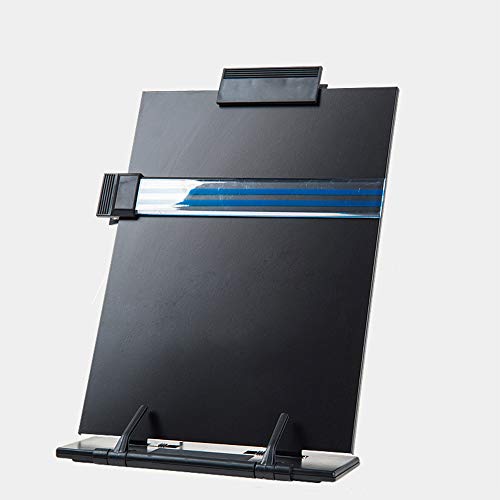
The Abankey is a metal and plastic desktop stand with seven grooves that lock the page at seven viewing angles. A removable line guide highlights the row you are reading.

It wins because stepped grooves hold the angle you pick, where friction hinges slowly slump under the weight of a thick manual. The metal parts give it more mass on a slick desk than the lighter clipboards, and the line guide helps when you type figures. The Kensington is more mobile but offers no fixed steps.

Buy it for a permanent desk spot and heavier books or binders. The caveat is that it sits on the desk, so it takes space beside the keyboard and cannot clip to a laptop.

Material
Metal and plastic
Angles
7 grooves
Line guide
Removable
Mount
Freestanding

What we like

  • +Seven locked viewing angles
  • +Metal parts add weight
  • +Removable line guide
  • +Holds books and binders

Watch out for

  • −Takes desk space
  • −No clip-on option

Buy it if: Desk workers copying from thick manuals and binders every day.

Skip it if: You work on a laptop and need paper beside the screen.

2

Best for Laptops

Kensington Document Holder for Typing for Laptops and Monitors

Our verdict: A clip-on gooseneck that parks paper right beside your screen.

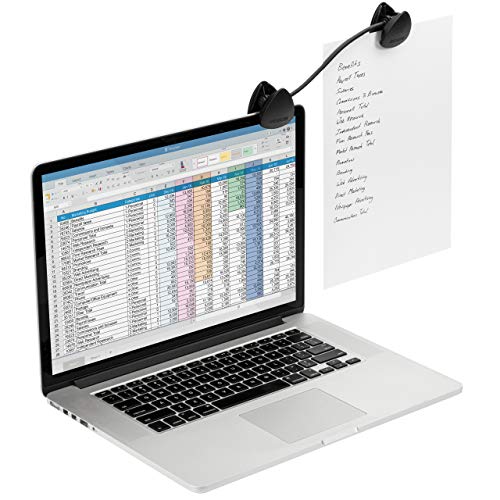
Kensington's holder uses a clip that attaches to a laptop or monitor and a flexible gooseneck that lets you place the document at the most comfortable viewing position. It is easy to carry and use at the desk or on the go.

It ranks second because it puts the page in the same sight line as the screen, which the desktop stands cannot, and costs nothing in desk area. It gives up the fixed steps of the Abankey, so a gooseneck can droop under a heavy paper stack.

Choose it for laptops, shared workstations and travel. The caveat is that clip pressure depends on bezel thickness, so confirm your screen edge can take a clamp before ordering.

Mount
Clip to laptop or monitor
Arm
Flexible gooseneck
Portability
Carry-friendly
Price band
Under $25

What we like

  • +Clips to laptop or monitor
  • +Flexible gooseneck positioning
  • +Frees up desk space
  • +Easy to carry

Watch out for

  • −Can droop with heavy pages
  • −Needs a clampable bezel

Buy it if: Laptop users and hot-deskers who need paper beside the screen.

Skip it if: You copy from thick books that need a rigid stand.

3

Best Two-Pack

Lawei 2 Pack Desktop Document Holder with Adjustable Clip and Line Guide

Our verdict: Two adjustable holders with clips and line guides for the price of one.

Lawei ships two holders in iron and plastic, each with adjustable tilt, an adjustable clip and a line guide. It is sold as a value pack.

It ranks third because the iron-and-plastic mix is lighter than the Abankey's metal body and offers continuous tilt rather than locked steps, so it can slip under a heavy page. What it adds is quantity: one for the home desk, one for the office, with the line guide on both.

Buy it if two people share a space or you split time between sites. Neither angle count nor paper capacity is published, so test the tilt hold on a real stack the day it arrives and return it if it slumps.

Pack
2 holders
Material
Iron and plastic
Tilt
Adjustable
Extras
Clip and line guide

What we like

  • +Two holders in one pack
  • +Adjustable clip
  • +Line guide on each
  • +Under $25

Watch out for

  • −Angle count not stated
  • −Lighter than all-metal

Buy it if: Home plus office users, or two people sharing a workspace.

Skip it if: You want locked angles for thick reference books.

4

Best Slim Clipboard

Hanghs Desktop Document Holder/Paper Stand/Clipboard for Sheet

Our verdict: A slim 13.9 by 8.2 inch clipboard stand with a highlighting side clip.

Hanghs is a clipboard-style paper stand measuring 13.9 by 8.2 inches, with a side clip that highlights the line you are on. The design is described as classy, simple and elegant.

It ranks fourth because the single-sheet format suits forms and invoices but not books, where the Abankey excels. Its slim profile does take less desk space than a book stand, which is the trade you make, and the highlighting clip is a real aid when you scan columns of figures.

Buy it for entering data from loose sheets all day. No angle count or material is given, so stability on a lightweight board is something to confirm from the product page before you rely on it.

Size
13.9 x 8.2 in
Form
Clipboard stand
Guide
Highlighting side clip
Price band
Under $25

What we like

  • +Slim desk footprint
  • +Side clip highlights lines
  • +Handles loose sheets
  • +Simple, tidy look

Watch out for

  • −Not for thick books
  • −Angle options not listed

Buy it if: Data entry from loose forms, invoices and printed sheets.

Skip it if: You reference bound books or binders.

5

Best Dual-Use Clipboard

Rodarola Desktop Document Holder for Typing Clipboard

Our verdict: A standing clipboard whose back opens, doubling as a regular clipboard.

Rodarola is an ergonomic standing clipboard where the back opens freely, built for fast typing and comfortable viewing. The listing adds that it also works as a regular clipboard.

It ranks last because the dual-use design compromises the stand: a board that folds for carrying cannot match the locked grooves of the Abankey or the screen-side position of the Kensington. The upside is flexibility, since one item serves desk and clipboard roles.

Buy it for light, occasional typing from a few sheets, or when a clipboard in a meeting is as useful as a stand at the desk. Angle steps and capacity go unmentioned, so expect a looser hold than the metal stands give.

Form
Standing clipboard
Back
Opens freely
Use
Typing and clipboard
Price band
Under $25

What we like

  • +Doubles as a clipboard
  • +Stands for easy typing
  • +Compact and light
  • +Low cost

Watch out for

  • −Angle steps not listed
  • −Lighter hold than metal stands

Buy it if: Occasional typing from a few sheets and general clipboard use.

Skip it if: You need a rigid, locked stand for daily heavy use.

Methodology

How We Ranked These

Viewing angle control

Stepped grooves, adjustable tilt and gooseneck positioning decide how well each holder keeps the page where your eyes are.

Reading aids

Line guides and highlighting clips prevent skipped rows, so we credited listings that state one.

Build and stability

Metal parts and weight keep a stand from creeping, while lighter boards can slip, so we scored materials where listed.

Footprint and mounting

Desk stands, clip-ons and slim boards each cost a different amount of workspace; we weighed that against how you work.

Value

All five sit under or near $25, so we judged extras like packs and dual use against missing specs.

Every Primea Score uses the same weights: Performance 30% · Build & Materials 20% · Everyday Usability 20% · Value 20% · Owner Satisfaction 10%. Full scoring rules

Buyer's guide

How to Pick the Right One for You

By Mounting Style

Pick where the paper should sit before you compare extras.

SetupOur pick
Freestanding on deskAbankey KLOUD CityBlack
Clips to laptop or monitorKensington Document Holder
Two desks, two holdersLawei 2 Pack
Slim loose-sheet standHanghs Desktop Document Holder
Clipboard that also standsRodarola Typing Clipboard

By Budget

SpendOur pick
Under $25, best buildAbankey KLOUD CityBlack
Under $25, laptopsKensington Document Holder
Under $25, two unitsLawei 2 Pack
Under $25, loose sheetsHanghs or Rodarola

Stand vs Clip-On

Desk stand

The Abankey and Lawei sit on the desk, hold books and binders, and keep a fixed tilt. They cost surface area but carry more weight.

Clip-on

The Kensington gooseneck attaches to a screen and frees the desk. It is lighter duty and suits loose pages near the display.

Default to the Abankey at a fixed desk and the Kensington on a laptop.

By Document Type

You copy fromOur pick
Thick manuals and booksAbankey KLOUD CityBlack
A few printed pages beside a screenKensington Document Holder
Forms and invoicesHanghs Desktop Document Holder
Mixed light useRodarola Typing Clipboard

For Data Entry Specifically

Look for

A line guide, a steady angle and a position near eye level, so your head stays still while your eyes track rows.

In this ranking

The Abankey combines a removable line guide with seven locked angles, and the Kensington keeps the page next to the screen.

When to Spend More

Spend more if

You copy from paper for hours daily. The Abankey's metal build and locked angles repay the small extra over a plain clipboard.

Save if

You type from paper once a week. The Rodarola or Hanghs covers it, and the Lawei adds a second unit cheaply.

Questions

Frequently Asked Questions

Will the Kensington clip fit my laptop?+

It attaches to a laptop or monitor edge, but clip fit depends on bezel thickness. Thin ultrabook lids may need a firmer grip, while thick monitor bezels work easily. Check your screen edge before ordering, or choose the Abankey for a desk stand.

What is the common mistake with document holders?+

Placing the holder flat to one side of the keyboard. That keeps your head turned. Put the Abankey or Kensington directly beside the screen at similar height, so your eyes move without your neck rotating.

Is the Abankey worth it over a clipboard stand?+

Yes for books and binders. Its seven locked angles and metal parts hold heavy pages that a Hanghs or Rodarola board would let slide. For loose sheets only, the cheaper clipboards are enough, and the saving is small.

How do I set up a holder to avoid neck strain?+

Raise the page to the lower edge of your monitor and angle it toward you. On the Abankey, pick the groove that makes the page face your eyes. With the Kensington gooseneck, bend it until the sheet sits beside the screen.

How do I keep pages from slipping?+

Use the clip or ledge fully and avoid overfilling. The Lawei has an adjustable clip for this, and the Abankey grooves cradle books. Wipe the base occasionally so rubber or plastic feet grip the desk.

Can I use these with a standing desk?+

Yes, but pick a holder that will not tip when the desk moves. The Kensington clips to the screen and travels with it, while the Abankey stays put on the surface and may need a clear spot beside the monitor.

Final take

The Abankey KLOUD CityBlack is the document holder to buy for a fixed desk: seven locked angles, metal parts and a removable line guide. Laptop users should take the Kensington gooseneck, and shared setups get good value from the Lawei two-pack. The Hanghs and Rodarola clipboards are fine for light work, but none of them replace a locked stand for daily copying.

More Ranked & Reviewed Guides