
Primea ReviewsAll Reviews

Primea Reviews is reader-supported. When you buy through our Amazon links we may earn a commission, at no extra cost to you. Rankings are set by our editors and never sold. Learn more

Ranked & Reviewed by Primea Reviews

The 7 Best Desk Document Holders of 2026, Ranked & Reviewed

By the Primea Editorial TeamUpdated November 4, 20268 min read7 products ranked
The 7 Best Desk Document Holders of 2026, Ranked & Reviewed

The short answer

The Fellowes Letter Sized Copyholder is the document holder to buy for data entry and transcription, with a removable line guide on a repositionable track. The Ultimate Office AdjustaView is the multi-document pick with a 12-inch weighted base and five-angle pockets. MaxGear and Abankey cover viewing-angle flexibility for under $25.

The Primea Scoreboard

Ranked & Reviewed

  1. A removable line guide on a track that repositions along the top or side.

    93Outstanding
    Check price
  2. A round 12-inch weighted base and pockets that pivot to five angles.

    91Excellent
    Check price
  3. 03
    MaxGear Desktop Document Holder

    Best Adjustable Angles

    MaxGear Desktop Document Holder

    Hands-free reading with six viewing angles and a stable non-slip base.

    89Excellent
    Check price
  4. Metal and plastic parts, seven grooves for seven angles and an adjustable clip.

    87Excellent
    Check price
  5. A 13.9 by 8.2 inch stand with a highlighting side clip and a simple design.

    85Excellent
    Check price
  6. An ergonomic standing clipboard whose back opens freely for desk use.

    82Very Good
    Check price
  7. 07
    Paper Holder for Typing

    Best Minimal Weighted Clip

    Paper Holder for Typing

    A weighted base with a page clip that holds one page or several sheets.

    80Very Good
    Check price

Anyone who types from paper knows the moment: you look down, find your place, look up, and lose it. A document holder fixes this by lifting the page to monitor height, but a bad one slides, tips or hides the line you are reading. The features that matter are not obvious from a photo: base weight, the number of angles and whether there is a guide for your eye.

Primea editors reviewed seven holders from under $25 to $100 and ranked them on viewing angles, base stability, line guides and clips. We included the holders that suit typing from paper and kept bookstands out of the ranking. Where the listing gives a number, such as six viewing angles or a 12-inch base, we used it; where it does not, we say so.

Before you buy

What Actually Matters

01

Line guide

A line guide is a movable bar that marks the line you are reading, so your eye does not drift. It matters for data entry and transcription. The Fellowes has a removable guide on a repositionable track. Check the listing for a guide or highlight clip, since basic stands leave you tracking by eye.

02

Number of angles

More angles let you tilt the page to eye level whether you sit or stand. MaxGear lists six, Abankey seven and the AdjustaView five pivot positions. Check the count, and prefer groove or pivot locks, because friction hinges slowly sag under the weight of paper.

03

Base weight

A weighted base keeps the holder in place when you tap the desk or bump a page. The AdjustaView has a round 12-inch weighted base, and the Paper Holder for Typing is also weighted. Check the base description, as a light plastic base slides when paper is clipped on.

04

Page capacity

Some holders hold one letter page, and others hold multiple sheets or reference pockets. Choose by how many documents you consult. The Fellowes suits one page and the AdjustaView several. Check the stated page size and number of pockets before you buy.

05

Footprint

A document holder sits between you and the monitor, so a large base can crowd the keyboard. The AdjustaView needs 12 inches of round base. Check the dimensions on the listing, and place the holder to the side of the monitor so it does not block your view.

In-depth reviews

Our Ranked Picks, Reviewed

1

Best Overall

Fellowes Letter Sized Non-Magnetic Copyholder

Our verdict: A removable line guide on a track that repositions along the top or side.

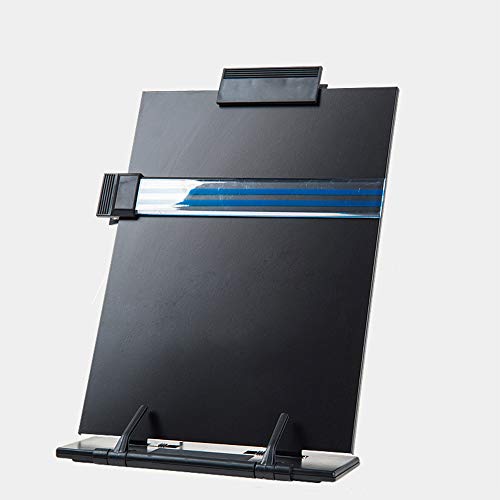
The Fellowes copyholder is a letter-sized holder made of sturdy, impact-resistant plastic with a removable line guide that slides along a track at the top or the side of the page. The line guide is the feature that matters: it highlights the line you are on so you keep your place.

It wins because it solves the lost-your-place problem directly, and it is non-magnetic, so it is safe near media and electronics. The Ultimate Office below holds more documents, but the Fellowes is the better pick for typing one page at a time.

An easy choice for data entry and transcription. The caveat is that it holds a single letter-size page, so it does not suit stacks.

Page size
Letter
Line guide
Removable, repositionable track
Material
Impact-resistant plastic
Price bucket
Under $25

What we like

  • +Removable line guide
  • +Track repositions top or side
  • +Non-magnetic plastic
  • +Under $25 bucket

Watch out for

  • −Single page only
  • −Plastic base is light
  • −Fixed viewing angle

Buy it if: Data entry and transcription from single pages.

Skip it if: You need to hold several documents.

2

Best Multi-Document

Ultimate Office AdjustaView Desk Reference Display Organizer

Our verdict: A round 12-inch weighted base and pockets that pivot to five angles.

The AdjustaView is a desk reference display organizer on a round 12-inch weighted base, with pockets that pivot to five angled positions for sitting or standing. Multiple pockets let you keep reference sheets in view while you work.

It ranks second because it is built for reference documents, not one-page typing. The weighted base keeps the display rock-solid, which the lighter holders below cannot match.

It suits a desk where you refer to several sheets, such as price lists or procedures. The caveat is price, in the $50 to $100 bucket, and the 12-inch base takes real desk space.

Base
Round 12-inch weighted
Angles
5 pivot positions
Use
Reference document display
Price bucket
$50 to $100

What we like

  • +Weighted 12-inch base
  • +Five pivot angles
  • +Holds several reference sheets
  • +Works sitting or standing

Watch out for

  • −Highest price in the ranking
  • −Large desk footprint
  • −Overkill for single pages

Buy it if: Desks that rely on several reference sheets.

Skip it if: You only read one page at a time.

3

Best Adjustable Angles

MaxGear Desktop Document Holder

Our verdict: Hands-free reading with six viewing angles and a stable non-slip base.

MaxGear offers a desktop holder for hands-free reading and typing, with six viewing angles and a stable non-slip base. Six angles let you tilt the page toward your eyes at the height that suits you.

It ranks third because it lacks the line guide of the Fellowes and the weighted base of the AdjustaView, but it is the most flexible of the simple holders. It costs under $25.

A good fit for a mixed work desk. The caveat is that a non-slip base is not a weighted one, so heavy documents may tip a light holder.

Angles
6 viewing angles
Base
Stable, non-slip
Use
Hands-free reading and typing
Price bucket
Under $25

What we like

  • +Six viewing angles
  • +Non-slip base
  • +Hands-free typing
  • +Under $25 bucket

Watch out for

  • −No line guide
  • −Light base for heavy sheets
  • −Page size not stated

Buy it if: General office work with varied document sizes.

Skip it if: You need a line guide or weighted base.

4

Best Metal Build

Abankey KLOUD City Black Metal Desktop Document Book Holder

Our verdict: Metal and plastic parts, seven grooves for seven angles and an adjustable clip.

The Abankey KLOUD holder combines metal and plastic parts with seven grooves for seven viewing angles and an adjustable document clip that can sit on either side edge. Grooves hold the angle firmly, instead of relying on friction.

It ranks fourth because MaxGear gives six angles with a stable base, while the Abankey gives seven with a clip, and the metal parts add durability. It also works for books.

A fit for a desk with mixed paper and books. The caveat is the ordinary base, which the listing does not describe as weighted.

Angles
7 grooves
Build
Metal and plastic parts
Clip
Adjustable, either side
Price bucket
Under $25

What we like

  • +Seven groove-locked angles
  • +Metal parts for durability
  • +Movable document clip
  • +Works with books too

Watch out for

  • −Base not described as weighted
  • −Clip can mark thin paper
  • −Bulkier folded size

Buy it if: Mixed document and book reading at a desk.

Skip it if: You want a weighted base or line guide.

5

Best Highlight Clip

Hanghs Desktop Document Holder / Paper Stand

Our verdict: A 13.9 by 8.2 inch stand with a highlighting side clip and a simple design.

The Hanghs stand measures 13.9 by 8.2 inches and has a highlighting side clip with a classy, simple design. The side clip holds a highlighter strip against the line you are reading.

It ranks fifth because it has fewer stated angles than MaxGear or Abankey, and it relies on a clip rather than a track like the Fellowes. The dimensions are useful: they confirm it holds a standard sheet.

A clean option for a tidy desk. Missing from its page are the viewing-angle count and the base weight, both worth confirming.

Size
13.9 x 8.2 inches
Clip
Highlighting side clip
Design
Simple, elegant
Price bucket
Under $25

What we like

  • +Stated 13.9 x 8.2 inch size
  • +Highlighting side clip
  • +Simple, clean design
  • +Under $25 bucket

Watch out for

  • −Angle count not stated
  • −Base weight unknown
  • −Fewer adjustments

Buy it if: Tidy desks that need a plain page stand.

Skip it if: You want many viewing angles.

6

Best Dual-Use Clipboard

Rodarola Desktop Document Holder for Typing Clipboard

Our verdict: An ergonomic standing clipboard whose back opens freely for desk use.

The Rodarola is an ergonomic standing clipboard whose back opens freely, so it works as a paper stand for typing and as a regular clipboard. Flipping between uses saves a separate purchase.

It ranks sixth because its stand function is the weaker of its two jobs, and the listing gives no angle count or base weight. Its advantage is portability: you can carry it to a meeting.

It suits people who walk between desk and meetings. The caveat is that a clipboard stand is lighter than a weighted holder, so thick stacks may slide.

Type
Standing clipboard
Back
Opens freely
Use
Typing stand and clipboard
Price bucket
Under $25

What we like

  • +Doubles as a clipboard
  • +Ergonomic typing angle
  • +Portable between desks
  • +Under $25 bucket

Watch out for

  • −Light base
  • −No angle count listed
  • −Weaker as a fixed stand

Buy it if: Mobile workers who carry paper between meetings.

Skip it if: You want a heavy, fixed desk stand.

7

Best Minimal Weighted Clip

Paper Holder for Typing

Our verdict: A weighted base with a page clip that holds one page or several sheets.

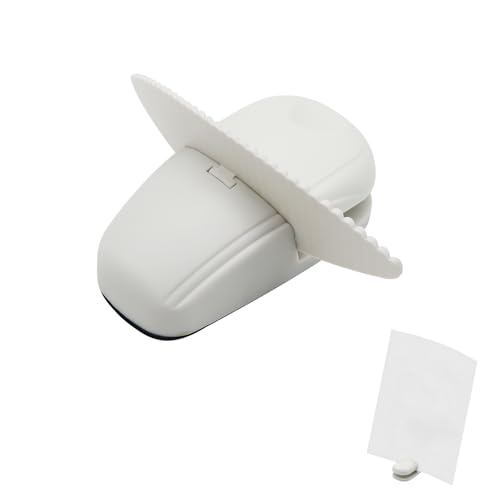
This paper holder keeps pages upright with a weighted base and a page clip that can hold one page or several sheets. A weighted base is what stops a holder walking across the desk.

It ranks last because the listing gives no brand, angle count or size, and the design is the simplest. Its weighted base is a real advantage over the lighter clips above.

A minimal pick for a small desk. The caveat is that, with no angle adjustment described, you get a single tilt.

Base
Weighted
Clip
Page clip
Capacity
One page or several sheets
Price bucket
Under $25

What we like

  • +Weighted base stays put
  • +Page clip holds sheets
  • +Simple to use
  • +Under $25 bucket

Watch out for

  • −No brand or size detail
  • −Angle options not described
  • −Basic features only

Buy it if: Small desks that need a simple weighted page holder.

Skip it if: You want adjustable angles.

Methodology

How We Ranked These

Viewing angles

Stated angle counts, such as six or seven, were compared for how well each tilts to your eyes.

Base stability

Weighted and non-slip bases score above light plastic.

Reading aids

Line guides and highlight clips help you keep your place.

Capacity

Single-page, multi-sheet and multi-document designs were matched to use cases.

Listing clarity

Holders with stated sizes and angle counts outranked vague ones.

Every Primea Score uses the same weights: Performance 30% · Build & Materials 20% · Everyday Usability 20% · Value 20% · Owner Satisfaction 10%. Full scoring rules

Buyer's guide

How to Pick the Right One for You

By Task

Match the holder to what you actually do with paper.

TaskOur pick
Data entry from one pageFellowes Letter Sized Non-Magnetic Copyholder
Several reference sheetsUltimate Office AdjustaView
General typingMaxGear Desktop Document Holder
Mixed paper and booksAbankey KLOUD Metal Document Holder

By Budget

SpendOur pick
Under $25, line guideFellowes Letter Sized Copyholder
Under $25, anglesMaxGear Desktop Document Holder
Under $25, weightedPaper Holder for Typing
$50 to $100Ultimate Office AdjustaView

Single Page vs Multi-Document

Single page

Compact and cheap. The Fellowes, MaxGear and Hanghs hold one page at a time.

Multi-document

Pockets keep several sheets visible. The AdjustaView is the pick.

Most typists need only a single-page holder.

By Mobility

NeedOur pick
Fixed desk standUltimate Office AdjustaView
Carry between meetingsRodarola Desktop Document Holder
Plain standHanghs Desktop Document Holder
Stable weighted clipPaper Holder for Typing

For Data Entry Specifically

Look for

A line guide, a firm angle lock and a base that does not slide.

In this ranking

The Fellowes has the line guide, and the Abankey has seven groove-locked angles.

When to Spend More

Spend more if

You work from several documents. The AdjustaView at $50 to $100 keeps them in view.

Save if

You only read single pages. Any under $25 holder will do.

Questions

Frequently Asked Questions

Where should a document holder sit?+

Between the keyboard and monitor, or beside the monitor at the same height. The MaxGear and Abankey tilt to eye level, which cuts neck movement. Avoid placing a large base like the AdjustaView where it blocks the screen.

What mistake do buyers make with copyholders?+

Choosing one with no angle control. A fixed angle, like the Fellowes, works when the monitor height matches, but angled grooves on the Abankey adapt to different desks. Check how the holder locks its position.

Is the AdjustaView worth it over the Fellowes?+

Only for several documents. The AdjustaView costs $50 to $100 and uses a 12-inch weighted base with pivoting pockets, while the Fellowes is under $25 and keeps one page with a line guide.

How do I set one up for comfort?+

Place the top of the page at eye level, angled slightly toward you, and keep it beside the monitor. The MaxGear's six angles make this easy, and a line guide on the Fellowes reduces eye strain.

How do I keep a holder from sliding?+

Use a weighted or non-slip base. The Paper Holder for Typing is weighted, and MaxGear lists a non-slip base. Wipe the desk and the base occasionally, because dust reduces grip.

Can I use a document holder for a tablet?+

Possibly, though these are designed for paper. The Abankey's grooves and clip can hold a thin tablet or book, but a dedicated stand is safer. Check the weight limit before relying on any holder.

Final take

The Fellowes Letter Sized Copyholder is the document holder to buy for typing from paper, because its removable line guide keeps you on the right line. The AdjustaView is the choice for several reference documents, and MaxGear and Abankey give flexible angles for under $25. Hanghs, Rodarola and the Paper Holder for Typing suit simpler needs.

More Ranked & Reviewed Guides