
Primea ReviewsAll Reviews

Primea Reviews is reader-supported. When you buy through our Amazon links we may earn a commission, at no extra cost to you. Rankings are set by our editors and never sold. Learn more

Ranked & Reviewed by Primea Reviews

The 6 Best Desktop CNC Machines for Cutting Wood, Ranked & Reviewed

By the Primea Editorial TeamUpdated November 3, 202611 min read6 products ranked
The 6 Best Desktop CNC Machines for Cutting Wood, Ranked & Reviewed

The short answer

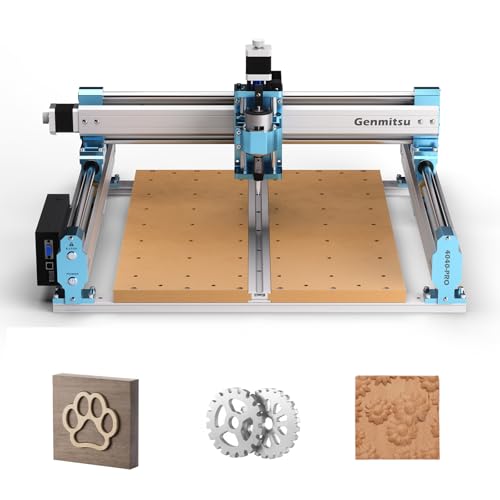
The Genmitsu 4040-PRO is the desktop CNC to buy for wood if you want room to make real projects, with a 435 x 400 x 80mm work area and dual 16mm steel tubes on every axis. The FoxAlien Masuter Pro has the stiffest frame at its size, the SainSmart PROVer V2 is the easiest first machine, and the Genmitsu 3018-PRO is the small, cheap way to learn.

The Primea Scoreboard

Ranked & Reviewed

  1. A 435 x 400mm bed on steel tube rails gives wood projects the room and stiffness they need.

    94Outstanding
    Check price
  2. A stiff aluminum build and a rail-guided Z-axis that goes together in roughly fifteen minutes.

    92Outstanding
    Check price
  3. A pre-assembled gantry and spoilboard mean you can be cutting in under an hour.

    90Excellent
    Check price
  4. A 15.7 inch square bed with a full accessory kit, using belt and V-wheel motion.

    88Excellent
    Check price
  5. A 300 x 180mm desktop machine with an offline controller and a raised, steadier base.

    86Excellent
    Check price
  6. A 3018-class kit with an added E-stop and limit switches on all three axes.

    84Very Good
    Check price

Most first-time buyers pick a CNC for wood by looking at the spindle, and that is the wrong end of the machine. A hobby spindle can cut pine and walnut on any of these frames. What differs is how much the frame flexes while it does, because wood puts sideways force on the tool that thin extrusions and plastic parts cannot hold. A wobbly gantry leaves chatter marks, rounded corners and bits that wander off line, and no spindle upgrade fixes that.

So we ranked these six by rigidity and working area first, then by setup effort, safety hardware and upgrade path. We reviewed the specification sheets and listings, drawing on stated work area, axis construction, controller type and what is bundled in the box. Where the listings are quiet about spindle power or accuracy, we do not guess, and we point out that gap in each write-up.

Before you buy

What Actually Matters

01

Frame and axis rigidity

Rigidity is how much the machine bends when the bit pushes sideways. Wood creates side force as the tool cuts, so a flexing frame leaves rough edges and inaccurate dimensions. Look for steel tubes, linear rails and aluminum, and be cautious about resin parts in the load path.

02

Work area and Z height

Work area is the largest piece you can machine in one setup, and Z height is the thickest stock the machine can clear. A 300 x 180mm bed suits small items, while 400mm class beds handle signs and cutting boards. Check both numbers, because a large bed with only 45mm of Z travel still cannot take a thick block.

03

Spindle and speed control

Most desktop machines use a small brushed or brushless spindle in the range of tens to hundreds of watts. Wood cuts best at moderate speed with a sharp upcut or compression bit and a light pass. Check the listing for the maximum RPM and for whether the spindle is upgradable.

04

Controller and limit switches

GRBL is the common open-source controller firmware and works with free sender software. Limit switches let the machine home itself and stop at its boundaries. Look for an E-stop, limit switches on every axis, and an offline controller if you do not want a laptop tied to every job.

05

Dust and noise management

Wood produces fine dust that clogs bearings and lungs. A dust shoe connected to a shop vacuum is the standard fix, and enclosures reduce noise. Check whether the listing includes a dust shoe or whether you must buy one separately, and plan on one.

In-depth reviews

Our Ranked Picks, Reviewed

1

Best Overall for Wood

Genmitsu 4040-PRO CNC Router Machine for Metal Acrylic Cutting Milling

Our verdict: A 435 x 400mm bed on steel tube rails gives wood projects the room and stiffness they need.

The 4040-PRO offers a 435 x 400 x 80mm work area and runs each axis on dual 16mm steel tubes. The listing says it assembles in about 15 minutes. The title mentions metal and acrylic, but the same frame handles hardwood and plywood.

It takes first place because wood punishes a flimsy axis, and a pair of steel rods per axis resists bending far better than a single guide. The 80mm of Z travel lets you cut thick stock or use a longer bit, and a bed this size takes cutting boards, small signs and joinery pieces. Against the Masuter Pro it gives up a little on the linear-rail Z-axis, but it offers more usable room and a lower price bracket than the Carvera class.

Choose it for a home workshop where you will cut real furniture parts, signs and inlays. The caveat is that the footprint is bigger than the 3018 class, and you will want a dust shoe and a shop vacuum from day one.

Work area
435 x 400 x 80mm
Axis build
Dual 16mm steel tubes
Assembly
About 15 minutes
Price bracket
$500+

What we like

  • +Large 435 x 400mm cutting bed
  • +Dual steel tubes resist flex
  • +80mm of Z travel for thick stock
  • +Fast 15 minute assembly

Watch out for

  • −Needs a bigger bench than a 3018
  • −Dust collection is an extra purchase

Buy it if: Hobbyists who want to cut full-size signs, boards and furniture parts.

Skip it if: Your workspace is a small desk or shelf.

2

Best Rigid Frame

FoxAlien Masuter Pro 3-Axis CNC Router Machine

Our verdict: A stiff aluminum build and a rail-guided Z-axis that goes together in roughly fifteen minutes.

The Masuter Pro has a 15.75 x 15.75 x 2.36 inch work area, an all-aluminum frame and a linear rail on the Z-axis. The listing puts assembly at 10 to 15 minutes.

It ranks second because its frame is the most solid for its size. A linear rail on the vertical axis keeps the spindle from rocking when you plunge into hardwood, and an aluminum structure resists twisting when you cut a deep pocket. The work area is almost the same as the 4040-PRO, but the 2.36 inch (about 60mm) Z travel is smaller, so thick blocks need other methods. That limit is why it sits below the Genmitsu.

Buy it if you want a precise machine for detailed carving, relief work and small furniture parts. Skip it if you routinely cut stock over two inches thick.

Work area
15.75 x 15.75 x 2.36 in
Frame
All aluminum
Z-axis
Linear rail
Assembly
10 to 15 minutes

What we like

  • +Linear rail Z holds the spindle steady
  • +All-aluminum frame resists twist
  • +Quick 10 to 15 minute assembly
  • +Good area for relief carving

Watch out for

  • −Only 2.36 inches of Z height
  • −Sits in the premium price bracket

Buy it if: Woodworkers who want precision for carving and detailed joinery parts.

Skip it if: You cut thick blocks of stock regularly.

3

Best for Beginners

SainSmart Genmitsu 3018-PROVer V2 CNC Router Machine for Beginners

Our verdict: A pre-assembled gantry and spoilboard mean you can be cutting in under an hour.

The PROVer V2 arrives with the gantry and spoilboard already assembled, with a setup the listing puts at under an hour. It supports a wide accessory range, including spindle and extension kits, and is listed for wood, acrylic, PCB and soft metals.

It sits third because it removes the biggest barrier for new owners, which is the first build. Many beginners stall at assembly and calibration, and a machine that is mostly ready lets you learn software and feeds sooner. The ecosystem is the other advantage: extension kits can enlarge the cutting area later, and the accessories are widely supported by the community. It ranks below the Masuter Pro and 4040-PRO because the 3018 class is smaller and lighter in build, and it limits the depth and speed you can safely cut hardwood.

This is the machine for someone learning CNC on a $200 to $500 budget. The caveat is that you will outgrow the work area, so treat it as the first step rather than the last.

Setup
Pre-assembled, under 1 hour
Materials
Wood, acrylic, PCB, soft metals
Accessories
Spindle and extension kits
Price bracket
$200 to $500

What we like

  • +Gantry and spoilboard arrive assembled
  • +Wide accessory and upgrade ecosystem
  • +Cuts wood, acrylic and PCB
  • +Gentle learning curve for beginners

Watch out for

  • −Smaller and lighter than the 4040 class
  • −Limits on hardwood depth and speed

Buy it if: First-time CNC buyers who want the least setup friction.

Skip it if: You already know you need a large cutting area.

4

Best Bundled Kit

WolfPawn CNC Router Machine 4040-PRO for Metal Acrylic Cutting Milling

Our verdict: A 15.7 inch square bed with a full accessory kit, using belt and V-wheel motion.

The WolfPawn offers a 15.7 x 15.7 x 2.9 inch working area, belt and V-wheel motion on the X and Y axes, and a linear guide on Z. A full accessory kit is included.

It ranks fourth because the belt-and-wheel system is lighter and cheaper than rigid steel tubes. V-wheels roll along an aluminum track, and belts are driven by a stepper motor. Both can work well for wood in light passes, but they flex more under heavy chip loads and wear over time, so you need to keep the wheel tension correct. The linear guide on Z and the 2.9 inch (about 74mm) height help, and the kit saves you from buying bits and clamps separately.

Choose it for a lower-cost 4040 class machine that arrives with the extras. Skip it if you plan on deep, aggressive cuts in hardwood, where the steel tube Genmitsu is more reliable.

Work area
15.7 x 15.7 x 2.9 in
X/Y motion
Belt and V-wheel
Z-axis
Linear guide
In the box
Full accessory kit

What we like

  • +Accessory kit saves extra purchases
  • +Linear guide on the Z-axis
  • +2.9 inches of cutting height
  • +Mid-range price for a 4040 bed

Watch out for

  • −Belt and wheels flex more under load
  • −V-wheels need periodic tension checks

Buy it if: Buyers who want a large bed and a bundled kit on a mid-range budget.

Skip it if: You want to cut deep into hardwood.

5

Best Compact Starter

Genmitsu CNC 3018-PRO Router Kit, 3-Axis CNC Machine, Mini Milling Machine

Our verdict: A 300 x 180mm desktop machine with an offline controller and a raised, steadier base.

The 3018-PRO has a 300 x 180 x 45mm work area, a raised base meant to reduce wobble, and an included offline controller. It is a small three-axis machine in the hobby class.

It ranks fifth because the compact size caps what you can do in wood. A 45mm Z height handles plywood, softwood and thin hardwood, and the 300 x 180mm bed is enough for name plates, small boxes and engraved coasters. The offline controller is the standout feature, as it lets you run a job without keeping a laptop connected, which avoids stalls from a sleeping computer. The raised base helps with stability, but the thin frame still limits aggressive passes.

Pick it if you want to try CNC cheaply, have limited space, or mainly engrave and cut small parts. If you want furniture-sized projects, step up to a 4040 machine.

Work area
300 x 180 x 45mm
Base
Raised, reduces wobble
Controller
Offline included
Price bracket
$100 to $200

What we like

  • +Offline controller frees up a laptop
  • +Raised base reduces wobble
  • +Compact enough for a desk
  • +Lowest-cost serious starter

Watch out for

  • −Small 300 x 180mm bed
  • −Light frame limits hardwood cuts

Buy it if: Small-space makers cutting plaques, boxes and engraved pieces.

Skip it if: You want to build furniture-sized parts.

6

Best Safety Extras

RATTMMOTOR Upgrade 3018-PRO CNC Wood Router Machine Kit

Our verdict: A 3018-class kit with an added E-stop and limit switches on all three axes.

This RATTMMOTOR kit uses mixed resin, aluminum and steel construction and a GRBL board that supports spindle speeds up to 20,000 RPM. It adds an E-stop and X, Y and Z limit switches to the standard 3018 formula.

It finishes sixth because the build is the least rigid of the group. Resin parts are lighter and cheaper but flex more than aluminum or steel. What earns it a place is the safety hardware: an emergency stop lets you kill the machine instantly when a bit snags, and limit switches stop the carriage from crashing into the frame. For a beginner running wood unattended for the first time, those parts matter more than a few millimeters of stiffness.

Choose it for a safety-minded first machine in the $100 to $200 range. The caveat is that the listing gives no work area dimensions in the material we reviewed, so check the size before buying.

Construction
Resin, aluminum and steel
Safety
E-stop and XYZ limit switches
Controller
GRBL board
Spindle speed
Up to 20,000 RPM

What we like

  • +E-stop kills the machine instantly
  • +Limit switches on all three axes
  • +GRBL board works with common software
  • +Spindle supports up to 20,000 RPM

Watch out for

  • −Resin parts flex under load
  • −Work area not stated in listing

Buy it if: Beginners who want emergency stop and limit switches built in.

Skip it if: You want the stiffest possible frame.

Methodology

How We Ranked These

Frame rigidity

We compared stated frame materials and axis construction, because steel tubes, aluminum and linear rails resist flex far better than resin or thin extrusions.

Work area and Z travel

We checked bed size and vertical travel, since wood projects need both space for the design and height for thick stock.

Setup effort

We looked at assembly time and what arrives pre-built, as the first build is where many beginners give up.

Safety hardware

We favored emergency stops, limit switches and offline controllers, which protect both the machine and the user.

Upgrade path and value

We considered accessory ecosystems and bundled kits to judge how far each machine can grow and what the price bracket buys.

Every Primea Score uses the same weights: Performance 30% · Build & Materials 20% · Everyday Usability 20% · Value 20% · Owner Satisfaction 10%. Full scoring rules

Buyer's guide

How to Pick the Right One for You

By Project Size

Match the bed to the biggest piece you expect to cut, and add a margin for clamps.

Biggest projectOur pick
Signs and boards over 12 inGenmitsu 4040-PRO CNC Router Machine
Detailed carvings, 15 in squareFoxAlien Masuter Pro 3-Axis CNC Router
Mid-size parts with a kitWolfPawn CNC Router Machine 4040-PRO
Plaques and small boxesGenmitsu CNC 3018-PRO Router Kit

By Budget

SpendOur pick
$100 to $200, with safety gearRATTMMOTOR Upgrade 3018-PRO Wood Router Kit
$100 to $200, compactGenmitsu CNC 3018-PRO Router Kit
$200 to $500SainSmart Genmitsu 3018-PROVer V2
$500+Genmitsu 4040-PRO CNC Router Machine

Rod Frame vs Belt and Wheel

Steel tubes or linear rails

Hard guides resist bending and stay accurate under chip load. They cost more and weigh more. Picks: Genmitsu 4040-PRO, FoxAlien Masuter Pro.

Belt and V-wheel

Lighter and cheaper, with good speed, but more flex and wear over time. Picks: WolfPawn 4040-PRO, and the resin-based 3018 kits.

Default to steel tubes or linear rails if you plan to cut hardwood.

By Experience Level

Your experienceOur pick
Complete beginnerSainSmart Genmitsu 3018-PROVer V2
Beginner who wants safety firstRATTMMOTOR Upgrade 3018-PRO Wood Router Kit
Some experience, wants precisionFoxAlien Masuter Pro 3-Axis CNC Router
Ready for full projectsGenmitsu 4040-PRO CNC Router Machine

For Hardwood Specifically

Look for

Steel or linear-rail guides, a rigid Z-axis, and room to upgrade the spindle. Plan on shallow passes and a sharp upcut bit.

In this ranking

The Genmitsu 4040-PRO is the sturdiest for hardwood, with the FoxAlien Masuter Pro as the precise alternative for shallow carving.

When to Spend More

Spend more if

You want to cut furniture parts, work with hardwood or run jobs for sale. The Genmitsu 4040-PRO or FoxAlien Masuter Pro repays it in accuracy and repeatability.

Save if

You are learning or making small pieces. The Genmitsu CNC 3018-PRO or the PROVer V2 is enough to start.

Questions

Frequently Asked Questions

Can these machines cut hardwood such as oak or walnut?+

Yes, but only in shallow passes with a sharp bit and a modest feed rate. The stiffer 4040-PRO and Masuter Pro handle it best, while the 3018 class does better with softwood, plywood and thin hardwood. Expect to take several light passes instead of one deep cut.

What is the most common mistake new owners make?+

Trying to cut too deep or too fast, which snaps bits and burns the wood. Start with shallow depth per pass and test feeds on scrap. Also clamp the workpiece firmly, since a moving board ruins a job.

Is a bigger machine worth it over a 3018?+

It is if you want to cut parts larger than about a foot or work in hardwood often. The 4040 class gives you about three times the area and a much stiffer frame. If you only make small signs and engravings, the 3018 is enough.

What software do I need?+

You need CAD or design software to draw the part, CAM software to generate toolpaths, and a sender to run the GRBL controller. Many free options exist for each step. Beginners often start with an all-in-one tool to keep it simple.

How do I keep dust under control?+

Fit a dust shoe and connect it to a shop vacuum, and wear a dust mask. Fine wood dust is also a fire and health concern. Clean the rails and screws regularly so dust does not build up.

Do I need an enclosure?+

It is not required, but an enclosure cuts noise and contains chips, which helps in a home or apartment. Open machines are fine in a garage with good dust extraction. Make sure the enclosure does not block the emergency stop.

Final take

The Genmitsu 4040-PRO is the best desktop CNC for wood here, offering size and stiffness that suit real projects. The FoxAlien Masuter Pro is the pick for precise carving, and the SainSmart PROVer V2 is the easiest first machine. If space is tight, the Genmitsu 3018-PRO is a capable small starter, and the RATTMMOTOR kit is the one with the best safety gear.

More Ranked & Reviewed Guides