
Primea ReviewsAll Reviews

Primea Reviews is reader-supported. When you buy through our Amazon links we may earn a commission, at no extra cost to you. Rankings are set by our editors and never sold. Learn more

Ranked & Reviewed by Primea Reviews

The 8 Best Desktop CNC Machines for Home Workshops, Ranked & Reviewed

By the Primea Editorial TeamUpdated November 3, 202612 min read8 products ranked
The 8 Best Desktop CNC Machines for Home Workshops, Ranked & Reviewed

The short answer

The Carvera Air is the most capable desktop CNC here, an enclosed mini mill with an automatic tool changer and a tight spindle runout. The Carvera Air with 4th axis adds rotary work and a PCB kit, and the Genmitsu 4040-PRO is the large-bed router for the money. The Genmitsu Cubiko is the easiest enclosed machine to start on, and the 3018 kits are the low-cost way to learn.

The Primea Scoreboard

Ranked & Reviewed

  1. An enclosed mini mill with an automatic tool changer, built for accurate small parts.

    94Outstanding
    Check price
  2. The same enclosed mini mill with a rotary 4th axis and a PCB fabrication pack.

    92Outstanding
    Check price
  3. A 435 x 400mm bed on steel tube rails, assembled in about a quarter of an hour.

    90Excellent
    Check price
  4. Pre-assembled and enclosed, with auto Z-probing and four ways to control it.

    88Excellent
    Check price
  5. A stiff aluminum router with a rail-guided Z-axis and a 15.75 inch square bed.

    86Excellent
    Check price
  6. A 710W spindle that the listing says can cut 1.5mm aluminum in one pass.

    84Very Good
    Check price
  7. Pre-assembled gantry and spoilboard with a large accessory ecosystem.

    82Very Good
    Check price
  8. A small 300 x 180mm router with an offline controller and a raised base.

    80Very Good
    Check price

Buying a desktop CNC is really a choice between two different tools wearing the same name. A router-style machine has a big open bed and a light spindle, and it is happiest cutting wood, plastics and foam. A mill-style machine is enclosed, stiffer and more accurate, and it is what you want if you plan to cut aluminum or make small precise parts. Choosing a router and expecting mill results is the commonest way to end up with a pile of broken bits.

So this ranking begins with that split and then sorts by rigidity, accuracy, work area, safety and how long it takes to get a first part off the machine. We reviewed eight machines from their listings and specifications. Figures such as spindle runout and accuracy are the seller's, not ours. Where a listing is silent on spindle power or accuracy, we leave it out and say so.

Before you buy

What Actually Matters

01

Router versus mill

A router has a light spindle on a gantry and is best for wood, plastic and foam over a large bed. A mill is stiffer and enclosed, and it handles aluminum and fine detail on a small bed. Match the style to the material you cut most, and look for the words enclosed mini mill to spot mills.

02

Spindle runout and accuracy

Runout is how far the bit wobbles off center while spinning, and accuracy is how closely the machine hits a programmed position. Low runout gives cleaner cuts and longer bit life. Look for stated figures such as under 0.0004 inch or plus or minus 0.1mm, and treat vague claims with caution.

03

Work area and Z height

Work area is the largest part you can cut and Z height is the thickest stock that fits. A big bed with little Z height cannot take a block, and a tall Z with a small bed cannot take a sheet. Check all three dimensions on the listing.

04

Automation features

Automatic tool changers swap bits mid-job, and Z-probing finds the top of the material for you. These save time and prevent crashes for beginners. Look for named probing, surface mapping or tool change features on the product page.

05

Enclosure and dust control

Cutting makes chips and fine dust, and an enclosure contains them and muffles noise. Open machines need a dust shoe and a vacuum. Check for an enclosure or plan an extraction setup before you buy.

In-depth reviews

Our Ranked Picks, Reviewed

1

Best Overall

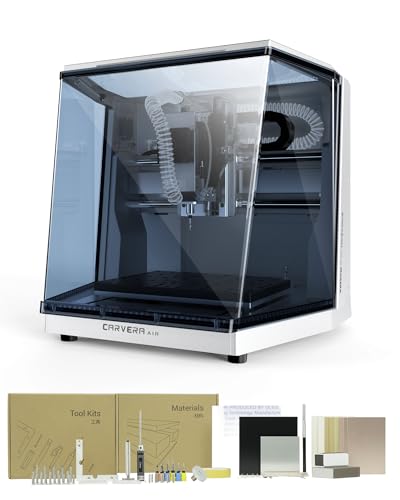
Carvera Air Desktop CNC by MAKERA, Enclosed Mini Mill with CAM

Our verdict: An enclosed mini mill with an automatic tool changer, built for accurate small parts.

The Carvera Air is an enclosed desktop mill with an 11.8 x 7.9 x 5.1 inch work area, an automatic tool changer that swaps bits in about ten seconds, and a listed spindle runout under 0.0004 inch. It includes CAM software support.

It takes first place because it behaves like a small production machine rather than a hobby router. Runout is how much the cutting tool wobbles as it spins, and a figure under 0.0004 inch means cleaner walls and longer bit life. The tool changer lets a job use a roughing bit and a finishing bit without you stopping to swap by hand, and the enclosure keeps chips and noise in. It does cost more than every router here, and its work area is smaller than the open-bed machines.

Buy it if you want precise small parts, including aluminum, and are willing to pay the premium. Skip it if you want to cut sheet goods, as the bed is small.

Work area
11.8 x 7.9 x 5.1 in
Enclosure
Fully enclosed
Tool change
Automatic, about 10 sec
Runout
Under 0.0004 in

What we like

  • +Automatic tool changer saves time
  • +Very low listed spindle runout
  • +Enclosure contains chips and noise
  • +Includes CAM workflow

Watch out for

  • −Highest price bracket in the group
  • −Smaller bed than open routers

Buy it if: Makers who want accurate small parts and an enclosed machine.

Skip it if: You want to cut large sheets or are on a tight budget.

2

Best for Rotary and PCB Work

Carvera Air Desktop CNC with 4th Axis & PCB Kit, MAKERA Enclosed Mini Mill

Our verdict: The same enclosed mini mill with a rotary 4th axis and a PCB fabrication pack.

This version of the Carvera Air adds a 4th axis with a rotary work area of 3.6 inches in diameter by 7.9 inches long, a closed-loop spindle running 0 to 13,000 RPM, and a PCB fabrication pack.

It ranks a step behind the base machine only because the extras raise the price and only some buyers will use them. A 4th axis rotates the workpiece, so you can machine round stock, carve around a cylinder or reach multiple faces without re-fixturing. The closed-loop spindle reports its actual speed back to the controller, which keeps cutting speed steady under load. The PCB pack is a rare inclusion, letting you mill circuit boards at your desk.

Choose it if you do electronics prototyping, jewelry or cylindrical parts. If you only cut flat plates, the base Carvera Air gives you the same core machine for less.

4th axis
3.6 in dia x 7.9 in rotary
Spindle
Closed loop, 0 to 13,000 RPM
Included
PCB fabrication pack
Enclosure
Enclosed mini mill

What we like

  • +Rotary axis opens round-part work
  • +Closed-loop spindle holds speed
  • +PCB fabrication pack included
  • +Enclosed for safe indoor use

Watch out for

  • −Costs more than the base model
  • −Extras are useless for flat work

Buy it if: Electronics hobbyists and makers who machine round or multi-face parts.

Skip it if: You only cut flat plates and sheets.

3

Best Large-Bed Router

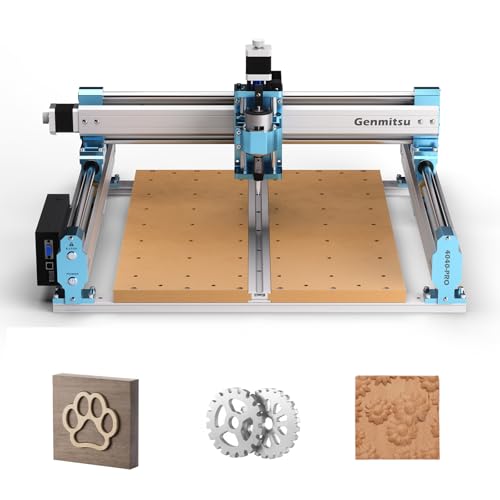
Genmitsu 4040-PRO CNC Router Machine for Metal Acrylic Cutting Milling

Our verdict: A 435 x 400mm bed on steel tube rails, assembled in about a quarter of an hour.

The 4040-PRO offers a work area of 435 x 400 x 80mm and uses dual 16mm steel tubes on each axis. Its listing puts assembly at about 15 minutes.

It ranks third because it delivers the most space for the price. Two tubes per axis keep the gantry from twisting, and 435mm of travel is enough for signs, panels and larger plastic parts. It gives up the accuracy and enclosure of the Carvera mills, so expect to wear a dust mask and manage chips yourself. On metal it needs light passes, but wood and plastics are well within its range.

Buy it if you have bench space and want to cut large things at a moderate price. The 80mm of Z height also suits thicker stock.

Work area
435 x 400 x 80mm
Axis build
Dual 16mm steel tubes
Assembly
About 15 minutes
Price bracket
$500+

What we like

  • +Big bed for the price
  • +Dual steel tubes add stiffness
  • +Quick to assemble
  • +80mm of Z height

Watch out for

  • −Open design needs dust control
  • −Not suited to heavy metal cutting

Buy it if: Hobbyists who want a large cutting area without a mill's price.

Skip it if: You want an enclosure or a tool changer.

4

Best Enclosed Beginner Machine

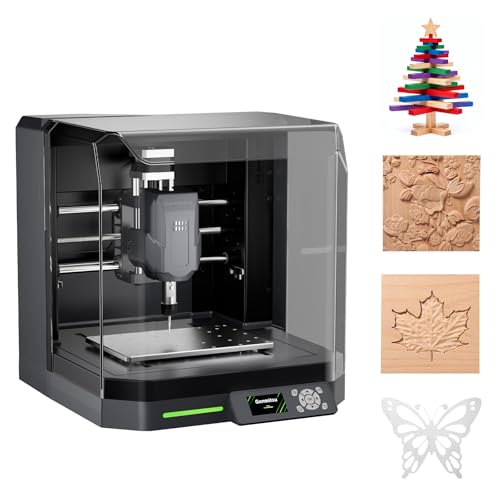
Genmitsu Cubiko Desktop CNC Router Machine with Enclosure for Beginners

Our verdict: Pre-assembled and enclosed, with auto Z-probing and four ways to control it.

The Cubiko arrives pre-assembled in an enclosure, with a listed accuracy of plus or minus 0.1mm, automatic Z-probing and multi-point surface mapping. You can run it from an app, over WiFi, from a PC or offline.

It ranks fourth because it removes the most beginner headaches. Z-probing finds the top of your material automatically, and surface mapping measures an uneven board so the cut depth stays consistent. Those are the two steps novices get wrong most often. Because it is enclosed, it is better suited to a living space than an open router. It is placed under the Genmitsu 4040-PRO because the listing gives a smaller price bracket but does not state a work area.

Choose it if you are new to CNC and want a machine that is ready to run and quiet enough for a spare room. Check the work area before you buy.

Build
Pre-assembled, enclosed
Accuracy
Plus or minus 0.1mm
Probing
Auto Z-probe, surface mapping
Control
App, WiFi, PC or offline

What we like

  • +Arrives pre-assembled
  • +Auto Z-probing sets depth for you
  • +Surface mapping handles uneven stock
  • +Enclosure contains dust and noise

Watch out for

  • −Work area is not listed
  • −Enclosure limits workpiece size

Buy it if: Beginners who want a ready-to-run, enclosed CNC.

Skip it if: You need a large bed for sheet goods.

5

Best Aluminum Frame

FoxAlien Masuter Pro 3-Axis CNC Router Machine

Our verdict: A stiff aluminum router with a rail-guided Z-axis and a 15.75 inch square bed.

The Masuter Pro has a 15.75 x 15.75 x 2.36 inch work area, a linear rail on the Z-axis and an all-aluminum frame. The listing says it assembles in 10 to 15 minutes.

It ranks fifth because the frame is rigid for a router in this class, but the 2.36 inch cutting height keeps it away from thick stock. A rail-guided Z-axis resists the rocking that a rod-and-nut design has under side load, which helps with detail work and engraving. It is an open design without a tool changer or probe, so setup remains manual.

Buy it for carving, signs and flat projects where precision matters more than height. If you want to cut thick blocks, choose the 4040-PRO.

Work area
15.75 x 15.75 x 2.36 in
Frame
All aluminum
Z-axis
Linear rail
Assembly
10 to 15 minutes

What we like

  • +Rail-guided Z reduces rocking
  • +Aluminum frame is rigid
  • +Fast assembly
  • +Roomy square bed

Watch out for

  • −Only 2.36 inches of Z height
  • −Open design, no enclosure

Buy it if: Detail carvers and sign makers working on flat stock.

Skip it if: You cut thick blocks or want an enclosure.

6

Best Spindle Power

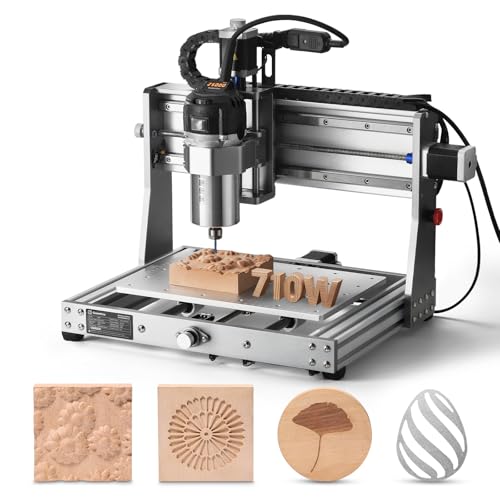
Genmitsu 3020-PRO Ultra CNC Router Machine, All-Metal Engraver for Metal

Our verdict: A 710W spindle that the listing says can cut 1.5mm aluminum in one pass.

The 3020-PRO Ultra pairs an all-metal frame with a 710W spindle that runs 6,500 to 30,000 RPM and is listed at 7.3 Nm of torque. The listing says it cuts 1.5mm aluminum in a single pass, and it includes 65mm and 52mm adapters for the spindle or a laser.

It ranks sixth because spindle power is only half the story, and the bed is a small 3020-class size. A 710W spindle is much stronger than the small motors on most hobby routers, so it can take bigger bites in wood and plastic, and it suits light work in soft metals. The adapters mean you can later swap in a laser module. A small frame, though, limits how much of that power it can use without flexing.

Pick it if you want a strong spindle in a compact machine, mostly for engraving and thin aluminum. Do not expect mill-grade accuracy.

Spindle
710W, 6,500 to 30,000 RPM
Torque
7.3 Nm listed
Metal cutting
1.5mm aluminum, one pass
Adapters
65mm and 52mm included

What we like

  • +710W spindle has real power
  • +Wide 6,500 to 30,000 RPM range
  • +All-metal frame
  • +Laser and spindle adapters included

Watch out for

  • −Compact frame limits cut depth
  • −Not a replacement for a mill

Buy it if: Engravers who want a strong spindle in a compact machine.

Skip it if: You need big beds or precision milling.

7

Best Upgradable Starter

SainSmart Genmitsu 3018-PROVer V2 CNC Router Machine for Beginners

Our verdict: Pre-assembled gantry and spoilboard with a large accessory ecosystem.

The PROVer V2 ships with its gantry and spoilboard assembled, with setup the listing puts under an hour. It has a wide accessory range, including spindle and extension kits, and handles wood, acrylic, PCB and soft metals.

It ranks seventh because the 3018 platform is the smallest category here, but it is the most upgradable. Because so many people own one, there are third-party spindles, clamps and extension kits, plus a lot of community advice. That support lowers the risk of a first purchase. The cutting area and stiffness are modest, so treat it as a learning machine.

Buy it if you are starting out on a $200 to $500 budget. You will probably want to upgrade the spindle within a year.

Setup
Pre-assembled, under 1 hour
Materials
Wood, acrylic, PCB, soft metals
Upgrades
Spindle and extension kits
Price bracket
$200 to $500

What we like

  • +Arrives largely assembled
  • +Large accessory ecosystem
  • +Handles soft metals and PCB
  • +Strong beginner community

Watch out for

  • −Small cutting area
  • −Light frame limits aggressive cuts

Buy it if: First-time buyers who want an easy start and room to upgrade.

Skip it if: You want to cut aluminum regularly.

8

Best Budget Entry

Genmitsu CNC 3018-PRO Router Kit, 3-Axis CNC Machine, Mini Milling Machine

Our verdict: A small 300 x 180mm router with an offline controller and a raised base.

The 3018-PRO has a 300 x 180 x 45mm working area, a raised base meant to reduce wobble and an included offline controller. It costs between $100 and $200.

It finishes last because every other machine here offers more of something, from size to power to accuracy. Its strength is the price and the offline controller, which lets you run a job from the controller without a laptop. A raised base steadies the frame on the bench. For engraving, small signs and learning the workflow, it does well enough.

Buy it if you want to see whether CNC suits you before spending more. Plan to outgrow it.

Work area
300 x 180 x 45mm
Base
Raised, reduces wobble
Controller
Offline included
Price bracket
$100 to $200

What we like

  • +Lowest cost in the ranking
  • +Offline controller included
  • +Raised base reduces wobble
  • +Small footprint

Watch out for

  • −Smallest bed here
  • −Limited rigidity for hard materials

Buy it if: Curious buyers who want to try CNC cheaply.

Skip it if: You know you need a bigger bed or metal capability.

Methodology

How We Ranked These

Rigidity and accuracy

We weighed frame materials, enclosed designs and listed runout or tolerance, because stiffness decides how clean each cut is.

Work area

We compared bed size and Z height to see what size of project each machine can take in one setup.

Automation

We looked for tool changers, auto Z-probing and surface mapping, which cut setup time and reduce mistakes.

Safety and enclosure

We favored enclosed machines and those with limit switches or stops, since chips, dust and noise matter in a home.

Value and growth

We weighed price brackets and accessory ecosystems to judge how far each machine can grow with you.

Every Primea Score uses the same weights: Performance 30% · Build & Materials 20% · Everyday Usability 20% · Value 20% · Owner Satisfaction 10%. Full scoring rules

Buyer's guide

How to Pick the Right One for You

By Machine Type

Decide between an open router and an enclosed mill first, because it narrows the field fast.

What you want to makeOur pick
Precise small parts, aluminumCarvera Air Desktop CNC by MAKERA
Round parts and PCBsCarvera Air with 4th Axis & PCB Kit
Large signs and panelsGenmitsu 4040-PRO CNC Router Machine
Engraving and thin aluminumGenmitsu 3020-PRO Ultra CNC Router Machine

By Budget

SpendOur pick
$100 to $200Genmitsu CNC 3018-PRO Router Kit
$200 to $500, beginnerSainSmart Genmitsu 3018-PROVer V2
$200 to $500, enclosedGenmitsu Cubiko Desktop CNC Router
$500+Carvera Air Desktop CNC by MAKERA

Open Router vs Enclosed Machine

Open router

Big bed for the money and easy access, but chips, dust and noise are your problem. Picks: Genmitsu 4040-PRO, FoxAlien Masuter Pro, the 3018 kits.

Enclosed machine

Contains dust and noise and usually adds automation. Smaller bed and higher price. Picks: Carvera Air models and Genmitsu Cubiko.

Choose enclosed if the machine lives in a house or apartment.

By Material

Main materialOur pick
Wood and sheet goodsGenmitsu 4040-PRO CNC Router Machine
Soft metals and brassCarvera Air Desktop CNC by MAKERA
Thin aluminum, engravingGenmitsu 3020-PRO Ultra CNC Router Machine
Plastics, PCB, mixedSainSmart Genmitsu 3018-PROVer V2

For Beginners Specifically

Look for

Pre-assembly, automatic Z-probing, an enclosure and a large user community. These remove the steps where first-timers most often go wrong.

In this ranking

The Genmitsu Cubiko is the easiest to start on, and the SainSmart 3018-PROVer V2 has the biggest support ecosystem.

When to Spend More

Spend more if

You need accurate parts, cut aluminum or sell what you make. The Carvera Air models repay it in precision and automation.

Save if

You are learning or cutting wood and plastic. The Genmitsu 3018-PRO or 4040-PRO does the job for far less.

Questions

Frequently Asked Questions

Can a desktop CNC cut aluminum?+

Yes, with the right machine. The Carvera Air mills are the best suited, and the 3020-PRO Ultra lists 1.5mm aluminum in one pass. Open routers can do it only in very light passes with proper tooling and lubrication.

What is the most common beginner mistake?+

Pushing too fast or too deep and snapping bits. Take shallow passes and test on scrap. Clamp the workpiece well so it cannot shift.

Is an enclosed machine worth it over an open router?+

It is if you work indoors, since it contains dust and noise and often adds automation. An open router gives you more bed for the money. If you have a garage or shed, open is fine.

What software will I need?+

You need design software for the shape and CAM software to make toolpaths. Many machines use GRBL-style control that works with free senders. The Carvera Air lists CAM support as part of its workflow.

How do I manage dust?+

Use a dust shoe with a shop vacuum on open routers, and wear a dust mask. Enclosed machines contain most of it. Empty the chip tray often.

How often does it need maintenance?+

Clean the rails and lead screws after each job and lubricate them as the manual says. Check the collet and bits for wear. Tighten the frame bolts occasionally.

Final take

The Carvera Air is the best desktop CNC machine here for accurate, enclosed work, and the 4th-axis version is the one to take for rotary and PCB projects. The Genmitsu 4040-PRO is the best large-bed router, and the Cubiko is the friendliest first machine. The 3018 kits are inexpensive places to start, with the PROVer V2 offering the better upgrade path.

More Ranked & Reviewed Guides