
Primea ReviewsAll Reviews

Primea Reviews is reader-supported. When you buy through our Amazon links we may earn a commission, at no extra cost to you. Rankings are set by our editors and never sold. Learn more

Ranked & Reviewed by Primea Reviews

The 8 Best Compact Keyboards Under $50, Ranked & Reviewed

By the Primea Editorial TeamUpdated November 3, 20269 min read8 products ranked
The 8 Best Compact Keyboards Under $50, Ranked & Reviewed

The short answer

The Logitech Pebble Keys 2 K380s is the best compact keyboard under $50, with three-device Bluetooth and a three-year battery. The Logitech K250 is the best compact board with a number pad, and the CACKBIRD is the best true mechanical 60% under $30.

The Primea Scoreboard

Ranked & Reviewed

  1. A slim three-device Bluetooth board with scooped keys and a three-year battery.

    94Outstanding
    Check price
  2. A compact board that keeps the number pad, with a 12-month battery and spill resistance.

    91Excellent
    Check price
  3. A true mechanical 61-key board with blue switches and a detachable USB-C cable.

    87Excellent
    Check price
  4. A 65% board that keeps dedicated arrow keys and 11 media keys.

    84Very Good
    Check price
  5. A 68-key wired mini with a loud, crisp click and splash-proof design.

    82Very Good
    Check price
  6. A 61-key 60% board with a detachable cable and two-color keycaps.

    80Very Good
    Check price
  7. A quiet membrane board with mechanical feel, arrow keys and USB-C.

    79Very Good
    Check price
  8. A 61-key wired mini with a silicone key base and five backlight effects.

    78Very Good
    Check price

Compact keyboards invite one mistake: shrinking the board before counting the keys you actually use. A 60% layout hides the arrows, function row and navigation cluster under a Fn modifier, and that is fine for gamers who only need WASD but maddening for writers and spreadsheet users who live on Home, End and the arrow keys. A number pad removed from a board you use for accounting is a daily irritation, not a space saving.

So we ranked these eight by how much of the keyboard they keep, how they connect, and how they feel. Two are Logitech Bluetooth boards that pair with phones and tablets, and six are wired 60% or 65% boards with detachable USB-C cables. Only the Pebble Keys 2 sits in the $30 to $50 band, so the rest leave room in the budget.

A few buying truths apply across this price tier. Boards sold as mechanical feel are membrane designs with a stiffer rubber dome, and a real mechanical switch like a blue is loud. Battery, spill and switch claims here are manufacturer statements from the listings, not measured, and the main failure points are worn cables, shiny keycaps and dead keys on the cheapest wired units.

Before you buy

What Actually Matters

01

Layout percentage

A 60% board has about 61 keys and no arrows, function row or number pad, while a 65% adds dedicated arrows and a 75% adds a function row. Fewer keys means a smaller desk footprint but more Fn chords, and that cost shows up in daily writing and spreadsheet work. Count the keys you use, and check the listing for a key count and a layout image.

02

Connection type

Bluetooth boards pair with phones, tablets and laptops without a dongle, but need batteries and a re-pairing step if the OS changes. Wired boards need no battery, and a detachable USB-C cable is easier to replace when the cable frays, which is the most common failure at this price. Look for the words detachable or Type-C on the listing, and for a stated device count on Bluetooth models.

03

Mechanical vs membrane

A true mechanical switch like a blue gives a tactile bump and a click, while a membrane board uses a rubber dome and is quieter and softer. Many budget listings say mechanical feel, which means membrane. Check whether the listing names a switch type, because a named switch is a real spec and a feel claim is not.

04

Battery life

Wireless battery claims range from 12 months to three years, and they assume light daily use with the backlight off. Backlit wireless boards drain far faster. Check whether batteries are included and whether the board auto-sleeps.

05

Noise level

Blue switches click loudly enough to carry across a room, while scooped membrane keys and silicone bases stay quiet. If you share a desk, a bedroom or an office, noise matters more than any spec on the sheet. Look for words like quiet, silent or scooped, and avoid anything described as loud or clicky unless that is what you want.

In-depth reviews

Our Ranked Picks, Reviewed

1

Best Overall

Logitech Pebble Keys 2 K380s Wireless Bluetooth Keyboard

Our verdict: A slim three-device Bluetooth board with scooped keys and a three-year battery.

The Pebble Keys 2 K380s is a slim Bluetooth keyboard about 0.63 inches thick that pairs with up to three devices across Windows, macOS, iPadOS and ChromeOS, switched with a single Easy-Switch button. It uses scooped round keys, ten programmable function keys through the Logi Options+ app, and a battery Logitech lists at three years, with batteries included. Plastic parts include at least 49% certified post-consumer recycled material.

It ranks first because it solves the problem most compact keyboard buyers actually have: moving between a laptop, a tablet and a phone without re-pairing. The scooped keys give a laptop-like feel at low volume, which beats the clack of the wired mechanical boards in a shared room. It beats the K250 on slimness and device switching, and gives up the K250's number pad.

Buy it if you work across devices or travel with a bag. It is the only pick in the $30 to $50 band. The caveat is the layout, since there is no number pad and the shortcut row needs a software install to customize.

Connection
Bluetooth, 3 devices
Battery
3 years listed
Thickness
About 0.6 in
Shortcuts
10 programmable Fn keys

What we like

  • +Hops between three devices
  • +Three-year battery listed
  • +Slim and travel-friendly
  • +Quiet, laptop-like keys

Watch out for

  • −No number pad
  • −Sits at the top of the budget

Buy it if: Anyone who types on a laptop, a tablet and a phone.

Skip it if: You need a number pad or backlight.

2

Best with Number Pad

Logitech K250 Compact Wireless Bluetooth Keyboard

Our verdict: A compact board that keeps the number pad, with a 12-month battery and spill resistance.

The K250 is a compact Bluetooth keyboard measuring about 5.4 by 14.6 inches that keeps a number pad, arrow keys and function shortcuts. The listing highlights deep-profile keys, an adjustable tilt leg, a spill-resistant design and a battery rated at 12 months of daily use. At least 64% of its plastic parts are listed as recycled.

It ranks second because it is the only pick that keeps the number pad at this size, which makes it the right answer for spreadsheets, invoicing and data entry. It loses to the Pebble Keys 2 on portability and multi-device pairing, since the K250 is a single-connection Bluetooth board with no dongle, and it is noticeably wider. It beats every wired 60% board for office work.

Buy it for a home desk that needs a tidy number pad and wireless freedom. It sits in the under $30 band. The caveat is that it works over Bluetooth only, so a PC with no Bluetooth adapter needs one.

Layout
Compact with number pad
Connection
Bluetooth only
Battery
12 months listed
Extras
Spill resistant, tilt leg

What we like

  • +Number pad retained
  • +Spill-resistant design
  • +12-month battery
  • +Costs under $30

Watch out for

  • −Bluetooth only, no receiver
  • −Wider than 60% boards

Buy it if: Spreadsheet users on a budget who want a quiet board.

Skip it if: Your computer lacks Bluetooth.

3

Best Mechanical Feel

CACKBIRD 60% Wired Mechanical Keyboard, Blue Switches

Our verdict: A true mechanical 61-key board with blue switches and a detachable USB-C cable.

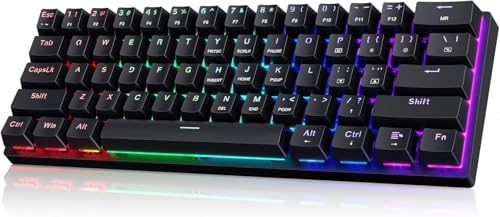
The CACKBIRD is a 61-key 60% board with genuine blue mechanical switches, a detachable Type-C cable on the right side, and rainbow LED lighting with 18 effects. It measures about 12.2 inches wide, uses double-injection ABS keycaps for a clear backlight legend, and works without drivers on Windows and macOS. Pressing Fn plus Space toggles a mode, per the listing.

It ranks third because it is the only real mechanical switch board in the guide, and blue switches deliver a tactile bump and audible click that typists often love. It loses to the two Logitech boards for office use because the 60% layout hides arrows, and blue switches are loud enough to annoy people nearby. It beats the membrane boards on key feel and long-term durability.

Buy it if you want a true mechanical feel on a tiny desk footprint. It sits in the under $30 band. The caveat is noise, so skip it in an open office or a shared bedroom.

Layout
60%, 61 keys
Switches
Blue mechanical
Cable
Detachable USB-C
Width
About 12.2 in

What we like

  • +Real mechanical blue switches
  • +Detachable Type-C cable
  • +Tiny 12.2 inch footprint
  • +Plug and play, no driver

Watch out for

  • −Blue switches are loud
  • −No dedicated arrow keys

Buy it if: Click lovers who want a tiny wired board.

Skip it if: You work near other people.

4

Best Mid-Size Mini

GEODMAER 65% Gaming Keyboard, 68 Keys, Wired

Our verdict: A 65% board that keeps dedicated arrow keys and 11 media keys.

The GEODMAER is a 65% board with 68 keys, separate arrow keys, eleven media buttons and a detachable Type-C cable. The listing quotes more than ten million keystrokes of life, UV-coated keycaps to resist fading, and two-color injection molding so the legends glow under backlighting. It uses an imitation-mechanical membrane feel, not a mechanical switch.

It ranks fourth because it keeps arrows, which is the single most useful key group a 60% board drops. It sits behind the CACKBIRD on switch quality and behind the Logitech boards for office comfort, but ahead of 61-key rivals for general use. It beats the Snpurdiri for layout flexibility, with FN plus Win lockable to prevent accidental presses during games.

Buy it for a mixed gaming and work desk. It sits in the under $30 band. The caveat is that the feel is a membrane press, not a mechanical switch, so a typing purist will notice the difference.

Layout
65%, 68 keys
Cable
Detachable USB-C
Rated life
10 million keystrokes
Media keys
11

What we like

  • +Dedicated arrow keys
  • +Detachable USB-C cable
  • +11 media shortcuts
  • +UV-coated, fade-resistant caps

Watch out for

  • −Not true mechanical
  • −No number pad

Buy it if: Small-desk users who still use arrow keys often.

Skip it if: You want real mechanical switches.

5

Best Clicky Feel

Guiheng 60% Wired Mechanical Feeling Keyboard, 68 Keys

Our verdict: A 68-key wired mini with a loud, crisp click and splash-proof design.

The Guiheng is a 68-key wired mini with a long USB cable, ten multimedia keys, double-shot non-slip keycaps and rainbow backlighting. The listing describes a splash-proof and dust-proof design and adjustable kickstand feet, and says the keys give a loud, crisp click with strong feedback. It runs on PC, Mac, Android, Linux, iOS and consoles, according to the listing.

It ranks fifth because a splash-proof body and a clear click are useful, but the listing never names a switch type, so you are buying a feel, not a spec. It beats the Snpurdiri on arrow keys and the number of media keys, while trailing the GEODMAER on cable design, since the cable length here is long but its detachability is not stated.

Buy it if you want a clicky wired keyboard with some spill protection. It sits in the under $30 band. The caveat is volume, since a loud click will carry across a shared room.

Layout
60%, 68 keys
Media keys
10
Body
Dust-proof, splash-proof
Feel
Crisp, clicky

What we like

  • +Splash-proof design
  • +Clicky, crisp keys
  • +Adjustable kickstand feet
  • +Long USB cable

Watch out for

  • −Switch type not specified
  • −Loud in shared rooms

Buy it if: Gamers and typists who want a click at low cost.

Skip it if: You need a detachable cable.

6

Best Budget Black and White

Snpurdiri 60% Wired Gaming Keyboard, 61 Keys

Our verdict: A 61-key 60% board with a detachable cable and two-color keycaps.

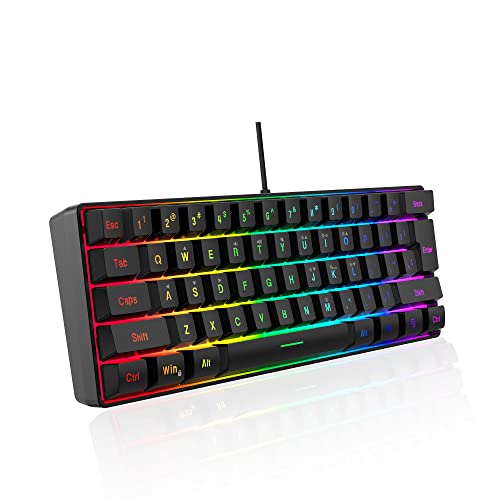
The Snpurdiri is a 61-key 60% board measuring roughly 11.5 by 4 inches, with a detachable Type-C cable, double-color injection keycaps with transparent legends, and RGB lighting with six effects and eight colors. It has an imitation-mechanical feel and a black and white keycap scheme meant to look mature.

It ranks sixth because the build is sound but the lighting and layout offer less than the GEODMAER or Guiheng. The 61-key layout leaves out dedicated arrows, so you need Fn combinations for navigation. It beats the CORBOBO on cable design, but loses on keeping arrows.

Buy it if you want a small, tidy black and white board for a clean desk. It sits in the under $30 band. The caveat is the imitation-mechanical feel, which is softer than a real switch.

Layout
60%, 61 keys
Cable
Detachable
Lighting
6 effects, 8 colors
Feel
Imitation mechanical

What we like

  • +Clean black and white styling
  • +Detachable cable
  • +Two-color keycaps
  • +Portable size

Watch out for

  • −Imitation mechanical feel
  • −Few lighting effects

Buy it if: Minimal desks that want a small wired board.

Skip it if: You want true mechanical switches.

7

Best Quiet Membrane

CORBOBO 60% Membrane Keyboard SK968, 68 Keys

Our verdict: A quiet membrane board with mechanical feel, arrow keys and USB-C.

The CORBOBO SK968 is a 68-key 60% membrane keyboard that keeps the arrow keys and uses a USB-A to Type-C cable. The listing describes ten backlight effects controlled by Fn combinations, a mechanical-feel membrane, three-color keycap splicing and a light, portable body. It is marketed as a quiet board for laptops, offices and games.

It ranks seventh among eight because quiet typing is a genuine advantage in shared spaces, but membrane feel is the softest in this group. It beats the Snpurdiri by keeping arrows, and it loses to the DGG on little, since both sit in the same tier. It suits laptop users who want a plug-in second keyboard.

Buy it if noise matters more than switch feel. It sits in the under $30 band. The caveat is that the cable detail reads as USB-A to Type-C, so check whether it detaches before you pack it.

Layout
68 keys, arrows included
Type
Membrane, mechanical feel
Connection
USB-A to Type-C
Lighting
10 effects

What we like

  • +Quiet typing for shared rooms
  • +Keeps arrow keys
  • +Light and portable
  • +Plug and play

Watch out for

  • −Membrane, not mechanical
  • −Cable may not detach

Buy it if: Laptop users who want a quiet add-on board.

Skip it if: You want distinct key feedback.

8

Best Silicone Feel

DGG K60 61-Key RGB 60% Wired Keyboard

Our verdict: A 61-key wired mini with a silicone key base and five backlight effects.

The DGG K60 is a 61-key 60% wired keyboard with a membrane stem and a silicone base under each key, a skin-like oil-sprayed keycap coating and RGB backlighting with five effects and five brightness and speed levels. The listing says it works on Windows and macOS, can work on Xbox, PlayStation and Switch with an adapter, and carries a one-month return or exchange offer. It also warns that WASD doubles as arrows after an Fn press.

It ranks last because the layout is the smallest of the group and the listing itself tells buyers to judge the size before ordering. It beats nothing here on features, but the silicone key base is a pleasant touch, and the honest layout warning is useful. It loses to the Snpurdiri, which also has a detachable cable.

Buy it as a travel keyboard or a gaming second board. It sits in the under $30 band. The caveat is that the arrows live on a Fn layer, so daily writing will be slower than on any 65% or 68-key option.

Layout
60%, 61 keys
Feel
Membrane, silicone base
Lighting
5 effects, 5 levels
Returns
One-month policy listed

What we like

  • +Skin-like keycap coating
  • +Five lighting effects
  • +Console-friendly with adapter
  • +One-month returns listed

Watch out for

  • −Arrows need Fn layer
  • −Smallest layout here

Buy it if: Travelers who want the tiniest wired board.

Skip it if: You navigate documents all day.

Methodology

How We Ranked These

Layout and key retention

We scored how much of the keyboard each board keeps, from number pad to arrows, and how much sits behind a Fn layer.

Connection and battery

Bluetooth multi-device pairing, listed battery life, cable type and detachability were compared across wired and wireless picks.

Switch feel and noise

Real mechanical blues, imitation-mechanical membranes and scooped quiet keys were weighed for typing comfort and room noise.

Build and portability

Thickness, footprint, recycled materials, splash resistance and keycap finish were credited where the listing states them.

Value under $50

Only one pick reaches the $30 to $50 band, so we judged features per dollar and flagged where a cheaper board does the job.

Every Primea Score uses the same weights: Performance 30% · Build & Materials 20% · Everyday Usability 20% · Value 20% · Owner Satisfaction 10%. Full scoring rules

Buyer's guide

How to Pick the Right One for You

By Main Use

Start with where the keyboard will live. A board that rides in a backpack has different priorities from one that sits on a fixed desk, and the right layout depends on whether you type documents, crunch numbers or play shooters.

UseOur pick
Travel across devicesLogitech Pebble Keys 2 K380s Wireless Bluetooth Keyboard
Spreadsheets and data entryLogitech K250 Compact Wireless Bluetooth Keyboard
Gaming desk, wiredGEODMAER 65% Gaming Keyboard, 68 Keys, Wired
Mechanical click on a tiny deskCACKBIRD 60% Wired Mechanical Keyboard, Blue Switches
Quiet shared roomCORBOBO 60% Membrane Keyboard SK968, 68 Keys
Travel board for a bagDGG K60 61-Key RGB 60% Wired Keyboard

By Budget

SpendOur pick
Under $30, wirelessLogitech K250 Compact Wireless Bluetooth Keyboard
Under $30, mechanicalCACKBIRD 60% Wired Mechanical Keyboard, Blue Switches
Under $30, arrows keptGEODMAER 65% Gaming Keyboard, 68 Keys, Wired
Under $30, splash-proofGuiheng 60% Wired Mechanical Feeling Keyboard, 68 Keys
Under $30, black and whiteSnpurdiri 60% Wired Gaming Keyboard, 61 Keys
$30 to $50Logitech Pebble Keys 2 K380s Wireless Bluetooth Keyboard

Wireless vs Wired

Wireless

Pairs with phones and tablets, removes cable clutter and charges nothing, but needs batteries and an occasional re-pair. Picks: Pebble Keys 2 and K250.

Wired

No battery and no pairing, with a detachable cable on several models, but you are tethered. Picks: CACKBIRD, GEODMAER, Guiheng, Snpurdiri, CORBOBO and DGG.

Pick wireless for laptops and tablets, wired for a fixed desk or any game where input delay matters.

By Key Count

Key count decides how much you rely on Fn combinations. More keys cost desk width but save fumbling.

LayoutOur pick
Number pad keptLogitech K250 Compact Wireless Bluetooth Keyboard
Slim, no number padLogitech Pebble Keys 2 K380s Wireless Bluetooth Keyboard
68 keys with arrowsCORBOBO 60% Membrane Keyboard SK968, 68 Keys
65% with dedicated arrowsGEODMAER 65% Gaming Keyboard, 68 Keys, Wired
61 keys, smallest mechanicalCACKBIRD 60% Wired Mechanical Keyboard, Blue Switches
61 keys, silicone feelDGG K60 61-Key RGB 60% Wired Keyboard

For Small Desks Specifically

Look for

A footprint around 12 inches, a detachable cable, and arrow keys if you navigate documents. A mouse needs room too, so the savings only count if the layout still suits your work.

In this ranking

CACKBIRD is the smallest mechanical at about 12.2 inches, the GEODMAER adds arrows, and the Pebble Keys 2 at about 0.63 inches thick slips into a laptop bag.

When to Spend More

Spend more if

You want hot-swap switches, a metal case, a backlit wireless board or a multi-device mechanical board. Those start above $50 and mostly add durability.

Save if

You use it occasionally or only for travel. The K250 handles office work for under $30.

Questions

Frequently Asked Questions

Will these work with my tablet?+

The two Logitech boards connect over Bluetooth, and the Pebble Keys 2 lists support for Windows, macOS, iPadOS and ChromeOS. The wired boards need a USB-C to USB-A adapter or a tablet with a USB port, and some may need an OTG adapter on Android.

What is the most common mistake?+

Buying a 60% board for writing. Arrow keys sit under Fn on 61-key layouts, so Home, End and navigation become two-key chords. If you edit documents all day, pick a 65% or a Logitech with arrows.

Is the Pebble Keys 2 worth it over the K250?+

Yes if you switch between devices, because the Pebble pairs with three and has a slimmer body. The K250 is the better buy if you need a number pad and use one computer, and it costs less.

How do I pair Bluetooth boards?+

Hold the Easy-Switch key until the light flashes, then pick the keyboard in your device Bluetooth menu. On the Pebble Keys 2 you can store three devices, and the K250 pairs with one device at a time.

How do I clean a compact board?+

Unplug it, turn it upside down, and shake out crumbs, then wipe the keycaps with a lightly damp cloth. Never pour liquids on a board that is not marked splash-proof, and avoid pulling keycaps off a membrane unit.

Do the mechanical feel boards last?+

The listing for the GEODMAER quotes ten million keystrokes, but that is a manufacturer figure. In practice, cable wear and shiny keycaps show up before switches fail, so a detachable cable is a real durability feature.

Final take

The Pebble Keys 2 is the best compact keyboard under $50 for anyone who moves between devices, and the K250 is the pick if you need a number pad. The CACKBIRD is the one to buy if you want a real mechanical click on a tiny desk. Whatever you choose, count the keys you use before you commit to a 60% layout.

More Ranked & Reviewed Guides