
Primea ReviewsAll Reviews

Primea Reviews is reader-supported. When you buy through our Amazon links we may earn a commission, at no extra cost to you. Rankings are set by our editors and never sold. Learn more

Ranked & Reviewed by Primea Reviews

The 6 Best Ergonomic Keyboard and Mouse Combos of 2026, Ranked & Reviewed

By the Primea Editorial TeamUpdated November 1, 202610 min read6 products ranked
The 6 Best Ergonomic Keyboard and Mouse Combos of 2026, Ranked & Reviewed

The short answer

The Logitech Wave Keys and Lift combo is the best ergonomic keyboard and mouse set: a cushioned wave keyboard with a true vertical mouse. The MX Keys S combo is the premium multi-device pick, and the MEETION is the budget split with a vertical mouse. The cheap wave-key combo with a phone holder gives little mouse relief.

The Primea Scoreboard

Ranked & Reviewed

  1. The only combo here where both the keyboard and the mouse are truly ergonomic.

    94Outstanding
    Check price
  2. A premium typing and mousing set with multi-device switching on both halves.

    91Excellent
    Check price
  3. A split curved keyboard plus a vertical mouse without a premium bill.

    88Excellent
    Check price
  4. A comfortable wave keyboard with a compact matching mouse and one receiver.

    85Excellent
    Check price
  5. MX ergonomics with the fleet management features IT teams ask for.

    82Very Good
    Check price
  6. A cheap full size wave keyboard with a thick wrist rest and a phone holder.

    79Very Good
    Check price

The word ergonomic on a combo box often describes only half the set. A wave-shaped keyboard paired with a conventional flat mouse still twists your forearm every time you reach across the desk, which means the mouse is where most of the strain relief lives. Boxes rarely say so, and a sculpted mouse is not the same thing as a vertical one.

We read six combos from spec sheets and owner reports, then ranked them on how ergonomic the mouse is, how supportive the keyboard is, connection options, battery type and overall value. Two budget combos with weaker ergonomic claims were left out. A premium typing set can land lower than a plainer one if its mouse changes nothing about your wrist.

Before you buy

What Actually Matters

01

Mouse shape

A vertical mouse holds your hand in a handshake position, which reduces the forearm twist a flat mouse forces. This matters most for people who click for hours each day. Look for the words true vertical in the listing rather than just ergonomic or sculpted. The Lift and the MEETION mouse qualify, while the MX Master line and the others do not.

02

Keyboard layout

Wave keyboards curve the key rows to match your fingers, and split designs separate the halves to straighten the wrists. Splits are more ergonomic but take days to learn. Pick a wave if you want comfort with no adjustment period, as with the Wave Keys, and a split like the MEETION if you want a bigger posture change.

03

Wrist rest

A palm rest keeps your wrists from bending upward while you type. Cushioned or memory foam rests feel softer, but a thick rest raises your hands. Check whether the rest is attached and how thick it looks in the product photos. The Wave Keys has an attached cushion, and the budget combo uses memory foam.

04

Connection type

A 2.4GHz receiver uses a USB port and is simple to set up. Bluetooth frees the port and pairs with tablets, and multi-device switching changes devices with a key press. Look for the connection types in the title or bullets. The MEETION lists no Bluetooth, while the Logitech sets offer it or Logi Bolt.

05

Battery type

Rechargeable sets avoid buying cells, while AA or AAA models run for months and swap instantly. Rechargeable batteries can degrade over years. Check the listing for battery type and runtime before buying. The MX Keys sets and the MEETION recharge, and the Wave Keys and MK670 use disposable cells.

In-depth reviews

Our Ranked Picks, Reviewed

1

Best Overall

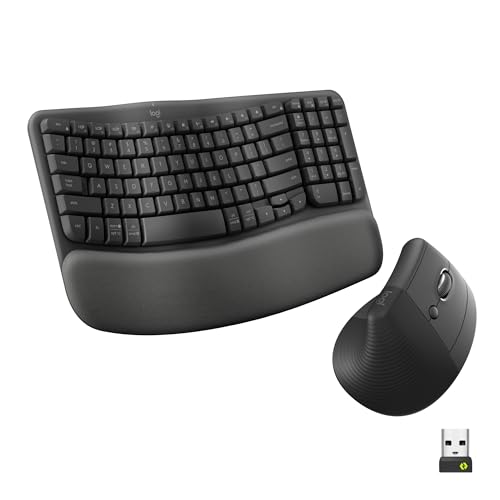
Logitech Wave Keys Keyboard & Lift Mouse Ergonomic Combo - Graphite

Our verdict: The only combo here where both the keyboard and the mouse are truly ergonomic.

The Logitech Wave Keys and Lift combo pairs a wave-shaped keyboard with a cushioned rest and the Lift, a true vertical mouse. They share a receiver or connect by Bluetooth, and run for months on batteries. A vertical mouse holds the hand in a handshake posture, so the forearm stops twisting, while the wave keyboard curves the rows toward the fingers.

It ranks first because both pieces carry an ergonomic purpose. The MX Keys S set types well but its mouse stays conventional, and the MK670 gives a standard-shaped mouse.

Buy it for heavy daily typing and mousing. The caveats are that the Lift is right handed as sold, with a separate left-handed version, and the keyboard is a wave, not a split. Skip it if you are left handed and want one box.

Keyboard
Wave shape, cushioned rest
Mouse
Lift true vertical
Connection
Shared receiver or Bluetooth
Power
Batteries, months of runtime

What we like

  • +True vertical mouse
  • +Cushioned wave keyboard
  • +Receiver or Bluetooth
  • +Months on batteries

Watch out for

  • −Right handed as sold
  • −Not a split keyboard

Buy it if: Daily heavy typists wanting a complete ergonomic setup.

Skip it if: You are left handed and want one box.

2

Best Premium

Logitech MX Keys S Combo Performance Wireless Keyboard and Mouse - Graphite

Our verdict: A premium typing and mousing set with multi-device switching on both halves.

The Logitech MX Keys S combo pairs a low-profile backlit keyboard with a sculpted MX Master-line mouse, connecting through Logi Bolt or Bluetooth with multi-device switching on both halves and a rechargeable battery. Switching between a laptop and a tablet with a key press is a daily convenience for people who work on several devices.

It ranks second because the keyboard is flat and the mouse, though sculpted, is not vertical. The Wave Keys and Lift combo does more for posture at lower cost.

Buy it if you move across devices and want a premium feel. Skip it if you want a vertical mouse or a wave keyboard. The higher price bracket pays for typing quality and flexibility, not for a wrist-friendly angle.

Keyboard
Low profile, backlit
Mouse
MX Master line
Connection
Logi Bolt or Bluetooth
Power
Rechargeable

What we like

  • +Multi-device switching
  • +Backlit low profile keys
  • +Rechargeable battery
  • +Sculpted mouse

Watch out for

  • −Flat keyboard shape
  • −Higher price bracket

Buy it if: Multi-device workers wanting premium feel.

Skip it if: You want a vertical mouse or wave keyboard.

3

Best Budget Ergonomic

MEETION Ergonomic Keyboard and Mouse, Wireless Keyboard with Vertical Mouse

Our verdict: A split curved keyboard plus a vertical mouse without a premium bill.

The MEETION combo has a split curved keyboard with a wrist rest and a true vertical mouse, connected through a single 2.4GHz USB receiver, with rechargeable parts and Windows and Mac compatibility. A split keyboard straightens the wrists more than a wave, and the combo gets both pieces at a price under $100.

It ranks third because there is a learning curve and no Bluetooth is listed. Brand polish trails Logitech, and the build feels less premium.

Buy it if you are curious about split ergonomics on a budget. Skip it if you need Bluetooth or a premium build. Plan to spend a few days adapting, and keep your old keyboard handy at first.

Keyboard
Split, curved, wrist rest
Mouse
True vertical
Connection
2.4GHz USB receiver
Power
Rechargeable

What we like

  • +Split curved keyboard
  • +True vertical mouse
  • +Rechargeable parts
  • +Under $100

Watch out for

  • −Learning curve
  • −No Bluetooth listed

Buy it if: Budget buyers curious about split ergonomics.

Skip it if: You need Bluetooth or premium build.

4

Best Value Wave

Logitech Wave Keys MK670 Combo Wireless Keyboard and Mouse - Graphite

Our verdict: A comfortable wave keyboard with a compact matching mouse and one receiver.

The Logitech MK670 combo has a wave keyboard with a cushioned rest and a compact companion mouse, sharing a single USB receiver with a Bluetooth alternative, powered by AA and AAA batteries. A single receiver leaves a port free, and the cushioned wave suits typists who want comfort without retraining.

It ranks fourth because the mouse is a conventional shape, so the forearm still twists, and the disposable batteries need replacing. It costs a bit less than the Wave Keys and Lift.

Buy it if you want wrist comfort on a budget and your mouse use is light. Skip it if you want an ergonomic mouse. For long hours, the Lift in the top-ranked set is worth the upgrade.

Keyboard
Wave shape, cushioned rest
Mouse
Compact companion
Connection
Shared receiver or Bluetooth
Power
AA and AAA batteries

What we like

  • +Cushioned wave keyboard
  • +Single shared receiver
  • +Bluetooth alternative
  • +Under $100

Watch out for

  • −Standard shape mouse
  • −Disposable batteries

Buy it if: Typists wanting wrist comfort on a budget.

Skip it if: You want an ergonomic mouse.

5

Best for Business

Logitech MX Keys Combo for Business Keyboard and Mouse - Graphite

Our verdict: MX ergonomics with the fleet management features IT teams ask for.

The Logitech MX Keys Combo for Business pairs a low-profile keyboard with a sculpted mouse, using the Logi Bolt secure receiver, fleet management support, multi-device switching and a rechargeable battery. Business management features matter to IT teams buying in bulk, where security and deployment count.

It ranks fifth because those features add cost for personal buyers and the keyboard is flat. It matches the MX Keys S in hardware and adds the admin tools.

Buy it for an IT-managed office buying in quantity. Skip it for personal use, since the MX Keys S gives the same typing feel without the fleet extras. Neither set changes the angle of the wrist.

Keyboard
Low profile
Mouse
Sculpted
Connection
Logi Bolt secure receiver
Management
Business fleet support

What we like

  • +Logi Bolt secure receiver
  • +Fleet management support
  • +Multi-device switching
  • +Rechargeable battery

Watch out for

  • −Business features add cost
  • −Flat keyboard shape

Buy it if: IT managed offices buying in bulk.

Skip it if: You are buying for personal use.

6

Cheapest Comfort Upgrade

Wireless Keyboard and Mouse Combo, Full-Sized Ergonomic Wave Keys with Memory Foam Wrist Rest & Phone Holder

Our verdict: A cheap full size wave keyboard with a thick wrist rest and a phone holder.

The budget wave-key combo has a full-size wave keyboard with a memory foam wrist rest, an integrated phone holder, a standard-shape wireless mouse and a 2.4GHz USB receiver. A thick foam rest is soft, and a phone holder is a small convenience.

It ranks last because the mouse is flat and standard, the build is budget, and a thick rest can raise the hands. Next to the MK670, it offers less brand backing.

Buy it for casual wrist comfort at the lowest price. Skip it if you have wrist or forearm pain, because a flat mouse does nothing for the twist. Expect modest relief, not a posture fix.

Keyboard
Full size wave keys
Wrist rest
Memory foam
Extra
Integrated phone holder
Mouse
Standard shape

What we like

  • +Memory foam wrist rest
  • +Built in phone holder
  • +Full size layout
  • +Under $50

Watch out for

  • −Flat standard mouse
  • −Budget build quality

Buy it if: Casual users wanting cheap wrist comfort.

Skip it if: You have wrist or forearm pain.

Methodology

How We Ranked These

Mouse ergonomics

A true vertical or sculpted mouse scored above a standard flat shape.

Keyboard support

We rated wave, split and cushioned designs for how well they reduce wrist strain.

Connectivity

Bluetooth, shared receivers and multi-device switching were weighed for flexibility.

Power

Rechargeable cells ranked above disposable batteries for long term cost and convenience.

Value

Price tier was weighed against the ergonomic benefit actually delivered.

Every Primea Score uses the same weights: Performance 30% · Build & Materials 20% · Everyday Usability 20% · Value 20% · Owner Satisfaction 10%. Full scoring rules

Buyer's guide

How to Pick the Right One for You

By Ergonomic Need

Match the set to how much strain relief you need.

NeedOur pick
Full ergonomic setupLogitech Wave Keys and Lift combo
Split keyboard and vertical mouseMEETION split combo
Wrist comfort onlyLogitech Wave Keys MK670
Casual comfort upgradeFull size wave memory foam combo

By Budget

SpendOur pick
Under $50Full size wave memory foam combo
$50 to $100MEETION split combo
$100 to $200Logitech MX Keys S Combo

Wave vs Split Keyboards

Wave

Curved rows and a cushioned rest with almost no learning curve. Covered by the Wave Keys sets and the budget wave combo.

Split

Separated halves for straighter wrists, with a few days of adjustment. Covered by the MEETION combo.

Most buyers should default to a wave keyboard unless they already feel wrist strain.

By Connection Style

StyleOur pick
Multi-device switchingLogitech MX Keys S Combo
Single shared receiverLogitech Wave Keys MK670
Secure receiver for workLogitech MX Keys Combo for Business
Receiver or BluetoothLogitech Wave Keys and Lift combo

For Forearm Pain Specifically

Look for

A true vertical mouse and a cushioned or split keyboard, ideally with a shape you can adjust to.

In this ranking

The Logitech Wave Keys and Lift combo has both, and the MEETION combo is the budget route.

When to Spend More

Spend more if

You type or click most of the day. The Logitech Wave Keys and Lift combo is the full ergonomic upgrade.

Save if

You want a softer feel for occasional work. The full size wave memory foam combo is enough.

Questions

Frequently Asked Questions

Does an ergonomic combo work with Mac?+

Most do, and the MEETION lists Windows and Mac support. Check the listing for compatibility and for keys like Command before buying, since a Windows-first layout may need remapping, and confirm Bluetooth pairing works on your Mac.

What is the biggest mistake when buying an ergonomic combo?+

Choosing a wave keyboard with a flat mouse and expecting relief. The mouse is usually the bigger source of strain, so a set like the Wave Keys and Lift, with a vertical mouse, does more for your wrist than a nicer keyboard alone.

Is the Lift mouse worth it over the standard MK670 mouse?+

For long hours, yes. The vertical shape cuts forearm twist, while the MK670 mouse is a conventional shape. If you click only lightly, the MK670 is enough and costs less, so match the choice to your hours.

How long does adjusting to a split keyboard take?+

Owners usually report a few days to a couple of weeks. Start with short typing sessions, build up gradually, and keep your old keyboard nearby. The MEETION is the split option in this guide.

How do I keep a wrist rest clean?+

Wipe it with a slightly damp cloth and let it dry. Memory foam and cushioned rests collect oils faster than hard plastic, so clean the Wave Keys cushion and the budget foam rest regularly, and let them dry fully.

Can left handed users use these?+

Most mice here are right handed. The Wave Keys and Lift set has a separate left handed Lift mouse, and the vertical MEETION mouse should be checked against its listing before you order.

Final take

The Logitech Wave Keys and Lift combo is the right ergonomic set for most desks, because both pieces actually change posture. The MX Keys S suits multi-device work, and the MEETION is the cheap split option. Judge the mouse before the keyboard, since that is where the strain starts.

More Ranked & Reviewed Guides