
Primea ReviewsAll Reviews

Primea Reviews is reader-supported. When you buy through our Amazon links we may earn a commission, at no extra cost to you. Rankings are set by our editors and never sold. Learn more

Ranked & Reviewed by Primea Reviews

The 6 Best Wireless Ergonomic Keyboard and Mouse Combos of 2026, Ranked & Reviewed

By the Primea Editorial TeamUpdated November 1, 20269 min read6 products ranked
The 6 Best Wireless Ergonomic Keyboard and Mouse Combos of 2026, Ranked & Reviewed

The short answer

The Logitech Wave Keys and Lift combo is the best ergonomic set, pairing a wave keyboard with a vertical mouse and connecting by Bluetooth or receiver. ProtoArc's EKM02 offers the wave idea for less, and the EKM01 Plus is its plainer sibling. SABLUTE adds a quiet set and a rechargeable set, and an unbranded 2.4G combo is the cheapest trial.

The Primea Scoreboard

Ranked & Reviewed

  1. A matched wave keyboard and vertical mouse that connect either way.

    95Outstanding
    Check price
  2. A wave-style wireless combo at a lower price point.

    91Excellent
    Check price
  3. A budget friendly wireless ergonomic set from a focused brand.

    89Excellent
    Check price
  4. A budget combo that states a 30dB quiet rating.

    87Excellent
    Check price
  5. A rechargeable ergonomic pair that skips disposable batteries.

    84Very Good
    Check price
  6. The cheapest wave-style 2.4G combo in this ranking.

    81Very Good
    Check price

A wireless combo should free a desk, yet many cost you two USB ports. Some sets pair keyboard and mouse through one tiny receiver; others ship a dongle for each, and on a thin laptop with two ports that is the difference between a clean setup and a hub purchase. Listings in this price range often leave it vague, so the single dongle question is the first thing to settle.

The second is how much ergonomics you actually get. A wave keyboard and a vertical mouse change posture; a generic curved set mostly changes appearance. We ranked six wireless ergonomic sets on paper, comparing keyboard shape, mouse design, power type, noise claims and price bucket. The Logitech pair is counted once, although it sells in two colors.

Before you buy

What Actually Matters

01

Dongle count

Some combos share one receiver for keyboard and mouse, others ship two, and two receivers take two USB ports, which matters on a slim laptop. The listings here tell you to verify, so do. Read the bullets and images carefully, because one dongle versus two changes your port budget, and look at the box contents photo or the answers section before ordering.

02

Vertical vs standard mouse

A vertical mouse turns your hand to a handshake position, easing the forearm twist that a flat mouse forces. It takes a few days to learn and can feel odd at first, with slower pointing. Look for the word vertical in the product name, as in the Logitech Lift, and do not assume a curved mouse is vertical, since many ergonomic mice only tilt slightly.

03

Wave keyboard shape

A wave keyboard curves the key rows to match the arc of your hand. It is gentler than a split design, so the adjustment is shorter, and it suits most typists. Check the listing images for the curve and the shape of the key rows, since some ergonomic labels mean only a slight angle and do little for the wrist.

04

Rechargeable power

Rechargeable sets skip disposable cells, which saves money and waste, but you must remember to charge them. Look for the word rechargeable in the title and check the charging port type. Battery-powered sets need spares on hand, so factor in the recurring cost when comparing price buckets over a year.

05

Noise rating

A decibel figure suggests how loud the keys and clicks are. A maker-stated number like 30dB is a claim that the listing does not verify, and key weight and desk surface change real noise. Compare it with the switch type, and prefer sets that name their key mechanism and give a measurement method.

In-depth reviews

Our Ranked Picks, Reviewed

1

Best Overall

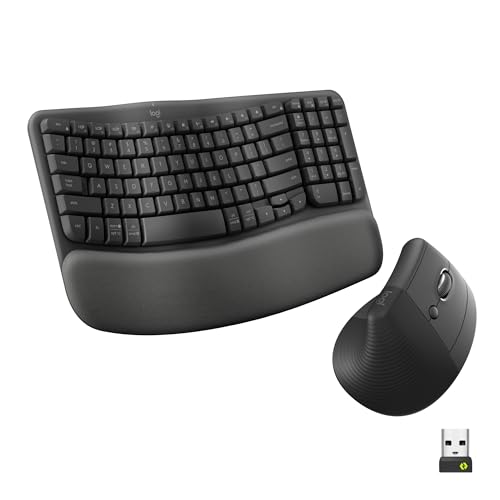
Logitech Wave Keys Keyboard and Lift Mouse Ergonomic Combo - Graphite

Our verdict: A matched wave keyboard and vertical mouse that connect either way.

Logitech's graphite set earns first place by treating both hands. The Wave Keys keyboard curves its key rows to follow the arc of your fingers, and the Lift mouse is vertical, turning the hand to a handshake position so the forearm stops twisting. Both connect over Bluetooth or a receiver, and the design is matched, so the desk looks coherent. It sells in the $50 to $100 bucket.

It tops the ProtoArc sets because the vertical mouse is a genuine posture change, not a styling choice. The cost is a higher price than the budget sets below.

Buy it if you want an ergonomic upgrade for keyboard and mouse together. The caveat is practical: confirm on the current listing whether it ships with one dongle or two, and expect a few days of adjustment on the vertical mouse.

Keyboard
Wave Keys
Mouse
Lift vertical
Connection
Bluetooth or receiver
Price tier
$50 to $100

What we like

  • +Vertical mouse included
  • +Wave keyboard shape
  • +Bluetooth or receiver
  • +Matched design

Watch out for

  • −Costs more than budget sets
  • −Check dongle count

Buy it if: A full ergonomic upgrade from one brand.

Skip it if: You want the lowest price.

2

Best Budget Alternative

ProtoArc EKM02 Wave Keys Ergonomic Wireless Keyboard and Mouse, Black

Our verdict: A wave-style wireless combo at a lower price point.

The ProtoArc EKM02 is how you get the wave layout without paying Logitech prices. It is a wireless ergonomic keyboard and mouse combo with wave-style keys, sold at the lower end of the $50 to $100 bucket. A wave keyboard sits between a flat slab and a full split, which makes it easy to learn.

It ranks second because it matches the wave concept of the Logitech set for less money. The trade is the mouse: it is a more conventional ergonomic shape rather than a Lift-style vertical design, so it relieves less forearm twist.

Choose it if you want the wave keyboard on a tighter budget and do not need a vertical mouse. The caveat is thinner brand detail, and the listing asks you to verify whether the combo uses a single receiver or two before you order.

Type
Keyboard and mouse combo
Layout
Wave keys
Connection
Wireless
Price tier
$50 to $100, lower end

What we like

  • +Wave keyboard
  • +Wireless
  • +Lower price point
  • +Ergonomic mouse

Watch out for

  • −Less brand detail
  • −Check dongle count

Buy it if: Budget buyers who want a wave layout.

Skip it if: You want a vertical mouse.

3

Best Mid-Range Combo

ProtoArc EKM01 Plus Wireless Ergonomic Keyboard Mouse Combo, Gray Black

Our verdict: A budget friendly wireless ergonomic set from a focused brand.

ProtoArc's EKM01 Plus is the plainer cousin. It is a wireless ergonomic keyboard and mouse set in the $50 to $100 bucket, described as budget friendly, and it comes from a brand that focuses on ergonomic gear. Keyboard and mouse are sold together, so setup is a single purchase.

It ranks third behind the EKM02 because its listing gives fewer design details, though it costs about the same. For most buyers the two are close, and the extra specifics on the EKM02 tip the decision. Neither offers a vertical mouse.

Pick it for a straightforward ergonomic pair if the price is right. The caveat is how little the listing says about the shape of the keyboard and mouse, so check photos closely, and verify the dongle count, since the arrangement decides how many USB ports it uses.

Type
Keyboard and mouse combo
Connection
Wireless
Design
Ergonomic set
Price tier
$50 to $100

What we like

  • +Wireless set
  • +Ergonomic design
  • +Budget friendly
  • +Keyboard and mouse together

Watch out for

  • −Few design details
  • −Check dongle count

Buy it if: A simple ergonomic upgrade on a budget.

Skip it if: You want a vertical mouse.

4

Best Quiet Pick

SABLUTE MA41 Wireless Keyboard and Mouse Combo, 30dB Quiet Ergonomic

Our verdict: A budget combo that states a 30dB quiet rating.

SABLUTE's MA41 is the quiet combo. It pairs a wireless keyboard and mouse in the $25 to $50 bucket and states a 30dB quiet rating on the listing. That matters in shared rooms and on calls, where a mouse click and keyboard clatter are heard by everyone.

It ranks fourth because the 30dB figure comes from the maker, not an independent source, so it is a claim rather than data. It is cheaper than the sets above it, though, and the ergonomic design is a mild one, closer to a curved keyboard than a wave.

Choose it for noise-sensitive spaces on a limited budget. The caveat is that you should not expect Logitech-level refinement. Verify whether the pair shares one receiver or needs two, and treat the noise number as marketing until you hear the keys yourself.

Quiet rating
30dB, maker stated
Type
Keyboard and mouse combo
Connection
Wireless
Price tier
$25 to $50

What we like

  • +30dB stated rating
  • +Budget price bucket
  • +Wireless
  • +Ergonomic design

Watch out for

  • −Noise claim is maker stated
  • −Check dongle count

Buy it if: Shared spaces where noise matters.

Skip it if: You want independent noise data.

5

Best Rechargeable

SABLUTE Ergonomic Wireless Keyboard and Mouse Combo, Rechargeable

Our verdict: A rechargeable ergonomic pair that skips disposable batteries.

This second SABLUTE set drops disposable batteries. It is a rechargeable ergonomic keyboard and mouse combo with a matched design, in the $50 to $100 bucket. Rechargeable power means no AA runs, and the wireless link keeps the desk clear.

It ranks fifth because it costs more than the MA41 without a stated noise rating, so you are paying for the battery convenience and not for quiet. Against the Logitech pair, it has a matched design but offers no vertical mouse or Bluetooth.

Pick it if you dislike buying cells and want a tidy, battery-free desk. The caveat is price against the budget sets. If cost is the only goal, the MA41 or the unbranded combo wins, and you should still confirm on the listing how the devices connect.

Power
Rechargeable
Type
Keyboard and mouse combo
Design
Matched ergonomic
Price tier
$50 to $100

What we like

  • +Rechargeable
  • +Matched design
  • +Wireless
  • +Mouse included

Watch out for

  • −Costs more than MA41
  • −Check dongle count

Buy it if: Anyone who wants a battery free desk.

Skip it if: Price is the only goal.

6

Lowest Price

Wireless Keyboard and Mouse Combo, 2.4G Ergonomic Wave Keys, Black

Our verdict: The cheapest wave-style 2.4G combo in this ranking.

The last entry is an unbranded 2.4G wave-shaped combo, black, and the cheapest set in this ranking at $25 to $50. It includes a wave keyboard and a matching mouse over 2.4G wireless, which is a stable, widely used link.

It comes last because the brand gives you little to go on: no name behind it means less about warranty, support and long-term quality. Every other set here has a clearer identity, even the ProtoArc sets that cost nearly twice as much.

Buy it as a cheap trial of a wave layout before committing to a better set. The caveat is trust. Verify whether it uses a single dongle or two, and keep expectations modest on key feel, because the price leaves little room for refinement.

Connection
2.4G wireless
Layout
Wave keys
Type
Keyboard and mouse combo
Price tier
$25 to $50

What we like

  • +Lowest price here
  • +Wave keyboard
  • +2.4G wireless
  • +Mouse included

Watch out for

  • −Less known brand
  • −Check dongle count

Buy it if: A cheap trial of an ergonomic layout.

Skip it if: You want a recognised brand.

Methodology

How We Ranked These

Ergonomic design

We compared wave keyboards and vertical mice for how much they change posture.

Wireless connection

We noted Bluetooth, receiver and 2.4G options and flagged dongle count.

Power

We favoured rechargeable sets over disposable batteries.

Noise

We recorded maker stated quiet ratings without treating them as independent.

Price tier

We weighed each price bucket against what the set includes.

Every Primea Score uses the same weights: Performance 30% · Build & Materials 20% · Everyday Usability 20% · Value 20% · Owner Satisfaction 10%. Full scoring rules

Buyer's guide

How to Pick the Right One for You

By Mouse Type

The mouse decides how different the set feels.

MouseOur pick
Vertical mouseLogitech Wave Keys Keyboard and Lift Mouse Combo
Ergonomic mouse, budgetProtoArc EKM02 Wave Keys
Quiet mouseSABLUTE MA41
Rechargeable mouseSABLUTE Rechargeable Combo

By Budget

SpendOur pick
$25 to $50, lowestWireless Keyboard and Mouse Combo 2.4G Wave Keys
$25 to $50, quietSABLUTE MA41
$50 to $100, budgetProtoArc EKM02 Wave Keys
$50 to $100, premiumLogitech Wave Keys and Lift Combo

Rechargeable vs Battery

Rechargeable

No cells to buy and a tidier desk. The SABLUTE Rechargeable Combo is the clear example.

Battery or receiver

Simple and cheap to start. The Wireless 2.4G Wave Keys combo and the ProtoArc sets use this approach.

Most buyers should default to rechargeable if the price gap is small.

By Noise Sensitivity

NeedOur pick
Shared roomSABLUTE MA41
Calls all daySABLUTE MA41
Standard officeLogitech Wave Keys and Lift Combo
Home office on a budgetProtoArc EKM01 Plus

For Laptop Users Specifically

Look for

Bluetooth support or a single shared dongle, so you do not use up scarce USB ports.

In this ranking

The Logitech Wave Keys and Lift Combo lists Bluetooth or receiver connectivity.

When to Spend More

Spend more if

You want a vertical mouse and a matched design, which the Logitech Wave Keys and Lift Combo provides.

Save if

You only want to try a wave layout, where the Wireless 2.4G Wave Keys combo is the cheapest.

Questions

Frequently Asked Questions

Do both devices share one dongle?+

It varies by set, and the listings tell you to verify. Check before ordering, especially for the Logitech set or any combo like the ProtoArc EKM02, when USB ports are scarce on your laptop.

Will a vertical mouse feel odd?+

For a few days, yes. A vertical mouse like the Logitech Lift feels odd until the hand adapts. Give it a week before judging, and keep the old mouse nearby for the first days in case of deadlines.

Is the Logitech combo worth it over the ProtoArc EKM02?+

If you want a vertical mouse and Bluetooth, yes. If you only want a wave layout, the ProtoArc EKM02 costs less and still gives you a curved keyboard and a wireless pair.

How do I connect a wireless combo?+

Plug in the receiver or pair over Bluetooth, then switch both devices on. For the Logitech set you can use either method, while the ProtoArc and unbranded 2.4G sets rely on a receiver, so mind your free USB ports.

How do I keep it running?+

Charge rechargeable sets such as the second SABLUTE regularly, and keep the receiver close to the devices, ideally on a short extension port. Avoid placing it behind a metal case or a monitor base, which can weaken the signal.

Is the 30dB rating reliable?+

It is stated by the manufacturer, so treat it as a claim, not an independent measurement. The SABLUTE MA41 lists 30dB, but key feel, typing force and the desk surface change how loud it sounds in practice.

Final take

Buy the Logitech Wave Keys and Lift combo if you want a real posture change from one maker, or the ProtoArc EKM02 to get a wave layout for less. Pick the SABLUTE sets for quiet or rechargeable use, and the unbranded 2.4G combo only as a cheap experiment. Check the dongle count on any of them before ordering.

More Ranked & Reviewed Guides