
Primea ReviewsAll Reviews

Primea Reviews is reader-supported. When you buy through our Amazon links we may earn a commission, at no extra cost to you. Rankings are set by our editors and never sold. Learn more

Ranked & Reviewed by Primea Reviews

The 7 Best Business Card Scanners of 2026, Ranked & Reviewed

By the Primea Editorial TeamUpdated November 1, 202610 min read7 products ranked
The 7 Best Business Card Scanners of 2026, Ranked & Reviewed

The short answer

The Ambir ImageScan Pro 667 is the best business card scanner: a dedicated scan path with card-specific OCR software for Windows and Mac. PenPower WorldCard Pro is the pick for contact management, and the ScanSnap iX1300 wins for scanning stacks of cards plus paperwork. Document scanners from Brother and Canon work for occasional cards but lack card parsing.

The Primea Scoreboard

Ranked & Reviewed

  1. The most complete card-first package here, built around software that parses cards.

    94Outstanding
    Check price
  2. A contact-management-first scanner with the software bundle doing the heavy lifting.

    91Excellent
    Check price
  3. The one that can chew through a stack of cards and then do your paperwork.

    88Excellent
    Check price
  4. A niche vertical-feed card scanner for people who scan IDs and cards together.

    85Excellent
    Check price
  5. A compact A6 simplex scanner that also takes small documents and IDs.

    82Very Good
    Check price
  6. A portable document scanner that handles cards when you need it to.

    80Very Good
    Check price
  7. An office duplex scanner where cards are a side job.

    78Very Good
    Check price

Business cards are a bad fit for most scanners. They are tiny, glossy, printed in decorative fonts and often have a logo where the name should be. A general document scanner captures a clean image of one and then stops, leaving you to type a phone number from a picture. The hardware is the easy half of the job.

The real work is OCR, the software that reads that image and splits it into name, title, phone and email. We reviewed seven scanners that handle cards, from dedicated card-only units to document scanners that treat cards as one of many jobs, and ranked them on listed software, scan path, batch feeding and platform support. A medical ID scanner was left out because it is not built for business cards.

Before you buy

What Actually Matters

01

Dedicated vs document scanner

A dedicated card scanner uses a narrow path sized for cards, while a document scanner treats a card as one more sheet type. The gap shows up in software: card units bundle OCR that splits a card into name, phone and email. Check whether the listing names card software, not just that cards are accepted, since that is the real difference.

02

Software bundle

A scan is only an image until software reads it. Contact-focused bundles such as WorldCard or AmbirScan turn a card into a record you can search. Look for the software name in the title or bullets, and confirm it matches your operating system before you buy, because a platform mismatch strands the bundle and leaves you with a plain image scanner.

03

Single or double sided

Simplex scanners capture only the front of a card. If your cards carry details on the back, such as a second language or a map, you need duplex capture. Look for the word duplex or double-sided on the listing. The ScanSnap iX1300 and Canon R40II scan both sides, while the Ambir PS667 and PS670ST-AS do not.

04

Batch feeding

A hopper lets you load a stack and walk away, which matters after a trade show when you come home with dozens of cards. Single-sheet scanners need you to feed each card by hand. Check for ADF or hopper in the specs, and look for plastic card support if your cards are thick.

05

Platform and power

Some scanners run on USB power, which means no wall adapter and easy travel, and some add wireless. Confirm Windows or Mac support before buying, since a mismatch strands the software. Check whether the scanner needs a driver download, and whether the bundled software works on the version of your operating system you actually run.

In-depth reviews

Our Ranked Picks, Reviewed

1

Best Overall

Ambir ImageScan Pro 667 Business Card Scanner with AmbirScan Business Card

Our verdict: The most complete card-first package here, built around software that parses cards.

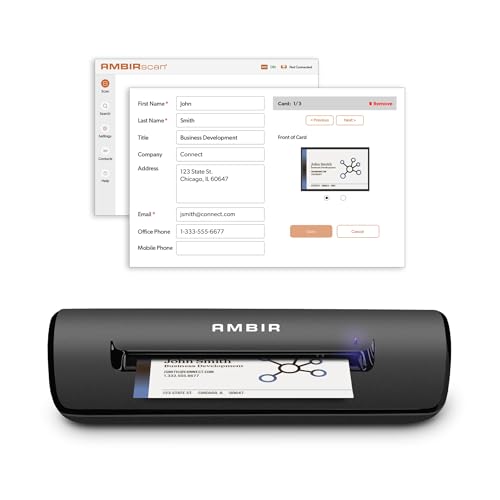
The Ambir ImageScan Pro 667 pairs a dedicated business card scan path with the AmbirScan Business Card software and runs on Windows and Mac. A narrow path sized for cards keeps them aligned, and the bundled OCR reads fields into a contact instead of leaving a flat image. That software step is where card scanning succeeds or fails.

It tops the list because the hardware and software are built as a single card-first package. The PenPower WorldCard Pro is similar, but leans harder toward contact management. The ScanSnap iX1300 is faster in batches but treats cards as a document.

Buy it if business cards are your main job. The caveats are two: it is not a document scanner, so letters need another machine, and OCR output still needs proofreading.

Type
Dedicated card scanner
Software
AmbirScan Business Card
Platforms
Windows and Mac
Price
$100-200

What we like

  • +Dedicated card scan path
  • +Card-specific OCR bundle
  • +Windows and Mac support
  • +Purpose-built for cards

Watch out for

  • −Not a document scanner
  • −OCR needs proofreading

Buy it if: Anyone whose main scanning job is business cards.

Skip it if: You also need to scan letter-size documents.

2

Best for Contact Management

PenPower WorldCard Pro Business Card Scanner

Our verdict: A contact-management-first scanner with the software bundle doing the heavy lifting.

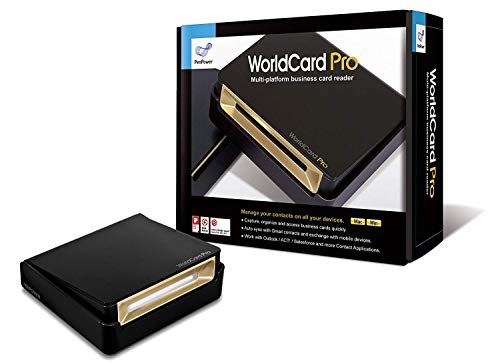
PenPower's WorldCard Pro is a dedicated card scanner built around the WorldCard contact management software, with Windows and Mac support. The scanner is almost secondary: the product's value is the way it files cards into searchable contact records, which matters most when you collect dozens at a conference and need to find one later.

It ranks second because the Ambir bundle has a more complete card-first package, while WorldCard puts the weight on the database side. Against the ScanSnap iX1300 in third, it is cheaper and cards-only, with nothing to feed a pile of paperwork.

Buy it if you are in sales or recruiting and want cards turned into contacts. The caveat is that the software defines your experience, so if you only need image files of cards, you are paying for features you will not use.

Type
Dedicated card scanner
Focus
Contact management
Platforms
Windows and Mac
Price
$100-200

What we like

  • +Contact-focused workflow
  • +Bundled WorldCard software
  • +Windows and Mac support
  • +Established dedicated product

Watch out for

  • −Software defines the experience
  • −Cards only

Buy it if: Salespeople who want cards turned into searchable contacts.

Skip it if: You only want simple image files of cards.

3

Best for Batch Scanning

ScanSnap iX1300 Wireless or USB Double-Sided Color Document Scanner, White

Our verdict: The one that can chew through a stack of cards and then do your paperwork.

The ScanSnap iX1300 is a duplex document scanner with a batch hopper, wireless or USB connection, and ScanSnap Home software for card management. It explicitly handles thick items and plastic cards, and the hopper lets you load a stack and walk away. That matters after an event, when 60 cards arrive in one afternoon.

It ranks third because it is document-first and costs more than the dedicated units above. In return, it captures both sides at once and doubles as an office scanner for contracts and receipts.

Buy it if you scan cards in stacks and also need paperwork handled. Skip it if you want the cheapest card-only unit. Without a dedicated card OCR bundle, expect to do more manual cleanup than with the Ambir.

Type
ADF duplex scanner
Feeding
Batch hopper
Handles
Thick items, plastic cards
Price
$200-500

What we like

  • +Batches multiple cards
  • +Duplex scanning
  • +Handles plastic cards
  • +Wireless or USB

Watch out for

  • −Costs more than card units
  • −Document-first design

Buy it if: Event attendees scanning stacks of cards plus documents.

Skip it if: You want the cheapest dedicated card scanner.

4

Best Vertical Feed

AMBIR ID Card and Business Card Scanner PS670ST-AS High Speed Single Sided Vertical USB Powered

Our verdict: A niche vertical-feed card scanner for people who scan IDs and cards together.

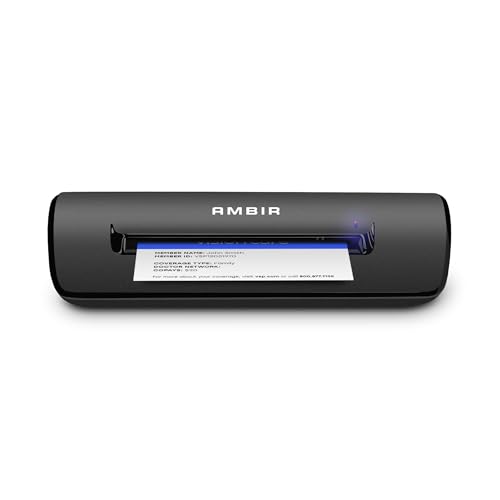
The AMBIR PS670ST-AS is a high-speed vertical-feed scanner that is USB powered and handles both ID cards and business cards on Windows and Mac. A vertical path drops each card straight through, which suits reception desks where staff scan a visitor's ID and a card back to back.

It ranks fourth because it scans one side only and costs more than the cheaper Ambir 667 above, which it overlaps. The ScanSnap in third captures both sides and batches cards, so this unit sits in a narrow niche.

Buy it if a front desk scans IDs and cards together all day. Skip it if the back of the card matters, such as a second-language side. USB power avoids a wall adapter, but the single-sided design is a hard limit.

Type
Vertical card scanner
Sides
Single sided
Power
USB powered
Price
$200-500

What we like

  • +High-speed vertical path
  • +USB powered
  • +Handles ID and business cards
  • +Windows and Mac support

Watch out for

  • −Single-sided only
  • −Pricier than the 667

Buy it if: Reception desks scanning IDs and cards together.

Skip it if: You need both sides of a card captured.

5

Best Budget Card Scanner

Ambir Technology PS667 Simplex A6 Card Scanner

Our verdict: A compact A6 simplex scanner that also takes small documents and IDs.

The Ambir PS667 is a simplex A6 card scanner that takes cards, small documents and IDs over USB, in a compact body. An A6 path is wider than a pure card slot, so it swallows receipts and small forms, which a narrow card scanner would reject.

It ranks fifth because the software story is thin. The listing does not name a bundled card OCR package, so unlike the ImageScan Pro 667 at the top, you may be typing contacts by hand. It is single-sided too.

Buy it for a small desk with mixed card and ID scanning on a budget. Skip it if you want cards turned into contacts automatically. For that job, the Ambir ImageScan Pro 667 or PenPower WorldCard Pro are the better answers.

Format
A6 simplex
Handles
Cards, small documents, IDs
Connection
USB
Price
$100-200

What we like

  • +Compact footprint
  • +Dedicated A6 path
  • +Handles small documents
  • +USB connection

Watch out for

  • −Single-sided only
  • −Thin software story

Buy it if: Small desks with mixed card and ID scanning.

Skip it if: You want bundled card OCR software.

6

Best for Occasional Use

Brother DS-640 Compact Mobile Document Scanner

Our verdict: A portable document scanner that handles cards when you need it to.

The Brother DS-640 is a compact, single-sheet mobile scanner that handles cards among other documents, using the free iPrint&Scan app. It runs light enough for a travel bag, which is its real appeal: scan a card on the road without carrying a separate unit.

It ranks sixth because it lacks card-specific software. Unlike the Ambir and PenPower units, it will not parse a card into fields, and single-sheet feeding means every card is a separate manual step. It beats the Canon R40II on portability.

Buy it if you scan the occasional card with receipts and documents and need something small. Skip it for volume, because feeding cards one at a time after a trade show becomes tedious fast.

Type
Mobile single-sheet
App
iPrint&Scan (free)
Handles
Cards and documents
Price
$100-200

What we like

  • +Compact and portable
  • +Free scanning app
  • +Handles many document types
  • +Good general-purpose value

Watch out for

  • −No card-specific software
  • −Single-sheet feeding

Buy it if: Travelers who scan the occasional card with documents.

Skip it if: You scan cards in volume.

7

Best for Office Workflows

Canon imageFORMULA R40II Office Document Scanner

Our verdict: An office duplex scanner where cards are a side job.

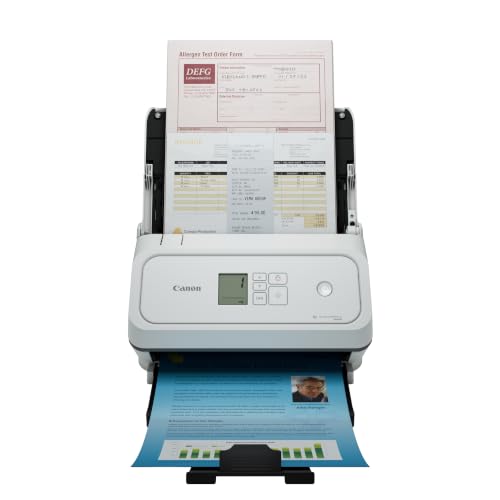
The Canon imageFORMULA R40II is an office duplex scanner with direct cloud connectivity, easy setup and support for varied document types, including cards. Office scanners earn their place on paperwork: duplex capture, cloud filing and routine reliability for contracts and invoices.

It ranks last because cards are a side job. Without card OCR software or a dedicated path, it lacks what the Ambir and PenPower units bring, and it costs more than the Brother DS-640 above. The listing is also newer, so the track record is short.

Buy it if your office scans documents all day and the occasional card is an afterthought. Skip it if business cards are the main task, because the dedicated models above handle that job better and for less money.

Type
Office duplex scanner
Cloud
Direct connectivity
Handles
Documents and cards
Price
$200-500

What we like

  • +Duplex scanning
  • +Direct cloud connectivity
  • +Easy setup
  • +Handles varied documents

Watch out for

  • −Not card-focused
  • −Newer listing

Buy it if: Offices that scan documents and some cards.

Skip it if: Business cards are your main job.

Methodology

How We Ranked These

Card Fit

Whether the scan path and software are built for business cards or only tolerate them.

Software

What bundled software does with the scan, from OCR to contact management.

Feeding

Single-sheet versus hopper batching, and whether both sides can be captured.

Platform Support

Windows and Mac compatibility as listed on the spec sheet.

Value

What each scanner offers inside its price bucket, judged against narrower alternatives.

Every Primea Score uses the same weights: Performance 30% · Build & Materials 20% · Everyday Usability 20% · Value 20% · Owner Satisfaction 10%. Full scoring rules

Buyer's guide

How to Pick the Right One for You

By Primary Use

Match the scanner to what you actually scan.

If you mostlyOur pick
Scan business cards onlyAmbir ImageScan Pro 667
Build a contact databasePenPower WorldCard Pro
Scan stacks after eventsScanSnap iX1300
Scan IDs and cards togetherAMBIR PS670ST-AS
Scan the odd card with documentsBrother DS-640

By Budget

SpendOur pick
$100-200, card-firstAmbir ImageScan Pro 667
$100-200, compactAmbir PS667
$100-200, portable generalBrother DS-640
$200-500, batch and duplexScanSnap iX1300
$200-500, office workflowCanon imageFORMULA R40II

Dedicated vs Document Scanner

Dedicated

Built around cards with card software. Picks: Ambir ImageScan Pro 667, PenPower WorldCard Pro, Ambir PS667, AMBIR PS670ST-AS.

Document

Handles cards plus general paper. Picks: ScanSnap iX1300, Brother DS-640, Canon imageFORMULA R40II.

Most buyers should default to dedicated unless they also scan paperwork.

By Sides and Feeding

You needOur pick
Duplex captureScanSnap iX1300
Hopper batchingScanSnap iX1300
Fast vertical single-sided feedAMBIR PS670ST-AS
Compact simplexAmbir PS667

For Sales Teams Specifically

Look for

Card-specific software that exports to contacts, and Windows or Mac support matching your team.

In this ranking

The PenPower WorldCard Pro is built around contact management, and the Ambir ImageScan Pro 667 bundles AmbirScan Business Card.

When to Spend More

Spend more if

You return from events with stacks of cards: the ScanSnap iX1300 batches them through a hopper and scans both sides.

Save if

You scan cards occasionally: the Brother DS-640 or Ambir PS667 cost less and do the job.

Questions

Frequently Asked Questions

Can a regular document scanner read business cards?+

Many can, as images. The ScanSnap iX1300 explicitly lists plastic and thick cards. What document scanners lack is card-specific parsing, so you may type contacts by hand instead of getting fields filled in automatically.

What is the most common mistake?+

Buying on hardware alone. The value is in the software that turns a scan into a contact, so check the bundled package first. The Ambir ImageScan Pro 667 and PenPower WorldCard Pro both name theirs.

Is a dedicated scanner worth it over a document scanner?+

If cards are your main job, yes, since the Ambir and PenPower units bundle card software. If you also scan paperwork, a document scanner like the ScanSnap iX1300 is the better single purchase because it handles both.

How do I set one up?+

Install the bundled software for your operating system first, then connect the scanner by USB and run a test card. The ScanSnap iX1300 can also connect wirelessly. Running the software before the cable avoids driver mismatches on both Windows and Mac.

Do I need to proofread scans?+

Yes. OCR can stumble on stylized fonts, logos and glossy finishes, so a quick review pass before saving contacts avoids bad data. Expect this with every model here, including the Ambir ImageScan Pro 667, and budget a few minutes after a big batch.

Will the single-sided models miss the back of a card?+

Yes. The AMBIR PS670ST-AS and Ambir PS667 scan one side only, so details printed on the back, such as a second language or a direct line, are lost. Choose the duplex ScanSnap iX1300 or Canon R40II if backs matter.

Final take

The Ambir ImageScan Pro 667 is the right buy for anyone whose main job is business cards, because the scanner and the card OCR software are designed together. Choose PenPower WorldCard Pro for contact management, or the ScanSnap iX1300 when cards arrive in stacks alongside paperwork. Check the software before the hardware, since that decides how much typing you do afterward.

More Ranked & Reviewed Guides