
Primea ReviewsAll Reviews

Primea Reviews is reader-supported. When you buy through our Amazon links we may earn a commission, at no extra cost to you. Rankings are set by our editors and never sold. Learn more

Ranked & Reviewed by Primea Reviews

The 5 Best 8-Port Managed Network Switches of 2026, Ranked & Reviewed

By the Primea Editorial TeamUpdated November 3, 202610 min read5 products ranked
The 5 Best 8-Port Managed Network Switches of 2026, Ranked & Reviewed

The short answer

The NETGEAR GS308EP is the managed switch to buy if you need PoE for cameras or access points. The NETGEAR GS308E is the best value for anyone who just wants VLANs, and the TP-Link TL-SG108E is the budget pick with a three-year warranty. The NETGEAR GS110TP adds SFP uplinks and SNMP for small offices.

The Primea Scoreboard

Ranked & Reviewed

  1. The only 8-port pick that powers cameras and access points while still giving you VLANs and per-port control.

    94Outstanding
    Check price
  2. The cheapest way to get real VLANs, loop protection and a clean web interface on eight ports.

    90Excellent
    Check price
  3. A long-running budget managed switch with link aggregation and a three-year warranty.

    88Excellent
    Check price
  4. Eight PoE+ ports, two SFP slots and SNMP for networks that may grow past one closet.

    85Excellent
    Check price
  5. Solid VLAN, QoS and port mirroring in a fanless case, but the cheaper GS308E has overtaken it.

    82Very Good
    Check price

Most people buy a managed switch for one feature and then discover they needed another. They want VLANs and find out later that their new camera needs PoE, or they buy PoE and never touch a VLAN. The smart way to shop is to list what plugs into the box first, and let that decide the switch.

This ranking covers five switches with eight usable gigabit ports each. We reviewed the spec sheets for VLAN limits, PoE wattage, uplink options, monitoring and warranty, and ranked them on how much real capability each gives you at its price. Where a listing does not state a feature, we leave it out rather than guess.

Before you buy

What Actually Matters

01

VLAN count

A VLAN is a virtual network inside one switch, letting you keep guest, IoT and work devices apart. Counts on these models run from 32 to 64, which is far more than a home needs. What matters more is how easy the web interface makes tagging a port, so look for screenshots of the VLAN page on the listing.

02

PoE budget

PoE+ lets a switch deliver data and power on one cable, but the wattage is shared across all ports. A 62W or 55W budget covers a handful of cameras or access points, not a dozen. Add up the stated draw of each device and leave about a fifth in reserve.

03

Management style

Easy Smart means a browser-based page with a limited feature set, compared with a full managed switch that adds a command line. For most homes the browser page is plenty. Check that the switch can be found by a discovery utility or at a fixed address, so you are not locked out after changing a setting.

04

Uplinks and monitoring

SFP slots accept fiber or copper modules for long runs, and SNMP lets monitoring software watch the switch. Neither matters on a desk. Both matter in an office where a second switch sits across the building, so check the listing for SFP count and SNMP before assuming you have them.

05

Heat, noise and warranty

A fanless switch is silent, but PoE models run warm, so leave space around the vents. Warranty length is a rough proxy for build confidence, and it ranges from one to three years here. Look for the exact term on the listing, not just a generic lifetime claim.

In-depth reviews

Our Ranked Picks, Reviewed

1

Best Overall

NETGEAR GS308EP 8-Port PoE+ Smart Managed Switch

Our verdict: The only 8-port pick that powers cameras and access points while still giving you VLANs and per-port control.

The GS308EP is an Easy Smart managed switch with eight gigabit ports, all of them PoE+, sharing a 62W power budget. That pairing is what makes it the most useful 8-port box in this ranking: one cable can feed a ceiling access point, an IP camera or a VoIP phone, and the web interface lets you shut PoE off or on per port. It also keeps PoE running while the switch itself reboots, which saves a lot of unplugging when you change settings.

It sits above the TP-Link and the other NETGEAR models because power delivery is the feature that normally forces people into a pricier switch. The tradeoff is the budget. 62W is a total, not a per-port figure, so two or three cameras and an access point is comfortable, while a rack of power-hungry devices is not. It also costs noticeably more than the plain managed models, so if nothing on your network needs PoE you are paying for capability you will not use.

Buy it for a small office, a home lab or a smart-home network where a few devices need both data and power. Skip it if you only need VLAN segmentation for computers, because the cheaper GS308E does that job for far less. Check the combined wattage of everything you plan to plug in before you commit, since PoE+ devices vary widely in how much of the budget they claim.

Ports
8 gigabit, all PoE+
PoE budget
62W total
Management
Easy Smart web UI
PoE control
Per-port, persists on reboot

What we like

  • +All eight ports supply PoE+
  • +Per-port PoE on and off control
  • +PoE stays up during reboot
  • +Easy Smart web management

Watch out for

  • −62W budget is shared across ports
  • −Costs far more than plain managed models

Buy it if: Home offices and small shops powering cameras or access points from one box.

Skip it if: You have no PoE devices and only want VLANs.

2

Best Value

NETGEAR GS308E 8-Port Easy Smart Managed Switch

Our verdict: The cheapest way to get real VLANs, loop protection and a clean web interface on eight ports.

The GS308E is NETGEAR's entry Easy Smart managed switch. It lists support for up to 64 VLANs, a web interface that works from any operating system, and automatic protection against DoS attacks, loops and broadcast storms. In practice that means you can split a home network into trusted, guest and IoT segments without buying anything beyond the switch itself.

It ranks second because it delivers nearly everything the top pick does for managed networking at a fraction of the cost, and it carries a larger VLAN allowance than the TP-Link below it on paper. What it leaves out is PoE, so every device needs its own power adapter. That is the real tradeoff against the GS308EP, and it is why this model is a stepping stone for people who already have power at each endpoint.

Choose it if you want to learn VLANs, isolate smart-home gadgets, or tidy up a desk setup with traffic prioritization. Avoid it if you plan to mount cameras or access points where there is no outlet. Be aware that Easy Smart firmware is configured through a browser page rather than a full command line, so power users who want scripting will outgrow it.

Ports
8 gigabit
VLANs
Up to 64
Protection
Auto DoS, loop, storm
Interface
Cross-platform web GUI

What we like

  • +Supports up to 64 VLANs
  • +Built-in loop and storm protection
  • +Browser setup on any system
  • +Priced among the lowest

Watch out for

  • −No PoE on any port
  • −Web UI only, no command line

Buy it if: Anyone segmenting a home or small network on a tight budget.

Skip it if: Your devices need power over the Ethernet cable.

4

Best for Fiber Uplinks

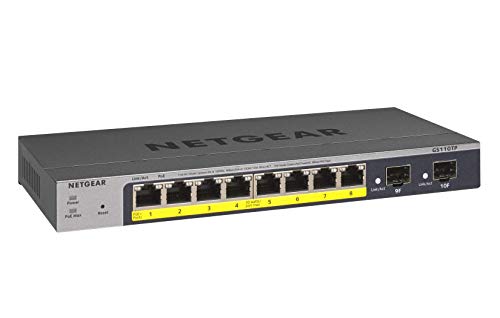
NETGEAR GS110TP 10-Port PoE+ Smart Managed Switch

Our verdict: Eight PoE+ ports, two SFP slots and SNMP for networks that may grow past one closet.

The GS110TP is a step up in class: eight PoE+ gigabit ports with a 55W budget, plus two SFP slots, smart managed software, SNMP support and a year of NETGEAR Insight cloud management. The SFP pair is the feature none of the other switches here have, because it lets you run fiber or a long uplink to another building or rack.

It ranks fourth because the extra connectivity comes with compromises. Its PoE budget is a little lower than the GS308EP's 62W and its price is higher, so for a plain eight-camera setup the cheaper switch actually has more power to spend. We placed it above the GS108E because SNMP and fiber options give it a job the basic models cannot do at all.

Buy it if you run a small business network that needs monitoring, or if you must connect a distant switch over fiber. Skip it if you just want eight copper ports at a low price. Note that it is a 10-port model, so strictly speaking eight of its ports are copper; confirm you have SFP modules on hand before relying on the uplinks.

Ports
8 PoE+ plus 2 SFP
PoE budget
55W total
Monitoring
SNMP, NETGEAR Insight
Management
Smart managed

What we like

  • +Two SFP uplink slots
  • +SNMP monitoring support
  • +Insight cloud management included
  • +Eight PoE+ copper ports

Watch out for

  • −Lower PoE budget than GS308EP
  • −Priced well above desktop models

Buy it if: Small offices that want PoE, fiber uplinks and monitoring.

Skip it if: You only need eight basic copper ports.

5

Reliable Classic

NETGEAR GS108E 8-Port Easy Smart Managed Switch

Our verdict: Solid VLAN, QoS and port mirroring in a fanless case, but the cheaper GS308E has overtaken it.

The GS108E is a long-standing Easy Smart switch with VLAN support, QoS and port monitoring, in a fanless, energy-efficient housing. Fanless matters if the switch sits on a desk or in a bedroom closet where you do not want noise.

It ranks last of the five because the newer GS308E offers the same management class and a larger VLAN allowance, usually for less money. Port monitoring is the one feature worth highlighting, since it lets you mirror traffic to a port and inspect it, which is a real aid when you are diagnosing a flaky device. That keeps it on the list rather than off it.

Pick it only if you find it at a discount or want a model with years of community documentation behind it. Skip it if you are buying new at full price, because the GS308E is the smarter choice. As with every Easy Smart model, set a static management address before you move it into a rack or wall plate.

Ports
8 gigabit
Features
VLAN, QoS, port monitoring
Cooling
Fanless
Management
Easy Smart web UI

What we like

  • +Port mirroring for diagnosing
  • +Silent fanless design
  • +Mature, well documented firmware
  • +QoS traffic prioritization

Watch out for

  • −Superseded by the GS308E
  • −Costs more than newer models

Buy it if: Tinkerers who want port monitoring and silent operation.

Skip it if: You are paying full price for a new switch.

Methodology

How We Ranked These

Management depth

We compared VLAN counts, QoS, port mirroring, loop protection and link aggregation as listed by each maker, since these decide how much a managed switch can actually do.

Power delivery

PoE+ ports, the shared wattage budget and whether PoE survives a reboot were weighed for cameras, access points and phones.

Uplink and growth

SFP slots, SNMP and cloud management were scored as signs a switch can scale beyond a single desk.

Reliability and warranty

Fanless designs, protection against loops and storms, and warranty length stood in for long-term dependability.

Value in class

Feature depth was set against each price bucket, from under $25 to $100 to $200.

Every Primea Score uses the same weights: Performance 30% · Build & Materials 20% · Everyday Usability 20% · Value 20% · Owner Satisfaction 10%. Full scoring rules

Buyer's guide

How to Pick the Right One for You

By What You Plug In

The devices on the other end of the cable decide which switch you need.

Your devicesOur pick
Cameras or access points needing powerNETGEAR GS308EP 8-Port PoE+ Smart Managed Switch
Computers, NAS and consoles onlyNETGEAR GS308E 8-Port Easy Smart Managed Switch
Mixed gear plus a fiber uplinkNETGEAR GS110TP 10-Port PoE+ Smart Managed Switch
A quiet desk and port mirroringNETGEAR GS108E 8-Port Easy Smart Managed Switch

By Budget

SpendOur pick
Under $25NETGEAR GS308E 8-Port Easy Smart Managed Switch
Under $25, longer warrantyTP-Link TL-SG108E 8-Port Easy Smart Switch
$50 to $100NETGEAR GS308EP 8-Port PoE+ Smart Managed Switch
$100 to $200NETGEAR GS110TP 10-Port PoE+ Smart Managed Switch

PoE vs Non-PoE

PoE+ switch

Power and data share one cable, so cameras and access points can go anywhere you can run Ethernet. Costs more and the wattage is shared. Picks: NETGEAR GS308EP and GS110TP.

Non-PoE switch

Every device keeps its own power adapter. Cheaper and cooler. Picks: NETGEAR GS308E, TP-Link TL-SG108E and NETGEAR GS108E.

Default to non-PoE unless at least two devices need power from the switch.

By Network Size

SizeOur pick
One desk or living roomTP-Link TL-SG108E 8-Port Easy Smart Switch
Whole-home VLAN setupNETGEAR GS308E 8-Port Easy Smart Managed Switch
Small office with camerasNETGEAR GS308EP 8-Port PoE+ Smart Managed Switch
Office with a second buildingNETGEAR GS110TP 10-Port PoE+ Smart Managed Switch

For a Home Lab Specifically

Look for

Port mirroring to inspect traffic, VLAN tagging for lab segments, and a management page you can reach reliably. A fanless case keeps the lab quiet.

In this ranking

NETGEAR GS108E for port mirroring, NETGEAR GS308E for the best VLAN allowance per dollar, and NETGEAR GS110TP if you want SNMP monitoring.

When to Spend More

Spend more if

You need PoE, SFP uplinks or SNMP monitoring. The NETGEAR GS308EP and GS110TP cover those jobs.

Save if

You only need to split traffic between a few computers and gadgets. The NETGEAR GS308E or TP-Link TL-SG108E is enough.

Questions

Frequently Asked Questions

Do these switches work with any router?+

Yes. Managed switches sit behind the router and use standard gigabit Ethernet, so they work with any router or modem. VLANs that need routing between segments still depend on your router supporting them, so check that before you plan guest or IoT networks.

What is the most common mistake with a managed switch?+

Locking yourself out by changing the management VLAN or port settings from the wrong port. Always change settings from a port you are not about to reconfigure, and note the switch's management address before you start.

Is the PoE model worth it over a plain managed switch?+

Only if two or more devices need power from the switch. One camera can run on a small PoE injector, but a camera and an access point justify the GS308EP. Without PoE devices, the premium buys you nothing.

How do I set up a VLAN on an Easy Smart switch?+

Find the switch with the maker's utility or its default address, open the web page, and create a VLAN with a number. Then mark which ports are tagged or untagged members. Save the configuration before you test, and keep one port in the default VLAN for emergency access.

How do I look after a switch that runs all the time?+

Keep the vents clear, avoid stacking it under warm gear, and update the firmware when the maker publishes a fix. A PoE switch runs warmer, so give it breathing room. Back up the configuration file after you finish setup.

Can I mix a managed switch into a network of unmanaged ones?+

Yes. Managed and unmanaged switches interoperate fine on a flat network. Just remember that VLANs only apply to the managed switch's ports, and unmanaged ones will pass tagged traffic without understanding it, which can cause surprises.

Final take

The NETGEAR GS308EP is the best 8-port managed switch for anyone who will ever plug in a camera or access point, and the NETGEAR GS308E is the best choice when you will not. The TP-Link TL-SG108E is the budget alternative with the strongest warranty. Choose by PoE need first, then by how many VLANs you actually plan to build.

More Ranked & Reviewed Guides