
Primea ReviewsAll Reviews

Primea Reviews is reader-supported. When you buy through our Amazon links we may earn a commission, at no extra cost to you. Rankings are set by our editors and never sold. Learn more

Ranked & Reviewed by Primea Reviews

The 6 Best 30-Laptop Charging Carts of 2026, Ranked & Reviewed

By the Primea Editorial TeamUpdated November 4, 20269 min read6 products ranked
The 6 Best 30-Laptop Charging Carts of 2026, Ranked & Reviewed

The short answer

The Pearington 30-device cart is the one to buy: 30 locked bays plus two bonus outlets, with cable management built into the dividers. The POCHAR mixed-fleet model is the pick for schools juggling Chromebooks, iPads and laptops. The ALT Technology cart is a straightforward school workhorse, the ARTMAN adds a two-slot buffer, and the open POCHAR suits supervised classrooms that do not need a lock.

The Primea Scoreboard

Ranked & Reviewed

  1. 30 locked bays, two bonus outlets and tidy cable dividers. The cart that thinks about the cables.

    92Outstanding
    Check price
  2. Named for Chromebooks, iPads and 14 inch laptops, so one cart serves a mixed fleet.

    89Excellent
    Check price
  3. A 30-device cart marketed squarely at K-12 classrooms with 14 inch laptops.

    87Excellent
    Check price
  4. A 30-bay mobile school cart for Chromebooks and tablets from a dedicated education supplier.

    85Excellent
    Check price
  5. A 30+2 bay cabinet with a small buffer above 30, but with no review history yet.

    83Very Good
    Check price
  6. An open-design 30-device cart for supervised classrooms. No lock, so no overnight security.

    81Very Good
    Check price

The number on the box, 30, hides the question that decides whether a cart works in your building: thirty of what? A bay that fits a slim tablet may not take a 14 inch laptop in a thick protective case, and a cart with thirty slots but no room for charger bricks leaves cables dangling across the carpet. Fleet type and case thickness matter more than the headline count.

We ranked six carts built for thirty devices and scored them on the Primea framework, weighting bay design, device compatibility, security and cable management most heavily. Larger carts that merely exceed thirty, such as 36 or 42 port models, were left out, because they solve a different procurement problem. Every cart here lists thirty bays, and none lists exact prices, only price brackets.

Before you buy

What Actually Matters

01

Bay size versus cased devices

Screen size is the number on the box, but the bay has to fit the device plus its protective case and charger. A 13 inch slot will refuse a 14 inch laptop. Measure a cased device, add an inch for the plug, and compare it with the bay dimensions in the listing.

02

Lock and security

A locked cart keeps devices safe overnight and between classes, while an open cart speeds distribution. Choose by where the cart lives. A cart in a corridor or shared lab needs a lock, and a cart inside one supervised classroom can go without. Check whether the listing says locking doors or open storage.

03

Cable management

Thirty chargers in one cabinet can become a knot. Dividers with cable channels keep each lead separate and speed up daily collection. Look for the words cable management or channels in the description, and check whether chargers plug into a surge-protected strip inside the cart or need separate outlets, because loose chargers are what jam a cart on a busy school morning.

04

Total outlets and charging load

Charging thirty devices draws real power, and a cart that stages or distributes the load protects the building circuit. Bonus outlets, like the Pearington's two, let you add a teacher laptop. Ask the seller how the cart is wired, and confirm the plug fits your classroom outlet. Ask your facilities team whether the circuit can carry the whole cart.

05

Assembly and mobility

Carts arrive flat-packed and weigh a lot when loaded. Assembly can take a couple of hours, and caster quality decides whether the cart rolls over thresholds. Check for stated assembly requirements, locking casters and a handle position that lets one person steer the loaded cart safely. A cart that tips on a classroom threshold can wreck thirty devices at once.

In-depth reviews

Our Ranked Picks, Reviewed

1

Best Overall

Pearington 30 Device Mobile Charging/Storage Cart for iPads, Tablets, Laptop

Our verdict: 30 locked bays, two bonus outlets and tidy cable dividers. The cart that thinks about the cables.

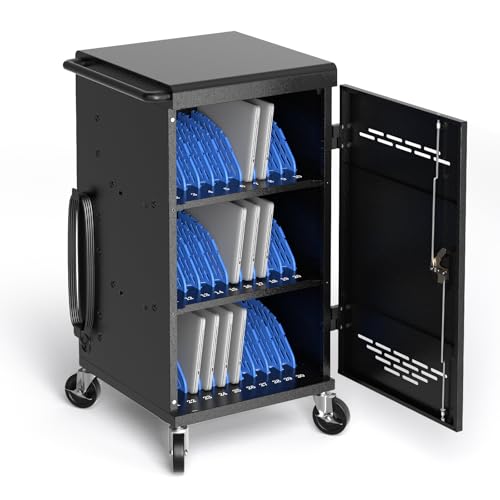
Pearington builds its cart around 30 bays for storing and locking devices, plus two bonus outlets that let you charge 32 items in total. Slots are sized for screens up to 13 inches, and cable management lives in the dividers, so each device's lead stays in its own channel instead of tangling with its neighbours.

It ranks first over the POCHAR carts because the details are stated and the bonus outlets cover a teacher laptop or hotspot. The tradeoff is the 13 inch screen limit: 14 inch Chromebooks in cases will not fit, and full assembly is required, so budget an afternoon. It sits in the $200 to $500 bracket.

Best for schools with tablets and 13 inch laptops that value organised cabling. Measure your cased devices before ordering.

Bays
30 stored and locked
Charging
32 with 2 bonus outlets
Screen slots
Up to 13 in
Assembly
Full assembly required

What we like

  • +Two bonus outlets for 32 devices
  • +Cable management in dividers
  • +Locked storage for all 30 bays
  • +Fits tablets and laptops

Watch out for

  • −13 inch screen limit
  • −Full assembly required
  • −Priced in the $200 to $500 bracket

Buy it if: Schools with tablets and small laptops who want tidy cabling.

Skip it if: Your Chromebooks are 14 inches or larger in cases.

2

Best for Mixed Fleets

POCHAR 30 Unit Device Charging Station for Chromebook, iPad, 14'' Laptop

Our verdict: Named for Chromebooks, iPads and 14 inch laptops, so one cart serves a mixed fleet.

POCHAR's 30-unit station is positioned for mixed device fleets, with its title naming Chromebooks, iPads and 14 inch laptops together. Thirty-device capacity is stated, and the 14 inch figure is the key difference from the Pearington's 13 inch slots.

It ranks second since the listing carries fewer details than the Pearington's: no outlet count or cable-management description appears. What it does give is flexibility, because a district that bought three kinds of device can park them in one cart. Compared with the K-12 POCHAR below, it trades classroom branding for broader fleet coverage.

Choose it when your devices vary in size. Confirm bay depth for cased units before you commit, since the listing does not state it.

Capacity
30 devices
Fleet
Chromebook, iPad, 14 in laptop
Price tier
$200 to $500
Type
Mixed-fleet station

What we like

  • +Named for a mixed device fleet
  • +14 inch laptops supported
  • +30-device capacity
  • +Same bracket as Pearington

Watch out for

  • −Few stated specs
  • −Outlet count not listed
  • −Cable management unclear

Buy it if: Schools running Chromebooks, iPads and laptops side by side.

Skip it if: You need documented cable channels or extra outlets.

3

Best for Classrooms

POCHAR 30 Devices 14'' Screen Laptop Charging Cart for K-12 Classrooms

Our verdict: A 30-device cart marketed squarely at K-12 classrooms with 14 inch laptops.

This POCHAR variant is aimed at K-12 classrooms and states a 14 inch screen size with 30-device capacity. For a school whose Chromebooks all share one form factor, that stated size is more useful than a mixed-fleet promise.

It lands third because it sacrifices the tablet-friendly flexibility of the other POCHAR and shares its missing details: no outlet count and no description of how cables are managed. Against the Pearington it wins on screen size and loses on documentation. Both sit in the $200 to $500 bracket.

Buy it for a laptop-only classroom set where the device is the standard 14 inch Chromebook. If tablets are in the mix, step up one rank.

Capacity
30 devices
Screen size
14 in
Target
K-12 classrooms
Price tier
$200 to $500

What we like

  • +14 inch screen size stated
  • +Built for K-12 use
  • +30-device capacity
  • +Mid-range price bracket

Watch out for

  • −Less suited to tablets
  • −Sparse feature listing
  • −Cabling details missing

Buy it if: Classroom sets of identical 14 inch Chromebooks.

Skip it if: Your fleet includes tablets or varying sizes.

4

Best School Workhorse

ALT Technology 30-Bay Mobile School Charging Cart Station for Chromebook, Tablet

Our verdict: A 30-bay mobile school cart for Chromebooks and tablets from a dedicated education supplier.

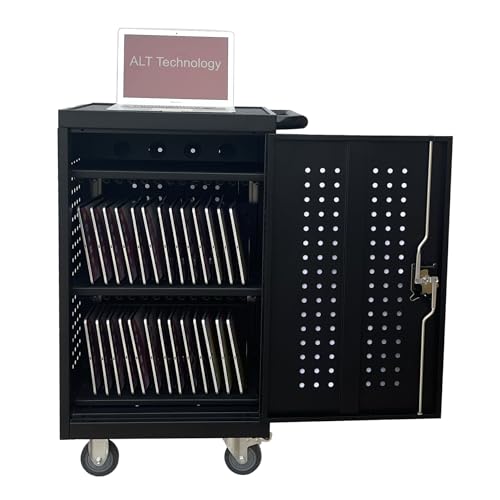
ALT Technology's cart is described as a 30-bay mobile school charging station for Chromebooks and tablets. The title names both device types, which makes it a safe fit for K-12 deployments that standardise on a smaller form factor.

It ranks fourth because the listing offers the least detail of the main four: no screen size, no outlet count and no cabling notes. We rank the Pearington and POCHAR carts higher for documenting more. ALT is a reasonable way to cross-check a quote if your district already buys through an education vendor.

It suits Chromebook and tablet fleets under standard school conditions. Ask the seller for bay dimensions before ordering if you use rugged cases.

Bays
30
Devices
Chromebook, tablet
Type
Mobile school cart
Price tier
$200 to $500

What we like

  • +30 bays for school fleets
  • +Chromebooks and tablets named
  • +Mobile cart design
  • +Education-focused supplier

Watch out for

  • −Screen size not stated
  • −Outlet count not listed
  • −No cabling details

Buy it if: Chromebook and tablet fleets bought through school suppliers.

Skip it if: You need larger laptops or documented cabling.

5

Best Extra Capacity

ARTMAN Mobile Charging Cart Station, 30+2 Bay Storage Cabinet for Chromebook, Tablet

Our verdict: A 30+2 bay cabinet with a small buffer above 30, but with no review history yet.

ARTMAN lists a 30+2 bay storage cabinet for Chromebooks and tablets, which gives you two spare slots above the headline count. That buffer is handy for loaner devices, a teacher unit or a device awaiting repair.

It ranks fifth because it sits in the $500 and up bracket, the priciest of the six, and because it is a new listing with no meaningful ownership history. Against the Pearington, which also delivers a 32-device total for less, the ARTMAN offers a cabinet form factor and little else on paper.

It works for buyers who want a fully enclosed cabinet and can afford the premium. Treat it with caution until owner feedback builds up.

Bays
30+2
Devices
Chromebook, tablet
Type
Storage cabinet
Price tier
$500 and up

What we like

  • +Two buffer bays above 30
  • +Enclosed cabinet design
  • +Chromebooks and tablets named
  • +Mobile cart form

Watch out for

  • −Priciest of the six
  • −New listing, little history
  • −Few stated specs

Buy it if: Buyers wanting a small spare-slot buffer in an enclosed cabinet.

Skip it if: You want a proven track record or a lower price.

6

Best Open Design

POCHAR 30 Devices Open Laptop Charging Cart for iPads, Tablets

Our verdict: An open-design 30-device cart for supervised classrooms. No lock, so no overnight security.

This POCHAR uses an open design with room for 30 devices, aimed at iPads and tablets. Without doors it lets students grab and return devices quickly, and teachers can see at a glance whether anything is missing.

The lack of a lock is why it ranks last: it gives no theft protection after hours unless the room itself is secure. The closed POCHAR and Pearington carts offer locked storage and are better for shared hallways. Where the room is locked and supervised, open access is faster and avoids key management.

Best for a single classroom with a supervised routine. Skip it for carts that move between rooms or sit in corridors.

Capacity
30 devices
Design
Open, no lock
Devices
iPads, tablets
Price tier
$200 to $500

What we like

  • +Fast student access
  • +Visible device check at a glance
  • +30-device capacity
  • +Same bracket as locked carts

Watch out for

  • −No lock for security
  • −Not suited to shared spaces
  • −Few specs listed

Buy it if: Supervised classrooms that value quick distribution.

Skip it if: The cart sits in a corridor or moves between rooms.

Methodology

How We Ranked These

Bay design and compatibility

We compared stated screen sizes and device types, because a 30-bay count means little if your cased devices do not fit.

Security

Locked storage was weighed against open designs, with the setting of the cart deciding which is appropriate.

Cable management

Carts that document divider channels or bonus outlets scored higher than those that leave cabling unstated.

Fleet flexibility

Mixed-fleet support and spare capacity were credited, since school device mixes change over time.

Listing transparency and price

Carts that state more details were ranked ahead of those with sparse listings or no ownership history, within each price bracket.

Every Primea Score uses the same weights: Performance 30% · Build & Materials 20% · Everyday Usability 20% · Value 20% · Owner Satisfaction 10%. Full scoring rules

Buyer's guide

How to Pick the Right One for You

By Device Fleet

Start with what you will actually put in the cart.

FleetOur pick
Tablets and 13 inch laptopsPearington 30 Device Mobile Charging/Storage Cart for iPads, Tablets, Laptop
Chromebooks, iPads and 14 inch laptopsPOCHAR 30 Unit Device Charging Station for Chromebook, iPad, 14'' Laptop
Identical 14 inch ChromebooksPOCHAR 30 Devices 14'' Screen Laptop Charging Cart for K-12 Classrooms
Chromebooks and tablets, school supplierALT Technology 30-Bay Mobile School Charging Cart Station for Chromebook, Tablet
iPads and tablets, open accessPOCHAR 30 Devices Open Laptop Charging Cart for iPads, Tablets

By Budget

SpendOur pick
$200 to $500, best documentedPearington 30 Device Mobile Charging/Storage Cart for iPads, Tablets, Laptop
$200 to $500, mixed fleetPOCHAR 30 Unit Device Charging Station for Chromebook, iPad, 14'' Laptop
$200 to $500, school supplierALT Technology 30-Bay Mobile School Charging Cart Station for Chromebook, Tablet
$200 to $500, open designPOCHAR 30 Devices Open Laptop Charging Cart for iPads, Tablets
$500 and up, spare slotsARTMAN Mobile Charging Cart Station, 30+2 Bay Storage Cabinet for Chromebook, Tablet

Locked Storage vs Open Cart

Locked storage

Secures devices overnight and in shared corridors, at the cost of key management and slower handouts. Picks: Pearington, POCHAR mixed fleet, POCHAR K-12 and ARTMAN.

Open cart

Students grab and return devices fast and you can see gaps instantly, but nothing stops theft. Pick: the open POCHAR 30 Devices cart.

Default to locked storage unless the cart never leaves a supervised, lockable room.

By Extra Capacity

NeedOur pick
Two bonus outlets for a teacher unitPearington 30 Device Mobile Charging/Storage Cart for iPads, Tablets, Laptop
Two spare bays, 30+2ARTMAN Mobile Charging Cart Station, 30+2 Bay Storage Cabinet for Chromebook, Tablet
Exactly 30, no extrasPOCHAR 30 Devices 14'' Screen Laptop Charging Cart for K-12 Classrooms
Exactly 30, tabletsALT Technology 30-Bay Mobile School Charging Cart Station for Chromebook, Tablet
Exactly 30, mixedPOCHAR 30 Unit Device Charging Station for Chromebook, iPad, 14'' Laptop

For a K-12 Classroom Set Specifically

Look for

A stated screen size that matches your cased devices, locking doors, cable channels and an assembly time your facilities team can handle.

In this ranking

The POCHAR K-12 cart for identical 14 inch Chromebooks, or the Pearington if your devices are tablets and 13 inch laptops.

When to Spend More

Spend more if

You want an enclosed cabinet with two spare bays, which points to the ARTMAN, and you accept a thin ownership record.

Save if

You already have a secure, supervised room. The open POCHAR avoids paying for locking hardware you will not use.

Questions

Frequently Asked Questions

Will a 30-device cart fit my 14 inch Chromebooks?+

Only if the bay says so. The Pearington lists slots up to 13 inches, while both POCHAR carts state 14 inch compatibility. Measure a cased Chromebook and compare it with the listing before ordering.

What mistake do schools make buying charging carts?+

Buying for the bare device. Cases add width and depth, and chargers add bulk. A cart that fits a naked tablet can refuse the same tablet in a rugged case, so check dimensions with the case on.

Is the ARTMAN worth the extra money over the Pearington?+

Rarely. The ARTMAN adds two bays in the $500 and up bracket but has no ownership history. The Pearington charges 32 devices in the $200 to $500 bracket, so it delivers similar capacity for less.

Do these carts need much setup?+

Plan on assembly. The Pearington states that full assembly is required, and the others ship flat-packed too. Allow a couple of hours, two people for the lifting, and a flat floor so the casters roll straight.

How should I care for a charging cart?+

Keep vents clear, route cables through the dividers and avoid daisy-chaining extension cords. On the Pearington, use the dividers so chargers do not pull on ports. Check the lock and casters each term.

Can I use an open cart like the POCHAR for overnight storage?+

Only inside a locked room. The open POCHAR has no door lock, so it offers no protection on its own. For corridors or shared labs choose a locked cart such as the Pearington.

Final take

For most schools the Pearington 30 Device cart is the one to buy: locked bays, two bonus outlets and cable management you can actually see in the listing. Pick the POCHAR mixed-fleet cart if your devices come in several sizes, the ALT Technology cart for a plain school workhorse, and the open POCHAR only for a supervised, lockable classroom. Treat the ARTMAN with caution until it has owner feedback.

More Ranked & Reviewed Guides