
Primea ReviewsAll Reviews

Primea Reviews is reader-supported. When you buy through our Amazon links we may earn a commission, at no extra cost to you. Rankings are set by our editors and never sold. Learn more

Ranked & Reviewed by Primea Reviews

The 8 Best Webcams Under $50: 4K to Basic 1080p, Ranked & Reviewed

By the Primea Editorial TeamUpdated November 3, 202610 min read8 products ranked
The 8 Best Webcams Under $50: 4K to Basic 1080p, Ranked & Reviewed

The short answer

The EMEET Piko is the best webcam under $50 for its dual-camera 4K picture and mic modes, and the EMEET NOVA gives 4K at a steadier price. The Lenovo Essential Gen 2 fits laptops best, the Logitech Brio 101 is the plain brand-name pick and the C950 suits tight frames.

The Primea Scoreboard

Ranked & Reviewed

  1. A dual-camera 4K webcam with a three-mic array and three sound modes, at the top of the $30 to $50 bracket.

    93Outstanding
    Check price
  2. 02
    EMEET NOVA 4K Webcam

    A 4K webcam with phase-detect autofocus and dual mics that ships in 1080p by default.

    90Excellent
    Check price
  3. A 1080p webcam sized for thin monitors, with an 85 degree view and a built-in shutter.

    87Excellent
    Check price
  4. A basic Logitech 1080p webcam with auto light balance and a slide cover.

    85Excellent
    Check price
  5. 05
    EMEET C950 1080P Webcam

    Best Narrow View

    EMEET C950 1080P Webcam

    A 2MP 1080p webcam with a tight 70 degree view and a slide privacy cover.

    82Very Good
    Check price
  6. 06
    NexiGo N60 1080P Webcam

    A 2 MP 1080p webcam with a 3.6 mm glass lens and a slide cover.

    81Very Good
    Check price
  7. A 1080p webcam with dual digital mics, HDR processing and a 360 degree head.

    80Very Good
    Check price
  8. A 1080p webcam with a clip, a detachable tripod and a 5 foot cable.

    79Very Good
    Check price

Most webcam shopping fixates on resolution and ignores the thing that decides how you look: how quickly the camera focuses and how it handles dim light. A 1080p camera that locks focus fast and balances exposure often beats a 4K one that hunts for focus every time you lean forward. Sensor size, lens width and the microphones behind the grille matter more on a Monday morning call than a pixel count.

We ranked eight webcams from their listings on picture, microphones, field of view, mounting and price position. Four list in the $30 to $50 bracket, and four sit under $30. The field of view is the number most buyers overlook: 70 degrees frames only your face and hides the room, 85 degrees fits two people or a messy desk.

Budget webcams fail in familiar ways. Fixed-focus lenses soften when you move, auto light correction can pump brightness in a window-lit room, and the built-in mics pick up keyboard clatter. USB 2.0 caps bandwidth, so a camera claiming 4K may run lower resolutions in some apps. Everything here is based on spec sheets and listing details, and we flag where a claim is a manufacturer statement.

Before you buy

What Actually Matters

01

4K claims

A 4K webcam has about 8.3 million pixels per frame, yet many ship defaulted to 1080p and need an app setting to unlock 4K, and USB 2.0 can limit frame rates. Video apps often cap uploads at 720p or 1080p anyway, so 4K mainly helps recording and cropping. Check the listing for the words 4K at 30 fps and whether the default is lower.

02

Autofocus type

Phase-detect autofocus, as on the NOVA, locks faster and hunts less than contrast focus, and a dual-camera design like the Piko's adds a second camera to help. Fixed-focus lenses stay sharp only in a set range, such as the NexiGo's 19.6 inches to 13 feet. Look for the words PDAF, AI autofocus or fixed focus, and check the stated working distance.

03

Field of view

A 70 degree view frames only your face and shoulders, while 85 degrees shows more of the room and fits a second person. A wider view is more forgiving for a laptop sitting low, but it exposes background clutter. Check the degree figure on the listing and compare it to how far you sit from the camera.

04

Mic quality

One omni mic hears your keyboard as loudly as your voice, while two or three mics let noise reduction separate speech from background. Sound modes help in a quiet room versus a busy one. Look for a mic count, a stated pickup distance and a mention of noise canceling, and keep a headset on hand for loud rooms.

05

Mount and cable

A clip needs to fit your monitor's thickness, and a lens that tilts helps a low laptop camera angle. A tripod thread adds flexibility, and a short cable limits where the camera can sit. Check the stated monitor thickness range, thread size and cable length.

In-depth reviews

Our Ranked Picks, Reviewed

1

Best Overall

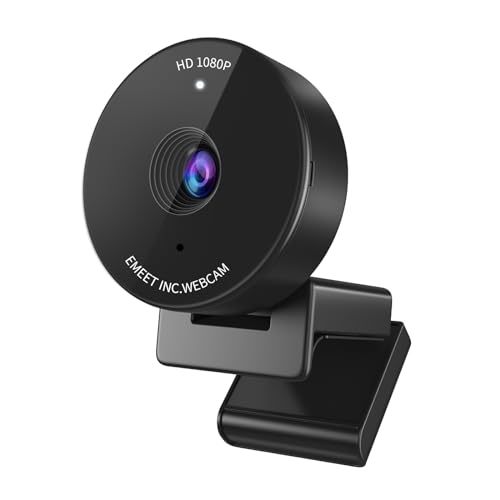
EMEET Piko 4K Dual-Camera Webcam

Our verdict: A dual-camera 4K webcam with a three-mic array and three sound modes, at the top of the $30 to $50 bracket.

The Piko is a 4K dual-camera webcam: a main camera with a 1/2.8 inch sensor plus a second AI-assisted camera that handles autofocus and face lighting. It uses a three-mic array with three sound modes (noise canceling, original sound and live), connects over USB C-to-C or C-to-A, and measures just 1.69 by 0.87 by 2.2 inches. A panda-inspired magnetic cover blocks the lens.

It ranks first because the second camera tackles the two failures that ruin cheap webcams, slow focus and poor face exposure, while the mic modes let you tune for a quiet bedroom or a noisy shared space. It beats the NOVA on audio flexibility and compact size, and trades some of the NOVA's tripod friendliness for a small clip-on design.

Buy it if you stream, record or take many video calls and want the best picture here. It lists in the $30 to $50 bracket, the top of the cap. The caveat is that 4K needs the right USB port, app and upload, and the small body is easy to knock off a thin monitor.

Resolution
4K main plus AI camera
Microphones
3-mic array, 3 modes
Connection
USB C-C and C-A
Privacy
Magnetic cover

What we like

  • +Second camera aids focus and light
  • +Three-mic array with sound modes
  • +USB-C and USB-A options
  • +Small and light body

Watch out for

  • −At the top of the $50 cap
  • −Remote is an optional extra

Buy it if: Streamers and remote workers who want the strongest picture.

Skip it if: You only need a simple call camera.

2

Best 4K Value

EMEET NOVA 4K Webcam

Our verdict: A 4K webcam with phase-detect autofocus and dual mics that ships in 1080p by default.

The NOVA is a 4K webcam at 30 fps with a CMOS sensor, phase-detect autofocus within a fixed range that starts at about 7.9 inches, a fixed 73 degree field of view and two omnidirectional mics. It has a universal joint that rotates 360 degrees horizontally and tilts 15 degrees vertically, plus a standard quarter inch tripod nut. The listing notes the camera ships set to 1080p and 4K must be enabled in the app.

It ranks second because PDAF autofocus is genuinely faster than contrast focus, and the tripod thread is rare at this price. It loses to the Piko on mic modes and AI exposure, and offers no manual focus or adjustable view. It beats every 1080p pick for detail when you record or share a screen with your face.

Buy it if you want true 4K on a budget with a tripod option. It lists in the $30 to $50 bracket. The caveat is bandwidth: the USB 2.0 interface may limit 4K frame rates in some apps, so check the camera settings after you plug in.

Resolution
4K at 30 fps, 1080p default
Focus
PDAF, 7.9 to 118 in
Field of view
73 degrees fixed
Mounting
Clip plus 1/4 in thread

What we like

  • +True 4K option at 30fps
  • +Phase-detect autofocus
  • +Tripod thread included
  • +Dual omnidirectional mics

Watch out for

  • −Defaults to 1080p
  • −No manual focus or FOV change

Buy it if: Solo presenters who want sharp, quick focus.

Skip it if: You need a wide room shot.

3

Best for Laptops

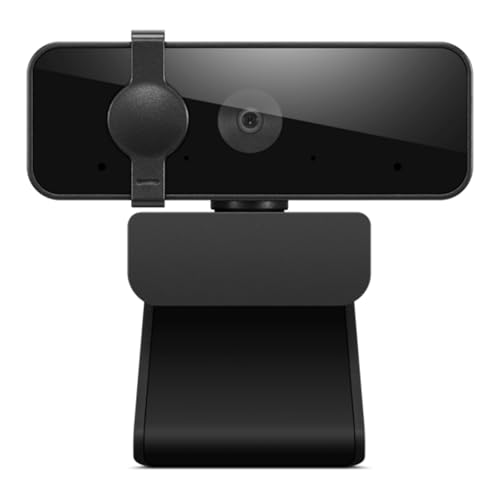
Lenovo Essential FHD Webcam Gen 2

Our verdict: A 1080p webcam sized for thin monitors, with an 85 degree view and a built-in shutter.

Lenovo's Essential FHD Gen 2 is a 1080p webcam at 30 fps with dual built-in microphones, an 85 degree field of view and a slide-closed privacy shutter. The clip fits monitors from 4 to 40 mm thick, the tilt range runs from minus 20 to 10 degrees, and the integrated cable is 1.8 meters long on USB-A 2.0 at 5V and 1A.

It ranks third because the mount and cable are well matched to thin laptop screens and office monitors, and the wide view fits a second person in frame. It loses to the NOVA and Piko on picture ceiling, since the listing mentions no autofocus, and it beats the Logitech on specifics, because the numbers are actually published.

Buy it for hybrid work on a laptop or a slim monitor. It lists in the $30 to $50 bracket. The caveat is that an 85 degree view includes more of your room, so tidy up or use background blur.

Resolution
1080p at 30 fps
Field of view
85 degrees
Mount
4 to 40 mm monitors
Cable
1.8 m, USB-A 2.0

What we like

  • +Wide 85 degree view
  • +Mount fits 4 to 40 mm screens
  • +Slide privacy shutter
  • +Dual built-in mics

Watch out for

  • −No autofocus listed
  • −1080p only

Buy it if: Laptop and slim monitor users who want a safe, simple camera.

Skip it if: You want 4K or autofocus.

4

Best Brand Name

Logitech Brio 101 Full HD Webcam

Our verdict: A basic Logitech 1080p webcam with auto light balance and a slide cover.

The Brio 101 is a Full HD 1080p Logitech webcam with a built-in mic, a slide-in privacy cover and RightLight auto light balance. Logitech says RightLight brightens video by up to 50% compared with earlier Logitech cameras. The body is small at about 2.9 by 2.6 by 1.3 inches, and it works with Teams, Zoom and Google Meet with no setup.

It ranks fourth because a known brand and simple software count for something, but the listing publishes fewer specs than the Lenovo, and there is no autofocus or 4K. It beats the EMEET C950 on brand support, and loses to the Lenovo on mount details.

Buy it if you want a plug-and-play camera from a familiar maker. It lists in the $30 to $50 bracket. The caveat is that the sheet leaves out field of view and sensor type, so you are buying brand and software, not specifications.

Resolution
1080p
Light
RightLight auto balance
Privacy
Integrated slide cover
Setup
Plug and play

What we like

  • +Familiar Logitech software
  • +Auto light balance
  • +Built-in slide cover
  • +Works with major call apps

Watch out for

  • −Few specs listed
  • −No 4K or autofocus

Buy it if: Office users who want a known brand with no setup.

Skip it if: You want published field of view or focus details.

5

Best Narrow View

EMEET C950 1080P Webcam

Our verdict: A 2MP 1080p webcam with a tight 70 degree view and a slide privacy cover.

The C950 is a 2 MP, 1080p webcam at 30 fps with a 70 degree field of view, fixed focus, low-light correction and an omnidirectional mic. The listing recommends sitting 0.5 to 1.2 meters from the lens, and says it runs on Windows 10 and 11, macOS 10.14 and later, Android TV 7.0 and later, Linux and UVC devices. A slide cover blocks the lens.

It ranks fifth because the 70 degree view is tidy and hides a messy room, and it is cheap, but fixed focus and low-light correction rely on a well-lit space. It beats the Gowzmnd for framing and cross-platform support, while the sheet warns you to avoid backlighting.

Buy it for solo calls in a bright room. It lists under $30. The caveat is that a narrow field of view cannot fit two people, and a window behind you will wash out your face.

Resolution
1080p, 2MP, 30 fps
Field of view
70 degrees
Compatibility
Windows, macOS, Linux, UVC
Privacy
Slide cover

What we like

  • +Tight view hides clutter
  • +Cross-platform UVC support
  • +Slide privacy cover
  • +Low cost

Watch out for

  • −Needs good room light
  • −Not for two people

Buy it if: Solo callers with a cluttered room.

Skip it if: You share the frame with others.

6

Best Glass Lens

NexiGo N60 1080P Webcam

Our verdict: A 2 MP 1080p webcam with a 3.6 mm glass lens and a slide cover.

The NexiGo N60 uses a 2 MP CMOS sensor and a 3.6 mm glass lens, producing 1920 by 1080 at 30 fps. The listing says the lens is optimized for subjects from 19.6 inches out to 13 feet, and it works over USB 2.0 or 3.0 with no drivers on Windows, macOS, Linux, Chrome OS and Android, but not on Xbox or PlayStation. The built-in mic is noise cancelling and a cover slides over the lens.

It ranks sixth because a glass lens and a wide working range suit a desk or a small room, and it is cheap, but it publishes no autofocus or exposure features, and the listing advises owners to contact support for a firmware update if audio runs behind the picture. It beats the NIVEOLI on lens specifics.

Buy it for a basic Zoom setup. It lists under $30. The caveat is the possible audio delay, so check lip sync in a test call, and note that consoles are not supported.

Video
1080p, 30 fps
Lens
3.6 mm glass
Range
19.6 in to 13 ft
Platforms
No Xbox or PlayStation

What we like

  • +Glass lens element
  • +Works at 19.6 in to 13 ft
  • +Driver-free setup
  • +Slide privacy cover

Watch out for

  • −Possible audio delay
  • −No console support

Buy it if: Basic calls on a Windows or Mac desk.

Skip it if: You need console support.

7

Best Rotating Head

NIVEOLI 1080P Webcam with Privacy Cover

Our verdict: A 1080p webcam with dual digital mics, HDR processing and a 360 degree head.

NIVEOLI offers 1080p at 30 fps, HDR processing, dual noise-reducing digital mics and fixed focus. The listing says it supports Windows, Mac, Linux and Android, includes an adjustable clip for monitors or standalone use, and has a 360 degree rotating head plus a slide-over privacy cover that also keeps the lens dust-free.

It ranks seventh because the HDR and stereo mic claims sound ambitious for the price, but the listing gives no sensor, lens or field of view figures. It beats the Gowzmnd on mic design and loses to the NexiGo on lens specifics.

Buy it if you want a cheap everyday camera with a rotating head. It lists under $30. The caveat is that claimed HDR on a small sensor is only a processing trick, so expect modest results in backlit rooms.

Video
1080p, 30 fps, HDR
Mics
Dual digital
Mount
Clip, 360 degree head
Focus
Fixed

What we like

  • +Rotating head for angles
  • +Dual noise-reducing mics
  • +Slide privacy cover
  • +Clip fits monitors

Watch out for

  • −No field of view listed
  • −HDR claim unproven

Buy it if: Everyday calls on a monitor or laptop.

Skip it if: You want published sensor details.

8

Best Bundle

Gowzmnd HD 1080P Webcam with Tripod

Our verdict: A 1080p webcam with a clip, a detachable tripod and a 5 foot cable.

Gowzmnd's webcam shoots 1080p at 30 fps through a wide-angle lens with a noise-canceling mic and automatic light correction. It comes with a 5 foot USB cable, a built-in clip and a detachable flexible tripod, and works with USB 2.0, 3.0 and 3.1, Windows, Mac, Linux, tablets and Android phones through UVC.

It ranks last because the specs are generic and the field of view is not given, though the bundle of clip and tripod is useful. It beats nothing on picture quality, but it is the most flexible option if you move the camera around a room or onto a shelf.

Buy it for a desk or table that needs two mounting options. It lists under $30. The caveat is that unbranded sensors vary, so plan for a return if the picture looks soft.

Resolution
1080p, 30 fps
Cable
5 ft USB
Mounting
Clip and detachable tripod
Privacy
Slide shield

What we like

  • +Tripod plus clip included
  • +Wide-angle lens
  • +Auto light correction
  • +Slide privacy shield

Watch out for

  • −Few sensor details listed
  • −Generic specs

Buy it if: Anyone who wants a cheap spare with a tripod.

Skip it if: You need strong low-light performance.

Methodology

How We Ranked These

Picture and focus

Resolution, sensor size, autofocus type and light correction were weighed together, because a sharp focus matters more than raw pixel count.

Microphones

Mic count, sound modes and noise reduction were compared, since built-in webcam mics decide how you sound on a call.

Field of view and framing

Stated fields of view from 70 to 85 degrees were matched to solo calls, two-person calls and cluttered rooms.

Mounting and cable

Clip thickness range, tripod threads, cable length and USB type were credited where the listing states them.

Privacy and value under $50

Slide covers and shutters count, and four picks sit in the $30 to $50 bracket, so we judged value against the cap.

Every Primea Score uses the same weights: Performance 30% · Build & Materials 20% · Everyday Usability 20% · Value 20% · Owner Satisfaction 10%. Full scoring rules

Buyer's guide

How to Pick the Right One for You

By Image Quality

Higher resolution only helps if focus and lighting keep up, so match the camera to the job rather than the pixel count.

NeedOur pick
Best picture overallEMEET Piko 4K Dual-Camera Webcam
4K and fast autofocusEMEET NOVA 4K Webcam
Reliable 1080p, wide viewLenovo Essential FHD Webcam Gen 2
Known brand, plain 1080pLogitech Brio 101 Full HD Webcam
Tight, tidy frameEMEET C950 1080P Webcam
Glass lens, wide working rangeNexiGo N60 1080P Webcam

By Budget

Four picks list in the $30 to $50 bracket, so check the live price against the cap before you buy.

SpendOur pick
Under $30, tight frameEMEET C950 1080P Webcam
Under $30, glass lensNexiGo N60 1080P Webcam
Under $30, rotating headNIVEOLI 1080P Webcam with Privacy Cover
Under $30, flexible mountingGowzmnd HD 1080P Webcam with Tripod
$30 to $50, laptop fitLenovo Essential FHD Webcam Gen 2
$30 to $50, brand nameLogitech Brio 101 Full HD Webcam
$30 to $50, best qualityEMEET Piko 4K Dual-Camera Webcam

4K vs 1080p

4K

More detail for crops, recordings and streams, with faster autofocus on the NOVA and Piko, but only if the app and your upload can carry it. Picks: EMEET Piko and EMEET NOVA.

1080p

Enough for nearly every call, lighter on bandwidth and easier on a USB 2.0 port. Picks: Lenovo Essential, Logitech Brio 101, EMEET C950, NexiGo N60, NIVEOLI and Gowzmnd.

Choose 1080p unless you record or stream, because most meeting apps cap what other people see.

By Mounting

The mount decides where the camera can live.

MountingOur pick
Thin laptop or monitor, 4 to 40 mmLenovo Essential FHD Webcam Gen 2
Tripod threadEMEET NOVA 4K Webcam
Clip and loose tripodGowzmnd HD 1080P Webcam with Tripod
Small desktop clipEMEET Piko 4K Dual-Camera Webcam
Clip with rotating headNIVEOLI 1080P Webcam with Privacy Cover

For Streaming Specifically

Look for

4K at 30 fps, fast autofocus, a mic with modes and a tripod thread. Streaming also wants a USB port that can carry the signal and a camera app you can control.

In this ranking

EMEET Piko for sound modes and the dual-camera focus system, and EMEET NOVA for PDAF autofocus and a tripod mount.

When to Spend More

Spend more if

You want a larger sensor, optical zoom, a wide dynamic range or software face tracking. Those cost more than this cap.

Save if

You only join calls. The EMEET C950 or the Lenovo covers that without paying for 4K.

Questions

Frequently Asked Questions

Will these webcams work with a Mac?+

The EMEET C950 lists macOS 10.14 and later, and the NexiGo lists Mac OS X 10.7 and above. Others say Mac but give no version, so check the listing, and use a USB-C adapter if your laptop lacks a USB-A port.

What is the most common mistake with cheap webcams?+

Buying for resolution and ignoring light. A 1080p camera in a well-lit room looks better than a 4K camera in a dim one, so put a lamp in front of you and avoid sitting with a window behind you.

Is the Piko worth it over the NOVA?+

If you stream or record, yes: the second camera and the three sound modes make a real difference. If you mostly take calls and want a tripod thread, the NOVA costs about the same and does the job.

How do I switch the NOVA to 4K?+

The listing says it ships set to 1080p. Open the EMEETLINK app or your video app's camera settings and select the 4K option, and make sure it is plugged into a USB port that supports the bandwidth.

How do I clean a webcam lens?+

Use a clean microfiber cloth or lens wipe and avoid sprays on the lens. Close the privacy cover when not in use, because a dust-free lens stays sharp longer.

Can I use these with a TV or console?+

The NexiGo listing says it does not work with Xbox, PS4 or PS5, and the C950 lists Android TV 7.0 and later. For other models, check that the device supports USB video class cameras before you buy.

Final take

The EMEET Piko is the best webcam under $50 for anyone who streams, records or lives on video calls, because its second camera and mic modes address the weak points of budget cameras. The NOVA is the pick for 4K with a tripod thread, and the Lenovo is the best fit for a thin laptop screen. If you only take a few calls a week, a $30 1080p camera in good light does the job.

More Ranked & Reviewed Guides