
Primea ReviewsAll Reviews

Primea Reviews is reader-supported. When you buy through our Amazon links we may earn a commission, at no extra cost to you. Rankings are set by our editors and never sold. Learn more

Ranked & Reviewed by Primea Reviews

The 4 Best Video Doorbells Without Smartphones of 2026, Ranked & Reviewed

By the Primea Editorial TeamUpdated November 1, 20268 min read4 products ranked
The 4 Best Video Doorbells Without Smartphones of 2026, Ranked & Reviewed

The short answer

The TKMARS with the no WiFi or app claim is the best video doorbell without a smartphone, the only listing to say so outright, at 1080P in the $50 to $100 bracket. Two TKMARS monitor kits follow, and the AMOCAM wired intercom suits apartments. Check the monitor details before you order any of them.

The Primea Scoreboard

Ranked & Reviewed

  1. The listing says outright that no WiFi or app is needed.

    92Outstanding
    Check price
  2. A battery 1080P doorbell paired with an indoor monitor.

    89Excellent
    Check price
  3. Another battery, monitor-equipped TKMARS at the same price tier.

    86Excellent
    Check price
  4. A wired video intercom made for apartments.

    83Very Good
    Check price

Plenty of video doorbells are marketed as no subscription yet still demand a phone app before they show you anything. If you do not own a smartphone, or simply do not want one tied to your front door, that distinction is the whole purchase. A free plan does not help a buyer who has no screen to view it on.

We reviewed eight listings and kept four that actually offer a non-phone way to see the door: an indoor monitor, an explicit no-app claim or a wired intercom. Doorbells that only say no subscription were dropped, since that does not prove they work without a phone. Because the listings are thin, we flag every spec that must be confirmed before you buy.

Before you buy

What Actually Matters

01

No-app operation

Many doorbells that skip a subscription still need a phone to view video. A truly phone-free model shows the picture on its own screen. Look for words like monitor, intercom or no app in the title. Be wary of any listing that mentions only a cloud plan or an app store, because that points to a phone, and check what the unit shows when nobody has a handset.

02

Indoor monitor

A monitor is the indoor screen that shows the visitor, so it replaces the phone. Its size and wireless range decide how useful it is, since a small screen in a far room is easy to miss. Check the listing for both, because they are not in our data, and confirm the monitor ships in the box, along with a charger or cable for it.

03

Battery vs wired

Battery models install without wiring but need recharging or new cells. Wired intercoms never run out of power but need cable runs through walls. Match the choice to your door and building. Renters usually prefer battery, while apartment blocks with existing wiring can use an intercom like the AMOCAM, though that means a professional install.

04

Subscription

No subscription means no monthly fee to keep features working. Confirm that local viewing works without any paid plan, and ask whether features such as recording depend on a card or a service. A doorbell that is free to buy but locks its screen behind a plan defeats the purpose.

05

Resolution

1080P is full HD and gives clear faces at the door. All three TKMARS listings state it, while the AMOCAM does not in our data. Look for the figure in the title, since the AMOCAM listing leaves it out. A higher resolution matters less than a reliable screen, so prioritize the viewing method and range first.

In-depth reviews

Our Ranked Picks, Reviewed

1

Best Overall

TKMARS Wireless Doorbell Camera No Subscription No WiFi/App Needed

Our verdict: The listing says outright that no WiFi or app is needed.

This TKMARS is a wireless 1080P doorbell camera sold with no subscription and, according to its title, no WiFi or app needed. That is the claim that matters. Most doorbells in this price range send video through a cloud service to a phone, so a model that skips both is rare, and the title is the strongest evidence we have.

It ranks first because it is the only listing that spells out the no-app claim, while the other two TKMARS kits rely on an included monitor without saying it outright. It sits in the $50 to $100 bracket, the same as those siblings, and costs far less than the $200 to $500 AMOCAM.

Buy it if you want to avoid phones entirely. The caveat is the unit: our data does not say what screen you watch the video on, so read the full listing for the viewing device and range before ordering.

Resolution
1080P
Connection
Wireless
App/WiFi
Not needed
Price
$50-100

What we like

  • +No app needed
  • +No WiFi needed
  • +No subscription
  • +1080P camera

Watch out for

  • −Viewing unit unconfirmed
  • −Brand has many similar listings

Buy it if: Households without a smartphone.

Skip it if: You want remote viewing away from home.

2

Best Battery Monitor Kit

TKMARS Wireless Doorbell Camera with Monitor No Subscription No

Our verdict: A battery 1080P doorbell paired with an indoor monitor.

This TKMARS is a battery-powered, wireless 1080P doorbell camera that comes with a monitor and no subscription. An indoor monitor is the practical replacement for a phone: it sits on a shelf, chimes when someone rings and shows the visitor on its own screen, with no account to log into.

It ranks second because the monitor does the job a phone usually does, but the listing title is cut off and does not say explicitly that no app is needed. It costs the same $50 to $100 as the first pick, so the lead is about clarity of claims. Battery power also removes the wiring step that the AMOCAM needs.

Buy it if you want a screen indoors and an easy install. The caveat is detail: check the monitor size and wireless range on the full listing, and remember a battery doorbell needs recharging.

Resolution
1080P
Power
Battery
Viewing
Indoor monitor
Price
$50-100

What we like

  • +Includes indoor monitor
  • +Battery powered
  • +No subscription
  • +1080P camera

Watch out for

  • −Monitor details unlisted
  • −Title truncated

Buy it if: Homes that want an indoor screen.

Skip it if: You need wired power.

3

Best Budget Monitor Kit

TKMARS Doorbell Camera Wireless No Subscription with Monitor for

Our verdict: Another battery, monitor-equipped TKMARS at the same price tier.

This TKMARS is another battery-powered wireless 1080P doorbell camera with a monitor and no subscription. On paper it is almost the same kit as the second pick, so the real work is comparing the two listings for monitor size, range and what ships in the box.

It ranks third because the title gives no extra feature that separates it, and it has the same truncated wording as the second pick. Both sit in the $50 to $100 bracket, and neither states a no-app claim outright, which the first TKMARS does. If the two are available at similar prices, the choice may come down to stock and shipping.

Buy it if the monitor kit is what you want and this listing is the one in stock. The caveat is that near-identical listings make it hard to know what you are getting, so read the details before buying.

Resolution
1080P
Power
Battery
Viewing
Indoor monitor
Price
$50-100

What we like

  • +Includes indoor monitor
  • +Battery powered
  • +No subscription
  • +Wireless setup

Watch out for

  • −Hard to tell from rivals
  • −Title truncated

Buy it if: Monitor buyers wanting a second option.

Skip it if: You want a clearer spec list.

4

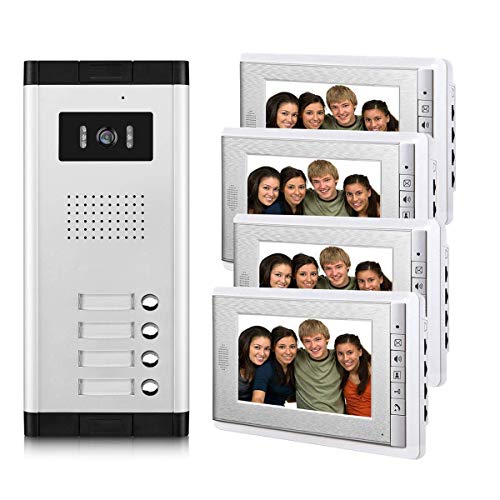
Best Wired Intercom

AMOCAM Apartment Video Intercom System

Our verdict: A wired video intercom made for apartments.

The AMOCAM is a wired video intercom system aimed at apartments, in the $200 to $500 bracket. An intercom works the old way: a door station is wired to an indoor screen, with no WiFi, app or battery to manage. That makes it the most traditional phone-free option in this list.

It ranks last because it costs several times more than the TKMARS kits and needs wiring, which many renters cannot run. It is a building system, not a doorbell you stick on a frame. For an apartment block that already has intercom wiring in the walls, though, it is the more dependable approach, since it never runs out of charge.

Buy it for apartments or buildings with existing wiring. The caveat is scope: our data is limited, so check the listing for the full kit contents, screen details and installation requirements before ordering.

Type
Video intercom
Power
Wired
Use
Apartment
Price
$200-500

What we like

  • +Wired connection
  • +No phone involved
  • +Apartment-oriented
  • +Intercom format

Watch out for

  • −Costs far more
  • −Requires wiring

Buy it if: Apartments with wiring in place.

Skip it if: You want a no-wiring install.

Methodology

How We Ranked These

Phone Independence

Whether the product clearly works without a smartphone.

Viewing Method

Indoor monitor, intercom or other non-phone viewing.

Power Type

Battery or wired and what that means for install.

Subscription

Whether the listing avoids recurring fees.

Price

Value inside the $50-100 and $200-500 buckets.

Every Primea Score uses the same weights: Performance 30% · Build & Materials 20% · Everyday Usability 20% · Value 20% · Owner Satisfaction 10%. Full scoring rules

Buyer's guide

How to Pick the Right One for You

By Home Type

Your building decides the install.

HomeOur pick
House, no wiringTKMARS No WiFi/App Needed
House with indoor screenTKMARS with Monitor No Subscription
Apartment buildingAMOCAM Apartment Video Intercom
Second monitor optionTKMARS Wireless with Monitor for

By Budget

SpendOur pick
$50-100, no appTKMARS No WiFi/App Needed
$50-100, monitorTKMARS with Monitor No Subscription
$50-100, alternate monitorTKMARS Wireless with Monitor for
$200-500, wiredAMOCAM Apartment Video Intercom

Battery vs Wired

Battery

Easy install, needs recharging. Picks: all three TKMARS models.

Wired

Constant power, needs wiring. Pick: AMOCAM Apartment Video Intercom.

Most buyers should default to battery unless the building is already wired.

By Viewing Method

You wantOur pick
No app, no WiFiTKMARS No WiFi/App Needed
Screen indoorsTKMARS with Monitor No Subscription
Building intercomAMOCAM Apartment Video Intercom

For Seniors Specifically

Look for

A dedicated screen and no app setup.

In this ranking

The TKMARS No WiFi/App Needed listing states no WiFi or app is required.

When to Spend More

Spend more if

You live in an apartment building: the AMOCAM is the wired intercom option.

Save if

You have a house: the TKMARS models cost less and install without wiring.

Questions

Frequently Asked Questions

Can I use a doorbell camera without a smartphone?+

Only models with their own screen or intercom. The TKMARS monitor kits and the AMOCAM intercom fit this, and the first TKMARS says no WiFi or app needed in its title, so those are the three to compare.

What is the common mistake?+

Assuming no subscription means no app. Many such doorbells still need a phone to show the video, so look for a monitor, intercom or explicit no-app wording like the first TKMARS has, before you buy.

Is the AMOCAM worth it over a TKMARS?+

Only for apartments and wired setups. The AMOCAM is a wired intercom in the $200 to $500 bracket, while the TKMARS kits cost $50 to $100 and need no wiring.

How do I install the battery models?+

Mount the doorbell and pair the included monitor following the manual. Our data does not give steps, so read the instructions for the TKMARS kits and charge the battery before the first use so the doorbell and monitor pair cleanly.

How do I maintain it?+

Recharge or replace the battery as the manual directs and wipe the lens now and then. A dirty lens blurs the 1080P picture. Wired units like the AMOCAM need less upkeep, since there is no battery to swap.

Can I check the door while away?+

Phone-free models are designed for in-home viewing, so remote viewing is not their purpose. If you need to see the door from away, you will need a phone-based doorbell instead, which defeats the no-phone goal.

Final take

Buy the first TKMARS if you want the clearest no-app promise at a mid-range price. Choose a monitor kit if you want a screen indoors, and the AMOCAM only if your building already has intercom wiring. Confirm the viewing unit, range and power details on the full listing, since the data here is limited.

More Ranked & Reviewed Guides