
Primea ReviewsAll Reviews

Primea Reviews is reader-supported. When you buy through our Amazon links we may earn a commission, at no extra cost to you. Rankings are set by our editors and never sold. Learn more

Ranked & Reviewed by Primea Reviews

5 Video Doorbells for Ethernet-Powered Installs, Ranked & Reviewed (2026)

By the Primea Editorial TeamUpdated November 3, 20269 min read5 products ranked
5 Video Doorbells for Ethernet-Powered Installs, Ranked & Reviewed (2026)

The short answer

The Ring Wired Doorbell 4K Elite is the PoE doorbell to buy if you want the sharpest picture and a single Ethernet cable for power and data. The REOLINK PoE 2K is the better value for a home that already has a PoE switch, and the Aqara G400 is the cheapest PoE model. The Ring 4K Pro and WYZE v2 are wired alternatives that do not state PoE, for homes with existing doorbell wire.

The Primea Scoreboard

Ranked & Reviewed

  1. 4K resolution and PoE in one wired doorbell, at $200 to $500.

    94Outstanding
    Check price
  2. A 2K PoE doorbell for $100 to $200, from a company that builds PoE cameras.

    92Outstanding
    Check price
  3. The least expensive PoE doorbell here, with a chime included.

    88Excellent
    Check price
  4. 04
    Ring Wired Doorbell 4K Pro

    Best 4K Without PoE

    Ring Wired Doorbell 4K Pro

    4K and wired, but the listing does not state PoE power.

    85Excellent
    Check price
  5. 05
    WYZE Wired Doorbell Camera v2

    Best Budget 2K Wired

    WYZE Wired Doorbell Camera v2

    A 2K wired doorbell for $50 to $100, with no PoE listed.

    81Very Good
    Check price

The usual PoE doorbell mistake happens before you open the box: people buy the doorbell and forget the other end of the cable. Power over Ethernet only works if a PoE switch or injector sits at the router, a cable runs to the front door, and the run stays inside the 100 meter Ethernet limit. A doorbell cannot fix a house that has no network cable near the door.

This ranking covers the three models that list PoE, then two wired alternatives that run on conventional doorbell wiring and do not state PoE in their listings. We reviewed all five on paper, looking at resolution, how they get power, the price bracket and what the listing leaves out. Anything not stated, such as storage or cloud fees, we do not claim.

Before you buy

What Actually Matters

01

PoE infrastructure

Power over Ethernet sends power and data over one cable, but needs a PoE switch or injector and a cable run under 100 meters. Without those, the doorbell cannot power on. Check that your router closet has a PoE port and a free path to the door.

02

Resolution

4K captures four times the pixels of 1080p and allows deeper zoom on faces and plates. 2K is a good middle point. Look for the resolution in the title, because a missing number usually means a lower resolution.

03

Chime and indoor alert

A PoE doorbell does not ring your existing mechanical chime without extra hardware. Some include a plug-in chime, like the Aqara G400. Check whether the listing includes one.

04

Field of view and shape

A tall, narrow field of view shows packages on the doorstep while a wide one shows the porch. The listing may give degrees. Pick a model with a head-to-toe view if package theft worries you.

05

Storage and subscriptions

Many doorbells store clips in a cloud plan that costs a monthly fee, while others record locally. The listings here do not state storage, so check the manufacturer's page before buying.

In-depth reviews

Our Ranked Picks, Reviewed

1

Best Overall

Ring Wired Doorbell 4K Elite

Our verdict: 4K resolution and PoE in one wired doorbell, at $200 to $500.

The Ring Wired Doorbell 4K Elite lists 4K video and PoE power, wired, in the $200 to $500 bracket. A single Ethernet cable carries both electricity and the video stream, so there is no battery to charge and no Wi-Fi signal to lose at the door.

It ranks first because it combines the highest listed resolution with the most reliable connection method. 4K gives you more pixels to zoom into when you need to read a license plate or a package label. The tradeoff is cost, since it is the most expensive doorbell here, and you will pay for Ring's subscription features to review footage in the app.

Buy it if your house already has Ethernet at the door and you want top image quality. Skip it if you only have conventional doorbell wiring.

Resolution
4K
Power
PoE
Connection
Wired
Price bucket
$200 to $500

What we like

  • +4K video for zooming into detail
  • +PoE gives power and data on one cable
  • +No battery or Wi-Fi dropouts
  • +Familiar Ring app

Watch out for

  • −Highest price in the ranking
  • −Needs Ethernet cable at the door

Buy it if: New builds and renovations with Ethernet at the front door.

Skip it if: You have only low-voltage doorbell wire.

3

Cheapest PoE

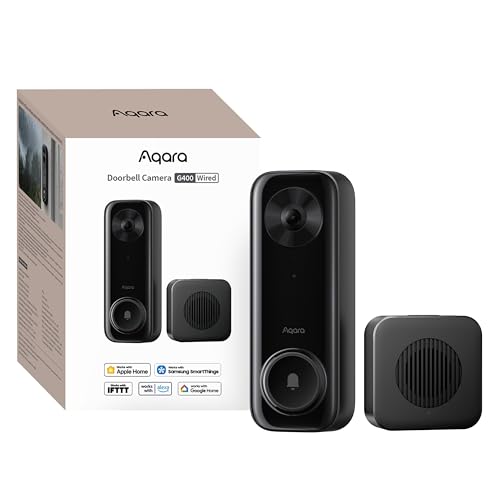
Aqara Doorbell Camera G400 with Chime

Our verdict: The least expensive PoE doorbell here, with a chime included.

The Aqara G400 lists PoE power, a wired design and an included chime, priced at $50 to $100. No resolution is stated, which is the main gap.

It ranks third because it is half the price of the Reolink and a quarter of the Ring, and the included chime means you do not need to hunt for a separate indoor unit. Aqara is a smart-home brand, so it should fit homes already using its sensors. With no resolution listed, we cannot place it above the Reolink for image quality.

Buy it if you want PoE on a small budget. Skip it if you want to confirm picture quality before buying.

Power
PoE
Chime
Included
Design
Wired
Price bucket
$50 to $100

What we like

  • +Lowest-priced PoE doorbell
  • +Chime included in the box
  • +Fits Aqara smart-home gear
  • +No battery to charge

Watch out for

  • −Resolution not listed
  • −Needs Ethernet cable at the door

Buy it if: Budget PoE installs in Aqara smart homes.

Skip it if: You need a confirmed picture quality.

4

Best 4K Without PoE

Ring Wired Doorbell 4K Pro

Our verdict: 4K and wired, but the listing does not state PoE power.

The Ring Wired Doorbell 4K Pro lists 4K video and a wired design, at $100 to $200. Unlike the Elite, the listing does not mention PoE, so assume it runs on conventional doorbell wiring unless the seller says otherwise.

It ranks fourth because it is the way to get 4K picture quality without installing Ethernet at the door. It sits behind the PoE models because power and data both depend on your existing wiring and Wi-Fi.

Choose it if you want 4K and have working doorbell wire. Skip it if you specifically need PoE.

Resolution
4K
Power
Wired (PoE not listed)
Brand
Ring
Price bucket
$100 to $200

What we like

  • +4K video at a lower price
  • +Wired, so no battery swaps
  • +Familiar Ring app
  • +Simpler install than Ethernet

Watch out for

  • −PoE not stated on the listing
  • −Relies on Wi-Fi for video

Buy it if: Homes with doorbell wire that want 4K.

Skip it if: You require PoE power.

5

Best Budget 2K Wired

WYZE Wired Doorbell Camera v2

Our verdict: A 2K wired doorbell for $50 to $100, with no PoE listed.

The WYZE Wired Doorbell Camera v2 lists 2K video and a wired design, at $50 to $100. PoE is not mentioned in the listing, so treat it as a doorbell-wire model.

It ranks last because the PoE options give a steadier connection, while this one depends on Wi-Fi. It does bring 2K at the same price as the Aqara, which makes it a fair choice if you cannot run Ethernet.

Buy it for a budget wired install on existing doorbell wiring. Skip it if you want PoE.

Resolution
2K
Power
Wired (PoE not listed)
Brand
WYZE
Price bucket
$50 to $100

What we like

  • +2K video at a low price
  • +Wired, no battery to charge
  • +Simple install on doorbell wire
  • +Low cost of entry

Watch out for

  • −PoE is not listed
  • −Wi-Fi dependent

Buy it if: Budget installs on existing doorbell wiring.

Skip it if: You need PoE or the best picture.

Methodology

How We Ranked These

Power method

Confirmed PoE models were ranked above doorbells whose listings only say wired, since PoE gives power and data over one cable.

Video resolution

Listed 2K and 4K figures were compared, and a missing resolution counted against a listing.

Install requirements

We weighed the need for an Ethernet run, a PoE switch or injector, or existing doorbell wire.

Ecosystem fit

App and smart-home brand fit, from Ring to Reolink and Aqara, was considered for day-to-day use.

Value within the bracket

Each doorbell was scored inside its $50 to $100, $100 to $200 or $200 to $500 bucket.

Every Primea Score uses the same weights: Performance 30% · Build & Materials 20% · Everyday Usability 20% · Value 20% · Owner Satisfaction 10%. Full scoring rules

Buyer's guide

How to Pick the Right One for You

By Power Source

Start by deciding what power you can actually get to the front door.

Power availableOur pick
Ethernet and PoE switch, top imageRing Wired Doorbell 4K Elite
Ethernet and PoE switch, valueREOLINK Video Doorbell PoE 2K Wired Outdoor Security Camera with
Ethernet, small budgetAqara Doorbell Camera G400 with Chime
Doorbell wire onlyRing Wired Doorbell 4K Pro

By Budget

SpendOur pick
$50 to $100 (PoE)Aqara Doorbell Camera G400 with Chime
$50 to $100 (doorbell wire)WYZE Wired Doorbell Camera v2
$100 to $200REOLINK Video Doorbell PoE 2K Wired Outdoor Security Camera with
$200 to $500Ring Wired Doorbell 4K Elite

PoE vs Doorbell Wire

PoE

One cable for power and data, with a stable wired link. Needs an Ethernet run and a PoE switch or injector. Picks: Ring 4K Elite, REOLINK, Aqara G400.

Doorbell wire

Uses your existing low-voltage doorbell wiring and relies on Wi-Fi for video. Easier to install. Picks: Ring 4K Pro, WYZE v2.

Default to PoE if you can run a cable, because a wired link beats Wi-Fi.

By Resolution

ResolutionOur pick
4K PoERing Wired Doorbell 4K Elite
4K, no PoERing Wired Doorbell 4K Pro
2K PoEREOLINK Video Doorbell PoE 2K Wired Outdoor Security Camera with
2K, no PoEWYZE Wired Doorbell Camera v2

For a Home Camera System Specifically

Look for

A PoE doorbell that works with the same switch as your cameras, so one device powers everything and the network stays simple.

In this ranking

The REOLINK PoE fits a PoE camera setup, and the Ring Elite gives the best image if you already use the Ring app.

When to Spend More

Spend more if

You want the sharpest picture and a rock-solid connection. The Ring Wired Doorbell 4K Elite delivers both.

Save if

You just need PoE and a chime. The Aqara G400 offers that at a fraction of the cost.

Questions

Frequently Asked Questions

Do I need a PoE switch for these doorbells?+

For the three PoE models, you need either a PoE switch or a PoE injector at the router end. The Ring 4K Pro and WYZE v2 do not list PoE and use doorbell wiring instead.

What is the biggest mistake with PoE doorbells?+

Forgetting the cable run. If your door has no Ethernet, you need to pull a cable through the wall, which is the real cost of a PoE install.

Is the Ring Elite worth it over the REOLINK?+

If you want 4K and Ring's app, yes. If you already run a PoE switch for cameras, the REOLINK gives you 2K and wired reliability for half the price.

How do I set up a PoE doorbell?+

Run an Ethernet cable from the PoE switch to the door, mount the bracket, plug in the doorbell and pair it through the app. Weatherproof the cable entry point.

How long can the Ethernet run be?+

Standard Ethernet carries power and data up to about 100 meters. Longer runs need an extender.

Will a PoE doorbell ring my indoor chime?+

Not by itself. You need a plug-in chime, like the one with the Aqara G400, or a compatible chime kit from the maker.

Final take

The Ring Wired Doorbell 4K Elite is the PoE doorbell to buy for the best picture and a stable connection. The REOLINK PoE 2K is the smart pick if you already have a PoE switch, and the Aqara G400 is the budget route. If you cannot run Ethernet, the Ring 4K Pro is the fallback.

More Ranked & Reviewed Guides