
Primea ReviewsAll Reviews

Primea Reviews is reader-supported. When you buy through our Amazon links we may earn a commission, at no extra cost to you. Rankings are set by our editors and never sold. Learn more

Ranked & Reviewed by Primea Reviews

The 7 Best USB-C Ethernet Adapters for MacBook Air, Ranked & Reviewed

By the Primea Editorial TeamUpdated November 3, 202610 min read7 products ranked
The 7 Best USB-C Ethernet Adapters for MacBook Air, Ranked & Reviewed

The short answer

The Anker USB-C to Ethernet Adapter is the one to buy for a MacBook Air, with a braided cable, aluminum body and a plain 1Gbps connection that just works. The UGREEN 2.5G adapter is the pick if your router or switch can go faster than gigabit, the TP-Link UE300C folds small enough for a laptop sleeve, and the Belkin has the longest warranty at two years.

The Primea Scoreboard

Ranked & Reviewed

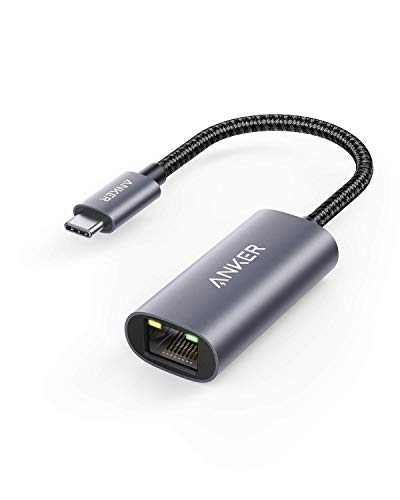
  1. A rugged gigabit adapter with an aluminum body, braided cable and 18-month cover.

    94Outstanding
    Check price
  2. A 2.5Gb adapter on the RTL8156BG chip that still falls back cleanly to gigabit.

    92Outstanding
    Check price
  3. A 2.8 by 1.0 by 0.6 inch foldable adapter that needs no drivers, even on Linux.

    90Excellent
    Check price
  4. 04
    UGREEN USB-C to Ethernet Adapter (1Gbps)

    Best Multi-Device Compatibility

    UGREEN USB-C to Ethernet Adapter (1Gbps)

    A driver-free gigabit adapter with an LED light that also works with game consoles.

    88Excellent
    Check price
  5. Up to 1000Mbps with universal Mac and Windows support and a 2-year warranty.

    86Excellent
    Check price
  6. 06
    BENFEI USB-C to Ethernet Adapter

    Best Thunderbolt Compatibility

    BENFEI USB-C to Ethernet Adapter

    A gigabit adapter that lists Thunderbolt 3 and 4 compatibility, with an unconditional 18-month warranty.

    84Very Good
    Check price
  7. 07
    uni USB-C to Ethernet Adapter 1Gbps

    Best Port-Clearing Design

    uni USB-C to Ethernet Adapter 1Gbps

    A driver-free gigabit adapter with a non-slip, port-clearing shape and 18-month cover.

    82Very Good
    Check price

The common mistake with a MacBook Air is treating its ports as free. A recent Air gives you only two USB-C ports, and they handle charging, storage and displays. Spending one of them on a wired network link is a real cost, so the adapter you choose should be small, solid and trouble free, and it should not need a driver or a second dongle to work.

That is how we ranked these seven. We reviewed listings and spec data for link speed, chipset notes, build material, cable design, warranty length and compatibility claims. All but one of the adapters here sit under $25, so price barely separates them. The real differences are speed ceilings, how well each one clears neighbouring ports, and how much support the maker offers.

Before you buy

What Actually Matters

01

Speed ceiling

A 1Gbps adapter tops out around 940Mbps in real use, which covers nearly every broadband plan. A 2.5Gb adapter only helps if your router or switch has a 2.5G port. Check your own equipment first, because paying for speed you cannot reach is the most common waste.

02

Driver-free setup

Most modern adapters use a chipset macOS recognises automatically, so you plug in and connect. A listing that says driver-free on most systems is a good sign. Be wary of an adapter that asks you to install software, since that can break after a macOS update.

03

Cable and case build

The fragile point on an adapter is the cable joint. A braided nylon jacket resists fraying better than thin rubber, and a metal case helps spread heat. Look for those words on the listing, and compare them with the warranty length.

04

Size and port clearance

An Air has two USB-C ports close together, and a wide connector can crowd the second. Foldable or port-clearing designs avoid that. Compare the listed dimensions, such as the 2.8 by 1.0 by 0.6 inch TP-Link, against your usual setup.

05

Warranty

Warranties here run from 18 months to 2 years, and some listings give none. A longer cover tells you what the maker expects of the product. Prefer a listed warranty over a silent one, especially at this price.

In-depth reviews

Our Ranked Picks, Reviewed

1

Best Overall

Anker USB-C to Ethernet Adapter

Our verdict: A rugged gigabit adapter with an aluminum body, braided cable and 18-month cover.

The Anker is a 1Gbps adapter on USB-C 3.0 with an aluminum body and a braided nylon cable, backed by an 18-month warranty. It costs under $25.

It takes first place because it handles the part of an adapter that usually fails, which is the cable. A braided jacket survives being stuffed in a bag far better than a thin rubber one, and the aluminum shell helps shed heat during long transfers. Gigabit is also plenty for nearly every home or office link, since few broadband plans exceed it. It sits ahead of the UGREEN 2.5G because it is simpler and cheaper, and a faster link is useless without a matching router.

Buy it if you want a durable adapter to leave in a laptop bag and forget. Skip it if your network already runs above one gigabit.

Speed
1Gbps
Interface
USB-C 3.0
Build
Aluminum, braided nylon cable
Warranty
18 months

What we like

  • +Braided cable survives bag travel
  • +Aluminum body sheds heat
  • +Gigabit speed fits most networks
  • +18-month warranty

Watch out for

  • −Capped at 1Gbps
  • −Tethered cable adds bulk

Buy it if: MacBook Air owners who want a durable travel adapter.

Skip it if: Your router or switch runs faster than gigabit.

2

Best Multi-Gig Upgrade

UGREEN USB-C to Ethernet Adapter 2.5G

Our verdict: A 2.5Gb adapter on the RTL8156BG chip that still falls back cleanly to gigabit.

This UGREEN reaches 2.5Gb through the RTL8156BG chip, comes in an aluminum housing with status LEDs, and remains backward compatible with 1Gb networks. It sits in the $25 to $50 range.

A 2.5Gb link is worth the premium only if the rest of your network can use it, meaning a router, switch or NAS with a 2.5G port. If it can, the Air gains more usable bandwidth for backups and large downloads than any 1Gbps adapter allows. If it cannot, the adapter simply negotiates down to gigabit and costs you a few dollars extra. That safety net, plus the LEDs for troubleshooting, is why it lands second.

Buy it if you are upgrading to multi-gig equipment now or soon. Skip it if you have a standard gigabit router and no plans to change.

Speed
2.5Gb
Chipset
RTL8156BG
Build
Aluminum, status LEDs
Fallback
Works on 1Gb networks

What we like

  • +2.5Gb speed future-proofs the link
  • +Falls back to gigabit networks
  • +Status LEDs aid troubleshooting
  • +Aluminum housing

Watch out for

  • −Costs more than gigabit rivals
  • −Needs 2.5G gear to pay off

Buy it if: Anyone moving to a multi-gig router or NAS.

Skip it if: Your network tops out at gigabit.

4

Best Multi-Device Compatibility

UGREEN USB-C to Ethernet Adapter (1Gbps)

Our verdict: A driver-free gigabit adapter with an LED light that also works with game consoles.

The UGREEN gigabit adapter is driver-free on most systems, uses an aluminum alloy case with an LED status light, and is listed as compatible with the Nintendo Switch and Steam Deck. It costs under $25.

The compatibility list is what separates it from the Anker, because it tells you the same adapter can move between a MacBook Air and a gaming handheld without fuss. The LED shows link activity at a glance, which saves guesswork when a cable fails. It ranks fourth because the listing gives no cable material or warranty details, so build quality is harder to judge than the Anker's.

Buy it if one adapter must serve a Mac and a console. Skip it if you want a warranty and braided cable.

Speed
1Gbps
Case
Aluminum alloy
Indicator
LED status light
Also works with
Nintendo Switch, Steam Deck

What we like

  • +Works with Switch and Steam Deck
  • +LED shows link status
  • +Driver-free on most systems
  • +Aluminum alloy case

Watch out for

  • −Warranty not listed
  • −Cable details not listed

Buy it if: People sharing one adapter across a Mac and a console.

Skip it if: You want a braided cable and clear warranty.

5

Best Warranty

Belkin USB-C to Ethernet Adapter

Our verdict: Up to 1000Mbps with universal Mac and Windows support and a 2-year warranty.

The Belkin offers up to 1000Mbps gigabit Ethernet, universal Mac and Windows USB-C compatibility, and a 2-year warranty, at under $25.

The 2-year warranty is the longest among the gigabit adapters, which is the best reason to buy it. It also carries a respected name in Mac accessories, so support questions are easier to resolve. It ranks fifth because it lists fewer physical details than the Anker, with no mention of the case material or cable. Its age shows, too: the product has been around for years, and newer rivals have refined the form.

Buy it if a long warranty and a familiar brand matter most. Skip it if you want a premium finish or a faster link.

Speed
Up to 1000Mbps
Compatibility
Mac and Windows USB-C
Warranty
2 years
Price
Under $25

What we like

  • +2-year warranty is longest here
  • +Respected Mac accessory brand
  • +Mac and Windows compatibility
  • +Under $25

Watch out for

  • −Few build details listed
  • −No faster option offered

Buy it if: Buyers who put warranty and brand first.

Skip it if: You want a premium case or a multi-gig link.

6

Best Thunderbolt Compatibility

BENFEI USB-C to Ethernet Adapter

Our verdict: A gigabit adapter that lists Thunderbolt 3 and 4 compatibility, with an unconditional 18-month warranty.

The BENFEI is a 1Gbps adapter with a braided nylon cable and aluminum casing. It lists Thunderbolt 3/4 compatibility and an 18-month unconditional warranty, and costs under $25.

It matches the Anker on materials and warranty, so the ranking comes down to track record. The Thunderbolt compatibility note reassures anyone connecting to a modern Air, whose ports are Thunderbolt-capable. The word unconditional in the warranty suggests a simple claims process. It lands sixth only because the Anker is the better-known name, and the listing offers no extra speed or form factor advantage.

Buy it as a near-identical alternative to the Anker. Skip it if brand recognition is a deciding factor.

Speed
1Gbps
Compatibility
Thunderbolt 3/4
Build
Braided nylon, aluminum
Warranty
18 months, unconditional

What we like

  • +Braided cable and aluminum case
  • +Thunderbolt 3 and 4 compatible
  • +Unconditional 18-month warranty
  • +Under $25

Watch out for

  • −Less known than Anker
  • −Capped at gigabit speed

Buy it if: Shoppers wanting an Anker-like build from another brand.

Skip it if: You prefer a widely recognised name.

7

Best Port-Clearing Design

uni USB-C to Ethernet Adapter 1Gbps

Our verdict: A driver-free gigabit adapter with a non-slip, port-clearing shape and 18-month cover.

The uni adapter delivers 1Gbps, is driver-free on most operating systems, features a non-slip design that clears neighbouring ports, and has an 18-month warranty. It costs under $25.

The port-clearing shape is useful on an Air, where the two USB-C ports sit close together and a bulky connector can block the other. The non-slip grip also helps it stay put when you tug a cable. It ranks last because the listing gives no casing material or cable details, and in a field of near-identical gigabit adapters, extra detail on construction earns trust.

Buy it if clearance next to a second port is your concern. Skip it if you want a fully described metal build.

Speed
1Gbps
Drivers
Driver-free on most systems
Design
Non-slip, port-clearing
Warranty
18 months

What we like

  • +Port-clearing shape protects neighbouring port
  • +Non-slip grip stays put
  • +Driver-free on most systems
  • +18-month warranty

Watch out for

  • −Case material not listed
  • −No speed advantage

Buy it if: Air owners who plug something into the other port.

Skip it if: You want full material details on the case.

Methodology

How We Ranked These

Link speed

We compared 1Gbps and 2.5Gb ratings and checked how each adapter behaves on a slower network.

Build and cable

Aluminum or alloy cases, braided cables and foldable bodies were weighed as evidence of survival in a laptop bag.

Compatibility and drivers

Driver-free claims, Thunderbolt notes and extra device support were read directly from the listings.

Warranty and support

Warranty lengths from 18 months to 2 years were treated as the maker's confidence in the product.

Fit on a two-port laptop

Size, shape and clearance for a neighbouring USB-C port mattered because the Air has so few ports.

Every Primea Score uses the same weights: Performance 30% · Build & Materials 20% · Everyday Usability 20% · Value 20% · Owner Satisfaction 10%. Full scoring rules

Buyer's guide

How to Pick the Right One for You

By Network Speed

Match the adapter to the fastest port your network can actually offer.

NetworkOur pick
2.5G router or switchUGREEN USB-C to Ethernet Adapter 2.5G
Standard gigabit, durableAnker USB-C to Ethernet Adapter
Standard gigabit, smallestTP-Link UE300C USB-C to Ethernet Adapter
Standard gigabit, long warrantyBelkin USB-C to Ethernet Adapter

By Budget

SpendOur pick
Under $25, best buildAnker USB-C to Ethernet Adapter
Under $25, near-identical alternativeBENFEI USB-C to Ethernet Adapter
Under $25, fits crowded portsuni USB-C to Ethernet Adapter 1Gbps
$25 to $50UGREEN USB-C to Ethernet Adapter 2.5G

Gigabit vs 2.5G

Gigabit

Fast enough for nearly every home connection and cheaper. Picks: Anker, TP-Link UE300C, Belkin, BENFEI, uni.

2.5G

Worth it if your router, switch or NAS has a 2.5G port, and it still works on gigabit gear. Pick: UGREEN 2.5G.

Default to gigabit unless you already own multi-gig equipment.

By Carry Style

How you carry itOur pick
Loose in a bagAnker USB-C to Ethernet Adapter
In a laptop sleeve pocketTP-Link UE300C USB-C to Ethernet Adapter
Shared with a game consoleUGREEN USB-C to Ethernet Adapter (1Gbps)
Left plugged in at a deskBENFEI USB-C to Ethernet Adapter

For Working From Home Specifically

Look for

A stable gigabit link for video calls, a driver-free setup that survives macOS updates, and a warranty that outlasts a year.

In this ranking

The Anker for a steady daily link, the Belkin for the longest warranty, and the UGREEN 2.5G if your home office has multi-gig gear.

When to Spend More

Spend more if

You move large files over a wired network and own a 2.5G router or NAS. The UGREEN 2.5G is the upgrade.

Save if

You only need stable video calls and browsing. Any of the under $25 gigabit adapters is enough.

Questions

Frequently Asked Questions

Will these adapters work with every MacBook Air?+

Any Air with a USB-C port should work, since these adapters are driver-free on macOS. The BENFEI also lists Thunderbolt 3 and 4 compatibility. Always confirm the port type on older Airs before ordering.

What is the biggest mistake when buying an Ethernet adapter?+

Paying for 2.5Gb when your router offers only gigabit ports. The faster adapter works, but you gain nothing. Check your router or switch port speeds first.

Is the Anker worth it over a cheaper no-name adapter?+

Usually yes. The braided cable, aluminum body and 18-month warranty address the points where cheap adapters tend to fail. The price gap is only a few dollars.

How do I set one up?+

Plug the adapter into a USB-C port, connect the Ethernet cable, and macOS should detect the new network service on its own. Open System Settings, then Network, to confirm it shows as connected.

Why does my adapter feel warm?+

Gigabit adapters generate some heat under load, and a metal case spreads it out. Mild warmth is normal, but if it becomes too hot to hold, unplug it and check for a faulty unit.

Can I use it with an iPad or a phone?+

Many USB-C iPads accept Ethernet adapters and show a wired connection in settings. Support varies by device, so check the maker's compatibility list before relying on it.

Final take

For most MacBook Air owners, the Anker USB-C to Ethernet Adapter is the best choice: a braided cable, an aluminum body, 1Gbps speed and 18 months of cover for under $25. The UGREEN 2.5G is the one to get if you run multi-gig equipment, and the TP-Link UE300C wins on carrying size. The Belkin offers the longest warranty. Check your router speed first, then pick the build you trust.

More Ranked & Reviewed Guides