
Primea ReviewsAll Reviews

Primea Reviews is reader-supported. When you buy through our Amazon links we may earn a commission, at no extra cost to you. Rankings are set by our editors and never sold. Learn more

Ranked & Reviewed by Primea Reviews

The 7 Best USB-C Ethernet Adapters for Mac Desktops and Laptops, Ranked & Reviewed

By the Primea Editorial TeamUpdated November 3, 202611 min read7 products ranked
The 7 Best USB-C Ethernet Adapters for Mac Desktops and Laptops, Ranked & Reviewed

The short answer

The UGREEN 2.5G adapter is the best choice for most Mac owners, because it is faster than gigabit yet falls back cleanly on older networks. The Anker is the simple, sturdy 1Gbps pick, the UGREEN 5Gb is the speed champion but only works on newer Apple silicon, and the uni 4-in-1 hub adds three USB-A ports to the Ethernet jack.

The Primea Scoreboard

Ranked & Reviewed

  1. 2.5Gb speed on a proven RTL8156BG chip, with fallback to ordinary gigabit.

    93Outstanding
    Check price
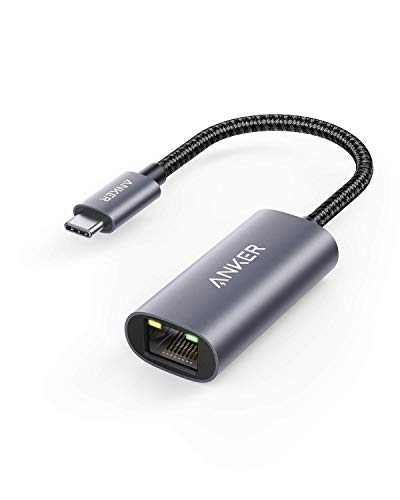
  2. The sturdy gigabit adapter, with an aluminum body, braided cable and 18-month cover.

    91Excellent
    Check price
  3. A 5Gb RTL8157 adapter with overheating protection, limited to Apple M3 and newer on macOS 15.

    89Excellent
    Check price
  4. A foldable 1Gbps adapter that is driver-free on Mac, Windows and Linux.

    87Excellent
    Check price
  5. A gigabit adapter with an LED light that doubles for a Nintendo Switch or Steam Deck.

    85Excellent
    Check price
  6. Non-slip, driver-free gigabit with a shape that leaves the next port free.

    83Very Good
    Check price
  7. 07
    uni USB-C Hub Ethernet 1Gbps 4-in-1

    Gigabit Ethernet plus three USB-A ports at up to 5Gbps, with dual status indicators.

    81Very Good
    Check price

Not every Mac is the same machine, and that is the buyer trap with Ethernet adapters. An older Intel laptop, an M1 mini and a current M3 or newer system do not all support the same speeds, and some of the fastest adapters list a minimum chip and operating system. Buying on the headline number without reading that line is how people end up with a dongle that connects at a fraction of its rating.

So this ranking begins with compatibility and speed tiers, then looks at build and warranty. We reviewed seven adapters from their listings, covering 1Gbps, 2.5Gb and 5Gb links, chipset notes, extra ports and warranty periods. Anything the listings do not state, we have left out.

Before you buy

What Actually Matters

01

Speed tier and your network

Adapters come in 1Gbps, 2.5Gb and 5Gb. The speed you get is the lowest of the adapter, the cable and the switch or router port. Look at the port labels on your router before you pay for more speed than it can deliver.

02

Apple chip and macOS limits

Faster adapters can rely on newer silicon and software. The 5Gb UGREEN lists Apple M3 and newer with macOS 15 or later, for instance. Read that compatibility line and compare it with your Mac under the Apple menu before buying.

03

Chipset

The chipset decides driver support and stability. Realtek parts such as the RTL8156BG and RTL8157 are common and well supported on current systems. A listing that names its chip gives you something to check, while one that hides it asks for trust.

04

Heat and housing

Faster links run hotter, and a metal housing helps spread the load. Auto Lite style modes reduce speed to avoid overheating. Look for a metal case and any thermal feature on the listing, especially for 2.5G and above.

05

Extra ports and warranty

A hub like the uni 4-in-1 adds USB-A, but shares bandwidth. Warranty is a clue to durability, and 18 months is the common level here. Match the extras to what you actually plug in.

In-depth reviews

Our Ranked Picks, Reviewed

1

Best Overall

UGREEN USB-C to Ethernet Adapter 2.5G

Our verdict: 2.5Gb speed on a proven RTL8156BG chip, with fallback to ordinary gigabit.

This UGREEN adapter links at 2.5Gb through the RTL8156BG chip, sits in an aluminum housing with status LEDs, and stays backward compatible with 1Gb networks. It falls in the $25 to $50 range.

It wins because it is the sweet spot between price, speed and risk. The 2.5G tier is where new routers, switches and NAS boxes are heading, so a Mac with this adapter is ready for them. Unlike the 5Gb model below, it does not hide a chip and OS requirement behind its box, and the fallback to 1Gb means nothing breaks on today's network. The LEDs help when you are tracing a faulty cable.

Buy it if you want a speed bump that works with the Mac you own now. Skip it if you are happy with gigabit and want to spend the least.

Speed
2.5Gb
Chipset
RTL8156BG
Housing
Aluminum with LEDs
Fallback
Backward compatible with 1Gb

What we like

  • +2.5Gb speed without OS restrictions
  • +Falls back to 1Gb networks
  • +LEDs show link status
  • +Metal housing

Watch out for

  • −Costs more than gigabit units
  • −Needs 2.5G gear for full speed

Buy it if: Mac owners preparing for a multi-gig home network.

Skip it if: Gigabit is plenty and budget is tight.

2

Best 1Gbps Pick

Anker USB-C to Ethernet Adapter

Our verdict: The sturdy gigabit adapter, with an aluminum body, braided cable and 18-month cover.

The Anker is a 1Gbps adapter that runs over USB-C 3.0, with an aluminum body, a braided nylon cable and an 18-month warranty. It is priced under $25.

This is the adapter to buy when speed beyond gigabit is irrelevant to your setup. The braided cable resists the kinks and fraying that kill cheap adapters, and the metal body copes with sustained transfers. It places second because 2.5G is a meaningful step up for people with the gear, and the Anker cannot offer it.

Buy it for a Mac that moves between desks and needs something dependable. Skip it if your router already offers 2.5G ports.

Speed
1Gbps
Interface
USB-C 3.0
Build
Aluminum, braided nylon
Warranty
18 months

What we like

  • +Braided cable resists fraying
  • +Aluminum body handles heat
  • +18-month warranty
  • +Under $25

Watch out for

  • −Limited to gigabit
  • −Cable adds some bulk

Buy it if: Mac users who move between desks and want durability.

Skip it if: You own multi-gig networking gear.

3

Fastest Link

UGREEN USB-C to Ethernet Adapter 5Gb

Our verdict: A 5Gb RTL8157 adapter with overheating protection, limited to Apple M3 and newer on macOS 15.

The 5Gb UGREEN uses the RTL8157 chip and an Auto Lite mode meant to prevent overheating. The listing states that it supports Apple M3 and newer only, with macOS 15 or later, Windows 11 or Linux 5.17 and up. It costs in the $25 to $50 range.

It is the fastest adapter in the field, yet that single line of restrictions is why it ranks third instead of first. On a current Mac with a 5G switch it makes a real difference to large transfers. On an older Mac, it may not work at all. The Auto Lite feature is a thoughtful addition, since faster links run hotter and the adapter can step down rather than throttle suddenly.

Buy it only if your Mac is an M3 or newer and your network has 5G ports. Skip it if there is any chance you will use it with an older machine.

Speed
5Gb
Chipset
RTL8157
Thermal
Auto Lite mode
Support
Apple M3 and newer, macOS 15+

What we like

  • +5Gb is the fastest option here
  • +Auto Lite mode prevents overheating
  • +Also supports Windows 11 and Linux
  • +Priced in the $25 to $50 range

Watch out for

  • −Apple M3 and newer only
  • −Needs 5G gear to benefit

Buy it if: Owners of a newer Mac with a 5G network.

Skip it if: Your Mac predates the M3 or runs older macOS.

5

Best Console Crossover

UGREEN USB-C to Ethernet Adapter (1Gbps)

Our verdict: A gigabit adapter with an LED light that doubles for a Nintendo Switch or Steam Deck.

This UGREEN gigabit adapter is driver-free on most systems, uses an aluminum alloy case and an LED status light, and lists compatibility with the Nintendo Switch and Steam Deck. It costs under $25.

It is the practical choice for a household that wants a single adapter for a Mac and a gaming handheld. The LED gives a quick read on whether the cable is carrying traffic. It ranks fifth since the listing says nothing about warranty or cable construction, and the Anker covers both.

Buy it if one dongle has to serve both work and play. Skip it if durability data matters more than flexibility.

Speed
1Gbps
Case
Aluminum alloy
Indicator
LED status light
Also supports
Switch, Steam Deck

What we like

  • +Works with game consoles too
  • +LED confirms link activity
  • +Driver-free on most systems
  • +Metal alloy case

Watch out for

  • −No warranty listed
  • −Cable details missing

Buy it if: Households sharing one adapter across devices.

Skip it if: You want a stated warranty.

6

Best Port Clearance

uni USB-C to Ethernet Adapter 1Gbps

Our verdict: Non-slip, driver-free gigabit with a shape that leaves the next port free.

The uni adapter runs at 1Gbps, installs without drivers on most operating systems, uses a non-slip and port-clearing shape, and has an 18-month warranty. It costs under $25.

On a Mac mini or a laptop where USB-C ports sit side by side, a chunky plug can block the neighbour, and this design is meant to avoid that. The non-slip surface also makes it easier to pull out. It ranks sixth because the listing gives no case material or cable description, so it trails the Anker on durability evidence.

Buy it if your ports are tightly packed. Skip it if you want a metal shell.

Speed
1Gbps
Drivers
Driver-free on most systems
Shape
Non-slip, port-clearing
Warranty
18 months

What we like

  • +Leaves the neighbouring port usable
  • +Non-slip grip
  • +18-month warranty
  • +Driver-free setup

Watch out for

  • −Case material not listed
  • −No faster option

Buy it if: Packed port layouts on laptops and minis.

Skip it if: You want a stated metal shell.

7

Best Hub With Ethernet

uni USB-C Hub Ethernet 1Gbps 4-in-1

Our verdict: Gigabit Ethernet plus three USB-A ports at up to 5Gbps, with dual status indicators.

This uni hub combines a 1Gbps Ethernet port with three USB-A ports at up to 5Gbps, along with dual status indicators and an 18-month warranty. It costs under $25.

It is a different kind of product from the pure adapters above, because it turns a single USB-C port into four connections. That helps a Mac with few ports, where a keyboard, a drive and a wired network all compete. It ranks last because a hub shares bandwidth across its ports, so heavy use of the drive and the network at once can slow both, and it is bulkier to carry.

Buy it if you need USB-A ports as well as Ethernet. Skip it if you want the smallest, simplest network link.

Ethernet
1Gbps
USB-A
3 ports, up to 5Gbps
Indicators
Dual status lights
Warranty
18 months

What we like

  • +Adds three USB-A ports
  • +Gigabit Ethernet included
  • +Dual status indicators
  • +18-month warranty

Watch out for

  • −Ports share bandwidth
  • −Bulkier than a dongle

Buy it if: Mac owners who need USB-A ports and wired internet.

Skip it if: You want the smallest possible network adapter.

Methodology

How We Ranked These

Speed tier

We compared 1Gbps, 2.5Gb and 5Gb adapters and how each one behaves when the network is slower.

Mac and OS support

Driver-free claims and stated minimums such as Apple M3 and macOS 15 were read straight from the listings.

Chipset and heat

Realtek chip notes, metal housings and the Auto Lite thermal mode were weighed for sustained transfers.

Construction and warranty

Braided cables, folding bodies and warranty periods of 18 months were taken as signs of durability.

Port economy

Clearance for neighbouring ports and the value of extra USB-A connections were scored for port-starved Macs.

Every Primea Score uses the same weights: Performance 30% · Build & Materials 20% · Everyday Usability 20% · Value 20% · Owner Satisfaction 10%. Full scoring rules

Buyer's guide

How to Pick the Right One for You

By Network Speed

Pick the tier your router can use, then add margin only if you plan to upgrade.

NetworkOur pick
5G switch, M3 Mac or newerUGREEN USB-C to Ethernet Adapter 5Gb
2.5G router or NASUGREEN USB-C to Ethernet Adapter 2.5G
Standard gigabit, tough buildAnker USB-C to Ethernet Adapter
Standard gigabit, pocket sizeTP-Link UE300C USB-C to Ethernet Adapter

By Budget

SpendOur pick
Under $25, durableAnker USB-C to Ethernet Adapter
Under $25, shared with a consoleUGREEN USB-C to Ethernet Adapter (1Gbps)
Under $25, with USB-A portsuni USB-C Hub Ethernet 1Gbps 4-in-1
$25 to $50UGREEN USB-C to Ethernet Adapter 2.5G

Single Adapter vs Hub

Single adapter

One job, minimal size, no shared bandwidth. Picks: Anker, TP-Link UE300C, both UGREEN gigabit and multi-gig models, uni 1Gbps.

Hub with Ethernet

Adds USB-A ports for drives and peripherals, at the cost of shared bandwidth. Pick: uni USB-C Hub 4-in-1.

Default to a single adapter, and choose a hub only when you are short of USB-A ports.

By Mac Type

MacOur pick
Older Intel or early Apple siliconAnker USB-C to Ethernet Adapter
M3 or newerUGREEN USB-C to Ethernet Adapter 5Gb
Mac mini with crowded portsuni USB-C to Ethernet Adapter 1Gbps
Any Mac, mixed useUGREEN USB-C to Ethernet Adapter 2.5G

For Fast File Transfers Specifically

Look for

A 2.5Gb or 5Gb rating, a metal housing and a network switch with matching ports, since the slowest link sets the speed.

In this ranking

The UGREEN 2.5G for broad compatibility, and the UGREEN 5Gb if your Mac is an M3 or newer with a 5G switch.

When to Spend More

Spend more if

You move large video or backup files over wired networks. The UGREEN 2.5G or 5Gb adapters cut the wait.

Save if

You only need steady internet. The Anker or TP-Link UE300C gives a stable gigabit link for less.

Questions

Frequently Asked Questions

Do these adapters need drivers on a Mac?+

Most are driver-free on current macOS. The 5Gb UGREEN requires an Apple M3 or newer and macOS 15 or later, so check that line before buying.

What is the biggest mistake when buying a USB-C Ethernet adapter for a Mac?+

Ignoring the compatibility line. A fast adapter with a chip or OS requirement your Mac does not meet will not reach its rating. Read the support notes first.

Is 2.5G worth it over gigabit?+

Yes if your router, switch or NAS has a 2.5G port, because transfers become noticeably faster. If not, the adapter just runs at 1Gb and you gain nothing.

How do I set one up on macOS?+

Connect the adapter and an Ethernet cable, then open System Settings and choose Network. A new service appears, and it should show as connected within a few seconds.

Can a hub slow down my network connection?+

It can. A hub shares one USB-C connection across several ports, so heavy drive activity may compete with Ethernet. For a dedicated fast link, use a single adapter.

How do I keep an adapter from getting too hot?+

Choose a metal housing, avoid covering it with fabric, and use a lower-speed mode if the adapter offers one. Faster links naturally run warmer than gigabit.

Final take

For most Mac owners, the UGREEN 2.5G adapter is the best USB-C Ethernet choice: faster than gigabit, safe on any network and free of operating system traps. The Anker is the dependable gigabit pick, while the UGREEN 5Gb belongs only in a newer M3 Mac with a 5G switch. The uni hub earns a place when USB-A ports are scarce. Read the compatibility line first, then match the speed to your router.

More Ranked & Reviewed Guides