
Primea ReviewsAll Reviews

Primea Reviews is reader-supported. When you buy through our Amazon links we may earn a commission, at no extra cost to you. Rankings are set by our editors and never sold. Learn more

Ranked & Reviewed by Primea Reviews

The 7 Best Ultrawide Monitors With USB-C for a One-Cable Desk, Ranked & Reviewed

By the Primea Editorial TeamUpdated November 3, 202611 min read7 products ranked
The 7 Best Ultrawide Monitors With USB-C for a One-Cable Desk, Ranked & Reviewed

The short answer

The Dell UltraSharp U3425WE is the USB-C ultrawide to buy if you want the full one-cable desk, with Thunderbolt 4, an IPS panel at 120Hz and ten USB ports. The Dell U4924DW is the 49 inch option, the Philips 346B1C adds a built-in KVM at a lower price, and the Samsung ViewFinity S65UA offers 90W charging for big laptops.

The Primea Scoreboard

Ranked & Reviewed

  1. A 34 inch IPS with Thunderbolt 4, ten USB 3.2 Gen2 ports and Ethernet in one box.

    95Outstanding
    Check price
  2. 02
    Dell UltraSharp U4924DW

    Best 49 Inch Ultrawide

    Dell UltraSharp U4924DW

    A 49 inch, 5120x1440 IPS Black monitor with 90W USB-C, KVM and 2.5GbE.

    93Outstanding
    Check price
  3. 03
    Philips 346B1C

    Best Built-In KVM Value

    Philips 346B1C

    The only 34 inch pick with a built-in KVM switch, plus 95W USB-C and Gigabit Ethernet.

    91Excellent
    Check price
  4. 04
    Samsung ViewFinity S65UA

    Best for Big Laptops

    Samsung ViewFinity S65UA

    A 1000R curved 34 inch with 90W USB-C, Ethernet and HDR10 for a mid-range price.

    89Excellent
    Check price
  5. A 34 inch curved VA with up to 120Hz, 0.03ms response and 65W USB-C.

    87Excellent
    Check price
  6. 06
    Philips 34E1C5600HE

    Best With Built-In Webcam

    Philips 34E1C5600HE

    A 34 inch curved VA with a 5MP Windows Hello webcam, mic and a 4-year warranty.

    85Excellent
    Check price
  7. 07
    LG 34WR55QK-B

    Best Entry Price

    LG 34WR55QK-B

    A 34 inch curved VA with 65W USB-C, Reader Mode, PbP and a height-adjustable stand.

    82Very Good
    Check price

The trap with USB-C monitors is the number printed next to the port. A laptop that needs 90W will charge slowly or not at all from a 65W port, and some monitors list USB-C data and video without making clear how much power flows back. Before you look at refresh rate or panel type, match the monitor's power delivery to your laptop's charger.

This ranking starts with the cable: power delivery, docking features and ports. It then looks at panel type, refresh rate, size and warranty. We reviewed seven ultrawide monitors from their listings and spec sheets, and we do not credit a feature the listing leaves out.

Before you buy

What Actually Matters

01

USB-C power delivery wattage

Power delivery is how much charge the monitor sends back to your laptop through the same cable. A thin laptop may run on 65W, while a performance model may want 90W or more. Check your charger's wattage and match or exceed it, because a lower figure may charge slowly or not while you work.

02

Thunderbolt versus USB-C

A plain USB-C port with DisplayPort Alt Mode carries video and power. Thunderbolt 4 adds higher bandwidth and daisy-chaining, and in this ranking only the Dell U3425WE offers it. Choose Thunderbolt if you plan to attach fast drives or a second display.

03

Panel type

IPS panels hold color and brightness when you view from the side. VA panels have deeper blacks and higher contrast but narrower angles. On a curved ultrawide you sit near the center, so VA is usually acceptable for office work.

04

KVM and Ethernet

A KVM switch lets one keyboard and mouse control two computers, and a built-in Ethernet port gives a wired connection through the monitor. Both reduce desk clutter. Look for the terms KVM and RJ45 or Gigabit in the listing.

05

Warranty and replacement terms

An advance replacement warranty ships a new unit before you return the old one, which keeps you working. Four years is long for a monitor. Note whether the dead-pixel policy is stated on the listing.

In-depth reviews

Our Ranked Picks, Reviewed

1

Best Overall

Dell UltraSharp U3425WE

Our verdict: A 34 inch IPS with Thunderbolt 4, ten USB 3.2 Gen2 ports and Ethernet in one box.

The U3425WE is a 34 inch IPS ultrawide at 3440x1440 and 120Hz. It is the only Thunderbolt 4 monitor in this ranking, with ten USB 3.2 Gen2 ports in total, Ethernet, picture-by-picture, an ambient light sensor and G-Sync compatibility, under a 3-year warranty.

It wins because it turns the monitor into a proper dock. Thunderbolt 4 carries video, data and power through one cable, and the port count lets a laptop plug into a keyboard, drives and a network without a separate hub. IPS panels also hold their colors from the side better than the VA panels used by most rivals here. The price is the catch: it sits in the $500 and up bracket, and some of that cost pays for features a simple home setup will not touch.

Buy it if you work from one laptop and want a single-cable desk that lasts. Skip it if you do not need Thunderbolt or this many ports.

Panel
34 in IPS, 3440x1440, 120Hz
Connection
Thunderbolt 4
Ports
10 USB 3.2 Gen2 plus Ethernet
Warranty
3 years

What we like

  • +Thunderbolt 4 single-cable docking
  • +IPS panel with 120Hz refresh
  • +Ten USB 3.2 Gen2 ports
  • +Ethernet and ambient light sensor

Watch out for

  • −Priced in the $500 plus bracket
  • −More ports than casual users need

Buy it if: Remote workers who dock one laptop daily.

Skip it if: You only need a basic USB-C connection.

2

Best 49 Inch Ultrawide

Dell UltraSharp U4924DW

Our verdict: A 49 inch, 5120x1440 IPS Black monitor with 90W USB-C, KVM and 2.5GbE.

The U4924DW is a 49 inch IPS Black monitor at 5120x1440, the widest panel here. It has 90W USB-C power delivery, an automatic KVM switch, 2.5GbE Ethernet, 11 USB ports in total, dual 9W speakers and 100% sRGB coverage.

It ranks second because a 49 inch screen is effectively two 27 inch panels without a bezel in the middle, which suits traders, coders and anyone who wants side-by-side documents. The automatic KVM lets one keyboard and mouse control two computers, a feature the 34 inch Dell lacks. The cost is desk space and money: a 49 inch curve needs a deep, wide desk, and the price lands in the $500 and up bracket. At 1440 pixels tall it also has the same vertical resolution as the 34 inch models.

Buy it if you want the ultimate wide workspace and have the desk. Skip it if your desk is under about 55 inches wide.

Panel
49 in IPS Black, 5120x1440
Power
90W USB-C
Extras
Automatic KVM, 2.5GbE
Ports
11 USB total

What we like

  • +Widest screen in the ranking
  • +Automatic KVM across two PCs
  • +90W USB-C charging
  • +2.5GbE and 11 USB ports

Watch out for

  • −Needs a large, deep desk
  • −Premium price bracket

Buy it if: Power users who want two screens in one.

Skip it if: You have a compact desk.

3

Best Built-In KVM Value

Philips 346B1C

Our verdict: The only 34 inch pick with a built-in KVM switch, plus 95W USB-C and Gigabit Ethernet.

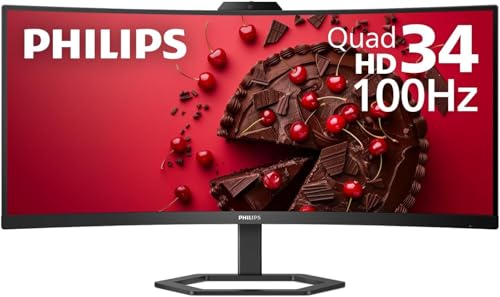
The Philips 346B1C is a 34 inch VA ultrawide at 3440x1440 and 100Hz. It has 95W USB-C power delivery, a built-in KVM switch, a Gigabit Ethernet port, 119% sRGB and 90% Adobe RGB coverage, and a 4-year advance replacement warranty.

It takes third place because it hands you the strongest charging in the group at 95W while including a KVM in the $200 to $500 bracket. If you share a keyboard and mouse between a work laptop and a personal PC, the KVM saves you a switch box. The 4-year advance replacement warranty is the best coverage here, because a replacement ships before you send yours back. The tradeoff against the IPS Dells is the VA panel, which has deeper blacks but narrower viewing angles.

It is a strong buy for hybrid workers juggling two computers. Skip it if you want an IPS panel or Thunderbolt.

Panel
34 in VA, 3440x1440, 100Hz
Power
95W USB-C
Extras
Built-in KVM, Gigabit Ethernet
Warranty
4 years advance replacement

What we like

  • +Built-in KVM switch
  • +95W USB-C is the strongest at 34 inches
  • +Four-year advance replacement warranty
  • +Wide color coverage, 119% sRGB

Watch out for

  • −VA panel has narrower viewing angles
  • −Only 100Hz refresh

Buy it if: Hybrid workers sharing one keyboard across two PCs.

Skip it if: You prefer an IPS panel.

4

Best for Big Laptops

Samsung ViewFinity S65UA

Our verdict: A 1000R curved 34 inch with 90W USB-C, Ethernet and HDR10 for a mid-range price.

The ViewFinity S65UA is a 34 inch, 1000R curved VA monitor at 3440x1440 and 100Hz. It provides 90W USB-C power delivery, HDR10 support, a built-in Ethernet port, TUV-certified eye care and a 3-year warranty.

It places fourth because it gives you 90W charging, a strong figure that covers most large laptops, plus Ethernet in the $200 to $500 bracket. The 1000R curve is the tightest of the group and wraps around your field of view, which many users like for immersion and some find a bit much for spreadsheets. HDR10 is a label more than a showpiece on a VA panel without local dimming. It lacks the KVM of the Philips and the speed of the Dell S3425DW.

Buy it if your laptop wants 90W and you like a strong curve. Skip it if you want a KVM.

Panel
34 in VA 1000R, 3440x1440, 100Hz
Power
90W USB-C
Extras
HDR10, built-in Ethernet
Warranty
3 years

What we like

  • +90W USB-C powers large laptops
  • +Built-in Ethernet port
  • +Tight 1000R curve for immersion
  • +TUV-certified eye care

Watch out for

  • −No KVM switch included
  • −HDR10 limited on this panel type

Buy it if: Users charging a 90W laptop who like a deep curve.

Skip it if: You want a flatter screen or a KVM.

5

Best for Fast Response

Dell 34 Plus USB-C Curved Monitor (S3425DW)

Our verdict: A 34 inch curved VA with up to 120Hz, 0.03ms response and 65W USB-C.

The S3425DW is a 34 inch curved VA monitor at 3440x1440 and up to 120Hz. It lists a 0.03ms response time, the fastest here, with 65W USB-C power delivery, 99% sRGB, 95% DCI-P3 and 3000:1 contrast. It has built-in speakers and Dell's Premium Panel warranty.

It ranks fifth because speed and color are strong, but the 65W USB-C limits it for large laptops, and it has no Ethernet or KVM. For an ultrabook that draws well under 65W, that is fine. The 120Hz refresh gives smoother scrolling and gaming than the 100Hz rivals, and the 95% DCI-P3 coverage suits photo and video work. The 3000:1 contrast is the VA advantage, with deeper blacks than IPS in a dim room.

Buy it for mixed work and play with a light laptop. Skip it if you need more than 65W.

Panel
34 in curved VA, up to 120Hz
Response
0.03ms
Power
65W USB-C
Color
99% sRGB, 95% DCI-P3

What we like

  • +Up to 120Hz refresh rate
  • +Fastest response time listed
  • +95% DCI-P3 color coverage
  • +Built-in speakers included

Watch out for

  • −Only 65W USB-C charging
  • −No Ethernet or KVM

Buy it if: Mixed work and gaming with a light laptop.

Skip it if: Your laptop needs more than 65W.

6

Best With Built-In Webcam

Philips 34E1C5600HE

Our verdict: A 34 inch curved VA with a 5MP Windows Hello webcam, mic and a 4-year warranty.

The Philips 34E1C5600HE is a 34 inch curved VA monitor at 3440x1440 and 100Hz. It has 65W USB-C power delivery, a built-in 5MP webcam with Windows Hello and a noise-canceling mic, dual 5W speakers and a 4-year advance replacement warranty.

It ranks sixth because the webcam is its identity. For video calls it removes the need for a separate camera, and Windows Hello gives you face login without extra hardware. The other tradeoff is power delivery: 65W suits lighter laptops only. It has no KVM or Ethernet port. A monitor webcam sits at the top of the screen, which gives a flattering call angle, but it is hard to replace if it fails, so the long warranty matters.

Buy it if you spend your day on video calls. Skip it if you already own a good webcam.

Panel
34 in curved VA, 3440x1440, 100Hz
Power
65W USB-C
Webcam
5MP with Windows Hello
Warranty
4 years advance replacement

What we like

  • +Built-in 5MP Windows Hello webcam
  • +Noise-canceling microphone included
  • +Four-year advance replacement warranty
  • +Dual 5W speakers

Watch out for

  • −65W charging suits lighter laptops
  • −No KVM or Ethernet

Buy it if: People who spend hours on video calls.

Skip it if: You prefer a separate webcam.

7

Best Entry Price

LG 34WR55QK-B

Our verdict: A 34 inch curved VA with 65W USB-C, Reader Mode, PbP and a height-adjustable stand.

The LG 34WR55QK-B is a 34 inch curved VA monitor at 3440x1440 and 100Hz. It supports 65W USB-C power delivery, Reader Mode, picture-by-picture, OnScreen Control software and a stand with height and tilt adjustment.

It ranks last because the spec sheet stops at the basics: no KVM, no Ethernet, no stated warranty detail and only 65W of charging. That does not make it a poor monitor; it makes it the plainest. Reader Mode softens the display's blue light, and OnScreen Control lets you split windows with a few clicks. A height-adjustable stand is a real convenience that some rivals leave out.

Buy it if you want the simplest USB-C ultrawide and a clean setup. Skip it if you need docking features.

Panel
34 in curved VA, 3440x1440, 100Hz
Power
65W USB-C
Software
OnScreen Control, PbP
Stand
Height and tilt adjustable

What we like

  • +Height-adjustable stand included
  • +Picture-by-picture mode
  • +Reader Mode for long sessions
  • +OnScreen Control window splitting

Watch out for

  • −No KVM, no Ethernet
  • −Warranty details not listed

Buy it if: People who want a plain USB-C ultrawide.

Skip it if: You want a docking hub built in.

Methodology

How We Ranked These

USB-C power and docking

We compared wattage from 65W to 95W, Thunderbolt 4 support, and built-in Ethernet and KVM, since those decide how much a single cable can do.

Panel type and refresh

IPS, IPS Black and VA panels at 100Hz and 120Hz were weighed for viewing angles, contrast and motion handling.

Size and resolution

34 inch 3440x1440 and 49 inch 5120x1440 formats were compared for desk fit and workspace.

Ports and extras

USB port count, speakers, webcam and software features were scored for everyday usefulness.

Warranty and price

Warranty terms of 3 and 4 years, including advance replacement, were set against the $200 to $500 and $500 and up brackets.

Every Primea Score uses the same weights: Performance 30% · Build & Materials 20% · Everyday Usability 20% · Value 20% · Owner Satisfaction 10%. Full scoring rules

Buyer's guide

How to Pick the Right One for You

By Laptop Power Needs

USB-C wattage is the first filter, since it sets what your laptop can do from one cable.

Laptop drawOur pick
95W, performance laptopPhilips 346B1C
90W, large laptopSamsung ViewFinity S65UA
90W, with 49 inch screenDell UltraSharp U4924DW
65W or less, ultrabookLG 34WR55QK-B

By Budget

SpendOur pick
$200 to $500, best docking valuePhilips 346B1C
$200 to $500, fast panelDell 34 Plus USB-C Curved Monitor (S3425DW)
$200 to $500, webcam built inPhilips 34E1C5600HE
$500 and upDell UltraSharp U3425WE

IPS vs VA

IPS

Wider viewing angles and steadier colors off center, a better fit for shared screens and color work. Picks: Dell UltraSharp U3425WE, Dell UltraSharp U4924DW (IPS Black).

VA

Higher contrast and deeper blacks at a lower price, with weaker angles. Picks: Philips 346B1C, Samsung S65UA, Dell S3425DW, Philips 34E1C5600HE, LG 34WR55QK-B.

Default to IPS if you will share the screen or edit images; VA is fine for solo office work.

By Work Style

Work styleOur pick
Two computers, one keyboardPhilips 346B1C
Daily video callsPhilips 34E1C5600HE
Trading or coding, wide workspaceDell UltraSharp U4924DW
Single-cable laptop dockingDell UltraSharp U3425WE

For Remote Work Specifically

Look for

USB-C power that matches your laptop, an Ethernet port, a KVM if you juggle work and personal machines, and a warranty of at least 3 years.

In this ranking

The Dell UltraSharp U3425WE for full docking, the Philips 346B1C for KVM value and the Philips 34E1C5600HE for call-heavy days.

When to Spend More

Spend more if

You dock daily, need Thunderbolt or want a 49 inch workspace. The Dell U3425WE and U4924DW justify the $500 and up bracket.

Save if

You just need a clean USB-C connection to a light laptop. The LG 34WR55QK-B covers it.

Questions

Frequently Asked Questions

Will my laptop charge through the monitor's USB-C port?+

Only if the monitor's power delivery meets your laptop's needs. A 65W port may charge an ultrabook but struggle with a 100W machine. Check your charger's wattage and pick a monitor at that level or higher.

What is the biggest mistake with USB-C monitors?+

Assuming every USB-C port carries video. Your laptop port must support DisplayPort Alt Mode or Thunderbolt for the single-cable setup. Check the laptop's spec page before buying.

Is the Dell U3425WE worth it over the Philips 346B1C?+

If you need Thunderbolt 4, an IPS panel and ten ports, yes. If you want a KVM and strong 95W charging for less, the Philips is the better value. Neither is wrong; they serve different desks.

How hard is setup?+

Connect the USB-C cable to the laptop, then attach the stand and plug in power. Set the resolution to 3440x1440 in your display settings. If the monitor has a KVM, you may need to assign inputs in the on-screen menu.

Can I run two computers on one monitor?+

Yes, with picture-by-picture or a KVM. The Philips 346B1C and Dell UltraSharp U4924DW include KVM switching, while the Dell U3425WE and LG offer picture-by-picture to show two inputs side by side.

Does a curved ultrawide suit gaming?+

It can, particularly at 120Hz as on the Dell S3425DW or U3425WE. A 100Hz screen still works for casual play. Check your graphics output supports the resolution at that rate.

Final take

For a one-cable desk, the Dell UltraSharp U3425WE is the best USB-C ultrawide here, with Thunderbolt 4, IPS and a deep port list. The Philips 346B1C is the value choice with a KVM and 95W charging, and the Dell UltraSharp U4924DW is the answer for a 49 inch workspace. Match the power delivery to your laptop before you consider anything else.

More Ranked & Reviewed Guides