
Primea ReviewsAll Reviews

Primea Reviews is reader-supported. When you buy through our Amazon links we may earn a commission, at no extra cost to you. Rankings are set by our editors and never sold. Learn more

Ranked & Reviewed by Primea Reviews

The 6 Best Touchscreen Digital Photo Frames of 2026, Ranked & Reviewed

By the Primea Editorial TeamUpdated November 1, 20269 min read6 products ranked
The 6 Best Touchscreen Digital Photo Frames of 2026, Ranked & Reviewed

The short answer

The Nixplay 10.1 inch touch frame is the best overall, pairing touch with remote app control and free basic cloud storage. The ApoloSign 15.6 inch is the large-format choice. Frameo and AEEZO frames bring touch with 32GB for less, and the Alexa-based Nixplay frame is the one to buy only if voice replaces touch.

The Primea Scoreboard

Ranked & Reviewed

  1. Touch navigation plus remote app control on a 10.1 inch frame.

    94Outstanding
    Check price
  2. A big 15.6 inch touch target that is easy to hit.

    91Excellent
    Check price
  3. A low-cost touch screen with 32GB of storage.

    88Excellent
    Check price
  4. Frameo-branded touch hardware with a 1280x800 IPS panel.

    85Excellent
    Check price
  5. The cheapest touch screen frame here.

    82Very Good
    Check price
  6. Voice control through Alexa instead of relying on touch.

    78Very Good
    Check price

Touch is a feature people forget they have by the second week. Where it earns its keep is arm's reach: a kitchen counter, a desk, an end table where a visitor wants to flick back through last summer. On a high shelf or a hallway wall nobody will ever touch it, and the money is better spent on a bigger panel or a stronger app.

That is the filter behind this ranking. We went through six frames on paper, looking at whether the listing really names a touch screen, then at size, storage, platform terms and price tier. One entry controls photos by voice instead of touch and says so. The platform behind a frame, Nixplay or Frameo, shapes ownership more than the hardware does.

Before you buy

What Actually Matters

01

Touch navigation

Touch navigation lets you swipe through photos on the frame itself instead of reaching for a phone. It matters when the frame sits at arm's reach, such as a counter or desk, and little on a high wall. Look for touch screen in the product title, and treat a listing that mentions only an app or voice as not confirming touch.

02

Screen size

Screen size sets both the picture and the touch target, and larger screens are easier to hit with a finger. They also need more space and a nearby outlet. Check the inch figure in the title, measure the space, and compare it with the shelf or wall area where the frame will actually sit before you order.

03

Cloud and storage

Cloud storage lets relatives send photos from anywhere, while built-in memory keeps them on the frame itself so the display survives a WiFi outage. Look for 32GB or free cloud storage in the title, and check whether the frame needs an account. Both together make a frame easy to share with family and hard to break.

04

Platform terms

Some platforms offer a free basic tier and paid upgrades for extra storage or features. It matters for long-term cost, because a cheap frame with an expensive plan is no bargain. Read the listing for the word basic or optional, and look for no subscription statements on the cheaper frames before assuming a plan is optional.

05

Resolution

A 1280x800 panel looks clear on a 10 inch frame, while a larger screen like the ApoloSign needs FHD to stay sharp. Resolution matters most for photos viewed up close. Find the pixel numbers or HD and FHD labels in the title, and be cautious where only a generic label such as HD appears without the numbers.

In-depth reviews

Our Ranked Picks, Reviewed

1

Best Overall

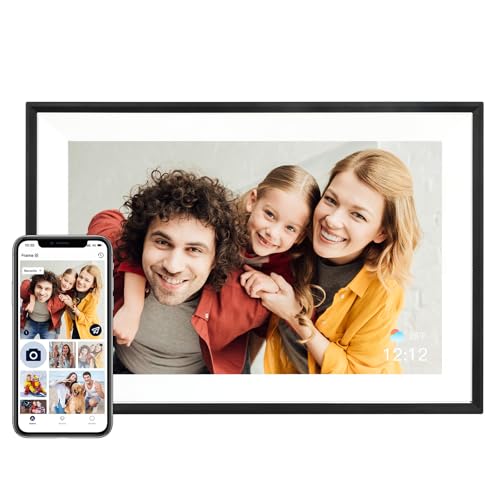
Nixplay Digital Touch Screen Picture Frame with WiFi, 10.1", Black/Silver

Our verdict: Touch navigation plus remote app control on a 10.1 inch frame.

Nixplay's 10.1 inch touch frame leads because it does two jobs at once. The screen responds to touch for swiping through photos, and the companion app lets relatives send pictures from anywhere over WiFi. Free cloud storage on the Basic plan means you can start without a subscription, and the 10.1 inch size suits a counter or desk.

It ranks first over the ApoloSign because it matches the platform without the footprint of a 15.6 inch screen, and over the Frameo frames because the app experience is more polished. The price is $100 to $200, and the word Basic hints at paid upgrades.

Buy it for a frame that works by touch up close and by app from far away. The caveat is cost: if all you want is the lowest-priced touch screen, the AEEZO or Frameo undercut it by a wide margin.

Display
10.1 inch touch screen
Connectivity
WiFi
Cloud
Free storage on Basic
Price tier
$100 to $200

What we like

  • +Touch screen navigation
  • +Remote app control
  • +Free basic cloud storage
  • +WiFi connectivity

Watch out for

  • −Mid-high price tier
  • −Paid plans exist

Buy it if: Users who want touch and app control.

Skip it if: You want the lowest price.

2

Best Large Touch Screen

ApoloSign Digital Picture Frame Powered by Nixplay, 15.6" FHD IPS Touch Screen

Our verdict: A big 15.6 inch touch target that is easy to hit.

The ApoloSign enlarges the same Nixplay platform to 15.6 inches of FHD IPS touch screen. Size changes how touch feels: a bigger target means swipes land where you meant them, and the picture reads clearly across a room. It includes free cloud storage and sits in the $100 to $200 tier, about the same as the 10.1 inch Nixplay.

It ranks second because the footprint suits a wall, console or living room more than a desk. At the same price band, the smaller Nixplay is easier to place, and for most households a 10 inch frame is the right fit.

Buy it for an easy-to-tap display and large photos. The caveat is space: it is too big for a crowded shelf or an office desk, and a frame this size needs a power cable route to a wall outlet or console.

Display
15.6 inch FHD IPS touch
Platform
Nixplay
Cloud
Free storage
Price tier
$100 to $200

What we like

  • +Large 15.6 inch screen
  • +FHD IPS panel
  • +Easy touch target
  • +Free cloud storage

Watch out for

  • −Too big for a desk
  • −Mid-high price tier

Buy it if: Wall or living room frames.

Skip it if: Space is limited.

3

Best Budget Touch

Frameo 10.1 Inch WiFi Digital Picture Frame, HD IPS Touch Screen

Our verdict: A low-cost touch screen with 32GB of storage.

Frameo's 10.1 inch HD IPS touch frame is the value route. It supplies a touch screen, 32GB of storage and free core sharing with no subscription, for $50 to $100. The storage is generous: family can send pictures through the Frameo app and the frame keeps them on board, which also means it keeps displaying them without the cloud.

It ranks third because the experience is plainer than Nixplay's. The app does the basics, with an optional upgrade tier on top, and it lacks the polish of the cloud service ahead of it. Still, it costs about half as much.

Buy it for a good-value touch frame for a parent or grandparent. Skip it if you dislike optional paid tiers or want a refined platform, because the Nixplay 10.1 inch is the better finished product.

Display
10.1 inch HD IPS touch
Storage
32GB
Sharing
Free core
Price tier
$50 to $100

What we like

  • +Touch screen control
  • +32GB storage
  • +Free core sharing
  • +Lower price

Watch out for

  • −Plainer experience
  • −Optional upgrade tier

Buy it if: Value-focused touch frame buyers.

Skip it if: You want a polished platform.

4

Best Frameo-Branded Hardware

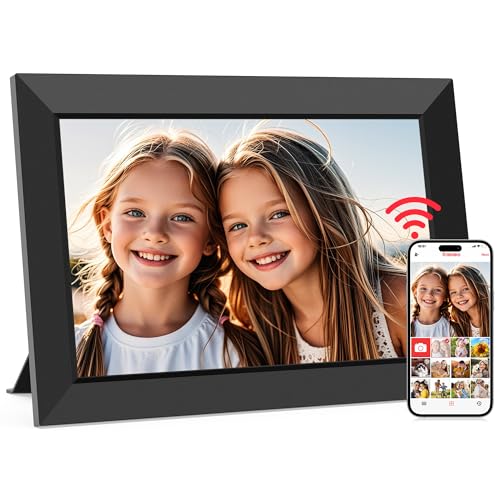
32GB FRAMEO 10.1 Inch Smart WiFi Digital Photo Frame, 1280x800 IPS LCD Touch Screen

Our verdict: Frameo-branded touch hardware with a 1280x800 IPS panel.

This 32GB FRAMEO smart frame puts the software maker's name on the hardware. It has a 10.1 inch 1280x800 IPS LCD touch screen and 32GB of storage, at $50 to $100. The 1280x800 panel looks clear at 10 inches, and touch navigation works on the device.

It ranks fourth because it overlaps the other Frameo frame almost exactly and adds little beyond the branding. The sensible comparison is price: if the generic Frameo costs less, the match between hardware and software is not worth a premium.

Buy it if you prefer hardware branded by the software maker, and expect a consistent Frameo setup. Skip it when the other Frameo or the AEEZO is cheaper. The caveat is basic extras, as the listing offers no features that separate it from its neighbors.

Display
10.1 inch 1280x800 IPS
Storage
32GB
Brand
Frameo hardware
Price tier
$50 to $100

What we like

  • +Frameo-branded hardware
  • +1280x800 IPS panel
  • +32GB storage
  • +Touch control

Watch out for

  • −Overlaps other Frameo
  • −Basic extras

Buy it if: Buyers who prefer branded hardware.

Skip it if: You want the cheapest Frameo.

5

Best Lowest Price

AEEZO Digital Picture Frame, 10.1 Inch, 1280x800 HD IPS Touch Screen

Our verdict: The cheapest touch screen frame here.

AEEZO is the cheapest touch screen frame here, costing under $50. It has a 10.1 inch 1280x800 HD IPS touch screen, 32GB of built-in memory and no subscription. Built-in memory is the useful detail: photos are stored on the frame, so a lapse in WiFi or an account problem does not blank the display.

It ranks fifth because the listing gives less detail on its platform and app than Nixplay or Frameo. You are trading polish for price, and with a brand-name platform the app experience is easier to predict.

Buy it as a low-cost gift or a first frame. Skip it if you want a refined app or remote management. The caveat is sparse listing detail, so check how photos are sent to the frame before ordering.

Display
10.1 inch 1280x800 IPS
Memory
32GB built in
Subscription
None
Price tier
Under $50

What we like

  • +Lowest price here
  • +32GB built-in memory
  • +No subscription
  • +Touch control

Watch out for

  • −Sparse listing detail
  • −Basic app

Buy it if: Low-cost gifts and first frames.

Skip it if: You want a polished app.

6

Best Voice Alternative

Digital Picture Frame Powered by Nixplay 10.1", Support Alexa, Auto Rotate

Our verdict: Voice control through Alexa instead of relying on touch.

The Alexa Nixplay frame exists for households that talk to their devices. It is a 10.1 inch Nixplay-powered frame with Alexa support, auto rotate and free cloud storage, for $50 to $100. Auto rotate keeps portrait photos upright when the frame is turned, which suits a vertical placement.

It ranks last because the listing never states touch navigation, so it fits this guide only partly. Control comes by voice or app, which is useful but is not what a touchscreen buyer searched for.

Buy it if you own Alexa devices and want hands-free control. Skip it if confirmed touch matters, since the first Nixplay and the ApoloSign both state it. The caveat is that it needs an Alexa device to use the voice feature.

Display
10.1 inch
Voice
Alexa support
Rotation
Auto rotate
Cloud
Free storage

What we like

  • +Alexa voice support
  • +Auto rotate
  • +Free cloud storage
  • +Lower price

Watch out for

  • −Touch not confirmed
  • −Needs an Alexa device

Buy it if: Alexa households.

Skip it if: You need confirmed touch navigation.

Methodology

How We Ranked These

Touch navigation

Listings that name touch screen control ranked above those that rely on voice or app.

Screen size

10.1 inch and 15.6 inch displays were compared for touch comfort.

Storage and cloud

Built-in memory and free cloud terms were compared.

Platform

Nixplay and Frameo ecosystems were compared for app control.

Value

Price tier was weighed against the features.

Every Primea Score uses the same weights: Performance 30% · Build & Materials 20% · Everyday Usability 20% · Value 20% · Owner Satisfaction 10%. Full scoring rules

Buyer's guide

How to Pick the Right One for You

By Where It Sits

Touch only works when the frame is in reach.

LocationOur pick
Kitchen counter or deskNixplay Digital Touch Screen Picture Frame 10.1"
Living room wallApoloSign Digital Picture Frame 15.6"
Bedside tableFrameo 10.1 Inch HD IPS Touch Screen
Gift for a first-timerAEEZO Digital Picture Frame 10.1 Inch
Smart speaker homeNixplay Digital Picture Frame Alexa 10.1"

By Budget

SpendOur pick
Under $50AEEZO Digital Picture Frame 10.1 Inch
$50 to $100, touchFrameo 10.1 Inch HD IPS Touch Screen
$50 to $100, voiceNixplay Digital Picture Frame Alexa 10.1"
$100 to $200, standardNixplay Digital Touch Screen Picture Frame 10.1"
$100 to $200, largeApoloSign Digital Picture Frame 15.6"

Nixplay vs Frameo

Nixplay

Cloud-based service with remote app control. Picks: Nixplay touch 10.1, ApoloSign 15.6, Nixplay Alexa.

Frameo

Free core sharing at lower cost. Picks: Frameo HD IPS, FRAMEO 32GB.

Most buyers should choose Nixplay for polish and Frameo for price.

By Screen Size

SizeOur pick
10.1 inch standardNixplay Digital Touch Screen Picture Frame 10.1"
15.6 inch largeApoloSign Digital Picture Frame 15.6"
10.1 inch budgetAEEZO Digital Picture Frame 10.1 Inch
10.1 inch FrameoFRAMEO 10.1 Inch 32GB

For Easy Use by Older Relatives Specifically

Look for

A large screen, simple touch gestures and photos that update remotely.

In this ranking

The ApoloSign has the biggest touch target, and the Nixplay touch frame adds remote photo uploads.

When to Spend More

Spend more if

You want a polished platform and large screen. The Nixplay and ApoloSign fit.

Save if

You only need basic touch. The Frameo or AEEZO is enough.

Questions

Frequently Asked Questions

Do touchscreen frames need WiFi?+

Most do, and it is worth having. WiFi lets the frame receive photos from family and updates from the app. Without a connection, a frame with built-in memory such as the AEEZO or Frameo models still shows stored photos.

Is touch better than an app?+

Touch is handy when the frame is within reach, like the Nixplay 10.1 inch on a counter. An app is better for remote updates, and the best frames in this list offer both, so you rarely have to choose one.

Is Nixplay worth it over Frameo?+

If you want a polished platform and smooth remote control, yes, it is worth the premium. The Nixplay 10.1 inch costs more than the Frameo frames, which are plainer but cheaper and include 32GB of storage.

How do I clean the screen?+

Use a soft, dry or slightly damp microfiber cloth wrung out well, and avoid spraying liquid directly onto the screen or edges. Switch the frame off first so smudges show clearly and touch input does not trigger by accident.

Will my photos stay if the frame loses power?+

Frames with built-in memory, like the Frameo and AEEZO models, keep photos stored through a power cut. Cloud-based frames such as the Nixplay will sync again once power and WiFi return, so nothing you uploaded is lost.

Can multiple people send photos?+

Yes, many people can. Nixplay and Frameo both let family send photos through an app, so grandchildren and cousins can all add pictures to the same frame without visiting.

Final take

Buy the Nixplay 10.1 inch if you want touch and a polished app, or the ApoloSign for a wall or living room display. Choose a Frameo or AEEZO frame to spend less and accept a plainer experience. Skip the Alexa Nixplay unless voice control matters more than touch.

More Ranked & Reviewed Guides