
Primea ReviewsAll Reviews

Primea Reviews is reader-supported. When you buy through our Amazon links we may earn a commission, at no extra cost to you. Rankings are set by our editors and never sold. Learn more

Ranked & Reviewed by Primea Reviews

The 6 Best Smart Digital Photo Frames of 2026, Ranked & Reviewed

By the Primea Editorial TeamUpdated November 1, 202610 min read6 products ranked
The 6 Best Smart Digital Photo Frames of 2026, Ranked & Reviewed

The short answer

The Nixplay 10.1 inch touch frame is the best smart digital photo frame, with multi-contributor app sharing, touch navigation and free cloud storage. Aura's Carver is the no-subscription alternative. Skylight is the easiest for relatives who avoid apps, the ApoloSign is the large-screen Nixplay, and the Alexa Nixplay and Frameo cover voice and budget needs.

The Primea Scoreboard

Ranked & Reviewed

  1. Many relatives can send to one frame, and you swipe through on the touch screen.

    94Outstanding
    Check price
  2. Cloud sharing by invitation and no subscription to unlock it.

    91Excellent
    Check price
  3. Photos arrive by plain email, with an app upload alternative.

    88Excellent
    Check price
  4. Nixplay's sharing system on a 15.6 inch full HD touch screen.

    85Excellent
    Check price
  5. The only frame here with Alexa support, plus auto-rotate.

    82Very Good
    Check price
  6. Cloud sharing through the Frameo app at a budget price.

    79Very Good
    Check price

Smart, on a photo frame, mostly means one thing: far-away relatives can drop pictures in without visiting. How they do it varies, and that variation is the real buying decision. Some frames use app invitations, some give the frame an email address, and one or two lean on voice. Pick the wrong route and the person you bought it for ends up sending photos that never arrive.

So this ranking starts with the sharing path, then looks at how many people can contribute, whether voice is offered and what recurring fees apply. Six internet-connected frames were compared from their listing details and stated features, not from household trials. Screen size and price bucket came after, because a lovely panel that nobody can feed is just a dark rectangle on a shelf.

Before you buy

What Actually Matters

01

How family sends photos

Some frames use an app invitation, others a plain email address. Email suits people who dislike apps, while apps support many contributors and finer control. Check the listing for the named method, such as email or app sharing, and think about the least technical person who will send photos, because that person sets the real limit.

02

Subscription tiers

A frame that works free is cheaper over the years. Skylight offers an optional Plus tier, while Aura requires no plan to share. Read the bullets for the words optional and required, and check what the optional tier unlocks, so you know whether a paid plan would change daily use or only add extras, then add up the cost across several years.

03

Screen size

A 10 inch frame fits a desk or nightstand, while a 15.6 inch frame fills a wall or console. Check the diagonal size in the title and measure the space you have. Bigger screens cost more and need an outlet nearby, so consider the viewing distance and where the cable will run before paying for size.

04

Voice control

Alexa support is rare in photo frames, and it is useful only if you already use Alexa. Look for the name in the title or bullets, and confirm whether an Echo or other Alexa device is needed. If you do not use voice at home, ignore it and compare other features such as storage and sharing.

05

Orientation handling

Auto rotate keeps vertical photos upright when the frame is turned, so portrait pictures fill the screen instead of showing sideways. Look for auto rotate or similar wording in the specs. It matters most for frames you plan to place in portrait mode or hang on a wall, where a sideways photo looks wrong.

In-depth reviews

Our Ranked Picks, Reviewed

1

Best Overall

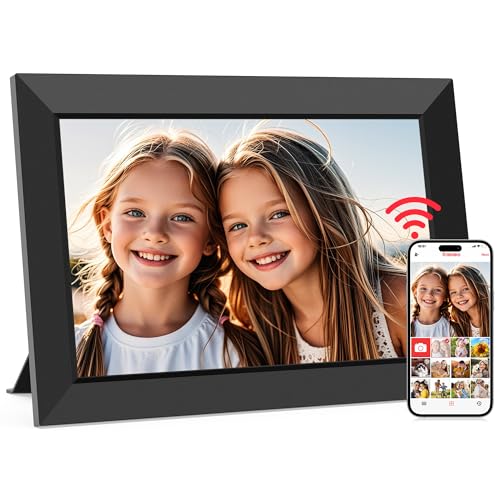
Nixplay Digital Touch Screen Picture Frame with WiFi, 10.1", Connecting Families & Friends

Our verdict: Many relatives can send to one frame, and you swipe through on the touch screen.

Nixplay's 10.1 inch frame is the best answer to a family where five people want to send photos to one screen. App sharing supports multiple contributors, so siblings, cousins and grandparents all feed the same display, and a touch screen lets you swipe back through older pictures. Free cloud storage means you do not need a plan to start, and it sits in the $100 to $200 bucket.

It ranks first because the contributor model matches a spread-out family better than any other frame here. The Aura Carver is simpler but handles fewer sending routes.

Buy it for a household that expects many senders and wants control on the frame itself. The caveat is that an optional paid tier exists, so decide in advance whether you will ever want it, and the mid-range cost is more than the Frameo asks.

Display
10.1 inch touch
Sharing
Multiple contributors via app
Cloud
Free storage
Price bucket
$100-200

What we like

  • +Many contributors
  • +Touch screen navigation
  • +Free cloud storage
  • +WiFi frame

Watch out for

  • −Optional paid tier
  • −Mid-range cost

Buy it if: Large, spread-out families sharing one screen.

Skip it if: You want zero paid tiers of any kind.

2

Best No-Fee Smart Frame

Aura HD Digital Picture Frame, Carver: The Best Frame for Gifting

Our verdict: Cloud sharing by invitation and no subscription to unlock it.

Aura's Carver is the frame for people who dislike recurring charges. It is a cloud-connected HD frame where contributors are invited into the account, with no subscription required to unlock sharing. Invitations keep control with you: only people you add can send photos, and a clean design makes it a common gift choice.

It ranks second because cost is predictable and the app experience is refined, but it offers fewer controls on the frame than the Nixplay's touch screen. In the $100 to $200 bucket, it matches the Nixplay on price while giving up swipe navigation.

Choose it when you want smart sharing without any plan. The caveat is coordination: invitations take a little more setup than giving someone an email address, so a relative who cannot manage an app invite will find Skylight easier.

Display
HD
Sharing
Cloud with invitations
Monthly plan
Not required
Price bucket
$100-200

What we like

  • +No subscription
  • +Cloud-based sharing
  • +Invite contributors
  • +Clean design

Watch out for

  • −No touch screen
  • −Invite setup needed

Buy it if: Buyers who refuse recurring fees.

Skip it if: You want on-screen controls.

3

Easiest for Relatives

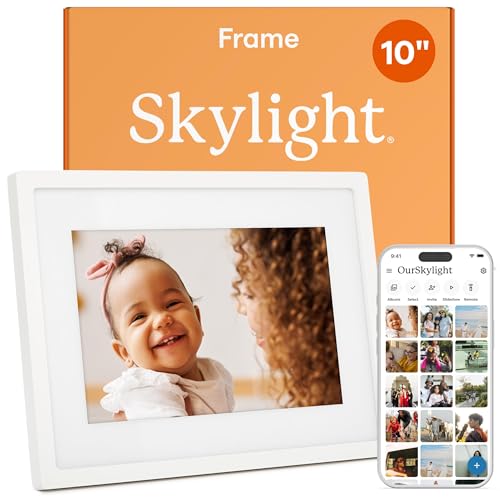
Skylight Digital Picture Frame, Load from Phone Capability, 10" White

Our verdict: Photos arrive by plain email, with an app upload alternative.

Skylight in white gives the frame its own email address, so any relative can send a photo the way they send a message: attach, address, send. An app upload option also exists, and an optional Plus tier adds more. For a grandparent who has never installed anything, email is the lowest barrier on offer.

It ranks third because features behind the Plus tier keep it below the free-platform picks. Next to the Nixplay, the free storage and multi-contributor app are better value, but neither helps if your sender will not open an app.

Get it when your relatives will never install anything. The caveat is the optional paid tier and plainer features: the frame does the basic job well and little more, and the $100 to $200 price buys simplicity rather than a long list of options.

Display
10 inch
Sharing
Email and app
Finish
White
Extra tier
Optional Plus

What we like

  • +Email photo sending
  • +App upload option
  • +White finish
  • +Accessible to anyone

Watch out for

  • −Plus tier upsell
  • −Plainer features

Buy it if: Families with non-technical senders.

Skip it if: You want zero optional plans.

4

Best Large Screen

ApoloSign Digital Picture Frame Powered by Nixplay, 15.6" Large WiFi Digital Photo Frame

Our verdict: Nixplay's sharing system on a 15.6 inch full HD touch screen.

The ApoloSign puts Nixplay's sharing system on a 15.6 inch FHD touch screen, with app sharing and free cloud storage, in the $100 to $200 bucket. A larger panel suits a living room wall or a console, where a 10 inch frame feels lost and the pictures lack presence from across the room.

It ranks fourth because the size is a real draw only for a big space, and a third-party seller name adds a little uncertainty compared with Nixplay's own frame. The sharing experience is the same platform.

Choose it if you want Nixplay's platform at a larger size. The caveat is room: it needs wall or shelf space, and it costs more than the 10.1 inch version. If the frame will live on a desk or nightstand, the standard Nixplay is the smarter buy.

Display
15.6 inch FHD touch
Platform
Nixplay app
Cloud
Free storage
Price bucket
$100-200

What we like

  • +15.6 inch screen
  • +Nixplay platform
  • +Touch screen
  • +Free cloud storage

Watch out for

  • −Third-party brand name
  • −Needs wall or shelf space

Buy it if: People who want a bigger display with Nixplay sharing.

Skip it if: A 10 inch frame is plenty.

5

Best Voice Support

Digital Picture Frame Powered by Nixplay 10.1", Support Alexa, Free Cloud Storage

Our verdict: The only frame here with Alexa support, plus auto-rotate.

This Nixplay-powered frame adds Alexa support to a 10.1 inch panel, along with free cloud storage and auto rotate that turns photos between orientations. Voice control means a spoken command can change what plays, a convenience when your hands are busy in the kitchen. It sits in the lower $50 to $100 bucket.

It ranks fifth because voice is a niche need, and the branding is a partner label rather than Nixplay's own flagship. It also costs less, which keeps it in the running for buyers who already use an Echo.

Buy it if you already use Alexa around the house. The caveat is that you rely on a partner-branded product, and the voice feature probably needs an Alexa device in the room. If you do not use Alexa, the extra capability is wasted, and the standard Nixplay does more.

Display
10.1 inch
Voice
Alexa support
Cloud
Free storage
Price bucket
$50-100

What we like

  • +Alexa voice support
  • +Auto rotate
  • +Free cloud storage
  • +Lower price tier

Watch out for

  • −Partner-branded product
  • −Niche appeal

Buy it if: Alexa households wanting voice control of the frame.

Skip it if: You do not use Alexa.

6

Best Cheap Cloud Frame

Frameo 10.1 Inch WiFi Digital Picture Frame, Smart Cloud Electronic Photo Frame

Our verdict: Cloud sharing through the Frameo app at a budget price.

The Frameo is a 10.1 inch WiFi frame with 32GB of storage that shares through the Frameo app. Core sharing requires no subscription, and the price falls in the $50 to $100 bucket. Onboard storage means photos stay on the frame itself.

It ranks last because the brand is the least established here, even though the price is hard to ignore. Compared with the Nixplay, it lacks multi-contributor depth and a touch screen on this listing.

Pick it for smart sharing on a tight budget. The caveat is long-term app support, which is less certain than for the established platforms. If the frame is a gift for someone who will rely on it daily for years, spend the extra on Nixplay or Aura.

Display
10.1 inch
Storage
32GB
Sharing
Frameo app
Price bucket
$50-100

What we like

  • +Low price tier
  • +32GB storage
  • +No subscription for core sharing
  • +App sharing

Watch out for

  • −Less established brand
  • −App support uncertain

Buy it if: Budget buyers wanting cloud photo sharing.

Skip it if: You want a long-proven platform.

Methodology

How We Ranked These

Remote sharing method

We compared app invitations, email and multi-contributor options for how easily distant family can send photos.

Subscription risk

Required and optional paid plans were weighed against the cost of ownership.

Screen and control

Size, touch capability and voice support were checked from the listing.

Platform maturity

Established platforms scored higher than newer or third-party ones.

Value in the bucket

We matched features to price bucket.

Every Primea Score uses the same weights: Performance 30% · Build & Materials 20% · Everyday Usability 20% · Value 20% · Owner Satisfaction 10%. Full scoring rules

Buyer's guide

How to Pick the Right One for You

By Who Sends the Photos

The senders' habits decide the frame.

SendersOur pick
Many siblings and cousins via appNixplay 10.1 Touch Frame
Relatives who only use emailSkylight 10" White
Invited family, no feesAura HD Carver
Alexa usersNixplay-powered Alexa Frame
Budget app sharingFrameo 10.1 Inch

By Budget

SpendOur pick
$50 to $100Frameo 10.1 Inch or the Alexa-enabled Nixplay frame
$100 to $200, touch controlNixplay 10.1 Touch Frame
$100 to $200, no feesAura HD Carver
$100 to $200, big screenApoloSign 15.6 Inch

App Invitation vs Email Sharing

App invitation

Nixplay, Aura and Frameo ask contributors to join through an app, which supports many senders.

Email

The Skylight accepts photos emailed to the frame, which is simplest for people who avoid apps.

Most families should default to app sharing, the Nixplay touch frame, unless a key sender will never install an app.

By Screen Size

SpaceOur pick
Shelf or deskNixplay 10.1 Touch Frame
Wall displayApoloSign 15.6 Inch
Kitchen counterSkylight 10" White
BedsideAura HD Carver

For Long-Distance Families Specifically

Look for

A frame where photos can arrive without anyone present to set it up, with cloud storage included.

In this ranking

The Nixplay touch frame has free cloud storage and multi-contributor sharing, and the Skylight takes plain email.

When to Spend More

Spend more if

You need many contributors or a big screen, so the Nixplay or ApoloSign justify the cost.

Save if

Basic sharing is enough. The Frameo or Alexa Nixplay frame keeps costs down.

Questions

Frequently Asked Questions

What makes a photo frame smart?+

It connects to WiFi and accepts photos remotely. How it receives them varies between app invitations, a dedicated email address and cloud storage, so check which route your senders can handle before you buy, and ask them if you can.

What is the biggest buying mistake?+

Ignoring who will actually send the photos. A frame needs a method that suits the least technical sender, which is why Skylight's email works for some families and Nixplay's app for others. Ask your senders first.

Is the Nixplay worth more than the Frameo?+

For multi-contributor sharing and an established platform, yes. For basic sharing at the lowest price, the Frameo is enough, but it has less depth and a less proven app, and its listing shows no touch screen.

How do I set one up?+

Connect it to WiFi, then create an account or note its email address, and invite contributors. Send one test photo from each sender before you give it away, so any email or invitation problem shows up early.

Will it work offline?+

Stored photos usually display, but sharing needs WiFi. Check the product details for offline behavior, and expect new photos to arrive once the frame reconnects to the network, which may take a few minutes.

Does the Alexa frame need an Echo?+

The listing says it supports Alexa, so you likely need an Alexa device for voice commands. Confirm in the product details, and do not expect it to work as a standalone speaker or replace an Echo.

Final take

Buy the Nixplay 10.1 inch for a spread-out family where several people send photos, or the Aura Carver if you refuse any plan. Choose Skylight when a key sender will never install an app. The ApoloSign suits a bigger wall, the Alexa Nixplay suits voice households, and the Frameo is the budget route.

More Ranked & Reviewed Guides