
Primea ReviewsAll Reviews

Primea Reviews is reader-supported. When you buy through our Amazon links we may earn a commission, at no extra cost to you. Rankings are set by our editors and never sold. Learn more

Ranked & Reviewed by Primea Reviews

The 6 Best Small Keyboards Under $30 for Tight Desks, Ranked & Reviewed

By the Primea Editorial TeamUpdated November 3, 20269 min read6 products ranked
The 6 Best Small Keyboards Under $30 for Tight Desks, Ranked & Reviewed

The short answer

The Cherry Stream wired TKL keyboard is the best small keyboard under $30, with Cherry SX scissor switches and a certified build. The Arteck 2.4G is the best wireless pick with a rechargeable battery rated for six months, the TECKNET Mini offers the smallest footprint and a 36-month warranty, and the Lumsburry is the budget backlit choice.

The Primea Scoreboard

Ranked & Reviewed

  1. A wired compact TKL with Cherry SX scissor switches, a metal stability plate and a GS safety certification.

    94Outstanding
    Check price
  2. A slim 2.4GHz wireless keyboard with a rechargeable battery rated for six months and a 24-month warranty.

    92Outstanding
    Check price
  3. 03
    TECKNET 2.4G Wireless Mini Compact Keyboard

    An 11.5 by 4.9 inch, 10.4 ounce keyboard with a 36-month warranty on registration.

    90Excellent
    Check price
  4. An 87-key wired keyboard with adjustable rainbow LED backlighting and twelve multimedia shortcuts.

    87Excellent
    Check price
  5. A low-profile, splash-resistant wired keyboard, the cheapest pick here.

    84Very Good
    Check price
  6. A 78-key compact keyboard with a matching mouse on one USB dongle, with up to a 2-year warranty.

    81Very Good
    Check price

A small keyboard sounds like a simple purchase until you lose a key you actually use. Compact layouts remove the number pad, the arrow cluster or the function row, and the sacrifice that is fine for one typist drives another to distraction. The first decision is not brand or price but which keys you can live without.

This ranking sorts six small keyboards under $30 by layout, switch mechanism, connection and warranty. We reviewed the specification lists supplied for each, and where a claim such as battery life comes from the listing, we credit it to the listing instead of treating it as a measurement. The Macally combo can sit slightly above $30, so check the current price.

Before you buy

What Actually Matters

01

Which keys you lose

A TKL layout drops the number pad, an 87-key board keeps the arrows and a 78-key board merges more functions. Think about which keys you press daily before you shrink.

02

Switch type

Scissor switches have short, stable travel and suit quiet typing. Membrane keys feel softer and mushy. A named switch, like Cherry SX scissor, is a good sign.

03

Wired vs 2.4G wireless

Wired keyboards never need charging and have no lag. A 2.4G wireless model needs a USB port for its receiver. Neither of the wireless models here lists Bluetooth.

04

Battery type

A built-in rechargeable battery avoids buying cells. The Arteck lists about six months. Check whether the keyboard needs AAA or AA batteries.

05

Warranty

A warranty from 24 to 36 months suggests the maker expects the board to last. Some require registration, as the TECKNET does. Register on day one.

In-depth reviews

Our Ranked Picks, Reviewed

1

Best Overall

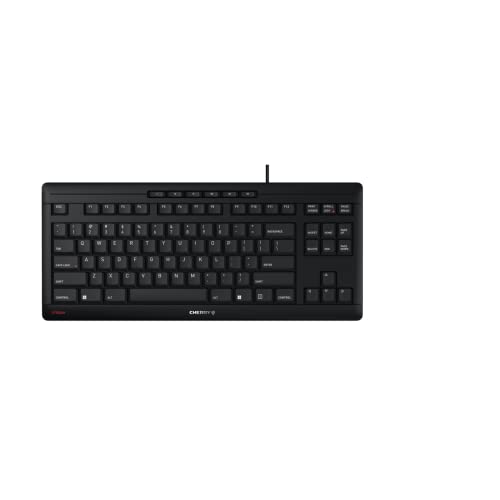
Cherry Stream Wired Keyboard Without Number Pad, Compact TKL

Our verdict: A wired compact TKL with Cherry SX scissor switches, a metal stability plate and a GS safety certification.

The Cherry Stream is a wired USB tenkeyless keyboard with Cherry SX scissor switch technology, an integrated metal stability plate and a GS Tested Safety certification. It costs under $25.

It wins because the typing mechanism is the part of a cheap keyboard most likely to disappoint, and this one names its switch and brand. Scissor switches give short, controlled travel that suits fast typing, and a metal plate keeps the board from flexing. Dropping the number pad saves about four inches of desk width and brings your mouse closer.

Buy it if you type a lot and want a dependable wired board. Skip it if you need a number pad.

Layout
Compact TKL, no number pad
Switch
Cherry SX scissor
Build
Metal stability plate
Connection
Wired USB

What we like

  • +Named Cherry SX scissor switches
  • +Metal stability plate
  • +GS certified build
  • +Saves desk width

Watch out for

  • −No number pad
  • −Wired only

Buy it if: Heavy typists wanting a reliable wired board.

Skip it if: You enter numbers all day.

2

Best Rechargeable Wireless

Arteck 2.4G Wireless Keyboard, Ultra Slim and Compact

Our verdict: A slim 2.4GHz wireless keyboard with a rechargeable battery rated for six months and a 24-month warranty.

The Arteck is an ultra-slim 2.4G wireless keyboard with a nano USB receiver, a built-in rechargeable battery that the listing rates for about six months, and a 24-month warranty. It costs under $25.

It ranks second because it removes the cord and the battery chore at once. A built-in battery avoids the AAA changes that always happen at the wrong moment, and the nano receiver lives in a USB port. The listing mentions full-size keys, though the board is still compact. Six months is a listing figure that will vary with use and backlight, if any.

Choose it for a tidy wireless desk. Skip it if you want Bluetooth.

Connection
2.4GHz nano receiver
Battery
Rechargeable, about 6 months
Warranty
24 months
Profile
Ultra-slim

What we like

  • +Built-in rechargeable battery
  • +No AAA batteries to buy
  • +24-month warranty
  • +Slim profile

Watch out for

  • −Uses a USB receiver
  • −No Bluetooth mentioned

Buy it if: Desks wanting a cordless, tidy setup.

Skip it if: You want Bluetooth pairing.

3

Best Warranty and Footprint

TECKNET 2.4G Wireless Mini Compact Keyboard

Our verdict: An 11.5 by 4.9 inch, 10.4 ounce keyboard with a 36-month warranty on registration.

The TECKNET is a 2.4GHz wireless mini keyboard measuring 11.5 by 4.9 inches and weighing 10.4 ounces, with a 36-month warranty on registration and no Bluetooth. It costs under $25.

It ranks third because it has the smallest footprint and the longest stated warranty. At 11.5 inches wide it fits easily in a bag or a narrow desk, and 10.4 ounces is light enough to carry. The trade is the battery: the listing does not give a rechargeable battery, so expect to buy cells.

Buy it if footprint and warranty matter most. Skip it if you hate swapping batteries.

Size
11.5 x 4.9 inch
Weight
10.4 ounces
Connection
2.4GHz USB
Warranty
36 months with registration

What we like

  • +Smallest footprint here
  • +Light at 10.4 ounces
  • +36-month warranty
  • +Simple USB receiver

Watch out for

  • −No Bluetooth
  • −Battery is not rechargeable

Buy it if: Narrow desks and carry-around use.

Skip it if: You want a rechargeable battery.

4

Best Backlit Budget Board

Lumsburry Computer Keyboard, 87 Keys Compact Wired

Our verdict: An 87-key wired keyboard with adjustable rainbow LED backlighting and twelve multimedia shortcuts.

The Lumsburry is an 87-key compact wired USB keyboard with adjustable rainbow LED backlighting and twelve multimedia shortcut keys on F1 to F12. It costs under $25.

It ranks fourth because backlighting at this price is rare and helps in a dim room. The 87-key layout keeps the arrow cluster and function row, so it feels familiar. The listing gives no switch type or warranty, which puts it below the Cherry and Arteck on confidence.

Buy it for low-light typing at a very low cost. Skip it if you want a documented switch.

Layout
87-key compact
Lighting
Adjustable rainbow LED
Shortcuts
12 multimedia keys
Connection
Wired USB

What we like

  • +Adjustable LED backlight
  • +87 keys keep the arrows
  • +Multimedia shortcuts
  • +Very low price

Watch out for

  • −Switch type not stated
  • −Warranty not listed

Buy it if: Typing in dim rooms on a budget.

Skip it if: You want a documented switch.

5

Best Cheapest Keyboard

Rii RK907 Ultra-Slim Compact USB Wired Keyboard

Our verdict: A low-profile, splash-resistant wired keyboard, the cheapest pick here.

The Rii RK907 is an ultra-slim compact wired USB keyboard with low-profile keys and a splash-resistant design. It costs under $25 and is the cheapest keyboard in this group.

It ranks fifth because the cheapest price comes with the fewest named features. Low-profile keys are comfortable if you like a laptop feel, and splash resistance helps with a spilled drink. It does not name a switch or a warranty, and it lacks the extras of the Lumsburry.

Choose it for a plain, spill-tolerant board. Skip it if you want backlighting.

Profile
Low-profile keys
Resistance
Splash-resistant
Connection
Wired USB
Setup
Plug and play

What we like

  • +Cheapest keyboard here
  • +Splash-resistant design
  • +Low-profile keys
  • +Plug and play

Watch out for

  • −No switch or warranty named
  • −No backlight

Buy it if: A cheap, spill-tolerant desk keyboard.

Skip it if: You want backlighting.

6

Best Keyboard and Mouse Pair

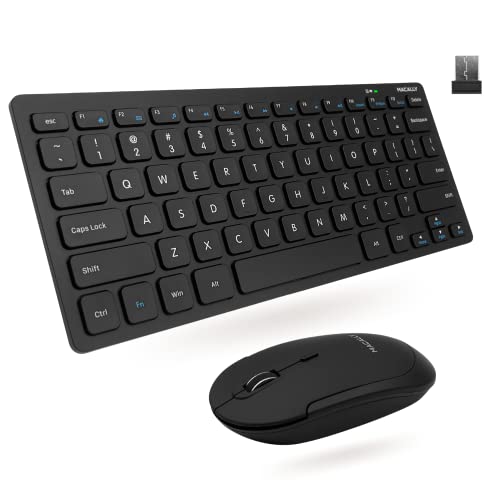
Macally Small Wireless Keyboard and Mouse Combo

Our verdict: A 78-key compact keyboard with a matching mouse on one USB dongle, with up to a 2-year warranty.

The Macally combo has a 78-key compact layout, a matching wireless mouse, a single USB dongle for both and up to a 2-year warranty with lifetime support. It is in the $25 to $50 bucket, so check the price against your $30 limit.

It ranks last because it is the most expensive and the most cramped: 78 keys means more shared functions. The value is the bundle, one dongle and a mouse that matches, which suits a fresh small-desk setup.

Buy it for a new workstation that needs both. Skip it if you already own a mouse.

Layout
78-key compact
Included
Matching wireless mouse
Connection
Single USB dongle
Warranty
Up to 2 years

What we like

  • +Keyboard and mouse together
  • +One dongle for both
  • +Up to 2-year warranty
  • +Lifetime support

Watch out for

  • −Only 78 keys
  • −Costs more than the others

Buy it if: New small-desk setups needing both.

Skip it if: You already own a mouse.

Methodology

How We Ranked These

Layout and key count

TKL, 87-key and 78-key layouts were compared for which keys were removed and how much desk width was saved.

Switch and build

Named scissor switches, metal plates and low-profile designs were weighed against unnamed mechanisms.

Connection and battery

Wired, 2.4GHz wireless and rechargeable designs were compared for convenience.

Warranty

Warranties from 24 to 36 months were credited as evidence of build confidence.

Value under $30

Each board was judged against the under $25 and $25 to $50 buckets.

Every Primea Score uses the same weights: Performance 30% · Build & Materials 20% · Everyday Usability 20% · Value 20% · Owner Satisfaction 10%. Full scoring rules

Buyer's guide

How to Pick the Right One for You

By Connection

Wired is the simplest; wireless is the tidiest.

ConnectionOur pick
Wired, best buildCherry Stream Wired Keyboard Without Number Pad, Compact TKL
Wireless, rechargeableArteck 2.4G Wireless Keyboard, Ultra Slim and Compact
Wireless, smallestTECKNET 2.4G Wireless Mini Compact Keyboard
Wireless with a mouseMacally Small Wireless Keyboard and Mouse Combo

By Budget

SpendOur pick
Under $25, bestCherry Stream Wired Keyboard Without Number Pad
Under $25, backlitLumsburry Computer Keyboard, 87 Keys Compact Wired
Under $25, cheapestRii RK907 Ultra-Slim Compact USB Wired Keyboard
Near $30, bundleMacally Small Wireless Keyboard and Mouse Combo

Rechargeable vs Battery-Powered Wireless

Rechargeable

A built-in battery avoids buying cells and charges by cable. Pick: Arteck.

Replaceable batteries

Easy to swap in a pinch, but you must keep spares. Picks: TECKNET and Macally.

Default to rechargeable unless you travel somewhere you cannot charge.

By Layout

LayoutOur pick
TKL, no number padCherry Stream Wired Keyboard Without Number Pad
87 keys with arrowsLumsburry Computer Keyboard, 87 Keys Compact Wired
Mini, smallest footprintTECKNET 2.4G Wireless Mini Compact Keyboard
78 keys with a mouseMacally Small Wireless Keyboard and Mouse Combo

For Small Desks Specifically

Look for

A width under 12 inches, a keyboard that tucks under a monitor stand and a cordless design to cut clutter.

In this ranking

TECKNET at 11.5 inches is the smallest, and the Cherry Stream saves about four inches by dropping the number pad.

When to Spend More

Spend more if

You type for hours or want mechanical switches and Bluetooth. That means going above $30.

Save if

You type occasionally. The Cherry Stream or Rii under $25 is enough.

Questions

Frequently Asked Questions

Will these work with a Mac?+

Most work with any computer that has a USB port, but some function keys may not match macOS shortcuts. Check the listing for Mac compatibility if you need multimedia keys.

What is the biggest mistake?+

Buying a layout that lacks a key you use. If you need a number pad for data entry, a TKL board will frustrate you.

Is the Cherry Stream worth it over the Rii?+

Yes if you type a lot. Cherry's named scissor switches and certified build are a step up from an unnamed membrane.

How hard is setup?+

Plug in a wired keyboard, or insert the USB receiver for a wireless one. Most work without drivers.

How do I clean one?+

Unplug it, turn it upside down, shake it gently, and wipe the keys with a lightly damp cloth. Use compressed air between keys.

Do wireless keyboards lag?+

A 2.4GHz receiver has low lag for typing. Keep the receiver close to the keyboard and away from large metal objects.

Final take

The Cherry Stream wired TKL is the best small keyboard under $30, with named Cherry SX scissor switches and a certified build. The Arteck is the best wireless option with a rechargeable battery, the TECKNET has the smallest footprint and the longest warranty, and the Lumsburry adds backlighting. Decide which keys you can live without first.

More Ranked & Reviewed Guides