
Primea ReviewsAll Reviews

Primea Reviews is reader-supported. When you buy through our Amazon links we may earn a commission, at no extra cost to you. Rankings are set by our editors and never sold. Learn more

Ranked & Reviewed by Primea Reviews

The 7 Best RGB Mouse Pads of 2026, Ranked & Reviewed

By the Primea Editorial TeamUpdated November 4, 20269 min read7 products ranked
The 7 Best RGB Mouse Pads of 2026, Ranked & Reviewed

The short answer

The Razer Goliathus Extended Chroma is our top RGB pad because its lighting is built into a control-focused cloth surface with a nonslip base. The Razer Strider Chroma is the hybrid pick for people who want a firm lower half. The Gimars is the best pick if your phone should charge on the desk, and the TIDALSOIL is the cheap oversized option.

The Primea Scoreboard

Ranked & Reviewed

  1. Chroma-lit cloth built for control, with a nonslip rubber base and a strong ecosystem.

    94Outstanding
    Check price
  2. A hybrid soft and hard mat with 19 Chroma lighting zones across an extended body.

    91Excellent
    Check price
  3. An extra-large RGB desk mat with 15W wireless charging and 10 light modes.

    89Excellent
    Check price
  4. 15W wireless charging with 6 safety protections and a high-density woven top.

    87Excellent
    Check price
  5. 05
    TIDALSOIL RGB Gaming Mouse Pad

    Best Oversized Budget

    TIDALSOIL RGB Gaming Mouse Pad

    An oversized pad with 12 RGB light modes at the bottom of the price range.

    85Excellent
    Check price
  6. 06
    HUADO RGB Gaming Mouse Pad

    Best Customizable Lighting

    HUADO RGB Gaming Mouse Pad

    Customizable RGB modes on an extended pad with a smooth fabric top.

    83Very Good
    Check price
  7. A 31.5 by 12 inch pad with LED backlight and an anti-slip rubber base.

    81Very Good
    Check price

Most RGB mouse pads are judged on the wrong thing. Buyers count lighting modes, when the mouse still has to glide on a surface that happens to glow. Light travels through a translucent edge strip or layer, and cheap pads often compromise the cloth or the rubber underneath to fit the LEDs and a USB cable in.

We ranked seven lit pads on what you will notice daily. That means the surface type, the size, the base grip, how the lights are controlled, and whether a feature such as 15W wireless charging is stated on the listing. Lighting-mode counts, like 10 or 12, counted for little on their own. We reviewed spec sheets and listing language, not lab results, and we note where details are missing.

Before you buy

What Actually Matters

01

Surface type

Cloth gives a slower, controlled glide, hard surfaces give speed, and hybrids split the two. The lights do not change how the mouse tracks, so the surface decides your daily experience. Check whether the listing names cloth, woven or hybrid, and avoid pads that describe only the lighting.

02

Lighting zones and modes

A mode is a preset effect, while a zone is an independently lit segment, so 19 zones allow gradients that 10 modes cannot. More zones matter only if software can address them. Look for the word zone or software support on the listing, and treat a bare mode count as presets.

03

Wireless charging output

A figure such as 15W is the pad's maximum, but your phone decides what it accepts. Cases thicker than a few millimetres or metal plates in them can block the field. Check the wattage on the listing and your phone's maximum, and look for the safety protections it names.

04

Size and desk fit

Extended pads such as 31.5 by 12 inches hold a keyboard and a mouse together, which keeps your wrists at one height. An oversized pad may overhang a shallow desk. Measure your desk depth first, and compare it with the stated dimensions, since not every listing gives them.

05

Base grip and cable

A rubber base keeps the pad from drifting during fast swipes, and the USB cable should exit where it will not catch your mouse. Both are minor until they fail. Look for the words nonslip or anti-slip rubber, and consider where the lighting cable will run.

In-depth reviews

Our Ranked Picks, Reviewed

1

Best Overall

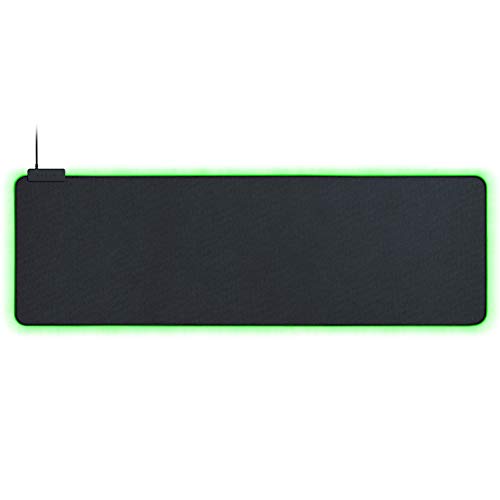
Razer Goliathus Extended Chroma Gaming Mousepad

Our verdict: Chroma-lit cloth built for control, with a nonslip rubber base and a strong ecosystem.

The Goliathus Extended Chroma is a cloth mat designed for control, with Razer Chroma lighting running around the edge and a nonslip rubber base. Cloth gives a slower, more predictable glide than hard surfaces, which suits players who aim with fine wrist movements.

It ranks first because the surface and the lighting come from the same brand, and the lighting plugs into the Razer Chroma software that syncs with other peripherals. The Strider Chroma offers a firmer lower half but costs more, and the Chinese-brand pads undercut it on price while giving less detail about the surface.

Best for a gaming desk already filled with Razer gear. The caveat is that the pad is powered by USB, so a cable runs back to your PC, and the price bucket of $50 to $100 is higher than most here.

Surface
Control cloth
Lighting
Razer Chroma
Base
Nonslip rubber
Size
Extended

What we like

  • +Cloth tuned for control
  • +Chroma lighting syncs with Razer gear
  • +Nonslip rubber base
  • +Extended desk coverage

Watch out for

  • −Higher price tier
  • −USB cable required for lights

Buy it if: Razer-based gaming desks where lighting should sync.

Skip it if: You want the cheapest lit pad or a wireless charger built in.

2

Best Hybrid Surface

Razer Strider Chroma Hybrid Gaming Mouse Mat with Chroma RGB

Our verdict: A hybrid soft and hard mat with 19 Chroma lighting zones across an extended body.

The Strider Chroma mixes a soft and a hard section in one extended mat, and its listing counts 19 Chroma RGB lighting zones. The hybrid idea is that the harder part gives a quick glide for mouse sweeps while the soft part supports the keyboard and wrists.

It ranks second because it costs the most in the group, in the $100 to $200 bucket, and the mixed surface suits fewer players than the Goliathus cloth. It beats the budget pads on lighting resolution, since 19 zones allow gradients that a handful of modes cannot.

This is the pick for a desk where the mat doubles as a full surface. The caveat is price: you pay a lot for lighting and a hybrid layout, and you give up the wireless charging of the Gimars and TARKARI.

Surface
Hybrid soft and hard
Lighting zones
19
Size
Extended
Software
Razer Chroma

What we like

  • +19 lighting zones
  • +Hybrid soft and hard surface
  • +Extended size for keyboard
  • +Chroma software sync

Watch out for

  • −Highest price tier here
  • −Mixed surface not for everyone

Buy it if: Players who want gradient lighting and a firmer glide area.

Skip it if: You want a single soft surface or a lower price.

3

Best With Wireless Charging

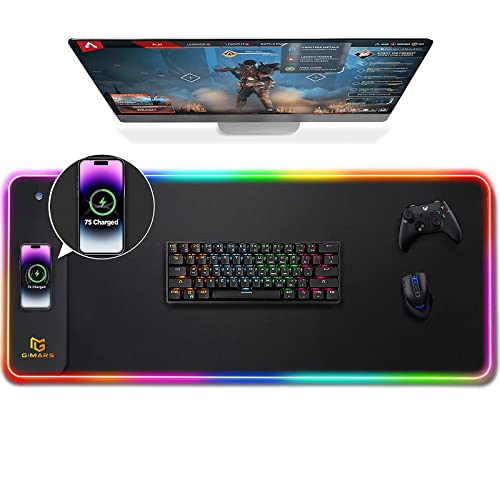
Gimars RGB Gaming Mouse Pad, 15W Wireless Charging Mousepad with 10 Light Modes

Our verdict: An extra-large RGB desk mat with 15W wireless charging and 10 light modes.

Gimars builds a charging pad into an extra-large RGB desk mat, with 15W wireless fast charging and 10 light modes. The extra-large size covers the keyboard and mouse, and the charger saves one cable on the desk.

It sits third because it is the more established of the two charging pads here, and it adds a stated size that covers the whole workspace. The TARKARI offers the same 15W figure plus a safety-protection claim, but the Gimars is the one that spells out the light-mode count and the desk-mat format.

Buy it if a phone lives next to your mouse all day. The caveat is that wireless charging at 15W only works with compatible phones, and a case that is too thick can slow or stop it.

Charging
15W wireless
Lighting
10 modes
Size
Extra-large desk mat
Price bucket
$25 to $50

What we like

  • +15W wireless charging built in
  • +10 RGB light modes
  • +Extra-large desk coverage
  • +Fewer desk cables

Watch out for

  • −Charging needs a compatible phone
  • −Thick cases may block charging

Buy it if: People who park their phone on the desk all day.

Skip it if: You do not need a charger or dislike a thicker pad.

4

Best Woven Surface

TARKARI Mouse Pad Gaming Wireless Charging

Our verdict: 15W wireless charging with 6 safety protections and a high-density woven top.

The TARKARI promises 15W multi-level fast wireless charging with 6 safety protections, 10 RGB modes switched by an inductive touch control and a high-density woven fabric surface. The touch switch replaces a button and keeps the edge clean.

It ranks below the Gimars because the format details are thinner, with no stated size, and above the plain pads because it adds charging safeguards. Where the Gimars is a clear desk mat, this one reads as a standard pad with a charger inside, so check the dimensions before you buy.

Suitable for a mid-size desk where a woven top and a phone dock share one surface. The caveat is that wireless charging pads can run warm, and the listing's safety wording is the reassurance, not a test result.

Charging
15W wireless
Safety
6 protections
Lighting
10 RGB modes
Surface
High-density woven

What we like

  • +15W charging with safeguards
  • +Touch switch for lighting
  • +High-density woven top
  • +Under $25 price tier

Watch out for

  • −Size not stated
  • −Charging pad can run warm

Buy it if: Mid-size desks that want charging and a woven surface.

Skip it if: You need a full-desk mat or Razer-style software.

5

Best Oversized Budget

TIDALSOIL RGB Gaming Mouse Pad

Our verdict: An oversized pad with 12 RGB light modes at the bottom of the price range.

TIDALSOIL offers 12 RGB light modes on an oversized pad that covers the desk, in the under $25 bucket. Oversized coverage matters because a keyboard and mouse sharing one surface stay at the same height.

It ranks fifth because the listing gives no surface detail beyond a durable claim, and no charging. It still beats the BladeHawks on lighting variety, with 12 modes against an unstated count, and it is the cheapest pad here that promises full coverage.

Pick it when you want a lit desk mat without spending Razer money. The caveat is that cheap RGB pads often skimp on the cable and controller, so check how the lighting is switched before relying on it.

Lighting
12 RGB modes
Size
Oversized
Charging
None
Price bucket
Under $25

What we like

  • +12 RGB light modes
  • +Oversized desk coverage
  • +Lowest price tier
  • +Simple plug-in setup

Watch out for

  • −Surface details thin
  • −No wireless charging

Buy it if: Budget desks that want a lit, full-coverage mat.

Skip it if: You want brand software or a charger.

6

Best Customizable Lighting

HUADO RGB Gaming Mouse Pad

Our verdict: Customizable RGB modes on an extended pad with a smooth fabric top.

HUADO lists customizable RGB lighting modes, an extended size for full desktop coverage and a smooth fabric surface for consistent mouse control. Consistency is the useful word: a smooth weave keeps tracking steady across the pad.

It ranks sixth because the listing gives no mode count, unlike the TIDALSOIL with 12, and nothing about the base. It stays ahead of the BladeHawks since it names the surface and stresses customization.

A reasonable choice for an everyday desk where lights are a bonus and the fabric is the point. The caveat is that customizable lighting without a number leaves you guessing what the controller actually offers.

Lighting
Customizable RGB
Size
Extended
Surface
Smooth fabric
Price bucket
Under $25

What we like

  • +Customizable RGB modes
  • +Extended desktop coverage
  • +Smooth fabric top
  • +Under $25 price tier

Watch out for

  • −Mode count not stated
  • −Base grip not described

Buy it if: Everyday desks where the surface matters more than the show.

Skip it if: You want a stated number of light modes.

7

Best Anti-Slip Base

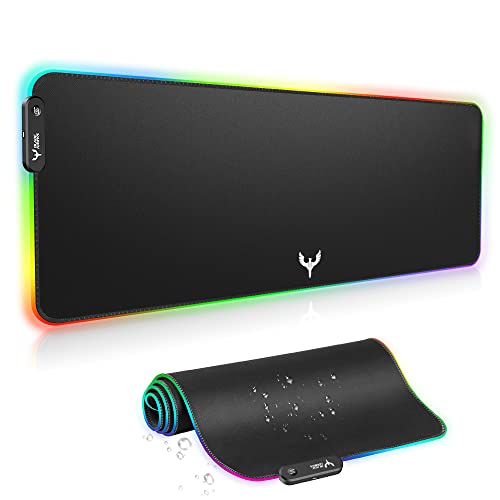
BladeHawks RGB Gaming Mouse Pad Extra Large Extended 31.5x12 Inch-Black

Our verdict: A 31.5 by 12 inch pad with LED backlight and an anti-slip rubber base.

BladeHawks gives you an exact size, 31.5 by 12 inches, an LED backlight and an anti-slip rubber base. That is a classic keyboard-and-mouse format, long enough for a full-size keyboard with room to spare.

It finishes seventh because the lighting is described only as an LED backlight, with no mode count, and the surface is not named. It earns its place with the one detail the others skip: dimensions you can check against your desk.

The pick for a buyer who knows exactly how much desk is available and wants a no-frills lit pad. The caveat is the missing lighting detail, so expect basic colour cycling rather than customization.

Size
31.5 x 12 in
Lighting
LED backlight
Base
Anti-slip rubber
Price bucket
Under $25

What we like

  • +Exact 31.5 x 12 in size
  • +Anti-slip rubber base
  • +LED backlit edge
  • +Under $25 price tier

Watch out for

  • −Lighting modes not stated
  • −Surface type not named

Buy it if: Keyboard-and-mouse setups with a known desk width.

Skip it if: You want detailed lighting control.

Methodology

How We Ranked These

Surface quality

Cloth, woven or hybrid surface type and how well the listing explains it, since glide matters more than glow.

Lighting execution

Mode counts, zone counts, software support and how the lights are switched.

Size and coverage

Stated dimensions and whether the pad holds both keyboard and mouse.

Base and stability

Whether the underside is rubber or anti-slip, which stops the pad creeping.

Extras and value

Wireless charging, safety claims and price tier compared with what the pad delivers.

Every Primea Score uses the same weights: Performance 30% · Build & Materials 20% · Everyday Usability 20% · Value 20% · Owner Satisfaction 10%. Full scoring rules

Buyer's guide

How to Pick the Right One for You

By Surface

Start with how you want the mouse to glide.

SurfaceOur pick
Control clothRazer Goliathus Extended Chroma Gaming Mousepad
Hybrid soft and hardRazer Strider Chroma Hybrid Gaming Mouse Mat
High-density wovenTARKARI Mouse Pad Gaming Wireless Charging
Smooth fabricHUADO RGB Gaming Mouse Pad

By Budget

SpendOur pick
Under $25TIDALSOIL RGB Gaming Mouse Pad
$25 to $50Gimars RGB Gaming Mouse Pad
$50 to $100Razer Goliathus Extended Chroma Gaming Mousepad
$100 to $200Razer Strider Chroma Hybrid Gaming Mouse Mat

Charging vs Plain Lighting

Wireless charging

Turns the pad into a phone dock. The Gimars and TARKARI both quote 15W and suit desks where the phone stays put.

Lighting only

Keeps the pad simpler and cooler. The Goliathus, Strider, TIDALSOIL and HUADO focus on surface and lights.

Choose charging only if your phone supports it, otherwise a plain pad such as the Goliathus is the safer buy.

By Size

SizeOur pick
Stated 31.5 x 12 inBladeHawks RGB Gaming Mouse Pad Extra Large
Extra-large desk matGimars RGB Gaming Mouse Pad
Oversized coverageTIDALSOIL RGB Gaming Mouse Pad
Extended with gradientsRazer Strider Chroma Hybrid Gaming Mouse Mat

For Razer Setups Specifically

Look for

A pad that speaks Chroma, so lighting follows your keyboard and mouse through one piece of software.

In this ranking

The Goliathus is the straightforward match, and the Strider adds 19 zones for gradients at a higher price.

When to Spend More

Spend more if

You want synced lighting and a known surface. The Razer pair is where the money goes.

Save if

Lights are decoration. The TIDALSOIL or BladeHawks covers the desk for under $25.

Questions

Frequently Asked Questions

Do RGB pads need to be plugged in?+

Yes. The Goliathus, Strider and the budget pads draw power over USB for the lights, and the Gimars and TARKARI also need power for charging. Check that your PC has a free USB port or use a powered hub.

What is the most common mistake with a charging pad?+

Using a thick or metal case. The Gimars and TARKARI quote 15W, but a thick case reduces alignment and can stop charging entirely. Test with your phone and case, and centre the phone on the coil.

Is the Razer Goliathus worth more than the TIDALSOIL?+

If you use Razer gear, yes, because Chroma syncs with your other devices and the surface is built for control. The TIDALSOIL gives 12 modes and oversized coverage for far less, but without that ecosystem.

How do I set up the lighting?+

Plug the USB cable into your PC, then use the touch control or button on the pad to cycle modes. For the Razer pads, install Razer Synapse to assign colours and zones, including the Strider's 19 zones.

How do I clean a lit cloth pad?+

Unplug it first, then wipe the surface with a damp cloth and let it air dry fully. Avoid soaking the Goliathus or Gimars, because the electronics sit under the fabric and moisture can damage the LEDs.

Will the lights distract during work?+

They can, so look for a pad you can switch off. The TARKARI's touch switch and the Razer software both allow a static or off setting, which keeps the pad useful as a plain desk mat after hours.

Final take

The Razer Goliathus Extended Chroma is the best RGB mouse pad here because the surface, base and lighting work as one system. The Strider Chroma adds 19 zones and a hybrid top for those who will pay for it. Pick the Gimars if the desk needs a phone charger, and the TIDALSOIL if budget matters more than brand.

More Ranked & Reviewed Guides