
Primea ReviewsAll Reviews

Primea Reviews is reader-supported. When you buy through our Amazon links we may earn a commission, at no extra cost to you. Rankings are set by our editors and never sold. Learn more

Ranked & Reviewed by Primea Reviews

The 8 Best Printers Without Wi-Fi of 2026, Ranked & Reviewed

By the Primea Editorial TeamUpdated November 1, 20269 min read8 products ranked
The 8 Best Printers Without Wi-Fi of 2026, Ranked & Reviewed

The short answer

The HP LaserJet M209d is the best printer without Wi-Fi: wired connection only, no wireless radio, a USB cable in the box and automatic duplex, for $100 to $200. The Brother DCP-L2640DW adds scan and copy, and the Canon MF753Cdw II is the fast color laser. The inkjets suit color and photos.

The Primea Scoreboard

Ranked & Reviewed

  1. No Wi-Fi radio at all, a USB cable in the box and automatic duplex.

    94Outstanding
    Check price
  2. A compact laser with scan and copy that runs on USB with Wi-Fi switched off.

    92Outstanding
    Check price
  3. 35 PPM color duplex laser with an ADF, scan, copy and fax.

    90Excellent
    Check price
  4. A 2.7-inch touchscreen, automatic 2-sided copy and scan and high-yield ink.

    88Excellent
    Check price
  5. Fax, ADF and duplex print and scan, all usable over USB.

    86Excellent
    Check price
  6. High-yield INKvestment cartridges and a manual feed slot, for less than the 5010.

    84Very Good
    Check price
  7. Duplex color photo printing, scan and copy, with USB Connect named in the listing.

    82Very Good
    Check price
  8. A business-oriented inkjet with scanner, copier and fax.

    79Very Good
    Check price

People ask for a printer without Wi-Fi for three reasons: they do not want another device on the home network, their signal is patchy, or they simply want a machine that works every time a cable is plugged in. The catch is that almost nothing on sale today is truly radio-free. Most printers carry a Wi-Fi chip and just let you turn it off, which is not the same as never having one.

This list is built around that distinction. One model is wired-only by design. The other seven are Wi-Fi capable, but their listings say a USB-B connection keeps working with the radio disabled in settings. We ranked them on how cleanly they run wired, what they do beyond printing, and the running cost their ink or toner implies, using spec sheets and owner reports.

Before you buy

What Actually Matters

01

Wired-only is rare

Nearly every current printer includes a Wi-Fi radio. A few, like the HP LaserJet M209d, omit it entirely, while others let you switch it off in settings. If you need no wireless at all, look for the words wired connection only in the title or bullets. A disabled radio is not the same as no radio, because a firmware update or reset can switch it back on.

02

Check the USB type

Printers use USB-B to connect to a computer, a squarish plug. Modern laptops often have USB-C only, so you will need a USB-B to USB-C cable or a hub. Look at the ports on your computer first, and buy the right cable with the printer. The HP M209d includes a USB cable, so you can plug in on day one.

03

Laser versus inkjet running cost

Lasers use toner that lasts for thousands of pages and does not dry out. Inkjets cost less up front but their ink dries if you print rarely. If you print a few pages a month, choose a laser, like the HP M209d or the Brother DCP-L2640DW, and save inkjets for color. Toner cartridges also tend to cost more up front but print more pages.

04

Setup without wireless

Some printers need Wi-Fi for first-time setup or firmware. Check that the setup works over USB with the driver downloaded from the maker's site. Look for a driver for your operating system before ordering, and confirm it installs without an account, if privacy is your reason for going wired. Avoid models that ask you to sign in to finish setup.

05

Duplex and ADF save time

Automatic duplex prints on both sides without you flipping paper. An automatic document feeder scans stacks without lifting the lid. If you handle paper regularly, both are worth looking for in the specs. The HP M209d and Brother laser list duplex, and the Canon and HP OfficeJet add an ADF. Duplex also halves your paper bill on long documents.

In-depth reviews

Our Ranked Picks, Reviewed

1

Best Overall

HP LaserJet M209d Laser Printer, Wired Connection Only

Our verdict: No Wi-Fi radio at all, a USB cable in the box and automatic duplex.

The HP LaserJet M209d is a monochrome laser sold as wired connection only, with a USB cable included and automatic duplex printing. There is no wireless radio to disable, which is the point: with no chip inside, there is nothing to switch back on after a firmware update. It sells for $100 to $200, the lowest laser price here.

It ranks first because it is the only printer in this guide that is genuinely wireless-free. The Brother DCP-L2640DW adds scan and copy but keeps a radio you must switch off, and the Canon costs far more. Toner also lasts for thousands of pages and does not dry between jobs, which suits a home office printing at irregular intervals.

Buy it for black text documents. The caveat is the missing scanner, color and the requirement that it sits near the computer. Skip it if you need to scan, copy or print color.

Connection
Wired only, USB
Print
Monochrome laser
Duplex
Automatic
In the box
USB cable

What we like

  • +No wireless radio at all
  • +USB cable included
  • +Automatic duplex
  • +Lowest laser price here

Watch out for

  • −Black and white only
  • −No scanner or copier
  • −Must sit near the computer

Buy it if: Text-heavy home offices that want no wireless.

Skip it if: You need to scan, copy or print color.

2

Best Wired All-in-One

Brother DCP-L2640DW Wireless Compact Monochrome Laser Printer

Our verdict: A compact laser with scan and copy that runs on USB with Wi-Fi switched off.

The Brother DCP-L2640DW is a compact monochrome laser with duplex printing, copy and scan. The listing notes its Wi-Fi can be disabled in settings while the USB-B connection keeps working. It sells for $200 to $500. Alexa features require Wi-Fi to be on, so a privacy-minded owner skips them. A laser engine keeps cost per page low on text.

It places second behind the HP because it still carries a wireless radio, but it does more: scanning and copying in a single box. Against the Canon MF753Cdw II, it is a simpler, cheaper step, with no color and no fax. Against the INKvestment inkjets, it avoids the drying problem.

Best for a small office that needs scan and copy without a network. The caveat is that the radio remains, so you must disable it in settings. Skip it if you need a printer with no radio at all.

Connection
USB-B, Wi-Fi can be disabled
Print
Monochrome laser, duplex
Extras
Copy and scan
Alexa
Needs Wi-Fi on

What we like

  • +Copy and scan built in
  • +Duplex printing
  • +USB works with Wi-Fi off
  • +Compact laser

Watch out for

  • −Still has a Wi-Fi radio
  • −Black and white only
  • −Alexa needs wireless on

Buy it if: Small offices that scan and copy over USB.

Skip it if: You need a printer with no radio at all.

3

Best Color Laser

Canon Color imageCLASS MF753Cdw II Wireless Duplex Laser Printer

Our verdict: 35 PPM color duplex laser with an ADF, scan, copy and fax.

The Canon MF753Cdw II is a color duplex laser at 35 PPM, the fastest printer in this guide, with an automatic document feeder, scanner, copier and fax. Wi-Fi can be disabled in settings while USB-B stays active, and a three-year limited warranty is listed. It sells for $200 to $500. Speed at 35 pages per minute keeps a busy office moving through multi-page reports.

It ranks third because it costs far more than the Brother, and most home offices do not need color at that speed. For a small business that prints marketing pages, though, nothing else here comes close. Against the HP OfficeJet Pro, it offers a longer warranty and laser consistency.

Best for a color laser workflow without a wireless network. The caveats are the price, the highest in the guide, and a large body. Skip it if you only print black text.

Speed
35 PPM color duplex
Extras
ADF, scan, copy, fax
Connection
USB-B, Wi-Fi can be disabled
Warranty
3-year limited

What we like

  • +Fastest printer here
  • +Color duplex laser
  • +ADF and fax included
  • +3-year limited warranty

Watch out for

  • −Highest price in the guide
  • −Large for a home desk
  • −Wireless radio still present

Buy it if: Small businesses printing color documents at speed.

Skip it if: You only print black text.

4

Best Inkjet Touchscreen

Brother INKvestment 5010 Wireless Color Inkjet All-in-One Printer

Our verdict: A 2.7-inch touchscreen, automatic 2-sided copy and scan and high-yield ink.

The Brother INKvestment 5010 is a color inkjet all-in-one with a 2.7 inch touchscreen, automatic 2-sided copy and scan, and a higher-yield cartridge system. The listing notes a wired USB-B connection stays fully usable with Wi-Fi disabled. It sells for $200 to $500. High-yield cartridges stretch the gap between refills, which lowers running cost for people who print color often.

It ranks fourth because it is an inkjet, which suits occasional color work better than the lasers above. Against the 4355 below, you pay more for the bigger screen and two-sided scanning. Against the HP OfficeJet Pro 9135, it lacks fax and an ADF but works over USB with Wi-Fi off.

Best for a household that prints color and copies a lot. The caveat is that inkjets dry out if you rarely print. Skip it if you print rarely.

Display
2.7 inch touchscreen
Scan and copy
Automatic 2-sided
Ink
INKvestment high-yield
Connection
USB-B, Wi-Fi can be disabled

What we like

  • +Touchscreen controls
  • +Automatic 2-sided copy and scan
  • +High-yield ink system
  • +Works over USB with Wi-Fi off

Watch out for

  • −Inkjets dry out when idle
  • −Mid-high price
  • −Wireless radio still present

Buy it if: Households that copy and print color.

Skip it if: You print rarely.

5

Best Office Features

HP OfficeJet Pro 9135 Wireless All-in-One Color Inkjet Printer

Our verdict: Fax, ADF and duplex print and scan, all usable over USB.

The HP OfficeJet Pro 9135 is the most fully featured inkjet here, with fax, an ADF and duplex printing and scanning. The listing says it keeps working over USB-B with Wi-Fi disabled and includes a 3-month Instant Ink trial. It sells for $200 to $500. An ADF scans a stack of pages without lifting the lid, which saves time on paperwork.

It ranks fifth because the price is high for an inkjet, and the Instant Ink offer only makes sense if you connect to HP's service, which needs the internet. That defeats the point of a wired setup. For wired-only use, the Brother models are better value.

Best for an office with fax and document workflows that still want color. The caveat is that the Instant Ink trial needs a connection and the footprint is large. Skip it if you want the lowest running cost.

Extras
Fax, ADF
Scan and print
Duplex
Connection
USB-B, Wi-Fi can be disabled
Ink plan
3-month Instant Ink trial

What we like

  • +Fax and ADF included
  • +Duplex print and scan
  • +Works over USB with Wi-Fi off
  • +Office-level feature set

Watch out for

  • −High price
  • −Instant Ink needs the internet
  • −Large footprint

Buy it if: Offices that fax and scan stacks of paper.

Skip it if: You want the lowest running cost.

6

Best Value Inkjet

Brother INKvestment 4355 Wireless Color Inkjet All-in-One Printer

Our verdict: High-yield INKvestment cartridges and a manual feed slot, for less than the 5010.

The Brother INKvestment 4355 keeps the high-yield cartridge system and adds a 1.8 inch color display and a manual feed slot for cardstock and envelopes. Wi-Fi can be disabled while USB-B continues to work. It sells for $200 to $500. A manual feed slot lets thicker stock bypass the paper tray, which matters for envelopes and labels that jam in a cassette.

It ranks sixth because the 5010 above adds a touchscreen and 2-sided scanning for a modest step up. Against the Epson XP-7100 below, it is the better choice for text and envelopes, because its cartridges are built for volume. The Brother laser models still beat it for black text.

Best for a budget color inkjet with a long-lasting cartridge system. The caveat is the small screen, which makes menus slower. Skip it if you want easier menus.

Ink
INKvestment high-yield
Display
1.8 inch color
Media
Manual feed slot
Connection
USB-B, Wi-Fi can be disabled

What we like

  • +High-yield cartridges
  • +Manual feed for cardstock
  • +Lower price than the 5010
  • +USB works with Wi-Fi off

Watch out for

  • −Small 1.8 inch screen
  • −No touchscreen
  • −Inkjet drying risk

Buy it if: Budget color printing with envelopes.

Skip it if: You want easier menus.

7

Best for Photos

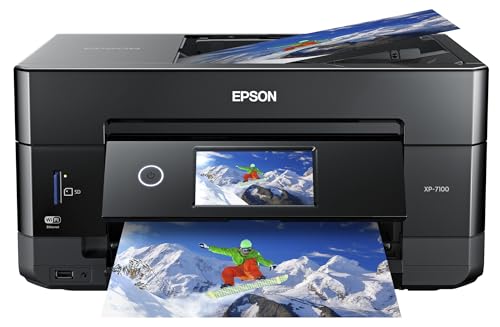
Epson Expression Premium XP-7100 Wireless Photo Printer, USB Connect

Our verdict: Duplex color photo printing, scan and copy, with USB Connect named in the listing.

The Epson Expression Premium XP-7100 is a compact photo printer with duplex color printing, a scanner and a copier. The listing names USB Connect alongside wireless, and the radio can be switched off while USB-B continues to work. It sells for $100 to $200. Photo inkjets use more ink colors than office models, which helps gradients and skin tones in prints.

It ranks seventh because it is photo first, and text pages cost more than on the Brother laser or the high-yield inkjets. Against the Canon MAXIFY, it is the better choice if you print pictures, but worse at documents. If photos matter, it is the specialist here.

Best for a desk that prints photos and some documents. The caveat is higher ink costs on everyday text. Skip it if you print mainly text.

Print
Duplex color photo
Extras
Scanner and copier
Connection
USB Connect, Wi-Fi optional
Design
Compact

What we like

  • +Photo-focused printing
  • +Scanner and copier
  • +Compact design
  • +USB Connect named in the listing

Watch out for

  • −Costly for text pages
  • −Photo specialist, not office
  • −Wireless radio still present

Buy it if: Desks that print photos and some documents.

Skip it if: You print mainly text.

8

Best Small Office Inkjet

Canon MAXIFY MB2720 Wireless Color Photo Printer

Our verdict: A business-oriented inkjet with scanner, copier and fax.

The Canon MAXIFY MB2720 is a business-oriented inkjet with scanner, copier and fax, plus color photo printing. Wi-Fi can be disabled in settings with the USB-B connection staying active. It sells for $100 to $200. Fax on a printer this price is uncommon, which suits a small office that still receives forms by phone line.

It ranks last because it is the oldest listing in the group, and the Brother INKvestment models offer a more current ink system. It does keep a full feature set at a mid price. Against the Epson XP-7100, it trades photo focus for fax and a business design.

Best for a small office that wants fax on a budget. The caveat is the older design, so check current ink prices before you commit. Skip it if you want a current ink system.

Extras
Scanner, copier, fax
Print
Color photo capable
Design
Business MAXIFY
Connection
USB-B, Wi-Fi can be disabled

What we like

  • +Fax, scan and copy
  • +Business-oriented design
  • +Color photo capability
  • +Mid price

Watch out for

  • −Older design
  • −Ink costs need checking
  • −Wireless radio present

Buy it if: Small offices that still use fax.

Skip it if: You want a current ink system.

Methodology

How We Ranked These

Wired behavior

We ranked wired-only design first, then printers whose listings say USB works with Wi-Fi disabled.

Features beyond print

Scan, copy, fax and ADF were compared, since a wired desk still needs those jobs done.

Ink and toner system

Laser and high-yield inkjet systems were weighed for running cost and for how well they cope with infrequent use.

Speed and duplex

Stated pages per minute and automatic two-sided printing were compared across the field.

Value in bracket

Each printer was weighed against others at a similar price on the spec sheet.

Every Primea Score uses the same weights: Performance 30% · Build & Materials 20% · Everyday Usability 20% · Value 20% · Owner Satisfaction 10%. Full scoring rules

Buyer's guide

How to Pick the Right One for You

By Document Type

What you print decides almost everything else.

You printOur pick
Black text, no scanningHP LaserJet M209d Laser Printer
Text plus copy and scanBrother DCP-L2640DW Compact Monochrome Laser Printer
Color documents at speedCanon Color imageCLASS MF753Cdw II
PhotosEpson Expression Premium XP-7100
Color with envelopes and cardstockBrother INKvestment 4355

By Budget

SpendOur pick
Under $120Canon MAXIFY MB2720 Wireless Color Photo Printer
$120 to $200HP LaserJet M209d Laser Printer
$200 to $250Brother INKvestment 5010
$450 and upCanon Color imageCLASS MF753Cdw II

Laser vs Inkjet

Laser

Toner does not dry out, and text is crisp and cheap per page. Picks: HP LaserJet M209d, Brother DCP-L2640DW, Canon MF753Cdw II.

Inkjet

Better for color and photos, with a lower price, but ink dries if unused. Picks: Brother INKvestment 5010 and 4355, HP OfficeJet Pro 9135, Epson XP-7100, Canon MAXIFY MB2720.

Default to a laser unless you need color or photos.

By Extra Features

NeedOur pick
Fax and ADFHP OfficeJet Pro 9135
TouchscreenBrother INKvestment 5010
Warranty lengthCanon Color imageCLASS MF753Cdw II
Compact footprintEpson Expression Premium XP-7100

For Privacy-Minded Users Specifically

Look for

A model with no wireless radio at all, or a listing that confirms USB keeps working with Wi-Fi disabled.

In this comparison

The HP LaserJet M209d has no radio, so there is nothing to switch off. Among the others, the Brother DCP-L2640DW is the simplest to run wired.

When to Spend More

Spend more if

You print color regularly or need an ADF and fax. The Canon MF753Cdw II and HP OfficeJet Pro 9135 are the models built for that load.

Save if

You print black text. The HP LaserJet M209d does it with no wireless to worry about.

Questions

Frequently Asked Questions

Do any printers have no Wi-Fi at all?+

Few do. The HP LaserJet M209d is listed as wired connection only. Most others, including the Brother DCP-L2640DW and Canon MF753Cdw II, have a radio you can turn off in settings.

Can I turn off Wi-Fi and still print?+

Yes on the Brother, Canon and HP OfficeJet listings here, which say the USB-B connection stays fully functional. Check your model's setup steps before you disable it, and keep the driver handy, since reinstalling later is easier with the file saved.

Is the Brother DCP-L2640DW worth more than the HP M209d?+

If you scan or copy, yes. For printing alone, the HP is cheaper and has no radio. The Brother adds a scanner but keeps a Wi-Fi chip, so decide which matters more for your workflow. A scanner is the main reason to take the Brother.

Do I need a special cable?+

A USB-B to USB-A or USB-C cable. The HP M209d includes a USB cable, and the others may not, so check the box contents. Newer laptops may need a USB-C adapter, which costs little. Keep the run short for a reliable link.

Which is better for infrequent printing?+

A laser, because toner does not dry. Inkjets such as the Epson XP-7100 can clog if left idle for weeks. If you print a few pages a month, the HP M209d is the safer choice, and the Brother DCP-L2640DW also avoids clogging.

Will a wired printer work with my phone?+

Not directly. Phones need a wireless link, so a wired-only printer like the HP M209d is for computers only. A Wi-Fi-capable model with the radio enabled is needed for phone printing, such as the Canon or Epson with the radio left on.

Final take

Buy the HP LaserJet M209d if you print black text and want no radio at all. Choose the Brother DCP-L2640DW when you also scan and copy, and the Canon MF753Cdw II for color at speed. Take a Brother INKvestment, HP OfficeJet or Epson only for color or photos. Prefer a laser if you print rarely, since toner does not dry out like ink.

More Ranked & Reviewed Guides