
Primea ReviewsAll Reviews

Primea Reviews is reader-supported. When you buy through our Amazon links we may earn a commission, at no extra cost to you. Rankings are set by our editors and never sold. Learn more

Ranked & Reviewed by Primea Reviews

The 6 Best Printers for Dorm Rooms of 2026, Ranked & Reviewed

By the Primea Editorial TeamUpdated November 1, 202610 min read6 products ranked
The 6 Best Printers for Dorm Rooms of 2026, Ranked & Reviewed

The short answer

The Canon PIXMA TS4320 is the best printer for dorm rooms: wireless, duplex, print-copy-scan and a compact body for $50 to $100. The TS6520 adds an OLED display for shared rooms, the TR4720 has a document feeder for scanning, and the HP DeskJet 4355 is the budget all-in-one. The MT610Pro is an inkless backup.

The Primea Scoreboard

Ranked & Reviewed

  1. Prints, copies, scans and duplexes in a body that fits a dorm desk.

    94Outstanding
    Check price
  2. A small OLED screen makes a shared printer far less confusing.

    91Excellent
    Check price
  3. An automatic document feeder turns multi-page scanning into a one-step job.

    88Excellent
    Check price
  4. A full wireless all-in-one that keeps the starting cost low.

    85Excellent
    Check price
  5. The lightest, simplest Canon, easy to pack at semester's end.

    82Very Good
    Check price
  6. No ink, no toner, just a thermal backup for occasional pages.

    79Very Good
    Check price

Dorm printers fail on boring details. One that needs a USB cable to your laptop, or a wide body that will not fit on a standard desk shelf, ends up in the closet by October. Setup matters more than speed in a room you share with a roommate and a hundred other devices. If a printer takes more than ten minutes to join the Wi-Fi, students give up and walk to the library.

We reviewed eight printers and kept six that suit a dorm. We ranked them on spec sheets and owner-reported use, focusing on size, wireless and phone printing, scanning, two-sided printing and how much ongoing ink or cartridge hassle each one brings. Footprint and weight carry real weight here, because the machine has to move in and out every year.

Before you buy

What Actually Matters

01

Footprint and weight

A dorm desk shelf is often narrower than a standard printer, and a heavy machine is hard to move at semester's end. Measure the space and compare it with the listing dimensions. Compact and lightweight wording in the specs is a helpful signal, as on the TS3720, and allow room for the open lid and paper tray too, since both extend past the body.

02

Wireless and mobile printing

Wireless printing lets you send documents from a laptop or phone without a cable. In a shared room this avoids swapping cords between roommates. Check the listing for Wi-Fi or Bluetooth and for mobile printing support. Also ask your campus IT about device registration, since some dorm networks block printers. Ask before you buy, not after.

03

Duplex printing

Duplex means the printer prints on both sides of the paper automatically. It halves your paper use on long readings and makes thick packets easier to handle. Look for the word duplex or 2-sided in the specs, since it is missing on some cheaper models like the DeskJet 4355 and TS3720.

04

Scanning and feeders

A flatbed scanner handles single sheets, while an auto document feeder takes a stack. For lease forms or signed pages a feeder saves minutes each time. Check whether the listing mentions a feeder, as the TR4720 does, or only a flatbed, and think about how often you will scan more than a page. A feeder also helps copy double-sided forms.

05

Ink or inkless cost

Inkjets are cheap to buy, but replacement cartridges add up, and subscriptions bill monthly. Inkless thermal printers like the MT610Pro avoid cartridges but only print simple documents. Decide how much you really print before choosing, and count the yearly ink cost, not just the price of the printer. Paper adds up too.

In-depth reviews

Our Ranked Picks, Reviewed

1

Best Overall

Canon PIXMA TS4320 Wireless Color Inkjet Printer

Our verdict: Prints, copies, scans and duplexes in a body that fits a dorm desk.

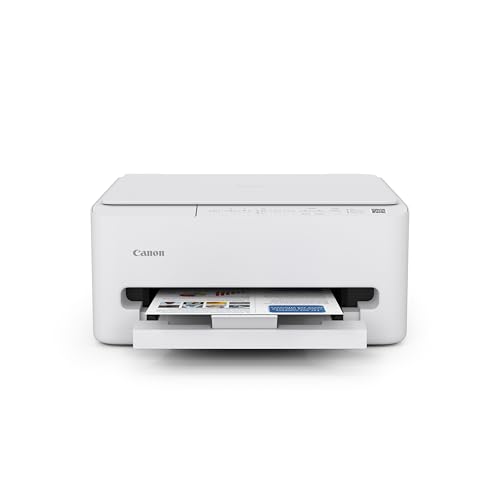
The TS4320 is a wireless color inkjet all-in-one that prints, copies and scans, with two-sided printing built in. It has a compact desktop footprint and a one-year limited warranty, and sells for $50 to $100. Duplex halves paper use on long readings, which cuts the number of reams a student lugs up the stairs.

It wins over the TS6520 because it covers the same everyday jobs in the same price range without paying for features a solo student seldom uses. It gives up the display of the pricier TS6520, so setup relies on the phone app. Against the HP DeskJet 4355, it adds duplex.

Choose it for essays, forms and the occasional scan. The caveat is that inkjet cartridges add up and there is no screen for menus. Look elsewhere if you share the printer with several roommates.

Type
Wireless color inkjet
Functions
Print, copy, scan
Two-sided
Duplex printing
Warranty
1 year limited

What we like

  • +Wireless all-in-one
  • +Duplex saves paper
  • +Compact desktop size
  • +Scans and copies too

Watch out for

  • −No built-in display
  • −Inkjet cartridges add up

Buy it if: Most dorm students who want one all-round printer.

Skip it if: A shared printer needs a screen for menus.

2

Best for Roommates

Canon PIXMA TS6520 Wireless Color Inkjet Printer

Our verdict: A small OLED screen makes a shared printer far less confusing.

The TS6520 adds a 1.42 inch OLED display to a wireless color inkjet all-in-one with duplex printing and copy and scan functions. The design stays compact and it sells for $50 to $100. A small screen matters in a shared room because anyone can check status, clear a paper warning or change settings without installing an app.

It ranks just under the TS4320 only because most solo students never use the screen, and it sits in the same price range. For roommates, the display lets anyone check status or change settings without the app. Against the TR4720, it is smaller and adds duplex.

Pick it when two or more people share the machine. The caveat is that the screen is small. If you are the only user, the TS4320 does the same work without the extra feature. Skip it if you live alone.

Display
1.42 inch OLED
Type
Wireless color inkjet
Two-sided
Duplex printing
Functions
Print, copy, scan

What we like

  • +Easy-to-read OLED display
  • +Duplex printing built in
  • +Wireless all-in-one
  • +Compact design

Watch out for

  • −Screen is small
  • −Extra feature for solo users

Buy it if: Shared dorm rooms with several users.

Skip it if: You live alone and rarely touch settings.

3

Best for Scanning

Canon PIXMA TR4720 All-in-One Wireless Printer

Our verdict: An automatic document feeder turns multi-page scanning into a one-step job.

The TR4720 pairs wireless printing with an auto document feeder, built-in fax and mobile printing. It prints, scans, copies and faxes, comes in a white finish, and sells for $50 to $100. A feeder takes a stack of pages in one pass, so scanning a signed lease or lab notes takes seconds instead of minutes of lid lifting.

It ranks third because the feeder makes it bulkier than the TS-series models, which matters on a small desk. In return you can load a stack of signed pages and scan them without opening the lid for each sheet. Fax is a dated extra that most dorm users will never touch.

Best for students who scan lease paperwork, forms or lab notes often. The caveat is the larger body. If you mostly print, the TS4320 saves space. Skip it if desk space is very tight.

Feeder
Auto document feeder
Functions
Print, scan, copy, fax
Connectivity
Wireless and mobile
Finish
White

What we like

  • +Feeder scans stacks
  • +Built-in fax
  • +Mobile printing support
  • +Wireless setup

Watch out for

  • −Bulkier than TS models
  • −Fax is rarely used

Buy it if: Students who scan multi-page documents regularly.

Skip it if: Desk space is very tight.

4

Best Budget All-in-One

HP DeskJet 4355 Wireless All-in-One Color Inkjet Printer

Our verdict: A full wireless all-in-one that keeps the starting cost low.

The HP DeskJet 4355 prints, scans and copies wirelessly and includes a three-month Instant Ink trial. It is a compact home design with AI-capable features listed, and sells for $50 to $100. Instant Ink bills by pages instead of cartridges, so a student who prints in bursts pays little during quiet weeks.

It ranks fourth because the listing does not mention duplex printing, which the Canon models above offer. The Instant Ink trial can lower early ink costs, but it is a subscription you need to manage after the trial, or ink supplies lapse. Against the TS3720, it adds the ink plan.

A good fit for budget-minded students who want a full machine without extra frills. The caveat is missing duplex and subscription upkeep. Skip it if two-sided printing is a priority.

Type
Wireless color inkjet
Functions
Print, scan, copy
Ink plan
3-month Instant Ink trial
Design
Compact for home

What we like

  • +Low starting cost
  • +Wireless all-in-one
  • +Instant Ink trial included
  • +Compact home design

Watch out for

  • −Duplex not listed
  • −Subscription needs managing

Buy it if: Budget students who want a full all-in-one.

Skip it if: You want automatic two-sided printing.

5

Best for Moving

Canon PIXMA TS3720 Wireless All-in-One Printer

Our verdict: The lightest, simplest Canon, easy to pack at semester's end.

The TS3720 is a basic wireless color inkjet all-in-one with a compact, lightweight body in white. It prints, scans and copies and focuses on plain home printing. It sells for $50 to $100. Light weight is the point: it is the easiest of the Canons to carry up a staircase and pack at semester's end.

It sits below the TS4320 because it drops the duplex support and extras listed on that model. The upside is bulk, since it is the simplest to carry. Against the DeskJet 4355, it has no ink trial, but it is about as small and has the same basic jobs.

Good for students who change rooms each year and print only occasionally. The caveat is a basic feature set with no duplex listed. If your course load is print-heavy, the TS4320 saves paper and time. Skip it if you print large volumes.

Type
Wireless color inkjet
Functions
Print, scan, copy
Body
Compact and lightweight
Finish
White

What we like

  • +Light and easy to carry
  • +Wireless setup
  • +Prints, scans and copies
  • +Small desk footprint

Watch out for

  • −Basic feature set
  • −No duplex listed

Buy it if: Students who move rooms often.

Skip it if: You print large volumes of coursework.

6

Best Backup Printer

Inkless Portable Printer for Travel (MT610Pro)

Our verdict: No ink, no toner, just a thermal backup for occasional pages.

The MT610Pro is a Bluetooth thermal printer that needs no ink or toner cartridges. It prints Letter and A4 at 300 DPI, works with iOS, Android and laptops, and sells for $50 to $100. Thermal printing heats special paper, so there is no cartridge to dry out over summer break.

It ranks last because it is not a copier or scanner, and thermal output suits plain documents rather than color work. Its advantage is size and zero cartridge shopping. Against the Canon all-in-ones, it replaces scanning and copying with pure portability.

Best as a lightweight backup for students who rely mostly on campus print stations. The caveat is monochrome-only output and no scan or copy. If you need scanning or color, one of the Canon all-in-ones is the better choice.

Printing
Inkless thermal
Connection
Bluetooth
Paper
Letter and A4
Resolution
300 DPI

What we like

  • +No ink or toner
  • +Very portable
  • +Works with phones and laptops
  • +Letter and A4 supported

Watch out for

  • −No scan or copy
  • −Not for color documents

Buy it if: Students who mostly use campus printing.

Skip it if: You need scanning or color output.

Methodology

How We Ranked These

Dorm footprint

We ranked how much desk or shelf space each printer needs and how easy it is to carry.

Wireless and phone printing

We checked for Wi-Fi, Bluetooth and mobile printing so no cable is required.

Everyday functions

We weighed scanning, copying, duplex printing and document feeders against typical student jobs.

Shared-room usability

We looked for displays and simple controls that make a shared printer less confusing.

Running cost approach

We compared cartridge-based inkjets, ink subscription trials and inkless thermal printing.

Every Primea Score uses the same weights: Performance 30% · Build & Materials 20% · Everyday Usability 20% · Value 20% · Owner Satisfaction 10%. Full scoring rules

Buyer's guide

How to Pick the Right One for You

By Printing Habit

How often you print decides how much machine you need.

HabitOur pick
Weekly essays and formsCanon PIXMA TS4320
Shared with roommatesCanon PIXMA TS6520
Frequent multi-page scansCanon PIXMA TR4720
Occasional, packs up oftenCanon PIXMA TS3720
Almost never, campus firstMT610Pro Inkless Portable Printer

By Budget

SpendOur pick
$50 to $100, best overallCanon PIXMA TS4320
$50 to $100, lowest costHP DeskJet 4355
$50 to $100, sharedCanon PIXMA TS6520
$50 to $100, backupMT610Pro Inkless Portable Printer

Inkjet vs Inkless

Inkjet

Inkjets print in color, scan and copy, but need cartridges. The Canon TS4320, TS6520, TR4720, TS3720 and the HP DeskJet 4355 are all inkjet all-in-ones.

Inkless thermal

Thermal printers use heat on special paper, so there are no cartridges, but they cannot scan or print color. The MT610Pro is the only one here.

Most students should choose an inkjet unless printing is rare.

By Room Situation

SituationOur pick
Single room, one userCanon PIXMA TS4320
Triple with shared costsCanon PIXMA TS6520
Tiny desk shelfCanon PIXMA TS3720
Signing leases and formsCanon PIXMA TR4720
Cartridge-free lifeMT610Pro Inkless Portable Printer

For Phone-First Printing Specifically

Look for

Mobile and tablet printing support plus wireless setup so you can print without a laptop.

In this ranking

The Canon TR4720 lists mobile printing support outright, and the MT610Pro works with iOS and Android over Bluetooth.

When to Spend More

Spend more if

Several people share the printer, which favors the Canon TS6520 display, or you scan stacks, which favors the TR4720 feeder.

Save if

You print rarely. The HP DeskJet 4355 or Canon TS3720 cover basics, and the MT610Pro skips cartridges completely.

Questions

Frequently Asked Questions

Do dorm printers need a cable?+

Not the wireless ones. The Canon models and the HP DeskJet 4355 join your Wi-Fi, while the MT610Pro uses Bluetooth. Check that your dorm network allows device connections before buying, because some block printers, and a registration step may be needed for the TS4320 or TR4720.

What is the most common buying mistake?+

Buying on price without checking size. A printer that does not fit your desk shelf becomes floor clutter, so measure first, then compare the TS3720 and TS4320 on footprint. Check the shelf depth, since paper trays stick out.

Is the TS6520 worth it over the TS4320?+

Only for shared rooms. The display helps roommates manage settings, but a solo student gets the same prints from the cheaper TS4320. Weigh the screen against how many people use the machine. Roommates tend to cause the most paper jams.

How do I set up a wireless printer in a dorm?+

Use the manufacturer's phone app to join the printer to your Wi-Fi, then add it on your laptop. Some campus networks need a device registration step first, so do that before the first print.

How do I keep ink costs down?+

Print in draft mode for notes, use duplex printing and avoid full-color pages. The HP Instant Ink trial can help early on, but track the plan after it ends. Buy a spare cartridge before finals week.

Can an inkless printer replace a normal one?+

For plain text documents, yes. The MT610Pro cannot scan, copy or print color, so most students will still want an inkjet like the TS4320 for forms and projects. Keep the thermal one for quick drafts.

Final take

Buy the Canon TS4320 for a solo dorm. Take the TS6520 when roommates share the machine, the TR4720 if you scan stacks of paperwork, and the DeskJet 4355 for the lowest start-up cost. The TS3720 is the light one for moving, and the MT610Pro a thermal backup only. Measure your shelf and test the Wi-Fi setup before ordering.

More Ranked & Reviewed Guides