
Primea ReviewsAll Reviews

Primea Reviews is reader-supported. When you buy through our Amazon links we may earn a commission, at no extra cost to you. Rankings are set by our editors and never sold. Learn more

Ranked & Reviewed by Primea Reviews

The 7 Best Portable Power Stations for Laptops, From Pocket Hubs to Full AC Units, Ranked & Reviewed

By the Primea Editorial TeamUpdated November 3, 20269 min read7 products ranked
The 7 Best Portable Power Stations for Laptops, From Pocket Hubs to Full AC Units, Ranked & Reviewed

The short answer

The Jackery Explorer 300 is the best portable power station for most laptop users, with 292Wh, 300W and 100W USB-C power delivery in a 7.5 lb body. The ALLPOWERS VOLIX P300 adds fast AC recharge, the Duracell M250 is the compact work hub, and the Jackery Explorer 1000 v2 is for multi-day or heavy use.

The Primea Scoreboard

Ranked & Reviewed

  1. 292Wh, 300W with 600W surge, 100W USB-C PD and six device ports at 7.5 lb.

    94Outstanding
    Check price
  2. 256Wh, 300W, a two-hour AC fast charge, a 6-year warranty and 4,000 plus cycles.

    91Excellent
    Check price
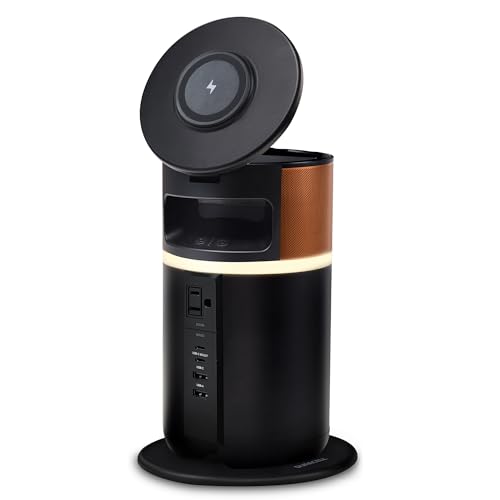
  3. A 4.5 lb, 250W hub with a tiltable lid, a ring light and documented laptop and phone charges.

    88Excellent
    Check price
  4. 1,070Wh and 1,500W with a one-hour app-controlled fast charge at 23.8 lb.

    86Excellent
    Check price
  5. 280Wh, 300W, about 5 lb, MPPT solar input and three recharge paths.

    83Very Good
    Check price
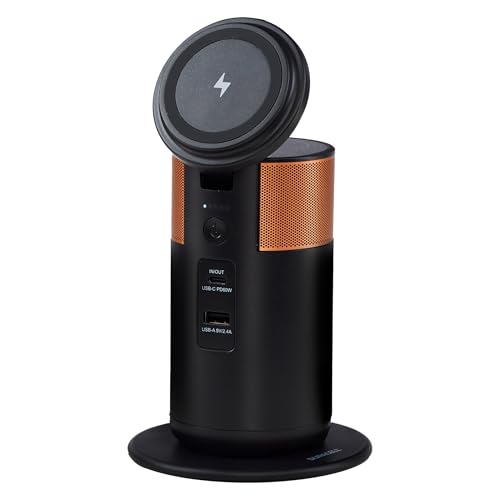
  6. A 1.5 lb, 92W, FAA carry-on compliant hub with dual wireless charging.

    81Very Good
    Check price
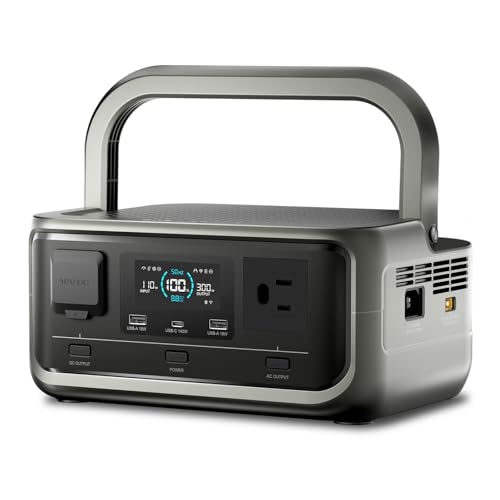
  7. 97.6Wh, 120W, 2.2 lb with a status screen and a 110V outlet.

    79Very Good
    Check price

A laptop is the easy case for a power station: most draw 45 to 100 watts, so even a small unit powers one for hours. The trap is port type. A modern laptop charges happily from a USB-C power delivery port, while an older one needs the AC outlet and its brick, which wastes some energy. Which port you use shifts runtime by a fifth or more.

Seven units are ranked here, from a 92W pocket hub to a 1,070Wh station. Scoring weighs watt-hours, output wattage, USB-C power delivery, weight and recharge speed. As a rough rule, watt-hours divided by your laptop's wattage gives hours, before conversion losses.

Before you buy

What Actually Matters

01

Watt-hours

Divide capacity by your laptop's draw to estimate hours. 292Wh over a 60W laptop is about four to five hours after losses. Larger units run monitors too.

02

USB-C power delivery

A 100W USB-C port charges most laptops directly and wastes less energy than an AC adapter. The Jackery Explorer 300 lists it. Check your laptop's charger wattage.

03

Weight

A laptop user carrying a unit daily wants under 8 lb. Heavy stations suit outages. The Duracell M100 is 1.5 lb.

04

Recharge speed

A two-hour AC recharge fits a workday. Solar input extends field use. Check input options.

05

Air travel

Airlines limit batteries to about 100Wh in carry-on without approval. Only the M100 is stated as FAA compliant here.

In-depth reviews

Our Ranked Picks, Reviewed

1

Best Overall

Jackery Explorer 300 Portable Power Station, 292Wh

Our verdict: 292Wh, 300W with 600W surge, 100W USB-C PD and six device ports at 7.5 lb.

The Jackery Explorer 300 stores 292Wh and outputs 300W with a 600W surge, weighs 7.5 lb, powers 6 devices and has 100W USB-C power delivery. The listing cites an 11 plus year life over 4,000 cycles. It sits in the $200 to $500 bracket.

A 100W USB-C port charges most laptops directly, so the AC conversion loss is avoided. At about 292Wh, a 60W laptop runs for roughly four to five hours. It wins as the balanced choice for weight, output and ports.

Buy it if you work from cafes, cars and campsites. Skip it if you need multi-day power.

Capacity
292Wh
Output
300W, 600W surge
USB-C
100W PD
Weight
7.5 lb

What we like

  • +100W USB-C PD charges laptops
  • +Six device ports
  • +Light at 7.5 lb
  • +4,000 plus cycle life claim

Watch out for

  • −Mid-bracket price
  • −292Wh limits long sessions

Buy it if: Remote work and travel.

Skip it if: You need multi-day power.

2

Best Fast Recharge

ALLPOWERS VOLIX P300 Portable Power Station, 256Wh 300W

Our verdict: 256Wh, 300W, a two-hour AC fast charge, a 6-year warranty and 4,000 plus cycles.

The VOLIX P300 stores 256Wh, outputs 300W with a 600W surge, weighs 7.87 lb, recharges 0 to 100 percent in 2 hours from AC and carries a 6-year warranty with 4,000 plus cycles. It sits in the $100 to $200 bracket.

The warranty is the longest listed here, and a two-hour refill suits people who plug in over lunch. It ranks second because capacity is a bit lower than the Jackery and the listing gives no USB-C wattage.

Buy it if you value warranty and fast refills. Skip it if you want listed USB-C power.

Capacity
256Wh
Output
300W, 600W surge
Recharge
2 hours from AC
Warranty
6 years

What we like

  • +Six-year warranty
  • +Two-hour AC recharge
  • +4,000 plus cycle life
  • +Lower price bracket

Watch out for

  • −USB-C wattage not listed
  • −Slightly heavier

Buy it if: Daily use with quick top-ups.

Skip it if: USB-C power delivery is essential.

3

Best Work Hub

Duracell M250 Portable Charging Hub, 250W Charger

Our verdict: A 4.5 lb, 250W hub with a tiltable lid, a ring light and documented laptop and phone charges.

The Duracell M250 is a 250W hub weighing 4.5 lb, with a tiltable lid, a 360 degree ring light and documented 3 laptop and 14 phone charges. It sits in the $200 to $500 bracket.

The lid works as a laptop stand and the ring light helps on video calls, which suits a desk workflow. It ranks third because it costs as much as the Jackery with less stated capacity.

Buy it if you want a desk hub with calls in mind. Skip it if capacity matters most.

Output
250W
Weight
4.5 lb
Extras
Tiltable lid, ring light
Charges
3 laptop, 14 phone

What we like

  • +Light at 4.5 lb
  • +Ring light for calls
  • +Tiltable lid as stand
  • +Documented charge counts

Watch out for

  • −Watt-hours not listed
  • −Priced like larger units

Buy it if: Video-call workers on the move.

Skip it if: You want maximum capacity.

4

Best for Heavy Use

Jackery Explorer 1000 v2 Portable Power Station, 1070Wh, 1500W

Our verdict: 1,070Wh and 1,500W with a one-hour app-controlled fast charge at 23.8 lb.

The Explorer 1000 v2 stores 1,070Wh and outputs 1,500W AC with 3,000W surge, charges quickly in about an hour via the app, and weighs 23.8 lb with a foldable handle. It sits in the $200 to $500 bracket.

It runs a laptop for most of a day and powers a monitor and router besides. It ranks fourth because 23.8 lb is a lot to carry for a laptop-only user.

Buy it if outages or camping mean several devices. Skip it if you carry it daily.

Capacity
1,070Wh
Output
1,500W, 3,000W surge
Recharge
About 1 hour via app
Weight
23.8 lb

What we like

  • +1,070Wh runs a laptop all day
  • +1,500W output
  • +Fast charge
  • +Foldable handle

Watch out for

  • −Heavy at 23.8 lb
  • −Overkill for one laptop

Buy it if: Outages and multi-device camping.

Skip it if: You carry it every day.

5

Best Budget 300W

ZeroKor Portable Power Station 300W, 280Wh (without Solar Panel)

Our verdict: 280Wh, 300W, about 5 lb, MPPT solar input and three recharge paths.

The ZeroKor 300W stores 280Wh, outputs 300W maximum, weighs about 5 lb, supports MPPT solar and has three recharge paths with 12 months of support. Its price lands in the lower-middle tier.

This is the lightest 300W class unit here and adds solar flexibility. It ranks fifth because the support period is short and no USB-C wattage is listed.

Buy it if you want light and solar-ready. Skip it if you want a longer warranty.

Capacity
280Wh
Output
300W
Weight
About 5 lb
Recharge
3 paths, MPPT

What we like

  • +Light at about 5 lb
  • +Solar MPPT input
  • +Three recharge paths
  • +Lower price bracket

Watch out for

  • −12 month support only
  • −USB-C wattage not listed

Buy it if: Light travel with solar options.

Skip it if: You want a long warranty.

6

Best Carry-On Hub

Duracell M100 Portable Charging Hub, 92W Charger

Our verdict: A 1.5 lb, 92W, FAA carry-on compliant hub with dual wireless charging.

The Duracell M100 is a 92W hub weighing 1.5 lb, FAA carry-on compliant, with dual wireless charging for a phone and earbuds and a 3-hour recharge. It sits in the $50 to $100 bracket.

It is the one you can fly with and slip into a bag. At 92W it can charge a small laptop but will not run a power-hungry one. It ranks sixth because capacity is small.

Buy it if you fly and charge light devices. Skip it if you run a gaming laptop.

Output
92W
Weight
1.5 lb
Travel
FAA carry-on compliant
Extra
Dual wireless charging

What we like

  • +FAA carry-on compliant
  • +Only 1.5 lb
  • +Wireless charging pads
  • +Lowest price tier

Watch out for

  • −Limited capacity
  • −Not for heavy laptops

Buy it if: Flights and light laptops.

Skip it if: Your laptop draws over 90W.

7

Smallest AC Bank

ZeroKor Portable Power Station, 120W, 110V Power Bank

Our verdict: 97.6Wh, 120W, 2.2 lb with a status screen and a 110V outlet.

This ZeroKor is a 97.6Wh, 120W, 2.2 lb power bank with a 110V outlet and a screen showing real-time power status. DC output needs a long press of the button. It sits in the $50 to $100 bracket.

It runs a light laptop for one to two hours, enough for a short session. It ranks last because the capacity is the smallest.

Buy it if you want a small AC outlet bank. Skip it if you need long sessions.

Capacity
97.6Wh
Output
120W
Weight
2.2 lb
Display
Real-time status

What we like

  • +Only 2.2 lb
  • +110V outlet
  • +Status screen
  • +Low price bracket

Watch out for

  • −Small 97.6Wh capacity
  • −DC needs a long press

Buy it if: Short sessions and light laptops.

Skip it if: You need long run time.

Methodology

How We Ranked These

Capacity

Watt-hours from about 98 to 1,070 were compared for laptop runtime.

Output and ports

Output wattage and USB-C power delivery were weighed for laptop compatibility.

Weight and travel

Weight and carry-on compliance were scored for portability.

Recharge

Stated recharge times and solar input were compared.

Support and value

Warranties and the $50 to $100, $100 to $200 and $200 to $500 brackets informed the order.

Every Primea Score uses the same weights: Performance 30% · Build & Materials 20% · Everyday Usability 20% · Value 20% · Owner Satisfaction 10%. Full scoring rules

Buyer's guide

How to Pick the Right One for You

By How You Work

Where you work decides capacity.

SituationOur pick
Cafes and carsJackery Explorer 300 Portable Power Station, 292Wh
FlightsDuracell M100 Portable Charging Hub, 92W Charger
Video calls on the goDuracell M250 Portable Charging Hub, 250W Charger
OutagesJackery Explorer 1000 v2 Portable Power Station, 1070Wh, 1500W

By Budget

SpendOur pick
$50 to $100ZeroKor Portable Power Station, 120W, 110V Power Bank
$100 to $200 (warranty)ALLPOWERS VOLIX P300 Portable Power Station, 256Wh 300W
$100 to $200 (solar)ZeroKor Portable Power Station 300W, 280Wh (without Solar Panel)
$200 to $500Jackery Explorer 300 Portable Power Station, 292Wh

USB-C Charging vs AC Outlet

USB-C PD

Direct charging that wastes little. Pick: Jackery Explorer 300.

AC outlet

Works with any laptop brick, with extra loss. Picks: all the 300W stations.

Default to USB-C if your laptop supports it.

By Weight

WeightOur pick
Under 2 lbDuracell M100 Portable Charging Hub, 92W Charger
Around 2 lbZeroKor Portable Power Station, 120W, 110V Power Bank
Around 5 lbZeroKor Portable Power Station 300W, 280Wh (without Solar Panel)
Around 8 lbJackery Explorer 300 Portable Power Station, 292Wh

For Remote Workers Specifically

Look for

USB-C PD, enough watt-hours for a workday and a recharge that fits a lunch break.

In this ranking

The Jackery Explorer 300 and ALLPOWERS VOLIX cover that.

When to Spend More

Spend more if

You need a monitor or several devices. The Explorer 1000 v2 handles it.

Save if

You top up a laptop occasionally. A small bank is enough.

Questions

Frequently Asked Questions

How long will a laptop run on a power station?+

Divide watt-hours by the laptop's wattage and subtract about 15 percent. A 60W laptop on 292Wh gets roughly four hours.

What is the biggest mistake when buying one?+

Buying only on watt-hours and ignoring ports. A laptop needs a compatible USB-C or AC outlet.

Is the Jackery worth it over the ZeroKor?+

If you want USB-C PD and a stronger brand, yes. The ZeroKor is lighter and cheaper.

Can I take one on a plane?+

Only small batteries, typically 100Wh or less, in carry-on. The Duracell M100 is stated as compliant.

Can I use it while charging?+

Most support pass-through, though it generates heat. Check the manual.

How should I store it?+

Keep it cool and about half charged, and recharge every few months.

Final take

The Jackery Explorer 300 is the best portable power station for laptops, with 292Wh, 300W, 100W USB-C and a 7.5 lb body. The ALLPOWERS VOLIX adds a long warranty and fast recharge, the Duracell M100 is the flight-friendly hub, and the Explorer 1000 v2 is for heavy use. Match watt-hours to your laptop's draw.

More Ranked & Reviewed Guides