
Primea ReviewsAll Reviews

Primea Reviews is reader-supported. When you buy through our Amazon links we may earn a commission, at no extra cost to you. Rankings are set by our editors and never sold. Learn more

Ranked & Reviewed by Primea Reviews

The 7 Best Mouse Pads for Wireless Charging of 2026, Ranked & Reviewed

By the Primea Editorial TeamUpdated November 4, 202610 min read7 products ranked
The 7 Best Mouse Pads for Wireless Charging of 2026, Ranked & Reviewed

The short answer

The 4-in-1 Wireless Charging Mouse Pad with Foldable Phone Holder is the best of the group, charging a phone and earbuds together at 15W. The TARKARI is the budget standout, with six listed safety protections and a woven surface. The RGB model with a phone stand is the one for desks that want a propped screen. The Logitech G POWERPLAY 2 is a different kind of product and deserves a careful read before buying.

The Primea Scoreboard

Ranked & Reviewed

  1. A 4-in-1 desk mat that charges a phone and AirPods together at 15W.

    93Outstanding
    Check price
  2. 15W multi-level charging with six safety protections for under $25.

    91Excellent
    Check price
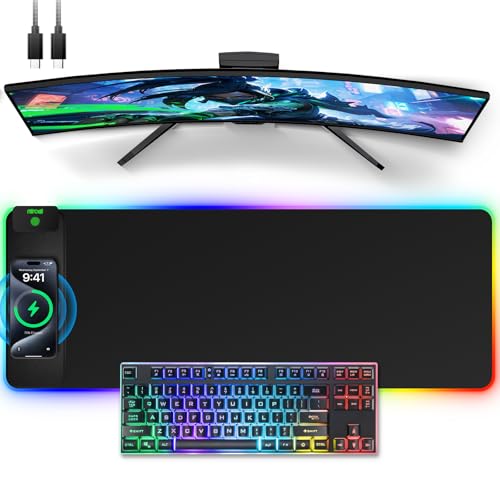
  3. A dual-charging desk mat with a foldable stand and adjustable RGB lighting.

    88Excellent
    Check price
  4. A 15W Qi charger with a wrist rest, for people who type and click all day.

    86Excellent
    Check price
  5. 05
    Wireless Charging Mouse Pad

    Best Thick Surface

    Wireless Charging Mouse Pad

    A 15W charging pad with 16 lighting modes and a 4mm thick surface.

    84Very Good
    Check price
  6. An oversized desk pad with fast charging, a phone holder and 11 RGB modes.

    82Very Good
    Check price
  7. A branded pad built around non-stop wireless charging, not phone charging.

    79Very Good
    Check price

The headline spec on most wireless charging mouse pads is 15W, and it is nearly always a ceiling, not a promise. Charging speed depends on the phone, the case thickness and how well the coil lines up with your device. Put a phone on the wrong spot and a 15W pad will deliver far less, or nothing at all.

So we ranked these seven pads by what a real desk needs: a stated charging output, safety protections for a surface that sits under your hand all day, extra coils or stands and a mouse surface that does not fight the cable you also have to hide. We reviewed the listings, not retail hype, and scored each on the Primea framework.

Before you buy

What Actually Matters

01

Stated wattage

A wattage figure such as 15W tells you the best-case charging speed. Real speeds depend on your phone, its case and how well it sits on the coil. Look for a number in the listing, and treat a pad with only the words fast charging as unproven rather than slow.

02

Safety protections

A wireless charger sits under a warm phone, so over-temperature, over-current and foreign-object protections matter. The TARKARI lists six. Search the listing for those protections by name and prefer pads that name them. A vague line about multiple protection is better than nothing, but it is not something you can check.

03

Coil alignment

Wireless charging only works when the phone sits near the coil, so a pad with a marked charging zone or a stand makes life easier. A phone placed slightly off will charge slowly or stop. Check for a marked area in the listing's photos, and keep thick cases or metal plates off the coil.

04

Surface thickness

A thicker surface hides the coil and keeps mouse tracking smooth, while a thin one may let the charger show through. The 4mm build on one listing is an example. Check thickness in the specifications, and look for stitched edges or a non-slip base so the pad stays put.

05

Cable and size

A USB cable runs from the pad to a wall adapter, and a short cord limits where you can put it. An oversized pad needs a deep desk. Measure your desk, check the cable length and the adapter requirement in the listing, since many pads do not include a wall plug.

In-depth reviews

Our Ranked Picks, Reviewed

1

Best Overall

Wireless Charging Mouse Pad with Foldable Phone Holder

Our verdict: A 4-in-1 desk mat that charges a phone and AirPods together at 15W.

This 4-in-1 desk mat lists 15W fast wireless charging and says you can charge a phone and AirPods at the same time. The combination matters because most single-coil pads force a choice, while a desk mat with a second charging area keeps your earbuds topped up without another cable.

It wins because the other pads here either charge one device or hide the details. Against the RGB model with a phone stand it adds the foldable holder and a second charging spot, and it sits in the top price bucket of $50 to $100.

It suits a one-desk, many-gadget setup. Expect to learn where each coil sits, since misaligned devices charge slowly or not at all.

Output
15W wireless
Layout
4-in-1 desk mat
Charges
Phone and AirPods together
Price band
$50 to $100

What we like

  • +Phone and earbuds charge together
  • +15W stated output
  • +Foldable phone holder included
  • +Full desk-mat surface

Watch out for

  • −Highest price here
  • −Coil placement takes learning
  • −Output depends on phone

Buy it if: Desk users who charge a phone and earbuds side by side.

Skip it if: You only need a basic mouse pad with a single coil.

2

Best Budget Pick

TARKARI Mouse Pad Gaming Wireless Charging

Our verdict: 15W multi-level charging with six safety protections for under $25.

TARKARI's listing is unusually specific: 15W multi-level fast wireless charging with six safety protections, ten RGB light modes with an inductive touch switch and a high-density woven fabric surface. Safety protections matter on a charger you rest a warm phone on, because over-heat and foreign-object cutoffs are what separate a good pad from a fire risk.

It ranks second because it lacks the second charging area of the top pick, and the touch switch for lighting is a feature you may or may not want. It also costs under $25, the lowest bucket in the group.

A smart choice for gamers who want a clean surface and honest safety specs. Skip it if you need earbuds charging too.

Output
15W multi-level
Safety
6 protections
Lighting
10 RGB modes, touch switch
Price band
Under $25

What we like

  • +Six listed safety protections
  • +Woven fabric control surface
  • +Touch-switch RGB modes
  • +Lowest price bucket

Watch out for

  • −Single charging area
  • −No stand or holder
  • −RGB may distract some users

Buy it if: Gamers wanting a safe, well-specified pad for little money.

Skip it if: You also want earbuds or a second device charged.

3

Best With Stand

Wireless Charging RGB Mouse Pad with Phone Stand

Our verdict: A dual-charging desk mat with a foldable stand and adjustable RGB lighting.

This model is a dual wireless charging desk mat with a foldable phone stand and adjustable RGB lighting. A propped phone at eye level means you read notifications without moving your hand off the mouse, and a stand also keeps the phone aligned on its coil.

Its listing leaves out a wattage figure, unlike the 15W pads above it, so charging speed cannot be compared. It sits in the $25 to $50 bucket, which makes it cheaper than the top pick, though without the AirPods spot.

Buy it for a desk where the phone should stay upright and visible. Skip it if you want documented charging output.

Charging
Dual wireless
Stand
Foldable phone stand
Lighting
Adjustable RGB
Price band
$25 to $50

What we like

  • +Foldable phone stand included
  • +Dual wireless charging
  • +Adjustable RGB lighting
  • +Mid price bucket

Watch out for

  • −Wattage not stated
  • −No safety protections listed
  • −Stand adds bulk to the desk

Buy it if: Desk users who want the phone propped at eye level.

Skip it if: You want a stated charging speed.

4

Best With Wrist Support

15W Wireless Charging Mouse Pad with Wrist Support

Our verdict: A 15W Qi charger with a wrist rest, for people who type and click all day.

This is a 15W Qi wireless charger built into a mouse pad with an ergonomic wrist support and multiple protection features. A wrist rest cushions the heel of your hand against the desk edge, which is the comfort feature other pads here skip.

It ranks fourth because the listing gives few details on the protections or surface, and the wrist support is a different priority from the extra coils and stands above. It is the better pick over the plain 15W model below if comfort matters, and it sits under $25.

A fit for office workers on long shifts. Skip it if you want RGB lighting or a stand, since none is listed.

Output
15W Qi
Comfort
Wrist support
Safety
Multiple protection
Price band
Under $25

What we like

  • +Built-in wrist support
  • +15W Qi wireless charging
  • +Multiple protection features
  • +Under $25

Watch out for

  • −No lighting or stand
  • −Protection details unlisted
  • −Smaller pad surface

Buy it if: Office users who want comfort and a built-in charger.

Skip it if: You want RGB lighting or a propped phone.

5

Best Thick Surface

Wireless Charging Mouse Pad

Our verdict: A 15W charging pad with 16 lighting modes and a 4mm thick surface.

This pad lists 15W fast charge, 11 plus 5 dynamic lighting modes and a 4mm thick build. The thickness matters because a thin pad lets the charging coil and cable ridges show through under the mouse, while 4mm smooths them out.

It ranks fifth because the listing offers no safety protections or stand and the name is generic, so you have less to verify than on the TARKARI. It stays under $25, so it undercuts the stand and wrist models above.

Choose it for a straightforward, well-lit pad on a small budget. Skip it if you want earbuds charging or a documented list of protections.

Output
15W fast charge
Lighting
11 plus 5 modes
Thickness
4mm
Price band
Under $25

What we like

  • +Stated 15W fast charge
  • +4mm thick surface
  • +Many lighting modes
  • +Under $25

Watch out for

  • −Generic product name
  • −No safety list shown
  • −No stand included

Buy it if: Budget buyers who want a lit, thick pad.

Skip it if: You need a stand or documented protections.

6

Best XXL Surface

XXL Mouse Pad with Phone Holder

Our verdict: An oversized desk pad with fast charging, a phone holder and 11 RGB modes.

The XXL pad is an oversized desk mat with fast charging, a phone holder and 11 RGB lighting modes. An oversize mat gives room for keyboard and mouse, so you can sweep the mouse without it falling off the edge.

It ranks sixth because the listing does not state a wattage or safety protections, which makes the charging claim vague. At $25 to $50 it costs more than the TARKARI and gives you less to verify. The holder keeps the phone visible, a plus over the plain pads.

Buy it if desk coverage is the priority. Skip it if you need to know how fast it charges.

Size
XXL desk pad
Charging
Fast charging
Holder
Phone holder
Lighting
11 RGB modes

What we like

  • +Oversized keyboard-and-mouse surface
  • +Phone holder included
  • +11 RGB lighting modes
  • +Fast charging claimed

Watch out for

  • −No wattage stated
  • −No safety list shown
  • −Costs more than TARKARI

Buy it if: Users who want full desk coverage with a phone holder.

Skip it if: You need a documented charging speed.

7

Best for Mouse Charging

Logitech G POWERPLAY 2 Wireless Charging Mouse Pad

Our verdict: A branded pad built around non-stop wireless charging, not phone charging.

Logitech's listing promises non-stop wireless charging, plug, power, play and a future-ready wireless system, with no wattage and no phone-charging claim. That wording points to a different job from the other pads: the pad is meant to keep a compatible wireless gaming mouse powered while you play.

It ranks last because the listing gives you no way to compare it on phone charging, which is what most buyers want, and it costs $50 to $100, the same bucket as the top pick. It is the one to consider only if you already own a compatible Logitech mouse.

Skip it if you want to charge a phone or earbuds, and check the product page for mouse compatibility first.

Focus
Non-stop wireless charging
Setup
Plug, power, play
Brand
Logitech G
Price band
$50 to $100

What we like

  • +Established gaming brand
  • +Plug, power, play setup
  • +Built around continuous charging
  • +Premium positioning

Watch out for

  • −No phone charging stated
  • −Wattage not listed
  • −Compatibility details missing

Buy it if: Owners of a compatible Logitech gaming mouse.

Skip it if: You want to charge a phone or earbuds.

Methodology

How We Ranked These

Charging output

Pads with a stated wattage scored above those that only claim fast charging, since speed is the whole point of the product.

Safety protections

Listed over-heat and foreign-object protections were credited because the charger sits under your hand and next to a warm phone.

Charging coverage

We weighed second charging areas, stands and holders against single-coil pads.

Mouse surface

Thickness, fabric and size were judged for tracking comfort and for how well the pad hides the coil underneath.

Lighting and extras

RGB modes, wrist supports and touch switches were treated as extras, not a substitute for charging quality.

Every Primea Score uses the same weights: Performance 30% · Build & Materials 20% · Everyday Usability 20% · Value 20% · Owner Satisfaction 10%. Full scoring rules

Buyer's guide

How to Pick the Right One for You

By Charging Need

Decide what you want charged before you pick the surface.

What you chargeOur pick
Phone and earbuds togetherWireless Charging Mouse Pad with Foldable Phone Holder
One phone, safety firstTARKARI Mouse Pad Gaming Wireless Charging
Phone propped uprightWireless Charging RGB Mouse Pad with Phone Stand
Phone while typing all day15W Wireless Charging Mouse Pad with Wrist Support
A compatible Logitech mouseLogitech G POWERPLAY 2 Wireless Charging Mouse Pad

By Budget

SpendOur pick
Under $25, safetyTARKARI Mouse Pad Gaming Wireless Charging
Under $25, comfort15W Wireless Charging Mouse Pad with Wrist Support
Under $25, thick surfaceWireless Charging Mouse Pad
$25 to $50, standWireless Charging RGB Mouse Pad with Phone Stand
$50 to $100Wireless Charging Mouse Pad with Foldable Phone Holder

Standard Pad vs Full Desk Mat

Standard pad

Compact, easy to place and cheaper, with room for the mouse only. Picks: TARKARI, 15W Wrist Support and the generic Wireless Charging Mouse Pad.

Desk mat

Covers keyboard and mouse and often adds a second charging area or holder. Picks: the 4-in-1 Foldable Phone Holder model and the XXL Mouse Pad with Phone Holder.

Default to a standard pad unless your desk is deep enough for a full mat.

By Lighting

Lighting preferenceOur pick
Many modes, thick padWireless Charging Mouse Pad
Touch-switch RGBTARKARI Mouse Pad Gaming Wireless Charging
Adjustable RGB with standWireless Charging RGB Mouse Pad with Phone Stand
11 modes, oversizedXXL Mouse Pad with Phone Holder

For Gaming Desks Specifically

Look for

A woven surface, a stated 15W output and protections that cut power if the pad overheats. Be careful with lighting that distracts from the screen.

In this ranking

The TARKARI for safety on a budget, and the Logitech G POWERPLAY 2 only if you own a compatible Logitech mouse.

When to Spend More

Spend more if

You charge more than one device. The 4-in-1 Foldable Phone Holder desk mat covers a phone and earbuds, at the $50 to $100 bucket.

Save if

You have one phone. The TARKARI delivers a stated 15W and six protections for under $25.

Questions

Frequently Asked Questions

Will these pads charge any phone?+

They charge phones that support Qi wireless charging, such as those on the 15W Wireless Charging Mouse Pad with Wrist Support. A thick case or metal plate can block charging. Check your phone's wireless charging support before buying any of them.

What is the most common mistake with charging mouse pads?+

Placing the phone off-centre. The coil is smaller than the pad, so a phone parked on the TARKARI or the generic Wireless Charging Mouse Pad may charge slowly or not at all. Find the charging zone and mark it.

Is the foldable holder desk mat worth it over the TARKARI?+

Only if you charge more than one device. The 4-in-1 mat charges a phone and AirPods together at 15W, while the TARKARI charges one device for under $25 and lists six protections. For a single phone, the TARKARI is enough.

How do I set up a wireless charging mouse pad?+

Plug the USB cable into a wall adapter, since many pads ship without one, then place the pad where the cord reaches. Put your phone on the charging area. On the RGB model with a phone stand, unfold the holder first.

How do I maintain the surface?+

Wipe the cloth surface with a damp cloth and let it dry fully before powering the pad. Keep liquids away from the USB port, and unplug it before cleaning the XXL Mouse Pad with Phone Holder or any other RGB model.

Does the Logitech POWERPLAY 2 charge a phone?+

Its listing does not say so. The Logitech G POWERPLAY 2 is described around non-stop wireless charging and plug, power, play, with no phone claim or wattage. Treat it as a mouse-charging product, and confirm compatibility on the product page.

Final take

The Wireless Charging Mouse Pad with Foldable Phone Holder is the best choice if you charge more than a phone, thanks to its 15W output and AirPods spot. The TARKARI is the budget answer, with six listed protections for under $25. The RGB model with a phone stand suits propped screens, and the wrist-support pad suits long typing days. Treat the Logitech G POWERPLAY 2 as a specialist product, and read its compatibility before buying.

More Ranked & Reviewed Guides