
Primea ReviewsAll Reviews

Primea Reviews is reader-supported. When you buy through our Amazon links we may earn a commission, at no extra cost to you. Rankings are set by our editors and never sold. Learn more

Ranked & Reviewed by Primea Reviews

The 7 Best Monitor Light Bars Under $50 in 2026, Ranked & Reviewed

By the Primea Editorial TeamUpdated November 3, 202610 min read7 products ranked
The 7 Best Monitor Light Bars Under $50 in 2026, Ranked & Reviewed

The short answer

The Quntis monitor light bar is the best under $50 for anyone who works at a screen all day, with an ambient light sensor, a stated Ra98 colour rendering and an asymmetric beam. The SAMPHON is the best value task light at under $30, the Colorpanda is the best budget pick with memory, and the KANTUTOE is the one to buy for RGB gaming effects.

The Primea Scoreboard

Ranked & Reviewed

  1. An ambient light sensor that holds desk lighting near 900 lux, plus a stated Ra98 colour index.

    94Outstanding
    Check price
  2. A wide beam rated at 900 lux in the centre, with a 45 degree angle and a one-button control.

    92Outstanding
    Check price
  3. A touch-control bar with CRI 95, three colour temperatures and a clip for screens up to 2.2 inches thick.

    89Excellent
    Check price
  4. A full-metal 250 lumen bar with a retractable clip and colour temperatures from 2700K to 6500K.

    86Excellent
    Check price
  5. A 17 inch bar on a gooseneck that clamps to the desk instead of the monitor.

    83Very Good
    Check price
  6. A 15.7 inch RGB bar with 16 million colours, a music mode and phone app control.

    80Very Good
    Check price
  7. A 12 inch RGB strip with 353 dynamic modes and 12 static colours, on adhesive pads.

    78Very Good
    Check price

Two very different products share the name monitor light bar. One is a task light that clips on top of the screen and throws a beam down onto your desk, and the other is an RGB strip that sits behind or under the monitor and glows. Mixing them up is the most common mistake in this category, because only the first kind will help you read a book or keyboard in a dim room.

We split this ranking accordingly. The top four are task lights judged on beam design, colour rendering, dimming and clip fit, then a clamp-style bar, and finally two RGB gaming strips judged as decoration. We reviewed the spec sheets and listings rather than measuring light output ourselves, and where a listing quotes a brightness figure we treat it as the maker's claim. Two picks cost $30 to $50, so they sit near the ceiling.

Before you buy

What Actually Matters

01

Task light versus RGB strip

A task monitor bar aims a focused beam at your desk, while an RGB strip colours the wall or the underside of the screen. Only the first reduces eye strain in a dim room. Read the title and bullets for words such as asymmetric, reading and task, and treat words like ambient and music sync as decoration.

02

Asymmetric optics

An asymmetric design bends the beam so that it falls on the desk, not onto the screen or into your eyes. Without it, you get reflected glare on the display. Check the listing for the phrase asymmetric or a quoted angle such as 45 degrees.

03

Colour rendering index

CRI measures how accurately a light shows colours on a scale to 100. A CRI of 95 or Ra98 suits photo and design work, while 80 is fine for plain reading. Look for a stated figure, and be careful with listings that give none.

04

Colour temperature

Colour temperature runs from warm yellow near 2700K to cool white near 6500K. Cooler light feels sharper for daytime work, and warmer light suits the evening. A range that covers at least 3000K to 6500K, with stepless dimming, is flexible.

05

Clip fit

Counterweight clips grip the top of the monitor and need a flat top and enough thickness range. Listed ranges vary from 1.1 inches to 2.2 inches. Measure your monitor's top edge, and consider a clamp bar if the back is curved or the top is sloped.

In-depth reviews

Our Ranked Picks, Reviewed

1

Best Overall

Quntis Computer Monitor Lamp, Screen Monitor Light Bar for Eye Caring, USB Reading LED Task Lamp with Auto-Dimming

Our verdict: An ambient light sensor that holds desk lighting near 900 lux, plus a stated Ra98 colour index.

The Quntis is a 16 inch task light with 78 LED beads, an asymmetric optical design that lights the desk and not the screen, and a weighted clip that sits on top of the monitor. An ambient light sensor adjusts the output toward 900 lux, and stepless dimming is available manually. The listing quotes a colour rendering index of Ra98 and says the light meets the IEC/TR 62778 blue light and IEC/EN 62471 photobiological standards, with flicker-free output. Its price bucket is $30 to $50, the top of this budget.

It ranks first because it is the only light here that adapts to the room on its own, which matters when daylight changes across an afternoon. The high CRI claim is good for photo and design work, and the listed standards are the most specific in the group. It costs more than the SAMPHON, and the 900 lux target is something you may want to override.

Buy it if you work long hours at a screen and want a set-and-forget light. Because it sits at the ceiling of the budget, the SAMPHON is the better pick for a lower-cost task light.

Colour rendering
Ra98 (stated)
Beam
Asymmetric, no screen glare
Control
Auto-dimming sensor, stepless
Price tier
$30 to $50 (near the cap)

What we like

  • +Auto-dimming ambient sensor
  • +Stated Ra98 colour rendering
  • +Blue light and flicker standards listed
  • +78 LEDs for even light

Watch out for

  • −Near the top of the budget
  • −Auto target is fixed at 900 lux

Buy it if: All-day screen workers and photo editors.

Skip it if: You want the cheapest decent task light.

2

Best Value Task Light

SAMPHON Monitor Light Bar, Eye-Care USB Computer Monitor Lamp for Home Office Gaming, 15.7'' Ultrawide LED Light

Our verdict: A wide beam rated at 900 lux in the centre, with a 45 degree angle and a one-button control.

The SAMPHON light bar is 15.7 inches wide and claims 900 lux at the centre over a 35 by 25 inch area. A patented 45 degree asymmetric design aims the light at the desk and keyboard, three colour temperatures from 3000K to 6500K are on offer with stepless dimming, and a mechanical switch handles power, temperature and brightness through short and long presses. The tool-free counterweight clip fits thin, thick, flat and curved monitors, and USB power works with a computer, adapter or power bank. It costs under $30.

It places second because it delivers the core features of the Quntis, the right beam and a wide coverage area, for less. It gives up auto-dimming and has no colour rendering figure, so it is harder to judge for colour-critical work. The warm end at 3000K is also less warm than some rivals.

Buy it for a home office on a budget. Skip it if colour accuracy matters.

Coverage
900 lux centre, 35 x 25 in area
Colour temperature
3000K to 6500K, 3 settings
Control
Mechanical switch, stepless
Price tier
Under $30

What we like

  • +Wide 35 by 25 inch coverage
  • +Tool-free counterweight clip
  • +Works with power banks
  • +Costs under $30

Watch out for

  • −No CRI figure listed
  • −No auto-dimming

Buy it if: Home offices and wide desks on a budget.

Skip it if: You do colour-critical work.

3

Best Memory Function

16.14" Monitor Light Bar,250LM USB LED Desk Lamp,Home Office Gaming | Eye-Care LED Screen Lamp,CRI 95

Our verdict: A touch-control bar with CRI 95, three colour temperatures and a clip for screens up to 2.2 inches thick.

The Colorpanda is a 16.14 inch bar rated at 250 lumens, with a stated CRI of 95, an asymmetric anti-glare optic and touch controls. Three colour temperatures, 2700K, 4000K and 6500K, plus stepless dimming, and the unit remembers its last setting. The counterweight clip handles screen thicknesses from 0.12 to 2.2 inches. It costs under $30.

It takes third place because the CRI of 95 and the wider 2.2 inch clip range are better than the SAMPHON's listing, and the warm 2700K setting suits evening work. It loses to the SAMPHON on stated coverage, because the listing gives no lux figure, and to the Quntis on sensing.

Choose it for a desk where the monitor is thick or a bezel is unusual. The touch controls are neat but can be fiddly in the dark.

Output
250 lumens, CRI 95
Colour temperature
2700K, 4000K, 6500K
Clip range
0.12 to 2.2 in
Control
Touch, memory

What we like

  • +CRI 95 stated
  • +Warm 2700K evening mode
  • +Fits thick monitors
  • +Remembers last setting

Watch out for

  • −No lux coverage figure
  • −Touch buttons can be fiddly

Buy it if: Thick-bezel or curved monitors and evening work.

Skip it if: You want auto-dimming.

4

Best Metal Build

YEELIGHT Monitor Light Bar, Computer Monitor Lamp for Home Office Gaming, 250LM No Glare Eye-Care Screen Light

Our verdict: A full-metal 250 lumen bar with a retractable clip and colour temperatures from 2700K to 6500K.

The YEELIGHT is a full-metal bar about 17.6 inches long, with 250 lumens, stepless dimming and colour temperature from 2700K to 6500K. A retractable clip fits monitors from 0.3 to 1.1 inches thick, flat or curved, and the metal body helps carry heat away. The listing describes a camera-friendly design that avoids glare on video calls. It is in the $30 to $50 bracket.

It ranks fourth because the build is better than the plastic bars, but the clip fits only up to 1.1 inches, which excludes some thick monitors, and it costs more than the Colorpanda without a better stated colour index. It also sits near the ceiling of the budget.

Buy it if a metal body and a clean look matter. If your monitor is thick, choose the Colorpanda.

Output
250 lumens
Colour temperature
2700K to 6500K, stepless
Clip range
0.3 to 1.1 in
Length
About 17.6 in

What we like

  • +Full-metal body
  • +Camera-friendly glare design
  • +Warm to cool range
  • +Retractable clip

Watch out for

  • −Clip limited to 1.1 inches
  • −Near the top of the budget

Buy it if: Video-call workers who want a metal, tidy bar.

Skip it if: Your monitor is thicker than 1.1 inches.

5

Best Clamp-On Alternative

LED Desk Lamp with Clamp, 17" Stepless Dimming Light, Black | 2700K-6500K, 100 LEDs, 360° Gooseneck

Our verdict: A 17 inch bar on a gooseneck that clamps to the desk instead of the monitor.

The Airlonv is a 17 inch bar with 100 LEDs on a 360 degree gooseneck, clamped to the desk edge. Stepless dimming runs from 1 to 100 percent, colour temperature spans 2700K to 6500K, and the listing says it suits monitors and work heights up to about 31 inches. The aluminium and ABS body is meant to dissipate heat. It costs under $30.

Fifth place reflects a different design: a clamp frees the top of the screen but takes desk edge space and needs a thick-enough desk. The gooseneck aims light anywhere, which is handy for a book or a drawing pad.

It suits a desk where the monitor has no flat top, such as an all-in-one or a very curved screen. Anyone with a normal monitor can use a clip-on bar.

Length
17 in, 100 LEDs
Dimming
1 to 100 percent, stepless
Colour temperature
2700K to 6500K
Mount
Desk clamp, 360° gooseneck

What we like

  • +Gooseneck aims light freely
  • +Works with awkward monitors
  • +Wide 1 to 100 percent dimming
  • +Under $30

Watch out for

  • −Needs desk edge for the clamp
  • −No anti-glare optic stated

Buy it if: Curved or all-in-one monitors with no flat top.

Skip it if: You want a clip-on bar that saves desk space.

6

Best RGB Gaming Strip

KANTUTOE Under Monitor Light Bar, App and Remote Control Gaming Ambient Lights, Music Sync Color Changing

Our verdict: A 15.7 inch RGB bar with 16 million colours, a music mode and phone app control.

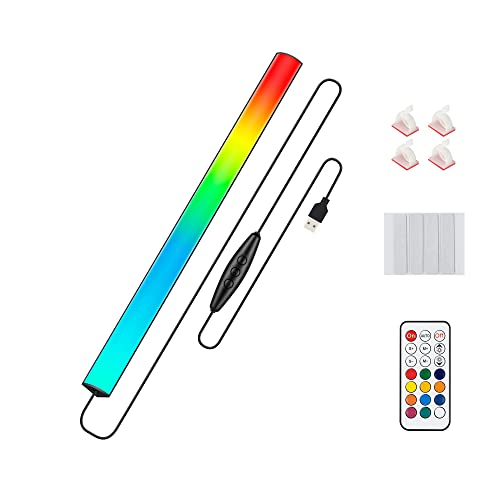
The KANTUTOE is an RGB bar around 15.7 inches long, with 16 million colours, a music mode that follows sound, a remote and an app that you reach by scanning a QR code. It runs from any USB port, including a power bank, and remembers the last mode, brightness and speed. It is decorative lighting rather than a task light. It costs under $30.

It ranks sixth because the job is different: it adds atmosphere behind or under a screen and does nothing for reading or glare. Within RGB strips it is the more complete one, thanks to the app and music sync.

Buy it for a gaming setup. Do not expect it to replace a task light.

Colours
16 million RGB
Control
Remote and app, music mode
Power
USB, with memory
Length
About 15.7 in

What we like

  • +Music sync mode
  • +App and remote control
  • +Remembers last setting
  • +Runs from a power bank

Watch out for

  • −Decorative only
  • −Needs a phone app for full control

Buy it if: Gaming desks that want colour effects.

Skip it if: You want to see your keyboard or reduce glare.

7

Best Mode Variety

Under Monitor RGB Light Bar, LED Light for Desk Gaming Setup, USB Powered Keyboard Light, 12 Inch 5V

Our verdict: A 12 inch RGB strip with 353 dynamic modes and 12 static colours, on adhesive pads.

The JUSJUBR is a 12 inch, 5V USB RGB bar with a black aluminium case, 353 dynamic modes and 12 static colours. A wireless remote and an inline switch change speed and brightness, and it remembers the last mode. It sticks on with adhesive pads and comes with clips for the extra cord. It costs under $30.

It takes last place because it is short, provides no task lighting, and the 353 modes are more novelty than function. It is simple to fit and easy to hide behind a monitor.

It is the cheapest way to add a glow to a desk. Skip it if you need real lighting.

Modes
353 dynamic, 12 static
Control
Remote and inline switch
Length
12 in, 5V USB
Mount
Adhesive pads and clips

What we like

  • +353 lighting modes
  • +Remote included
  • +Easy adhesive mounting
  • +Very low cost

Watch out for

  • −Short at 12 inches
  • −No task lighting

Buy it if: Cheap ambient glow behind a monitor.

Skip it if: You want to read or type by it.

Methodology

How We Ranked These

Beam design

Asymmetric optics that light the desk and avoid screen glare score highest, and RGB strips are judged only as decoration.

Colour quality

Stated CRI, colour temperature range and flicker or blue light standards decide how comfortable the light is for long sessions.

Control and dimming

Stepless dimming, memory, touch or switch design and automatic adjustment are weighed for daily convenience.

Fit and mounting

Clip thickness range, curved screen support and clamp or adhesive options decide whether it fits your monitor.

Value inside the cap

Two bars sit at $30 to $50, and each has to justify its premium over the sub-$30 alternatives.

Every Primea Score uses the same weights: Performance 30% · Build & Materials 20% · Everyday Usability 20% · Value 20% · Owner Satisfaction 10%. Full scoring rules

Buyer's guide

How to Pick the Right One for You

By Purpose

Decide whether you need light on the desk or colour on the wall, since few bars do both.

PurposeOur pick
All-day work, auto-adjustingQuntis Monitor Light Bar with Auto-Dimming
Wide desk, lowest costSAMPHON Ultrawide Monitor Light Bar
Evening work, warm lightColorpanda 16.14 Inch Monitor Light Bar
Monitor with no flat topAirlonv 17 Inch Clamp LED Desk Lamp
Gaming atmosphereKANTUTOE Under Monitor RGB Light Bar

By Budget

SpendOur pick
Under $30, task lightSAMPHON Ultrawide Monitor Light Bar
Under $30, warm and memoryColorpanda 16.14 Inch Monitor Light Bar
Under $30, decorationJUSJUBR 12 Inch Under Monitor RGB Light Bar
$30 to $50Quntis Monitor Light Bar with Auto-Dimming

Clip-On vs Clamp

Clip-on

Sits on top of the monitor, uses no desk space and keeps the light centred over the screen. The Quntis, SAMPHON, Colorpanda and YEELIGHT work this way.

Clamp

Attaches to the desk edge on a gooseneck and aims anywhere, which helps if the screen top is curved. The Airlonv uses this design, at the cost of desk edge space.

Choose clip-on unless the top of your monitor is curved or sloped.

By Colour Needs

NeedOur pick
Highest stated CRI, Ra98Quntis Monitor Light Bar with Auto-Dimming
CRI 95Colorpanda 16.14 Inch Monitor Light Bar
Widest temperature rangeYEELIGHT Monitor Light Bar
Any colour you likeKANTUTOE Under Monitor RGB Light Bar

For Video Calls and Streaming Specifically

Look for

A beam that avoids the screen so the glare does not reflect in glasses or on camera, a dimmable output and a clean metal or matte finish that does not catch the webcam.

In this ranking

The YEELIGHT lists a camera-friendly design, and the Quntis, SAMPHON and Colorpanda all use asymmetric optics. RGB strips are best kept behind the screen.

When to Spend More

Spend more if

You want wireless control, a taller lamp with a wide light spread, or lights integrated with a smart home. Premium monitor bars above $50 add remote dials and app control.

Save if

You only need light on your keyboard. The SAMPHON gives 900 lux at the centre for under $30, and the Colorpanda adds memory and a warm setting at the same price.

Questions

Frequently Asked Questions

Will a light bar fit a curved monitor?+

Many clip bars list support for curved screens, including the SAMPHON and YEELIGHT, but the top edge still needs to be flat enough for the counterweight to sit. If it is not, use the Airlonv clamp lamp.

What is the common mistake when buying a monitor light bar?+

Buying an RGB strip for task lighting. Strips like the KANTUTOE and JUSJUBR add colour, not a reading beam, so choose an asymmetric task bar if you want less eye strain.

Is the Quntis worth more than the SAMPHON?+

If your room light changes through the day, yes, because the sensor adjusts the output for you and the Ra98 claim helps with colour work. For a fixed room, the SAMPHON does most of the job for under $30.

How do I set one up?+

Clip it on top, aim the beam so the light falls on the desk and not the screen, and plug the USB cable into a computer, adapter or power bank. Start dim and raise the brightness until the screen no longer looks harsh.

Do light bars need maintenance?+

Only dusting. Wipe the diffuser with a dry cloth, keep the clip contact points clean so the bar does not slip, and avoid chemical cleaners on the lens.

Do they help with eye strain?+

They can reduce strain from contrast between a bright screen and a dark room, and a glare-free beam helps. They are not a medical treatment, so take breaks and set the screen brightness sensibly.

Final take

The Quntis monitor light bar is the best under $50 for people who work at a screen all day, thanks to its sensor, Ra98 claim and glare-free beam, though it sits at the top of the budget. The SAMPHON gives most of that for under $30, and the Colorpanda adds a warm mode and memory. Buy the RGB bars only if you want atmosphere, and treat them as a second light.

More Ranked & Reviewed Guides