
Primea ReviewsAll Reviews

Primea Reviews is reader-supported. When you buy through our Amazon links we may earn a commission, at no extra cost to you. Rankings are set by our editors and never sold. Learn more

Ranked & Reviewed by Primea Reviews

The 6 Best Mechanical Keyboards for Mac of 2026, Ranked & Reviewed

By the Primea Editorial TeamUpdated November 1, 202610 min read6 products ranked
The 6 Best Mechanical Keyboards for Mac of 2026, Ranked & Reviewed

The short answer

The Logitech MX Mechanical Mini Mac is the best mechanical keyboard for Mac, with Mac-native keycaps, a correct Fn row and low-profile tactile switches. The Keychron K3 Version 2 is the slim runner-up at $50 to $100, and the K4 keeps a number pad. The C2 is the cheapest wired option.

The Primea Scoreboard

Ranked & Reviewed

  1. The one that behaves like a Mac keyboard from the first minute.

    95Outstanding
    Check price
  2. A slim board that sits at MacBook height.

    91Excellent
    Check price
  3. Keeps the number pad without the full-size footprint.

    88Excellent
    Check price
  4. Adjustable actuation in a compact, Mac-friendly body.

    86Excellent
    Check price
  5. A full-size board you can re-switch over time.

    83Very Good
    Check price
  6. Cheap full-size mechanical typing for a Mac desktop.

    80Very Good
    Check price

A mechanical keyboard that looks great but prints the wrong symbol on the Command key is a quiet annoyance that never goes away. Mac compatibility is more than plugging in a cable: layout, keycaps and function row behavior all decide whether the board feels native. Most mechanical keyboards are designed for Windows first and patched for macOS second.

We reviewed six models and ranked them on paper, weighing Mac-native design, switch type, connectivity and how much room each one takes on a desk. Prices appear as buckets only. Five of the six come from Keychron or Logitech, so the real comparison is between a Mac-first board and Windows-first boards that add a Mac mode, plus how much desk each one takes.

Before you buy

What Actually Matters

01

Mac-native keycaps

Mac keyboards use Command and Option instead of Windows and Alt. Boards without Mac labelling still work but leave you remapping in your head. Look for the word Mac in the product title and keycap images. The Logitech is the only listing here that explicitly pairs native keycaps with correct Fn behavior, and that detail saves a surprising amount of daily friction.

02

Layout size

A 75% board drops the number pad and saves about a hand width of desk. Ask yourself whether you type numbers daily. The Logitech and K3 are compact, the K4 is 96%, and the V6 Max and C2 are full size. Count the keys listed in the specs, and measure your desk and keyboard tray before buying, since a 96% board can still overhang a narrow tray.

03

Switch feel

Tactile Brown switches give a small bump without the click, which suits shared spaces. Low-profile versions shorten key travel and match laptop height. The Logitech and K3 use low-profile switches. Look for the switch name in the title, and remember that Hall effect switches work differently from mechanical contacts, so the feel is not directly comparable.

04

Connection type

Bluetooth pairs with Macs without a dongle, while wired is lag-free. 2.4GHz receivers cut latency for gaming. Check for Bluetooth version or 2.4GHz named in the listing, and confirm the board can hold multiple pairings if you switch between a Mac and an iPad, since not every wireless board can.

05

Hot-swap and software

Hot-swappable boards let you change switches without soldering, and QMK allows deep remapping. Both are for enthusiasts. Confirm these terms in the listing if you want them. The V6 Max and K2 HE list them, while most typists will never touch them, and they add cost and setup time.

In-depth reviews

Our Ranked Picks, Reviewed

1

Best Overall

Logitech MX Mechanical Mini Mac Wireless Keyboard, Low-Profile (Space Grey)

Our verdict: The one that behaves like a Mac keyboard from the first minute.

The MX Mechanical Mini Mac is a 75% layout board with Mac-native keycaps, low-profile tactile switches and USB-C rechargeable wireless, in the $100 to $200 bucket. Native keycaps mean Command and Option are printed where Mac users expect them, and the media keys and Fn row act correctly without remapping or a hardware toggle.

It wins because that out-of-box behavior is the whole problem with most mechanical boards. The Keychron models below are cheaper, but ask you to flip a switch or install software to get Mac behavior. The low-profile switches also keep the board slim enough to sit beside a MacBook.

It suits Mac users who want zero fuss. The caveat is cost: it asks for more money than the Keychron alternatives, and it has no number pad.

Layout
75% compact
Switches
Low-profile tactile
Charging
USB-C rechargeable
Keycaps
Mac-native

What we like

  • +Mac-native keycaps
  • +Correct Fn-row out of box
  • +Rechargeable via USB-C
  • +Compact 75% layout

Watch out for

  • −Costs more than rivals
  • −No number pad

Buy it if: Mac users wanting zero setup.

Skip it if: You need a number pad.

2

Best Slim Board

Keychron K3 Version 2, 84 Keys Ultra-Slim Wireless/Wired Low-Profile Mechanical Keyboard, Brown Switch

Our verdict: A slim board that sits at MacBook height.

The K3 Version 2 has 84 keys, low-profile Brown switches, Bluetooth or wired USB, and a white LED backlight, in the $50 to $100 bucket. Low-profile Browns give a small tactile bump with shorter travel than a standard switch, which matches the feel of a laptop keyboard while still being mechanical.

The K3 takes runner-up because it costs far less than the Logitech while keeping the slim profile. The trade is that Mac behavior is something you set, with a mode switch, instead of arriving ready. It also lacks Mac-native keycaps in this listing. It beats the K4 on footprint by dropping the number pad.

A good match for laptop users who dock beside a MacBook. The caveat is that missing number pad, plus the setup step.

Layout
84 keys
Switches
Low-profile Brown
Connection
Bluetooth or USB
Backlight
White LED

What we like

  • +Ultra-slim profile
  • +Bluetooth or wired
  • +White backlight
  • +Mid-range price

Watch out for

  • −No number pad
  • −Mac mode needs setup

Buy it if: MacBook owners wanting a slim mechanical board.

Skip it if: You prefer tall, classic keycaps.

3

Best 96% Layout

Keychron K4 96% Layout Wireless Bluetooth 5.1/Wired Mechanical Keyboard, Super Brown Switch

Our verdict: Keeps the number pad without the full-size footprint.

The K4 is a 96% layout with a number pad and arrow keys, Super Brown tactile switches, Bluetooth 5.1 or wired, and a white backlight, in the $50 to $100 bucket. A 96% board compresses a full-size layout by removing gaps, so you keep the numeric keys without losing much desk width.

The K4 slots in third since the extra keys cost desk width compared with the K3, though they matter for spreadsheet work. It uses standard-height switches, unlike the low-profile K3, so the typing travel is longer. Against the V6 Max, it is smaller and cheaper, with fewer custom features.

For Mac users who type numbers all day and want wireless. The caveat is bulk: it is wider than the slim K3 and the Logitech, so measure the desk first.

Layout
96%
Switches
Super Brown tactile
Wireless
Bluetooth 5.1
Backlight
White LED

What we like

  • +Number pad included
  • +Tighter than full size
  • +Bluetooth 5.1 or wired
  • +Tactile switches

Watch out for

  • −Wider than the K3
  • −White backlight only

Buy it if: Spreadsheet-heavy Mac users.

Skip it if: Desk width is tight.

4

Best Adjustable Switches

Keychron K2 HE Rapid Trigger Wireless Custom Keyboard, Hall Effect Gateron Double-Rail Magnetic Switch

Our verdict: Adjustable actuation in a compact, Mac-friendly body.

The K2 HE uses Hall effect magnetic switches with adjustable actuation and Rapid Trigger support, 2.4GHz or Bluetooth 5.2 and QMK compatibility, in the $100 to $200 bucket. Hall effect switches sense the key position magnetically, so you can set how far a key must travel before it registers, and rapid trigger resets it the instant you lift.

The K2 HE sits fourth since adjustable switches are a niche feature for typing, and it costs about as much as the Logitech without the Mac-native keycaps. Gamers gain real speed from rapid trigger, but typists do not. Compared with the K3, it is dearer and more complicated.

Buy it if you game or tweak settings on a Mac. The caveat is that plain typists get more from the options above, and the listing offers no Mac-native legends.

Switches
Hall effect magnetic
Wireless
2.4GHz / Bluetooth 5.2
Software
QMK compatible
Layout
Compact

What we like

  • +Adjustable actuation
  • +Rapid Trigger support
  • +Two wireless modes
  • +Works on Mac and Windows

Watch out for

  • −Pricey for typing
  • −Not Mac-native keycaps

Buy it if: Tinkerers who also game.

Skip it if: You only want a good typing board.

5

Best Customizable

Keychron V6 Max Wireless Custom Mechanical Keyboard, Hot-swappable Gateron Banana Switch

Our verdict: A full-size board you can re-switch over time.

The V6 Max is a full-size, hot-swappable board with Gateron Banana switches, RGB backlighting, wireless and QMK support, in the $100 to $200 bucket. Hot-swap sockets let you pull a switch and replace it without soldering, so you can change feel over time, and QMK allows deep remapping.

The V6 Max lands fifth since the full-size body demands desk space and the hot-swap benefit only matters if you actually change switches. It competes with the Logitech on price but lacks Mac-native keycaps. Against the C2 it adds wireless and customization, at several times the cost.

It is for hobbyists who want to upgrade later. The caveat is that casual users will not use its flexibility, and the large footprint is hard to dock beside a laptop.

Layout
Full size
Switches
Hot-swappable Banana
Lighting
RGB
Software
QMK compatible

What we like

  • +Hot-swappable switches
  • +RGB backlighting
  • +Wireless connection
  • +Full number pad

Watch out for

  • −Large footprint
  • −Overkill for typists

Buy it if: Keyboard hobbyists on Mac.

Skip it if: You never swap switches.

6

Best Budget

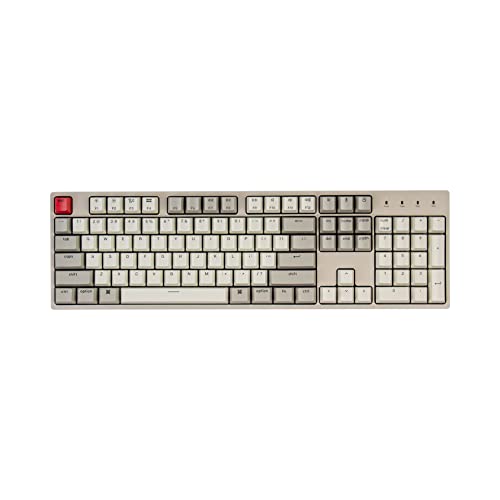
Keychron C2 Full Size Wired Mechanical Keyboard, Compatible with Mac, Brown Switch

Our verdict: Cheap full-size mechanical typing for a Mac desktop.

The C2 is a 104-key wired board with tactile Brown switches and a braided USB-C cable, in the $25 to $50 bucket. A full 104-key layout keeps the number pad and function row, so it works for data entry or spreadsheets, and a wired link removes latency and charging.

The C2 finishes sixth since it is wired only and lacks premium touches, but it is the cheapest route to a mechanical feel on a Mac. It matches the K4 on tactile Browns, though it lacks Bluetooth and backlighting in the listing. Against the K3, it saves a full bracket.

It suits a fixed Mac mini or iMac desk. The caveat is the cable, which limits where you can use it, and its no-frills build.

Layout
Full 104-key
Switches
Tactile Brown
Cable
Braided USB-C
Price
$25-50

What we like

  • +Lowest price here
  • +Full number pad
  • +Braided USB-C cable
  • +Tactile Brown switches

Watch out for

  • −Wired only
  • −No frills

Buy it if: Fixed Mac desktop setups on a budget.

Skip it if: You want wireless.

Methodology

How We Ranked These

Mac-native design

We checked for Mac keycaps and function-row behavior that works without extra setup.

Switch type

We compared tactile, low-profile and Hall effect designs by what they offer a typist.

Connectivity

We looked at Bluetooth, 2.4GHz and wired options for desk flexibility.

Footprint

We weighed layout size, since a full-size board crowds a small Mac desk.

Value

We balanced listed features against each price bucket.

Every Primea Score uses the same weights: Performance 30% · Build & Materials 20% · Everyday Usability 20% · Value 20% · Owner Satisfaction 10%. Full scoring rules

Buyer's guide

How to Pick the Right One for You

By Layout

Layout drives desk space.

You wantOur pick
Compact 75%, Mac-nativeLogitech MX Mechanical Mini Mac
Slim 84 keysKeychron K3 Version 2
Number pad, tighter bodyKeychron K4
Full sizeKeychron V6 Max

By Budget

SpendOur pick
$25-50Keychron C2
$50-100, slimKeychron K3 Version 2
$50-100, number padKeychron K4
$100-200Logitech MX Mechanical Mini Mac

Tactile vs Hall Effect

Tactile

Familiar bump, simple and consistent. Picks: Logitech MX Mechanical Mini Mac, K3 Version 2, K4 and C2.

Hall effect

Magnetic switches with adjustable actuation. Picks: Keychron K2 HE.

Most Mac typists should default to tactile switches.

By Connectivity

NeedOur pick
Rechargeable wirelessLogitech MX Mechanical Mini Mac
Bluetooth or wiredKeychron K4
2.4GHz and BluetoothKeychron K2 HE
Wired onlyKeychron C2

For MacBook Docking Specifically

Look for

A low-profile, compact board with Bluetooth so it travels.

In this ranking

The Keychron K3 Version 2 matches MacBook height, and the Logitech MX Mechanical Mini Mac is the Mac-native option.

When to Spend More

Spend more if

You want zero setup or adjustable switches. The Logitech MX Mechanical Mini Mac and Keychron K2 HE serve those buyers.

Save if

A fixed desk and plain typing are enough. The Keychron C2 covers it.

Questions

Frequently Asked Questions

Do Keychron boards work on Mac?+

Yes, every listed model is Mac compatible. Some, like the Keychron K3, need a toggle or software to set the Mac layout, while the Logitech arrives native, with the Fn row ready to use.

What is the common mistake?+

Buying a Windows-labelled board and then confusing Alt and Option. Check for Mac keycaps in the photos, or plan to swap the legends on the Keychron boards with a Mac keycap set, which costs extra.

Is the Logitech worth it over the K3?+

If you want zero setup and Mac-native keys, yes. If price matters, the K3 is close in feel and saves a bracket, though it needs a mode switch and a short setup for the Mac layout.

How do I pair over Bluetooth?+

Switch the board to Bluetooth mode and select it in macOS Bluetooth settings. The Keychron K4 and K3 hold pairings, and the Logitech pairs the same way, so switching between devices is quick once saved.

How do I maintain a mechanical keyboard?+

Brush out crumbs and wipe keycaps periodically with a barely damp cloth. Hot-swappable boards like the V6 Max let you pull switches for deeper cleaning, but sealed boards need care with liquid, so keep drinks away and unplug before wiping.

Are Hall effect switches worth it?+

Only if you use adjustable actuation, as on the K2 HE. For plain typing, tactile switches like the K4's Super Browns are simpler and cheaper, and they feel familiar to most typists.

Final take

Buy the Logitech MX Mechanical Mini Mac if you want it to behave like an Apple keyboard from the first minute. The Keychron K3 is the budget slim board, the K4 suits number-heavy work, and the C2 covers a fixed desk. Skip the K2 HE and V6 Max unless you want adjustable or swappable switches.

More Ranked & Reviewed Guides