
Primea ReviewsAll Reviews

Primea Reviews is reader-supported. When you buy through our Amazon links we may earn a commission, at no extra cost to you. Rankings are set by our editors and never sold. Learn more

Ranked & Reviewed by Primea Reviews

The 6 Best Mechanical Keyboards of 2026, Ranked & Reviewed

By the Primea Editorial TeamUpdated November 1, 202610 min read6 products ranked
The 6 Best Mechanical Keyboards of 2026, Ranked & Reviewed

The short answer

The Keychron K4 is the best mechanical keyboard for most people: a 96% layout with tactile brown switches and a choice of Bluetooth or wired. The Corsair K70 CORE TKL is the quiet, wired gaming pick, and the Logitech G515 is the slim wireless choice. The Redragons are the budget route to hot-swappable switches.

The Primea Scoreboard

Ranked & Reviewed

  1. A compact full-size layout with tactile switches and Bluetooth.

    94Outstanding
    Check price
  2. Pre-lubed linear switches and sound-dampening foam.

    91Excellent
    Check price
  3. A slim, wireless TKL with an aluminum top plate.

    88Excellent
    Check price
  4. A dependable full-size board without gaming extras.

    85Excellent
    Check price
  5. Hot-swappable switches and PBT keycaps at a very low price.

    82Very Good
    Check price
  6. Full-size with four extra hotkeys and sound-absorbing foam.

    78Very Good
    Check price

The switch is the keyboard. Layout, lighting and brand matter less than what happens under each key, and product photos tell you nothing about it. Clicky switches announce every keystroke to the next cubicle. Linear switches glide with no feedback. Tactile switches put a bump in the middle of the press. Choose that first, because on a board that is not hot-swappable you cannot change your mind later.

We reviewed six mechanical keyboards on paper and scored them on the Primea framework, comparing switch type, layout, connectivity, keycap material and extras. Prices run from budget to premium, and we ranked each by how well it suits a general buyer who types and plays. Wireless, switch freedom and noise control carried the most weight.

Before you buy

What Actually Matters

01

Switch type

Linear switches press smoothly, tactile switches add a bump and clicky switches add an audible click. Switch type decides how the keyboard feels and sounds more than anything else. The Keychron K4 and C2 use browns, the Corsair and Redragons use reds. Check the switch color in the title, and read what each color means for that brand.

02

Layout size

A full-size board has a number pad. A tenkeyless layout drops it, and a 96% board squeezes it in. Layout affects mouse reach, which matters for gamers, and desk space. Look for 104-key, 96% or TKL in the title, and pair it with how often you type numbers. The Corsair K70 CORE and Logitech G515 are TKL.

03

Hot-swappable switches

Hot-swap sockets let you change switches without soldering, so you can test feels cheaply and replace one that fails. Both Redragon boards list it. Look for the phrase hot-swappable in the title or bullets. If it is absent, as on the Keychron K4 and C2, assume the switches are fixed to the board.

04

Connectivity

Bluetooth or wireless adds flexibility, but needs charging, and Bluetooth can add small delays. Wired boards never run out. Logitech Lightspeed lists roughly 1ms latency, while the Keychron K4 offers both modes. Check the connection type, and think about whether your desk is fixed or shared before you pay for wireless.

05

Keycap material

PBT keycaps resist shine and wear better than ABS, and double-shot caps keep the legends from rubbing off. It matters for long-term feel, since shiny keys look worn within a year. The Redragon boards list PBT or double-shot construction, while the C2 and Corsair use ABS. Look for PBT or double-shot in the title or bullets.

In-depth reviews

Our Ranked Picks, Reviewed

1

Best Overall

Keychron K4 96% Layout Wireless Bluetooth/Wired Mechanical Keyboard

Our verdict: A compact full-size layout with tactile switches and Bluetooth.

The K4 uses a 96% layout, which keeps the number pad but trims the dead space between clusters. It pairs brown tactile switches with Bluetooth 5.1 or a wired USB cable, a white backlight and N-key rollover. Tactile browns are the best compromise for a general buyer: enough bump to confirm a keypress, not enough noise to start a conflict.

It ranks first because it joins wireless flexibility to a switch type that suits both typing and games, in the $50 to $100 bracket. The Corsair below feels smoother and quieter but is wired only. The Keychron C2 is cheaper but cannot go wireless.

Buy it if the same keyboard has to handle spreadsheets and games. The caveats are a plain white backlight and no listed hot-swap support, so the switches are what you buy. Skip it if you want a loud clicky feel.

Layout
96% with number pad
Switches
Brown tactile
Connection
Bluetooth 5.1 or wired USB
Backlight
White LED

What we like

  • +Bluetooth or wired
  • +Tactile brown switches
  • +Compact 96% layout
  • +N-key rollover

Watch out for

  • −Plain white backlight
  • −Not hot-swappable listed

Buy it if: Typists and gamers who want wireless.

Skip it if: You want loud clicky switches.

2

Best Quiet Gaming

Corsair K70 CORE TKL RGB Tenkeyless Mechanical Wired Gaming Keyboard

Our verdict: Pre-lubed linear switches and sound-dampening foam.

The K70 CORE TKL is a tenkeyless board with pre-lubed MLX Red linear switches and factory dampening foam, a 1000Hz polling rate, SOCD input handling and double-shot ABS keycaps. Lube cuts the scratchy friction in a switch, and foam absorbs the hollow ping that rattles up from the case.

It ranks second because it gives up the Keychron's Bluetooth: it is wired only, and without a number pad. In return the feel is smoother and quieter, and the response is built for competitive play. SOCD handling decides what happens when you press opposite directions at once, which matters in fast shooters. It sits in the $50 to $100 bracket.

Buy it for quiet gaming at a desk. Skip it if you want wireless or a number pad, since both are absent and neither can be added.

Layout
Tenkeyless
Switches
Pre-lubed MLX Red linear
Polling
1000Hz
Keycaps
Double-shot ABS

What we like

  • +Pre-lubed linear switches
  • +Sound dampening foam
  • +1000Hz polling rate
  • +Compact tenkeyless

Watch out for

  • −Wired only
  • −No number pad

Buy it if: Quiet gaming at a desk.

Skip it if: You want wireless or a number pad.

3

Best Low-Profile Wireless

Logitech G515 Lightspeed TKL Wireless Gaming Keyboard (Tactile)

Our verdict: A slim, wireless TKL with an aluminum top plate.

The G515 is a low-profile tenkeyless board with tactile switches, Lightspeed wireless at roughly 1ms latency and an aluminum top plate. Low-profile switches travel a shorter distance than standard ones, so the keys feel like a laptop's, and the board sits lower on the desk.

It ranks third because it is the highest-priced pick here, in the $100 to $200 range, and it is built as a gaming board first. A metal top plate adds a premium feel but does not change typing. Against the Keychron K4 it loses the number pad and costs more; in exchange you get the slimmest profile and the low-latency wireless link.

Buy it if you like laptop-style keys and want wireless gaming. Skip it if you prefer full-height keys, since low-profile switches have a distinct, shallow feel that some typists never adjust to.

Layout
Tenkeyless, low profile
Switches
Tactile low-profile
Wireless
Lightspeed, about 1ms
Plate
Aluminum top

What we like

  • +Low-profile slim design
  • +Lightspeed wireless
  • +Aluminum top plate
  • +Compact footprint

Watch out for

  • −Highest price here
  • −No number pad

Buy it if: Wireless gamers who like slim keys.

Skip it if: You want standard-height keys.

4

Best Plain Wired Full-Size

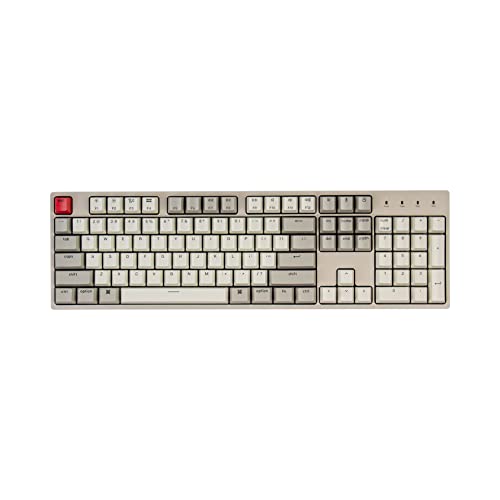
Keychron C2 Full Size Wired Mechanical Keyboard

Our verdict: A dependable full-size board without gaming extras.

The C2 is a 104-key wired keyboard with brown tactile switches, a braided USB-C cable and Mac and Windows compatibility, in the $25 to $50 bracket. Its retro-colored ABS keycaps are the visual signature. The 104 keys include the full number pad, which accountants and anyone entering data will use daily.

It ranks fourth because it lacks wireless and extras. Against the K4 it drops Bluetooth, the backlight is not listed and the keycaps are ABS, which shine with wear. What remains is a plain, dependable full-size layout at the lowest price of the tactile boards.

Buy it for office typing with a number pad when budget is tight. Skip it if you need Bluetooth, or if you want switches you can swap, since nothing about the listing says hot-swappable.

Layout
104-key full size
Switches
Brown tactile
Cable
Braided USB-C
Compatibility
Mac and Windows

What we like

  • +Full-size with number pad
  • +Brown tactile switches
  • +Braided USB-C cable
  • +Mac and Windows support

Watch out for

  • −Wired only
  • −ABS keycaps

Buy it if: Office typing on a budget.

Skip it if: You want wireless.

5

Best for Switch Experiments

Redragon Mechanical Gaming Keyboard, Hot-Swappable Red Switch

Our verdict: Hot-swappable switches and PBT keycaps at a very low price.

This Redragon is a full-size wired keyboard with hot-swappable red linear switches, double-shot PBT keycaps and 11 programmable backlight modes, with anti-ghosting, in the $25 to $50 bracket. Hot-swap sockets let you pull a switch out with a puller and push in another, no soldering needed, which is rare at this price.

It ranks fifth because the brand carries fewer premium touches than the Keychron. The case is gaming-styled and the build is lighter. What you get is freedom: you can test tactile or clicky switches in a few minutes, and PBT keycaps resist shine better than the ABS on the C2.

Buy it to experiment with switch types without spending much. Skip it if you want wireless or a minimalist look, because the lighting and angular styling are loud.

Switches
Red linear, hot-swappable
Keycaps
Double-shot PBT
Lighting
11 backlit modes
Connection
Wired

What we like

  • +Hot-swappable switches
  • +PBT keycaps
  • +11 lighting modes
  • +Lowest price tier

Watch out for

  • −Wired only
  • −Gaming styling

Buy it if: Switch-curious beginners.

Skip it if: You want a minimalist look.

6

Best Extra Hotkeys

Redragon K668 RGB Gaming Keyboard, 108 Keys, Hot-Swappable Red Switch

Our verdict: Full-size with four extra hotkeys and sound-absorbing foam.

The K668 has 108 keys, including four extra hotkeys, hot-swappable red linear switches, sound-absorbing foam and two included keycap sets in mixed colors, all in the $25 to $50 bracket. The foam quiets a linear board, and the extra keycaps make a swap of look as simple as a swap of switch.

It ranks last because it overlaps the other Redragon and adds hotkeys that most buyers will never use. The wider body also takes more desk space, which cuts mouse room for gamers. It stays under $50, so the extras cost little.

Buy it if you want media or macro hotkeys and a pair of keycap sets in one box. Skip it if you want a compact board, because the full 108-key footprint is large and the cable is the only connection.

Layout
108 keys, 4 extra hotkeys
Switches
Red linear, hot-swappable
Foam
Sound-absorbing
Keycaps
2 sets included

What we like

  • +Four extra hotkeys
  • +Hot-swappable switches
  • +Sound-absorbing foam
  • +Two keycap sets

Watch out for

  • −Wired only
  • −Large footprint

Buy it if: Users who want extra hotkeys.

Skip it if: You want a compact board.

Methodology

How We Ranked These

Switch type

We compared tactile, linear and clicky switches by feel and noise.

Layout

Full-size, 96% and tenkeyless boards were judged for desk fit.

Connectivity

Bluetooth and wireless models ranked above wired-only boards.

Build and keycaps

PBT and double-shot keycaps and top plates earned credit.

Value

Price tier was weighed against features.

Every Primea Score uses the same weights: Performance 30% · Build & Materials 20% · Everyday Usability 20% · Value 20% · Owner Satisfaction 10%. Full scoring rules

Buyer's guide

How to Pick the Right One for You

By Switch Feel

Pick the feel first, then the layout.

FeelOur pick
Tactile bumpKeychron K4
Smooth and quietCorsair K70 CORE TKL
Low-profile tactileLogitech G515 TKL
Swappable linearRedragon Hot-Swappable Red
Simple tactile full-sizeKeychron C2

By Budget

SpendOur pick
$25 to $50, simpleKeychron C2
$25 to $50, swappableRedragon Hot-Swappable Red
$25 to $50, hotkeysRedragon K668
$50 to $100, wirelessKeychron K4
$100 to $200Logitech G515 TKL

Wired vs Wireless

Wired

No charging and lower latency. Picks: Corsair K70 CORE TKL, Keychron C2, Redragon boards.

Wireless

Cleaner desk but needs charging. Picks: Keychron K4, Logitech G515.

Most buyers should choose wired for a fixed desk and wireless for a shared one.

By Layout

LayoutOur pick
Full sizeKeychron C2
96% compactKeychron K4
TenkeylessCorsair K70 CORE TKL
Extra hotkeysRedragon K668

For Office Typing Specifically

Look for

Tactile or linear switches, a number pad and a quiet feel.

In this ranking

The Keychron K4 and C2 use brown tactile switches, which suit typing.

When to Spend More

Spend more if

You want wireless or a premium build. The G515 and K4 deliver.

Save if

You just want to try mechanical. The Redragon boards are cheap.

Questions

Frequently Asked Questions

What is the difference between linear and tactile switches?+

Linear switches press down smoothly with no bump, like the Corsair and Redragon reds. Tactile switches, like the Keychron browns, have a bump partway through the press that tells you the key has registered.

Are mechanical keyboards loud?+

Clicky switches are loud, while linear and tactile switches are quieter, though none here is silent. Foam inside the case reduces noise further, as on the Corsair K70 CORE and the Redragon K668.

Is a hot-swappable board worth it?+

Yes, if you want to test switches. It saves soldering and lets you replace a failed one, as on the Redragon boards. If you know your preferred switch, a fixed board like the Keychron K4 is fine.

How do I clean a mechanical keyboard?+

Remove keycaps with a puller, brush out debris and wipe the plate. Wipe keys with a damp cloth and let them dry fully. Keep liquid away from the switches and, on wireless boards, away from the battery.

Do I need a Mac-compatible board?+

The Keychron C2 lists Mac and Windows compatibility. Check the listing for yours, and confirm the layout keys on the Keychron K4 or other boards match your operating system, since modifier keys differ between Mac and Windows.

Is wireless laggy?+

Logitech Lightspeed lists roughly 1ms latency, which suits competitive play. Bluetooth, as on the Keychron K4, can add small delays, so use its wired mode for games, and keep the receiver close to the keyboard.

Final take

For most buyers, the Keychron K4 is the right mechanical keyboard: a compact 96% layout, tactile switches and a choice of Bluetooth or USB. Pick the Corsair K70 CORE TKL for quiet wired gaming and the Logitech G515 for slim wireless. The Redragons are the cheapest way to learn what switch you like.

More Ranked & Reviewed Guides