
Primea ReviewsAll Reviews

Primea Reviews is reader-supported. When you buy through our Amazon links we may earn a commission, at no extra cost to you. Rankings are set by our editors and never sold. Learn more

Ranked & Reviewed by Primea Reviews

The 7 Best Lenovo Laptop Locks for ThinkPad, IdeaPad and Yoga, Ranked & Reviewed

By the Primea Editorial TeamUpdated November 3, 202610 min read7 products ranked
The 7 Best Lenovo Laptop Locks for ThinkPad, IdeaPad and Yoga, Ranked & Reviewed

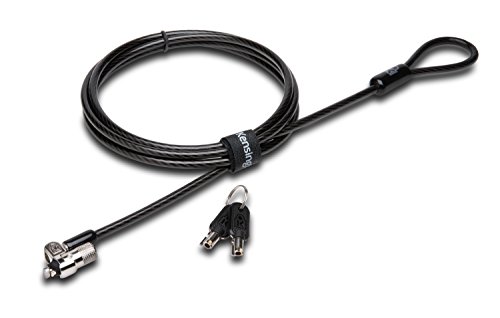
The short answer

ThinkPad owners should start with the Kensington NanoSaver Combination, the most complete Nano-slot lock here, or the Lenovo-branded NanoSaver Essential if they want a matched accessory. IdeaPad and Yoga owners on a Standard slot are best served by the Kensington Combination Cable T-Bar. The Universal 3-in-1 2.0 is the answer for a home with both kinds of Lenovo laptop.

The Primea Scoreboard

Ranked & Reviewed

  1. The most complete NanoSaver lock, with a resettable dial, online code recovery and lifetime support.

    93Outstanding
    Check price
  2. 02
    Lenovo NanoSaver Essential Cable Lock

    Sold under Lenovo's own accessory line and matched to its NanoSaver slot documentation.

    91Excellent
    Check price
  3. Standard, Nano and Wedge tips on one cable cover a family with ThinkPad and IdeaPad machines.

    89Excellent
    Check price
  4. Keyed NanoSaver with a pivot-and-rotate attach that works with one hand.

    87Excellent
    Check price
  5. The Standard T-Bar dial for non-ThinkPad Lenovo laptops, with a long-established design.

    85Excellent
    Check price
  6. A 10mm pivoting anti-pick tubular head for Standard-slot Lenovo laptops.

    83Very Good
    Check price
  7. The cheapest lock in the ranking, with a 5 ft anti-shearing cable and slider attach.

    80Very Good
    Check price

Lenovo is the one laptop brand where the product line decides the lock. ThinkPads are the machines that tend to carry the slim NanoSaver slot, while many IdeaPad and Yoga models keep the older Standard slot, and the two do not interchange. Buy by brand name alone and you have a 50 percent chance of a lock that will not seat.

We reviewed seven locks from listings, compatibility notes and support terms, and ranked them by how well they match a specific Lenovo family, how they open, and what happens when something goes wrong. None of these is a vault. A cable lock is a deterrent for classrooms, shared offices and coffee shops, and the ranking reflects that realistic job.

Before you buy

What Actually Matters

01

ThinkPad versus the rest of Lenovo

Lenovo's own NanoSaver slot is the slimmer port used on many ThinkPads, while a number of IdeaPad and Yoga laptops use the Standard slot. The two tips are not interchangeable. Check the port on the chassis, then match it to the lock name before ordering.

02

Dial, key or both

A dial can be reset in seconds and never gets lost, but a code must be remembered. A key removes the memory task and keeps a spare available to an administrator, at the cost of one more small object. Choose based on whether your workplace holds spares.

03

Cable length and anchor

A five foot cable has enough reach for most desk legs and bolts. The lock only protects the laptop if the cable loops something fixed, so a movable chair or a flimsy shelf defeats the purpose. Read the stated length on the listing.

04

Support behind the lock

Warranty terms and lifetime technical support matter when a mechanism sticks or a code goes missing. Online recovery is rarer still and appears only on the K60603WW here. Compare what each listing states instead of assuming all Kensington locks are equal.

05

What a cable lock cannot do

It slows a thief but does not stop one equipped with cutters. Think of it as theft friction for public places. Pair it with an encrypted drive and a strong login for real data protection.

In-depth reviews

Our Ranked Picks, Reviewed

1

Best for ThinkPad

Kensington NanoSaver Combination Laptop Lock, K60603WW

Our verdict: The most complete NanoSaver lock, with a resettable dial, online code recovery and lifetime support.

This Kensington is the lock most ThinkPad owners should buy. It uses the Nano slot, adds a resettable 4-wheel dial, and comes with a 2-year warranty and lifetime technical support. The online code recovery is the detail that separates it from cheaper dials, since it gives you a way back in if the combination slips your mind.

It ranks above the Lenovo-branded NanoSaver because the support terms and recovery are clearly written down, and the feature list is longer. The compromise is that it is a third-party accessory, so anyone who wants everything under one logo has to look to the branded model.

Buy it if your ThinkPad has a confirmed Nano slot and you like a dial. Skip it if the machine is an IdeaPad or Yoga with a Standard slot, because the tip will not seat.

Slot
Nano
Dial
4-wheel resettable
Recovery
Online code recovery
Warranty
2 years plus lifetime support

What we like

  • +Online code recovery if you forget
  • +Lifetime technical support included
  • +Resettable dial with no key
  • +Fits slim ThinkPad Nano slots

Watch out for

  • −Will not fit Standard slots
  • −Third-party rather than Lenovo-branded

Buy it if: ThinkPad owners with a confirmed Nano slot who want a dial.

Skip it if: Your Lenovo uses a Standard slot.

2

Best Lenovo-Branded Pick

Lenovo NanoSaver Essential Cable Lock

Our verdict: Sold under Lenovo's own accessory line and matched to its NanoSaver slot documentation.

Lenovo sells this NanoSaver Essential directly under its accessory range, and it is designed around Lenovo's own NanoSaver slot documentation. For a purchaser who works in IT or buys for a team, the value is traceability: the lock, the laptop and the support page all carry one brand.

It ranks second because the listing gives far fewer mechanical details than the Kensington models, so a reader cannot compare dial type, cable length or recovery on paper. That is not a flaw in the lock, but it does make it harder to justify over a documented alternative. The name Essential also suggests a basic tier of the range.

Choose it if you want matched branding for a ThinkPad fleet and your procurement team prefers it. Skip it if you want to compare features line by line first.

Slot
NanoSaver
Brand
Lenovo accessory line
Documentation
Matched to Lenovo NanoSaver
Price bucket
$25 to $50

What we like

  • +Sold by Lenovo itself
  • +Matched to NanoSaver slot documentation
  • +Simple one-brand support path
  • +Good fit for ThinkPad fleets

Watch out for

  • −Fewer listed mechanical details
  • −No stated code recovery

Buy it if: ThinkPad buyers who want a Lenovo-branded accessory.

Skip it if: You want to compare cable length and recovery first.

3

Best for Mixed Lenovo Households

Kensington Universal 3-in-1 2.0 Combination Laptop Lock, K63394WW

Our verdict: Standard, Nano and Wedge tips on one cable cover a family with ThinkPad and IdeaPad machines.

The Universal 3-in-1 2.0 ships with interchangeable Standard, Nano and Wedge tips, a resettable 4-digit dial with 10,000 combinations, and a head that rotates 360 degrees. On a household where one person carries a ThinkPad and another uses an IdeaPad or Yoga, it is the only lock here that fits both.

It lands third rather than first because most buyers have one laptop, and a single-slot lock is neater for that buyer. It also beats the Standard-only models below on flexibility, since slot type often changes when you upgrade a laptop. Keep the unused tips in a small bag, because they are the part most likely to vanish.

Buy it for a mixed fleet or for peace of mind before you check the slot. Skip it if a single-purpose lock with fewer parts appeals more.

Tips
Standard, Nano, Wedge
Dial
4-digit resettable
Combinations
10,000
Head
360-degree rotation

What we like

  • +Fits both Lenovo slot styles
  • +Dial resets to any four digits
  • +Rotating head eases cable routing
  • +Survives a laptop upgrade

Watch out for

  • −Spare tips are easy to lose
  • −More parts than a single-slot lock

Buy it if: Families or teams mixing ThinkPad and IdeaPad machines.

Skip it if: You own one laptop and know its slot.

4

Best Keyed Lock for ThinkPad

Kensington NanoSaver Keyed Laptop Lock, K64444WW

Our verdict: Keyed NanoSaver with a pivot-and-rotate attach that works with one hand.

This is the key-operated version of the NanoSaver family. It names Lenovo in Kensington's compatibility documentation, attaches with a one-handed pivot-and-rotate move, and carries a 2-year warranty with lifetime technical support.

A key suits workplaces that want administrators to hold a spare, and it removes the shoulder-surfing risk a dial has in a crowded room. That is why it ranks above both Standard-slot models. It falls behind the combination NanoSaver because a lost key is a hardware problem, while a forgotten code has an online fix.

Get it if you want key control on a ThinkPad. Skip it if you lose small things, since the cable stays locked to a desk until the key turns up.

Slot
Nano
Lock
Keyed
Attach
One-handed pivot and rotate
Support
2-year warranty, lifetime support

What we like

  • +Keyed lock resists shoulder surfing
  • +One-handed attach on tiny slots
  • +Lifetime technical support
  • +Two-year warranty

Watch out for

  • −Lost key leaves cable stuck
  • −No code recovery path

Buy it if: ThinkPad users in shared offices with key policies.

Skip it if: You would rather set your own code.

5

Best for IdeaPad and Yoga

Kensington Combination Cable T-Bar Standard Lock, K64673AM

Our verdict: The Standard T-Bar dial for non-ThinkPad Lenovo laptops, with a long-established design.

The K64673AM is the Standard-slot dial for Lenovo laptops that are not ThinkPads, such as IdeaPad and Yoga models. It has a resettable 4-wheel dial with 10,000 combinations, and it is the best-established lock in this comparison.

It ranks fifth only because the Standard slot is on a smaller share of new Lenovo machines than Nano, and the lock inherits that narrower audience. On build alone it is a strong choice. Against the keyed Standard model, a dial makes more sense for anyone who does not control a shared key.

Buy it for an IdeaPad or Yoga with a confirmed Standard slot. Skip it if you are on a ThinkPad, or if you cannot find the slot to confirm it.

Slot
Standard T-Bar
Dial
4-wheel resettable
Combinations
10,000
Fits
Non-ThinkPad Lenovo

What we like

  • +Longest-established design here
  • +Dial needs no key
  • +10,000 resettable combinations
  • +Suits IdeaPad and Yoga machines

Watch out for

  • −Useless on Nano slot ThinkPads
  • −No online recovery

Buy it if: IdeaPad and Yoga owners on a confirmed Standard slot.

Skip it if: You carry a ThinkPad with a NanoSaver slot.

6

Best Keyed Lock for IdeaPad

Kensington T-Bar Standard Keyed Lock, K65035AM

Our verdict: A 10mm pivoting anti-pick tubular head for Standard-slot Lenovo laptops.

The K65035AM has a 10mm pivoting anti-pick tubular lock head, fits the Standard T-Bar slot, and carries 8-year and lifetime technical support terms. Kensington positions it for non-ThinkPad Lenovo notebooks.

It ranks below the Standard combination lock because a key brings more everyday friction than a dial: you have to carry it, find it, and not lose it. The anti-pick head is a genuine plus, since it raises the effort needed for casual tampering.

It makes sense in a classroom or office where a spare key stays with a manager. Skip it if the laptop travels in a bag that gets emptied often.

Slot
Standard T-Bar
Head
10mm pivoting tubular
Security
Anti-pick
Support
8-year plus lifetime technical

What we like

  • +Anti-pick tubular head
  • +Pivoting head tracks cable angle
  • +Lifetime technical support
  • +No code to memorise

Watch out for

  • −Key can be misplaced
  • −Fits Standard slots only

Buy it if: IdeaPad owners who want a keyed lock.

Skip it if: You prefer a resettable dial.

7

Best Budget Pick

Kensington Combination Laptop Lock for Standard Security Slot, K60213WW

Our verdict: The cheapest lock in the ranking, with a 5 ft anti-shearing cable and slider attach.

The K60213WW is the only entry in the under $25 bucket. It has a resettable 4-wheel dial, a 5 ft anti-shearing cable, a 360-degree head pivot and a one-handed slider attach, aimed at non-ThinkPad Lenovo machines on a Standard slot.

It ranks last because the listing does not point to the support extras that the more expensive Kensington locks carry. For a laptop that sits at a student desk, those extras rarely matter, and the saving does.

Pick it for a budget setup on a confirmed Standard slot. Skip it if you want recovery, a warranty story, or a ThinkPad fit.

Slot
Standard
Cable
5 ft anti-shearing
Attach
One-handed slider
Price bucket
Under $25

What we like

  • +Only under $25 option here
  • +Five-foot anti-shearing cable
  • +Slider attach works one-handed
  • +360-degree head pivot

Watch out for

  • −Few support extras listed
  • −Not for ThinkPad Nano slots

Buy it if: Students on a budget with a Standard slot.

Skip it if: You carry a ThinkPad or want support extras.

Methodology

How We Ranked These

Lenovo family fit

We matched each lock to ThinkPad NanoSaver slots or to the Standard slot used by non-ThinkPad machines, using the listing and compatibility notes.

Lock style

Dial, key and anti-pick designs were compared for shared offices, classrooms and travel.

Cable and attach

Cable length, anti-shearing build and one-handed attach were reviewed from listing details.

Support terms

Warranty length, lifetime technical support and code recovery were counted as signals of long-term backing.

Value for the price bucket

Each lock was scored against the under $25 and $25 to $50 buckets where this category sits.

Every Primea Score uses the same weights: Performance 30% · Build & Materials 20% · Everyday Usability 20% · Value 20% · Owner Satisfaction 10%. Full scoring rules

Buyer's guide

How to Pick the Right One for You

By Lenovo Model Family

Find your family first, then the slot.

Your laptopOur pick
ThinkPad, wants a dialKensington NanoSaver Combination Laptop Lock, K60603WW
ThinkPad, wants Lenovo brandingLenovo NanoSaver Essential Cable Lock
IdeaPad or Yoga, Standard slotKensington Combination Cable T-Bar Standard Lock, K64673AM
Mixed family of bothKensington Universal 3-in-1 2.0 Combination Laptop Lock, K63394WW

By Budget

SpendOur pick
Under $25Kensington Combination Laptop Lock for Standard Security Slot, K60213WW
$25 to $50, Nano with supportKensington NanoSaver Combination Laptop Lock, K60603WW
$25 to $50, Lenovo brandedLenovo NanoSaver Essential Cable Lock
$25 to $50, any slotKensington Universal 3-in-1 2.0 Combination Laptop Lock, K63394WW

NanoSaver vs Standard T-Bar

NanoSaver

A slimmer slot on thin ThinkPad machines, and the more common choice on newer designs. Picks: NanoSaver Combination, Lenovo NanoSaver Essential, NanoSaver Keyed.

Standard T-Bar

The older, larger slot found on many non-ThinkPad Lenovo laptops. Picks: Combination Cable T-Bar, T-Bar Standard Keyed, Standard Combination.

Default to NanoSaver for a ThinkPad and Standard for an IdeaPad, then verify on the chassis.

By Opening Method

PreferenceOur pick
Code with online recoveryKensington NanoSaver Combination Laptop Lock, K60603WW
Key on a ThinkPadKensington NanoSaver Keyed Laptop Lock, K64444WW
Key on an IdeaPadKensington T-Bar Standard Keyed Lock, K65035AM
Plain budget dialKensington Combination Laptop Lock for Standard Security Slot, K60213WW

For a Classroom or Office Pool Specifically

Look for

Consistent slot types across the fleet, keyed locks if an administrator holds spares, and support terms you can cite in a purchase order.

In this ranking

Lenovo NanoSaver Essential for a pure ThinkPad pool, NanoSaver Keyed where keys are controlled, and the Universal 3-in-1 2.0 for a mixed set.

When to Spend More

Spend more if

You travel with the laptop and lock it in public daily. The NanoSaver Combination and Universal 3-in-1 2.0 bring recovery and flexibility.

Save if

The laptop lives on one home desk. The under $25 Standard combination lock is enough.

Questions

Frequently Asked Questions

Will a Kensington lock fit my Lenovo?+

It will if you match the slot type. Kensington's NanoSaver models name Lenovo ThinkPad compatibility, while the Standard T-Bar models are described for non-ThinkPad Lenovo laptops. Confirm the port on your own machine before ordering.

What is the biggest mistake Lenovo owners make?+

Assuming every Lenovo has the same slot. ThinkPad and IdeaPad families differ, and a wrong guess means a return. The Universal 3-in-1 2.0 avoids that mistake because it carries both tips.

Is the Lenovo NanoSaver Essential worth it over the Kensington?+

Only if branded procurement matters to you. The Kensington NanoSaver Combination lists more detail, including online code recovery and lifetime support, so it is easier to justify on paper. The Lenovo version is about convenience and a single-vendor paper trail.

How do I install it?+

Loop the cable around a fixed object, insert the head into the slot, and secure it with a dial setting or key turn. The NanoSaver Keyed uses a one-handed pivot and rotate, and the Standard combination lock uses a one-handed slider.

What if the combination is lost?+

The NanoSaver Combination supports online code recovery through Kensington. Other locks in this ranking do not list a recovery path, so write the code down and keep it away from the laptop bag.

Does a cable lock protect against determined theft?+

No. It deters quick grabs and buys time, but cutters will defeat any cable. Use full-disk encryption and a strong login as well, so lost hardware does not mean lost data.

Final take

ThinkPad owners should pick the Kensington NanoSaver Combination for its dial, recovery and support, or the Lenovo NanoSaver Essential if matching brands matters. IdeaPad and Yoga users on a Standard slot get the best balance from the Combination Cable T-Bar, and the Universal 3-in-1 2.0 suits a household that owns both kinds. Budget buyers on a confirmed Standard slot can stop at the under $25 combination lock. Always verify the slot before you order.

More Ranked & Reviewed Guides