
Primea ReviewsAll Reviews

Primea Reviews is reader-supported. When you buy through our Amazon links we may earn a commission, at no extra cost to you. Rankings are set by our editors and never sold. Learn more

Ranked & Reviewed by Primea Reviews

The 7 Best Laser Engravers Under $3000 of 2026, Ranked & Reviewed

By the Primea Editorial TeamUpdated November 4, 202610 min read7 products ranked
The 7 Best Laser Engravers Under $3000 of 2026, Ranked & Reviewed

The short answer

The ComMarker B6 20W fiber laser is the best overall pick for anyone who wants clean marks on bare metal and works in LightBurn. The Mr.Carve S4 30W is the stronger choice for jewelry and fine detail, while the OMTech K40+ 45W is the one to buy if you want to cut wood and acrylic rather than just mark. For a diode machine with air assist, the Ortur Laser Master 3 is the sensible mid-price option.

The Primea Scoreboard

Ranked & Reviewed

  1. A 20W fiber source with LightBurn support, aimed squarely at metal marking.

    94Outstanding
    Check price
  2. 02
    Mr.Carve S4-30W Fiber Laser Marking Machine

    Best for Jewelry and Fine Detail

    Mr.Carve S4-30W Fiber Laser Marking Machine

    More power than the B6, with swappable lenses and a claimed 0.01 mm precision.

    92Outstanding
    Check price
  3. A 45W CO2 tube that cuts and engraves where the fiber machines only mark.

    90Excellent
    Check price
  4. A fast 20W diode machine with air assist built in rather than bolted on.

    88Excellent
    Check price
  5. 05
    ATOMSTACK 20W Laser Engraver

    Best Mid-Price Diode

    ATOMSTACK 20W Laser Engraver

    A 20W A20 Pro V2 diode that costs noticeably less than the Ortur and still cuts.

    86Excellent
    Check price
  6. 06
    Longer RAY5 20W Laser Engraver

    Best for Flexible Connections

    Longer RAY5 20W Laser Engraver

    A 20W diode with four connection modes, handy if you work from a phone or tablet.

    84Very Good
    Check price
  7. A compact machine with a rotary roller for engraving round items like mugs and bottles.

    82Very Good
    Check price

Most people shopping for a laser engraver ask the wrong question first. They compare wattage when the real divider is the type of laser, because a 20W fiber, a 45W CO2 tube and a 20W diode are three different tools that happen to share a number on the box. A fiber laser marks bare metal beautifully and barely touches wood, while a diode does the opposite job with less force.

This ranking groups seven machines by what they are actually good at, then scores them on the Primea framework: laser technology versus the material you want to work, safety features, software support and day-to-day usability. Every pick sits comfortably below the $3000 ceiling, so the decision is about fit, not about stretching a budget.

Before you buy

What Actually Matters

01

Laser type

Fiber lasers mark bare metal, CO2 lasers cut organics like wood and acrylic, and diodes sit in between at a lower price. The wavelength decides what absorbs the beam. Check the listing for the word fiber, CO2 or diode before reading anything else, and match it to your material.

02

Real optical power

A 20W figure can mean wildly different things, because some listings quote electrical input while others state laser output. Higher true output cuts thicker material in fewer passes. Look for an optical output figure in milliwatts, such as 20,000 mW, rather than a vague claim like high power.

03

Air assist and ventilation

Air assist blows smoke and flame away from the cut, keeping edges clean and reducing fire risk. Fiber and CO2 machines also need exhaust. Verify whether air assist is integrated or an add-on, and plan fume extraction before you plug anything in.

04

Software compatibility

LightBurn is the most widely used controller, and machines that support it are easier to learn and tune. Machines with only proprietary apps can lock you in. Search the listing for LightBurn, GRBL or similar named software, not just the phrase easy to use.

05

Enclosure and eye safety

A laser beam can damage eyesight instantly, even through reflection. Enclosed or Class 1 designs protect bystanders, while open frames need goggles rated for the wavelength. Read whether the machine ships with a cover or alignment lasers, and budget for matching eye protection.

In-depth reviews

Our Ranked Picks, Reviewed

1

Best Overall

ComMarker B6 20W Fiber Laser Engraver

Our verdict: A 20W fiber source with LightBurn support, aimed squarely at metal marking.

The ComMarker B6 uses a 20W fiber laser, a source that couples its energy into bare metal far better than the blue diodes found in cheaper machines. Stainless, brass and anodized aluminum take a crisp, permanent mark without the coating tricks diode lasers need. The listing also confirms it supports LightBurn, the control software most serious hobbyists already own.

It outranks the Mr.Carve S4 on ecosystem and balance, though the 30W S4 pulls ahead on raw power. Compared with CO2 machines such as the OMTech, the B6 trades cutting ability for mark quality: do not expect it to slice through plywood.

Buy it for jewelry, tool marking and small metal goods. The caveat is the learning curve, since fiber machines need correct focus and ventilation, and they are an investment compared with entry diode kits.

Laser type
Fiber
Power
20W
Software
LightBurn supported
Best for
Bare metal marking

What we like

  • +Marks bare metal directly
  • +Supports LightBurn software
  • +20W fiber source
  • +Permanent, crisp marks

Watch out for

  • −Not suited to cutting wood
  • −Higher price than diode kits
  • −Needs careful focus setup

Buy it if: Hobbyists and small shops marking steel, brass and aluminum.

Skip it if: You mainly want to cut plywood or acrylic.

2

Best for Jewelry and Fine Detail

Mr.Carve S4-30W Fiber Laser Marking Machine

Our verdict: More power than the B6, with swappable lenses and a claimed 0.01 mm precision.

Mr.Carve's S4 steps up to a 30W fiber source and ships with two replaceable lenses, the 110 mm one being the usual workhorse field size. A pair of red lasers helps you align a part before committing to the mark, and the listing claims precision down to 0.01 mm, a figure that matters most on rings, pendants and engraved plastics.

It lands second because the B6 is the easier recommendation: its software and ecosystem are better documented. The S4 wins when you need deeper marks, faster cycle times or the option to swap lenses for finer or wider work.

Best for jewelers and Etsy sellers who engrave daily. The caveat is the learning curve for lens selection and power tuning, plus ventilation, which is non-negotiable with any metal marking.

Laser type
Fiber
Power
30W
Optics
Two lenses, 110 mm included
Alignment
Dual red lasers

What we like

  • +30W fiber for deeper marks
  • +Two replaceable lenses included
  • +Dual red alignment beams
  • +Claimed 0.01 mm precision

Watch out for

  • −Overkill for casual crafters
  • −Lens choice adds complexity
  • −Software less documented than rivals

Buy it if: Jewelers and small sellers engraving metals and plastics daily.

Skip it if: You need to cut wood or acrylic sheets.

3

Best for Cutting

OMTech K40+ 45W Desktop CO2 Laser Engraver & Cutter

Our verdict: A 45W CO2 tube that cuts and engraves where the fiber machines only mark.

Where the two fiber machines above live for metal, the OMTech K40+ uses a 45W CO2 laser, the traditional choice for cutting plywood, acrylic and leather. Wood and organic materials absorb CO2 wavelengths readily, so you get clean cuts in a single pass where a diode needs several. The listing also promotes global support and high-speed engraving.

It sits third purely because it solves a different problem. You pick it over the B6 when the job is cutting, and you accept that bare metal will not mark without a spray coating. A CO2 tube is also a consumable that eventually needs replacing.

Pick it for sign making, craft kits and acrylic work. Caveat: it needs proper exhaust, water cooling care and a bigger desk footprint than any diode unit.

Laser type
CO2
Power
45W
Form
Desktop engraver and cutter
Best for
Wood, acrylic, leather

What we like

  • +Cuts plywood and acrylic
  • +45W CO2 tube power
  • +Desktop cutter and engraver
  • +Support offered locally

Watch out for

  • −Will not mark bare metal
  • −CO2 tube wears out over time
  • −Large footprint and venting needs

Buy it if: Makers cutting signs, acrylic parts and leather goods.

Skip it if: Your focus is permanent marks on bare metal.

4

Best Diode with Air Assist

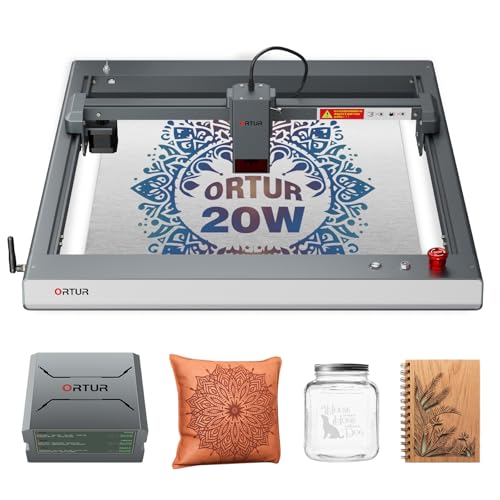
Ortur Laser Master 3 20000mW with Air Assist Laser Engraving Machine

Our verdict: A fast 20W diode machine with air assist built in rather than bolted on.

Ortur's Laser Master 3 is a 20,000 mW diode engraver with an integrated air assist system and a quoted speed of up to 20,000 mm/min. The air stream blows smoke away from the cut line, which is why diode cuts stay cleaner and flames stay calmer than on machines that skip it. Integration matters because aftermarket nozzles are fiddly.

It ranks below the fiber and CO2 machines because it cannot mark bare metal or match a CO2 tube on thick acrylic. It beats the ATOMSTACK and Longer below it on out-of-the-box airflow and speed.

A strong middle path for wood, leather and coated metals. Caveat: diode cuts on dark thick material are slow, and the open frame means you need your own eye protection and an enclosure.

Laser type
Diode
Power
20,000 mW
Speed
Up to 20,000 mm/min
Airflow
Integrated air assist

What we like

  • +Air assist integrated from the box
  • +Fast quoted travel speed
  • +20 W optical class output
  • +Good with wood and leather

Watch out for

  • −Cannot mark bare metal
  • −Open frame needs safety add-ons
  • −Slow on thick dark material

Buy it if: Craft sellers cutting thin wood, leather and card.

Skip it if: You need to engrave raw steel or aluminum.

5

Best Mid-Price Diode

ATOMSTACK 20W Laser Engraver

Our verdict: A 20W A20 Pro V2 diode that costs noticeably less than the Ortur and still cuts.

The ATOMSTACK A20 Pro V2 is a 20W diode machine aimed at buyers who want serious cutting power without paying the higher bracket. The listing stresses quick assembly and safety, which suits first-time owners who dread a two-hour build. Diode lasers at this class slice through thin plywood and engrave wood, slate and coated metal cleanly.

It ranks behind the Ortur Laser Master 3 because the Ortur's integrated air assist and stated travel speed give it an edge in cut quality. In exchange the ATOMSTACK sits lower in price, and it is a better fit than the Longer RAY5 if you want the more tried design.

Suits beginners and side hustlers. Caveat: like every diode, it will not mark raw metal without a coating.

Laser type
Diode
Power
20W
Model
A20 Pro V2
Assembly
Quick, beginner friendly

What we like

  • +20W cutting power for the money
  • +Straightforward assembly
  • +Handles wood and slate engraving
  • +Lower cost than the Ortur

Watch out for

  • −No bare metal marking
  • −Less refined airflow than Ortur
  • −Open design needs eye protection

Buy it if: Beginners and weekend makers wanting real cutting power.

Skip it if: You want fiber-grade metal marking.

6

Best for Flexible Connections

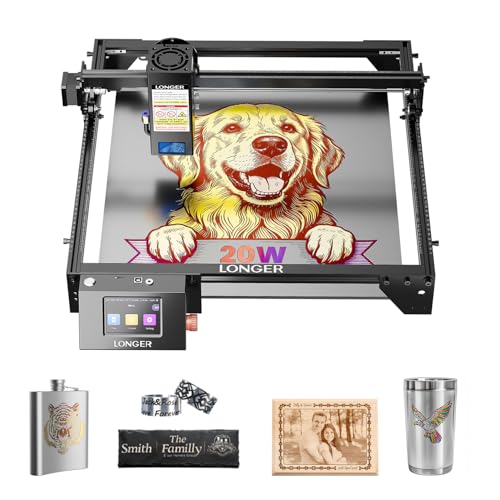
Longer RAY5 20W Laser Engraver

Our verdict: A 20W diode with four connection modes, handy if you work from a phone or tablet.

Longer's RAY5 20W is a diode engraver with four connection modes, meaning you can drive it from a laptop, a phone or offline, depending on how you work. The listing emphasizes high-power cutting and precise, fast engraving, the usual diode strengths on wood, leather and acrylic that absorbs blue light.

It finishes sixth because the ATOMSTACK offers similar cutting capacity and the Ortur adds air assist as standard. What the Longer buys you is flexibility: the connection options reduce the friction of getting a design to the machine, a real benefit for someone who hates juggling cables.

Pick it if you prototype often and move between devices. Caveat: spec-sheet detail is thin on optics and cooling, so check the listing before relying on it for long production runs.

Laser type
Diode
Power
20W
Connections
4 modes
Focus
High precision engraving

What we like

  • +Four ways to connect
  • +20W diode power class
  • +Fast engraving speed advertised
  • +Easy to operate

Watch out for

  • −No air assist highlighted
  • −Can't mark bare metal
  • −Limited detail on cooling

Buy it if: Makers who switch between laptop, phone and offline use.

Skip it if: You prefer built-in air assist and tested airflow.

7

Best Portable and Rotary

LaserPecker LP2 Laser Engraver with Roller

Our verdict: A compact machine with a rotary roller for engraving round items like mugs and bottles.

LaserPecker's LP2 is the odd one out here: a small, mobile unit sold with a roller that rotates round objects through 360 degrees. That makes it the practical way to engrave tumblers, bottles and pens, which flat-bed machines cannot do without a separate rotary add-on.

It ranks last because the format limits it. A compact body means a smaller work area and less cutting capacity than the Ortur or OMTech. Against the fiber machines, it cannot match their metal marking depth.

Choose it for personalized gifts and on-the-go demos at craft fairs. Caveat: the engraving field is small, so large signs and big sheets are out of reach, and the roller is the reason to buy rather than raw power.

Format
Compact, mobile
Rotary
360 degree roller included
Strength
Round object engraving
Use
Gifts and craft fairs

What we like

  • +Roller handles round items
  • +Compact and portable
  • +Good for personalized gifts
  • +Quick setup for demos

Watch out for

  • −Small work area
  • −Less cutting capacity
  • −Weaker than fiber on metal

Buy it if: Gift makers engraving mugs, bottles and pens.

Skip it if: You need large sheet cutting or heavy metal marking.

Methodology

How We Ranked These

Laser type versus material

Fiber, CO2 and diode sources behave very differently on metal, wood and acrylic, so each machine was scored on how well its source suits its target materials.

Power and speed

Rated wattage and quoted travel speed were weighed against the machine class, since 20W of diode is not equal to 20W of fiber.

Safety and enclosure

Alignment aids, air assist and enclosure options were scored, because an open beam is a real eye hazard.

Software and connectivity

LightBurn compatibility and connection modes affect how quickly a design reaches the machine.

Value under the $3000 cap

We compared what each machine delivers against its price bucket, favoring tools that are complete out of the box.

Every Primea Score uses the same weights: Performance 30% · Build & Materials 20% · Everyday Usability 20% · Value 20% · Owner Satisfaction 10%. Full scoring rules

Buyer's guide

How to Pick the Right One for You

By Laser Type

Start with the material in your head, then pick the laser that handles it.

MaterialOur pick
Bare steel, brass, aluminumComMarker B6 20W Fiber Laser Engraver
Jewelry and fine detailMr.Carve S4-30W Fiber Laser Marking Machine
Plywood, acrylic, leather cuttingOMTech K40+ 45W Desktop CO2 Laser Engraver & Cutter
Thin wood and coated metalOrtur Laser Master 3 20000mW with Air Assist Laser Engraving Machine

By Budget

SpendOur pick
$200 to $500ATOMSTACK 20W Laser Engraver
$200 to $500 with connectivityLonger RAY5 20W Laser Engraver
$500 and up for metalComMarker B6 20W Fiber Laser Engraver
$500 and up for cuttingOMTech K40+ 45W Desktop CO2 Laser Engraver & Cutter

Fiber vs Diode

Fiber

The ComMarker B6 and Mr.Carve S4 mark bare metal directly and produce permanent marks, but they do not cut wood well.

Diode

The Ortur Laser Master 3, ATOMSTACK and Longer RAY5 cut and engrave organics at a lower price, but need coatings to mark metal.

If metal is your goal, buy the ComMarker B6. If you want one machine for crafts, the Ortur Laser Master 3 is the safer default.

By Workspace Style

SetupOur pick
Round items and giftsLaserPecker LP2 Laser Engraver with Roller
Crafts bench with exhaustOMTech K40+ 45W Desktop CO2 Laser Engraver & Cutter
Laptop-free, phone-drivenLonger RAY5 20W Laser Engraver
Daily jewelry productionMr.Carve S4-30W Fiber Laser Marking Machine

For Small Business Use Specifically

Look for

Consistent output, spare lenses or consumables, LightBurn support and a way to repeat the same job without retuning.

In this ranking

The ComMarker B6 and Mr.Carve S4 suit repeatable metal work, while the OMTech K40+ handles batch cutting of wood and acrylic.

When to Spend More

Spend more if

You work with metal daily or sell product: the Mr.Carve S4 adds power and swappable lenses over the ComMarker B6.

Save if

You are learning on wood and leather. The ATOMSTACK 20W gives most of the cutting power at a lower price.

Questions

Frequently Asked Questions

Can a diode engraver mark bare metal?+

Not directly. The Ortur, ATOMSTACK and Longer diode machines need a marking spray or a coated surface. If you want clean marks on bare steel or brass, the ComMarker B6 or Mr.Carve S4 fiber lasers are the right tools.

What mistake do first-time buyers make?+

Buying on wattage alone. A 45W CO2 tube like the OMTech K40+ and a 20W fiber like the ComMarker B6 do different jobs, so matching laser type to material matters more than any number on the box.

Is the OMTech K40+ worth it over a diode?+

It is if cutting is the goal. The CO2 tube slices acrylic and plywood that the Ortur or ATOMSTACK would need several passes for, though it needs venting and a larger desk than the compact diodes.

How do I set up a fiber laser safely?+

Place it on a stable bench, route exhaust outdoors, and set focus using the red alignment beams on the Mr.Carve S4. Always wear wavelength-rated eye protection and keep a fire extinguisher nearby.

How should I maintain a CO2 or diode machine?+

Clean the lens regularly with the recommended wipe, and watch the CO2 tube in the OMTech for output drop over time. For diodes like the Ortur, keep the air assist nozzle clear so smoke does not coat the lens.

Can the LaserPecker LP2 cut wood?+

It is built mainly for engraving, especially round objects through its roller. For cutting boards or sheets, the Ortur Laser Master 3 or OMTech K40+ have the power and work area the compact LP2 lacks.

Final take

If metal is the point of your purchase, the ComMarker B6 is the cleanest recommendation here because fiber is the right physics for the job. Cutting-first buyers should move to the OMTech K40+, and general crafters will get more from the Ortur Laser Master 3. Choose the laser type before anything else, and the rest of this list sorts itself out.

More Ranked & Reviewed Guides