
Primea ReviewsAll Reviews

Primea Reviews is reader-supported. When you buy through our Amazon links we may earn a commission, at no extra cost to you. Rankings are set by our editors and never sold. Learn more

Ranked & Reviewed by Primea Reviews

The 5 Best Laptop Locks for Microsoft Surface Laptops and Pros in 2026, Ranked & Reviewed

By the Primea Editorial TeamUpdated November 3, 20268 min read5 products ranked
The 5 Best Laptop Locks for Microsoft Surface Laptops and Pros in 2026, Ranked & Reviewed

The short answer

The AboveTEK locking station is the best Surface lock if the laptop lives on a desk, with adjustable arms, a 2 metre keyed cable and a pivot hinge that suits kickstand angles. The Kensington adhesive kit is the neatest portable option with a cable included, and the I3C anchor-plate lock is the proven all-rounder for under $25.

The Primea Scoreboard

Ranked & Reviewed

  1. A clamp station with a pivot hinge for kickstand-style angles and a 2 metre cable.

    93Outstanding
    Check price
  2. A small adhesive mounting plate with the NanoSaver cable lock already included.

    90Excellent
    Check price
  3. An anchor plate for Surface plus a standard-slot head, on a 6.5 foot cut-resistant cable.

    87Excellent
    Check price
  4. An audio-port anchor with a 1.7 metre cable and a resettable 4-digit combination lock.

    84Very Good
    Check price
  5. A self-rolling 6.2 foot cable that compresses to 4 inches, with an anchor plate for slotless Surfaces.

    81Very Good
    Check price

Most Surface models do not have a standard lock slot, which is exactly why generic cable locks fail. The buyer mistake is picking a lock by cable thickness or length and finding out at the desk that it has nothing to plug into. The real question for a Surface is how the lock attaches: a clamp station, an adhesive plate, an anchor plate or the headphone port.

We looked at five locks that solve that problem, and compared them on attachment method, how safe the laptop finish is, which models they support and what is included in the box. This is a review of listings and spec sheets, not owner use, and we mention where a lock leaves the Surface exposed in some way.

Before you buy

What Actually Matters

01

How it attaches

Most Surface models lack a standard lock slot, so a lock must clamp, bond or anchor. Clamp stations leave the laptop unmarked, adhesive plates are portable but semi-permanent, and audio-port anchors are tool-free. Decide which trade-off suits you.

02

Surface model compatibility

A Surface Laptop, Pro and Book differ in shape and thickness. Check the width range of any station and the named models on the listing. Kickstand designs also need a lock that allows angle changes.

03

Cable material and length

A cut-resistant cable resists simple snips, and length determines what you can loop around. 6 to 7 feet suits most desks. Longer cables tangle, and shorter ones limit anchor points.

04

Keyed vs combination

Keys are quick but can be lost. Combinations cannot be lost but must be remembered, and resettable ones can be changed. Choose by who shares the lock.

05

Adhesive concerns

Adhesive plates can leave residue or lift paint when removed. If you resell or return laptops, prefer a clamp or port anchor. Warm slowly and use gentle solvent to remove.

In-depth reviews

Our Ranked Picks, Reviewed

1

Best Desk Station

AboveTEK MacBook and Surface Laptop Locking Station with Combo Lock Cable

Our verdict: A clamp station with a pivot hinge for kickstand-style angles and a 2 metre cable.

The AboveTEK station uses adjustable arms for laptops 11.1 to 15.7 inches wide, dual lock clips that handle thickness, and a 78.7 inch (2 metre) keyed lock cable. A hinge pivots from 45 to 125 degrees, which is built to suit kickstand-style viewing.

It ranks first because it is the only option here designed around how a Surface is used. The pivot lets the laptop sit at the angle you like on the desk, and clamping avoids stuck-on adhesive and port blocking. The $25 to $50 price is also reasonable. The compromise is that it is a desk fixture, not a bag-friendly lock.

Buy it if a Surface Laptop or Pro lives on one desk. Skip it if you want to take the lock with you.

Fit width
11.1 to 15.7 in
Cable
78.7 in (2 m) keyed
Hinge
45 to 125 degree pivot
Price
$25 to $50

What we like

  • +Pivot hinge suits kickstand angles
  • +No adhesive or port needed
  • +Two metre lock cable
  • +Reasonable price

Watch out for

  • −Desk fixture, not portable
  • −Bulky compared with plates

Buy it if: Surface owners with a fixed desk setup.

Skip it if: You carry the lock in a bag.

2

Best Adhesive Kit

Kensington Computer Lock Adapter Kit, K60206WW

Our verdict: A small adhesive mounting plate with the NanoSaver cable lock already included.

The K60206WW uses a 3M double-sided adhesive on a compact 1.77 by 1.77 inch mounting plate, and includes a NanoSaver cable lock so you do not need to buy one separately. The listing says the adhesive was assessed for attachment reliability.

It ranks second because it is the cleanest portable solution from a brand known for laptop security. Stick it on once and it stays, which suits a Surface kept in one place or carried between desks. The trade is permanence: adhesive is difficult to remove without risking the finish, so you are committing to the position.

Buy it if you want a portable, Kensington-branded kit with a lock included. Skip it if you want to keep the laptop's finish pristine for resale.

Attachment
3M double-sided adhesive
Plate size
1.77 x 1.77 in
Lock
NanoSaver cable included
Price
Under $25

What we like

  • +Cable lock included
  • +Compact mounting plate
  • +Kensington brand
  • +Under $25

Watch out for

  • −Adhesive is semi-permanent
  • −May mark the laptop on removal

Buy it if: Surface owners wanting a small portable lock.

Skip it if: You plan to resell the laptop in pristine shape.

3

Best Proven Anchor Plate

I3C Laptop Cable Lock, Hardware Security Cable Lock (1 Pack)

Our verdict: An anchor plate for Surface plus a standard-slot head, on a 6.5 foot cut-resistant cable.

The I3C lock includes an anchor plate for Surface devices plus a standard slot laptop head, so it also works on other laptops that have a lock slot. The cable is 6.5 feet long and cut-resistant, and the price is under $25.

It ranks third because the dual head makes it useful if you own a Surface and another laptop with a standard slot, and the cable is long enough to loop around a desk leg. It is less specialised than the AboveTEK, and the anchor plate is another adhesive solution with the same removal concern.

Buy it if you want one lock that covers a Surface and a standard-slot laptop. Skip it if you want a station that avoids adhesive.

Heads
Surface anchor plate and standard slot
Cable
6.5 ft cut-resistant
Pack
1
Price
Under $25

What we like

  • +Covers Surface and standard-slot laptops
  • +Cut-resistant cable
  • +Long 6.5 foot reach
  • +Under $25

Watch out for

  • −Anchor plate uses adhesive
  • −Less purpose-built for Surface

Buy it if: Households with a Surface and another laptop.

Skip it if: You want a no-adhesive solution.

4

Best No-Adhesive Kit

Multplx Universal Laptop Security Lock, Audio Port Anchor

Our verdict: An audio-port anchor with a 1.7 metre cable and a resettable 4-digit combination lock.

The Multplx anchors through the audio port, names Surface as compatible, and bundles a 1.7 metre cable with a resettable 4-digit combination lock. There is no adhesive involved, so no residue risk. It costs $25 to $50.

It ranks fourth because relying on the headphone jack as an anchor point is a weaker design than a clamp or a bonded plate. It is a good deterrent, not a vault. In its favour, it leaves no marks, and everything is in one box.

Buy it if you do not want adhesive on the laptop. Skip it if you need the headphone jack while locked.

Anchor
Audio port
Cable
1.7 m
Lock
Resettable 4-digit combination
Price
$25 to $50

What we like

  • +No adhesive or residue
  • +Surface named compatible
  • +Cable and lock bundled
  • +Resettable combination

Watch out for

  • −Blocks the audio port
  • −Deterrent, not high security

Buy it if: Surface owners who refuse adhesive.

Skip it if: You use headphones at the desk.

5

Best Self-Coiling Cable

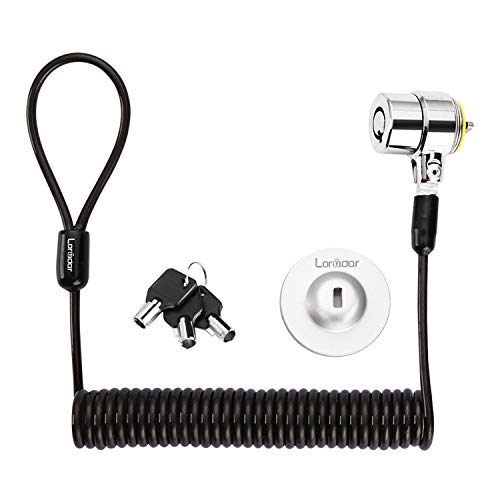
LORADAR Security Hardware Cable Lock Kit, Retractable Keyed

Our verdict: A self-rolling 6.2 foot cable that compresses to 4 inches, with an anchor plate for slotless Surfaces.

The LORADAR kit fits a 3 by 7 mm keyhole directly or uses an anchor plate for slotless Surface devices. The 6.2 foot cable is self-rolling and compresses to about 4 inches, and the lock body and key are numbered for traceability. It costs under $25.

It ranks fifth because the retractable cable is a nice carrying feature, but the listing frames it for Surface Book owners, and the anchor-plate approach shares the adhesive concern. It lacks the combination of cable strength and fit detail the higher picks offer.

Buy it if you want a lock that packs small in a laptop bag. Skip it if you want a station for a fixed desk.

Cable
6.2 ft self-rolling, 4 in coiled
Fit
3x7mm keyhole or anchor plate
Lock
Keyed, numbered
Price
Under $25

What we like

  • +Cable coils to 4 inches
  • +Numbered keys for traceability
  • +Works with keyhole or plate
  • +Under $25

Watch out for

  • −Framed for Surface Book
  • −Plate relies on adhesive

Buy it if: Travelling workers who want a compact keyed lock.

Skip it if: You want a fixed desk station.

Methodology

How We Ranked These

Attachment method

Clamp stations, adhesive plates, anchor plates and audio-port anchors were compared on how they fit a Surface with no standard slot.

Model fit

Named compatibility with Surface Laptop, Pro and Book models, plus width ranges, were checked against the listings.

Cable and lock type

Cable length, cut resistance and keyed or combination locks were weighed.

Finish protection

We favoured designs that leave the laptop's finish unmarked, and noted where adhesive creates a removal risk.

Value

Each lock was judged inside the under $25 and $25 to $50 brackets it occupies.

Every Primea Score uses the same weights: Performance 30% · Build & Materials 20% · Everyday Usability 20% · Value 20% · Owner Satisfaction 10%. Full scoring rules

Buyer's guide

How to Pick the Right One for You

By Attachment Type

Attachment type decides portability and finish risk.

AttachmentOur pick
Clamp stationAboveTEK MacBook and Surface Laptop Locking Station with Combo Lock Cable
Adhesive plate with lockKensington Computer Lock Adapter Kit, K60206WW
Anchor plateI3C Laptop Cable Lock, Hardware Security Cable Lock (1 Pack)
Audio-port anchorMultplx Universal Laptop Security Lock, Audio Port Anchor

By Budget

SpendOur pick
Under $25 (included lock)Kensington Computer Lock Adapter Kit, K60206WW
Under $25 (long cable)I3C Laptop Cable Lock, Hardware Security Cable Lock (1 Pack)
Under $25 (compact)LORADAR Security Hardware Cable Lock Kit, Retractable Keyed
$25 to $50AboveTEK MacBook and Surface Laptop Locking Station with Combo Lock Cable

Fixed Station vs Portable Lock

Fixed station

Clamps the laptop without adhesive and supports angle changes, but stays on the desk. Pick: AboveTEK locking station.

Portable lock

Fits in a bag and loops around furniture anywhere, but relies on a plate or port. Picks: Kensington kit, I3C, LORADAR and Multplx.

Default to the station for a home desk, and a portable plate for travel.

By Lock Type

PreferenceOur pick
Keyed with numbered keysLORADAR Security Hardware Cable Lock Kit, Retractable Keyed
Resettable combinationMultplx Universal Laptop Security Lock, Audio Port Anchor
Keyed cable on a stationAboveTEK MacBook and Surface Laptop Locking Station with Combo Lock Cable
NanoSaver lockKensington Computer Lock Adapter Kit, K60206WW

For a Coworking Space Specifically

Look for

A lock that takes seconds to attach, a cable long enough to reach the desk base, and an attachment that will not damage the laptop.

In this ranking

The Kensington kit mounts once and clips on in seconds, the LORADAR packs small, and the AboveTEK suits a regular desk.

When to Spend More

Spend more if

The laptop is expensive or you want no adhesive. The AboveTEK station is the best protection without sticking anything on.

Save if

You only need a deterrent at a cafe. The I3C or LORADAR does that for under $25.

Questions

Frequently Asked Questions

Does a Surface have a lock slot?+

Most do not. Surface Laptop and Pro models lack a standard slot, so you need a station, an adhesive or anchor plate, or a port anchor.

What is the common mistake when buying one?+

Buying a standard cable lock with no adapter. Without a slot, the lock has nothing to attach to. Choose a product designed for slotless laptops.

Is the AboveTEK station worth it over an adhesive kit?+

If your Surface stays on a desk, yes. It adds no adhesive and supports kickstand angles. For travel, the Kensington adhesive kit is easier to carry.

How hard is installation?+

Stations slide around the laptop, adhesive plates need a clean dry surface and time to bond, and port anchors push into the jack. Follow the instructions for your model.

Do USB-C port blockers protect against theft?+

No. Port blockers stop unauthorised USB access but do not secure the laptop to a desk. Use them alongside a physical lock, not instead of one.

Will adhesive plates damage my Surface?+

They can leave residue or lift paint if removed carelessly. Warm the plate slowly and use a gentle solvent, and consider a clamp station if you resell often.

Final take

For a Surface on a desk, the AboveTEK locking station is the best laptop lock here because it uses no adhesive and handles kickstand angles. The Kensington adhesive kit is the better choice for carrying a lock around, and the I3C is the broadly compatible budget option. Pick the attachment method first, then the cable.

More Ranked & Reviewed Guides