
Primea ReviewsAll Reviews

Primea Reviews is reader-supported. When you buy through our Amazon links we may earn a commission, at no extra cost to you. Rankings are set by our editors and never sold. Learn more

Ranked & Reviewed by Primea Reviews

The 6 Best Laptop Locks of 2026, Ranked & Reviewed

By the Primea Editorial TeamUpdated November 1, 20269 min read6 products ranked
The 6 Best Laptop Locks of 2026, Ranked & Reviewed

The short answer

The Kensington Universal 3-in-1 Combination Lock is the best laptop lock: three swappable heads for Standard, Nano and Wedge slots, plus a 6 ft cut-resistant cable and online code recovery, for $25 to $50. The Kensington T-Bar keyed lock suits Standard slots, and the Multplx anchors through the 3.5mm audio jack on slotless laptops.

The Primea Scoreboard

Ranked & Reviewed

  1. Three slot tips in one lock make it the low-risk buy.

    94Outstanding
    Check price
  2. Skip the code dial and use a real key.

    90Excellent
    Check price
  3. A resettable four-wheel dial for HP, Lenovo, Acer, and Asus.

    87Excellent
    Check price
  4. Anchors through the 3.5mm jack when there is no slot.

    84Very Good
    Check price
  5. Two keyed locks for the price bracket of one.

    81Very Good
    Check price
  6. A tapered Wedge head built for Dell and Alienware.

    78Very Good
    Check price

The biggest gotcha with a laptop lock is not the lock. Some modern laptops ship with no security slot at all, and those that have one come in three different shapes. Buying on brand name alone leaves plenty of owners holding a cable that cannot attach to anything. Slot type, not cable strength, decides whether a lock works on your machine.

We ranked six locks on the facts in their listings: which slot or port they anchor to, whether they use a dial or a key, how much cable you get and what recovery or support comes with them. Each is judged on what it covers, not on how strong it looks in a photo. Compatibility lines and tip lists carry as much weight as materials.

Before you buy

What Actually Matters

01

Slot or port type

A lock needs something to grab onto, and that anchor is either a Standard, Nano or Wedge security slot or, in a workaround, an audio port. If the head does not match, it will not seat. Check your laptop's spec page for the slot and compare it with the compatibility line on the listing.

02

Dial versus key

A dial means no key to carry, but you need to remember the code. A key is faster to use, yet losing it can lock you out. Look at whether the listing mentions a resettable code or recovery option, like Kensington's Register and Retrieve, because that decides how forgiving the lock is. A forgotten code can mean a locked-out laptop.

03

Cable material and length

A cut-resistant steel cable resists casual snipping, and length decides what you can tether to. Five to six feet wraps a desk leg, while 1.7m is just over five feet. Read the cable length in the title or bullets and measure your distance to the anchor, because a short cable limits where you can sit. Slack also lets a thief reach the laptop.

04

Compatibility lists

Budget locks sometimes carry a list of laptop models they do not fit. Skipping that list is the most common cause of returns. Search the listing text for the words incompatible or compatibility, and compare your exact model, not just the brand, since the same maker uses different slots across years. Slot types vary by model year.

05

Quantity

Some listings sell two locks, which halves the per-lock cost for shared spaces. This matters in classrooms and offices. Check the pack quantity in the title before assuming one, as on the AOMGD two-pack. Also check how many keys come with each lock, so you have a backup. A two-pack saves money only if you need both.

In-depth reviews

Our Ranked Picks, Reviewed

1

Best Overall

Kensington Universal 3-in-1 Combination Laptop Lock, K62316WW

Our verdict: Three slot tips in one lock make it the low-risk buy.

Kensington builds this lock around three swappable heads, Standard, Nano and Wedge, tethered so a spare never gets lost. The cable runs 6 ft in cut-resistant carbon steel, and Register and Retrieve online code recovery rounds out the package. It sells for $25 to $50. Tip coverage matters because the three slot shapes do not interchange, and a wrong tip means a cable that never seats.

It tops the list because it works in homes and offices with mixed hardware, where the other locks each cover one slot. The cost is a higher price than the under $25 single-slot picks. Against the T-Bar keyed lock, it adds slot choice and a recovery service.

It suits anyone who is unsure about their slot or may replace the laptop soon. The caveat is that it will not help with a laptop that has no slot. Skip it if your laptop lacks one.

Slot tips
Standard, Nano, Wedge
Cable
6 ft cut-resistant
Recovery
Register and Retrieve
Price
$25-50

What we like

  • +Covers three slot types
  • +Spare tips stay tethered
  • +Online code recovery
  • +6 ft cable

Watch out for

  • −Pricier than single-slot locks
  • −Needs a security slot

Buy it if: Mixed-brand homes and offices, or anyone unsure of their slot.

Skip it if: Your laptop has no security slot.

2

Best Keyed Lock

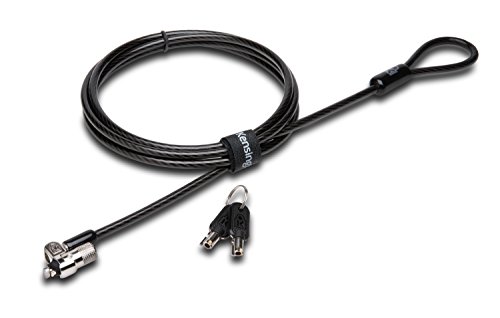
Kensington T-Bar Standard Keyed Lock for Laptops, K65035AM

Our verdict: Skip the code dial and use a real key.

This Kensington swaps the dial for a 10mm pivoting anti-pick tubular lock head. The cable joins the head with a hinge, and the listing mentions 8-year warranty terms plus lifetime technical support. It sells for $25 to $50. A tubular key resists casual picking better than a basic wafer lock, and a hinge reduces the strain on the slot when the cable is pulled at an angle.

It ranks under the universal pick because it fits only Standard slots, but it beats it for people who dislike memorizing codes. A key opens it instantly, with no dial to spin in a hurry. Against the K64673AM, it trades the resettable dial for a physical key.

It fits Standard-slot owners who want quick open-and-close. The caveat is the key itself: lose it and you are stuck. Skip it if you often misplace keys.

Lock
Keyed tubular
Head
10mm pivoting anti-pick
Slot
Standard T-bar
Price
$25-50

What we like

  • +No code to remember
  • +Anti-pick head design
  • +Hinged cable junction
  • +Lifetime technical support

Watch out for

  • −Standard slot only
  • −Lost key is a hassle

Buy it if: Standard-slot owners who prefer a physical key.

Skip it if: You often misplace keys.

3

Best Standard Combination

Kensington Combination Cable T-Bar Standard Lock for Laptops, K64673AM

Our verdict: A resettable four-wheel dial for HP, Lenovo, Acer, and Asus.

The K64673AM has a resettable four-wheel dial with 10,000 combinations and a 6 ft cut-resistant cable that the maker says was independently torque and pull tested. It is meant for confirmed Standard T-bar slots and sells for $25 to $50. Ten thousand combinations is the same count as a four-digit PIN, so a casual thief cannot guess it quickly.

It places third because it offers no extra slot tips and no recovery service, which the universal model does. In exchange, the design is simple and the cable is the same length. Against the keyed Kensington, it removes the key but adds a code you must remember.

Choose it for HP, Lenovo, Acer or Asus laptops with a confirmed Standard slot. The caveat is no Nano or Wedge support. Skip it if you are not sure your slot is Standard.

Combinations
10,000
Cable
6 ft cut-resistant
Slot
Standard T-bar only
Price
$25-50

What we like

  • +Resettable code
  • +6 ft reach
  • +10,000 combinations
  • +Simple dial operation

Watch out for

  • −Standard slot only
  • −No recovery service listed

Buy it if: HP, Lenovo, Acer, or Asus owners with a Standard slot.

Skip it if: You are not sure your slot is Standard.

4

Best for Slotless Laptops

Multplx Universal Laptop Security Lock, Audio Port Anchor

Our verdict: Anchors through the 3.5mm jack when there is no slot.

Instead of a security slot, the Multplx uses your laptop's 3.5mm audio port as its anchor. It pairs that with a 1.7m cut-resistant steel cable and a resettable four-digit combination lock, and sells for $25 to $50. Many thin laptops dropped the security slot to save thickness, which leaves owners with no standard way to tether.

It ranks fourth because anchoring through an audio port is a workaround, not the same as a purpose-built slot, and the 1.7m cable is shorter than the 6 ft Kensington options. It earns its place because it is the only pick that works on laptops with no slot at all.

It suits MacBook and thin-laptop owners who have nothing else to attach to. The caveat is that the jack must be present. Skip it if your laptop has no 3.5mm audio port.

Anchor
3.5mm audio port
Cable
1.7m steel
Lock
Resettable 4-digit
Price
$25-50

What we like

  • +Works without a security slot
  • +Resettable combination
  • +Cut-resistant steel cable
  • +Fits many thin laptops

Watch out for

  • −Relies on audio jack
  • −Shorter than 6 ft options

Buy it if: Owners of laptops with no security slot.

Skip it if: Your laptop has no 3.5mm audio port.

5

Best Two-Pack

AOMGD 2-Pack 6ft Laptop Lock Notebook Security Cable Lock

Our verdict: Two keyed locks for the price bracket of one.

This AOMGD set gives you two 6 ft locks made from galvanized wire rope and hardened stainless steel, with two keys per lock for four total. It fits a 3x7mm keyhole and costs under $25. A pair means one lock for each laptop at a shared desk, with a spare key to leave with someone else.

It ranks below the Kensington locks because the listing points you to an incompatibility list and says less about independent testing. Its edge is value: two locks in the under $25 range. Against the Kensington Universal, it covers one keyhole shape only.

Buy it for a shared desk, a classroom, or a couple that wants to lock both laptops. The caveat is compatibility, so check that your model is not on the list before ordering. Skip it if your laptop appears on the incompatibility list.

Quantity
2 locks
Cable
6 ft wire rope
Keys
2 per lock
Price
Under $25

What we like

  • +Two locks in one pack
  • +Two keys per lock
  • +Hardened stainless steel
  • +Under $25 bucket

Watch out for

  • −Model compatibility list applies
  • −3x7mm keyhole only

Buy it if: Shared desks or two-laptop households on a budget.

Skip it if: Your laptop is on the incompatibility list.

6

Best for Dell

Kensington N17 Dell Laptop Combination Lock, K68008WW

Our verdict: A tapered Wedge head built for Dell and Alienware.

The Kensington N17 uses a tapered wedge engagement that tightens under tension, with a resettable four-wheel dial and 10,000 combinations. It is made for Dell and Alienware laptops from 2016 onward, and costs under $25. Wedge slots are thin, and the head tightens when someone pulls on the cable, which is why a Wedge lock holds well when it fits.

It ranks last because only one family of laptops can use it, while the universal pick also covers Wedge slots. But in the under $25 range it is the cheapest route for a Dell fleet. Against the AOMGD set, it is purpose-built for one slot instead of a generic keyhole.

Buy it if you are certain your laptop has a Wedge-type slot. The caveat is brand lock-in. Skip it for any other brand.

Slot
Wedge, Dell/Alienware
Combinations
10,000
Lock
Resettable dial
Price
Under $25

What we like

  • +Under $25 bucket
  • +Wedge head tightens under pull
  • +Resettable code
  • +Made for 2016 and newer Dell

Watch out for

  • −Dell and Alienware only
  • −Single slot type

Buy it if: Dell or Alienware owners with a confirmed Wedge slot.

Skip it if: Your laptop is another brand.

Methodology

How We Ranked These

Anchor compatibility

We ranked how many laptops each lock can attach to, including slotless models.

Lock style

We compared dials, keys, and code recovery options for everyday convenience.

Cable build

We weighed cut-resistant materials, sheaths, and listed cable lengths.

Support and recovery

We noted warranties, technical support, and online code retrieval where listed.

Value per lock

We scored each lock against its price bucket and the number of locks included.

Every Primea Score uses the same weights: Performance 30% · Build & Materials 20% · Everyday Usability 20% · Value 20% · Owner Satisfaction 10%. Full scoring rules

Buyer's guide

How to Pick the Right One for You

By Laptop Type

Start with the slot your laptop actually has.

Your laptopOur pick
Unsure or mixed brandsKensington Universal 3-in-1 Combination Laptop Lock, K62316WW
HP, Lenovo, Acer, Asus (Standard)Kensington Combination Cable T-Bar Standard Lock, K64673AM
Dell or Alienware (Wedge)Kensington N17 Dell Laptop Combination Lock, K68008WW
No security slotMultplx Universal Laptop Security Lock, Audio Port Anchor

By Budget

SpendOur pick
Under $25 for oneKensington N17 Dell Laptop Combination Lock, K68008WW
Under $25 for twoAOMGD 2-Pack 6ft Laptop Lock
$25-50 flexibleKensington Universal 3-in-1 Combination Laptop Lock, K62316WW
$25-50 keyedKensington T-Bar Standard Keyed Lock, K65035AM

Dial vs Key

Dial

No key to lose, and the code can be reset. The Kensington K62316WW, K64673AM, N17, and the Multplx use dials.

Key

Faster to open, but a lost key is a problem. The Kensington K65035AM and AOMGD 2-Pack use keys.

Most buyers should choose a dial unless they already carry a dedicated keyring.

By Number of Laptops

SetupOur pick
One personal laptopKensington K64673AM
Two laptops at homeAOMGD 2-Pack 6ft Laptop Lock
Several different laptopsKensington Universal 3-in-1 K62316WW

For Thin MacBook-Style Laptops Specifically

Look for

An audio-port anchor or a slot type that the listing names for your exact model.

In this ranking

The Multplx Universal Laptop Security Lock anchors through the 3.5mm port, so it works where slot-based locks cannot.

When to Spend More

Spend more if

You want slot flexibility and a recovery service. The Kensington K62316WW covers both.

Save if

You have a known slot and a fixed desk. The Kensington N17 or AOMGD 2-Pack costs less in the under $25 bucket.

Questions

Frequently Asked Questions

Will any lock fit any laptop?+

No. Locks are built for Standard, Nano or Wedge slots, or for an audio-port anchor. Confirm the type on your laptop's spec page before choosing the Kensington Universal, T-Bar or N17. A magnifier and the slot's shape help when specs are unclear.

What is the most common buying mistake?+

Ignoring the compatibility line. Budget locks like the AOMGD often list models they do not support, so read it before ordering. A matching brand does not guarantee a matching slot, and the Multplx or Universal are safer when you are unsure.

Is the Kensington universal lock worth it over a single-slot one?+

If you may switch laptops, yes, because it carries three slot tips. If your slot is fixed and Standard, the T-Bar K65035AM or K64673AM saves money and works the same way.

How do I attach the cable?+

Loop the cable around a fixed object, insert the head into the slot, and set the dial or turn the key. The listing's instructions give the exact steps for your model, whether Kensington or Multplx. Tug the cable to confirm the head is locked in.

How do I change the combination?+

Resettable locks such as the K64673AM and Multplx let you set a new code with a reset step. The AOMGD two-pack uses keys, so there is no code to change, only a spare key to guard.

Does a lock stop theft completely?+

It deters casual grab-and-go theft. A determined thief with tools may still defeat a cable, so treat it as one layer of protection, alongside a locked room. Never leave it tethered to something that moves.

Final take

Buy the Kensington Universal 3-in-1 if you are unsure of your slot or may switch laptops. Choose the T-Bar keyed lock for a Standard slot and no code to remember, the Multplx for a laptop with no slot, and the AOMGD two-pack for a shared desk. The Kensington N17 fits only Dell and Alienware Wedge slots. Check the slot first.

More Ranked & Reviewed Guides