
Primea ReviewsAll Reviews

Primea Reviews is reader-supported. When you buy through our Amazon links we may earn a commission, at no extra cost to you. Rankings are set by our editors and never sold. Learn more

Ranked & Reviewed by Primea Reviews

The 6 Best eGPU Options for an RTX 5090, From 850W Boxes to Integrated AI Boxes, Ranked & Reviewed

By the Primea Editorial TeamUpdated November 3, 202610 min read6 products ranked
The 6 Best eGPU Options for an RTX 5090, From 850W Boxes to Integrated AI Boxes, Ranked & Reviewed

The short answer

The Plugable Thunderbolt 5 eGPU enclosure is the best home for an RTX 5090, with an 850W 80+ Gold supply that dedicates 600W to the GPU and room for cards up to 3.5 slots. The Sonnet Breakaway Box 850 T5 is the dock-rich alternative, and the GIGABYTE AORUS AI Box is the no-assembly route with a 5090 already inside.

The Primea Scoreboard

Ranked & Reviewed

  1. An 850W 80+ Gold supply with 600W set aside for the GPU, Thunderbolt 5 and 3.5 slot clearance.

    94Outstanding
    Check price
  2. An 850W box with triple-wide support, 80Gbps both ways, a 5GbE port and three 10Gbps USB-A ports.

    92Outstanding
    Check price
  3. An RTX 5090 with 32GB GDDR7 already inside, with Thunderbolt 5, USB4 and all-in-one WATERFORCE cooling.

    90Excellent
    Check price
  4. A 750W supply and JHL7440 controller, but a 2.3 inch thickness limit and a 40Gbps link.

    86Excellent
    Check price
  5. A 750W Thunderbolt 3 chassis with four USB-A ports and Gigabit Ethernet.

    82Very Good
    Check price
  6. A 750W Thunderbolt 3 chassis for Mac and Windows with a temperature-controlled fan.

    79Very Good
    Check price

An RTX 5090 is the most demanding card you can hang off a laptop cable. It draws far more power than any previous consumer GPU, it is physically large, and it wants as much bandwidth as the link can carry. Most eGPU boxes were designed around cards half as hungry, so the usual shopping advice, look for a Thunderbolt port and a decent supply, is not enough.

Six options are ranked here, and only a few are truly comfortable with a 5090. The rest are included with honest caveats about power headroom. Scoring weights supply wattage, wattage reserved for the GPU, link generation, card clearance and extras. A 240W box and a PCIe expansion unit without a stated supply were excluded for obvious reasons.

Before you buy

What Actually Matters

01

GPU wattage allocation

A power supply total does not tell you what reaches the card, because the enclosure also runs fans and the dock. The Plugable states 600W for the GPU. Prefer boxes that say how much goes to the graphics card.

02

Connector support

A 5090 uses the newer 12V-2x6 high-power connector. Confirm that the enclosure provides it or a compatible adapter. A missing or flimsy cable is a safety issue at these loads.

03

Thunderbolt 5 bandwidth

The 80Gbps link of Thunderbolt 5 is double the 40Gbps of earlier versions, which matters for a card this fast. Your laptop must support Thunderbolt 5 as well. Check both ends.

04

Card size

5090 partner cards vary from slim two-slot designs to chunky triple-slot ones. Compare the enclosure limit, such as 3.5 slots for the Plugable, with your card's dimensions.

05

Cooling

A 5090 puts a lot of heat into a small box. Good fans, open airflow and an efficient supply keep temperatures down. Integrated liquid cooling, as in the AORUS box, takes the problem away.

In-depth reviews

Our Ranked Picks, Reviewed

1

Best Overall

Plugable Thunderbolt 5 AI eGPU Enclosure & Dock, 850W PSU (TBT5-AI)

Our verdict: An 850W 80+ Gold supply with 600W set aside for the GPU, Thunderbolt 5 and 3.5 slot clearance.

The TBT5-AI has an 850W 80+ Gold power supply with 600W dedicated to the GPU, 80Gbps Thunderbolt 5, 2.5Gbps Ethernet and room for cards up to 346 by 170 by 77mm, or 3.5 slots.

The 600W GPU allocation is the number to care about, because a 5090 can pull a sustained load in the high 500s of watts and spikes above that. A supply that reserves 600W for the card gives a small buffer, which most 750W boxes cannot. The 80+ Gold rating means the supply runs efficiently and cooler. It leads because it is the one option here that states both the headroom and the card clearance.

Buy it if you want a box that is built for power-hungry cards. Skip it if your laptop has only Thunderbolt 4.

Supply
850W 80+ Gold, 600W to GPU
Link
Thunderbolt 5, 80Gbps
Clearance
346 x 170 x 77mm, 3.5 slots
Network
2.5Gbps Ethernet

What we like

  • +600W reserved for the GPU
  • +80+ Gold efficiency
  • +Fits 3.5 slot cards
  • +Thunderbolt 5 bandwidth

Watch out for

  • −Premium price bracket
  • −Needs a Thunderbolt 5 host to shine

Buy it if: A 5090 on a Thunderbolt 5 laptop or mini PC.

Skip it if: Your host is Thunderbolt 4 only.

2

Best Dock Extras

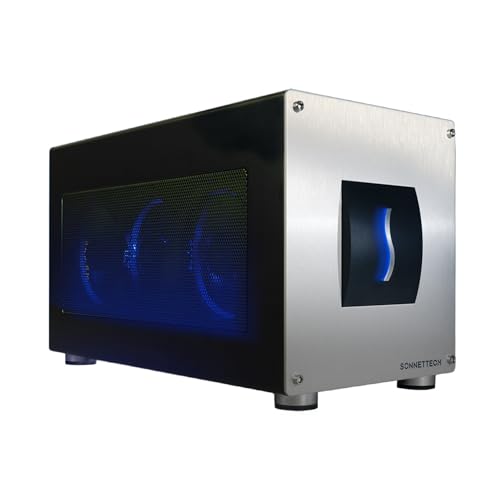
Sonnet Breakaway Box 850 T5 eGPU Enclosure, 80Gbps Thunderbolt 5

Our verdict: An 850W box with triple-wide support, 80Gbps both ways, a 5GbE port and three 10Gbps USB-A ports.

The Breakaway Box 850 T5 has an 850W supply, triple-wide card support, 80Gbps bidirectional Thunderbolt 5, a 5GbE port and 3 USB-A ports at 10Gbps.

Sonnet is the longest-running name in eGPU chassis, and its dock ports turn the box into a desk hub: wired networking, three fast USB ports and the GPU through one cable. It ranks just behind the Plugable because the listing does not state how much of the 850W is reserved for the graphics card, which is the number a 5090 owner wants.

Buy it if you want the box to double as a dock. Skip it if you want a stated GPU wattage.

Supply
850W
Link
Thunderbolt 5, 80Gbps
Card support
Triple-wide
Dock
5GbE, 3 x 10Gbps USB-A

What we like

  • +Triple-wide card support
  • +5GbE and three fast USB ports
  • +850W supply
  • +Respected eGPU maker

Watch out for

  • −GPU wattage not itemised
  • −Premium price bracket

Buy it if: A 5090 plus a one-cable desk setup.

Skip it if: You want a published GPU allocation.

3

Best No-Assembly Option

GIGABYTE AORUS RTX 5090 AI Box Graphics Card, 32GB GDDR7

Our verdict: An RTX 5090 with 32GB GDDR7 already inside, with Thunderbolt 5, USB4 and all-in-one WATERFORCE cooling.

The AORUS AI Box has an integrated RTX 5090 with 32GB of GDDR7, Thunderbolt 5 and USB4 with daisy chain support, and WATERFORCE all-in-one liquid cooling.

It skips the hardest parts of an eGPU build: no card to buy separately, no clearance worries and no power supply to size, because the vendor engineered them together. The compromise is that you cannot swap the card later, so the box is only as current as the GPU inside. It ranks third because it is a sealed product, not a flexible enclosure, and it sits in the top price bracket.

Buy it if you want a 5090 external with nothing to assemble. Skip it if you already own a card.

GPU
Integrated RTX 5090, 32GB GDDR7
Ports
Thunderbolt 5 and USB4, daisy chain
Cooling
WATERFORCE all-in-one
Format
Sealed AI box

What we like

  • +RTX 5090 already included
  • +Liquid cooling built in
  • +Thunderbolt 5 and USB4
  • +Nothing to assemble

Watch out for

  • −Card cannot be upgraded
  • −Top price bracket

Buy it if: Buyers who want a plug-in 5090.

Skip it if: You already own a graphics card.

4

Best Mid-Price Box With Caveats

ORARA eGPU Enclosure Thunderbolt 3/4/USB4 40Gbps with 750W PSU

Our verdict: A 750W supply and JHL7440 controller, but a 2.3 inch thickness limit and a 40Gbps link.

The ORARA includes a 750W supply, a JHL7440 controller with a 32Gbps daisy chain, and Thunderbolt 3, 4 and USB4 at 40Gbps. It fits cards up to 13.7 by 6.17 by 2.3 inches, with no triple-slot designs.

For a 5090 it is a compromise on three fronts. A 750W supply has little spare capacity beyond the card's peak draw, the 2.3 inch limit rules out the chunky partner designs, and a 40Gbps link leaves much of the 5090's capability unused. It ranks fourth because it is workable for a slim, power-limited 5090, and a lot cheaper than the Thunderbolt 5 boxes.

Buy it if you have a slim 5090 and an older laptop. Skip it if your card is a triple-slot model.

Supply
750W
Link
Thunderbolt 3/4, USB4, 40Gbps
Card limit
13.7 x 6.17 x 2.3 in
Bracket
$200 to $500

What we like

  • +Much cheaper than T5 boxes
  • +750W supply included
  • +Works with older laptops
  • +Daisy chain support

Watch out for

  • −Thin headroom for a 5090
  • −No triple-slot cards

Buy it if: Slim 5090 cards on older Thunderbolt hosts.

Skip it if: Your card is a thick partner design.

5

Best Older Sonnet With Dock Ports

Sonnet eGPU Breakaway Box 750ex, External GPU Chassis

Our verdict: A 750W Thunderbolt 3 chassis with four USB-A ports and Gigabit Ethernet.

The Breakaway Box 750ex has a 750W supply, 4 USB-A ports, Gigabit Ethernet and Thunderbolt 3, and works on Mac and Windows. It adds dock connectivity over the base 750 model.

It earns a place because Sonnet's older designs have a long record, but it is a Thunderbolt 3 product, so a 5090 would be heavily bandwidth limited. The listing does not give clearance numbers. Treat it as a way to run a lower-end card now, with the 5090 as a stretch.

Buy it if you own an older Thunderbolt 3 machine and want dock ports. Skip it if the 5090 is your reason for buying.

Supply
750W
Link
Thunderbolt 3
Dock
4 USB-A, Gigabit Ethernet
Platforms
Mac and Windows

What we like

  • +Four USB-A ports and Ethernet
  • +Mac and Windows compatibility
  • +750W supply
  • +Established Sonnet design

Watch out for

  • −Thunderbolt 3 bottleneck
  • −Clearance not stated

Buy it if: Older machines that need dock ports.

Skip it if: You want to use a 5090 fully.

6

Simplest Sonnet

Sonnet eGPU Breakaway Box 750, External GPU Chassis

Our verdict: A 750W Thunderbolt 3 chassis for Mac and Windows with a temperature-controlled fan.

The Breakaway Box 750 has a 750W supply, Thunderbolt 3, Mac and Windows compatibility and a variable-speed fan that follows temperature. The listing calls its sizing future-proof.

It ranks last for a 5090 because it is the same chassis as the 750ex without the dock ports, with the same link limit. The 750W supply is adequate for many cards, but a 5090 pushes it. The fan control is a plus for quiet operation.

Buy it if you have a mid-range card and a Thunderbolt 3 laptop. Skip it for a 5090.

Supply
750W
Link
Thunderbolt 3
Platforms
Mac and Windows
Cooling
Variable-speed fan

What we like

  • +Temperature-controlled fan
  • +Mac and Windows compatibility
  • +Trusted brand
  • +Lower price bracket

Watch out for

  • −Little 5090 headroom
  • −Thunderbolt 3 only

Buy it if: Mid-range cards on older hosts.

Skip it if: A 5090 is the goal.

Methodology

How We Ranked These

Supply headroom

Total wattage and any wattage reserved for the GPU were compared against the very high draw of an RTX 5090.

Link generation

Thunderbolt 5 at 80Gbps was set against 40Gbps Thunderbolt 3 and 4 links, since a 5090 benefits from bandwidth.

Card clearance

Stated slot width and dimensions were checked against large partner designs.

Dock features

Ethernet and USB ports were weighed as bonuses for desk setups.

Honesty of the fit

Boxes designed for smaller cards were ranked lower, with caveats written into each entry.

Every Primea Score uses the same weights: Performance 30% · Build & Materials 20% · Everyday Usability 20% · Value 20% · Owner Satisfaction 10%. Full scoring rules

Buyer's guide

How to Pick the Right One for You

By Whether You Own the Card

The simplest split is whether you already have a 5090.

SituationOur pick
Own a 5090, Thunderbolt 5 hostPlugable Thunderbolt 5 AI eGPU Enclosure & Dock, 850W PSU (TBT5-AI)
Own a 5090, want dock portsSonnet Breakaway Box 850 T5 eGPU Enclosure, 80Gbps Thunderbolt 5
Want the card includedGIGABYTE AORUS RTX 5090 AI Box Graphics Card, 32GB GDDR7
Slim 5090, older laptopORARA eGPU Enclosure Thunderbolt 3/4/USB4 40Gbps with 750W PSU

By Budget Approach

ApproachOur pick
Lowest cost of entryORARA eGPU Enclosure Thunderbolt 3/4/USB4 40Gbps with 750W PSU
Best long-term boxPlugable Thunderbolt 5 AI eGPU Enclosure & Dock, 850W PSU (TBT5-AI)
All-in-one purchaseGIGABYTE AORUS RTX 5090 AI Box Graphics Card, 32GB GDDR7
Older Sonnet valueSonnet eGPU Breakaway Box 750ex, External GPU Chassis

Empty Enclosure vs Integrated Box

Empty enclosure

You supply the card, so you can upgrade later. Picks: Plugable, Sonnet 850 T5, ORARA.

Integrated box

The card is built in with matched cooling. Pick: GIGABYTE AORUS AI Box.

Default to an empty enclosure if you may change cards.

By Host Port

HostOur pick
Thunderbolt 5Plugable Thunderbolt 5 AI eGPU Enclosure & Dock, 850W PSU (TBT5-AI)
Thunderbolt 4 or USB4ORARA eGPU Enclosure Thunderbolt 3/4/USB4 40Gbps with 750W PSU
Thunderbolt 3 Mac or PCSonnet eGPU Breakaway Box 750, External GPU Chassis
Thunderbolt 5 plus daisy chainGIGABYTE AORUS RTX 5090 AI Box Graphics Card, 32GB GDDR7

For AI and Rendering Work Specifically

Look for

Big video memory, high sustained power and a fast link. The 32GB on an RTX 5090 is the draw.

In this ranking

The Plugable and the AORUS box are best suited, since both are designed with AI workloads in mind.

When to Spend More

Spend more if

A 5090 is already in your budget. A Thunderbolt 5 box with a stated GPU wattage protects that investment.

Save if

You plan a lower-end card for now. An older 750W box handles it for much less.

Questions

Frequently Asked Questions

Can any eGPU run an RTX 5090?+

Only those with enough supply headroom, the right connector and enough clearance. The Plugable and Sonnet 850 T5 are designed for it. Smaller 750W boxes are a stretch.

What is the biggest mistake when buying an eGPU for a 5090?+

Choosing on the port alone. A Thunderbolt port without enough supply or space causes shutdowns. Check wattage and clearance.

Is the AORUS box worth it over an empty enclosure?+

If you do not own a card, yes, because it saves the hassle of matching parts. If you already have a 5090, buy an enclosure.

Will a Thunderbolt 4 laptop work?+

Yes, but at 40Gbps, so you lose part of the card's performance. Thunderbolt 5 doubles the link.

How loud are they?+

A 5090 under load makes noise whatever the box. Open airflow and good fans help, and the AORUS box uses liquid cooling.

Do I need a transfer cable?+

Use the Thunderbolt cable supplied with the enclosure, and avoid long third-party cables, which can drop the link speed.

Final take

The Plugable Thunderbolt 5 AI eGPU Enclosure is the best choice for an RTX 5090, with an 850W supply, 600W reserved for the GPU and room for 3.5 slot cards. The Sonnet 850 T5 is a strong alternative with dock ports, and the GIGABYTE AORUS AI Box is the no-assembly route. Older 750W boxes work only with caveats, so check power and size first.

More Ranked & Reviewed Guides