
Primea ReviewsAll Reviews

Primea Reviews is reader-supported. When you buy through our Amazon links we may earn a commission, at no extra cost to you. Rankings are set by our editors and never sold. Learn more

Ranked & Reviewed by Primea Reviews

The 8 Best eGPU Enclosures and Docks for an RTX 3060, Ranked & Reviewed

By the Primea Editorial TeamUpdated November 3, 202610 min read8 products ranked
The 8 Best eGPU Enclosures and Docks for an RTX 3060, Ranked & Reviewed

The short answer

The ORARA 750W enclosure is the safest all-in-one home for an RTX 3060, with a supply that handles the card with room to spare. The ANQUORA ANQ-L336 is the best compact dock for handheld PCs, with confirmed ROG Ally X and MSI Claw 8 support, and the External eGPU Enclosure with a 240W supply is the portable choice for a short travel kit.

The Primea Scoreboard

Ranked & Reviewed

  1. A 750W supply that leaves a 3060 hugely overpowered in headroom, with a JHL7440 controller.

    94Outstanding
    Check price
  2. A mini dock with confirmed ROG Ally X and MSI Claw 8 support and flexible power options.

    91Excellent
    Check price
  3. A 240W supply, a carrying case and dual Thunderbolt ports with 85W and 15W power delivery.

    89Excellent
    Check price
  4. An open frame with PCIe 4.0 x16 mode and 85W charging that takes any card length.

    86Excellent
    Check price
  5. An ENIG-plated board with JHL7440/7450 controllers and dual Thunderbolt ports with 85W charging.

    84Very Good
    Check price
  6. A JHL7440 mini dock with a pre-purchase compatibility check and SFX, ATX, FLEX and DC power support.

    82Very Good
    Check price
  7. A JHL7440 dock that also acts as a USB-A and Thunderbolt 4 hub.

    80Very Good
    Check price
  8. A JHL6340 dock at about 22Gbps with four power inputs and confirmed Legion Go compatibility.

    78Very Good
    Check price

An RTX 3060 is the friendliest card in eGPU land. It draws roughly 170 watts, fits in most cases, and does not need Thunderbolt 5 to be worthwhile. That frees you to choose on other grounds: how portable the box is, whether it can charge your laptop, and whether the maker has bothered to confirm compatibility with the handheld or ultrabook you actually own.

Eight boxes and docks are ranked here, from a full 750W enclosure to bare docks that accept your own power supply. Scoring covers power flexibility, controller, link speed, portability and compatibility notes. A 40Gbps Thunderbolt link will hold back a 3060 somewhat, but less than it holds back faster cards.

Before you buy

What Actually Matters

01

Supply size for a 3060

An RTX 3060 draws about 170W, so a 240W supply is adequate and a 750W supply is plenty. Smaller supplies leave less margin for a later upgrade. Check the card's rated draw.

02

Controller generation

The JHL7440 gives about 32Gbps of usable bandwidth, while the older JHL6340 gives about 22Gbps. A faster controller lets a 3060 run closer to desktop speed.

03

Handheld compatibility

Handheld PCs have quirky USB4 and Thunderbolt implementations. A dock that names your device, like the ANQUORA for the ROG Ally X, removes guesswork.

04

Complete kit versus bare dock

A kit includes a supply and case, so it works on arrival. A bare dock needs a supply you provide and some wiring care. Choose by your comfort with PC hardware.

05

Laptop charging

A port with 85W power delivery can run a laptop and the GPU from one cable. Lower wattage only trickle charges.

In-depth reviews

Our Ranked Picks, Reviewed

1

Best Overall

ORARA eGPU Enclosure Thunderbolt 3/4/USB4 40Gbps with 750W PSU

Our verdict: A 750W supply that leaves a 3060 hugely overpowered in headroom, with a JHL7440 controller.

The ORARA ships with a 750W supply and a JHL7440 controller, supporting a 32Gbps daisy chain over Thunderbolt 3, 4 and USB4. Its card bay measures 13.7 inches long, 6.17 tall and 2.3 thick, so triple-slot designs are out.

For a 3060, the supply is more than enough, and nearly every 3060 is a two-slot card that fits the clearance. It wins because it is complete: no extra supply to source, no case to find. The 750W unit is overkill, so you are paying for headroom you will not use, which is the reason to look at smaller options if cost matters.

Buy it if you want a no-fuss box that will accept a bigger card later. Skip it if you want something small and cheap.

Supply
750W included
Controller
JHL7440, 32Gbps daisy chain
Card limit
13.7 x 6.17 x 2.3 in
Link
Thunderbolt 3/4, USB4

What we like

  • +Supply included, nothing to source
  • +Fits nearly every 3060
  • +Room to upgrade the card
  • +Daisy chain support

Watch out for

  • −More supply than a 3060 needs
  • −Not travel sized

Buy it if: A simple home eGPU that can grow.

Skip it if: You need a pocketable box.

2

Best for Handheld PCs

ANQUORA ANQ-L336 Mini eGPU Enclosure, 40Gbps Thunderbolt 3/4 USB4

Our verdict: A mini dock with confirmed ROG Ally X and MSI Claw 8 support and flexible power options.

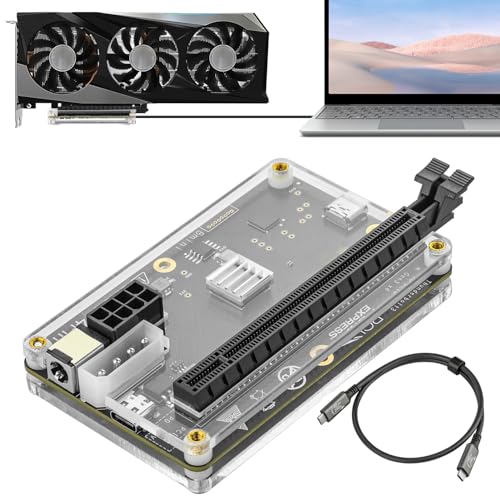
The ANQUORA ANQ-L336 uses a JHL7440 controller delivering 32Gbps through PCIe 4.0 x4, with confirmed ROG Ally X and MSI Claw 8 support, and accepts ATX, SFX, FLEX or DC power.

Confirmed compatibility is rare in this category, and handheld gaming PCs are among the fussiest hosts. It ranks second because it needs a separately sourced power supply, so the total cost and build effort is higher than the ORARA's.

Buy it if you game on a handheld and want a proven pairing. Skip it if you want a finished box.

Controller
JHL7440, PCIe 4.0 x4
Compatibility
ROG Ally X, MSI Claw 8
Power
ATX, SFX, FLEX, DC
Link
40Gbps Thunderbolt 3/4, USB4

What we like

  • +Confirmed handheld compatibility
  • +Flexible power inputs
  • +Compact dock
  • +Modern JHL7440 controller

Watch out for

  • −Needs a separate supply
  • −No case included

Buy it if: Handheld PC gamers adding a desktop GPU.

Skip it if: You want a sealed box.

3

Best Travel Kit

External eGPU Enclosure with 240W PSU, Thunderbolt 4/3 & USB4

Our verdict: A 240W supply, a carrying case and dual Thunderbolt ports with 85W and 15W power delivery.

This enclosure includes a 240W supply and a carrying case, supports GPUs up to 205 by 150 by 55mm, and has dual Thunderbolt ports with 85W and 15W power delivery.

A 240W supply is the right size for a 3060, which draws around 170W, leaving a modest margin. Because it includes a carrying case, it is the one that makes sense in a laptop bag. The 55mm height limit means a slim, two-slot card only. It ranks third because the margin leaves no room for a more powerful card later.

Buy it if you travel with your GPU. Skip it if you may upgrade to a power-hungry card.

Supply
240W included
Card limit
205 x 150 x 55mm
Ports
Dual TB, 85W and 15W PD
Extra
Carrying case

What we like

  • +Right-sized 240W supply
  • +Carrying case included
  • +85W laptop charging
  • +Portable footprint

Watch out for

  • −Small card limit
  • −No headroom for bigger cards

Buy it if: Travelling with a slim 3060.

Skip it if: You plan to upgrade the card.

4

Best Open Frame

Maskedfish eGPU Enclosure Thunderbolt 3/4 USB4 40Gbps PD 85W Charging (MK-L18)

Our verdict: An open frame with PCIe 4.0 x16 mode and 85W charging that takes any card length.

The MK-L18 uses JHL7540 or JHL7440 controllers in PCIe 4.0 x16 mode, has 85W PD charging and dual Thunderbolt ports, and its open frame has no GPU length limit.

It makes sense for a 3060 because the card is easy to power from a small supply, and an open frame stays cool without fans. It ranks fourth because it lists no included supply and gives a bare setup experience.

Buy it if you have a spare supply and like tinkering. Skip it if you want an enclosed unit.

Controller
JHL7540/7440, x16 mode
Charging
85W PD
Ports
Dual Thunderbolt
Frame
Open, no length limit

What we like

  • +Any card length fits
  • +85W laptop charging
  • +Runs cool in open air
  • +Reasonable price bracket

Watch out for

  • −No supply listed
  • −Exposed card collects dust

Buy it if: Tinkerers with a spare supply.

Skip it if: You want a closed box.

5

Best Board Quality

VIKINYEE Thunderbolt 3/4 eGPU Enclosure USB4 (VK-Y900)

Our verdict: An ENIG-plated board with JHL7440/7450 controllers and dual Thunderbolt ports with 85W charging.

The VK-Y900 uses JHL7440 or JHL7450 controllers on an ENIG-plated board, with dual Thunderbolt ports at 15W and 85W PD and support for newer RTX 50 and RX 9000 cards.

ENIG plating protects contacts from corrosion, which suggests care in the manufacture. For a 3060 it is a capable base. It ranks fifth because the listing omits supply and clearance details.

Buy it if you want a quality board for a DIY build. Skip it if you want a finished enclosure.

Controller
JHL7440/7450
Board
ENIG PCB
Charging
15W and 85W PD
GPU support
RTX 50, RX 9000

What we like

  • +ENIG-plated board
  • +Dual Thunderbolt ports
  • +85W charging
  • +Wide card support

Watch out for

  • −No supply listed
  • −Clearance not stated

Buy it if: DIY builders who value board quality.

Skip it if: You want a closed unit.

6

Best Documented Compatibility

Mini eGPU Enclosure Thunderbolt 3/4, USB4 40Gbps External GPU Dock

Our verdict: A JHL7440 mini dock with a pre-purchase compatibility check and SFX, ATX, FLEX and DC power support.

This mini dock uses a JHL7440 controller, supports SFX, ATX, FLEX and DC power, and offers a detailed pre-purchase compatibility check.

The compatibility check saves returns, since eGPU problems usually come from laptop firmware, not the dock. It ranks sixth because it is a bare dock with no host list in our data.

Buy it if you want to confirm compatibility before ordering. Skip it if you need a complete kit.

Controller
JHL7440
Power
SFX, ATX, FLEX, DC
Link
Thunderbolt 3/4, USB4, 40Gbps
Extra
Pre-purchase compatibility check

What we like

  • +Compatibility check offered
  • +Multiple power inputs
  • +Compact dock
  • +Mid price bracket

Watch out for

  • −Bare dock only
  • −Host list not in listing

Buy it if: Cautious buyers who want to verify fit.

Skip it if: You want a finished box.

7

Best Dock and Hub Combo

External GPU Dock Station, Mini eGPU Enclosure Thunderbolt 3/4 USB4 40Gbps

Our verdict: A JHL7440 dock that also acts as a USB-A and Thunderbolt 4 hub.

This dock accepts ATX, SFX, FLEX or DC 12V power, uses a JHL7440 controller with a 32Gbps daisy chain, and also works as a USB-A and Thunderbolt 4 hub.

The hub function means one cable can serve both the graphics card and peripherals. It ranks seventh because it ships without a supply or case and gives no clearance data.

Buy it if you want a graphics dock that doubles as a hub. Skip it if you prefer a full kit.

Power
ATX, SFX, FLEX, DC 12V
Controller
JHL7440, 32Gbps
Hub
USB-A and Thunderbolt 4
Bracket
$100 to $200

What we like

  • +Acts as a hub too
  • +Accepts several supply types
  • +Compact
  • +Daisy chain support

Watch out for

  • −No supply or case
  • −Clearance not given

Buy it if: One-cable desk setups.

Skip it if: You want a complete kit.

8

Cheapest Entry Dock

PCIE 3.0 x16 22Gbps eGPU Dock with Thunderbolt 4 Cable

Our verdict: A JHL6340 dock at about 22Gbps with four power inputs and confirmed Legion Go compatibility.

This dock uses a JHL6340 controller for roughly 22Gbps transfer and offers 4 power input options: CPU, Molex, PD and DC5521. It lists confirmed Legion Go compatibility and sits in the $50 to $100 bracket.

The controller is older and slower than the JHL7440 docks, so a 3060 loses more performance. It earns a spot because it is the cheapest way in, and it names the Legion Go. It ranks last because 22Gbps is about half the link of the leaders.

Buy it if you want the lowest-cost entry for a Legion Go. Skip it if you want full bandwidth.

Controller
JHL6340, about 22Gbps
Power inputs
CPU, Molex, PD, DC5521
Compatibility
Legion Go confirmed
Bracket
$50 to $100

What we like

  • +Lowest price bracket
  • +Four power input options
  • +Legion Go confirmed
  • +Thunderbolt 4 cable included

Watch out for

  • −Only about 22Gbps
  • −Older controller

Buy it if: Cheap entry on a Legion Go.

Skip it if: You want full bandwidth.

Methodology

How We Ranked These

Power options

Included supplies and accepted inputs were compared, since a 3060 needs only about 170W.

Controller and link

JHL7440 and JHL7450 docks at 32 to 40Gbps were set against the older 22Gbps controller.

Host compatibility

Confirmed handhelds and compatibility checks were credited.

Portability

Carrying cases, mini docks and open frames were weighed for travel and desks.

Value

Kits were compared against bare docks across the $50 to $100, $100 to $200 and $200 to $500 brackets.

Every Primea Score uses the same weights: Performance 30% · Build & Materials 20% · Everyday Usability 20% · Value 20% · Owner Satisfaction 10%. Full scoring rules

Buyer's guide

How to Pick the Right One for You

By Host Device

What you plug into decides the shortlist.

HostOur pick
ROG Ally X or MSI Claw 8ANQUORA ANQ-L336 Mini eGPU Enclosure, 40Gbps Thunderbolt 3/4 USB4
Lenovo Legion GoPCIE 3.0 x16 22Gbps eGPU Dock with Thunderbolt 4 Cable
Thunderbolt laptop at homeORARA eGPU Enclosure Thunderbolt 3/4/USB4 40Gbps with 750W PSU
Travel laptopExternal eGPU Enclosure with 240W PSU, Thunderbolt 4/3 & USB4

By Budget

SpendOur pick
$50 to $100PCIE 3.0 x16 22Gbps eGPU Dock with Thunderbolt 4 Cable
$100 to $200 (dock)ANQUORA ANQ-L336 Mini eGPU Enclosure, 40Gbps Thunderbolt 3/4 USB4
$100 to $200 (open frame)Maskedfish eGPU Enclosure Thunderbolt 3/4 USB4 40Gbps PD 85W Charging (MK-L18)
$200 to $500ORARA eGPU Enclosure Thunderbolt 3/4/USB4 40Gbps with 750W PSU

Complete Kit vs Bare Dock

Complete kit

Includes a supply and works on arrival. Picks: ORARA, the 240W travel box.

Bare dock

You add a supply, but you control cost and size. Picks: ANQUORA, Maskedfish, VIKINYEE, the two mini docks.

Default to a complete kit unless you already own a spare power supply.

By Link Speed

PriorityOur pick
Fastest linkANQUORA ANQ-L336 Mini eGPU Enclosure, 40Gbps Thunderbolt 3/4 USB4
Open-frame x16 modeMaskedfish eGPU Enclosure Thunderbolt 3/4 USB4 40Gbps PD 85W Charging (MK-L18)
Hub featuresExternal GPU Dock Station, Mini eGPU Enclosure Thunderbolt 3/4 USB4 40Gbps
Lowest speed, lowest costPCIE 3.0 x16 22Gbps eGPU Dock with Thunderbolt 4 Cable

For Handheld Gaming Specifically

Look for

A dock that names your handheld, a controller of at least JHL7440 grade and a supply you can place near your desk.

In this ranking

The ANQUORA lists the ROG Ally X and MSI Claw 8, and the 22Gbps dock lists the Legion Go.

When to Spend More

Spend more if

You may upgrade the card later. The ORARA's 750W supply covers a far larger GPU.

Save if

A 3060 is your ceiling. A bare dock or the 240W kit is plenty.

Questions

Frequently Asked Questions

Is an RTX 3060 worth putting in an eGPU?+

Yes, particularly with a handheld or thin laptop that has weak graphics. It loses less to the 40Gbps link than faster cards do.

What is the biggest mistake when buying one?+

Assuming every Thunderbolt port works. Some handhelds and laptops are unreliable with eGPUs. Choose a dock that lists your device.

Is the ORARA worth it over a bare dock?+

If you do not own a supply, yes, since it is complete. If you have a spare SFX unit, a dock is cheaper.

Do I need a power supply for a bare dock?+

Yes. You supply an ATX, SFX, FLEX or DC unit and connect the card's power cables yourself.

Will it work with a Mac?+

Apple silicon Macs do not support external GPUs for graphics. Intel Macs with Thunderbolt 3 may, with limits.

How much performance do I lose?+

Some, because the link carries less than a desktop slot. The loss varies by game and by link speed.

Final take

The ORARA 750W enclosure is the simplest, safest home for an RTX 3060, with a supply that handles the card with room for an upgrade. The ANQUORA ANQ-L336 is the best choice for handheld PCs, and the 240W kit is the travel option. Pick a dock that names your device and check the link speed.

More Ranked & Reviewed Guides