

Primea ReviewsAll Reviews

Primea Reviews is reader-supported. When you buy through our Amazon links we may earn a commission, at no extra cost to you. Rankings are set by our editors and never sold. Learn more

Ranked & Reviewed by Primea Reviews

The 6 Best Digital Photo Frames Without Subscriptions of 2026, Ranked & Reviewed

By the Primea Editorial TeamUpdated November 1, 20269 min read6 products ranked
The 6 Best Digital Photo Frames Without Subscriptions of 2026, Ranked & Reviewed

The short answer

The Aura Carver Mat is the best frame without subscriptions, with no subscription required, unlimited free cloud storage and the most refined setup. The plain Aura Carver shares that policy at a simpler design, and the PhotoSpring puts no subscription in its title. The Skylight and Frameo offer free core sharing with optional extras, and the AEEZO is the cheapest.

The Primea Scoreboard

Ranked & Reviewed

  1. Free cloud storage with no strings and the most refined setup.

    94Outstanding
    Check price
  2. Aura's no-fee policy with a plainer look.

    91Excellent
    Check price
  3. It says 'no subscription' in the product name.

    88Excellent
    Check price
  4. Free core sharing by email, with an optional upgrade.

    85Excellent
    Check price
  5. A touch screen frame with free app sharing and 32GB.

    82Very Good
    Check price
  6. The lowest price here, with a 1280x800 touch panel.

    78Very Good
    Check price

A digital photo frame is a small purchase that can quietly turn into a monthly bill. Some brands cap cloud storage, limit the photos you can send or lock features behind a plan, and the fine print hides in a bullet point. The fastest check is to look for the words core, optional and tier, because a frame that is free to start may not be free to keep.

Our editors examined six frames from their listings and scored them on the Primea framework, giving the most weight to subscription terms, cloud storage, upload method, screen and setup. Prices are buckets. Two wording tricks matter: no subscription required in a title is a claim you can hold the seller to, while free core sharing means something else is paid.

Before you buy

What Actually Matters

01

Subscription terms

Some frames hide paid plans behind a free start. The cost shows up later as extra storage, extra photos or lost features. Look for no subscription required in the title and read for optional tiers, and treat the word core as a warning that something sits outside it. Screenshot the terms before you buy.

02

Cloud storage

Cloud storage keeps photos online so the frame can receive them. Unlimited free storage means no cap or fee. Check whether the listing states it, because a frame that stores a limited number of photos can lock you into a plan the moment you hit the cap. Ask what happens to old photos.

03

Photo upload method

Email, app and web upload decide how relatives send pictures. Email needs no app for the sender, which helps older relatives. Check which methods the frame lists, and think about who will actually be sending photos, since a clumsy upload process kills a frame quickly. Email upload tends to survive when apps are ignored.

04

Screen size and resolution

A 10 inch frame is a good desk or shelf size. Resolution such as 1280x800 shows how sharp photos look. Check the numbers in the title, and note that a frame without a stated resolution is a gamble, since a soft screen undercuts the whole point of the gift. Compare sharpness at the same screen size.

05

Setup effort

A refined setup saves a lot of frustration when gifting. Some brands ask you to preload photos. Look for mention of a gift setup or easy setup, as on the Aura frames, and consider whether the recipient will manage Wi-Fi alone, because setup is where most gift frames fail. Do it for them in advance.

In-depth reviews

Our Ranked Picks, Reviewed

1

Best Overall

Aura HD Digital Picture Frame, Carver Mat: The Best Frame for Gifting

Our verdict: Free cloud storage with no strings and the most refined setup.

The Aura Carver Mat lists no subscription required and unlimited free cloud storage, and it describes a refined setup flow. Photos arrive through the Aura system without a monthly fee, in the $100 to $200 bucket. Unlimited storage means the cap never forces you into a plan, which is the usual trap with frames that start cheap.

It ranks first because it is the strongest fee-free option and the setup is described as the smoothest, which matters when you are gifting. The plain Carver shares the policy but drops the mat finish.

Buy it if you want a polished, fee-free frame. The caveats are the higher price bucket and fewer budget features. Skip it if you want the cheapest possible frame.

Subscription
None required
Storage
Unlimited free cloud
Setup
Refined flow
Price tier
$100 to $200

What we like

  • +No subscription required
  • +Unlimited free cloud storage
  • +Refined setup flow
  • +Mat gives a framed look

Watch out for

  • −Higher price bucket
  • −Fewer budget features

Buy it if: Buyers who want a polished, fee-free frame.

Skip it if: You want the cheapest possible frame.

2

Best Aura on a Budget

Aura HD Digital Picture Frame, Carver: The Best Frame for Gifting

Our verdict: Aura's no-fee policy with a plainer look.

The Aura Carver shares the no-subscription policy and unlimited free cloud storage of the Mat version, with a standard design. It is in the same $100 to $200 bucket. The same Aura app handles sharing, so family members use one app whichever finish you pick.

It ranks second because the Mat version is the more refined model, and this one keeps the policy with a plainer look. It does not give up any of the fee-free terms, which is what matters here.

Buy it if you want Aura's policy with a simpler design. The caveats are no mat finish and a still mid-range price. Skip it if you want a mat or the lowest price.

Subscription
None required
Storage
Unlimited free cloud
Design
Standard Carver
Price tier
$100 to $200

What we like

  • +No subscription required
  • +Unlimited free cloud storage
  • +Clean standard design
  • +Same Aura app

Watch out for

  • −No mat finish
  • −Still mid-priced

Buy it if: Anyone who wants Aura's policy at a simpler design.

Skip it if: You want a mat or the lowest price.

3

Best Named No-Fee Claim

PhotoSpring No Subscription, 10in WiFi Digital Picture Frame, Email App Web, USA Company

Our verdict: It says 'no subscription' in the product name.

The PhotoSpring puts no subscription in its title and accepts photos by email, app or web upload. The listing also notes a USA company, and the frame is a 10 inch WiFi model in the $50 to $100 bucket. Email upload means a relative can send a photo without installing anything.

It ranks third because the label is explicit and the price is lower than the Aura frames, but the storage terms are less detailed. You are told there is no subscription, not whether storage is unlimited.

Buy it if you want an explicit no-fee label at a mid price. The caveats are the thinner storage terms and a plain feature list. Skip it if unlimited cloud storage is a must.

Subscription
None, named in title
Upload
Email, app and web
Size
10 inch WiFi
Price tier
$50 to $100

What we like

  • +No-subscription claim in title
  • +Email, app and web upload
  • +Mid price bucket
  • +USA company listed

Watch out for

  • −Storage terms less detailed
  • −Plain feature list

Buy it if: Buyers who want an explicit no-fee label.

Skip it if: Unlimited cloud storage is a must.

4

Best Email Upload

Skylight Digital Picture Frame, Load from Phone Capability, 10" Black

Our verdict: Free core sharing by email, with an optional upgrade.

The Skylight is a 10 inch frame that loads photos by email and states no subscription for core sharing. It comes in black and sits in the $100 to $200 bucket. Email loading is the simplest path for older relatives, since there is no app to learn.

It ranks fourth because core sharing hints at paid extras, which the Aura and PhotoSpring listings avoid. The free part works, but you should check what the extras are before you grow attached to them.

Buy it for families sharing photos by email. The caveats are optional paid extras and a mid-high price. Skip it if you want every feature free.

Subscription
None for core sharing
Upload
Email-based
Screen
10 inch
Price tier
$100 to $200

What we like

  • +Email photo upload
  • +Core sharing is free
  • +Real 10 inch display
  • +Simple for relatives

Watch out for

  • −Optional paid extras exist
  • −Mid-high price bucket

Buy it if: Families sharing photos by email.

Skip it if: You want every feature free.

5

Best Touch Screen Value

Frameo 10.1 Inch WiFi Digital Picture Frame, HD IPS Touch Screen, 32GB

Our verdict: A touch screen frame with free app sharing and 32GB.

The Frameo is a 10.1 inch IPS touch frame with 32GB of storage and free core app sharing. It offers an optional Frameo+ tier, for between $50 and $100. Local storage means photos live on the frame, so cloud limits matter less.

Fifth place is down to that optional paid tier, while still offering a lower price than the Aura frames. The touch screen is a real convenience for browsing and deleting.

Buy it for budget buyers who want a touch screen. The caveats are the optional Frameo+ tier and a less polished setup. Skip it if you dislike optional paid tiers.

Screen
10.1 inch HD IPS touch
Storage
32GB
Sharing
Free core app
Price tier
$50 to $100

What we like

  • +Touch screen control
  • +32GB local storage
  • +Free core app sharing
  • +Lower price bucket

Watch out for

  • −Optional Frameo+ tier exists
  • −Less polished setup

Buy it if: Budget buyers who want a touch screen.

Skip it if: You dislike optional paid tiers.

6

Best Cheapest Entry

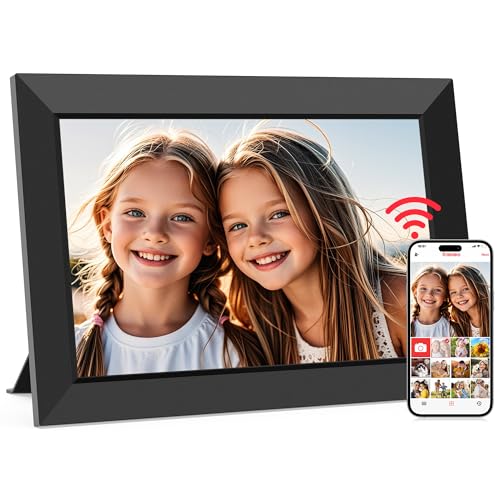
AEEZO Digital Picture Frame, 10.1 Inch, 1280x800 HD IPS Touch Screen

Our verdict: The lowest price here, with a 1280x800 touch panel.

The AEEZO is a 10.1 inch frame with a 1280x800 panel, free core sharing and no subscription required. Its price stays under $50, the lowest in this guide. A 1280x800 panel is adequate at this size for a shelf.

Last place comes from the fact that the listing offers the thinnest detail and fewer premium touches. It does list no subscription, so it matches the PhotoSpring on terms for less.

Buy it for low-cost gifts and first-time buyers. The caveats are the thin listing detail and fewer premium touches. Skip it if you want a polished experience.

Screen
10.1 inch 1280x800 IPS
Control
Touch screen
Subscription
None required
Price tier
$25 to $50

What we like

  • +Lowest price bucket
  • +No subscription required
  • +Touch screen control
  • +HD IPS panel

Watch out for

  • −Thin listing detail
  • −Fewer premium touches

Buy it if: Low-cost gifts and first-time buyers.

Skip it if: You want a polished experience.

Methodology

How We Ranked These

Subscription clarity

Listings that state no subscription plainly ranked above those that hint at paid tiers.

Storage terms

Unlimited free cloud storage earned the highest credit.

Photo delivery

Email, app and web upload options were compared for ease of sharing.

Screen and build

Display size and touch support were weighed from the listings.

Value

Price tier was set against the features that stay free.

Every Primea Score uses the same weights: Performance 30% · Build & Materials 20% · Everyday Usability 20% · Value 20% · Owner Satisfaction 10%. Full scoring rules

Buyer's guide

How to Pick the Right One for You

By Sharing Style

How your family sends photos decides the best frame.

StyleOur pick
Everything free in an appAura HD Digital Picture Frame, Carver Mat
Relatives email photosSkylight Digital Picture Frame 10" Black
Email, app and webPhotoSpring No Subscription 10in
Touch screen controlFrameo 10.1 Inch WiFi Frame
Cheapest startAEEZO Digital Picture Frame 10.1 Inch

By Budget

SpendOur pick
$25 to $50AEEZO Digital Picture Frame 10.1 Inch
$50 to $100, touch screenFrameo 10.1 Inch WiFi Frame
$50 to $100, named no-feePhotoSpring No Subscription 10in
$100 to $200, polishedAura HD Digital Picture Frame, Carver Mat
$100 to $200, plainAura HD Digital Picture Frame, Carver

Fully Free vs Free Core

Fully free

Names no subscription and no paid tier. Picks: Aura Carver Mat, Aura Carver, PhotoSpring, AEEZO.

Free core with upgrade

Basic sharing is free but a paid tier exists. Picks: Skylight 10", Frameo 10.1.

Most buyers should choose fully free unless a specific paid feature appeals.

By Gifting Need

NeedOur pick
Pre-loaded gift setupAura HD Digital Picture Frame, Carver Mat
Easy for older relativesSkylight Digital Picture Frame 10" Black
Lowest-cost giftAEEZO Digital Picture Frame 10.1 Inch
Simple designAura HD Digital Picture Frame, Carver

For Family Photo Sharing Specifically

Look for

A free way for several relatives to send photos without making accounts.

In this ranking

The Skylight takes emails, and the PhotoSpring accepts email, app and web uploads.

When to Spend More

Spend more if

You want a polished gift. The Aura Carver Mat gives unlimited free storage and easy setup.

Save if

You only need a basic screen. The AEEZO or Frameo does the job.

Questions

Frequently Asked Questions

Do all digital frames need a subscription?+

No. Several brands, including Aura and PhotoSpring, state that none is required. Always read for words like core or optional tier, as on the Skylight and Frameo. A frame that says free core is not the same as fully free.

What happens if I do not pay for the optional tier?+

Free core sharing keeps working on Skylight and Frameo. Paid tiers add extras, so check which extras you would miss before you buy. Free tiers can change, so read the current terms on the day you order.

Is an Aura frame worth it over a Frameo?+

If you want unlimited free cloud storage and a smoother setup, yes. The Frameo costs less but has a paid upgrade option, and that tier is the reason it ranks lower. Aura's terms are simpler to live with.

How do I set up a frame as a gift?+

Connect it to WiFi, add the recipient's account and load photos before wrapping. The Aura lists a refined gift setup flow, which makes it the best choice for this. Preload a few family photos so it works on day one.

Do these frames need WiFi?+

They connect to WiFi to receive photos from the cloud. Without WiFi they will only show what was already stored, as on the Frameo with its 32GB. Frames with local storage keep showing old photos even when the signal drops.

How can I keep the frame from going blank?+

Keep it plugged in and on WiFi, and check the app for any pending update. Reboot the frame if photos stop syncing. Most sync problems come from the router, not the frame.

Final take

Buy the Aura Carver Mat for the most polished fee-free frame, and the plain Carver if you want the same policy for a little less. The PhotoSpring is the explicit no-fee label at a lower price. Take the Skylight or Frameo only if you accept an optional paid tier, and the AEEZO as a low-cost gift. Always read for words like core and optional.

More Ranked & Reviewed Guides