

Primea ReviewsAll Reviews

Primea Reviews is reader-supported. When you buy through our Amazon links we may earn a commission, at no extra cost to you. Rankings are set by our editors and never sold. Learn more

Ranked & Reviewed by Primea Reviews

The 5 Best Digital Photo Frames With Remote Upload of 2026, Ranked & Reviewed

By the Primea Editorial TeamUpdated November 4, 20268 min read5 products ranked
The 5 Best Digital Photo Frames With Remote Upload of 2026, Ranked & Reviewed

The short answer

The Frameo 10.1 inch with 32GB is the best remote upload frame for most families: app-based sending, no subscription and a $50 to $100 price. PhotoSpring is the one for relatives who will only use email. Aura offers unlimited cloud storage for contributors in many households, Uhale adds messages, and AEEZO is the cheapest way in.

The Primea Scoreboard

Ranked & Reviewed

  1. App-based remote upload on an IPS touch screen with 32GB built in and no ongoing fees.

    93Outstanding
    Check price
  2. Accepts photos by email, app or web, with no subscription and a USA-based company.

    91Excellent
    Check price
  3. Unlimited cloud storage with app-based upload from multiple contributors and no subscription.

    88Excellent
    Check price
  4. Sends videos and photos instantly, with remote wishes and 32GB of storage.

    85Excellent
    Check price
  5. App-based remote upload on a 1280x800 IPS touch screen for $25 to $50.

    82Very Good
    Check price

Remote upload is the reason to buy a digital frame at all, and it is also where most of them quietly lock you in. A frame that sends photos over the internet needs somewhere to store them, and the storage can sit on the frame, in the manufacturer's cloud, or behind a monthly fee that appears after the first year. The sticker price tells you almost nothing about which model you are buying.

So we ranked on how photos get in and who pays to keep them. We reviewed five frames that explicitly support remote sending, using their listings, and every one states that no subscription is required. The ranking weighs how many ways a relative can send a picture, how much storage the frame offers and whether an outsider could be added to the sender list.

Before you buy

What Actually Matters

01

Upload methods

Frames receive photos through an app, an email address, a web page, or all three. More routes mean more relatives can take part. App-only frames like the Frameo require every sender to install software. PhotoSpring adds email. Count the senders in your family and match the route to the least technical one.

02

Storage location

Photos live either on the frame or in the maker's cloud. On-device storage, like the Frameo's 32GB, works without a subscription but fills up. Cloud storage, like Aura's unlimited library, never fills but depends on the service. Decide which risk you prefer before choosing, and check capacity in the listing.

03

Subscription terms

Some frames limit features or storage unless you pay monthly. All five here state no subscription, but wording matters, so read the listing carefully. A one-time purchase with free uploads is the standard to expect. Look for the phrase no subscription required on the product page.

04

Contributor limits

Some frames cap how many people can send photos, or require invitations. Aura lists multiple contributors, and Frameo uses app invitations. For a large family, check whether there is a limit on senders and how access is revoked. Plan who gets access before setup.

05

Display quality

A 1280x800 IPS panel gives a sharp image from wide angles, which suits a frame viewed across a room. AEEZO and Frameo list IPS. Touch screens add control but invite accidental taps. Look for resolution and panel type in the specs, since low-resolution panels make phone photos look soft.

In-depth reviews

Our Ranked Picks, Reviewed

1

Best Overall

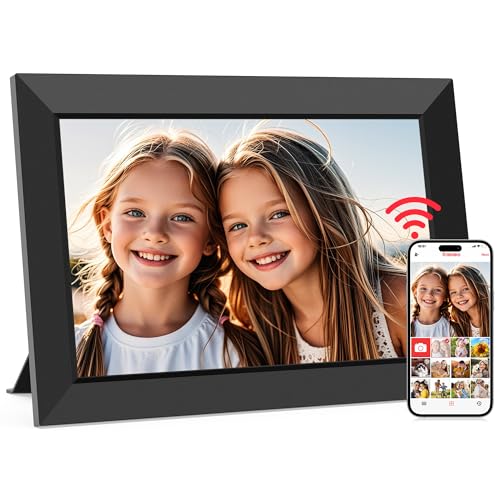
Frameo 10.1 Inch WiFi Digital Picture Frame, HD IPS Touch Screen, 32GB

Our verdict: App-based remote upload on an IPS touch screen with 32GB built in and no ongoing fees.

This Frameo pairs app-based remote upload with a 10.1 inch HD IPS touch screen and 32GB of built-in storage. The listing says no subscription is required, so the photos live on the frame and the ongoing cost is zero.

It ranks first because the storage sits in the device, which avoids the cloud dependence that Aura builds on. It also costs $50 to $100, below Aura's $100 to $200. Against PhotoSpring, it uses a dedicated app rather than email, which is safer for controlling who can send.

Buy it if you want a no-fee frame that family can fill from phones. The caveat: the app route means every sender must install it, so older relatives may need help.

Screen
10.1 in HD IPS touch
Storage
32GB
Upload
App-based remote
Subscription
None required

What we like

  • +App-based remote upload
  • +32GB stored on the device
  • +No subscription fees
  • +IPS touch screen

Watch out for

  • −Every sender needs the app
  • −Storage is finite at 32GB
  • −Costs $50 to $100

Buy it if: Families who want no fees and app-based photo sharing.

Skip it if: Your senders refuse to install an app.

2

Most Flexible Senders

PhotoSpring No Subscription, 10in WiFi Digital Picture Frame, Email App Web, USA Company

Our verdict: Accepts photos by email, app or web, with no subscription and a USA-based company.

PhotoSpring accepts uploads three ways: email, app and web. That breadth is the point, because a grandparent can forward a photo from a mail inbox without ever touching an app. The listing states no subscription and a USA company.

It ranks second because the Frameo's 32GB of on-device storage is stated, while PhotoSpring's listing gives no storage number. Both cost $50 to $100. Choose PhotoSpring when the people sending photos are not all comfortable with new apps.

Buy it if your contributors range from teenagers to octogenarians. The caveat: an email address as an upload route can be shared too widely, so keep it private.

Screen
10 in
Upload
Email, app and web
Subscription
None
Origin
USA company

What we like

  • +Three upload methods
  • +Email works with no app
  • +No subscription
  • +US-based company

Watch out for

  • −Storage not stated
  • −Email address needs guarding
  • −Costs $50 to $100

Buy it if: Mixed-age families where some senders avoid apps.

Skip it if: You want a stated storage capacity.

3

Best Cloud Storage

Aura HD Digital Picture Frame, Carver Mat: The Best Frame for Gifting

Our verdict: Unlimited cloud storage with app-based upload from multiple contributors and no subscription.

The Aura Carver Mat offers app-based remote upload from multiple contributors, unlimited cloud storage and no subscription. Unlimited storage means the album never fills up, even with thousands of photos and years of use.

It ranks third because it costs $100 to $200, double the Frameo, and the storage is cloud-based, so it depends on the maker's service continuing. In exchange, the polished setup and unlimited library suit large families with many contributors.

Choose it for a gift that needs to look finished and never run out of space. The caveat: cloud dependence means that if the service changes, your library does too.

Upload
App-based, multiple contributors
Storage
Unlimited cloud
Subscription
None required
Price tier
$100 to $200

What we like

  • +Unlimited cloud storage
  • +Many contributors supported
  • +No subscription required
  • +Polished gift presentation

Watch out for

  • −Priciest of the five
  • −Relies on cloud service
  • −App needed to send

Buy it if: Large families with many senders and years of photos.

Skip it if: You prefer on-device storage and a lower price.

4

Best for Videos and Messages

Uhale Digital Picture Frame 32GB Storage 10.1 Inch WiFi, Share Videos Photos Instantly Send Wishes Remotely

Our verdict: Sends videos and photos instantly, with remote wishes and 32GB of storage.

Uhale offers instant photo and video sharing, a remote wishes feature and 32GB of storage on a 10.1 inch WiFi frame. Video support is the differentiator, since not every frame in this ranking lists it.

It ranks fourth because its listing states fewer details about upload methods and no resolution, while the Frameo names IPS touch and an app route. The messages feature is a small bonus for birthdays and holidays, and the price is $50 to $100.

Buy it if clips and greetings matter as much as stills. The caveat: video files fill 32GB faster than photos, so prune older clips from time to time.

Storage
32GB
Screen
10.1 in WiFi
Sharing
Photos and videos instantly
Extra
Send wishes remotely

What we like

  • +Shares video as well as photos
  • +Send wishes remotely
  • +32GB on the device
  • +Instant delivery

Watch out for

  • −Resolution not listed
  • −Video fills storage faster
  • −Few upload route details

Buy it if: Families who share short video clips and greetings.

Skip it if: You want a listed screen resolution.

5

Best Budget Pick

AEEZO Digital Picture Frame, 10.1 Inch, 1280x800 HD IPS Touch Screen

Our verdict: App-based remote upload on a 1280x800 IPS touch screen for $25 to $50.

AEEZO delivers app-based remote upload on a 10.1 inch, 1280x800 IPS touch screen with no subscription, for $25 to $50. It is the cheapest way here to get the core feature.

It ranks last because the listing states no storage figure, and brand support is less established than Frameo or Aura. The 1280x800 resolution is clearly stated, which the Uhale listing omits. Against the Frameo, you save money and lose the published 32GB.

Choose it if the price is the deciding factor. The caveat: without a stated capacity, check owner feedback about how many photos it holds before filling it.

Screen
10.1 in IPS touch
Resolution
1280x800
Upload
App-based remote
Price tier
$25 to $50

What we like

  • +Lowest price here
  • +1280x800 IPS display
  • +No subscription required
  • +App-based remote upload

Watch out for

  • −Storage not stated
  • −Less established support
  • −Touch screen only

Buy it if: Budget buyers who still want remote photo sending.

Skip it if: You need a published storage capacity.

Methodology

How We Ranked These

Upload flexibility

App, email and web routes were compared, since each sender has a different comfort level.

Storage model

On-device capacity and cloud storage were weighed against reliability and long-term dependence.

Subscription cost

Every pick states no subscription, and we scored how clearly each listing says so.

Display

Resolution, panel type and touch control were rated where the listing states them.

Value

Price tier against upload methods, storage and display.

Every Primea Score uses the same weights: Performance 30% · Build & Materials 20% · Everyday Usability 20% · Value 20% · Owner Satisfaction 10%. Full scoring rules

Buyer's guide

How to Pick the Right One for You

By Upload Method

Match the route to your least technical sender.

MethodOur pick
App from phonesFrameo 10.1 Inch WiFi Digital Picture Frame, 32GB
Email, app and webPhotoSpring 10in WiFi Digital Picture Frame
App with many contributorsAura HD Digital Picture Frame, Carver Mat
Videos and wishesUhale Digital Picture Frame 32GB

By Budget

SpendOur pick
$25 to $50AEEZO Digital Picture Frame, 10.1 Inch
$50 to $100, on-device storageFrameo 10.1 Inch WiFi Digital Picture Frame
$50 to $100, email uploadPhotoSpring 10in WiFi Digital Picture Frame
$100 to $200Aura HD Digital Picture Frame, Carver Mat

On-Device vs Cloud Storage

On-device

Photos live on the frame, as with the Frameo and Uhale at 32GB. No cloud dependence, but capacity is finite.

Cloud

Aura offers unlimited cloud storage so the library never fills. You rely on the maker's service for the long term.

Choose on-device for independence and cloud for an endless library.

By Content Type

ContentOur pick
Mostly photosFrameo 10.1 Inch WiFi Digital Picture Frame, 32GB
Photos and videoUhale Digital Picture Frame 32GB
Huge libraryAura HD Digital Picture Frame, Carver Mat
Email attachmentsPhotoSpring 10in WiFi Digital Picture Frame

For Gifting to Relatives Specifically

Look for

No subscription, simple sender invitations and a screen that needs no setup beyond WiFi.

In this ranking

The Aura Carver Mat is built around gifting, and the Frameo 32GB covers it for less.

When to Spend More

Spend more if

Many relatives will send photos for years. Aura's unlimited cloud storage at $100 to $200 removes capacity worries.

Save if

A handful of people will send photos. AEEZO at $25 to $50 or Frameo at $50 to $100 is enough.

Questions

Frequently Asked Questions

Do I need WiFi for remote upload?+

Yes. All five frames connect over WiFi to receive photos. The Frameo and Uhale then store them on the device, so the frame keeps playing if the connection drops, but new uploads need a network.

What is the common mistake with remote frames?+

Assuming every sender will use the app. If some relatives resist, pick PhotoSpring, which accepts email, rather than the Frameo or AEEZO. A frame that nobody can send to ends up showing the same photos for years.

Is the Aura worth it over a Frameo?+

If you want unlimited cloud storage and a premium finish, yes. Otherwise the Frameo 32GB at $50 to $100 delivers the same remote upload without cloud dependence, and holds thousands of photos.

How do I set up remote upload?+

Connect the frame to WiFi, install the companion app on your phone, and link the two with the code shown on the screen. Then invite relatives. With PhotoSpring, share its email address instead of an app invite.

How do I manage storage over time?+

Review the library yearly and delete duplicates. On the 32GB Frameo or Uhale, video clips use more space than photos. With Aura, storage is unlimited, so the only task is pruning what you no longer want to see.

Can I control who sends photos?+

Yes, through invitations or sender lists. Aura and Frameo both use app invites, and PhotoSpring depends on who knows the frame's email address. Revoke access when a relative no longer needs it.

Final take

The Frameo 10.1 inch with 32GB is the best digital photo frame with remote upload for most families: no fees, on-device storage and a clean app. Pick PhotoSpring if some senders only use email, and Aura if you want an unlimited library. AEEZO is the cheapest way to get the same core feature.

More Ranked & Reviewed Guides