
Primea ReviewsAll Reviews

Primea Reviews is reader-supported. When you buy through our Amazon links we may earn a commission, at no extra cost to you. Rankings are set by our editors and never sold. Learn more

Ranked & Reviewed by Primea Reviews

The 7 Best Digital Photo Frames for Seniors of 2026, Ranked & Reviewed

By the Primea Editorial TeamUpdated November 4, 20269 min read7 products ranked
The 7 Best Digital Photo Frames for Seniors of 2026, Ranked & Reviewed

The short answer

The Frameo 10.1 inch WiFi frame is the best choice when family will send photos, since the recipient never has to touch a menu. The KECAG is the pick for seniors who want no WiFi and a simple remote. PhotoSpring lets relatives send by email, and the KODAK suits anyone who trusts a familiar brand. Aura is the polished gift if budget is open.

The Primea Scoreboard

Ranked & Reviewed

  1. Family sends photos through an app and the recipient just watches, with no subscription and a $25 to $50 price.

    93Outstanding
    Check price
  2. No WiFi or app needed: plug it in, load a card, and use the remote or let the motion sensor handle the rest.

    91Excellent
    Check price
  3. Relatives can send photos by email, app or web, with no subscription and a US-based company.

    89Excellent
    Check price
  4. A gifting-optimized frame with unlimited cloud storage and no subscription.

    87Excellent
    Check price
  5. A familiar brand with a 1280x800 display, a remote and local USB or SD loading.

    85Excellent
    Check price
  6. A 32GB WiFi frame with an SD card slot that lets family send wishes alongside photos.

    83Very Good
    Check price
  7. A 1280x800 IPS touch-screen frame with easy setup through the AiMOR app, at the lowest price.

    81Very Good
    Check price

Most photo frames fail seniors in the same place: the first five minutes. The frame arrives, someone has to join it to WiFi, create an account, download an app and learn a touch menu, and if that person is not in the room, it goes back in the box. The best frame for an older relative is the one that never asks them to do anything.

So we split this ranking into two kinds of simplicity. Some frames are fully offline, loaded by card or USB and controlled by a remote. Others connect to WiFi so family can send photos from anywhere, and the senior only watches. We reviewed seven current frames from their listings, and scored ease of use, setup burden, remote control and how photos arrive.

Before you buy

What Actually Matters

01

Remote control vs touch screen

Touch screens are easy for some seniors and frustrating for others, with accidental taps changing settings. A physical remote gives large, labelled buttons. The KECAG and KODAK both include one. If the recipient has tremor or arthritis, favor a remote or a frame that needs no interaction at all.

02

How photos arrive

Frames receive photos by card, by app or by email. Card loading needs a visit, while app and email delivery let family refresh the frame from anywhere. The Frameo and PhotoSpring work remotely. Decide whether your family will realistically visit, because a never-updated frame becomes wallpaper.

03

WiFi dependence

A WiFi frame needs a working network in the home, a one-time setup and sometimes a password change when the router changes. If the recipient has no internet, choose an offline frame like the KECAG. Check the listing for the words no WiFi needed before you buy.

04

Subscription costs

Some frames lock cloud storage or features behind a monthly fee. Most listed here state no subscription is required, including the Frameo, PhotoSpring and Aura. Confirm that claim in the listing, and look for unlimited cloud storage if you plan to send many photos.

05

Display and brightness

A 10.1 inch frame at 1280x800 resolution, as in the KODAK and AEEZO, is sharp enough for family photos at normal distance. Older eyes benefit from a bright, evenly lit panel. Look at the resolution and panel type in the specs, such as IPS for wider viewing angles.

In-depth reviews

Our Ranked Picks, Reviewed

1

Best Overall

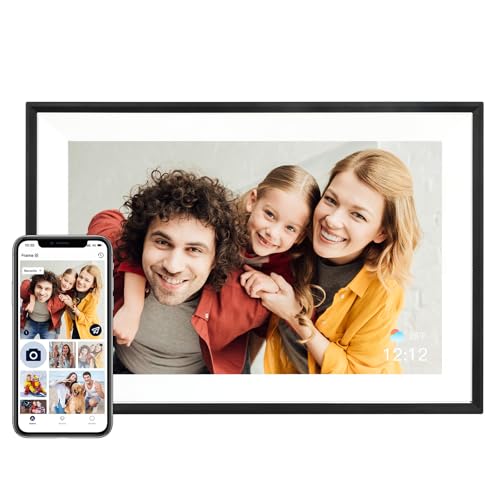
Frameo 10.1" WiFi Digital Picture Frame, Gift for Parents & Grandparents

Our verdict: Family sends photos through an app and the recipient just watches, with no subscription and a $25 to $50 price.

This Frameo frame is built around a simple split of roles: relatives upload photos from an app, and the person who owns the frame manages nothing. Its listing names parents and grandparents as the target, requires no subscription and costs $25 to $50.

It ranks first because it eliminates the senior's workload. The KECAG and KODAK also avoid menus, but they need someone to load a card by hand, and PhotoSpring needs an email workflow. The tradeoff is dependence on the family member who sets it up and keeps sending photos.

Buy it if your relatives are online and the recipient is not. The caveat: someone must complete the WiFi setup once, so plan to do it on a visit or by phone.

Screen
10.1 in
Photo delivery
App-based remote upload
Subscription
None required
Price tier
$25 to $50

What we like

  • +Family uploads from anywhere
  • +No subscription required
  • +Senior only watches
  • +Lowest price of the WiFi frames

Watch out for

  • −Needs one-time WiFi setup
  • −Depends on family sending photos
  • −Few hardware details listed

Buy it if: Seniors whose family will send photos and set up WiFi once.

Skip it if: The home has no WiFi or nobody will manage the app.

2

Best No-WiFi Frame

KECAG 10.1" Digital Picture Frame, No WiFi/App Needed, Plug & Play SD Card & USB, Remote & Motion Sensor

Our verdict: No WiFi or app needed: plug it in, load a card, and use the remote or let the motion sensor handle the rest.

KECAG is the offline answer. The listing promises no WiFi or app, plug-and-play loading from an SD card or USB drive, a remote control and a motion sensor. For a senior without internet, that is the entire setup.

It ranks second because the Frameo gets new photos to the screen without a visit. Against the KODAK, KECAG adds the motion sensor and states that no app is needed, which makes it more self-contained. The remote suits seniors who find touch screens fiddly.

Buy it if the frame will sit where there is no WiFi, or if the recipient prefers buttons. The caveat: new photos only arrive when someone physically brings a card, so it is a periodic chore for the family.

Screen
10.1 in
Loading
SD card and USB
Control
Remote control
Extra
Motion sensor

What we like

  • +No WiFi or app needed
  • +Remote avoids touch menus
  • +Motion sensor included
  • +Plug and play

Watch out for

  • −Photos need manual loading
  • −Costs $50 to $100
  • −Not for remote sharing

Buy it if: Seniors without WiFi who prefer a remote to a touch screen.

Skip it if: You want to send photos from a distance.

3

Best for Email Senders

PhotoSpring No Subscription, 10in WiFi Digital Picture Frame, Email App Web, USA Company

Our verdict: Relatives can send photos by email, app or web, with no subscription and a US-based company.

PhotoSpring accepts photos by email, app and web, which lets relatives who dislike installing apps still send pictures. There is no subscription, and the listing highlights a USA-based company, which can matter to buyers who want local support.

It ranks third because email is the lowest-friction way to send a photo, but the frame costs $50 to $100, double the Frameo. Against Aura it is far cheaper, and against KECAG it adds remote delivery. The simplest sending experience in the group is the reason to choose it.

Choose it if relatives of mixed ages will contribute. The caveat: email is less private than a closed app, so share the frame's address only with people you trust.

Screen
10 in
Photo delivery
Email, app and web
Subscription
None
Origin
USA company

What we like

  • +Email-based photo sending
  • +No subscription
  • +App and web options too
  • +US-based company

Watch out for

  • −Costs $50 to $100
  • −Email address needs guarding
  • −Needs WiFi setup

Buy it if: Families where some relatives will only send photos by email.

Skip it if: You want the cheapest WiFi frame.

4

Best Polished Gift

Aura HD Digital Picture Frame, Carver Mat: The Best Frame for Gifting

Our verdict: A gifting-optimized frame with unlimited cloud storage and no subscription.

Aura positions the Carver Mat as a gift: a refined setup experience, no subscription and unlimited cloud storage for photos. It is the premium choice, and it costs $100 to $200.

It ranks fourth because the price is two to four times the Frameo and PhotoSpring, and the listing gives few details about senior-specific controls. Against the KODAK, you pay more for the setup experience and cloud storage rather than for simpler operation.

Buy it if you are giving a frame to a parent and want the presentation and storage to feel finished. The caveat: premium polish does not change what the recipient must do, so confirm WiFi is available first.

Setup
Gifting-optimized
Storage
Unlimited cloud
Subscription
None required
Price tier
$100 to $200

What we like

  • +Unlimited cloud storage
  • +No subscription required
  • +Polished gifting setup
  • +Sleek mat design

Watch out for

  • −Priciest in the group
  • −Few senior-specific details
  • −Needs WiFi

Buy it if: Gift buyers who want a premium presentation and no storage worries.

Skip it if: You want the simplest operation at the lowest price.

5

Best Familiar Brand

KODAK 10.1 Inch Digital Picture Frame with Remote Control, USB or SD Card Required

Our verdict: A familiar brand with a 1280x800 display, a remote and local USB or SD loading.

KODAK offers a 10.1 inch frame with a 1280x800 display, a remote control and photos loaded through USB or SD card. The listing says USB or SD is required, so there is no WiFi route to confuse anyone.

It ranks fifth because KECAG lists no WiFi or app plus a motion sensor at the same $50 to $100 tier. The point in KODAK's favor is name recognition, which reassures seniors who distrust unfamiliar brands, and a clearly stated display resolution.

Choose it for a recipient who trusts a familiar label and likes a remote. The caveat: with local loading only, the frame cannot be refreshed remotely, so family must bring a card to change the photos.

Screen
10.1 in
Resolution
1280x800
Control
Remote control
Loading
USB or SD card

What we like

  • +Familiar brand name
  • +Remote control included
  • +1280x800 display stated
  • +No WiFi needed

Watch out for

  • −Photos loaded by hand
  • −No remote sending
  • −Costs $50 to $100

Buy it if: Brand-conscious seniors who like a remote and offline loading.

Skip it if: You want to send photos remotely.

6

Best for Sending Messages

Uhale Digital Picture Frame 32GB Storage 10.1 Inch WiFi, Send Wishes Remotely

Our verdict: A 32GB WiFi frame with an SD card slot that lets family send wishes alongside photos.

Uhale combines 32GB of storage, WiFi and an SD card slot, and the listing highlights sending wishes remotely, so messages can appear with photos. It is a hybrid that works online or from a card.

It ranks sixth because the Frameo does the remote part for half the price, and the messaging feature is a nice extra rather than a core need. What it offers over the pure-WiFi frames is a card slot as backup, so a recipient with flaky internet is not stranded.

Buy it if family wants to add messages to photos. The caveat: more features mean more screens to set up, so complete the configuration for the recipient before delivering the frame.

Storage
32GB
Screen
10.1 in
Loading
WiFi plus SD card slot
Extra
Send wishes remotely

What we like

  • +Messages sent with photos
  • +SD card slot as backup
  • +32GB of storage
  • +Works online or offline

Watch out for

  • −Costs $50 to $100
  • −More setup than simpler frames
  • −Frameo does remote for less

Buy it if: Families who want to add messages alongside photos.

Skip it if: You want the simplest possible operation.

7

Best Budget Frame

AEEZO Digital Picture Frame, 10.1 Inch, 1280x800 HD IPS Touch Screen, Easy Setup via AiMOR APP

Our verdict: A 1280x800 IPS touch-screen frame with easy setup through the AiMOR app, at the lowest price.

AEEZO's 10.1 inch frame uses a 1280x800 HD IPS touch screen and sets up through the AiMOR app, with no subscription. At $25 to $50 it matches the Frameo on price.

It ranks last because touch navigation is the wrong default for many seniors. The KECAG and KODAK both offer a remote, and the Frameo asks the recipient to touch nothing. What AEEZO offers is a clear display spec and an easy-setup claim aimed at the family member doing the work.

Choose it if the recipient is comfortable with a touch screen and budget matters. The caveat: a touch screen invites accidental taps, so ask whoever sets it up to lock the settings they do not want changed.

Screen
10.1 in IPS touch
Resolution
1280x800
Setup
AiMOR app
Price tier
$25 to $50

What we like

  • +Lowest price tier
  • +1280x800 IPS display
  • +App-based easy setup
  • +No subscription required

Watch out for

  • −Touch-only navigation
  • −No remote control listed
  • −Accidental taps possible

Buy it if: Budget buyers whose recipient is comfortable with touch screens.

Skip it if: The recipient struggles with touch controls.

Methodology

How We Ranked These

Ease of use

We scored how little the recipient must do: no menus, remote controls and passive photo delivery ranked highest.

Setup burden

WiFi, account creation and app pairing were weighed against plug-and-play card loading.

Photo delivery

Remote upload by app or email lets family refresh the frame, which card loading cannot do.

Control style

Remote controls and motion sensors scored above touch screens for older users.

Value

Price tier against features, plus whether any subscription is required.

Every Primea Score uses the same weights: Performance 30% · Build & Materials 20% · Everyday Usability 20% · Value 20% · Owner Satisfaction 10%. Full scoring rules

Buyer's guide

How to Pick the Right One for You

By How Photos Arrive

This decides who does the work after the gift is opened.

MethodOur pick
App upload from familyFrameo 10.1" WiFi Digital Picture Frame
Email uploadPhotoSpring 10in WiFi Digital Picture Frame
SD card or USB, no WiFiKECAG 10.1" Digital Picture Frame
WiFi plus card slotUhale Digital Picture Frame 32GB

By Budget

SpendOur pick
$25 to $50Frameo 10.1" WiFi Digital Picture Frame
$25 to $50, touch screenAEEZO Digital Picture Frame, 10.1 Inch
$50 to $100KECAG 10.1" Digital Picture Frame
$100 to $200Aura HD Digital Picture Frame, Carver Mat

WiFi vs Offline

WiFi frame

Family sends photos from anywhere. The Frameo, PhotoSpring, Aura and Uhale work this way, but they need a home network.

Offline frame

Loaded by card or USB with a remote. The KECAG and KODAK need no internet, but someone has to visit to change the photos.

Choose WiFi if the home has internet and family is far away, and offline if it does not.

By Control Style

ControlOur pick
No interaction neededFrameo 10.1" WiFi Digital Picture Frame
Large remote buttonsKODAK 10.1 Inch Digital Picture Frame with Remote Control
Remote plus motion sensorKECAG 10.1" Digital Picture Frame
Touch screenAEEZO Digital Picture Frame, 10.1 Inch

For Seniors With Limited Mobility Specifically

Look for

A remote or a no-touch design, plug-and-play power, and no need to climb, bend or adjust menus after setup.

In this ranking

The KECAG pairs a remote with a motion sensor, and the Frameo asks the recipient to do nothing at all.

When to Spend More

Spend more if

You want unlimited cloud storage and a polished gift. The Aura at $100 to $200 is the premium option.

Save if

Family will manage the frame for the recipient. The Frameo at $25 to $50 does the job.

Questions

Frequently Asked Questions

Do these frames need WiFi?+

Four do: Frameo, PhotoSpring, Aura and Uhale. The KECAG and KODAK work offline from a card or USB drive, which suits homes with no internet, though someone must bring new photos in person.

What mistake do buyers make most often?+

Choosing a feature-rich touch frame for someone who wants no interaction. A simple Frameo or a remote-driven KECAG usually wins, because the senior will not navigate menus or fix settings.

Is the Aura worth it over cheaper frames?+

Only if presentation and storage matter. The Aura's $100 to $200 price buys unlimited cloud storage and a polished setup, but the $25 to $50 Frameo is just as easy for the recipient to use.

How do I set up a frame for a parent?+

Do the setup yourself before delivery. Connect the Frameo or Uhale to their WiFi, add family members in the app, and send a first batch of photos. Then they open the box and it simply works.

How do I maintain a digital photo frame?+

Wipe the screen with a dry microfiber cloth, keep the cord out of reach of trip hazards, and refresh photos regularly. On the KECAG or KODAK, label the card so the right one goes back in.

What if the senior has no internet at all?+

Pick the KECAG or KODAK. Both load from SD or USB, and the KECAG adds a motion sensor and states that no WiFi or app is needed. Plan to swap the card on family visits.

Final take

For most families, the Frameo 10.1 inch is the best digital photo frame for a senior: photos arrive from relatives, and the recipient just watches. If there is no WiFi, buy the KECAG with its remote and motion sensor. Spend on the Aura only if you want a polished gift with unlimited cloud storage.

More Ranked & Reviewed Guides