

Primea ReviewsAll Reviews

Primea Reviews is reader-supported. When you buy through our Amazon links we may earn a commission, at no extra cost to you. Rankings are set by our editors and never sold. Learn more

Ranked & Reviewed by Primea Reviews

The 6 Best Digital Photo Frames for iPhone Users of 2026, Ranked & Reviewed

By the Primea Editorial TeamUpdated November 1, 20269 min read6 products ranked
The 6 Best Digital Photo Frames for iPhone Users of 2026, Ranked & Reviewed

The short answer

The Aura HD Carver Mat frame is the best digital photo frame for iPhone users: an iOS app with native Photos access, unlimited cloud storage and no subscription, for $100 to $200. The Nixplay suits families with many contributors, the Skylight accepts photos by email, and the Pexar has the sharpest 2K screen.

The Primea Scoreboard

Ranked & Reviewed

  1. The smoothest iPhone sending workflow with no ongoing fees.

    94Outstanding
    Check price
  2. Built for several relatives to share photos to one frame.

    90Excellent
    Check price
  3. Email a photo to the frame and it appears, no app needed.

    87Excellent
    Check price
  4. The best screen of the group, with an anti-glare touch panel.

    84Very Good
    Check price
  5. A straightforward app frame at half the usual price.

    81Very Good
    Check price
  6. The lowest-cost way onto the iPhone frame list.

    78Very Good
    Check price

An iPhone does not make every photo frame easy to use. The real question is how photos travel from your camera roll to the wall: through a native app, an email address or a shared link. A frame with a clumsy sending method ends up showing the same twenty pictures forever, because nobody wants to repeat a seven-step upload every time the grandchildren do something new.

We reviewed eight listings and kept six distinct frames, dropping a duplicate Aura and a color variant of the Skylight. The ranking weighs iOS app support, sending method, subscription terms where listed, screen quality and price bucket. All of it comes from spec sheets and owner feedback rather than lab work, and a frame that hides its subscription terms lost points.

Before you buy

What Actually Matters

01

Sending method

This is how photos reach the frame, whether through an app, email or a shared link. A native app with Photos access is the quickest on an iPhone. Read the listing for the word iOS app and for how many steps it takes to send a batch. The Aura lists native access, while the Skylight uses email.

02

Subscription cost

Some frames lock features or storage behind a monthly plan. That turns a one-time purchase into an ongoing cost. Look for the phrase no subscription and check what counts as core features. The Aura, Frameo and AEEZO state none, while the Pexar and Nixplay leave terms for you to confirm. Ask the seller in writing if you are buying a gift.

03

Screen resolution

Resolution decides how sharp iPhone photos look at 10 inches. 1280x800 is adequate, while 2K shows finer detail. Find the pixel count in the title or specs, not just HD. A bigger panel with the same pixels looks softer. The AEEZO lists 1280x800 and the Pexar 2K, while the Aura leaves it unstated, so check owner photos before judging sharpness.

04

Storage

Frames keep photos in the cloud, on the device, or both. Local storage like 32GB keeps working if wifi drops, while cloud limits can cap your library. Check how much space is free and what happens beyond it, and whether old photos disappear. The Aura lists unlimited cloud and the Nixplay basic free cloud.

05

Multiple contributors

If several relatives will send photos, the frame needs to accept more than one account. This keeps one person from being the bottleneck. Look for multi-contributor or shared album wording, as on the Nixplay. Email-based frames like the Skylight share the same trick through a single address.

In-depth reviews

Our Ranked Picks, Reviewed

1

Best Overall

Aura HD Digital Picture Frame, Carver Mat: The Best Frame for Gifting

Our verdict: The smoothest iPhone sending workflow with no ongoing fees.

The Aura Carver Mat uses an iOS app with native Photos access, so pictures can be sent straight from your library. The listing also promises unlimited cloud storage and no subscription. It sells for $100 to $200. Native access matters because it lets you pick whole albums at once, so a frame refreshes with a tap instead of a dozen manual uploads.

It ranks first because the sending process is the part most owners care about, and Aura leads on it. The tradeoff is the price, which sits in the same range as most rivals but well above the AEEZO. Against the Pexar, it gives up display detail for a smoother workflow.

It suits iPhone owners who want a frame for themselves or as a gift. The caveat is that the listing says little about display resolution, so screen sharpness is less clear than on the Pexar. Skip it if you need the cheapest frame.

iPhone link
iOS app, native Photos access
Subscription
None required
Storage
Unlimited cloud
Price bucket
$100-200

What we like

  • +Native Photos access
  • +No subscription needed
  • +Unlimited cloud storage
  • +Gift friendly

Watch out for

  • −Mid-premium price bucket
  • −Resolution not detailed

Buy it if: iPhone owners who want effortless photo sending.

Skip it if: You need the cheapest frame available.

2

Best for Families

Nixplay Digital Touch Screen Picture Frame with WiFi, 10.1", Black/Silver

Our verdict: Built for several relatives to share photos to one frame.

The Nixplay is a 10.1 inch touch screen frame with an iOS app, multi-contributor sharing and free basic cloud storage. It sells for $100 to $200. Several people can add photos to the same frame, which matters because one phone owner is rarely the only person who wants to share.

It ranks second because it handles group sharing better than the Aura, though the word basic on the storage hints at a ceiling you may hit with heavy use. Its price range matches the Aura. Against the Skylight, it needs each contributor to install an app.

Choose it for an extended family that all use iPhones. The caveat is that storage beyond the free tier may cost extra, so check the plan before gifting. Skip it if you are the only person adding photos.

Screen
10.1 in touch screen
iPhone link
iOS app
Sharing
Multi-contributor
Storage
Free basic cloud

What we like

  • +Multiple contributors
  • +Touch screen
  • +iOS app
  • +Free basic storage

Watch out for

  • −Storage limit on free tier
  • −Costs the same as Aura

Buy it if: Families where many people send photos.

Skip it if: You are the only person adding photos.

3

Best Email Sending

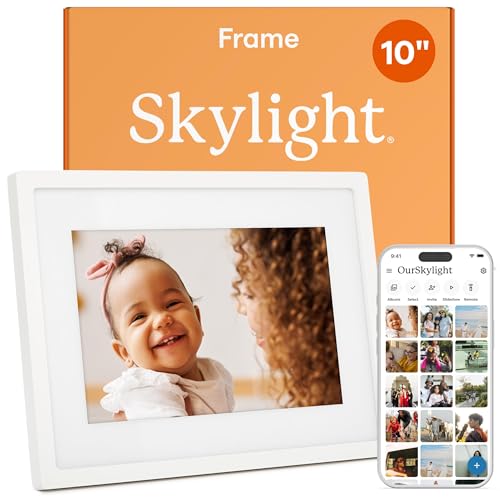
Skylight Digital Picture Frame, Load from Phone Capability, 10" White

Our verdict: Email a photo to the frame and it appears, no app needed.

The Skylight accepts photos by email, with an iOS app also available. Core sharing needs no subscription, which keeps the basic setup free. It sells for $100 to $200. Email upload lets a relative forward a picture without installing anything, which is the whole point for older people who avoid apps.

It ranks below the Aura and Nixplay because email sending takes more steps than a native Photos picker and the listing gives few display details. The upside is simplicity for non-technical senders. Against the Frameo, it costs more but takes photos from any email account.

It fits people who want grandparents to email pictures. The caveat is that email attachments may be compressed, which can soften the image. Skip it if you want a full photo library sync.

Screen
10 in white frame
Sending
Email upload
iPhone link
iOS app available
Subscription
None for core sharing

What we like

  • +Email photo sending
  • +iOS app available
  • +No core subscription
  • +Easy for relatives

Watch out for

  • −Email can compress photos
  • −Few display details

Buy it if: Households where relatives prefer email.

Skip it if: You want a full photo library sync.

4

Sharpest Display

Pexar by Lexar WiFi Digital Picture Frame 11″, 2K Resolution Ultimate Clarity, Anti-Glare Touch

Our verdict: The best screen of the group, with an anti-glare touch panel.

The Pexar offers an 11 inch display with 2K resolution and an anti-glare touch screen, plus an iOS app. It sells for $100 to $200. A 2K panel shows fine detail in modern iPhone photos, and an anti-glare coating keeps window light from washing out the picture.

It ranks fourth because the sending experience is less documented than the Aura's and the brand is newer in the frame space. The screen is a clear step above the 1280x800 AEEZO. Against the Nixplay, it is larger and sharper but lacks stated multi-contributor sharing.

Buy it if image quality is your priority and the frame sits near a window. The caveat is that the listing does not spell out subscription terms. Skip it if you want a proven sending workflow.

Screen
11 in, 2K resolution
Surface
Anti-glare touch
iPhone link
iOS app
Price bucket
$100-200

What we like

  • +2K resolution
  • +Anti-glare screen
  • +Larger 11 inch panel
  • +iOS app

Watch out for

  • −Subscription terms unclear
  • −Newer brand

Buy it if: People who care most about picture sharpness.

Skip it if: You want a proven sending workflow.

5

Best Budget Pick

Frameo 10.1 Inch WiFi Digital Picture Frame, HD IPS Touch Screen, 32GB

Our verdict: A straightforward app frame at half the usual price.

The Frameo is a 10.1 inch HD IPS touch screen frame with 32GB of storage, an iOS app and no subscription. It sells for $50 to $100, well below the premium names. Local storage means the frame keeps its photos even when wifi drops, a real advantage in rooms with weak signal.

It ranks fifth because the app is more basic than Aura's and the listing offers fewer extras. In return you get on-frame storage and a lower cost. Against the AEEZO, it offers more storage and a better-known app.

It works for budget-minded iPhone users who want an easy way to push photos. The caveat is that polish is lower, so expect a plainer interface. Skip it if you want a premium sending experience.

Screen
10.1 in HD IPS touch
Storage
32GB
iPhone link
iOS app
Price bucket
$50-100

What we like

  • +32GB on-frame storage
  • +No subscription
  • +IPS touch screen
  • +Lower price bucket

Watch out for

  • −Plainer app
  • −Fewer gifting touches

Buy it if: Budget buyers who want a simple app frame.

Skip it if: You want a premium sending experience.

6

Cheapest Frame

AEEZO Digital Picture Frame, 10.1 Inch, 1280x800 HD IPS Touch Screen

Our verdict: The lowest-cost way onto the iPhone frame list.

The AEEZO has a 10.1 inch 1280x800 IPS touch screen and works through the AiMOR iOS app, with no subscription. It sells for $25 to $50, the only pick in that range. IPS panels hold color from side angles, which matters for a frame viewed across a room.

It lands last because 1280x800 is the lowest resolution here and the AiMOR app is less established than Aura or Nixplay. That is the price of the cheapest entry. Against the Frameo, it gives up local storage and costs a tier less.

It suits a spare room or a kid's desk where polish matters less. The caveat is that app quality is the main unknown. Skip it if you expect a polished app experience.

Screen
10.1 in IPS touch
Resolution
1280x800
iPhone link
AiMOR iOS app
Price bucket
$25-50

What we like

  • +Lowest price bucket
  • +IPS touch screen
  • +No subscription
  • +Dedicated iOS app

Watch out for

  • −Lowest resolution here
  • −Less established app

Buy it if: A low-cost frame for a secondary room.

Skip it if: You expect a polished app experience.

Methodology

How We Ranked These

iPhone sending method

We favoured frames that take photos from the iOS app or Photos library with few steps.

Subscription terms

Listings stating no subscription for core features scored higher.

Display quality

Resolution, panel type and anti-glare treatment were compared on paper.

Group sharing

Frames letting several people contribute got extra credit for family use.

Price bucket value

Features were judged against the price band each frame sits in.

Every Primea Score uses the same weights: Performance 30% · Build & Materials 20% · Everyday Usability 20% · Value 20% · Owner Satisfaction 10%. Full scoring rules

Buyer's guide

How to Pick the Right One for You

By Who Sends Photos

The people filling the frame decide which app model fits.

SenderOur pick
You alone, from iPhoneAura HD Digital Picture Frame, Carver Mat
Several relativesNixplay Digital Touch Screen Picture Frame
Relatives who use emailSkylight Digital Picture Frame 10" White
Mixed devices, simple appFrameo 10.1 Inch WiFi Digital Picture Frame

By Budget

SpendOur pick
$25-50AEEZO Digital Picture Frame, 10.1 Inch
$50-100Frameo 10.1 Inch WiFi Digital Picture Frame
$100-200 (best app)Aura HD Digital Picture Frame, Carver Mat
$100-200 (best screen)Pexar by Lexar WiFi Digital Picture Frame 11 inch

App Sending vs Email Sending

App sending

Lets you pick from Photos and send in batches. Aura, Nixplay, Frameo, Pexar and AEEZO all lean on an iOS app.

Email sending

Works for anyone with an email account and no install. The Skylight is built around it.

Most iPhone owners should default to app sending, unless the sender is a relative who will never install an app.

By Display Priority

PriorityOur pick
Sharpest picturePexar by Lexar WiFi Digital Picture Frame 11 inch
Touch controlsNixplay Digital Touch Screen Picture Frame
On-frame storageFrameo 10.1 Inch WiFi Digital Picture Frame
Lowest costAEEZO Digital Picture Frame, 10.1 Inch

For Gifting Specifically

Look for

A simple setup, no subscription, and an app the recipient or sender can learn quickly.

In this ranking

The Aura Carver Mat is marketed for gifting and needs no subscription, while the Skylight lets relatives email photos.

When to Spend More

Spend more if

You want the best sending app with the Aura or the sharpest picture with the Pexar.

Save if

You just need photos to rotate, where the Frameo or AEEZO is enough.

Questions

Frequently Asked Questions

Do these frames work with iCloud Photos?+

Most connect through their own app rather than iCloud directly. The Aura lists native Photos access, which is the closest to a direct link, and lets you send whole albums from your iPhone library without extra steps.

Can I send Live Photos or video?+

Support varies by frame. Check the listing for video support before buying, since many frames show stills only. The Aura, Nixplay and Pexar listings do not promise video, so confirm how Live Photos display before you gift.

Is a subscription ever required?+

Core features are free on the picks listed, but extra storage or features may cost more. Read the plan details before gifting, especially for the Nixplay and Pexar. A free tier that fills up can force an upgrade after a year of heavy sharing.

How do I set one up?+

Connect the frame to wifi, install the app and link the frame with a code. Plan on ten minutes, and have the sender's phone on the same network. Test with one photo before loading a whole album.

How should I clean the screen?+

Wipe with a dry microfiber cloth. Avoid sprays, especially on anti-glare coatings like the Pexar's, and unplug the frame first. Dust the bezel as well and keep liquids away from the vents.

Can a frame show photos if wifi is down?+

Frames with local storage, like the 32GB Frameo, keep displaying saved photos. Cloud-dependent frames such as the Aura may stop updating until wifi returns, though they usually keep showing cached photos. Place the frame near the router for a steady link.

Final take

Buy the Aura for the smoothest iPhone workflow and an easy gift. Choose the Nixplay when several relatives send photos, the Skylight when a grandparent only uses email, and the Pexar for a sharper display. The Frameo and AEEZO are the budget picks. Decide how photos will arrive before you compare screens.

More Ranked & Reviewed Guides