
Primea ReviewsAll Reviews

Primea Reviews is reader-supported. When you buy through our Amazon links we may earn a commission, at no extra cost to you. Rankings are set by our editors and never sold. Learn more

Ranked & Reviewed by Primea Reviews

The 6 Best Digital Photo Frames of 2026, Ranked & Reviewed

By the Primea Editorial TeamUpdated November 1, 202610 min read6 products ranked
The 6 Best Digital Photo Frames of 2026, Ranked & Reviewed

The short answer

The Aura Carver Mat is the best digital photo frame: HD, a matted gift-ready look and free unlimited cloud storage with no required subscription. The Skylight is the easiest for relatives to send photos to by email, and the Nixplay adds a 10.1 inch touch screen. The Frameo and AEEZO are budget WiFi frames, and the Aura Limited Edition is the alternate finish.

The Primea Scoreboard

Ranked & Reviewed

  1. A refined, subscription-free frame that looks like real framed art.

    94Outstanding
    Check price
  2. Relatives can send photos by simply emailing them to the frame.

    91Excellent
    Check price
  3. A 10.1 inch touch frame with free basic cloud sharing.

    88Excellent
    Check price
  4. Frameo's app sharing and 32GB memory for the lowest of the major names.

    85Excellent
    Check price
  5. Aura's no-fee platform at a lower cost than the Carver Mat.

    82Very Good
    Check price
  6. The lowest-cost WiFi frame here, with an HD IPS touch screen.

    79Very Good
    Check price

Disappointment with a digital frame usually arrives after unboxing, not before. The screen looks fine, but getting photos onto it turns out to be a chore, or a paid plan quietly appears. How a frame receives photos matters more than its resolution, and that detail almost never appears in the product title. A beautiful panel nobody can send pictures to becomes an expensive black rectangle.

We reviewed six digital frames from five brands and ranked them on how photos are loaded, what the platform costs over time, screen size and finish. Several listings include optional subscription tiers, so we separated frames that work fully free from those that reserve features behind a plan, and we weighed brand longevity as a risk.

Before you buy

What Actually Matters

01

How photos get onto the frame

Email, app and phone loading each suit different families. Email works for people who avoid apps, while app sharing works for tech-comfortable relatives. Check the listing for the method named, such as email upload on the Skylight or the Frameo app, and ask who in your family will actually send photos, and how often. Setup is a one-time cost.

02

Subscription tiers

Some frames work fully free, others reserve features for a paid plan. Aura lists no required subscription, while Skylight and Nixplay offer optional Plus tiers. Read the bullets for the word optional and think about whether you would use the paid features before buying, because upsell prompts tend to return over time.

03

Storage

Built-in memory, like 32GB on the Frameo and AEEZO, holds photos on the frame, while cloud storage keeps them online and lets new photos arrive remotely. Look for the gigabyte figure or unlimited cloud storage in the listing. Onboard memory keeps showing photos if WiFi fails, a useful backstop in a flaky-router home.

04

Screen type and size

A 10 inch frame fits a shelf or desk, and IPS panels hold their color from side angles, which matters in a hallway or kitchen. Check the stated size and whether it has an IPS touch screen. Resolution counts less than loading method, but the AEEZO's 1280 by 800 is a useful baseline. Glare matters in bright rooms. Check the aspect ratio of your photos too.

05

Look and finish

A matted look or a distinctive finish matters for gifts and living rooms, while a plain black frame blends into an office. Compare photos of the finish against your decor. The Aura Carver Mat is the most art-like, and the Limited Edition offers an alternative if you prefer a different look. Glossy screens reflect windows.

In-depth reviews

Our Ranked Picks, Reviewed

1

Best Overall

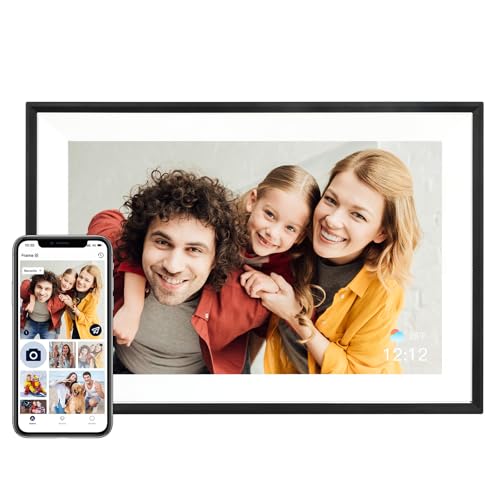
Aura HD Digital Picture Frame, Carver Mat: The Best Frame for Gifting

Our verdict: A refined, subscription-free frame that looks like real framed art.

The Aura Carver Mat is an HD frame with a matted look, free unlimited cloud storage and no required subscription. The mat is more than decoration. It hides the screen bezel so the frame reads as framed art on a mantel instead of a gadget, which is why it works as a gift. Unlimited storage means the family archive never hits a cap that forces a paid plan.

It ranks first because the day-to-day cost is zero and the presentation is the best here. The Skylight below it has an easier sharing method, but it also has a paid tier.

Buy it for a parent or grandparent when you want a frame that looks premium. The caveat is price, in the $100 to $200 bucket, and no touch screen.

Display
HD, matted look
Cloud storage
Unlimited, free
Monthly plan
Not required
Price bucket
$100-200

What we like

  • +Matted frame look
  • +Free unlimited storage
  • +No monthly fee
  • +Gift-ready finish

Watch out for

  • −Mid-range price
  • −No touch screen

Buy it if: Gift buyers who want a frame that looks premium.

Skip it if: You want the cheapest way to share photos.

2

Best for Easy Sharing

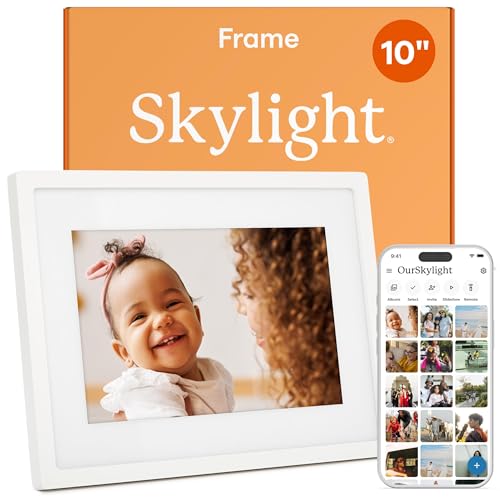
Skylight Digital Picture Frame, Load from Phone Capability, 10" Black

Our verdict: Relatives can send photos by simply emailing them to the frame.

The Skylight is a 10 inch frame that lets contributors upload by email, and also from a phone. An optional Skylight Plus tier is available for extra features. Email is the key: relatives who will never install an app can still send a photo by attaching it to a message, which is how most frames actually stay fresh.

It ranks second because email is the lowest-effort route for older family members. The Aura beats it on look and cost-free cloud storage, since the Skylight offers a paid add-on, in the same $100 to $200 bucket.

Choose it when the senders are your problem. The caveat is the optional Plus tier and plainer styling, so skip it if you want to avoid any subscription entirely.

Display
10 inch
Upload
Email or phone
Extra tier
Optional Plus
Price bucket
$100-200

What we like

  • +Email photo uploads
  • +Phone loading option
  • +10 inch display
  • +Easy for relatives

Watch out for

  • −Paid Plus tier exists
  • −Plainer styling

Buy it if: Families where grandparents email photos in.

Skip it if: You want to avoid any optional subscription.

3

Best Touch Control

Nixplay Digital Touch Screen Picture Frame with WiFi, 10.1", Black/Silver

Our verdict: A 10.1 inch touch frame with free basic cloud sharing.

The Nixplay is a 10.1 inch WiFi frame with a touch screen and free cloud storage for basic sharing. An optional Nixplay Plus tier is offered. Touch control lets you browse and manage photos directly on the frame, instead of reaching for a phone or remote for every change.

It ranks third because tapping the screen is a real convenience, but the Plus upsell and mid-range cost keep it below the Aura and Skylight. Free basic storage helps, though it is not unlimited like the Aura.

Buy it if you want to manage photos on the frame itself. The caveat is the optional Plus tier, which nudges you toward paying, and a price in the $100 to $200 bucket.

Display
10.1 inch touch
Connectivity
WiFi
Cloud
Free basic storage
Price bucket
$100-200

What we like

  • +Touch screen control
  • +Free cloud storage
  • +10.1 inch display
  • +WiFi sharing

Watch out for

  • −Optional Plus upsell
  • −Mid-range price

Buy it if: People who like on-screen controls.

Skip it if: You want zero paid tiers.

4

Best Budget Smart Frame

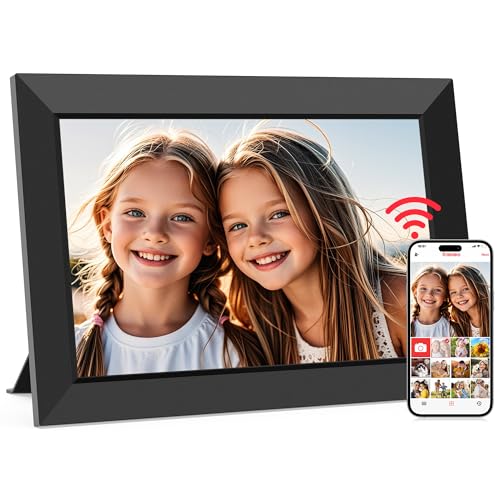
Frameo 10.1 Inch WiFi Digital Picture Frame, Smart Cloud Electronic Photo Frame with HD IPS Touch Screen

Our verdict: Frameo's app sharing and 32GB memory for the lowest of the major names.

The Frameo is a 10.1 inch WiFi frame with an HD IPS touch screen, 32GB of storage and photo sharing through the Frameo app. Core sharing needs no subscription. IPS panels keep their color and contrast when viewed from the side, which matters on a shelf in a hallway.

It ranks fourth because it undercuts the big names on price, in the $50 to $100 bucket, while still offering a touch screen. The brand has a smaller footprint than Aura or Nixplay, which is the trade-off.

Choose it when you want smart sharing on a budget. The caveat is support: the quality is unclear, and long-term app maintenance is less certain than with an established brand.

Display
10.1 inch IPS touch
Storage
32GB
Sharing
Frameo app
Price bucket
$50-100

What we like

  • +Touch IPS screen
  • +32GB storage
  • +App-based sharing
  • +Lower price tier

Watch out for

  • −Less established brand
  • −Support quality unclear

Buy it if: Budget buyers who still want app sharing.

Skip it if: You want a premium, gift-ready look.

5

Best Aura Alternative

Aura HD Digital Picture Frame, Limited Edition: The Best Frame for Gifting

Our verdict: Aura's no-fee platform at a lower cost than the Carver Mat.

The Aura Limited Edition is an HD frame with a distinctive finish. It keeps Aura's subscription-free approach but skips the matted look. That makes it the same platform with the same free cloud benefits, in a different shell.

It ranks fifth because it offers the same ownership benefits as the Carver Mat while giving up the mat styling and the fuller gift feel. Its price bucket is similar, at $100 to $200, so you choose on looks.

Get it when you want Aura's system in a less formal frame. The caveat is that a limited edition is not guaranteed to stay in production, so skip it if you want a model you can easily match or replace later.

Display
HD
Design
Limited Edition finish
Monthly plan
Not required
Price bucket
$100-200

What we like

  • +No required subscription
  • +Distinctive finish
  • +HD display
  • +Aura platform

Watch out for

  • −Limited run
  • −No mat styling

Buy it if: Buyers who like Aura but want a different look.

Skip it if: You want a guaranteed long-term model.

6

Cheapest Option

AEEZO Digital Picture Frame, 10.1 Inch, 1280x800 HD IPS Touch Screen, Smart Digital Frame

Our verdict: The lowest-cost WiFi frame here, with an HD IPS touch screen.

Pictures on the AEEZO appear on a 1280 by 800 IPS touch panel, and the frame stores them in 32GB of onboard memory while the AiMOR app handles sending. Onboard memory means the photos live on the frame, so it keeps showing them even when WiFi drops.

It ranks last because the brand and app are the least proven in the list, though the price in the $25 to $50 bucket is hard to beat. Against the Frameo, it offers similar specs for less.

Buy it as a low-risk way to try a smart frame. The caveat is that support and long-term software upkeep are unknown, so do not rely on it as a gift for someone who cannot troubleshoot.

Display
10.1 inch, 1280x800 IPS
Memory
32GB built in
App
AiMOR
Price bucket
$25-50

What we like

  • +Lowest price tier
  • +HD IPS touch screen
  • +32GB memory
  • +App sharing

Watch out for

  • −Least proven brand
  • −Support unknown

Buy it if: People trying a digital frame for the first time.

Skip it if: You want the polish of a premium brand.

Methodology

How We Ranked These

Photo-sharing method

We compared email, app and phone loading for how easily family members can add pictures.

Ongoing cost

Subscription requirements, optional plus tiers and cloud limits were weighed against upfront price.

Screen and control

Display size, resolution and touch navigation were checked from the listed specs.

Gift appeal

Finish, mat styling and presentation were rated for how well a frame works as a present.

Brand reliability

Established platforms scored above newer ones with limited support information.

Every Primea Score uses the same weights: Performance 30% · Build & Materials 20% · Everyday Usability 20% · Value 20% · Owner Satisfaction 10%. Full scoring rules

Buyer's guide

How to Pick the Right One for You

By Who Sends the Photos

The sender's tech comfort decides the best sharing method.

SenderOur pick
Grandparents who emailSkylight 10" Black
Family with a shared appFrameo 10.1 Inch WiFi
You, setting it up as a giftAura Carver Mat
Someone who likes touch menusNixplay Touch Screen Frame
Cheapest trialAEEZO 10.1 Inch Frame

By Budget

SpendOur pick
$25 to $50AEEZO 10.1 Inch Frame
$50 to $100Frameo 10.1 Inch WiFi
$100 to $200Aura Carver Mat, Skylight, or Nixplay Touch

Free Platform vs Optional Paid Tier

Free platform

The Aura Carver Mat and Limited Edition list no required subscription, so costs stay flat.

Optional paid tier

Skylight and Nixplay have Plus plans for extra features. You can ignore them, but the upsell exists.

Most buyers should default to the free platform, the Aura Carver Mat, unless email sharing is essential.

By Room

RoomOur pick
Living room shelfAura Carver Mat
Kitchen counterSkylight 10" Black
Home office deskNixplay Touch Screen Frame
Guest room or spareAEEZO 10.1 Inch Frame

For Gifting Older Relatives Specifically

Look for

A frame that needs little setup, shows photos right away, and lets family contribute without the recipient doing anything.

In this ranking

The Skylight accepts email uploads, and the Aura Carver Mat is a polished no-fee gift, so either suits a hands-off recipient.

When to Spend More

Spend more if

You want the best presentation and no recurring costs from the Aura Carver Mat, or touch control from the Nixplay.

Save if

A simple screen will do. The Frameo and AEEZO offer app sharing in the lower buckets.

Questions

Frequently Asked Questions

Do digital photo frames need WiFi?+

The frames here connect over WiFi for sharing. You can usually still show stored photos offline, especially the Frameo and AEEZO with 32GB onboard, but check the listing for the details of each model. Local storage helps when the router drops.

What is the biggest buying mistake?+

Overlooking how photos are loaded. A great screen is useless if relatives cannot easily send pictures. The Skylight's email upload solves that for people who avoid apps, while the Frameo needs its own app.

Is Aura worth more than Skylight?+

If you prefer a subscription-free setup and a polished look, yes. If email sharing for relatives is the priority, the Skylight wins, though it has an optional paid Plus tier that Aura lacks.

How do I set one up?+

Connect it to WiFi, pair it with the maker's app or email address, and invite contributors. Each brand's steps differ slightly, so follow the Aura, Skylight or Frameo instructions in the box carefully. Send a test photo before wrapping it as a gift.

Can I add photos from my phone?+

Yes. The Skylight lists load-from-phone, and the Frameo and AEEZO use their own apps, the Frameo app and AiMOR. Check which app each frame needs before inviting family to send photos. Allow a few minutes for sync.

What if the brand disappears?+

Smaller brands carry more risk of app changes. Established ones like Aura and Nixplay are safer for long-term use than the lesser-known AEEZO, whose support is unknown, so favor them for gifts. Check recent app reviews before buying.

Final take

For most buyers, the Aura Carver Mat is the right digital photo frame: free unlimited cloud storage, no required subscription and a gift-ready look. Choose the Skylight if older relatives need to email photos, the Nixplay for touch control, and the Frameo or AEEZO to save money. Decide who sends the photos before you choose a screen.

More Ranked & Reviewed Guides