
Primea ReviewsAll Reviews

Primea Reviews is reader-supported. When you buy through our Amazon links we may earn a commission, at no extra cost to you. Rankings are set by our editors and never sold. Learn more

Ranked & Reviewed by Primea Reviews

The 5 Best Cell Phones With Emergency Buttons for Seniors of 2026, Ranked & Reviewed

By the Primea Editorial TeamUpdated November 1, 20269 min read5 products ranked
The 5 Best Cell Phones With Emergency Buttons for Seniors of 2026, Ranked & Reviewed

The short answer

The Lively Jitterbug Flip2 is the best cell phone with an emergency button for seniors: a familiar flip phone with an Urgent Response key backed by a live agent, with the handset at $25 to $50 but a Lively plan required. The Lively Mobile Plus is the dedicated SOS device, and the SecuLife pendant alerts family with no contract.

The Primea Scoreboard

Ranked & Reviewed

  1. A familiar flip phone with a live agent behind the urgent response button.

    94Outstanding
    Check price
  2. Not a phone, but a focused SOS tool with GPS location sharing.

    91Excellent
    Check price
  3. Alerts go straight to family with no contract and fall detection.

    88Excellent
    Check price
  4. A 4G phone with an SOS button and photo shortcuts for key contacts.

    85Excellent
    Check price
  5. A cellular phone with a dedicated SOS key, with details to confirm.

    80Very Good
    Check price

An emergency button is only as good as what happens after it is pressed. Many buyers assume every SOS phone connects to a trained agent, when some only text a list of family numbers, and others do nothing until a paid service plan is activated. The sticker price tells you very little about whether help actually arrives, and a red key on the body is not a promise.

We reviewed the available listings and ranked five picks on how the alert works, whether extra service is required, ease of use and portability. Wi-Fi-only call buttons and a plain corded phone were left out, because they give no mobile protection away from home. Rankings use spec sheets and the listings' own wording, and thin listings lost points for what they do not say.

Before you buy

What Actually Matters

01

Who answers the alert

Some devices reach a 24/7 agent, others send alerts to family, and some do neither automatically. It matters because a missed alert can delay help by minutes. Read the listing for phrases such as live agent, call center or direct to family. The Jitterbug Flip2 lists an agent, while the SecuLife sends to family. Ask what happens if nobody answers.

02

Service plan requirement

Several devices do not work until a paid plan is activated. That means the sticker price understates what you will spend each month. Look for the words requires service or activation in the title and bullet points before buying, as on both Lively products, and multiply the monthly fee by twelve to see the yearly cost. Compare that with a no-contract pendant.

03

Fall detection

Automatic fall detection sends an alert even when the wearer cannot press anything. It is useful for people at risk of dizziness or fainting, though it can trigger false alarms. Check the listing for the words auto fall detection, as the SecuLife lists. Teach the wearer how to cancel an accidental alert. Wearing it in the shower matters too.

04

Cellular versus Wi-Fi

A cellular device works wherever there is signal, while a Wi-Fi-only button works only inside the home network. Cellular is the right fit for a senior who walks, shops or travels. Check for 4G or cellular in the product name, as the Easyfone and SOS phone list, and check coverage in the senior's area and in the places they walk. A strong signal at home is not enough.

05

Ease of operation

Big keys, a flip design and a physical red button are quicker to use under stress than touchscreen menus. Look for features like picture dial and a dedicated hardware SOS key. Ask whether the senior can press and hold the button, and whether an alert gives any beep or vibration to confirm. Test it together in a quiet room.

In-depth reviews

Our Ranked Picks, Reviewed

1

Best Overall

LIVELY Jitterbug Flip Cell Phone for Seniors, Flip2, Red

Our verdict: A familiar flip phone with a live agent behind the urgent response button.

The Jitterbug Flip2 is a classic flip phone with an Urgent Response button, built for seniors who want something that looks and works like a phone. The handset sits in the $25 to $50 range. A flip design makes a physical answer and hang-up motion, which helps seniors who struggle with touchscreens, and the dedicated button avoids menus in a crisis.

It ranks first because it combines everyday calling with a 24/7 agent-backed response. The cost is that it requires Lively service to function, so the handset price is not the full story. It is also less self-contained than a family-alert pendant like SecuLife, since it depends on the plan.

Choose it if you want a phone and professional response in one device. The caveat is the ongoing plan. Skip it if you refuse any monthly service plan, and budget for it before you buy.

Emergency feature
Urgent Response button
Design
Classic flip
Service
Requires Lively plan
Handset price
$25-50

What we like

  • +Live agent response
  • +Familiar flip design
  • +Dedicated urgent button
  • +Low handset price

Watch out for

  • −Requires Lively service
  • −Ongoing plan cost

Buy it if: Seniors who want a simple phone with professional emergency backup.

Skip it if: You refuse any monthly service plan.

2

Best Dedicated SOS Device

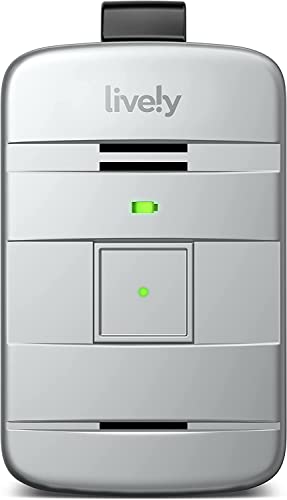
Lively Mobile Plus All-in-One Medical Alert Device

Our verdict: Not a phone, but a focused SOS tool with GPS location sharing.

The Lively Mobile Plus is a dedicated SOS device with GPS location sharing that needs Lively activation. It does one job, which keeps it simple to carry and use, and the button is the interface. GPS sharing matters in an emergency because the wearer may not be able to say where they are.

It ranks just below the Flip2 because it is not a phone for everyday calls, so a senior would need to carry two devices to chat as well. In return, there is no menu to learn and no screen to fumble. Against the SecuLife pendant, it connects to Lively's service instead of only to family.

Best for someone who already has a phone and wants a separate, reliable alert. The caveat is activation and a plan. Skip it if you want one device to do both jobs.

Type
Dedicated SOS device
Location
GPS sharing
Activation
Lively required
Use
Single purpose

What we like

  • +Single-purpose simplicity
  • +GPS location sharing
  • +Pairs with Lively service
  • +No phone menus

Watch out for

  • −Not a calling phone
  • −Needs service activation

Buy it if: Seniors who already own a phone and need a dedicated alert.

Skip it if: You want one device for calls and SOS.

3

Best No Contract

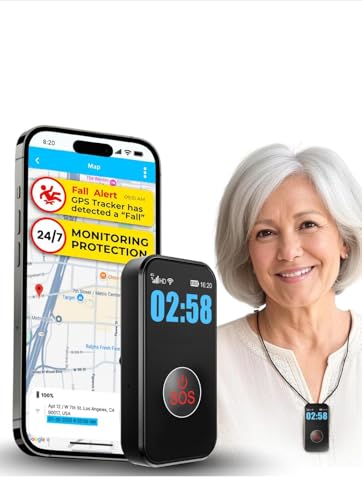
SecuLife Medical Alert Pendant, Alerts Go Direct to Family, No Call Center

Our verdict: Alerts go straight to family with no contract and fall detection.

The SecuLife pendant has automatic fall detection and sends alerts directly to family, with no call center and no contract. It sells in the $50 to $100 range. A pendant is worn all day, so it works when a phone is out of reach, and automatic detection can alert someone who cannot press a button after a fall.

It finishes third because direct-to-family alerts depend on someone picking up, unlike the Lively picks, where a trained agent answers around the clock. What you gain is no monthly bill and a device that is easy to wear. Against the Jitterbug Flip2, it replaces professional response with family response.

It fits families who are reachable and want to avoid contracts. The caveat is that nobody may answer at 3 a.m. Make sure at least two relatives can receive the alert, and skip it if nobody reliably answers.

Alert route
Direct to family
Fall detection
Automatic
Contract
None
Price bucket
$50-100

What we like

  • +No contract
  • +Automatic fall detection
  • +No call center needed
  • +Wearable pendant

Watch out for

  • −No professional agent
  • −Relies on family answering

Buy it if: Families who want direct alerts without a subscription.

Skip it if: Nobody reliably answers calls around the clock.

4

Best Picture-Dial Phone

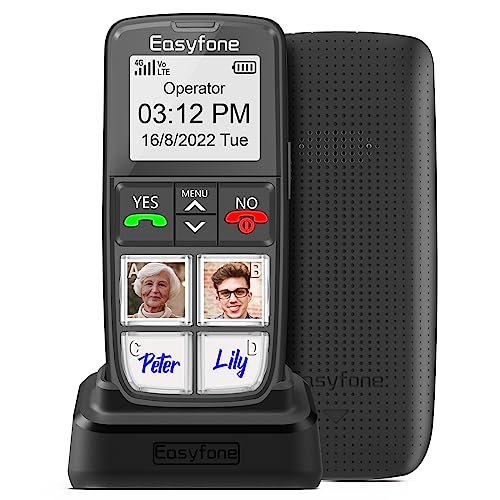
Easyfone Prime-T6 4G Picture Button Cell Phone for Seniors

Our verdict: A 4G phone with an SOS button and photo shortcuts for key contacts.

The Easyfone Prime-T6 is a 4G cellular phone with an SOS button and picture dial, which lets you assign faces to speed-dial keys. It gives genuine portability with phone-style simplicity. Picture dial helps seniors with memory or vision issues, since they press a photo instead of reading a number or scrolling a contacts list.

It ranks fourth because the listing does not describe an agent-backed response service like Lively does, so the SOS button's behavior depends on its setup. The upside is a regular phone you can use without a dedicated plan. Against the Flip2, you gain picture shortcuts and lose a confirmed live agent.

Best for seniors who struggle with small menus and want a few big buttons. The caveat is carrier fit, so confirm compatibility before purchase. Skip it if you need a trained agent to answer alerts.

Network
4G cellular
Emergency
SOS button
Dialing
Picture dial
Type
Cell phone

What we like

  • +4G cellular
  • +SOS button
  • +Picture-dial shortcuts
  • +Phone-style simplicity

Watch out for

  • −No agent service listed
  • −Carrier fit must be checked

Buy it if: Seniors who want big buttons and quick-call photos.

Skip it if: You need a trained agent to answer alerts.

5

Alternative, Verify First

Cellular SOS Phone for Seniors, Emergency Button

Our verdict: A cellular phone with a dedicated SOS key, with details to confirm.

This listing offers a cellular phone with a dedicated SOS button. The product data available is thin, and availability should be verified before ordering. A dedicated hardware SOS key is the right idea for an emergency phone, because it works without unlocking or navigating a menu.

It ranks fifth because we can say less about how the SOS function works compared with the Lively or Easyfone options. Service details are not described, and it is unclear who receives an alert. It remains here because it matches the category: a cellular phone with a button. Against the Easyfone, it states even less.

Consider it only if the other options are out of stock, and read the full listing for network and alert details first. The caveat is thin documentation and uncertain availability. Skip it if you want a documented response service.

Type
Cellular phone
Emergency
Dedicated SOS button
Service
Not detailed
Availability
Verify first

What we like

  • +Dedicated SOS button
  • +Cellular connectivity
  • +Phone form factor
  • +Simple concept

Watch out for

  • −Thin product details
  • −Availability uncertain

Buy it if: Shoppers who confirm details with the seller before buying.

Skip it if: You want a documented response service.

Methodology

How We Ranked These

Alert path

We ranked how the emergency press is handled: live agent, direct to family, or unspecified.

Everyday phone use

Picks that double as working phones scored above single-purpose gadgets for seniors who want one device.

Service requirements

Monthly plans and activation requirements were weighed as part of real ownership cost.

Ease of use

Large buttons, flip design and picture dial reduce confusion in a stressful moment.

Listing transparency

Products with thin or unclear specs were placed lower.

Every Primea Score uses the same weights: Performance 30% · Build & Materials 20% · Everyday Usability 20% · Value 20% · Owner Satisfaction 10%. Full scoring rules

Buyer's guide

How to Pick the Right One for You

By Who Should Respond

Decide who you trust to answer first.

ResponderOur pick
Trained 24/7 agent with a phoneLIVELY Jitterbug Flip2
Trained agent, separate alert deviceLively Mobile Plus
Family, no contractSecuLife Medical Alert Pendant
Unspecified, phone firstEasyfone Prime-T6

By Budget

SpendOur pick
Under $25No pick sits in this bucket
$25-50 handsetLIVELY Jitterbug Flip2
$50-100 no contractSecuLife Medical Alert Pendant
Varies, verify firstCellular SOS Phone for Seniors

Phone vs Wearable Alert

Phone

A phone gives calling, texting and an SOS key in one device, which helps seniors who do not want to carry two things. The Jitterbug Flip2 and Easyfone Prime-T6 follow this approach.

Wearable alert

A pendant or dedicated device stays on the body and may offer fall detection or GPS. The Lively Mobile Plus and SecuLife pendant fit this style.

Most seniors who already like a phone should default to the Jitterbug Flip2, and add a pendant if falls are a concern.

By Mobility and Fall Risk

SituationOur pick
Fall risk, family close bySecuLife Medical Alert Pendant
Active, out of the house oftenLIVELY Jitterbug Flip2
Needs GPS location sharedLively Mobile Plus
Trouble with small buttonsEasyfone Prime-T6

For Seniors With Memory or Vision Issues Specifically

Look for

A large physical SOS key, picture dial so faces replace numbers, and as few menus as possible.

In this ranking

The Easyfone Prime-T6 combines picture dial with an SOS button, and the Jitterbug Flip2 offers a classic flip with one red response key.

When to Spend More

Spend more if

You want a live person on the line every time, which means accepting the service cost attached to the Jitterbug Flip2 or Lively Mobile Plus.

Save if

Family can reliably answer alerts. The SecuLife pendant avoids a call center and contract.

Questions

Frequently Asked Questions

Do these phones work without a monthly plan?+

The two Lively products require Lively service or activation. SecuLife states no contract. For the Easyfone and the generic SOS phone, check the carrier and setup details on the listing, and call the seller if the service is not spelled out.

What is the most common mistake when buying one?+

Assuming the red button always reaches a professional. Confirm whether the alert goes to an agent, family or only a stored number before you rely on it. The Jitterbug Flip2 lists an agent, and a separate pendant adds cover in the bath.

Is a pendant better than a phone with an SOS key?+

A pendant like the SecuLife is worn continuously, so it works if the senior drops the phone or falls. A phone is better for everyday calls. Many families choose both, such as the Flip2 plus a pendant.

How do I set up emergency contacts?+

Each product has its own steps, usually through an app or activation call. Add at least two contacts and test the alert with the family before relying on it, especially for the SecuLife. Repeat the test after any change.

Does fall detection prevent false alarms?+

Not entirely. It can trigger when a pendant like the SecuLife is dropped or bumped, so make sure the person knows how to cancel a false alert, and agree who calls whom. Share the plan with neighbors.

Why are Wi-Fi call buttons not included?+

They only work inside the home network, so they do not protect a senior who leaves the house. They suit a different guide about in-home caregiver alerts, while these picks work on cellular.

Final take

Pick the Jitterbug Flip2 for a phone with professional backup, and budget for the Lively plan. Take the Lively Mobile Plus if the senior already owns a phone, and the SecuLife pendant for a family that can answer alerts without a contract. The Easyfone suits big buttons and picture dial. Confirm who answers the alert before you rely on any of them.

More Ranked & Reviewed Guides