
Primea ReviewsAll Reviews

Primea Reviews is reader-supported. When you buy through our Amazon links we may earn a commission, at no extra cost to you. Rankings are set by our editors and never sold. Learn more

Ranked & Reviewed by Primea Reviews

The 7 Best Cell Phones for Seniors of 2026, Ranked & Reviewed

By the Primea Editorial TeamUpdated November 1, 202610 min read7 products ranked
The 7 Best Cell Phones for Seniors of 2026, Ranked & Reviewed

The short answer

The LIVELY Jitterbug Flip2 is the best cell phone for seniors, a classic flip with an Urgent Response button for $25 to $50. The Jitterbug Smart5 offers a simplified senior smartphone with a 6.75 inch screen, and the Google Pixel 10a brings Live Caption and Sound Amplifier. The Samsung Galaxy A16 has six years of updates, and the Easyfone, artfone and renewed iPhone 17 serve narrower needs.

The Primea Scoreboard

Ranked & Reviewed

  1. The simplest phone here, with a dedicated safety button.

    94Outstanding
    Check price
  2. A 5G smartphone with a 6.75 inch screen and a senior-friendly interface.

    91Excellent
    Check price
  3. Mainstream Android with live captions and sound amplification built in.

    88Excellent
    Check price
  4. A mainstream unlocked 5G phone with six years of software updates.

    85Excellent
    Check price
  5. Picture buttons plus an SOS key and a charging dock.

    82Very Good
    Check price
  6. Large fonts, voice time and an SOS button on an unlocked 4G phone.

    80Very Good
    Check price
  7. Deep accessibility and satellite SOS, at the top price bucket.

    78Very Good
    Check price

The most common mistake when buying a phone for an older relative is choosing the phone you would want yourself. A flagship with a bottomless settings menu can leave a first-time smartphone user frustrated within a week, while a basic flip phone can feel limiting to someone who wants to see grandchildren on video. The right phone matches comfort with technology, not the spec sheet.

Seven phones were weighed against the Primea framework, with interface simplicity, safety buttons, display, battery and service requirements counting most. Prices appear as buckets. Some phones need a monitored service, some are unlocked, and one is a renewed iPhone, so the setup effort and the monthly cost matter as much as the handset.

Before you buy

What Actually Matters

01

Interface complexity

A flip or big-button phone shows only a few options, while a smartphone shows dozens. Complexity is the top reason seniors abandon new phones. Look for terms like simplified UI or picture buttons in the title, and let the user try the phone before committing. Hold it in a store if you can, because button size and weight matter.

02

Safety and SOS

An SOS button can call a contact or a monitored service. That is valuable for people who live alone. Check whether the button reaches a service or only stored numbers, since the Lively Flip2 lists an Urgent Response button and the artfone does not name a service. Ask who answers the call when the button is pressed.

03

Display size and fonts

Larger screens and fonts reduce eye strain. Read the stated screen size, such as 6.75 inch, and look for large font options. Test the display in daylight and indoors, since a bright, large screen helps users with reduced vision. Also test the ringer volume and the speaker clarity, since hearing is often the limiting factor.

04

Battery life

A phone that dies midday can be a safety problem. Look for the hours stated in the title and prefer 30 or more. The Smart5 lists 48 hours and the Pixel 10a 30-plus, which keeps a phone usable through a long day and overnight. Check how the battery is used in standby and whether a charging dock is included.

05

Service requirement

Some phones work only with a specific service, adding monthly cost. Others are unlocked and work with your carrier. Check the title for words like requires service or unlocked, and add the monthly service cost when comparing prices. A cheap handset on an expensive plan is poor value, so compare the total over a year.

In-depth reviews

Our Ranked Picks, Reviewed

1

Best Overall

LIVELY Jitterbug Flip Cell Phone for Seniors, Flip2, Graphite

Our verdict: The simplest phone here, with a dedicated safety button.

The Flip2 is a classic flip phone in graphite with an Urgent Response button. The handset sits in the $25 to $50 bucket and works only with Lively service. It ranks first for pure ease of use: open to answer, close to hang up, with no app to learn. A physical button for emergencies matters more than any camera for many older users.

The Smart5 costs more and adds features most seniors will not use. The Flip2 keeps the interface to its essentials.

Buy it for seniors who mostly make calls. The caveats are that it needs Lively service and has no smartphone features. Skip it if they want photos and video calls.

Design
Classic flip
Safety
Urgent Response button
Service
Lively required
Price bucket
$25-50

What we like

  • +Flip simplicity
  • +Urgent Response button
  • +Low handset price
  • +No apps to learn

Watch out for

  • −Needs Lively service
  • −No smartphone features

Buy it if: Seniors who mostly make calls.

Skip it if: They want photos and video calls.

2

Best Simplified Smartphone

LIVELY Jitterbug Smartphone for Seniors, No SIM Needed, Smart5

Our verdict: A 5G smartphone with a 6.75 inch screen and a senior-friendly interface.

The Smart5 is a 5G smartphone with a 6.75 inch screen, a 48-hour battery and a simplified senior interface. It needs no SIM setup and sits in the $100 to $200 bucket. A big screen and a two-day battery address the two biggest complaints: small text and dead phones.

It ranks second since it costs more than the Flip2 but unlocks the camera, video calls and messages, which families often want. The senior interface avoids the clutter of a standard Android.

Buy it for seniors ready for a simplified smartphone. The caveats are a higher handset price and being tied to Lively. Skip it if a flip phone is all they want.

Network
5G
Screen
6.75 inch
Battery
48 hours
Setup
No SIM needed

What we like

  • +Simplified senior interface
  • +48-hour battery
  • +Large 6.75 inch screen
  • +No SIM setup

Watch out for

  • −Higher handset price
  • −Tied to Lively ecosystem

Buy it if: Seniors ready for a simplified smartphone.

Skip it if: A flip phone is all they want.

3

Best Accessibility Features

Google Pixel 10a, 30+ Hours Battery, Camera Coach, Gemini, Fog 128GB

Our verdict: Mainstream Android with live captions and sound amplification built in.

The Pixel 10a is a midrange Android phone listing Live Caption, Sound Amplifier, Switch Access and car crash detection, with a 30-plus hour battery. Price is $200 to $500. Live Caption writes out speech, which helps anyone with hearing loss follow a call or a video.

Third place reflects that it needs more setup than the Lively phones, but the accessibility tools are the deepest here. It is also an unlocked phone for any carrier.

Buy it for seniors with hearing or vision needs who like Android. The caveats are that it needs setup help and sits in a mid-range price. Skip it if they want a locked-down simple interface.

Accessibility
Live Caption, Sound Amplifier
Battery
30+ hours
Safety
Car crash detection
Storage
128GB

What we like

  • +Live Caption
  • +Sound Amplifier
  • +30+ hour battery
  • +Car crash detection

Watch out for

  • −Needs setup help
  • −Mid-range price

Buy it if: Seniors with hearing or vision needs who like Android.

Skip it if: They want a locked-down simple interface.

4

Best Long-Term Support

Samsung Galaxy A16 5G, Large AMOLED Display, Unlocked, Blue Black

Our verdict: A mainstream unlocked 5G phone with six years of software updates.

An unlocked 5G Samsung with a large AMOLED display and six years of software updates. Budget about $100 to $200. Six years of updates means security patches for a long time, which protects a phone that holds contacts and banking details.

We placed it fourth since it has fewer senior-specific tools listed than the Pixel, though the long update promise is its strength. It is a standard Android with all its complexity.

Buy it for budget buyers who want long phone support. The caveats are no senior mode and standard Android complexity. Skip it if you need a simplified interface.

Updates
6 years software
Network
5G unlocked
Display
Large AMOLED
Price bucket
$100-200

What we like

  • +Six years of updates
  • +Unlocked 5G
  • +Large AMOLED display
  • +Lower price bucket

Watch out for

  • −No senior mode listed
  • −Standard Android complexity

Buy it if: Budget buyers who want long phone support.

Skip it if: You need a simplified interface.

5

Best Picture Dialing

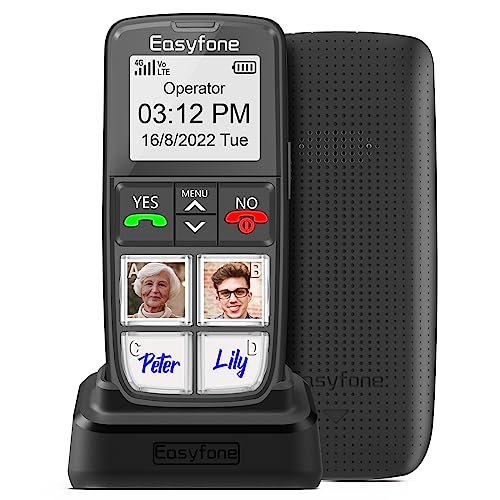
Easyfone Prime-T6 4G Picture Button Cell Phone for Seniors

Our verdict: Picture buttons plus an SOS key and a charging dock.

A 4G phone with picture buttons, an SOS button and a charging dock, in the $50 to $100 bucket. A picture button lets a person press a face to call a family member, which removes dialing entirely. A charging dock avoids fiddling with a cable.

It ranks fifth because it lacks the smartphone features of the models above, but its picture buttons suit those who recognize faces better than numbers. It is a niche phone with a clear purpose.

Buy it for seniors who dial by recognizing faces. The caveats are a basic feature set and a carrier fit to check. Skip it if they want apps and a camera.

Network
4G
Dialing
Picture buttons
Safety
SOS button
Charging
Dock included

What we like

  • +Picture-button dialing
  • +SOS button
  • +Charging dock
  • +4G cellular

Watch out for

  • −Basic feature set
  • −Carrier fit to check

Buy it if: Seniors who dial by recognizing faces.

Skip it if: They want apps and a camera.

6

Best Unlocked Big Button

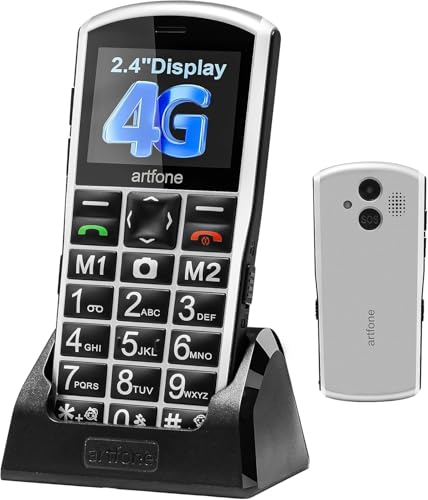
artfone A400 Big Button Cell Phone for Seniors, 4G LTE Unlocked

Our verdict: Large fonts, voice time and an SOS button on an unlocked 4G phone.

A 4G LTE unlocked big-button phone with an SOS button, large fonts and a voice time feature. The tag falls at $50 to $100. Unlocked means you choose any carrier, which avoids a forced monthly plan.

Landing sixth here is down to the point that there is no monitored service behind the SOS key in the listing, so a press may call only stored numbers. The Lively Flip2 has that service.

Buy it for seniors who want carrier freedom and big buttons. The caveats are no monitored service and a basic phone. Skip it if you want live-agent backup.

Network
4G LTE unlocked
Safety
SOS button
Display
Large fonts
Extra
Voice time

What we like

  • +Unlocked for any carrier
  • +Large fonts
  • +SOS button
  • +Voice time announcement

Watch out for

  • −No monitored service
  • −Basic phone only

Buy it if: Seniors who want carrier freedom and big buttons.

Skip it if: You want live-agent backup.

7

Best for Tech-Comfortable Seniors

Apple iPhone 17, US Version, 256GB, eSIM, Black (Renewed)

Our verdict: Deep accessibility and satellite SOS, at the top price bucket.

A renewed iPhone 17 with 256GB, eSIM and accessibility tools such as AssistiveTouch and Display Zoom. It also lists Emergency SOS via satellite and Crash Detection. It sits in the $500 and up bucket. Satellite SOS can reach help without a signal, which is rare.

It ranks last for most seniors because of the price and the learning curve. Renewed condition also raises questions about the battery and warranty.

Buy it for seniors already comfortable with iPhones. The caveats are the top price bucket and renewed condition. Skip it if you want a simple, low-cost phone.

Storage
256GB
Accessibility
AssistiveTouch, Display Zoom
Safety
Emergency SOS via satellite
SIM
eSIM

What we like

  • +Satellite Emergency SOS
  • +Crash Detection
  • +Display Zoom
  • +256GB storage

Watch out for

  • −Top price bucket
  • −Renewed condition

Buy it if: Seniors already comfortable with iPhones.

Skip it if: You want a simple, low-cost phone.

Methodology

How We Ranked These

Ease of use

Simple interfaces and clear physical controls ranked highest for first-time users.

Safety features

SOS buttons, crash detection and service-backed alerts were compared.

Display and battery

Screen size, readable fonts and battery life were weighed for older users.

Accessibility tools

Captions, amplification and zoom features were counted on the spec sheets.

Cost and service

Handset price and any required service plan were considered together.

Every Primea Score uses the same weights: Performance 30% · Build & Materials 20% · Everyday Usability 20% · Value 20% · Owner Satisfaction 10%. Full scoring rules

Buyer's guide

How to Pick the Right One for You

By Comfort With Technology

Start with how comfortable the user already is.

UserOur pick
Only makes callsLIVELY Jitterbug Flip2
Wants photos, simple screensLIVELY Jitterbug Smart5
Comfortable with AndroidGoogle Pixel 10a
Already uses iPhoneApple iPhone 17 (Renewed)

By Budget

SpendOur pick
$25-50LIVELY Jitterbug Flip2
$50-100Easyfone Prime-T6 or artfone A400
$100-200Samsung Galaxy A16 5G
$500 and upApple iPhone 17 (Renewed)

Basic Phone vs Smartphone

Basic phone

Physical keys, big text and an SOS button keep operation clear. The Jitterbug Flip2, Easyfone Prime-T6 and artfone A400 fit here.

Smartphone

A touchscreen unlocks video calls, photos and maps but takes more learning. The Smart5, Pixel 10a, Galaxy A16 and iPhone 17 fit here.

Most seniors who have never used a smartphone should default to a basic phone.

By Health Need

NeedOur pick
Hearing loss, captionsGoogle Pixel 10a
Trouble with small keysartfone A400 Big Button
Memory challengesEasyfone Prime-T6
Live alone, remote travelApple iPhone 17 (Renewed)

For Seniors Living Alone Specifically

Look for

A dedicated emergency key, long battery life and a way for family to reach them quickly.

In this ranking

The Jitterbug Flip2 pairs an urgent button with Lively service, and the iPhone 17 adds satellite SOS.

When to Spend More

Spend more if

You need strong accessibility tools, which the Pixel 10a delivers at a mid price, or satellite SOS from the iPhone 17.

Save if

Calls are the main use. The Jitterbug Flip2 or Easyfone cover them for less.

Questions

Frequently Asked Questions

Do senior phones need a special plan?+

The Lively models require Lively service, which adds a monthly bill. The artfone A400 and Samsung Galaxy A16 are unlocked and use your carrier, so you can keep an existing plan and your number. Check each listing.

What is the biggest mistake?+

Giving a senior a complicated phone to learn. Match the interface to their comfort, even if it is less powerful, because a phone that is never used protects no one, and a confused user often leaves it in a drawer.

Is a smartphone worth it over a flip phone?+

Only if they want video calls, photos or maps. A flip like the Jitterbug is easier and more reliable for calls, while the Smart5 offers a gentler step up.

How do I set up a phone for someone else?+

Transfer contacts, set large fonts and add emergency contacts before handing it over. Walk through the main steps with them, and write a short cheat sheet of the buttons they will use.

How long should a phone last?+

Software support varies. The Galaxy A16 lists six years of updates, which helps with long-term security, while the Lively and Easyfone models do not list any.

Is a renewed iPhone a good idea?+

It can be, but check the seller's warranty and battery condition. A new device is safer for less tech-savvy owners, and a renewed phone adds a risk of battery wear, so ask what the battery health is.

Final take

Buy the Flip2 for someone who mostly makes calls, and the Smart5 for a senior ready for photos and video. The Pixel 10a suits hearing and vision needs, while the Galaxy A16 is for long-term support. The Easyfone and artfone are basic SOS phones, and the iPhone 17 fits only a tech-comfortable senior. Set it up before you hand it over.

More Ranked & Reviewed Guides