
Primea ReviewsAll Reviews

Primea Reviews is reader-supported. When you buy through our Amazon links we may earn a commission, at no extra cost to you. Rankings are set by our editors and never sold. Learn more

Ranked & Reviewed by Primea Reviews

The 7 Best Under-Desk Keyboard Tray Drawers of 2026, Ranked & Reviewed

By the Primea Editorial TeamUpdated November 4, 20269 min read7 products ranked
The 7 Best Under-Desk Keyboard Tray Drawers of 2026, Ranked & Reviewed

The short answer

The Mount-It! tray with an adjustable mouse platform is our top pick because it combines height adjustment, a smooth slide and a separate mouse surface. The Kensington is the widest option at 24.5 inches, the Fellowes is the three-position drawer for standard keyboards, and the VIVO 27 by 11 clamp-on is the value pick.

The Primea Scoreboard

Ranked & Reviewed

  1. A height-adjustable shelf with a smooth sliding mechanism and a movable mouse platform.

    94Outstanding
    Check price
  2. An extra-wide 24.5 inch tray that fits oversize and ergonomic keyboards plus a wrist rest.

    91Excellent
    Check price
  3. A true drawer with three height adjustments for standard keyboards up to 20 inches.

    89Excellent
    Check price
  4. A 27 by 11 inch tray held by sturdy C-clamps, with adjustable typing angles.

    87Excellent
    Check price
  5. A 34 by 11 inch extra-long clamp-on tray that holds a keyboard and mouse side by side.

    85Excellent
    Check price
  6. 06
    VIVO Black Under Desk 25 x 10 in Keyboard Tray

    Best for Height-Adjustable Desks

    VIVO Black Under Desk 25 x 10 in Keyboard Tray

    A deluxe 25 by 10 inch tray with ergonomic keyboard and mouse space and notes for height-adjustable desks.

    83Very Good
    Check price
  7. 07
    BONTEC Under Desk Keyboard Tray

    Best Measured Fit Guide

    BONTEC Under Desk Keyboard Tray

    Frees monitor space and states its limits plainly: 31.3 inches of width and 11.8 inches of depth.

    81Very Good
    Check price

The measurement that ruins most keyboard tray purchases is not the tray, it is the desk. A tray hangs from the underside, so the thickness of the desktop, any front lip, a curved edge or a drawer rail can stop it from mounting. Several listings here warn about exactly this, with one stating that it needs at least 31.3 inches of width and 11.8 inches of depth.

We ranked seven trays on what you can verify from a listing: tray width and depth, whether it clamps or screws on, how many height or tilt positions it offers, and whether the mouse has somewhere to go. We reviewed specifications, not desks, so treat the dimensions as the starting point and measure your own clearance underneath before you order.

Before you buy

What Actually Matters

01

Desk clearance

A tray hangs below the desktop, so the thickness of the top, any front lip and drawer rails decide whether it fits. Check the gap between the top surface and your thighs, and compare it with the tray's stated depth. Clamps also need a flat edge to grip, which curved desks do not provide.

02

Tray width and depth

Width decides whether the mouse sits beside the keyboard, and depth decides your wrist angle. Trays of 25 inches suit compact keyboards, while 34 inches suit a full layout plus a mouse. Compare the stated numbers with your keyboard width and add roughly six inches for a mouse.

03

Height and tilt adjustment

Elbows should sit near a right angle, so a tray at the wrong height forces your wrists to bend. Some trays offer presets, such as three positions, while others adjust continuously. Look for a stated range, and plan to sit at your normal height before judging.

04

Clamp versus screw mounting

Clamps install without drilling and move easily between desks, but they need clearance and can loosen under load. Screws are more secure but leave holes. Check which method the listing uses, and test the grip regularly if the tray is a clamp style.

05

Mouse space

A mouse at desk height while the keyboard is below forces an awkward reach. A tray with a mouse platform or enough width keeps both at one level. Look for a stated mouse area, and avoid trays that only mention the keyboard if you use a mouse all day.

In-depth reviews

Our Ranked Picks, Reviewed

1

Best Overall

Mount-It! Keyboard Tray Under Desk with Adjustable Mouse Platform, Easy-Glide

Our verdict: A height-adjustable shelf with a smooth sliding mechanism and a movable mouse platform.

The Mount-It! tray is an under-desk keyboard shelf with a smooth sliding mechanism, height adjustment and an adjustable mouse platform. Height adjustment is the key detail, because a tray at the wrong height forces your wrists to bend upward.

It earns the top slot by pairing a stated glide, adjustable height and a separate mouse surface in a single tray. The Kensington is wider, but its listing mentions a wrist rest rather than a movable mouse area, and the VIVO trays rely on tilt angles.

Best for a daily typist who wants the keyboard tucked away. The caveat is the $50 to $100 bucket, which costs more than clamp-on rivals.

Height
Adjustable
Slide
Smooth, easy-glide
Mouse area
Adjustable platform
Price bucket
$50 to $100

What we like

  • +Height adjustable shelf
  • +Smooth sliding mechanism
  • +Adjustable mouse platform
  • +Keeps the desk clear

Watch out for

  • −Higher price tier
  • −Dimensions not in summary

Buy it if: Daily typists who want an adjustable keyboard and mouse shelf.

Skip it if: You only need the cheapest clamp-on tray.

2

Best Extra-Wide Tray

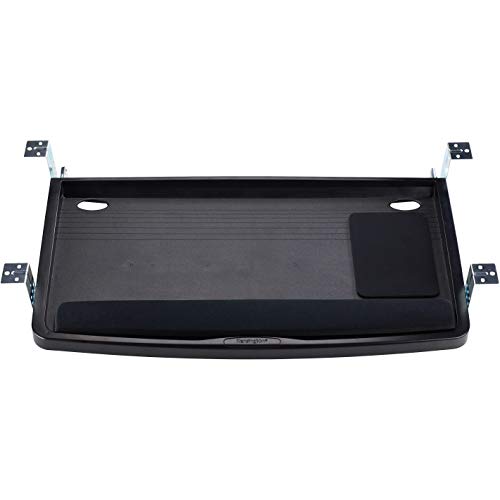
Kensington Keyboard Tray Under Desk

Our verdict: An extra-wide 24.5 inch tray that fits oversize and ergonomic keyboards plus a wrist rest.

Kensington's tray is extra wide at 24.5 inches, and the listing says it fits all keyboard sizes, including oversize and ergonomically shaped models, with room for a wrist rest. Wide trays matter for split or curved ergonomic keyboards that standard shelves crowd.

It ranks second because its width is the group's best-documented fit for big keyboards, while the Mount-It adds a movable mouse platform. It beats the Fellowes on size because that tray is rated for keyboards up to 20 inches.

Suits a typist with an ergonomic keyboard and a wrist rest. The caveat is that a wide tray needs a wide desk, and the listing summary does not detail the mouse area.

Width
24.5 in
Keyboard fit
All sizes, ergonomic
Wrist rest
Can hold one
Price bucket
$25 to $50

What we like

  • +24.5 inch wide platform
  • +Fits ergonomic keyboards
  • +Room for a wrist rest
  • +Under $50 price tier

Watch out for

  • −Mouse area not described
  • −Needs a wide desk

Buy it if: Typists using large or ergonomic keyboards.

Skip it if: Your desk is narrow or you want a movable mouse tray.

3

Best Three-Position Drawer

Fellowes Office Suites Underdesk Keyboard Drawer

Our verdict: A true drawer with three height adjustments for standard keyboards up to 20 inches.

The Fellowes is a drawer-style tray with three height adjustments, and its platform is spacious enough for keyboards up to 20 inches wide. The impact-resistant tray is meant for standard keyboards.

It ranks third because three preset heights are less flexible than the Mount-It's adjustment, and the 20 inch limit rules out wide ergonomic keyboards that suit the Kensington. It still beats the plain clamp-on trays by being a drawer, which gives a more finished look.

Good for an office desk with a standard keyboard. The caveat is the preset positions, so if none of the three matches your elbow height, you cannot fine-tune.

Height positions
3
Keyboard width
Up to 20 in
Style
Drawer
Price bucket
$25 to $50

What we like

  • +Three height positions
  • +Drawer-style neat look
  • +Impact-resistant tray
  • +Under $50 price tier

Watch out for

  • −Limited to 20 inch keyboards
  • −Only three presets

Buy it if: Office desks with standard-width keyboards.

Skip it if: You use a wide ergonomic keyboard.

4

Best Value Clamp-On

VIVO Black Clamp-on 27 x 11 in Keyboard Tray

Our verdict: A 27 by 11 inch tray held by sturdy C-clamps, with adjustable typing angles.

VIVO's 27 by 11 inch tray clamps to the desk with sturdy C-clamps and offers comfortable typing angles while saving desk space. The clamp mount avoids drilling, which suits rentals and shared desks.

It ranks fourth because the size is generous for a keyboard and mouse together, but its listing gives no height-adjust range like the Fellowes. It sits above the screw-mounted VIVO 25 by 10 because the clamp installs faster and the tray is bigger.

A smart buy for a desk where you do not want holes. The caveat is clamp clearance, since a thick desktop or front lip can prevent a C-clamp from gripping.

Size
27 x 11 in
Mounting
C-clamps
Angle
Adjustable typing angles
Price bucket
$25 to $50

What we like

  • +27 by 11 inch platform
  • +Tool-light clamp mounting
  • +Adjustable typing angles
  • +Under $50 price tier

Watch out for

  • −Clamps need clearance
  • −No height range stated

Buy it if: Rentals and shared desks where drilling is off limits.

Skip it if: Your desk edge is thick or has a lip.

5

Best Extra-Long Tray

VIVO Black Extra Large Clamp-on 34 x 11 in Keyboard Tray

Our verdict: A 34 by 11 inch extra-long clamp-on tray that holds a keyboard and mouse side by side.

This VIVO is the longest tray in the ranking at 34 by 11 inches, and it clamps on with sturdy C-clamps and offers comfortable typing angles. The length leaves room for a full keyboard, a number pad and a mouse area.

It ranks fifth because a 34 inch tray needs a wide desk, and the $50 to $100 bucket is higher than the 27 inch VIVO that suits most users. It wins on raw space, since no other tray here matches it.

Works for a wide desk and a maker who wants room for a keyboard and a graphics tablet. The caveat is weight and leverage, so use well-seated clamps and keep heavy items off the far end.

Size
34 x 11 in
Mounting
C-clamps
Angle
Adjustable typing angles
Price bucket
$50 to $100

What we like

  • +34 inch long platform
  • +Space for keyboard and mouse
  • +Clamp mounting
  • +Adjustable angles

Watch out for

  • −Needs a wide desk
  • −Costs more than the 27 inch model

Buy it if: Wide desks needing room for a full workspace.

Skip it if: Your desk is under 36 inches wide.

6

Best for Height-Adjustable Desks

VIVO Black Under Desk 25 x 10 in Keyboard Tray

Our verdict: A deluxe 25 by 10 inch tray with ergonomic keyboard and mouse space and notes for height-adjustable desks.

VIVO's 25 by 10 inch tray is described as a deluxe universal ergonomic keyboard and mouse tray, and the listing covers installing it on a height-adjustable desk. Mounting directions for sit-stand desks matter because the frame can interfere with a tray.

It ranks sixth because it is smaller than the clamp-on VIVO trays and lands in a higher bucket, $50 to $100, without a stated height range. It stays on the list because of its documentation for sit-stand desks.

A reasonable pick for a sit-stand desk where compatibility matters. The caveat is depth: 10 inches is tight for a keyboard plus a mouse.

Size
25 x 10 in
Style
Universal ergonomic tray
Desk type
Notes for height-adjustable desks
Price bucket
$50 to $100

What we like

  • +Guidance for sit-stand desks
  • +Universal mounting design
  • +Ergonomic layout
  • +Compact footprint

Watch out for

  • −Only 10 inches deep
  • −Higher price for the size

Buy it if: Sit-stand desks where compatibility is a concern.

Skip it if: You need room for a mouse beside the keyboard.

7

Best Measured Fit Guide

BONTEC Under Desk Keyboard Tray

Our verdict: Frees monitor space and states its limits plainly: 31.3 inches of width and 11.8 inches of depth.

BONTEC puts its limits up front. The tray will not work with desks that have curved edges, and it needs at least 31.3 inches of width and 11.8 inches of depth. It aims to move the keyboard and mouse below the desktop to free valuable space for monitors.

It ranks last because the strict requirements exclude more desks than the VIVO clamp-ons, and the listing says little about adjustment. It deserves credit for honesty, since that clarity prevents returns.

Best for a standard rectangular desk with clearance underneath. The caveat is the curved-desk exclusion, so it will not suit corner or L-shaped tops.

Minimum desk width
31.3 in
Minimum depth
11.8 in
Desk shape
Not for curved edges
Price bucket
$25 to $50

What we like

  • +Clear fit requirements
  • +Frees monitor space
  • +Under $50 price tier
  • +Fewer surprise returns

Watch out for

  • −Not for curved desks
  • −Adjustment not described

Buy it if: Rectangular desks with enough clearance beneath.

Skip it if: You have a curved, corner or L-shaped desk.

Methodology

How We Ranked These

Tray size

Stated width and depth, and whether a keyboard and mouse fit together.

Mounting method

Clamp or screw mounting, and clarity about the desk edges they work with.

Adjustability

Height positions, tilt angles and movable mouse platforms.

Compatibility notes

Warnings about curved desks, minimum widths and sit-stand frames.

Value by tier

Features delivered at the $25 to $50 and $50 to $100 price buckets.

Every Primea Score uses the same weights: Performance 30% · Build & Materials 20% · Everyday Usability 20% · Value 20% · Owner Satisfaction 10%. Full scoring rules

Buyer's guide

How to Pick the Right One for You

By Tray Width

Match the tray to your keyboard first.

WidthOur pick
25 inches, compactVIVO Black Under Desk 25 x 10 in Keyboard Tray
27 inches, standardVIVO Black Clamp-on 27 x 11 in Keyboard Tray
24.5 inches, ergonomicKensington Keyboard Tray Under Desk
34 inches, extra longVIVO Black Extra Large Clamp-on 34 x 11 in

By Budget

SpendOur pick
$25 to $50, ergonomicKensington Keyboard Tray Under Desk
$25 to $50, clamp-onVIVO Black Clamp-on 27 x 11 in Keyboard Tray
$25 to $50, drawerFellowes Office Suites Underdesk Keyboard Drawer
$50 to $100Mount-It! Keyboard Tray Under Desk

Clamp-On vs Drawer

Clamp-on

Quick installation without drilling. The VIVO 27 by 11 and 34 by 11 trays use C-clamps.

Drawer

A tidier look with set height positions. The Fellowes is the classic example.

Choose a clamp-on tray for rentals and a drawer for a permanent office desk.

By Adjustment

AdjustmentOur pick
Height and mouse platformMount-It! Keyboard Tray Under Desk
Three height positionsFellowes Office Suites Underdesk Keyboard Drawer
Typing anglesVIVO Black Clamp-on 27 x 11 in Keyboard Tray
Sit-stand guidanceVIVO Black Under Desk 25 x 10 in Keyboard Tray

For Sit-Stand Desks Specifically

Look for

A tray that states compatibility with height-adjustable frames, since cross bars and leg rails can block mounting.

In this ranking

The VIVO 25 by 10 tray documents sit-stand installation, and the Mount-It adds height flexibility.

When to Spend More

Spend more if

You type all day and need height and mouse adjustment. The Mount-It is the upgrade.

Save if

You want basic storage for a keyboard. The Kensington or Fellowes at $25 to $50 is enough.

Questions

Frequently Asked Questions

Will a keyboard tray fit my desk?+

Measure the width, the front-to-back depth and the thickness of the desktop edge. The BONTEC needs at least 31.3 inches by 11.8 inches, while clamp-on VIVO trays need a flat edge to grip.

What mistake do people make with keyboard trays?+

Ignoring leg room. A tray that hangs too low hits the thighs, and one that hangs too high raises the wrists. Sit at your normal height with the Fellowes or Mount-It adjustment before locking it.

Is the Mount-It worth more than the VIVO 27 by 11?+

For daily typists, yes, because the Mount-It adds height adjustment, a smooth glide and a movable mouse platform. The VIVO is a better value for occasional use or a rental desk.

How do I install a clamp-on tray?+

Position the brackets so the tray sits level, tighten the C-clamps evenly, then test it by pushing down on the front edge. Retighten after a day, since clamps can settle on a thick desktop.

How do I maintain a sliding tray?+

Wipe the runners with a dry cloth, check the screws or clamps monthly, and avoid resting heavy loads on the front edge. A drop of light lubricant on the Mount-It slide helps if it gets noisy.

Can I use a tray on a curved or L-shaped desk?+

Often not. The BONTEC warns that it will not work with curved desks, and clamps need a flat edge. Look for a model with screw-in mounting and measure the straight section where the tray would go.

Final take

The Mount-It! is the best under-desk keyboard tray here because it combines height adjustment, a smooth slide and a mouse platform. The Kensington is the one to buy for an ergonomic keyboard, and the VIVO 27 by 11 is the budget clamp-on. Measure your desk edge before you order, because fit decides everything.

More Ranked & Reviewed Guides