
Primea ReviewsAll Reviews

Primea Reviews is reader-supported. When you buy through our Amazon links we may earn a commission, at no extra cost to you. Rankings are set by our editors and never sold. Learn more

Ranked & Reviewed by Primea Reviews

The 7 Best Ultrawide Monitor Stands and Risers for Wide Desks, Ranked & Reviewed

By the Primea Editorial TeamUpdated November 3, 202610 min read7 products ranked
The 7 Best Ultrawide Monitor Stands and Risers for Wide Desks, Ranked & Reviewed

The short answer

The HUANUO TitanLift is the ultrawide monitor stand to buy if you own a 49 inch super-ultrawide, with a 44 lb rating and a 5-year warranty. The VIVO Freestanding stand is the best clamp-free option, the VIVO Extra Tall suits sit-stand desks, and the WESTREE riser is the simplest way to lift a panel without hardware.

The Primea Scoreboard

Ranked & Reviewed

  1. A heavy-duty arm for screens up to 49 inches and 44 lb, with a 5-year warranty.

    94Outstanding
    Check price
  2. A freestanding stand for ultrawides up to 38 inches, with 18 inches of lift and no clamp.

    92Outstanding
    Check price
  3. A 39 inch pole, the tallest in the group, rated for 38 inch ultrawides at 22 lb.

    90Excellent
    Check price
  4. 04
    WESTREE Dual Monitor Stand Riser

    A wide steel and wood riser with a 150 lb rating, the highest of any riser here.

    88Excellent
    Check price
  5. Three height settings, a USB 3.0 hub, USB-C and a phone holder on a folding riser.

    86Excellent
    Check price
  6. 06
    Across-Star Dual Monitor Stand Riser

    Best Adjustable Width Riser

    Across-Star Dual Monitor Stand Riser

    A modular three-piece riser that adjusts from 32 to 40 inches wide.

    84Very Good
    Check price
  7. 07
    VIVO Dual Vertically Stacked Monitor Stand

    Best for Stacking Two Screens

    VIVO Dual Vertically Stacked Monitor Stand

    Two arms on a 28.5 inch pole for stacking 34 inch ultrawides, 22 lb each.

    81Very Good
    Check price

The usual error with an ultrawide stand is trusting the weight number alone. A 34 inch panel may weigh less than a hefty 27 inch monitor, but it is almost a foot wider, so the leverage on a single arm or a short pole is much larger. A stand rated for the weight can still droop or wobble if its base and clamp were designed for a narrower screen.

This ranking sorts by rated screen size and load first, then by adjustability and how each stand attaches to the desk. We reviewed seven arms, poles and risers from their listings, comparing supported width, capacity, mounting method and warranty. Where a listing is silent, we leave the detail out.

Before you buy

What Actually Matters

01

Rated screen width

Ultrawides are far wider than regular monitors, and a stand rated only for 27 inch screens may flex or tilt under them. Check the listing for a stated maximum such as 34, 38 or 49 inches. If your screen is not named, treat the stand as unproven for your size.

02

Weight capacity with margin

Capacity is the heaviest monitor the stand should carry, but wide panels shift their weight far from the pole. Leave a margin of about 20% under the stated limit. Look up your monitor's weight with the stand removed, since the stand base often weighs a lot.

03

Arm versus riser

An arm gives you height, depth and tilt, and frees desk space. A riser is simpler and holds heavy loads, but it is fixed in one position. Choose an arm if you want to move the screen, and a riser if you mainly want a shelf under it.

04

Mounting method and desk edge

C-clamps need a solid edge, usually a stated thickness range, and glass tops need a backing plate. Grommet mounts need a hole through the desk. Freestanding bases need neither but use surface space. Check your desk before ordering.

05

VESA pattern and curve

VESA is the hole pattern on the back of the monitor, commonly 75 or 100mm. Many ultrawides are curved, and some have recessed mounts that need spacers. If your screen lacks VESA holes, a riser is the only option.

In-depth reviews

Our Ranked Picks, Reviewed

1

Best Overall

HUANUO TitanLift Heavy Duty Monitor Arm

Our verdict: A heavy-duty arm for screens up to 49 inches and 44 lb, with a 5-year warranty.

The TitanLift is built for super-ultrawide monitors, supporting screens up to 49 inches and up to 44 lb. The maker says the arm is 20% thicker and the base 30% wider than its standard model, and it was cycled through 50,000 movements. It uses a dual C-clamp mount and carries the longest warranty in this group at 5 years.

It takes first place because a 49 inch panel is the hardest case, and this is the only stand here rated for one. The dual clamp spreads the load over two points on the desk edge, which reduces the lean you often see on a single-clamp arm with a wide screen. A full arm also gives you height, depth and tilt adjustments that fixed risers cannot match. It costs more than the others, in the $50 to $100 bracket, and you need a desk edge thick and strong enough to clamp.

Buy it if you own a big, heavy ultrawide and want to move it freely. Skip it if your desk has a glass top or a lip that blocks the clamp.

Screen size
Up to 49 in
Capacity
Up to 44 lb
Mount
Dual C-clamp
Warranty
5 years

What we like

  • +Rated for 49 inch super-ultrawides
  • +Dual clamp spreads the load
  • +Longest warranty in the ranking
  • +Full arm adjustment range

Watch out for

  • −Highest price bracket here
  • −Needs a clampable desk edge

Buy it if: Owners of 49 inch and other heavy ultrawides.

Skip it if: Your desk cannot take a clamp.

2

Best No-Clamp Stand

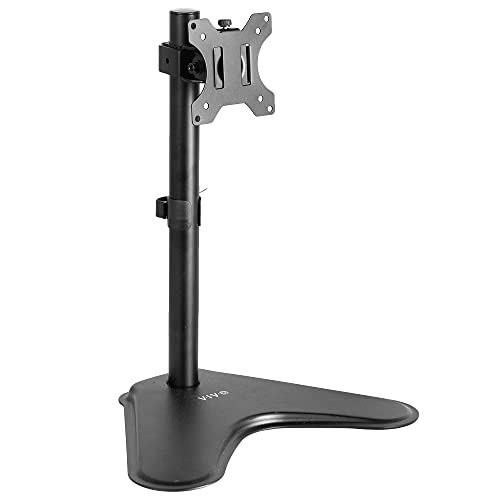
VIVO Single Monitor Desk Stand (Freestanding)

Our verdict: A freestanding stand for ultrawides up to 38 inches, with 18 inches of lift and no clamp.

The VIVO freestanding stand supports ultrawide monitors up to 38 inches, with 18 inches of lift. The head turns a full circle and nods 15 degrees up or down, and it fits VESA 75 and 100mm patterns and needs no desk clamp.

It ranks second because it solves a problem the arm cannot: desks you cannot drill or clamp. Office furniture on rental terms, glass tops and thin laminate edges all fall in that group. A freestanding base sets its footprint on the desk surface, so it takes up room that a clamp arm would not. Against the TitanLift, it supports a smaller screen and has no stated capacity in the listing. The upside is a quick setup with no tools beyond what comes in the box.

Buy it if your desk forbids clamping and your screen is 38 inches or less. Skip it if desk depth is already tight.

Screen size
Up to 38 in ultrawide
Lift
18 in
Adjustment
360 degree rotate, 15 degree tilt
VESA
75 and 100mm

What we like

  • +No clamp or drilling required
  • +Supports ultrawides up to 38 inches
  • +Eighteen inches of lift
  • +Rotates a full 360 degrees

Watch out for

  • −Base takes up desk surface
  • −Weight rating not stated

Buy it if: Rented or glass desks that cannot be clamped.

Skip it if: You need to save every inch of desk depth.

3

Best for Sit-Stand Desks

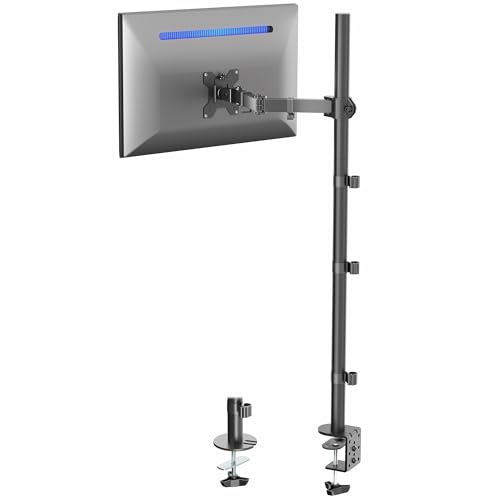
VIVO Extra Tall Single Monitor Desk Mount

Our verdict: A 39 inch pole, the tallest in the group, rated for 38 inch ultrawides at 22 lb.

The Extra Tall mount has a 39 inch pole, the tallest here, and supports ultrawides up to 38 inches at up to 22 lb. It tilts plus or minus 90 degrees, rotates 360 degrees and attaches with a C-clamp or a grommet mount.

It ranks third because the long pole is its entire reason for existing. On a sit-stand desk, the monitor needs a wide range of height, and a 39 inch pole lets the arm slide high enough for standing and low enough for sitting. The cost of height is leverage: a taller pole makes the screen sway more when you bump the desk, so a wide panel close to the 22 lb limit may wobble. It beats the other poles on reach but trails the TitanLift on capacity.

It is a good choice for standing desk users with lighter ultrawides. Skip it if your panel is heavy.

Pole height
39 in
Capacity
22 lb, up to 38 in ultrawide
Movement
90 degree tilt, 360 degree rotate
Mount
C-clamp or grommet

What we like

  • +Tallest pole in this ranking
  • +Works for sitting or standing desks
  • +Clamp or grommet mount options
  • +Wide tilt range

Watch out for

  • −22 lb limit rules out heavy panels
  • −Tall pole can sway slightly

Buy it if: Sit-stand desk owners with a lighter ultrawide.

Skip it if: Your monitor weighs over 22 lb.

4

Best Heavy-Duty Riser

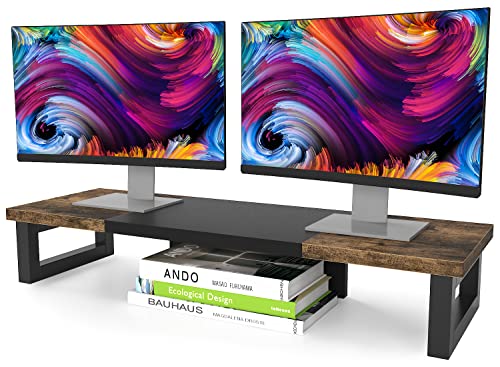
WESTREE Dual Monitor Stand Riser

Our verdict: A wide steel and wood riser with a 150 lb rating, the highest of any riser here.

The WESTREE is a 35.8 inch wide and 10.2 inch deep platform in steel and rustic brown wood. It carries up to 150 lb, the highest riser rating in the list, takes about two minutes to assemble and leaves storage space underneath.

It ranks fourth because a riser is a different product from an arm. It lifts the screen but does not tilt, swivel or change height after the fact. For an ultrawide, that may be fine, since a 34 inch panel often has a reasonable built-in stand. What the riser adds is a shelf under the monitor for a keyboard, notebooks or a laptop. The 35.8 inch width is also close to the panel width of a typical 34 inch ultrawide, so the monitor sits securely on it.

Pick it if you want a simple raised platform and storage. Skip it if you need adjustable height or tilt.

Platform
35.8 in W x 10.2 in D
Capacity
150 lb
Build
Steel and rustic brown wood
Assembly
About 2 minutes

What we like

  • +Highest weight rating among risers
  • +Wide platform suits 34 inch panels
  • +Storage space beneath
  • +Assembly takes about two minutes

Watch out for

  • −No height or tilt adjustment
  • −Fixed footprint on the desk

Buy it if: People who want a sturdy shelf under one wide screen.

Skip it if: You need to fine-tune viewing height.

5

Best Riser With USB Hub

OImaster Monitor Stand Riser with USB 3.0 Hub

Our verdict: Three height settings, a USB 3.0 hub, USB-C and a phone holder on a folding riser.

The OImaster riser offers three height settings of 16.5, 18.5 and 20.5 inches, a 50 to 55 lb capacity, and a build of ABS and metal. Extras include a USB 3.0 hub, a USB-C port, a drawer and a cradle for your phone, and the whole unit collapses flat.

It ranks fifth because the capacity is lower than the WESTREE, though it is enough for most ultrawides. The built-in hub is a useful touch if your monitor or laptop has few ports on the front. Height steps are coarse, so you pick one of three presets rather than dialing in a position. Folding flat helps for storage or moving a desk. It sits in the $25 to $50 bracket, level with the simpler risers.

Buy it if you want extra ports and a drawer under the screen. Skip it if you need precise height.

Height settings
16.5, 18.5, 20.5 in
Capacity
50 to 55 lb
Ports
USB 3.0 hub and USB-C
Extras
Phone holder, drawer

What we like

  • +Built-in USB 3.0 hub and USB-C
  • +Three height settings available
  • +Drawer and phone holder included
  • +Folds flat for storage

Watch out for

  • −Capacity lower than WESTREE
  • −Plastic parts feel less solid

Buy it if: Desk users who want ports and storage built in.

Skip it if: You need a high weight rating.

6

Best Adjustable Width Riser

Across-Star Dual Monitor Stand Riser

Our verdict: A modular three-piece riser that adjusts from 32 to 40 inches wide.

The Across-Star riser is made of metal and wood in a modular 3-piece design with adjustable length from 32 to 40 inches. It carries 80 lb and has storage space underneath.

It places sixth because adjustability is its strength, while capacity and build are middling. The ability to set the width means you can match the riser to a narrow desk or to a wider ultrawide base, and that is something the fixed WESTREE cannot do. The modular design gives you more joints, so over time check that the pieces stay snug and do not rock. At 80 lb it holds any consumer monitor, though it falls well below the WESTREE rating.

Choose it if your desk width is awkward. Skip it if you want a one-piece platform.

Width
32 to 40 in adjustable
Capacity
80 lb
Build
Metal and wood, 3 pieces
Budget bracket
$25 to $50

What we like

  • +Width adjusts from 32 to 40 inches
  • +80 lb capacity is ample
  • +Storage space under the shelf
  • +Metal and wood build

Watch out for

  • −Modular joints may loosen
  • −Lower capacity than WESTREE

Buy it if: Desks of unusual width that need a sized riser.

Skip it if: You prefer a single rigid platform.

7

Best for Stacking Two Screens

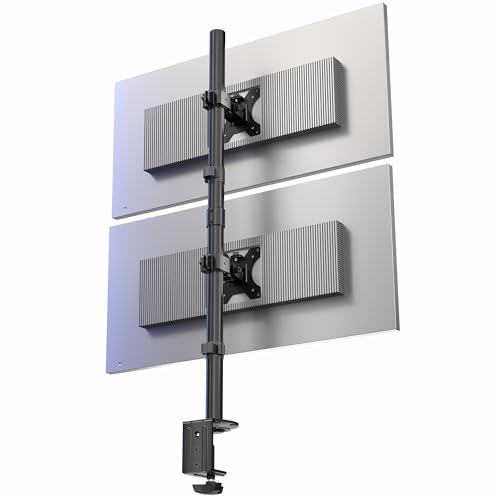
VIVO Dual Vertically Stacked Monitor Stand

Our verdict: Two arms on a 28.5 inch pole for stacking 34 inch ultrawides, 22 lb each.

This VIVO stand stacks two ultrawide monitors vertically, each up to 34 inches and 22 lb, on a 28.5 inch pole. Each arm tilts 15 degrees either way and rotates 360 degrees, and mounting is by C-clamp or grommet.

It ranks last because it answers a different question from most buyers' needs. Stacked ultrawides save desk width, but the upper screen sits high, and a 34 inch panel placed above another requires a tall neck-tilt for many users. It earns a place for trading and coding setups that want two ultrawides on one pole. Per-arm capacity matches the single VIVO poles, and the shorter pole than the Extra Tall limits sit-stand use.

Buy it if you plan to stack two ultrawides. Skip it if you want one screen.

Screens
2, up to 34 in each
Capacity
22 lb per arm
Pole
28.5 in
Movement
15 degree tilt, 360 degree rotate

What we like

  • +Stacks two ultrawides on one pole
  • +Each arm rotates 360 degrees
  • +Saves desk width versus side-by-side
  • +Clamp or grommet mounting

Watch out for

  • −Upper screen sits very high
  • −Only 22 lb per arm

Buy it if: Traders and coders stacking two ultrawides.

Skip it if: You only own a single monitor.

Methodology

How We Ranked These

Screen size support

We compared the maximum screen width each stand lists, from 34 to 49 inches, since ultrawides put the most strain on narrow-rated hardware.

Weight rating and leverage

Capacities from 22 lb up to 150 lb were read alongside the mounting method, because a wide panel on a single pole creates leverage a number does not show.

Adjustment range

Height, tilt, rotation and lift were scored, along with whether the stand is a fixed riser or a movable arm.

Desk fit and mounting

Clamp, grommet, freestanding and platform designs were compared for how many desk types they suit.

Warranty and extras

Warranty terms up to 5 years, USB hubs and under-stand storage were weighed against price.

Every Primea Score uses the same weights: Performance 30% · Build & Materials 20% · Everyday Usability 20% · Value 20% · Owner Satisfaction 10%. Full scoring rules

Buyer's guide

How to Pick the Right One for You

By Screen Size

Screen width sets the load on the stand, so it is the first filter.

ScreenOur pick
49 inch super-ultrawideHUANUO TitanLift Heavy Duty Monitor Arm
Up to 38 inch ultrawide, clamp-freeVIVO Single Monitor Desk Stand (Freestanding)
Up to 38 inch, sit-stand deskVIVO Extra Tall Single Monitor Desk Mount
Two stacked 34 inch screensVIVO Dual Vertically Stacked Monitor Stand

By Budget

SpendOur pick
$25 to $50, simplestWESTREE Dual Monitor Stand Riser
$25 to $50, with portsOImaster Monitor Stand Riser with USB 3.0 Hub
$25 to $50, sized to deskAcross-Star Dual Monitor Stand Riser
$50 to $100HUANUO TitanLift Heavy Duty Monitor Arm

Arm vs Riser

Arm or pole

Adjusts height, tilt and rotation, and frees up the desk under the screen. Needs a clamp, grommet or freestanding base. Picks: HUANUO TitanLift, VIVO Extra Tall, VIVO Freestanding.

Riser

A fixed platform that lifts the monitor and gives a shelf beneath. Holds heavy loads and needs no hardware. Picks: WESTREE, OImaster, Across-Star.

Default to an arm if you want ergonomic freedom, a riser if you want simplicity.

By Desk Type

DeskOur pick
Glass or rental desk, no clampingVIVO Single Monitor Desk Stand (Freestanding)
Sit-stand deskVIVO Extra Tall Single Monitor Desk Mount
Narrow or oddly sized deskAcross-Star Dual Monitor Stand Riser
Wide solid desk with a thick edgeHUANUO TitanLift Heavy Duty Monitor Arm

For a 49 Inch Super-Ultrawide Specifically

Look for

A stated maximum screen size of 49 inches, capacity well above your monitor's weight, a dual-point clamp and a warranty that shows the maker expects heavy use.

In this ranking

The HUANUO TitanLift is the only pick rated for 49 inches. The WESTREE riser is the fallback if the monitor has no VESA holes and only needs lifting.

When to Spend More

Spend more if

Your monitor is very wide, heavy or expensive to replace. The HUANUO TitanLift covers that with a 5-year warranty and a heavy-duty build.

Save if

Your panel is 34 inches or smaller and has a decent stand already. The WESTREE or OImaster gives you extra height and storage for little.

Questions

Frequently Asked Questions

Can an ultrawide monitor use a regular monitor arm?+

Only if the arm lists a screen size and weight that cover it. Many arms are rated for 27 or 32 inch screens and may sag under a wide panel. Look for an arm that names the ultrawide size you own.

What is the biggest mistake with ultrawide stands?+

Matching only the weight number. A wide screen puts its weight far from the pole, which adds strain that the rating may not reflect. Pick a stand with a listed screen width and leave a margin on weight.

Is the HUANUO TitanLift worth it over the VIVO stands?+

If your screen is 49 inches or heavy, yes, since the VIVO poles top out at 22 lb. For a lighter 34 to 38 inch panel the VIVO freestanding or Extra Tall is enough for less.

How do I install a clamp arm safely?+

Check the desk edge thickness against the clamp's range, tighten until the base cannot twist, and add a backing plate for glass or thin laminate. Route cables before you mount the screen, since the arm gets harder to reach once loaded.

Do risers work with curved ultrawides?+

Yes, if the platform is wide enough to carry the foot of the stand. The WESTREE is 35.8 inches wide, which suits most 34 inch panels. Check that the monitor's feet sit fully on the surface.

Will a stand fix neck strain?+

It helps if the top of the screen lands near eye level when you sit upright. A riser lifts the screen by a fixed amount, while an arm lets you tune it. Pair the stand with a chair and desk height that suit you.

Final take

For a super-ultrawide, the HUANUO TitanLift is the best ultrawide monitor stand here, with a 49 inch rating, 44 lb capacity and a 5-year warranty. The VIVO Freestanding is the answer for desks that cannot take a clamp, and the VIVO Extra Tall suits sit-stand setups. If you only want height and a shelf, the WESTREE riser does it simply. Match screen width, weight and desk edge before choosing.

More Ranked & Reviewed Guides