
Primea ReviewsAll Reviews

Primea Reviews is reader-supported. When you buy through our Amazon links we may earn a commission, at no extra cost to you. Rankings are set by our editors and never sold. Learn more

Ranked & Reviewed by Primea Reviews

The 8 Best Talking Clocks Under $50 of 2026, Ranked & Reviewed

By the Primea Editorial TeamUpdated November 4, 20269 min read8 products ranked
The 8 Best Talking Clocks Under $50 of 2026, Ranked & Reviewed

The short answer

The GOLOZA 7 inch talking clock is the best all-round pick, with ten volume levels and a large display that doubles as a dementia clock. The extra-loud Time & Date clock is the one to buy for a hard-of-hearing user, and the Cirbic button clock suits anyone who wants an answer on demand. The keychain models are for travel, not for the bedside.

The Primea Scoreboard

Ranked & Reviewed

  1. A 7 inch display with ten volume levels, the loudest and clearest option here.

    94Outstanding
    Check price
  2. An extra-loud announcement of both time and date, aimed at elderly, dementia and low vision users.

    92Outstanding
    Check price
  3. An extra-large button you press to hear the time. Speech on demand, not on a schedule.

    90Excellent
    Check price
  4. Voice-announced date and time for blind and elderly users, at the lowest price tier.

    88Excellent
    Check price
  5. A press-to-talk clock in blue and silver, at a lower price than the Cirbic.

    86Excellent
    Check price
  6. A portable keychain-style talking alarm clock with an LCD, for blind and visually impaired users.

    84Very Good
    Check price
  7. Two small keychain talking clocks with alarms in one pack.

    82Very Good
    Check price
  8. 08
    LSS Silver Talking Clock Keychain

    A plain silver keychain that speaks the time. No frills.

    80Very Good
    Check price

A talking clock fails in a very specific way: it speaks, and the person it was bought for still cannot make out the words. Volume range, speech clarity and when the clock chooses to talk are the real features. Buyers who pick on looks end up with a handsome clock that announces the time at a whisper, or one that chatters every hour and wakes the household.

We ranked eight talking clocks under $50 across the main designs: large desk clocks with a big display, button-activated clocks that speak on demand, and small keychain clocks for pockets. Scoring weighed volume control, display size, whether speech is on demand or automatic, and how well each design fits the person who will actually use it.

Before you buy

What Actually Matters

01

Volume range

A talking clock is only useful if it can be heard. Look for stated volume levels, such as the GOLOZA's ten, or an extra-loud claim. A small keychain speaker is quieter than a desk clock. Test it in the room where it will live, with background noise, before you rely on it.

02

Date announcement

For someone with memory problems, the date matters as much as the hour. Clocks that announce both save repeated questions. Check the listing for the words time and date, as on the NADOBA and the extra-loud clock. A clock that only gives the hour leaves the day unanswered.

03

Button or automatic speech

A button clock speaks only when pressed, which is calm and private but needs the user to remember. An automatic clock speaks on its own, which helps with memory but can disturb sleep. Choose by the user: a blind reader suits a button, a person with dementia often needs automatic.

04

Display size and contrast

Many talking clock users have some sight left. A 7 inch display like the GOLOZA's is readable across a room, while a keychain LCD is not. Look for the display size in inches and for high contrast, and treat tiny screens as a bonus, not the main feature.

05

Form factor

A desk clock sits on a nightstand; a keychain goes with you. They solve different problems, and a single product rarely does both well. Decide where the clock will be used most, and buy for that place, adding a keychain as a second tool if needed.

In-depth reviews

Our Ranked Picks, Reviewed

1

Best Overall

GOLOZA 7'' Digital Dementia Clock, Talking Clock with 10 Volumes

Our verdict: A 7 inch display with ten volume levels, the loudest and clearest option here.

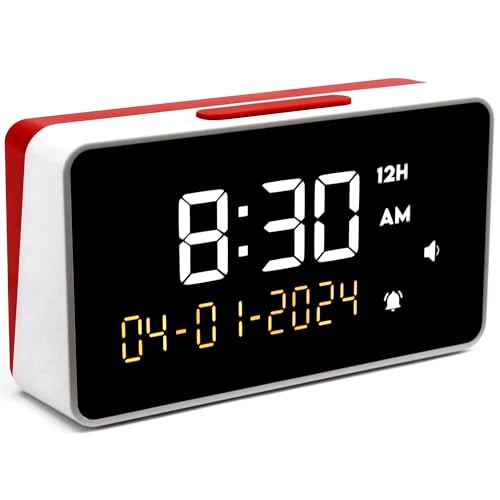
GOLOZA's clock combines a 7 inch digital display with a talking function and ten volume levels. The 7 inch screen is the large-format display that makes it a dementia-style clock as well, showing time and date clearly from across a room.

It leads because it covers both senses at once: the display for the eyes and a ten-step volume range for the ears. The extra-loud Time & Date clock below is also built for volume, but does not list the same number of levels or the 7 inch screen. Ten steps give you room to find a level that is audible without being startling in a quiet bedroom.

Buy it for a parent with fading sight or memory who needs both a big display and spoken time. The caveat is size: a 7 inch clock needs bedside or shelf space, so it will not slip into a travel bag.

Display
7 inch digital
Volume
10 levels
Function
Talking clock
Price bracket
$25 to $50

What we like

  • +Large 7 inch display
  • +Ten volume levels
  • +Designed with dementia in mind
  • +Works for sight and hearing

Watch out for

  • −Too big to travel with
  • −Needs a shelf or bedside spot
  • −Top of the price range

Buy it if: Older adults with fading sight or memory at home.

Skip it if: You want a pocket clock for travel.

2

Best for Hearing Loss

Talking Clock - Extra Loud Time & Date for Elderly, Dementia, Low Vision

Our verdict: An extra-loud announcement of both time and date, aimed at elderly, dementia and low vision users.

This clock announces both the time and the date at extra-loud volume and is aimed at elderly users, people living with dementia and low vision. Announcing the date matters as much as the time for anyone who loses track of the day.

It ranks second because the GOLOZA pairs the loud voice with a bigger, better-described display and a ten-step volume range. This model's listing says little about the display size or volume levels, so the loudness is its main claim. For someone with hearing loss and low vision, it is a strong choice, though.

Choose it where the date and the loudness are what you need. The caveat is that the sparse listing gives no display size, so check the photos for how readable the numbers are.

Speech
Time and date
Volume
Extra loud
Aimed at
Elderly, dementia, low vision
Price bracket
$25 to $50

What we like

  • +Announces the date as well
  • +Extra-loud voice
  • +Aimed at dementia and low vision
  • +Simple to understand

Watch out for

  • −Display size not listed
  • −Volume levels not described
  • −Few other specs stated

Buy it if: Users with hearing loss who need the date announced.

Skip it if: You want a clearly large display and volume steps.

3

Best On-Demand Clock

Cirbic Extra Large Talking Button Clock - for The Blind, Elderly or Visually impaired

Our verdict: An extra-large button you press to hear the time. Speech on demand, not on a schedule.

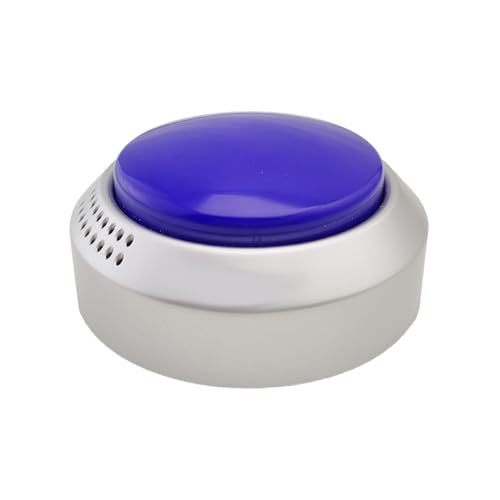
Cirbic's clock has an extra-large button that you press to hear the time, and it is aimed at blind, elderly and visually impaired users. The big button is the point: you find it by touch, with no fiddling with tiny controls.

It ranks third because on-demand speech suits some users better and others worse. It never chatters, so it will not wake a sleeper, but the user has to remember to press it. Against the GOLOZA, it has no stated display size and no volume levels, so it is a simpler tool.

It works for a blind or visually impaired person who wants a clock they control. The caveat is that anyone with memory problems may forget the button exists, so an automatic clock suits dementia better.

Control
Extra-large talk button
Speech
On demand
Aimed at
Blind and visually impaired
Price bracket
$25 to $50

What we like

  • +Big button is easy to find
  • +Speaks only when asked
  • +No schedule to program
  • +Aimed at blind users

Watch out for

  • −Must remember to press it
  • −Volume levels not listed
  • −Not ideal for memory loss

Buy it if: Blind or visually impaired users who want a clock on request.

Skip it if: The user has memory problems and needs automatic cues.

4

Best Budget Desk Clock

NADOBA Talking Clock for Blind Elderly, Voice Announced Date and Time

Our verdict: Voice-announced date and time for blind and elderly users, at the lowest price tier.

NADOBA's clock announces both the date and the time by voice, for blind and elderly users, at under $25. It gives you the same two pieces of information as the extra-loud clock above for less money.

It ranks fourth because it lists nothing about volume levels or display size. That is the problem with the cheapest models: you cannot tell from the listing whether the voice is clear or the screen readable. Compared with the Cirbic, it gives date as well as time, which is helpful for someone who loses track of days.

A reasonable buy for a second room or a guest. Check whether the speech is loud enough for the person using it, since the volume range is not stated.

Speech
Date and time
Aimed at
Blind and elderly
Volume
Not stated
Price bracket
Under $25

What we like

  • +Announces date and time
  • +Lowest price tier
  • +Aimed at blind and elderly users
  • +Simple desk clock

Watch out for

  • −Volume levels not listed
  • −Display size not listed
  • −Few specs overall

Buy it if: A second room or guest bedroom on a budget.

Skip it if: You need to know the clock is loud enough.

5

Best Button Clock Under $25

LAKXIUL Talking Button Clock - for The Blind, Elderly or Visually impaired (Blue and Silver)

Our verdict: A press-to-talk clock in blue and silver, at a lower price than the Cirbic.

LAKXIUL sells a talking button clock in blue and silver for blind, elderly and visually impaired users, at under $25. It follows the same press-to-hear idea as the Cirbic but costs less.

It ranks fifth because the listing is thin and the Cirbic specifically advertises an extra-large button. The colours help a person with partial sight find it on a table, though, since blue against a pale surface stands out. Against the NADOBA, it speaks only on request.

Choose it if you want the on-demand design for less. The caveat is that, like all button clocks, it will not announce time unless someone presses it.

Control
Talking button
Speech
On demand
Colours
Blue and silver
Price bracket
Under $25

What we like

  • +Press-to-talk design
  • +Contrasting blue and silver
  • +Lowest price tier
  • +Aimed at visually impaired users

Watch out for

  • −Button size not specified
  • −Volume levels not listed
  • −Must be pressed to speak

Buy it if: Visually impaired users who want an on-demand clock cheaply.

Skip it if: You want the extra-large button of the Cirbic.

6

Best Portable Alarm

Lenporl Talking Clock for The Blind and Visually Impaired - Easy-Use Talking Alarm Clock

Our verdict: A portable keychain-style talking alarm clock with an LCD, for blind and visually impaired users.

Lenporl's talking alarm clock has an LCD display and a keychain and portable design, aimed at blind and visually impaired users, at under $25. It adds an alarm to the speech, which most keychain clocks lack.

It ranks sixth because a keychain clock is a smaller tool than a desk clock. The LCD is small and the speaker cannot match a larger unit for volume. Against the Awaiymi pair below, it is a single unit with an LCD and a stated portable design.

It suits travel, hotel stays and a bag. The caveat is the volume: a small speaker is harder to hear in a noisy room, so test it in a quiet space first.

Display
LCD
Form
Keychain and portable
Function
Talking alarm clock
Price bracket
Under $25

What we like

  • +Alarm plus speech
  • +Portable keychain design
  • +LCD display included
  • +Lowest price tier

Watch out for

  • −Small speaker is quiet
  • −Small LCD is hard to read
  • −Not a bedside showpiece

Buy it if: Travel and hotel stays for a blind or low-vision user.

Skip it if: You need loud speech for a hearing loss.

7

Best Two-Pack

Awaiymi 2 Pack Talking Clock for Blind Keychain Alarm - Small Digital Clock with Alarm

Our verdict: Two small keychain talking clocks with alarms in one pack.

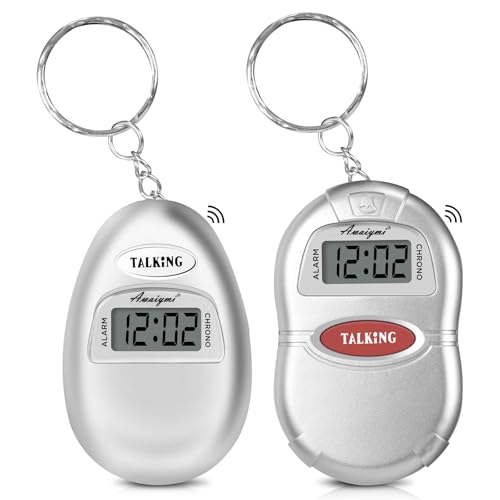
Awaiymi sells two keychain talking clocks with alarms in one pack, at under $25. The listing gives few other details, so the pair itself is the feature.

It ranks seventh because the listing has less detail than the Lenporl, which at least states its LCD. Two clocks for one price is a genuine plus: one stays at home, one goes in a bag, or you keep a spare. Against the LSS single keychain below, it adds the alarm and a second unit.

A useful pair for a household with two users or a user who loses things. The caveat is volume, since keychain speakers are small, so do not rely on one for someone with significant hearing loss.

Pack
2 clocks
Form
Keychain
Function
Talking with alarm
Price bracket
Under $25

What we like

  • +Two clocks in the pack
  • +Alarm function included
  • +Pocket-size keychain design
  • +Lowest price tier

Watch out for

  • −Few specs listed
  • −Small speaker volume
  • −Tiny display

Buy it if: Households with two users or someone who loses things.

Skip it if: Hearing loss means you need a louder voice.

8

Best Simple Keychain

LSS Silver Talking Clock Keychain

Our verdict: A plain silver keychain that speaks the time. No frills.

LSS makes a silver talking clock keychain at under $25. It is the simplest product in the ranking: a pocket device that speaks the time when you ask.

It ranks last because the listing lists no alarm, no date announcement and no volume control, all of which other models offer. Where it earns a place is simplicity. There is nothing to configure, which suits a user who finds menus confusing. Against the Awaiymi pair, you get one unit with no alarm.

Buy it as a pocket backup. The caveat is that it is a spot-check tool, not a clock to wake you up or to sit on a nightstand.

Form
Keychain
Finish
Silver
Function
Speaks the time
Price bracket
Under $25

What we like

  • +Very simple to use
  • +Pocket-size and light
  • +Lowest price tier
  • +Nothing to program

Watch out for

  • −No alarm listed
  • −No date announcement listed
  • −Small speaker

Buy it if: A simple pocket backup for time checks.

Skip it if: You need an alarm, the date or a louder voice.

Methodology

How We Ranked These

Volume and speech clarity

Stated volume levels or loudness claims, since a clock that cannot be heard fails its main job.

Display size

Whether a large display is stated, which matters for users with partial sight.

Announcement style

Speech on demand by button or on a schedule, and whether the date is announced.

Portability

Desk clock or keychain, and how each fits the way the user lives.

Price and detail

Price bracket against how much the listing tells you about the product.

Every Primea Score uses the same weights: Performance 30% · Build & Materials 20% · Everyday Usability 20% · Value 20% · Owner Satisfaction 10%. Full scoring rules

Buyer's guide

How to Pick the Right One for You

By User Need

Start with the person, then the product.

UserOur pick
Fading sight and memoryGOLOZA 7'' Digital Dementia Clock, Talking Clock with 10 Volumes
Hearing lossTalking Clock - Extra Loud Time & Date for Elderly, Dementia, Low Vision
Blind, wants speech on requestCirbic Extra Large Talking Button Clock - for The Blind, Elderly or Visually impaired
TravellerLenporl Talking Clock for The Blind and Visually Impaired - Easy-Use Talking Alarm Clock

By Budget

SpendOur pick
Under $25, deskNADOBA Talking Clock for Blind Elderly, Voice Announced Date and Time
Under $25, buttonLAKXIUL Talking Button Clock - for The Blind, Elderly or Visually impaired (Blue and Silver)
Under $25, two clocksAwaiymi 2 Pack Talking Clock for Blind Keychain Alarm - Small Digital Clock with Alarm
$25 to $50GOLOZA 7'' Digital Dementia Clock, Talking Clock with 10 Volumes

Button vs Automatic

Button

Speaks when pressed, so it stays quiet at night. Needs the user to remember. Picks: Cirbic and LAKXIUL.

Display and voice together

A larger clock that shows and speaks, which suits memory loss better. Picks: GOLOZA and the extra-loud Time & Date clock.

Default to a large display with voice for dementia, and a button clock for blind users.

By Form

FormOur pick
Bedside desk clockGOLOZA 7'' Digital Dementia Clock, Talking Clock with 10 Volumes
Button desk clockCirbic Extra Large Talking Button Clock - for The Blind, Elderly or Visually impaired
Keychain with alarmLenporl Talking Clock for The Blind and Visually Impaired - Easy-Use Talking Alarm Clock
Plain keychainLSS Silver Talking Clock Keychain

For Dementia Care Specifically

Look for

A large, high-contrast display, a clear voice at an adjustable volume, and the date as well as the time.

In this ranking

GOLOZA 7'' Digital Dementia Clock. Its 7 inch screen and ten volume levels fit the need, with the extra-loud Time & Date clock as the alternative.

When to Spend More

Spend more if

The user needs both a big display and an adjustable voice. The GOLOZA at $25 to $50 covers both.

Save if

You want a spare for a second room or a bag. The NADOBA or the Awaiymi pair cost under $25.

Questions

Frequently Asked Questions

Will a talking clock work for someone with dementia?+

It can help, especially one with a large display and date, like the GOLOZA 7 inch. A button-only clock such as the Cirbic is a poorer fit, because a user with memory loss may forget to press it.

What is the most common mistake when buying one?+

Assuming loud means clear. A tiny keychain speaker like the LSS can be hard to understand in a noisy room, however much you turn it up. Test any talking clock in the place it will be used.

Is the GOLOZA worth it over a cheaper NADOBA?+

If the user needs a big screen and a volume range, yes. The GOLOZA lists a 7 inch display and ten volume levels, while the NADOBA states neither. For a spare room, the NADOBA's lower price is enough.

How do I set one up?+

Insert batteries or plug in, then set the time and date, and the alarm if there is one. For the Lenporl or Awaiymi keychain models, check the alarm sound in a quiet room. Set the volume on the GOLOZA before placing it.

How do I look after a talking clock?+

Replace batteries on a schedule rather than waiting for the voice to fade, and wipe the speaker grille gently. Keychain models like the LSS get knocked about, so keep them in a pocket away from keys and coins.

Can a talking clock replace a smart speaker?+

For time and date, yes, and it is simpler. A button clock such as the LAKXIUL needs no Wi-Fi or setup. A smart speaker does more, but a talking clock never asks for an update or a password.

Final take

The GOLOZA 7 inch is the talking clock to buy for most people: a big display, ten volume levels and spoken time at the bedside. The extra-loud Time & Date model suits hearing loss, and the Cirbic suits blind users who want speech on request. Keychain clocks are travel tools, so pair one with a desk clock and test the volume where it will be used.

More Ranked & Reviewed Guides