
Primea ReviewsAll Reviews

Primea Reviews is reader-supported. When you buy through our Amazon links we may earn a commission, at no extra cost to you. Rankings are set by our editors and never sold. Learn more

Ranked & Reviewed by Primea Reviews

The 6 Best Smart Plugs for Seniors of 2026, Ranked & Reviewed

By the Primea Editorial TeamUpdated November 4, 20268 min read6 products ranked
The 6 Best Smart Plugs for Seniors of 2026, Ranked & Reviewed

The short answer

The Kasa HS103P4 four-pack is our top pick for older users because each plug keeps a touch actuator button, so a lamp still works without a phone or a voice command. The Amazon Smart Plug is the simplest option for Echo owners, with no hub and guided setup in the Alexa app. The Amazon Basics Alexa-only plug suits adult children setting up a parent's home from afar.

The Primea Scoreboard

Ranked & Reviewed

  1. A four-pack that keeps a touch button on every plug and works with Alexa, Echo and Google Home.

    94Outstanding
    Check price
  2. 02
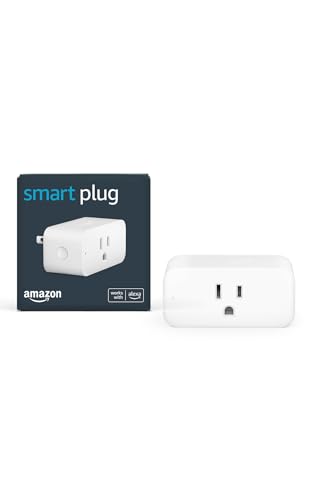
    Amazon Smart Plug

    Best for Echo Owners

    Amazon Smart Plug

    No hub and guided setup in the Alexa app, for Echo owners who want one familiar app.

    91Excellent
    Check price
  3. A compact single-socket plug with a zero-touch setup option, pre-linked for a parent with an Echo.

    88Excellent
    Check price
  4. A slim 15A plug with Alexa and Google voice and timers, for automatic evening lamps.

    85Excellent
    Check price
  5. 05
    Govee Smart Plug, 4-Pack

    Best Group Control

    Govee Smart Plug, 4-Pack

    Four plugs that connect by Bluetooth or Wi-Fi, with schedules and room groups.

    82Very Good
    Check price
  6. A single plug with Wi-Fi or Bluetooth, app control and timers, for one lamp or fan.

    79Very Good
    Check price

The smart plug that works best for an older relative is the one that still works when the smart part fails. Wi-Fi drops, apps update and assistants mishear, and a plug that goes dead in a dark living room is more of a hazard than a convenience. The best designs keep a physical button on the plug itself, so the lamp turns on with a press as it always did.

That is the first test we applied. The second was setup: older users rarely want to configure an app, so the person setting up the plug, often an adult child, needs the least possible friction. We ranked six plugs on manual control, voice support, setup effort, schedules and pack size, reading the spec sheets rather than trusting marketing language about being easy.

Before you buy

What Actually Matters

01

Physical button

A button on the plug lets anyone switch the device on or off without a phone or a voice command. That matters when Wi-Fi drops or the assistant misunderstands. The Kasa HS103P4 lists a touch actuator button. Check the listing for a manual button, and remember that a plug without one becomes a dead adapter if the network fails.

02

Voice assistant support

Alexa-only plugs suit Echo households, while Google Home users need a plug that supports Google. Cross-platform plugs like the Kasa work with both. Match the plug to the assistant already in the home, and check that the listing names it clearly, since a plug that cannot talk to your speaker is worth little.

03

Setup effort

Setup is where older users usually give up, so the person configuring the plug matters. Zero-touch and guided setups, like the Amazon Basics and Amazon Smart Plug, reduce steps. Look for a hub-free plug with guided setup, and set up the plug yourself before handing it over, so the user only has to press a button.

04

Wi-Fi band

Many plugs connect only on 2.4GHz Wi-Fi, which some routers hide or merge with 5GHz. The Kasa Ultra Mini lists a 2.4GHz requirement. Check the listing for the supported band, and if setup fails, temporarily separate your router's bands. Bluetooth-capable plugs, such as the Govee and GHome, give a fallback near the phone.

05

Schedules and timers

A schedule turns a lamp on at dusk and off at bedtime without anyone touching it, which is the most useful smart plug feature for most households. Timers and countdowns cover short tasks. Look for schedules in the listing, and set the time zone correctly in the app so lights follow the real day.

In-depth reviews

Our Ranked Picks, Reviewed

1

Best Overall

Kasa Smart Plug HS103P4 (4-Pack)

Our verdict: A four-pack that keeps a touch button on every plug and works with Alexa, Echo and Google Home.

The Kasa HS103P4 is a four-pack of 15A-rated plugs with a touch actuator button, voice control through Alexa, Echo and Google Home, and no hub required. The button is the feature that sets it apart for older users.

It ranks first because it never leaves a lamp stranded: if the Wi-Fi goes down or the user dislikes voice commands, a press on the plug still switches it. Households where several people use the lamps, and not all speak to assistants, are exactly its target. The Amazon Smart Plug is simpler to set up but has no equivalent button listed.

Buy it to light several rooms. The caveat is that setup is through the Kasa app, which takes more steps than the Alexa-only plugs.

Pack size
4 plugs
Manual control
Touch actuator button
Voice
Alexa, Echo, Google Home
Rating
15A, no hub

What we like

  • +Physical button on each plug
  • +Alexa and Google Home voice
  • +No hub required
  • +Four plugs per pack

Watch out for

  • −Setup through the Kasa app
  • −Costs $25 to $50
  • −More plugs than one room needs

Buy it if: Households where not everyone uses voice assistants.

Skip it if: You want an Alexa-only plug with guided setup.

2

Best for Echo Owners

Amazon Smart Plug

Our verdict: No hub and guided setup in the Alexa app, for Echo owners who want one familiar app.

Amazon's own plug works with Alexa, needs no smart home hub, sets up through the Alexa app and suits lamps, fans and coffee makers. It is a single plug in the under $25 bucket.

It ranks second because the setup path is the easiest in the group for someone who already owns an Echo, with guided steps in an app they know. It loses to the Kasa because it lists no manual button and works with Alexa only, so a lost connection means a dead plug.

Buy it for an Echo household that wants the least possible setup. The caveat is the Alexa lock-in: without an Echo, the plug is far less useful.

Voice
Alexa
Hub
Not required
Setup
Alexa app, guided
Pack size
1 plug

What we like

  • +No hub needed
  • +Guided Alexa app setup
  • +Under $25 price bucket
  • +Works with lamps and fans

Watch out for

  • −Alexa only
  • −No manual button listed
  • −Single plug per pack

Buy it if: Echo owners who want the least possible setup.

Skip it if: You use Google Assistant or want a physical button.

3

Best for Remote Setup

Amazon Basics Smart Plug (Alexa Only)

Our verdict: A compact single-socket plug with a zero-touch setup option, pre-linked for a parent with an Echo.

The Amazon Basics plug works with Alexa only, has a compact single-socket body and offers a zero-touch setup option, plus schedules and remote control. The one-socket footprint leaves neighbouring outlets free.

It ranks third because zero-touch setup is a genuine help for adult children: you can buy a plug that is already linked to a parent's Echo, so the parent has nothing to configure. It sits below the Amazon Smart Plug on cost, in the $25 to $50 range.

Buy it if you are setting a plug up for a parent from afar. The caveat is the Alexa-only support and the lack of a listed manual button.

Voice
Alexa only
Setup
Zero-touch option
Schedules
Yes, plus remote control
Footprint
One socket

What we like

  • +Zero-touch setup option
  • +Compact one-socket body
  • +Schedules and remote control
  • +Pre-linkable to an Echo

Watch out for

  • −Alexa only
  • −No manual button listed
  • −Costs $25 to $50

Buy it if: Adult children buying a pre-linked plug for a parent with an Echo.

Skip it if: The home uses Google Assistant.

4

Best Slim Plug

Kasa Smart Plug Ultra Mini 15A EP10

Our verdict: A slim 15A plug with Alexa and Google voice and timers, for automatic evening lamps.

The Kasa Ultra Mini EP10 is a slim body rated 15A, works with Alexa and Google Home, needs 2.4GHz Wi-Fi and offers timer and countdown scheduling. It is a single plug in the under $25 bucket.

It ranks fourth because the listing gives no manual button, unlike the HS103P4, and it requires a 2.4GHz network, which some newer routers hide. The slim body is its benefit, since it leaves the second outlet free.

Buy it for automatic evening lamps from a widely supported plug. The caveat is the 2.4GHz requirement and the app-based setup.

Rating
15A
Voice
Alexa, Google Home
Wi-Fi
2.4GHz required
Scheduling
Timer and countdown

What we like

  • +Slim Ultra Mini body
  • +Alexa and Google voice
  • +Timer and countdown
  • +Under $25 price bucket

Watch out for

  • −2.4GHz Wi-Fi required
  • −No manual button listed
  • −App-based setup

Buy it if: Automatic evening lamps from a slim, widely supported plug.

Skip it if: Your router is 5GHz only or you want a button.

5

Best Group Control

Govee Smart Plug, 4-Pack

Our verdict: Four plugs that connect by Bluetooth or Wi-Fi, with schedules and room groups.

Govee ships four plugs that connect by Bluetooth or Wi-Fi, support schedules and groups, and work with Alexa and Google Assistant. The group function lets one command turn on every lamp in a room.

It ranks fifth because no manual button is listed and its setup is app-heavy, which counts against it for older users. Bluetooth is a plus, as it lets the plug work near the phone if the router fails, but it needs the phone close by.

Buy it for a home with many lamps where one command should light a room. The caveat is the app complexity.

Pack size
4 plugs
Connection
Bluetooth or Wi-Fi
Voice
Alexa, Google Assistant
Extras
Schedules, group controller

What we like

  • +Group control for a room
  • +Bluetooth or Wi-Fi
  • +Alexa and Google Assistant
  • +Four plugs per pack

Watch out for

  • −No manual button listed
  • −More complex app
  • −Costs $25 to $50

Buy it if: Homes with many lamps where one command should light a room.

Skip it if: You want the simplest setup or a physical button.

6

Best Single Lamp

GHome Smart Plug, WiFi with Bluetooth

Our verdict: A single plug with Wi-Fi or Bluetooth, app control and timers, for one lamp or fan.

GHome offers Wi-Fi or Bluetooth connection, Alexa and Google Assistant voice, app control from anywhere and outlet timers, in the under $25 bucket.

It ranks last because it lists no manual button, and the brand has the least detail on setup or support in the listing. Timers are the helpful feature: set a lamp to come on at dusk and the user never touches it. Against the Govee, it offers a single plug without group control.

Buy it for a single lamp or fan where simple timers are enough. The caveat is the thin listing detail.

Connection
Bluetooth or Wi-Fi
Voice
Alexa, Google Assistant
Remote
App, from anywhere
Timers
Outlet timers

What we like

  • +Wi-Fi or Bluetooth
  • +Outlet timers
  • +Alexa and Google Assistant
  • +Under $25 price bucket

Watch out for

  • −No manual button listed
  • −Thin listing detail
  • −Single plug only

Buy it if: A single lamp or fan where simple timers are enough.

Skip it if: You want a physical button or group control.

Methodology

How We Ranked These

Manual control

Whether the plug has a physical button that still works if the app or Wi-Fi fails.

Voice support

Alexa, Google Home and Google Assistant compatibility and what happens without them.

Setup effort

Steps needed, hub requirements and whether someone can pre-configure it.

Schedules and automation

Timers and schedules that let lamps run without user input.

Pack size and value

Plugs per pack and price tier.

Every Primea Score uses the same weights: Performance 30% · Build & Materials 20% · Everyday Usability 20% · Value 20% · Owner Satisfaction 10%. Full scoring rules

Buyer's guide

How to Pick the Right One for You

By Setup Need

The easiest plug depends on who does the setting up.

SituationOur pick
Needs a physical buttonKasa Smart Plug HS103P4 (4-Pack)
Echo owner, guided setupAmazon Smart Plug
Adult child setting up remotelyAmazon Basics Smart Plug (Alexa Only)
Slim plug, Alexa or GoogleKasa Smart Plug Ultra Mini 15A EP10

By Budget

SpendOur pick
Under $25, Echo ownerAmazon Smart Plug
Under $25, slimKasa Smart Plug Ultra Mini 15A EP10
Under $25, timersGHome Smart Plug, WiFi with Bluetooth
$25 to $50, buttonKasa Smart Plug HS103P4 (4-Pack)
$25 to $50, groupsGovee Smart Plug, 4-Pack

Alexa-Only vs Cross-Platform

Alexa-only

Simplest setup inside an Echo home. The Amazon Smart Plug and Amazon Basics plug work this way.

Cross-platform

Works with Alexa and Google, so a speaker change will not strand the plug. The Kasa, Govee and GHome do this.

Pick Alexa-only only if the household is committed to Echo.

By Connection Type

ConnectionOur pick
Wi-Fi with a manual buttonKasa Smart Plug HS103P4 (4-Pack)
Wi-Fi only, 2.4GHzKasa Smart Plug Ultra Mini 15A EP10
Bluetooth or Wi-Fi with groupsGovee Smart Plug, 4-Pack
Bluetooth or Wi-Fi, singleGHome Smart Plug, WiFi with Bluetooth

For a Parent Living Alone Specifically

Look for

A physical button, a schedule for evening lamps and setup you can finish remotely.

In this ranking

The Kasa HS103P4 covers button and voice, and the Amazon Basics plug adds zero-touch pre-linking.

When to Spend More

Spend more if

You light several rooms, where the $25 to $50 Kasa or Govee four-pack gives more plugs.

Save if

You need one lamp automated, where the Amazon Smart Plug under $25 suffices.

Questions

Frequently Asked Questions

Do these need a smart home hub?+

No. The Amazon Smart Plug and Kasa HS103P4 both list no hub required, connecting directly to Wi-Fi. You will need an Alexa or Google speaker for voice, but the app works without one.

What is the most common mistake?+

Choosing a plug with no manual button for a user who does not use voice. If the Wi-Fi drops, the Amazon plug becomes a dead adapter. The Kasa HS103P4's touch button avoids that.

Are smart plugs worth it for older adults?+

For lamps, yes. A schedule from the Govee or GHome lights a room at dusk without anyone touching it. They are less suited to heaters or medical equipment, which should never run on a smart plug.

How do I set one up?+

Plug it in, open the Alexa or Kasa app and follow the steps. On the Amazon Basics, use zero-touch setup to pre-link the plug. Test the lamp with a command before leaving.

What if the Wi-Fi changes?+

The plug will need to be set up again with the new network. The Kasa Ultra Mini requires 2.4GHz, so check your router. Bluetooth models like the Govee can be re-paired near a phone.

Can I use one with a space heater or appliance?+

Check the plug's rating first. The Kasa models list 15A, but heaters and other high-draw devices carry fire risks. Many manufacturers advise against them. Use the plug for lamps, fans and coffee makers as listed.

Final take

Buy the Kasa HS103P4 four-pack if you want the safest choice for an older user: a touch button on every plug plus voice control. The Amazon Smart Plug is the simplest for an Echo home, and the Amazon Basics plug suits remote setup. Keep smart plugs to lamps and fans, and test the physical button on day one.

More Ranked & Reviewed Guides