

Primea ReviewsAll Reviews

Primea Reviews is reader-supported. When you buy through our Amazon links we may earn a commission, at no extra cost to you. Rankings are set by our editors and never sold. Learn more

Ranked & Reviewed by Primea Reviews

The 6 Best Smart Plugs for Lamps of 2026, Ranked & Reviewed

Joshua ParkesBy Joshua Parkes, Editor in ChiefUpdated November 11, 202610 min read6 products ranked
The 6 Best Smart Plugs for Lamps of 2026, Ranked & Reviewed

The short answer

The Kasa Smart Plug Ultra Mini is the best lamp plug, working with Alexa and Google in a slim body that leaves the neighboring socket free. The Linkind Matter plug is the choice if you run Apple Home, the Amazon Smart Plug is the easiest for Echo owners, and the Kasa 4-pack is the one for a whole house of lamps.

The Primea Scoreboard

Ranked & Reviewed

  1. A slim 15A plug with timers and countdowns that works with Alexa and Google Home.

    93Outstanding
    Check price
  2. 02
    Linkind Matter Smart Plug

    Matter support across Apple Home, Alexa and Google Home, with control over the local network.

    90Excellent
    Check price
  3. 03
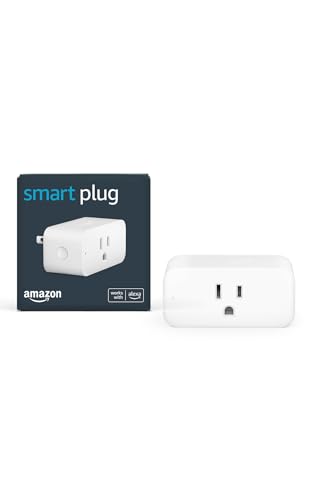
    Amazon Smart Plug

    Best for Echo

    Amazon Smart Plug

    The Alexa-native plug with guided setup and a physical on switch.

    88Excellent
    Check price
  4. 04
    Kasa Smart Plug HS103P4

    Best Multi-Room Pack

    Kasa Smart Plug HS103P4

    Four plugs with a touch actuator and support for Alexa and Google Home.

    85Excellent
    Check price
  5. 05
    Amazon Basics Smart Plug

    Best Slim Alexa Plug

    Amazon Basics Smart Plug

    A compact single-socket plug with built-in scheduling for Alexa users.

    82Very Good
    Check price
  6. 06
    GHome Smart Plug

    Best Basic Plug

    GHome Smart Plug

    An entry-level plug with timers for a single lamp, on Bluetooth or Wi-Fi.

    79Very Good
    Check price

A lamp is the easiest thing in the house to automate, and the one where the wrong smart plug is most irritating. A fat plug blocks the second outlet. A plug without a physical button leaves you stranded when the Wi-Fi drops. And a lamp with a dimmer bulb or a touch base can confuse a plug that only switches power.

We ranked six smart plugs from the listings: ecosystem support, hub requirements, body size, setup, scheduling and pack size. All six switch power on and off, so none can dim a bulb. They suit lamps with a physical switch left in the on position, or a lamp that turns on when power returns.

Before you buy

What Actually Matters

01

Ecosystem support

Smart plugs speak to Alexa, Google Home or Apple Home, and some speak to all. Matter plugs work across assistants from one device. On a listing, read the compatibility line carefully, since Alexa only plugs will not work with Google or Apple. Mixed households should favor Matter, which reduces the chance of buying twice.

02

Plug footprint

A bulky plug can cover the second wall socket, forcing you to waste an outlet. A slim plug sits flat against the wall. Check the listing for a mini or compact body, and photos beside a double outlet. Two plugs side by side only fit when both bodies are slim.

03

Wi-Fi band

Many plugs, including the Kasa Ultra Mini, run only on 2.4GHz Wi-Fi. If your router combines bands, setup can fail. Check the listing for the Wi-Fi band and use the 2.4GHz network during pairing. If your router merges bands, split the network briefly during pairing.

04

Physical button

A button on the plug works when the internet or app fails. The Amazon Smart Plug and Kasa HS103P4 list one. Look for a touch actuator or on switch on the listing, since a lamp that cannot turn on is frustrating. It also gives a fallback when a guest cannot use the app.

05

Load rating

The rating tells you how much power the plug can switch, such as 15A. A lamp draws far less, so the number matters most if you reuse the plug elsewhere. Check the rating if you may plug in a heater or fan later. Lamps with built-in dimmers should stay on their own switch.

In-depth reviews

Our Ranked Picks, Reviewed

1

Best Overall

Kasa Smart Plug Ultra Mini 15A

Our verdict: A slim 15A plug with timers and countdowns that works with Alexa and Google Home.

The Kasa Ultra Mini is a 15A plug on 2.4GHz Wi-Fi with timer and countdown functions and support for both Alexa and Google Home. The mini body is the headline for lamps, since it sits against the wall without covering the second socket.

It ranks first because it works across both major assistants and stays small. It beats the standard Kasa HS103P4 on footprint, though the HS103P4 adds a touch actuator and a four-pack. Against the Amazon plugs it gains Google Home support.

Buy it if your lamp shares an outlet. Skip it if you use Apple Home, which this plug does not list, and you have a 5GHz-only network.

Load
15A
Wi-Fi
2.4GHz
Scheduling
Timer and countdown
Voice
Alexa and Google Home

What we like

  • +Slim body frees the second socket
  • +Works with Alexa and Google Home
  • +15A rating is generous for lamps
  • +Timer and countdown included

Watch out for

  • −2.4GHz Wi-Fi only
  • −No Apple Home support

Buy it if: Buyers who want a slim lamp plug for either assistant.

Skip it if: You run Apple Home.

2

Best Matter Plug

Linkind Matter Smart Plug

Our verdict: Matter support across Apple Home, Alexa and Google Home, with control over the local network.

The Linkind is a Matter smart plug that works with Apple Home, Alexa, Siri and Google Home, and runs on the local network with remote app control.

It ranks second because Matter matters most in a mixed household. One plug works across assistants, and local control means the lamp still switches when the internet is out. It trails the Kasa Ultra Mini on body size and brand track record.

Buy it if you have iPhones and an Echo in the same house. Skip it if one assistant is enough and you want the cheapest plug.

Standard
Matter
Platforms
Apple Home, Alexa, Siri, Google Home
Control
Local network
Remote
App control

What we like

  • +Matter works across ecosystems
  • +Local control without the cloud
  • +Apple Home support
  • +Remote app control

Watch out for

  • −Matter setup is fussier at first
  • −Less proven than Kasa

Buy it if: Mixed households with Apple, Alexa and Google devices.

Skip it if: You only own an Echo.

3

Best for Echo

Amazon Smart Plug

Our verdict: The Alexa-native plug with guided setup and a physical on switch.

The Amazon Smart Plug works with Alexa, needs no hub and walks you through setup in the Alexa app. A physical switch on the device turns it on without the app.

It ranks third because setup is the smoothest in this group for an Echo household, but it works only with Alexa. It sits below the Linkind and Kasa because those cover more assistants. It beats the Amazon Basics plug on the physical button.

Buy it if you live inside the Alexa app. Skip it if you might ever add Google or Apple devices.

Ecosystem
Amazon Alexa
Hub
Not required
Setup
Alexa app, guided
Control
Physical on switch

What we like

  • +Guided Alexa setup
  • +Physical switch on the plug
  • +No hub required
  • +Under $25

Watch out for

  • −Alexa only
  • −No Google or Apple support

Buy it if: Echo households wanting the easiest setup.

Skip it if: You use Google Home or Apple Home.

4

Best Multi-Room Pack

Kasa Smart Plug HS103P4

Our verdict: Four plugs with a touch actuator and support for Alexa and Google Home.

The Kasa HS103P4 comes in a four-pack with a touch actuator, Alexa and Google Home support, and no hub requirement. You get a plug for every lamp in the living room, bedroom and den.

It ranks fourth because the body is larger than the Ultra Mini, which can block the second socket on a tight wall outlet. The four-pack lowers cost per plug, and the touch button gives control when the app is slow.

Buy it if you plan to automate several lamps. Skip it if your outlets are crowded and each plug must stay slim.

Pack
4 plugs
Control
Touch actuator and app
Voice
Alexa and Google Home
Hub
Not required

What we like

  • +Four plugs for several rooms
  • +Touch button on the plug
  • +Alexa and Google Home support
  • +No hub needed

Watch out for

  • −Bulkier than the Ultra Mini
  • −No Matter support listed

Buy it if: Homes with lamps in several rooms.

Skip it if: Your sockets are tight.

5

Best Slim Alexa Plug

Amazon Basics Smart Plug

Our verdict: A compact single-socket plug with built-in scheduling for Alexa users.

The Amazon Basics plug works only with Alexa, fits one socket, includes scheduling and has a zero-touch setup option that links it to your Echo.

It ranks fifth because it costs more than the Amazon Smart Plug, in the $25-50 range, yet loses the physical on switch. Its advantage is the slim footprint that leaves neighboring sockets free, and the zero-touch linking.

Buy it if you want the slimmest Alexa plug. Skip it if you want a manual button or Google support.

Ecosystem
Alexa only
Footprint
Fits 1 socket
Scheduling
Built in
Setup
Zero touch option

What we like

  • +Compact single-socket body
  • +Built-in scheduling
  • +Zero touch setup option
  • +Remote app control

Watch out for

  • −Alexa only
  • −Costs more than the Amazon Smart Plug

Buy it if: Alexa users who want a slim plug.

Skip it if: You want a physical button.

6

Best Basic Plug

GHome Smart Plug

Our verdict: An entry-level plug with timers for a single lamp, on Bluetooth or Wi-Fi.

The GHome offers Bluetooth or Wi-Fi connection, Alexa and Google Assistant support, remote app control and timers.

It ranks last because the listing is thin on load rating, size and hub details, and the brand is less proven than Kasa. It suits a single lamp where the plug does a simple on and off.

Buy it if you want a basic plug for one lamp. Skip it if you want a documented load rating or Matter support.

Connection
Bluetooth or Wi-Fi
Voice
Alexa and Google Assistant
Control
App from anywhere
Timers
Included

What we like

  • +Alexa and Google Assistant support
  • +Bluetooth or Wi-Fi connection
  • +Timers from the app
  • +Simple one-lamp use

Watch out for

  • −Load rating not listed
  • −Lesser-known brand

Buy it if: People who want a plain plug for one lamp.

Skip it if: You need documented specs.

Methodology

How We Ranked These

Ecosystem support

We checked which assistants each plug works with, including Matter.

Footprint

Body size decides whether a plug blocks the second outlet.

Setup and hub

We noted hub needs and how guided setup is.

Scheduling and control

Timers, countdowns and physical buttons were weighed.

Pack value

Multi-packs lower the cost per plug for several lamps.

Every Primea Score uses the same weights: Performance 30% · Build & Materials 20% · Everyday Usability 20% · Value 20% · Owner Satisfaction 10%. Full scoring rules

Buyer's guide

How to Pick the Right One for You

By Smart Home Platform

Choose the plug that speaks your assistant.

PlatformOur pick
Alexa onlyAmazon Smart Plug
Alexa and GoogleKasa Smart Plug Ultra Mini 15A
Apple Home, Alexa and GoogleLinkind Matter Smart Plug
Basic Alexa and GoogleGHome Smart Plug

By Budget

SpendOur pick
Under $25Amazon Smart Plug
$25 to $50, slimKasa Smart Plug Ultra Mini 15A
$25 to $50, pack of fourKasa Smart Plug HS103P4
$25 to $50, MatterLinkind Matter Smart Plug

Single Plug vs Multi-Pack

Single plug

One lamp to automate. Picks: Kasa Ultra Mini, Amazon Smart Plug, Amazon Basics Smart Plug.

Multi-pack

Several lamps or rooms. Pick: Kasa HS103P4 four-pack.

Default to a single plug if you only have one lamp.

By Outlet Space

Fit decides whether you lose a socket.

Outlet situationOur pick
Tight double outletKasa Smart Plug Ultra Mini 15A
Single socket compactAmazon Basics Smart Plug
Roomy outlet, several lampsKasa Smart Plug HS103P4
Standard outlet, EchoAmazon Smart Plug

For a Dimmable Lamp Specifically

Look for

A plug that only switches power, plus a lamp with a switch left on. A smart plug cannot dim bulbs.

In this ranking

Kasa Ultra Mini for a slim fit, and a Linkind Matter plug if you want local control.

When to Spend More

Spend more if

You use several assistants. The Linkind Matter plug is the most flexible.

Save if

You only have an Echo. The Amazon Smart Plug under $25 is enough.

Questions

Frequently Asked Questions

Can a smart plug dim my lamp?+

No. These plugs only switch power on and off. Use the Kasa Ultra Mini or Linkind to schedule a lamp, and buy a smart bulb if you want dimming. That keeps a nightstand lamp on a schedule without extra gear.

What is the most common mistake?+

Buying an Alexa-only plug and later adding Google or Apple devices. The Amazon Smart Plug and Amazon Basics plug work only with Alexa, while the Linkind spans Apple Home, Alexa and Google. Smart bulbs cost more but handle dimming and color.

Is the Linkind worth it over the Kasa Ultra Mini?+

If you use Apple Home, yes. The Linkind adds Matter and local control, while the Kasa Ultra Mini has a smaller body and a longer track record. Pairing takes a couple of minutes per plug.

How do I set one up?+

Plug it in, open the app and follow pairing. For the Kasa Ultra Mini, use your 2.4GHz network. The Amazon Smart Plug walks you through it in the Alexa app. Matter plugs can pair to several assistants at once.

Do I need a hub?+

No. The Amazon Smart Plug, Kasa HS103P4 and Linkind all list no hub requirement. They connect to your router directly. Hubs only matter for older Zigbee gear.

Can I use one on a touch lamp?+

Often not well. A touch lamp can turn off when power is cut, then stay off when power returns. Test a lamp with a physical switch left on first. Lamps with a mechanical switch are the safest bet.

Final take

The Kasa Smart Plug Ultra Mini is the best lamp plug because it is slim, works with Alexa and Google and runs timers and countdowns. Pick the Linkind if you use Apple Home, the Amazon Smart Plug for the easiest Echo setup, and the Kasa four-pack for lamps in several rooms.

About the author

Joshua Parkes, Editor in Chief at Primea Reviews

Joshua Parkes

Editor in Chief, Primea Reviews

Joshua owns the Primea Score framework and signs off on every ranking this site publishes. He and the editors work from spec sheets, manuals, warranty terms, certifications and long-term owner feedback, and a guide says so plainly when a listing leaves out the number that decides the purchase. Primea never claims to have physically tested a product it has not, and no brand can pay for placement.

More Ranked & Reviewed Guides