
Primea ReviewsAll Reviews

Primea Reviews is reader-supported. When you buy through our Amazon links we may earn a commission, at no extra cost to you. Rankings are set by our editors and never sold. Learn more

Ranked & Reviewed by Primea Reviews

The 7 Best RAID Direct-Attached Storage Enclosures for Editors and Home Backups, Ranked & Reviewed

By the Primea Editorial TeamUpdated November 3, 202610 min read7 products ranked
The 7 Best RAID Direct-Attached Storage Enclosures for Editors and Home Backups, Ranked & Reviewed

The short answer

The QNAP TR-004 is the best RAID direct-attached storage box for most people, with four 3.5 inch bays, hardware RAID 0, 1, 5 and JBOD, USB Type-C and lockable bays. The TerraMaster D2-320 is the fastest two-bay option for SSDs, while the ORICO five-bay is the cheapest way to hold 110TB.

The Primea Scoreboard

Ranked & Reviewed

  1. Four 3.5 inch bays with hardware RAID 0, 1, 5 and JBOD over USB Type-C, and lockable trays.

    94Outstanding
    Check price
  2. A 10Gbps USB 3.2 Gen 2 two-bay box quoted at up to 1,075MB/s with SSDs in RAID 0.

    92Outstanding
    Check price
  3. Five bays, eight RAID modes and a built-in 150W supply at up to 110TB in an aluminum body.

    90Excellent
    Check price
  4. Four bays, eight RAID modes, 88TB, a tray-less lock design and a 150W internal supply.

    88Excellent
    Check price
  5. Four bays up to 80TB with USB 3.0 and eSATA at 5Gbps and physical DIP-switch RAID selection.

    86Excellent
    Check price
  6. Two bays for 2.5 and 3.5 inch drives with hardware RAID 0, 1, JBOD, USB Type-C and lockable bays.

    83Very Good
    Check price
  7. A two-bay USB 3.2 Gen 2 Type-C box with DIP-switch hardware or software RAID and an eject button.

    80Very Good
    Check price

Direct-attached storage gets confused with a NAS all the time, and the difference decides the purchase. A DAS plugs into one computer by cable and shows up as a drive. It has no network features, no apps and no remote access, which is exactly why it is faster per dollar and simpler to run. If you want files on a shelf that one machine reads at full speed, a DAS is the right tool.

Seven enclosures are ranked below. Scoring weights RAID support, interface speed, bay count, cooling and power design, and how plainly the listing states each of them. RAID is not a backup, and every pick here needs a second copy of anything you cannot replace.

Before you buy

What Actually Matters

01

Hardware versus software RAID

Hardware RAID runs on the enclosure, so any computer sees one volume. Software RAID relies on the host or a NAS. DIP switches on the box, as on the CENMATE, are a hardware method.

02

RAID level

RAID 1 mirrors two drives, RAID 5 needs three or more and survives one failure, and RAID 0 stripes for speed with no protection. Choose the level before you choose the bay count.

03

Interface bandwidth

A 5Gbps link is enough for hard disks but caps SSD arrays. A 10Gbps USB 3.2 Gen 2 port, as on the TerraMaster, lets SSDs run faster. Check the port on your computer too.

04

Power and cooling

Spinning drives produce heat and need current. A built-in 150W supply and an 80mm fan, as on the ORICO, avoid external bricks and keep temperatures steady.

05

Backup reality

RAID guards against a drive failing, not against deletion, fire or a controller fault. Keep a second copy elsewhere for anything irreplaceable.

In-depth reviews

Our Ranked Picks, Reviewed

1

Best Overall

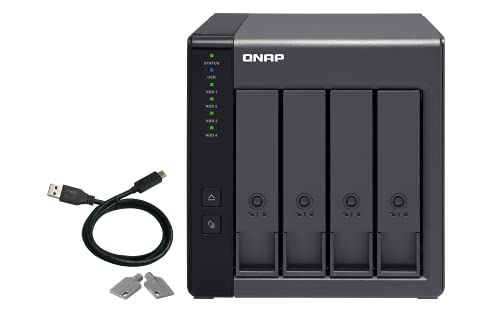
QNAP TR-004 4-Bay USB-C DAS with Hardware RAID (Diskless)

Our verdict: Four 3.5 inch bays with hardware RAID 0, 1, 5 and JBOD over USB Type-C, and lockable trays.

The TR-004 is a diskless four-bay enclosure with 3.5 inch bays, hardware RAID 0, 1, 5 and JBOD, a USB Type-C connection and lockable drive bays.

It leads because RAID 5 across four drives is the sweet spot for a home or small studio: one drive can fail without losing data, and you keep three drives of capacity. Hardware RAID means the enclosure handles the parity maths, so the computer is not burdened. The lockable bays are a quiet safeguard against someone pulling the wrong drive. It sits in the $200 to $500 bracket before you buy disks.

Buy it if you want a dependable four-drive array. Skip it if two bays are enough.

Bays
4 x 3.5 in
RAID
Hardware 0, 1, 5, JBOD
Interface
USB Type-C
Extras
Lockable drive bays

What we like

  • +Hardware RAID 5 across four bays
  • +Lockable drive bays
  • +USB Type-C connection
  • +Established QNAP support

Watch out for

  • −Drives sold separately
  • −Highest price bracket here

Buy it if: Editors and home archives needing redundancy.

Skip it if: A two-drive mirror is enough.

2

Fastest Two-Bay

TerraMaster D2-320 2-Bay USB RAID Enclosure (Diskless)

Our verdict: A 10Gbps USB 3.2 Gen 2 two-bay box quoted at up to 1,075MB/s with SSDs in RAID 0.

The D2-320 offers two bays, hardware RAID 0, 1, JBOD and Single, and a 10Gbps USB 3.2 Gen 2 link. The listing quotes up to 1,075MB/s with SSDs in RAID 0.

The interface is the difference. Spinning disks top out near 250MB/s each, so a 5Gbps port rarely limits them, but SSDs in RAID 0 will saturate it. A 10Gbps port gives them room. It ranks second because two bays cannot run RAID 5, and RAID 0 trades safety for speed, so use it for scratch footage, not sole copies.

Buy it if you use SSDs for video work. Skip it if you want parity protection.

Bays
2
RAID
Hardware 0, 1, JBOD, Single
Interface
USB 3.2 Gen 2, 10Gbps
Speed
Up to 1,075MB/s, SSD RAID 0

What we like

  • +10Gbps link suits SSD arrays
  • +Four mode choices in hardware
  • +Quoted speed above 1,000MB/s
  • +Compact two-bay body

Watch out for

  • −No RAID 5 with two bays
  • −RAID 0 offers no protection

Buy it if: Video editors using SSD scratch drives.

Skip it if: You want parity redundancy.

3

Best Capacity per Dollar

ORICO RAID 5-Bay HDD Enclosure (110TB, Aluminum)

Our verdict: Five bays, eight RAID modes and a built-in 150W supply at up to 110TB in an aluminum body.

This ORICO holds five drives, offers eight RAID modes, supports up to 110TB, quotes 235MB/s, and has a built-in 150W power supply and an 80mm fan.

Five bays give more RAID layouts than four, and an internal supply means no bulky external brick. It ranks third because 235MB/s is the ceiling of the USB 3.0 link, so it suits archives and backups more than editing. Aluminum helps dissipate heat from spinning drives.

Buy it if you want maximum capacity for the money. Skip it if you edit video directly from the array.

Bays
5
Capacity
Up to 110TB
Speed
235MB/s
Power
Built-in 150W

What we like

  • +Five bays, up to 110TB
  • +Built-in 150W supply
  • +Aluminum body with 80mm fan
  • +Eight RAID modes

Watch out for

  • −235MB/s ceiling
  • −Drives sold separately

Buy it if: Large archives and backups.

Skip it if: You edit directly from the array.

4

Best Tray-Less Four-Bay

ORICO 4-Bay RAID Hard Drive Enclosure (88TB, Aluminum)

Our verdict: Four bays, eight RAID modes, 88TB, a tray-less lock design and a 150W internal supply.

The ORICO four-bay offers eight RAID modes, up to 88TB, 235MB/s, a built-in 150W supply, an 80mm fan and a tray-less lock design.

Tray-less means drives slide in without screws, which makes swaps quick. It ranks fourth because it lacks the lockable-bay safeguards and brand support of the QNAP, and the same 235MB/s limit applies.

Buy it if you want a four-bay array at a lower price. Skip it if you want the QNAP's support.

Bays
4, tray-less
Capacity
Up to 88TB
Speed
235MB/s
Power
Built-in 150W

What we like

  • +Tray-less drive swaps
  • +Eight RAID modes
  • +Built-in power supply
  • +Lower price than QNAP

Watch out for

  • −Speed capped at 235MB/s
  • −Less established support

Buy it if: Budget four-drive arrays.

Skip it if: You want hardware-grade support.

5

Best Dual-Interface

CENMATE Aluminum 4-Bay Hardware RAID Enclosure (eSATA+USB)

Our verdict: Four bays up to 80TB with USB 3.0 and eSATA at 5Gbps and physical DIP-switch RAID selection.

The CENMATE has four bays, eight RAID modes, up to 80TB, USB 3.0 and eSATA at 5Gbps, and DIP switches for choosing the RAID mode.

DIP switches mean the mode is set on the box, not in software, so it works with any operating system. It ranks fifth because the 5Gbps link and unfamiliar brand offer less than the ORICO's built-in supply and fan.

Buy it if you need eSATA for an older machine. Skip it if you want a modern USB-C port.

Bays
4
Capacity
Up to 80TB
Interface
USB 3.0 and eSATA, 5Gbps
RAID select
DIP switches

What we like

  • +eSATA and USB both included
  • +DIP-switch RAID selection
  • +Eight RAID modes
  • +Aluminum body

Watch out for

  • −5Gbps interface
  • −No USB-C listed

Buy it if: Older machines that use eSATA.

Skip it if: You want USB-C.

6

Best Two-Bay Brand Pick

QNAP TR-002-A-US 2-Bay USB-C DAS with Hardware RAID (Diskless)

Our verdict: Two bays for 2.5 and 3.5 inch drives with hardware RAID 0, 1, JBOD, USB Type-C and lockable bays.

The TR-002-A-US is a two-bay enclosure with hardware RAID 0, 1 and JBOD, USB Type-C, lockable bays and support for both 2.5 inch and 3.5 inch drives.

A two-drive mirror is the simplest protection there is, and mixed bay sizes let you start with laptop drives or SSDs. It ranks sixth because it matches the TerraMaster on bays but not on stated speed.

Buy it if you want a simple mirrored pair from a known brand. Skip it if you need 10Gbps.

Bays
2
RAID
Hardware 0, 1, JBOD
Interface
USB Type-C
Drives
2.5 and 3.5 in

What we like

  • +Supports 2.5 and 3.5 inch drives
  • +Lockable bays
  • +Hardware RAID 1 mirror
  • +Known brand

Watch out for

  • −No parity RAID
  • −Speed not stated

Buy it if: A simple mirrored backup pair.

Skip it if: You need top speed.

7

Best Software RAID Option

QNAP TR-002 2-Bay Desktop DAS/NAS Expansion

Our verdict: A two-bay USB 3.2 Gen 2 Type-C box with DIP-switch hardware or software RAID and an eject button.

The TR-002 is a two-bay enclosure on USB 3.2 Gen 2 Type-C, with DIP switches to pick hardware or software RAID, an eject button and lockable trays. It can also expand a QNAP NAS.

Software RAID lets a QNAP NAS manage the disks, which is useful if you own one. It ranks last because it is an older model and the listing gives no price bracket or capacity.

Buy it if you own a QNAP NAS and want to expand it. Skip it if you want a standalone DAS with clear specs.

Bays
2
Interface
USB 3.2 Gen 2 Type-C
RAID
Hardware or software, DIP switch
Extras
Eject button, lockable trays

What we like

  • +Doubles as NAS expansion
  • +Eject button
  • +Lockable trays
  • +10Gbps-class USB link

Watch out for

  • −Older design
  • −Price and capacity not listed

Buy it if: QNAP NAS owners adding capacity.

Skip it if: You want a newer standalone box.

Methodology

How We Ranked These

RAID support

Hardware RAID levels, mode counts and how modes are selected were compared across all seven.

Interface speed

USB 3.0, USB 3.2 Gen 2 and eSATA links were weighed against the drive types each enclosure suits.

Bays and capacity

Bay counts and stated maximum capacities from 80TB to 110TB were compared.

Power and cooling

Built-in supplies, fans and metal bodies were scored for long sessions.

Support and value

Brand support, lockable bays and the $100 to $200 and $200 to $500 brackets informed the order.

Every Primea Score uses the same weights: Performance 30% · Build & Materials 20% · Everyday Usability 20% · Value 20% · Owner Satisfaction 10%. Full scoring rules

Buyer's guide

How to Pick the Right One for You

By Drive Count

The number of drives sets your RAID options.

DrivesOur pick
Two, fastestTerraMaster D2-320 2-Bay USB RAID Enclosure (Diskless)
Two, mirroredQNAP TR-002-A-US 2-Bay USB-C DAS with Hardware RAID (Diskless)
Four, RAID 5QNAP TR-004 4-Bay USB-C DAS with Hardware RAID (Diskless)
Five, large archiveORICO RAID 5-Bay HDD Enclosure (110TB, Aluminum)

By Budget

SpendOur pick
$100 to $200 (capacity)ORICO RAID 5-Bay HDD Enclosure (110TB, Aluminum)
$100 to $200 (speed)TerraMaster D2-320 2-Bay USB RAID Enclosure (Diskless)
$100 to $200 (four bays)ORICO 4-Bay RAID Hard Drive Enclosure (88TB, Aluminum)
$200 to $500QNAP TR-004 4-Bay USB-C DAS with Hardware RAID (Diskless)

Hard Disks vs SSDs

Hard disks

Cheap capacity, around 250MB/s per drive, fine over 5Gbps. Picks: ORICO five-bay and four-bay, CENMATE, QNAP TR-004.

SSDs

Need a 10Gbps link to stretch their legs. Pick: TerraMaster D2-320.

Default to hard disks for archives and SSDs for active editing.

By Computer Port

PortOur pick
USB Type-CQNAP TR-004 4-Bay USB-C DAS with Hardware RAID (Diskless)
10Gbps USBTerraMaster D2-320 2-Bay USB RAID Enclosure (Diskless)
eSATACENMATE Aluminum 4-Bay Hardware RAID Enclosure (eSATA+USB)
Existing QNAP NASQNAP TR-002 2-Bay Desktop DAS/NAS Expansion

For Video Editing Specifically

Look for

A 10Gbps link, SSD-friendly bays and hardware RAID that leaves the computer free.

In this ranking

The TerraMaster D2-320 quotes up to 1,075MB/s, and the QNAP TR-004 gives protected bulk storage.

When to Spend More

Spend more if

The data is irreplaceable and you want lockable bays and brand support. The QNAP TR-004 fits.

Save if

The array is a secondary backup. An ORICO enclosure holds more for less.

Questions

Frequently Asked Questions

Is a DAS the same as a NAS?+

No. A DAS connects to one computer by cable and acts as a drive. A NAS sits on the network and serves many devices.

What is the biggest mistake when buying a RAID enclosure?+

Treating RAID as a backup. It survives a drive failure but not deletion or fire. Keep a second copy elsewhere.

Is the QNAP worth it over the ORICO?+

If you value lockable bays and support, yes. The ORICO holds more capacity for less money but caps at 235MB/s.

Are drives included?+

No, the diskless models need drives. Use matching capacities for the best result.

What if the enclosure fails?+

Hardware RAID arrays are often tied to the controller, so keep a note of the RAID mode. Back up before relying on it.

Can I mix drive sizes?+

You can, but RAID uses the smallest drive's capacity on each member. Matching drives wastes nothing.

Final take

The QNAP TR-004 is the best RAID direct-attached storage enclosure for most people, with four bays, hardware RAID 5 and lockable trays. The TerraMaster D2-320 is the pick for SSD editing at 10Gbps, and the ORICO five-bay is the cheapest route to 110TB. Whatever you buy, keep a second copy of your important files.

More Ranked & Reviewed Guides