
Primea ReviewsAll Reviews

Primea Reviews is reader-supported. When you buy through our Amazon links we may earn a commission, at no extra cost to you. Rankings are set by our editors and never sold. Learn more

Ranked & Reviewed by Primea Reviews

The 8 Best Projectors Under $500 in 2026, Ranked & Reviewed

By the Primea Editorial TeamUpdated November 3, 202611 min read8 products ranked
The 8 Best Projectors Under $500 in 2026, Ranked & Reviewed

The short answer

The Aurzen D1R air is the projector to buy under $500 if you want to carry it from room to room, thanks to USB-C power, auto focus and a built-in Roku. The Aurzen D1R is the better pick for fixed movie nights with louder Dolby speakers, the Google TV 4K model is the best choice for people who want the brightest claim and a familiar interface, and the HY300Pro is the cheapest way to try the format.

The Primea Scoreboard

Ranked & Reviewed

  1. A Roku projector that runs from a USB-C charger or power bank and sets its own focus.

    94Outstanding
    Check price
  2. Full HD, auto focus and dual 5W Dolby speakers in a Roku-ready body.

    92Outstanding
    Check price
  3. A 500 ANSI lumen claim, WiFi 6 and a Google TV stick built into a 360 degree stand.

    90Excellent
    Check price
  4. Roku built in with AirPlay and Dolby Audio for a modest price, with manual focus.

    88Excellent
    Check price
  5. A Roku mini with a 270 degree stand and Alexa, Siri and Google Assistant support.

    86Excellent
    Check price
  6. Native 1080P with HDR10 decoding and ARC support, undermined by an unrealistic lumen headline.

    84Very Good
    Check price
  7. Remote-controlled focus and a 210 degree base, with HDMI, USB and audio ports.

    82Very Good
    Check price
  8. The cheapest entry: native 720P, 200 ANSI lumens and Android 14 for under $50.

    79Very Good
    Check price

The most common mistake in this price range is paying for a number on the box. Brightness figures of 5,000 or 10,000 lumens appear on listings that are nowhere near that output, and a projector rated at 200 honest ANSI lumens will look washed out in any room with a lamp on. Under $500 you are not buying a home cinema, you are buying a big, soft, enjoyable picture that works best in the dark.

So we ranked these eight on what you can verify from the listings: whether the streaming platform is built in, how focus and keystone are handled, how the image is actually specified, how the speakers are described, and how flexible the stand and power input are. We reviewed spec sheets and owner feedback rather than judging picture quality in person, and where a headline claim looks inflated we say so and score accordingly.

Before you buy

What Actually Matters

01

ANSI lumens versus marketing lumens

ANSI lumens are a standardised measurement of brightness, while the bare word lumens on a listing can mean almost anything. A figure of 200 to 500 ANSI is realistic under $500, and a claim of 5,000 should make you suspicious. Look for the unit spelled out as ANSI or ISO, and treat any model without a number as a dark-room projector.

02

Native resolution

Native resolution is the pixel count of the panel itself, not the highest signal the projector can accept. Many cheap models accept 4K but display 720P or 1080P. Read the listing for the words native or physical, and note that a 720P panel is noticeably soft once the screen passes about 100 inches.

03

Built-in platform

Roku and Google TV are licensed, so Netflix, Prime Video and Disney work without workarounds. Generic Android stores often cannot stream protected content at full quality. Check that the apps you pay for are named in the listing and that sign-in is supported on the device.

04

Focus and keystone

Keystone correction squares up a picture projected from an angle, and focus makes it sharp. Auto systems do this when you move the unit, manual ones need adjusting each time. Heavy digital keystone also shrinks and softens the image, so aim straight whenever you can.

05

Throw distance and screen size

Throw ratio decides how far the projector must sit from the wall to fill a given width. A 0.9:1 model fills 100 inches from about two metres, while a typical ratio needs more. Measure your room, compare it with the stated image-size range, and leave room for the fan to vent.

In-depth reviews

Our Ranked Picks, Reviewed

1

Best Overall

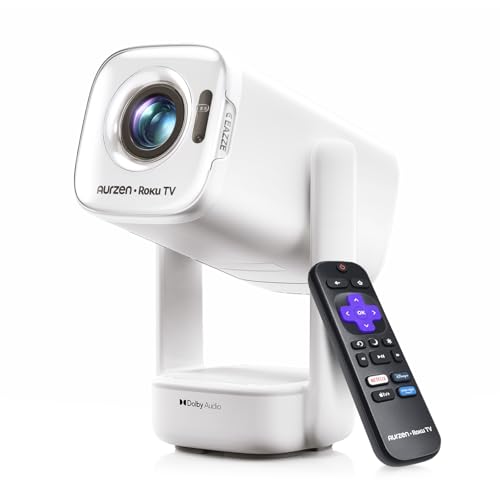
Aurzen Roku TV D1R air USB-C Powered Smart Portable Outdoor Projector White

Our verdict: A Roku projector that runs from a USB-C charger or power bank and sets its own focus.

The D1R air puts the Roku interface inside the projector, so there is no stick to plug in and no second remote. It accepts 65W-class USB-C power delivery, uses a time-of-flight sensor for auto focus, adds auto keystone, and supports AirPlay mirroring as well as Android devices. It lands in the $100 to $200 bracket, well under the $500 cap.

It ranks first because power flexibility is the thing that changes how a small projector gets used. A bottom-mounted power port keeps the cable out of the gimbal's rotation path, and a compatible laptop charger or power bank can run it in a tent, a hotel or a backyard. It edges past the standard D1R below because that model needs mains power and a heavier body, and it beats the Google TV model on setup effort, since focus and keystone are automatic rather than adjusted by hand.

Buy it if you want one projector that moves between a bedroom ceiling and a patio wall without fuss. The caveat is that nothing in the listing gives an ANSI lumen figure, so treat it as a dark-room or dusk projector, and note that the stand and PowerBase accessory are sold separately.

Platform
Roku built in, AirPlay
Focus
TOF auto focus, auto keystone
Power
USB-C PD, 65W class
Budget bracket
$100 to $200

What we like

  • +Runs from USB-C power banks
  • +Automatic focus and keystone
  • +Roku apps without a stick
  • +Cable stays out of the gimbal

Watch out for

  • −No brightness figure listed
  • −Stand accessory sold separately

Buy it if: Renters and families who move one projector between rooms and the yard.

Skip it if: You want a projector that stays on a shelf and prioritises speaker volume.

2

Best for Sound

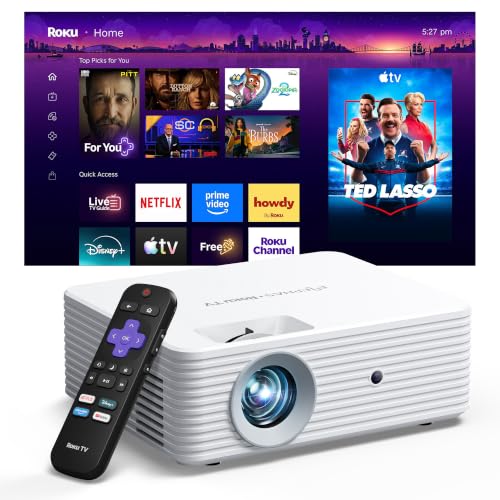
Aurzen Roku TV D1R Smart Portable Outdoor Projector with WiFi and Bluetooth

Our verdict: Full HD, auto focus and dual 5W Dolby speakers in a Roku-ready body.

The standard D1R is rated for 1080P output and a 60 to 150 inch picture, with auto focus, auto keystone, dual 5W speakers tuned for Dolby Audio, dual-band WiFi and Bluetooth 5.2. Roku handles the apps, voice control and the free channel lineup. It measures about 7.5 by 3.3 by 9.1 inches, which makes it a sizeable box by mini projector standards.

It takes second place because it matches the air model on automation but gives up portability: it is larger and tied to its power brick. What it gains is a more serious speaker pair, which matters because the built-in audio is the weak point of almost every projector under $500. Against the Google TV model it gives up the claimed brightness advantage but returns a more settled, less fiddly interface.

It suits a living room or bedroom shelf where you want decent sound with no soundbar. Skip it if you plan to carry it outdoors often, and remember that a 1080P label does not guarantee a bright image in a room with ambient light.

Resolution
1080P
Image size
60 to 150 in
Speakers
Dual 5W, Dolby Audio
Wireless
Dual-band WiFi, Bluetooth 5.2

What we like

  • +Dual 5W Dolby speakers
  • +Auto focus and keystone
  • +Roku interface with voice control
  • +Wide 60 to 150 inch range

Watch out for

  • −Bulkier than mini rivals
  • −Needs mains power

Buy it if: Bedroom and living room movie nights without a separate sound system.

Skip it if: You want to carry it to a campsite on battery power.

3

Best Google TV Pick

Smart 4K Projector [Google TV Stick Built-in & 360° Stand] with WiFi 6

Our verdict: A 500 ANSI lumen claim, WiFi 6 and a Google TV stick built into a 360 degree stand.

This projector bundles a Google TV stick, WiFi 6 and Bluetooth, and a stand that rotates a full 360 degrees for ceiling or wall projection. The listing states 500 ISO-standard ANSI lumens, which is a far more useful claim than the inflated figures common at this price. It sits in the $200 to $500 bracket, so it uses up to the full budget.

It ranks third because the brightness number is the most credible in the group, and brightness is what decides whether a projector is usable with some light in the room. It falls behind the Aurzen pair because the listing offers less on sound, keystone behaviour and warranty detail, and because Google TV adds a heavier interface than Roku on modest hardware. The 4K label should be read as decoding support, not a native 4K panel.

Choose it if a brighter picture and Google TV apps matter more than automatic setup. Check whether the listing ships with the stick pre-installed and licensed for the apps you use before you commit.

Brightness
500 ANSI lumens (stated)
Platform
Google TV stick built in
Stand
360° rotation
Budget bracket
$200 to $500

What we like

  • +Credible 500 ANSI lumen claim
  • +WiFi 6 for stable streaming
  • +Google TV app library
  • +360 degree rotating stand

Watch out for

  • −At the top of the budget
  • −Thin detail on speakers and warranty

Buy it if: Buyers who watch with some ambient light and prefer Google TV.

Skip it if: You want hands-off automatic focus and the cheapest total cost.

4

Best Manual Focus Roku

ELEPHAS Roku TV Smart Projector with Wi-Fi and Bluetooth

Our verdict: Roku built in with AirPlay and Dolby Audio for a modest price, with manual focus.

The ELEPHAS pairs the Roku platform with Apple AirPlay, Dolby Audio, dual-band WiFi and Bluetooth 5.2. It offers manual focus and keystone correction for a 40 to 150 inch image, and weighs in at roughly 5.6 by 2.5 by 6.8 inches. Its price bracket is $50 to $100, far under the cap.

It ranks fourth because it delivers the Roku experience at roughly half the cost of the Aurzen models, and the AirPlay support is a real convenience for iPhone households. It loses ground to them because focus is manual, so every time you move it you re-adjust, and because the listing gives no brightness or resolution figure to anchor expectations.

It is a smart value for a fixed spot, such as a bedroom shelf, where you focus once and forget it. Skip it if you will carry it around, and remember that AirPlay can be blocked by content protection on some apps.

Platform
Roku built in, AirPlay
Focus
Manual, keystone correction
Image size
40 to 150 in
Budget bracket
$50 to $100

What we like

  • +Roku and AirPlay together
  • +Dolby Audio on board
  • +Compact 5.6 inch footprint
  • +Costs half the Aurzen

Watch out for

  • −Focus is manual
  • −No brightness figure listed

Buy it if: iPhone households wanting a fixed bedroom projector on a small budget.

Skip it if: You move the projector often and hate refocusing.

5

Best Voice Control

HAPPRUN Roku TV Smart Mini Projector with WiFi and Bluetooth for Portable

Our verdict: A Roku mini with a 270 degree stand and Alexa, Siri and Google Assistant support.

The HAPPRUN offers Roku built in, Dolby Audio through dual stereo speakers, and smart-home voice control with Alexa, Siri or Google Assistant. Its 270 degree rotating stand throws the picture onto a wall or ceiling, and at about 4.1 by 5.2 by 5.9 inches it fits a backpack. Its price bracket is $50 to $100.

It ranks fifth, just under the ELEPHAS, because the two cost the same and share a platform, but the ELEPHAS lists AirPlay and a stated image-size range while this model leans on voice features. The stand is the real draw: ceiling viewing from bed is a genuine use case, and 270 degrees gets you there without a tripod.

It works for dorm rooms and travel. The caveat is the same as its neighbours: no lumen figure in the listing, so judge it as a dark-room projector, and speaker volume is modest in a large space.

Platform
Roku built in
Stand
270° rotation
Audio
Dual stereo, Dolby Audio
Size
4.1 x 5.2 x 5.9 in

What we like

  • +270 degree stand for ceilings
  • +Alexa, Siri, Google voice control
  • +Backpack-friendly mini body
  • +Dolby Audio speakers

Watch out for

  • −No lumen rating in listing
  • −Speakers modest in big rooms

Buy it if: Dorm rooms, hotels and bed-ceiling viewing.

Skip it if: You need AirPlay or a stated screen-size range.

6

Best HDR Decoding

VISSPL 5000ANSI Smart 4K Projector, AI Auto Focus, 3D Dolby Audio

Our verdict: Native 1080P with HDR10 decoding and ARC support, undermined by an unrealistic lumen headline.

The VISSPL lists a native 1080P panel, 4K decoding, HDR10 enhancement, WiFi 6, Bluetooth 5.2, auto focus and a 360 degree stand. It also supports audio return channel, so it can act as a speaker for other gear. It sits in the $200 to $500 bracket and uses up much of the budget.

It ranks sixth because the specification mix is strong but the name leads with a 5000 ANSI figure that no projector at this price delivers; the listing itself calls the panel native 1080P, which is the number to trust. The wide color gamut claim is similarly unverified. Against the Google TV model, which makes a more modest 500 ANSI claim, it asks for more trust and gives less certainty.

It can suit a buyer who wants HDR decoding and a true 1080P panel in a dark room. Be skeptical of the marketing, confirm the return window, and expect to judge brightness for yourself.

Native resolution
1080P, 4K decode
HDR
HDR10 support
Connectivity
WiFi 6, Bluetooth 5.2, ARC
Budget bracket
$200 to $500

What we like

  • +Native 1080P panel stated
  • +HDR10 decoding support
  • +Auto focus included
  • +ARC lets it feed speakers

Watch out for

  • −5000 lumen headline not credible
  • −Uses most of the budget

Buy it if: Dark-room viewers who value HDR support and a native 1080P panel.

Skip it if: You will watch with the lights on and need a proven bright picture.

7

Best Electric Focus

YGSKK Mini Projector with Wifi and Bluetooth, Built-in Apps,Movie Projector

Our verdict: Remote-controlled focus and a 210 degree base, with HDMI, USB and audio ports.

The YGSKK has electric focus controlled from the remote, a base that rotates 210 degrees, an included HDMI cable, and HDMI, USB and audio ports. Built-in apps include Prime Video, YouTube and Hulu, and an app store adds more. It measures about 3.9 by 3.9 by 7.9 inches, and costs $50 to $100.

It ranks seventh because remote-controlled focus is a genuine step above turning a ring, but the app platform is a generic Android-style store rather than a licensed Roku or Google TV, and streaming apps on such stores can be limited by licensing. It still earns a place above the budget Android box below it on port selection and stand.

It works well as a HDMI projector for a console or laptop, where the apps matter less. Skip it if the main use is Netflix, which is not named in the listing.

Focus
Electric, via remote
Stand
210° rotating base
Ports
HDMI, USB, audio
Budget bracket
$50 to $100

What we like

  • +Focus adjusts from the couch
  • +HDMI cable included
  • +Handy ports for consoles
  • +210 degree rotating base

Watch out for

  • −Netflix not listed
  • −Generic app store

Buy it if: Console and laptop users who rarely touch built-in apps.

Skip it if: Licensed Netflix and Disney apps are a requirement.

8

Best Budget Starter

Mini Projector with Wifi and Bluetooth, Portable 4K Support, Android 14/ Auto Keystone, HY300Pro

Our verdict: The cheapest entry: native 720P, 200 ANSI lumens and Android 14 for under $50.

The HY300Pro uses an Allwinner H726 chip with Android 14, a 0.9:1 throw ratio that gives a 35 to 135 inch image from 0.75 to 2.65 metres, WiFi 6 and Bluetooth 5.4. The listing is frank that native resolution is 720P, with 4K as input support only, and it quotes 200 ANSI lumens and a 5W speaker. It sits in the $30 to $50 bracket, the cheapest entry here.

It ranks last because the lumen figure is the lowest in the group, and 720P on a large screen shows soft edges. Its credit is honesty: the listing states native 720P, and the short throw ratio suits small bedrooms where space is tight. At roughly three-quarters of a pound it is the lightest pick.

Buy it to test whether a projector suits your room before spending more. Do not expect licensed streaming apps, and plan on a dark room.

Native resolution
720P
Brightness
200 ANSI lumens
Throw
0.9:1, 35 to 135 in
Budget bracket
$30 to $50

What we like

  • +Cheapest entry in the ranking
  • +Honest native 720P label
  • +Short throw suits small rooms
  • +Lightweight at about 0.77 lb

Watch out for

  • −Lowest brightness listed
  • −Soft picture on big screens

Buy it if: First-time buyers testing the idea in a dark bedroom.

Skip it if: You watch in daylight or want licensed streaming apps.

Methodology

How We Ranked These

Streaming and apps

Licensed built-in platforms such as Roku and Google TV score above generic app stores, because apps that work reliably are the whole reason to buy a smart projector.

Setup automation

Auto focus, auto keystone and stand design decide how often you will fiddle. Fixed manual focus costs points for anyone who moves the unit.

Picture specification

We rate stated native resolution and credible ANSI lumen figures. Inflated brightness headlines lose points rather than gain them.

Sound and connectivity

Speaker description, Bluetooth version, WiFi band and the port selection all feed a score, since a weak speaker usually means buying another device.

Portability and value

Body size, power input and where the price sits inside the $500 cap decide the final points.

Every Primea Score uses the same weights: Performance 30% · Build & Materials 20% · Everyday Usability 20% · Value 20% · Owner Satisfaction 10%. Full scoring rules

Buyer's guide

How to Pick the Right One for You

By Setup Style

How you will use the projector matters more than any spec, so start with where it lives.

SetupOur pick
Moves between rooms and outdoorsAurzen Roku TV D1R air
Fixed shelf, best built-in soundAurzen Roku TV D1R
Brighter picture with some ambient lightSmart 4K Projector with Google TV Stick
Fixed in a bedroom, iPhone householdELEPHAS Roku TV Smart Projector
Watches from bed, ceiling projectionHAPPRUN Roku TV Smart Mini Projector

By Budget

SpendOur pick
Under $50HY300Pro Android 14 Mini Projector
$50 to $100ELEPHAS Roku TV Smart Projector
$100 to $200Aurzen Roku TV D1R air
$200 to $500Smart 4K Projector with Google TV Stick

Roku vs Google TV

Roku

A simple interface that runs well on modest hardware, with a free channel lineup and AirPlay on several models. It is the safer default and is built into the Aurzen D1R air, the D1R, the ELEPHAS and the HAPPRUN.

Google TV

A larger app library and recommendations tied to a Google account, which suits Android households. The Google TV stick model carries it, but the interface asks more of modest hardware.

Choose Roku unless you already live inside Google services.

By Image Reliability

PriorityOur pick
Most credible brightness claimSmart 4K Projector with Google TV Stick
Native 1080P with HDR decodingVISSPL 5000ANSI Smart 4K Projector
Full HD with strong speakersAurzen Roku TV D1R
Honest native 720P at the lowest costHY300Pro Android 14 Mini Projector

For Backyard Movie Nights Specifically

Look for

USB-C or battery-friendly power, automatic focus so you can set up in the dusk, and a usable speaker or Bluetooth pairing. Pair the projector with a real screen and wait until it is properly dark.

In this ranking

The Aurzen Roku TV D1R air runs from a power bank and handles focus itself, and the Aurzen D1R adds louder Dolby speakers if you can run an extension cord.

When to Spend More

Spend more if

You watch with lights on, want a large screen over 120 inches, or care about HDR. The Google TV 4K model and the VISSPL sit at the top of the budget, and above $500 you move into proven brightness and lens quality.

Save if

You mostly watch in a dark bedroom on a wall under 100 inches. The ELEPHAS and HAPPRUN deliver the Roku experience for $50 to $100, and the HY300Pro is a fair test at under $50.

Questions

Frequently Asked Questions

Do these projectors work with an Xbox, PlayStation or laptop?+

Models with an HDMI port, such as the YGSKK, connect directly to a console or laptop, and the Roku and Google TV models list HDMI or wireless casting. Check the port selection before buying, and expect some input lag on wireless mirroring, which makes HDMI the better choice for gaming.

What is the most common mistake when buying a cheap projector?+

Trusting the brightness number on the listing. Figures in the thousands rarely mean ANSI lumens, so favour models that state a modest ANSI value or a native resolution, and plan on a dark room regardless.

Is it worth spending $500 instead of $100?+

Only if brightness and room conditions demand it. The Google TV model claims 500 ANSI lumens, which helps with ambient light, but for dark-room movie nights a $100 to $200 Roku projector gives most of the experience.

How do I set up a projector without a screen?+

A smooth, light-coloured wall works, and a matte white screen or painted panel looks better still. Place the unit level and square to the wall, set focus first, and use keystone only to correct small angles.

How do I maintain a projector?+

Keep the vents clear, give the fan a minute to cool before unplugging, and wipe dust from the intake with a soft brush. Small projectors run warm, so avoid enclosing them in a cabinet or tent without airflow.

Can I use these outdoors in daylight?+

Not satisfactorily. Even the strongest claim here is 500 ANSI lumens, which is dim next to sunlight, so wait for dusk and choose a model like the Aurzen D1R air that powers from a bank and sets up quickly.

Final take

The Aurzen D1R air is the one to buy under $500 for most people, because it removes setup chores and runs from USB-C power. Pick the Aurzen D1R if the projector stays put and sound matters, the Google TV 4K model if you watch with some light, and the HY300Pro only as a cheap first experiment. Whatever you choose, plan on a dark room and a modest screen size, and ignore the biggest number on the box.

More Ranked & Reviewed Guides