
Primea ReviewsAll Reviews

Primea Reviews is reader-supported. When you buy through our Amazon links we may earn a commission, at no extra cost to you. Rankings are set by our editors and never sold. Learn more

Ranked & Reviewed by Primea Reviews

The 5 Best Oscillating Desk Fans of 2026, Ranked & Reviewed

By the Primea Editorial TeamUpdated November 4, 20268 min read5 products ranked
The 5 Best Oscillating Desk Fans of 2026, Ranked & Reviewed

The short answer

The DREO Smart Fan is the best oscillating desk fan, since 3D auto oscillation sweeps both sideways and up and down. The Air Circulator with Remote wins on control, with 100 speed levels. The Holmes 12-inch is the no-frills table fan with a published 75 degree sweep. If you only want a fan that turns its head, the Holmes is the cheapest way there.

The Primea Scoreboard

Ranked & Reviewed

  1. 3D auto oscillation and whole-room airflow in a quiet, smart-controlled fan.

    93Outstanding
    Check price
  2. Omnidirectional oscillation, a remote and 100 speed levels for fine-tuned airflow.

    90Excellent
    Check price
  3. A 12-inch table fan with a stated 75 degree sweep, 3 speeds and 15 degree tilt for under $25.

    88Excellent
    Check price
  4. A long-running table fan with customizable airflow and a noise-free performance pitch.

    85Excellent
    Check price
  5. A three-speed, tilting oscillating fan that leans on quiet operation and a safety-minded build.

    82Very Good
    Check price

The word oscillating hides a big difference. Most cheap desk fans swing left and right across a fixed arc, which means the same patch of air gets blown at you and the rest of the desk gets ignored. A fan that also tilts or sweeps vertically moves air through a whole workspace instead of firing a draft at your face.

That is the lens for this ranking. Our editors reviewed five fans whose listings state oscillation, then compared how they sweep, how finely you can set the speed, how they handle tilt, and what they claim for noise, scoring each on the Primea framework inside its price bucket.

Before you buy

What Actually Matters

01

Oscillation type

Most oscillating fans sweep sideways only. Fans with 3D or omnidirectional movement also change vertical angle, so air reaches a standing desk and a bed. Look for terms like 3D or omnidirectional in the title, and for a stated sweep angle such as 75 degrees on a plain table fan.

02

Speed steps

Three speeds is the norm, but low is often too weak and medium too strong close up. More steps let you land on a gentle breeze that does not blow papers around. Check the listing for the number of speed settings and whether a remote or app can change them from your seat.

03

Noise at low speed

A fan on your desk sits a metre from your ears, so noise matters more than at a distance. Motor hum and blade turbulence both count. Look for a decibel figure or a quiet-operation design claim, and treat noise-free as marketing because every moving blade makes some sound.

04

Tilt and aim

A tilting head lets you point airflow at your torso rather than your face, which feels more comfortable over a long working day. Check the tilt range on the listing, such as 15 degrees, and make sure the head locks in place rather than drooping when the fan runs.

05

Footprint and guard

A desk fan competes for space with your keyboard and notes. Measure the base against your free corner, and look at the guard spacing if children or pets are around. A closely spaced cage and a stable base are worth more than extra airflow in a shared room.

In-depth reviews

Our Ranked Picks, Reviewed

1

Best Overall

DREO Smart Fan for Bedroom

Our verdict: 3D auto oscillation and whole-room airflow in a quiet, smart-controlled fan.

DREO's smart fan combines whole-room airflow power with 3D auto oscillation and quiet, energy-saving performance. Three-dimensional oscillation means the head sweeps vertically as well as sideways, so air reaches a standing desk, a bed and a corner in one pass.

It tops the list because every other fan here only swings left and right, while this one covers the vertical plane. The cost is the highest in the group, in the $50 to $100 bucket, and a smart model adds an app to the setup.

Buy it if one fan must serve a desk and a bedroom and you want less hot-spot airflow. The caveat is that quiet performance is a claim without a published decibel figure, so judge the noise against your own tolerance.

Oscillation
3D auto oscillation
Control
Smart fan
Airflow
Whole-room power
Price bucket
$50 to $100

What we like

  • +Sweeps vertically and sideways
  • +Whole-room airflow claim
  • +Smart control layer
  • +Quiet, energy-saving design

Watch out for

  • −Highest price here
  • −No decibel figure given
  • −More setup than a plain fan

Buy it if: People who want one fan to cool a desk and a bedroom evenly.

Skip it if: You want the cheapest working oscillating fan.

2

Best Control

Fan for Bedroom, Desk Fans, Air Circulator Fan with Remote

Our verdict: Omnidirectional oscillation, a remote and 100 speed levels for fine-tuned airflow.

This air circulator lists high-power airflow, omnidirectional oscillation and 100 adjustable speed levels, all driven from a remote. A hundred steps means you can dial a gentle breeze that does not blow papers off the desk, instead of choosing between three coarse settings.

It ranks second behind the DREO because the DREO states 3D sweeping and quiet operation, while this listing leans on power. It beats the three plain table fans below because the remote lets you adjust without reaching across the desk.

Buy it if you like to fine-tune airflow and sit far from the fan. The caveat is the vague brand, so check the return policy and read the newest reviews for motor noise.

Oscillation
Omnidirectional
Speeds
100 adjustable levels
Control
Remote included
Price bucket
$25 to $50

What we like

  • +100 adjustable speed levels
  • +Remote control included
  • +Omnidirectional oscillation
  • +Air circulator design

Watch out for

  • −Unfamiliar brand
  • −No noise figure given
  • −Remote can get lost

Buy it if: Anyone who wants fine control without leaving their chair.

Skip it if: You prefer a known brand with simple dials.

3

Best Basic Fan

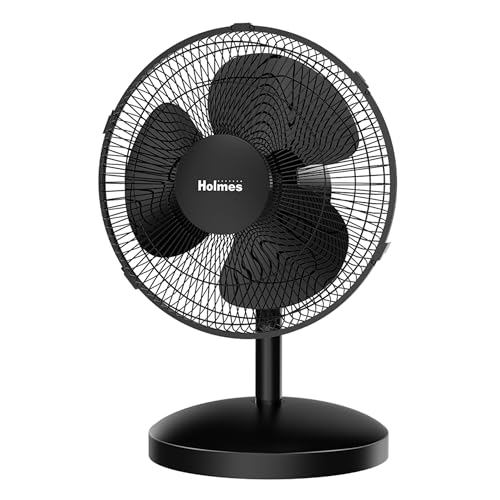
Holmes 12" Oscillating Table Fan 3-Speed Adjustable 15° Tilt Quiet

Our verdict: A 12-inch table fan with a stated 75 degree sweep, 3 speeds and 15 degree tilt for under $25.

The Holmes is a 12-inch table fan with a motorized 75 degree oscillation, three speed settings and a 15 degree head tilt. Those are real numbers, and 75 degrees of sweep is wide enough to cover a normal desk and the chair beside it.

It ranks third because it has only three speeds and no remote, but it costs the least, in the under $25 bucket. Next to the Comfort Zone it adds a stated tilt range and sweep, which makes the airflow easier to aim.

Buy it if you want a plain fan that does its job at a low price. The caveat is that it offers a coarse speed ladder and no timer, so the middle setting often ends up too strong for close-up use.

Size
12 inch
Oscillation
75 degree sweep
Speeds
3 settings
Tilt
15 degree

What we like

  • +Published 75 degree sweep
  • +Adjustable 15 degree tilt
  • +Three speed settings
  • +Lowest price bucket

Watch out for

  • −Only three speeds
  • −No remote or timer listed
  • −Plain styling

Buy it if: A low-cost desk fan with a clearly stated sweep and tilt.

Skip it if: You want fine speed control or vertical sweep.

4

Best Quiet Claim

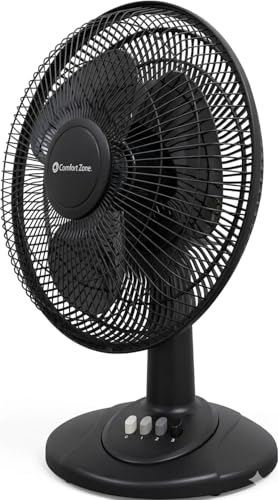
Comfort Zone Oscillating Table Fan with Adjustable Tilt

Our verdict: A long-running table fan with customizable airflow and a noise-free performance pitch.

Comfort Zone describes customizable and versatile airflow, adjustable tilt and noise-free performance. A well-known brand with an adjustable tilt head means you can aim air at a monitor stand or a seated position rather than at a wall.

It ranks fourth because the listing gives no sweep angle or speed count, unlike the Holmes, and noise-free is an absolute no fan can honestly claim. It does earn credit for a recognised name and a tilting head at a mid price.

Buy it if you want a familiar table fan that you can tilt and forget. The caveat is the missing detail, so confirm the number of speeds and the oscillation angle before paying.

Oscillation
Oscillating head
Tilt
Adjustable
Airflow
Customizable
Price bucket
$25 to $50

What we like

  • +Familiar table fan design
  • +Adjustable tilt head
  • +Customizable airflow claim
  • +Recognised brand

Watch out for

  • −No sweep angle stated
  • −No speed count stated
  • −Noise claim is absolute

Buy it if: Anyone who wants a familiar tilt-and-forget fan.

Skip it if: You want stated numbers for sweep and speed.

5

Best Safety Design

BEYOND BREEZE Oscillating Table Fan for Bedroom

Our verdict: A three-speed, tilting oscillating fan that leans on quiet operation and a safety-minded build.

BEYOND BREEZE lists a three-speed adjustable tilt oscillating fan with quiet operation and a focus on safety and durability. The safety claim typically points to a guarded blade cage, which is worth having if the fan sits on a low surface near children or pets.

It ranks last because the listing offers no sweep angle, no remote and no stated airflow, so it does the basics with the least evidence. Against the Holmes, it matches the three speeds but lacks the published 75 degree sweep.

Buy it for a bedroom or kid's room where a quiet, simple fan is enough. The caveat is that quiet operation has no number behind it, and the three-speed ladder is the coarsest control here.

Speeds
3 adjustable
Tilt
Adjustable
Focus
Quiet, safety, durability
Price bucket
$25 to $50

What we like

  • +Three speeds with tilt
  • +Safety and durability focus
  • +Quiet operation pitch
  • +Suits bedrooms

Watch out for

  • −No sweep angle stated
  • −No remote or timer
  • −Coarse speed control

Buy it if: A kid's room or bedroom needing a simple, quiet fan.

Skip it if: You want smart features or fine speed control.

Methodology

How We Ranked These

Sweep coverage

Fans that cover more than one plane or state a sweep angle scored higher, because oscillation is the reason to buy this type.

Speed control

We rewarded finer steps and remotes, since a three-speed ladder often leaves the right setting somewhere in between.

Noise claims

Specific quiet-operation design claims counted more than blanket noise-free promises, which no motor can truly meet.

Aim and tilt

Adjustable tilt and head position decide whether the airflow reaches you or the wall behind you.

Price bucket value

Each fan was judged inside its stated price range, with extra credit for numbers that can be checked.

Every Primea Score uses the same weights: Performance 30% · Build & Materials 20% · Everyday Usability 20% · Value 20% · Owner Satisfaction 10%. Full scoring rules

Buyer's guide

How to Pick the Right One for You

By Oscillation Style

Start with how widely you want the air to move.

CoverageOur pick
Whole room, up and downDREO Smart Fan for Bedroom
Omnidirectional with a remoteFan for Bedroom, Desk Fans, Air Circulator Fan with Remote
Wide sideways sweep, 75 degreesHolmes 12" Oscillating Table Fan 3-Speed Adjustable 15° Tilt Quiet
Simple tilt-and-aimComfort Zone Oscillating Table Fan with Adjustable Tilt
Quiet bedroom basicsBEYOND BREEZE Oscillating Table Fan for Bedroom

By Budget

SpendOur pick
Under $25Holmes 12" Oscillating Table Fan 3-Speed Adjustable 15° Tilt Quiet
$25 to $50, fine controlFan for Bedroom, Desk Fans, Air Circulator Fan with Remote
$25 to $50, familiar brandComfort Zone Oscillating Table Fan with Adjustable Tilt
$50 to $100DREO Smart Fan for Bedroom

Dials vs Remote or App

Dials

Simple, reliable and nothing to lose or pair. Picks: Holmes, Comfort Zone and BEYOND BREEZE.

Remote or app

Adjust from your chair and set finer speeds. Picks: Fan with Remote and DREO Smart Fan.

Default to dials unless you sit more than an arm's length from the fan.

By Where You Use It

LocationOur pick
Desk beside a monitorHolmes 12" Oscillating Table Fan 3-Speed Adjustable 15° Tilt Quiet
Bedroom nightstandBEYOND BREEZE Oscillating Table Fan for Bedroom
Standing desk and bedDREO Smart Fan for Bedroom
Open-plan workspaceFan for Bedroom, Desk Fans, Air Circulator Fan with Remote

For a Hot Home Office Specifically

Look for

Wide or 3D oscillation, fine speed control and a tilt head, so airflow covers you and your equipment without a direct draft.

In this ranking

The DREO Smart Fan for Bedroom, because 3D auto oscillation covers desk, chair and floor in one sweep.

When to Spend More

Spend more if

You share one fan between desk and bed. The DREO Smart Fan for Bedroom covers both with 3D oscillation.

Save if

You only want a breeze at the desk. The Holmes 12" table fan is under $25 with a stated 75 degree sweep.

Questions

Frequently Asked Questions

Do these fans oscillate in more than one direction?+

Only the DREO Smart Fan states 3D auto oscillation, and the Fan with Remote lists omnidirectional movement. The Holmes, Comfort Zone and BEYOND BREEZE sweep side to side with a tilting head you set by hand.

What is the most common mistake with a desk fan?+

Pointing it straight at your face on the highest speed. Tilt the Holmes or Comfort Zone slightly down toward your torso, and use a low speed. The Fan with Remote's finer steps make finding a comfortable level far easier.

Is a smart fan worth it over a basic table fan?+

Only if you value 3D coverage and adjusting from your seat. The DREO Smart Fan costs more than the Holmes, which is under $25 and fine for a simple desk. Pay for the DREO when one fan must cover a whole room.

How should I position an oscillating fan at a desk?+

Place it at one side, slightly behind your monitor, so the sweep crosses you rather than hitting you head-on. The Holmes 15 degree tilt helps you angle it. Keep cables and papers out of the airflow path.

How do I clean an oscillating fan?+

Unplug it, remove the front grille where the design allows, and wipe the blades with a damp cloth. Dust builds up on the Comfort Zone and BEYOND BREEZE cages quickly. Clean at the start and end of each hot season.

Will a desk fan work in a very small room?+

Yes, but stay at low speed. A compact fan like the BEYOND BREEZE or Holmes can circulate air in a small room without a gale. Use oscillation, not high speed, to avoid a constant draft on one spot.

Final take

For most buyers the DREO Smart Fan for Bedroom is the best oscillating desk fan, since 3D auto oscillation reaches the whole workspace. Pick the Fan with Remote if you want 100 speed levels without leaving your chair. The Holmes 12" table fan is the budget answer with a stated 75 degree sweep. Avoid any fan that promises noise-free operation and gives you no sweep or speed numbers.

More Ranked & Reviewed Guides